


Modern flight sim gear spans everything from compact plug-and-play joysticks to full metal HOTAS replicas that mimic the cockpits of military aircraft. Picking the right one comes down to your simulator, your platform, and how serious you are about immersion. This roundup walks through ten current options covering military-grade replicas, dual-stick space sim setups, yoke systems for civilian aviation, and the mounting hardware that ties a rig together. You will find honest trade-offs on each, plus guidance on who each one actually suits, so your next session behind the controls feels right from takeoff to landing.
A Fast Comparison Of The Options

ThrustMaster Hotas Warthog PC Bundle with TFRP Rudder

Thrustmaster T16000M FCS Space Sim Duo Joystick
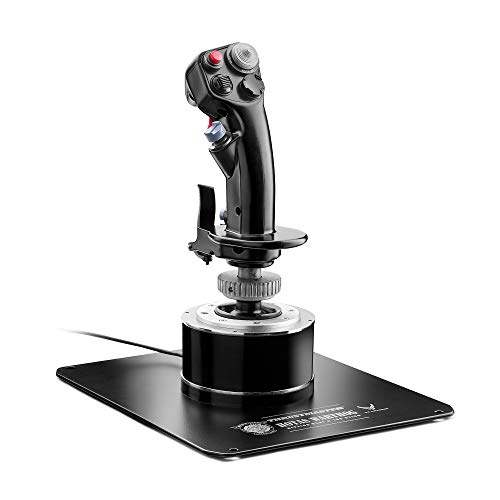
Thrustmaster HOTAS Warthog A-10C Metal Flight Stick

Logitech G Pro Flight Yoke + Rudder Pedals Bundle

Thrustmaster TFRP Rudder Pedals & T16000M FCS HOTAS

Thrustmaster T-Flight Hotas One (Xbox & PC)

Thrustmaster T-Flight Hotas X (PC)

Logitech G PRO Flight Yoke System (Black)

EG STARTS Metal Flight Stick Mounting Platform

Thrustmaster Viper TQS Mission Pack
Inside Each Recommended Option
This bundle pairs the A-10C replica joystick and throttle with a dedicated rudder pedal set, making it the closest you get to a real Warthog cockpit without leaving your desk. The metal construction runs through the joystick handle, the throttle, and the control surfaces, so the rig stays planted during aggressive maneuvers.
You get 19 action buttons and an 8-way point-of-view hat, which is generous enough for complex DCS modules. The TFRP rudder rounds out the toe-brake and rudder axis work that the throttle alone cannot handle, so tail-dragger landings finally feel coordinated.
Well-Handled Touches
- Detachable metal joystick handle that swaps between desk and cockpit mounts.
- Dual throttle system with a metal hand rest for long-haul sim sessions.
- Hall effect sensors (contactless magnetic sensors that resist wear) keep inputs drift-free over years of use.
- TFRP rudder pedals complete the rudder axis the Warthog throttle alone cannot cover.
- 19 buttons plus an 8-way POV hat cover almost any module binding you’ll encounter.
Worth Noting
- The throttle base lacks a dedicated toe-brake axis, which the included TFRP only partially fills.
- Desk mounting works but the metal weight can stress thinner tabletops during heavy use.
Quick Facts
Made For
Hardcore military sim pilots running DCS or IL-2 who want a near-authentic A-10C setup out of one box.
Where Another Pick Suits Better
Civil aviation fans in Microsoft Flight Simulator will find the Logitech G Pro Flight Yoke System a more natural fit for airliner muscle memory.
Two T16000M sticks sit at the heart of this package, which is exactly what space sim pilots have been asking for since Elite Dangerous launched. Running two sticks in tandem, you get six axes of input, which covers pitch, yaw, roll, and translation on a single hand each.
For Star Wars Squadrons, Elite, and dual-stick combat, the ergonomics click fast. The price also sits well below the metal HOTAS tier, so newcomers can experiment without sinking serious cash.
Strengths Worth Knowing
- Hall effect sensors in both sticks resist drift even after months of heavy play.
- Ambidextrous layout works whether you fly left-handed or right-handed.
- 32 programmable action buttons across the pair let you map every cockpit switch.
- Dual-stick setup is the standard for space sims and translates naturally to combat flight.
Trade Offs
- Plastic construction feels lighter and less premium than the Warthog series.
- You supply your own throttle or pedals, since the bundle ships sticks only.
Feature Card
Right Fit For
Space and combat sim pilots who want a dedicated left-hand/right-hand stick setup for six degrees of freedom flight.
Skip It When
You want an all-in-one HOTAS with throttle included, in which case the T-Flight Hotas One is a more natural starting point.
This is the standalone joystick from the Warthog range, sold without the throttle for simmers who already own a throttle or who want to build out their rig piece by piece. The all-metal handle and weighted base make it feel planted, and the A-10C replica grip mirrors the real aircraft’s control layout.
You get a 19-button layout plus the 8-way hat, which is generous for mapping switches, weapon releases, and view controls. Pilots moving up from entry-level sticks notice the difference immediately, since the metal parts don’t flex under pressure.
The Case For It
- All-metal handle and base give it a planted, near-indestructible feel.
- Detachable handle works with desk clamps or cockpit mounts.
- 19 buttons and an 8-way POV hat handle complex DCS A-10C bindings.
- Pairs naturally with Thrustmaster’s separate Warthog throttle or TFRP pedals.
Points To Note
- No throttle included, so the total cost climbs once you add one.
- Heavier base demands a sturdy desk or a proper mount to avoid sliding.
Whose Shelf It Belongs On
Pilots who already own a throttle and want the most authentic A-10C grip money can buy at this tier.
Reach For A Different Pick When
You need a throttle in the box from day one, in which case the Hotas Warthog Bundle makes more sense.
If your sim time leans toward Cessnas, Boeings, and GA aircraft in Microsoft Flight Simulator, a yoke makes more intuitive sense than a fighter-style stick. This bundle pairs Logitech’s Pro Flight Yoke with the matching rudder pedals, covering the three primary cockpit axes without extra shopping.
The yoke itself has 14 buttons, an 8-way POV hat, and a 3-position mode switch, which together can address up to 54 programmable controls when you factor in shifted layers. The pedals add self-centering rudder and differential toe brakes, so coordinated turns and short-field landings feel much more like the real thing.
What Pays Off
- Yoke plus pedals in one bundle gets you flying airliners with proper axes quickly.
- 54 programmable controls across the yoke handle complex airliner cockpits.
- Self-centering rudder pedals stay smooth and accurate through long sessions.
- Differential toe brakes help with realistic runway alignment and braking technique.
Small Caveats
- Yoke design feels off for combat sims where a stick is more natural.
- Plastic construction is sturdy but lacks the heft of metal HOTAS gear.
Specs At A Glance
Best Suited To
Civil aviation sim fans new to hardware who want airliner-style controls without juggling multiple purchases.
Swap It Out When
Your interest shifts to military combat sims, in which case the Hotas Warthog Bundle suits the mission profile better.
Pairing the T16000M joystick with the TFRP rudder pedals gives you a complete three-axis HOTAS setup at a price well below the Warthog tier. You get a hall effect joystick, a smooth-sliding pedal set, and compatibility with every major PC flight sim out of the box.
The TFRP’s S.M.A.R.T slide rails (a four-rail aluminum track system that keeps pedal motion silky) make differential braking a tactile pleasure rather than a chore, and the large 10-inch pedals accommodate a wide range of shoe sizes. It is a strong middle-ground for simmers who want more than entry-level without the Warthog price.
The Practical Payoff
- S.M.A.R.T slide rails keep rudder motion smooth and consistent.
- 16 action buttons with braille-style physical identification help blind bindings work.
- Removable heel rests let you choose between full-foot or ball-of-foot placement.
- 10-inch pedals fit a wide range of foot sizes comfortably.
Honest Caveats
- No dedicated throttle in this bundle, so you fly with stick twist for rudder.
- Plastic stick body feels less premium than the Warthog metal line.
Spec Snapshot
Who It Suits Best
PC flight sim pilots who want a true three-axis setup with solid pedals but do not need a separate throttle yet.
Consider Something Else When
You prefer a single combined HOTAS unit on your desk, in which case the T-Flight Hotas One is a tidier option.
The Hotas One is the gateway stick for Xbox and PC pilots who want real throttle and stick control without committing to a full HOTAS cockpit. It is officially licensed for Xbox consoles, which sets it apart from the PC-only T-Flight Hotas X.
Console compatibility makes it a strong fit for shared family setups where the rig moves between the living-room Xbox and a gaming PC. The ergonomic hand rest and adjustable resistance dial let you tune the stick feel to your hand, so longer sessions stay comfortable.
What Works In Its Favor
- Works on both Xbox One/Series X and PC from a single plug.
- Adjustable stick resistance dials the feel from loose to firm.
- Wide hand rest supports comfortable long sessions.
- Detachable throttle lets you set up a compact or split configuration.
Factors To Consider
- Plastic construction is sturdy but does not match metal HOTAS durability.
- Fewer programmable inputs than higher-tier Thrustmaster sticks.
Who Will Love This
Households that split time between console and PC, or newcomers who want one rig that travels between systems.
Look Elsewhere When
You fly exclusively on PC and want richer sensor tech, in which case the T16000M FCS HOTAS offers more precision per dollar.
The Hotas X has been a PC starter standard for years, and for good reason. You get a full HOTAS layout (joystick plus throttle in one desktop-friendly base) at a price that does not punish first-timers who are still figuring out whether flight sims will stick.
Twelve action buttons, five axes, and a resistance dial cover the basics for X-Plane, DCS, and Microsoft Flight Simulator entry-level flying. The throttle detaches, so you can split the rig across your desk or keep it compact depending on your space.
Points In Its Favor
- Twelve action buttons cover the bindings most starter sims ask for.
- Detachable throttle supports both compact and split desktop layouts.
- Resistance dial lets you tune stick tension to taste.
- Dual rudder control via handle rotation or a progressive lever.
Trade-Offs To Consider
- Plastic body shows wear faster than metal HOTAS gear under heavy use.
- Potentiometer sensors (analog resistive sensors) can drift after extended sessions.
Product Snapshot
Perfect Match For
PC sim pilots on a tight budget who want a real HOTAS layout without overspending on a first rig.
A Better Fit Elsewhere
Pilots chasing hall effect precision should look at the T16000M FCS HOTAS for noticeably better long-term accuracy.
Logitech’s standalone Pro Flight Yoke is the spine of many a GA and airliner sim rig, and the steel shaft inside gives it a confident, weighted feel that cheaper yokes lack. It clamps to your desk in two positions, so you can angle it to match your seating posture.
A separate three-axis throttle quadrant ships with the yoke, covering prop, mixture, and throttle axes for piston singles and twins. Seventy-five programmable controls spread across the buttons, hats, and mode switches give you enough inputs to map a complex airliner overhead panel.
A Strong Showing
- Stainless steel yoke shaft feels solid and stays smooth through years of use.
- 75 programmable controls cover complex airliner overhead panels.
- Built-in USB hub simplifies cable management for additional peripherals.
- LCD display on the yoke module shows mode and profile information.
Where It May Fall Short
- Yoke-only design does not suit combat sims where a stick is the right tool.
- Bundled throttle quadrant uses a lever rather than a true motorized throttle.
Built With In Mind
Airline and GA sim pilots who want yoke muscle memory and a real quadrant for prop, mixture, and throttle.
Not Your Match When
You mainly fly DCS, IL-2, or other combat titles, where the Warthog Bundle’s stick and throttle fit the mission better.
Once you own a serious HOTAS, mounting it properly becomes the next step. This metal platform from EG STARTS clamps to desks up to an inch thick and gives your joystick, throttle, and keyboard stable homes at ergonomic heights.
It also solves the keyboard-and-mouse reach problem common with HOTAS setups. Swinging the mouse pad out to either side lets you keep your hand on the stick while your mouse hand stays in a natural position, which is a small change that makes a big difference in long sessions.
The Helpful Details
- Sturdy metal platform supports heavy sticks and throttles without flex.
- Swiveling mouse pad adjusts to your arm placement preference.
- Keyboard mount included for a tidier multi-device rig.
- Clamp design fits tables up to one inch thick.
A Few Limitations
- Some drilling or bolt work may be required to mount heavier sticks securely.
- Not a controller itself, so it adds value only when paired with a HOTAS or yoke.
Who Should Grab It
DIY cockpit builders who already own a stick and throttle and want a sturdier, ergonomic mounting solution.
Where Another Pick Shines
Casual desk pilots without a permanent rig will get more value out of the T-Flight Hotas X’s all-in-one base.
This bundle is built for pilots who fly the F-16 in DCS and want the real TQS throttle layout under their left hand, paired with the familiar Warthog joystick on the right. The metal handle on the throttle is a 1:1 replica of the Viper’s stick, including the iconic CHAFF/FLARE slap switch for deploying countermeasures.
It is a specialty pick, since you need a compatible sim module to take full advantage of the TQS-specific controls. For Viper drivers, though, no other throttle comes close at this tier, and the adjustable friction system means you can tune the throttle feel to match your preferences.
What It Does Well
- 1:1 scale metal Viper TQS handle with realistic ergonomics.
- CHAFF/FLARE slap switch delivers authentic countermeasure deployment feel.
- Adjustable friction eliminates dead zones on the throttle axis.
- Official U.S. Air Force licensing for cockpit-accurate markings and layout.
Practical Considerations
- Throttle layout is Viper-specific, so other modules get less out of it.
- Higher price than general-purpose HOTAS bundles, reflecting the replica quality.
Feature Rundown
Right Fit For
Dedicated F-16 sim pilots in DCS who want the most authentic Viper throttle on the market.
Reach For A Different Pick When
You fly a wide variety of modules and want a general-purpose HOTAS, in which case the Warthog Bundle offers more flexibility.
What To Weigh Before Choosing Your Next Flight Stick
Sensor Type And Long-Term Accuracy
Hall effect sensors, which read stick position through magnets rather than physical contact, hold calibration far longer than potentiometer designs (analog sensors that physically rub against a resistive track). For daily sim pilots, that means fewer mid-session recalibrations and inputs that stay consistent across months of play. The T16000M series and Warthog lineup both use hall effect tech for this reason.
Stick, Yoke, Or Dual Stick
Your simulator determines the right tool. Combat and space sims feel natural with a stick or dual-stick setup, while airliners and GA aircraft benefit from a yoke’s steering-wheel-like motion. Choosing the wrong control type forces constant mental translation between the sim and the real muscle memory of a cockpit.
Platform Compatibility
Console-bound pilots should confirm Xbox or PlayStation licensing before buying. The T-Flight Hotas One covers Xbox and PC, while the Hotas X stays PC-only. Plug-and-play matters when sharing the rig between systems, since the same unit can serve a household’s living-room and desk setups.
Build Materials And Mounting
Metal handles and steel shafts last longer under aggressive inputs, but they also demand a sturdier desk or a proper mount. A platform like the EG STARTS mounting rig becomes a worthwhile add-on once the rig’s weight starts shifting around during use.
Common Shopping Slip Ups And Upgrade Tradeoffs
Pitfalls Shoppers Hit
Picking a stick because it looks like a fighter grip, then trying to fly an airliner with it, is a common mismatch. Equally common is buying a budget stick with a potentiometer, then wondering why inputs feel mushy after a year. Match the rig to your most-flown sim, and favor hall effect sensors for daily use.
Where The Extra Money Goes
Spending more buys metal construction, hall effect sensors, and replica-grade ergonomics. The Warthog line and Viper TQS lean on these upgrades, and for pilots flying DCS or IL-2 for hours a week, the difference shows up in fatigue and consistency. Casual weekend simmers get plenty from mid-tier offerings like the T16000M series, where the precision jump is real without the price jump.
Frequently Asked Questions
What Is A HOTAS Setup?
HOTAS stands for Hands On Throttle And Stick, meaning your throttle and joystick live under your hands at all times so you never need to look down. Military and combat sims benefit most from this layout, since weapon and engine management happen mid-maneuver.
Do I Need Rudder Pedals For Flight Sims?
Rudder pedals add the yaw axis that a stick’s twist or a dedicated rudder lever only partially covers. Tail-dragger landings, crosswind takeoffs, and coordinated turns all feel closer to real flying when your feet control the rudder.
Are Hall Effect Sensors Worth The Cost?
For pilots who fly several times a week, hall effect sensors pay back through consistent accuracy and longer service life. Casual weekend flyers get by with potentiometer sticks, though they may notice drift after a year or two of regular use.
Can I Use One Stick On Both PC And Xbox?
Only sticks licensed for the target platform will work on console. The T-Flight Hotas One is one of the few that covers both Xbox and PC, while most Thrustmaster and Logitech flight gear stays PC-only.
What Mounting Hardware Do I Need?
Heavy HOTAS setups benefit from a clamping mount or platform that secures the stick and throttle to the desk. Lighter entry-level sticks often work fine on a flat surface, but the moment the throttle slides during a session, a mount becomes the next logical purchase.
The Takeaway
The right flight stick depends almost entirely on what you fly. Combat pilots get the most from Warthog or Viper gear, space sim fans should look at dual T16000M setups, and airliner crews will feel at home behind a Logitech yoke with matching pedals. Match the rig to your most-flown simulator, lean toward hall effect sensors for long-term accuracy, and add a solid mount once the weight starts shifting. Whatever your pick, the gear that disappears into your hands and lets the sim do the talking is the one worth flying with.



