


A keyboard and a mouse can technically fly a plane in Microsoft Flight Simulator or X-Plane, but anyone who has tried a coordinated turn knows the limits. Realistic flight simulator peripherals turn vague inputs into a tactile feel: the weight of a yoke in your hands, the click of landing gear, the smooth slide of a rudder pedal under a tense crosswind. The right setup depends on what you fly, how often, and how much desk space you will sacrifice to the hobby. This roundup covers ten peripherals that cover most use cases, from a first HOTAS bundle to a full modular cockpit you can grow into over time.
The Main Contenders

Logitech G Pro Flight Yoke + Rudder Pedals Bundle

ThrustMaster TFRP Rudder Pedals & T16000M FCS HOTAS
OpenWheeler Flight Simulator HOTAS Add-on Kit (Config 1)

Logitech G USB PRO Flight Rudder Pedals

OCTAVI IFR-1 Compact All-in-one Cockpit
SimFab Modular Flight Sim Cockpit (DCS Edition)
Saitek PRO Flight Switch Panel (PZ55)

Logitech G Saitek PRO Flight Throttle Quadrant

Logitech G PRO Flight Yoke System

Logitech G USB Pro Flight Multi Panel
The Picks, Examined More Closely
Pairing a yoke with rudder pedals in one box removes the worst first-time sim pitfall: owning a yoke and trying to steer on the ground with your mouse. The Logitech G Pro Flight Yoke System gives you realistic pitch and roll via a centered control column, and the matching Pro Flight Rudder Pedals slide smoothly underfoot so taxi, takeoff, and crosswind corrections feel grounded in real input.
You sit down and the muscle-memory practice starts immediately, which is exactly what a first-year civilian pilot needs. The setup works well at a standard desk, and the foot rests adjust to accommodate different shoe sizes. Compared with the standalone ThrustMaster bundle covered below, this combo favors airliner and general aviation over combat.
Everyday Advantages
- Yoke and pedals ship together, so a coordinated crosswind landing is possible from day one.
- POV hat, 14 button controls, and a 3-position mode switch add up to 54 programmable commands across a flight.
- Self-centering pedals with adjustable damping keep small inputs predictable for first-time pilots.
- Differential toe brakes let you swing the nose left and right while taxiing, the way an actual aircraft behaves.
Trade Offs
- Plastic construction feels light, and owners commonly report a wobble at the base when pressure ramps up.
- The single throttle lever is fine for Cessna-style flying but limiting for twin-engine sim work.
- Tension on the rudder pedals is set with a knob, so finding the right feel takes a few test sessions.
Key Product Details
Made For
Aspiring civilian pilots who want the most realistic desk-friendly introduction to yoke and rudder control without buying each component separately.
Reach For A Different Pick When
Combat and space sim fans will get more out of the ThrustMaster TFRP Rudder Pedals & T16000M FCS HOTAS combo, which centers on a joystick instead of a yoke.
Where the Logitech G bundle invites you into a Cessna cockpit, the ThrustMaster TFRP and T16000M FCS HOTAS bundle invites you into an F-16 or an X-Wing. A HOTAS rig (Hands On Throttle And Stick) keeps your right hand on the joystick and your left hand on the throttle at all times, which is how real military and combat pilots fly. The T.16000M joystick ships with 16 action buttons identified by braille-style markings, and the TFRP pedals add a sliding rail system you can actually feel under pressure.
That S.M.A.R.T slide rail setup is the headline feature here: industrial-grade aluminum tracks make the rudder motion noticeably smoother than spring-loaded designs. The pedals include removable heel rests, so you can choose between a full-foot posture and a mid-pedal ball-of-the-foot stance. If you fly DCS, Star Wars: Squadrons, or Elite Dangerous, this combo covers the basics without burning a full paycheck on a dedicated combat rig.
Reasons It Performs
- S.M.A.R.T slide rails on four industrial-grade aluminum tracks give the pedals a smooth, controlled feel.
- 16 action buttons with braille-style identification make finding the right switch in a dogfight faster.
- Removable heel rests let you switch between full-foot and ball-of-foot ergonomic positions.
- PC compatibility is broad, and the system also works with PS4 joysticks sold separately.
Points To Note
- The 25-centimeter brake pedals are large and require a wider footwell than compact desktop rigs.
- Owners commonly report that the throttle sold in this bundle is a basic unit, so combat sim diehards may want a separate throttle upgrade.
Right Fit For
Combat and space sim pilots who want a smooth HOTAS setup without paying for a top-tier military-grade throttle.
A Better Fit Elsewhere
Civilian sim pilots flying airliners and Cessnas will find the Logitech G Pro Flight Yoke + Rudder Pedals Bundle a more natural match.
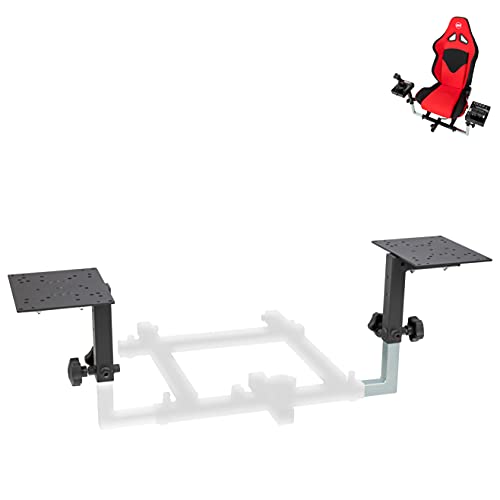
Sticks, throttles, and yokes usually land on a desk first, then slowly slide around as you reach for the keyboard. The OpenWheeler Flight Simulator HOTAS Add-on Kit is the accessory that anchors them: a set of brackets and adapter plates designed to mount a throttle and stick side by side at desk height. Configuration 1 targets combat or commercial HOTAS setups, and the bracket list covers Thrustmaster T.Flight sticks, the T16000M, the TCA Airbus line, Logitech X52, X52 Pro, X56, VKB Gladiator, CH Products, and Hori controls.
The practical gain is stability and consistent hand position. Once a stick and throttle are locked into a rigid frame, the small muscle-memory gains you’ve built up stop drifting every time you nudge the rig. This makes the kit a logical step between the ThrustMaster T16000M bundle above and a full cockpit frame like the SimFab covered later in this list.
A Favorable Mix
- Mounts a stick and throttle side by side at desk height, which removes the need to reach for keyboard hotkeys mid-flight.
- Adapter plate list covers a wide range of Thrustmaster, Logitech, VKB, CH Products, and Hori hardware.
- Lets you hold a real hand position for both hands without bolting hardware to a dedicated chair frame.
Worth Noting
- This Configuration 1 kit is geared toward HOTAS, so center-mounted yokes need a different bracket configuration.
- Assembly requires basic tools and some patience, and you may need to drill small adapter holes for less common sticks.
Feature Snapshot
Whose Shelf It Belongs On
Multi-stick rig builders who want to upgrade from a desk clutter into a stable side-by-side HOTAS mount without buying a full cockpit frame yet.
Skip It When
Pilots committed to a yoke-and-throttle layout will find the SimFab Modular Flight Sim Cockpit a more natural starting frame.
Sometimes the highest-leverage upgrade is also the smallest. A pair of dedicated rudder pedals changes taxi behavior, crosswind technique, and the feel of a coordinated turn, all for a modest outlay. The Logitech G USB PRO Flight Rudder Pedals are the standalone version of the pedals bundled with the Logitech G yoke above, which means the feel and adjustment range will be familiar to anyone who already owns that yoke.
Self-centering pedals with adjustable damping make the inputs predictable, and the tension dial lets you choose resistance based on how you fly. A partial metal construction helps with long-term durability, and the 1.8-meter cable reaches most desktop setups. Saitek Smart Technology programming software lets you map each axis and button to your preferred sim, and the pedals connect over USB 2.0 on Windows XP through Windows 10.
A Few Highlights
- Self-centering action with adjustable damping keeps taxi inputs predictable.
- Foot rests adjust to fit and use non-slip material for stability during long sessions.
- Tension adjustment dial lets you tune resistance to your flying style.
Room For Improvement
- Partial metal construction feels sturdy, but the plastic shells can scuff over time in heavy use.
- These pedals are designed as a complement to a yoke or stick, not a standalone replacement for one.
Quick Facts
Who Will Love This
Sim flyers on a tighter budget who want to graduate from keyboard rudder commands to real foot-controlled yaw without buying a full yoke bundle.
Not Your Match When
Anyone wanting aluminum rail tracks should step up to the ThrustMaster TFRP pedals in the T16000M bundle reviewed above.
Most flight sim panels split the workload across separate units: a switch panel, a multi panel, a radio stack, a separate autopilot controller. The OCTAVI IFR-1 condenses the instrument flying workload into a single compact unit, with high-precision controls for COM, NAV, FMS, autopilot, transponder, and other functions. LED-backlit buttons make the panel readable in a dim home setup.
The “IFR-1” name nods at instrument flight rules, and the panel is aimed at sim pilots who want to fly IFR procedures without taking hands off the yoke to dig through on-screen menus. For most home cockpits, the compact footprint is the real appeal: a single small unit on the desk replaces a stack of separate boxes.
The Good Stuff
- All-in-one panel covers COM, NAV, FMS, autopilot, and transponder without separate units.
- Compact footprint fits on a standard desk next to a yoke and throttle.
- LED-backlit buttons remain readable in dim or late-night flight sessions.
Points To Keep In Mind
- Compact layout means more controls per square inch, so muscle memory takes longer to build than with full-size panels.
- Made in Germany, which generally signals solid build quality, but you’ll want to confirm current software compatibility with your specific sim before relying on it.
Best Suited To
IFR-focused sim pilots flying airliners and complex GA aircraft who want realistic instrument control without dedicating an entire desk to a multi-panel setup.
Look Elsewhere When
Combat pilots who rarely touch radios or autopilot may be better served by mounting funds into the OpenWheeler HOTAS Add-on Kit for stick stability instead.
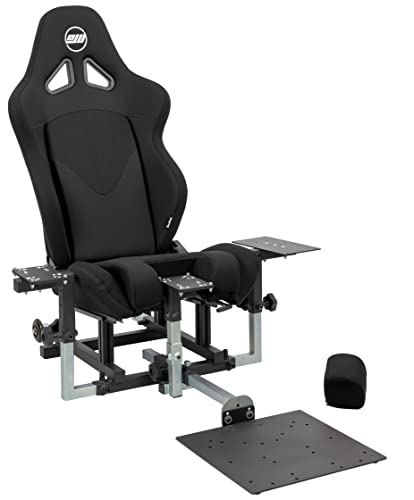
The SimFab Modular Flight Simulator Cockpit is the moment your sim hobby graduates from “stuff on a desk” to “stuff bolted to a frame with a seat.” The DCS Edition arrives configured for combat simulation, with a full-size foam seat on sliders and a recliner, a chassis that mounts a stick on the right, a center stick position for sticks with grip extensions or a cyclic, a throttle on the left, and a rudder pedal position. The package ships with all mounting hardware and wrenches needed to assemble it.
The “modular” label is the meaningful word: the frame is upgradable to general aviation, space sim, or sim racing down the line. Compatible hardware spans Thrustmaster Warthog, WinWing, VirPil, and VKB controls, which covers the high-end combat ecosystem. For sim pilots logging multi-hour DCS missions, the seat alone changes how long you can stay in the cockpit without back fatigue.
Positive Points
- Full foam seat with sliders and a recliner means long DCS missions are easier on your back.
- Chassis accepts a side stick, center stick, throttle, and rudder pedals in their proper positions.
- Modular upgrade path to general aviation, space sim, or sim racing protects the initial investment.
Trade-Offs To Consider
- Assembly takes a few hours, and the frame is large enough that you should plan dedicated floor space before unboxing.
- Seat and frame are heavy, so moving the rig around the room is realistically a two-person job.
Spec Overview
Perfect Match For
Long-session combat sim pilots who want a dedicated rig with a real seat and the option to reconfigure for other sim genres later.
Swap It Out When
Casual sim flyers on a tighter budget can get a stick and throttle mounted at desk height with the OpenWheeler HOTAS Add-on Kit for far less.
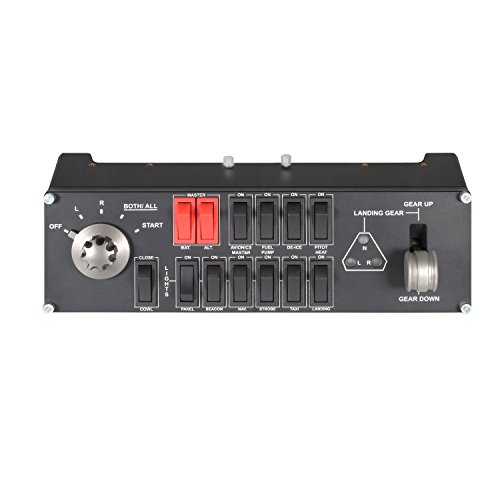
The Saitek PRO Flight Switch Panel is a focused tool: realistic landing gear control with LEDs that mirror actual gear status in Microsoft FSX, plus engine start switches and other cockpit functions on a single panel. The unit conveniently attaches to the base of the PZ44 Saitek Pro Flight Yoke System, which means it slots into an existing Logitech G Saitek setup without a separate mounting solution.
Compatibility is the headline limitation and the headline convenience. The panel connects over USB 2.0 and works on Windows 7, XP, XP64, and Vista, so it lines up best with the older Saitek ecosystem rather than the latest Microsoft Flight Simulator titles. Used with FSX or older Prepar3D installs, though, the gear and engine start feel as close to the real thing as a button panel gets.
Where It Delivers
- LEDs indicate actual landing gear status pulled from FSX, so the panel mirrors the sim in real time.
- Mounts directly to the base of the PZ44 Saitek Pro Flight Yoke System for a tidy single-footprint setup.
- Engine start switches add tactile realism to cold-and-dark cockpit flows.
Honest Caveats
- Designed for FSX-era sims, so compatibility with the latest Microsoft Flight Simulator requires checking current support before buying.
- Owners commonly report that the panel is a complement, not a standalone setup, so you still need a yoke and rudder pedals.
Who Should Grab It
FSX and Prepar3D pilots already running a Saitek yoke who want a real gear lever and engine start panel on the same desk footprint.
Where Another Pick Suits Better
Pilots running modern sims like Microsoft Flight Simulator 2020 will find broader autopilot coverage in the Logitech G USB Pro Flight Multi Panel reviewed later.
The Logitech G Saitek PRO Flight Throttle Quadrant is the missing piece for sim pilots who already own a Pro Flight Yoke and want a multi-engine throttle instead of a single lever. Three axis levers add even more options for control in your favorite flight sim, and the unit also includes three two-way rocker switches for additional cockpit functions.
The quadrant lines up directly with the Saitek Pro Flight Yoke System covered later in this list, which means you can grow a complete setup one component at a time. For most twin-engine and multi-engine pilots, the jump from one throttle lever to three is the moment power management starts to feel like the real thing.
The Case For It
- Three axis levers cover twin-engine, multi-engine, and complex power-management workflows.
- Three two-way rocker switches add extra cockpit commands beyond the throttle axes.
- Slot into the Saitek ecosystem alongside the Pro Flight Yoke without a new software setup.
Practical Considerations
- Most useful as an addition to a Saitek yoke setup, so it makes less sense as a standalone purchase.
- Detents and resistance are not as firm as higher-end combat throttles, which most civilian pilots won’t notice.
Built With In Mind
Multi-engine and twin-engine sim pilots running a Saitek yoke who want a dedicated throttle quadrant without buying a full bundle.
Consider Something Else When
Combat pilots flying DCS should look at the ThrustMaster T16000M FCS HOTAS bundle for a joystick-and-throttle combination instead.
The Logitech G PRO Flight Yoke System is the foundation for an entire Saitek panel setup, and the spec sheet makes the case clearly. You get a stainless steel yoke shaft, a 2-position clamp, a separate three-axis lever throttle, an integrated 1-port USB 2.0 hub, and an LCD display for status readouts. The control set includes a POV hat, 14 button controls, and a 3-position mode switch, with 75 programmable controls available across the system.
Windows compatibility runs from Windows 10 down through XP and Vista, which is unusually broad for a yoke that still sells today. The honest read is that this yoke has been the workhorse of the Saitek/Logitech flight ecosystem for years, and the mature software support shows in how many sims and panels integrate cleanly with it. For most home setups, the integrated USB hub alone saves a port on a tight desktop.
Good Reasons To Consider
- Stainless steel yoke shaft provides solid column feedback compared with all-plastic alternatives.
- 75 programmable controls across the yoke, throttle, and mode switch cover most cockpit needs.
- Integrated USB 2.0 hub simplifies cabling when adding switch panels and multi panels.
Factors To Consider
- The 2-position clamp is sturdy but designed for desks, so mounting to a dedicated cockpit frame may require adapter plates.
- Three-axis throttle is good for general aviation, but heavy iron sim work may want a dedicated throttle unit.
The Right Fit
Panel-build enthusiasts who plan to grow a Saitek/Logitech G flight setup over time with switch panels, multi panels, and a throttle quadrant.
Where A Sibling Pick Shines
Pilots who already know they want a rudder pedal included should grab the Logitech G Pro Flight Yoke + Rudder Pedals Bundle instead.
The Logitech G USB Pro Flight Multi Panel is the autopilot command center of the Saitek/Logitech G ecosystem. A full autopilot LED display works directly with flight sim software, effectively removing the need to use onscreen controls for routine adjustments. An integrated dial speeds up altitude selection, and additional functions allow adjustment of throttle, flaps, and elevator trim.
For most cruise-and-monitor sim pilots, the multi panel is the second most important purchase after the yoke itself. You spend long stretches of a flight at cruise altitude, and the autopilot panel means you’re not clicking through virtual menus on a tablet. The unit pairs naturally with the Logitech G PRO Flight Yoke System and the Saitek Switch Panel covered earlier.
Key Advantages
- LED display mirrors the in-sim autopilot, so you can manage altitude and heading without on-screen menus.
- Integrated dial accelerates altitude selection during climbs and descents.
- Additional controls for throttle, flaps, and elevator trim cover routine in-flight adjustments.
Less Ideal Details
- Software compatibility with the latest Microsoft Flight Simulator titles requires checking current support, since the panel predates that release.
- Owners commonly report the LED brightness is fixed, so the panel can be distracting in a darkened room.
Who It Suits Best
Cruise-and-monitor civilian sim pilots who fly airliners and complex GA aircraft and want real panel-style autopilot control without a full cockpit frame.
Skip It When
Combat and space pilots who rarely touch the autopilot will get more value out of the ThrustMaster TFRP Rudder Pedals & T16000M FCS HOTAS bundle covered earlier.
What Separates The Right Peripherals From The Wrong Fit
The first decision is layout: yoke or HOTAS. Civilian and airliner sims feel natural with a yoke, throttle, and rudder pedals, so the Logitech G Pro Flight Yoke + Rudder Pedals Bundle and the standalone Logitech G PRO Flight Yoke System are the natural starting points. Combat and space sims feel natural with a joystick and throttle, which makes the ThrustMaster TFRP and T16000M bundle the more useful entry.
Build quality is the second consideration. Plastic yokes are fine for casual use, but a stainless steel shaft like the one on the Logitech G PRO Flight Yoke System is a real upgrade if you log long sessions. Similarly, the aluminum slide rails on the ThrustMaster TFRP pedals make the rudder feel noticeably smoother than spring-loaded alternatives.
Software compatibility is the third. Older Saitek/Logitech G panels like the Switch Panel and Multi Panel were designed for FSX-era sims, so always confirm current support with your specific sim title before adding one to a new setup. Cross-platform ecosystems (Thrustmaster, VKB, WinWing) tend to have broader modern compatibility.
Finally, think about growth. A modular frame like the SimFab cockpit accepts new controls over time, and a desk-mounted bracket like the OpenWheeler HOTAS Add-on Kit can be a stepping stone toward a full rig. The right peripherals are the ones your future self can build on without starting over.
Key Considerations Across These Picks
Common Shopping Slip Ups
New sim pilots often buy a yoke without rudder pedals and then realize they can’t realistically taxi or correct crosswind drift. The cleanest fix is to start with a bundled setup like the Logitech G Pro Flight Yoke + Rudder Pedals Bundle. Another common mistake is picking a HOTAS rig for airliner flying, where a yoke feels far more natural.
Where The Extra Money Goes
Premium tiers in this category usually buy smoother mechanics, like the ThrustMaster TFRP’s aluminum rail system, and more durable construction, like the stainless steel yoke shaft on the Logitech G PRO Flight Yoke System. Modular frames like the SimFab cockpit add a real seat and reconfigurable mounting, which matters once you start logging multi-hour sessions. The upgrade is worth it for sim pilots who fly weekly rather than occasionally, and who notice the difference between plastic and metal under sustained pressure.
Frequently Asked Questions
Do I need rudder pedals to start flight sim?
Rudder pedals change how realistic taxi, takeoff, and crosswind landings feel, and most pilots consider them a priority add-on. The Logitech G USB PRO Flight Rudder Pedals are a budget-friendly starting point, while the Logitech G Pro Flight Yoke + Rudder Pedals Bundle pairs them with a yoke in one purchase.
What’s the difference between a yoke and a HOTAS setup?
A yoke simulates an aircraft control column, which fits civilian and airliner sims. A HOTAS setup (Hands On Throttle And Stick) keeps your hands on a joystick and throttle, which fits combat and space sims like DCS, Elite Dangerous, or Star Wars: Squadrons.
Can I use these peripherals with Microsoft Flight Simulator?
Most modern Thrustmaster, Logitech G, and OpenWheeler gear work with the latest Microsoft Flight Simulator titles, but older Saitek/Logitech G panels like the Switch Panel and Multi Panel should be checked for current software support before purchase. The IFR-1 panel and the ThrustMaster T16000M bundle are designed with broader modern compatibility in mind.
How much desk space do I need for a flight sim setup?
A single yoke, throttle, and rudder pedal arrangement fits on a standard desk with a clamp or mount. Full cockpit frames like the SimFab Modular Cockpit require dedicated floor space and aren’t practical for shared desks. The OpenWheeler HOTAS Add-on Kit is a middle-ground option that locks gear to the desk without occupying floor space.
Are modular flight sim cockpits worth the investment?
Modular cockpits are worth the investment for sim pilots who fly multi-hour sessions and want a real seat and reconfigurable mounting. Casual flyers can get most of the realism from a desk-mounted yoke or HOTAS setup with a sturdy bracket, so a full frame only pays off once the hobby becomes a regular habit.
The Takeaway
The right flight simulator peripherals depend on what you fly and how often. Civilian sim pilots should start with a yoke, throttle, and rudder pedal setup from the Logitech G Pro Flight ecosystem. Combat and space sim pilots get more out of a HOTAS bundle like the ThrustMaster T16000M. Cockpit frames, panel add-ons, and mounting kits are the next step once you know which aircraft and sims you keep coming back to.



