


A good flight simulator setup changes everything about the hobby. The right hardware pulls you out of a desktop chair and into a cockpit, where small movements matter: nudging a throttle, tapping rudder pedals, or feeling resistance as you trim for landing. The wrong setup leaves you fighting imprecise controls, drifting yokes, and wobbly joysticks that snap mid-flight.
This roundup covers eight pieces of gear that solve real problems for home pilots. Yokes for general aviation, HOTAS kits for combat and airliners, rudder pedals for taxi and crosswind landings, throttle quadrants for multi-engine aircraft, and desk mounts that keep everything planted. The picks span entry-level and serious sim rooms, so you can find something that fits your aircraft, your desk, and your budget.
A Snapshot Of The Selections
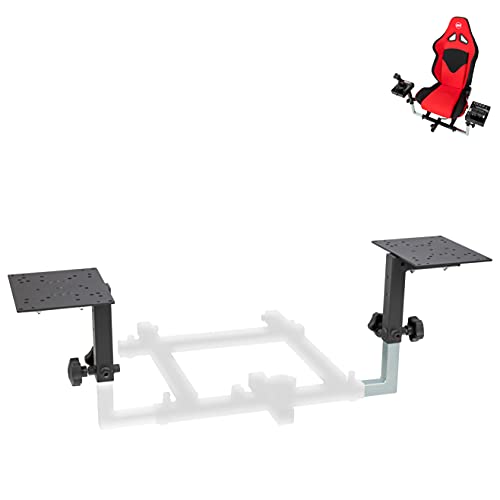
OpenWheeler Flight Simulator HOTAS Add-on Kit

Honeycomb Alpha Flight Controls Yoke & Switch Panel

Logitech G USB PRO Flight Rudder Pedals

Thrustmaster TPR Rudder Pedals (PC)

Thrustmaster T.Flight Hotas One Microsoft Flight Simulator Edition

XRhinorth Hotas Desk Mount

Honeycomb Bravo Throttle Quadrant

Meza Mount HOTAS Desk Mount Set of 2
A Deeper Look At The Lineup
Hardware compatibility is the silent killer of any sim upgrade. You buy a beautiful new throttle, only to discover the mount you already own does not fit the new base. The OpenWheeler HOTAS Add-on Kit exists precisely to dodge that headache, with brackets and adapter plates that accept a long list of popular sticks and throttles, from Thrustmaster’s T.Flight and T16000M lines to Logitech X52, X52 Pro, and X56 hardware, plus VKB Gladiator, CH Products, and Hori setups.
For simmers who mix and match gear over the years, that kind of broad fit is genuinely useful. You can swap from a side-by-side combat layout to a commercial aviation throttle without rebuilding your rig, which is the kind of flexibility that pays off across years of upgrades rather than weeks.
What Pays Off
- Supports a wide range of stick and throttle brands through swappable adapter plates
- Side-by-side mounting layout suits both combat and airliner workflows
- Solid construction that keeps heavier throttles planted during aggressive input
- Lets you upgrade individual pieces over time without replacing the whole rig
- Bracket-based design means the kit can travel between desks and home setups
Things To Consider
- Compatibility list is long but not universal, so confirm your exact model is listed before ordering
- Some users report that initial bracket alignment takes patience, especially with mismatched stick and throttle generations
Key Advantages
Best Suited To
Sim enthusiasts who already own gear from multiple brands and want a single mounting platform that grows with their collection.
Where Another Pick Suits Better
The Meza Mount HOTAS Desk Mount Set of 2 is a more focused pick for pilots running premium Thrustmaster Warthog or VPC bases and want purpose-built fit without adapter swaps.
For pilots who spend most of their time in Cessnas, Pipers, and other general aviation aircraft, a yoke simply feels right. The Honeycomb Alpha delivers that familiar shape with a solid steel shaft riding on two linear ball bearings, which is the engineering way of saying the rotation stays smooth and wobble-free even after thousands of hours.
The 180-degree rotation range and dampened, self-centering mechanism keep your inputs predictable. There is no center detent and minimal deadzone, meaning the yoke returns to neutral cleanly and small corrections feel crisp. The integrated switch panel adds master, alternator, avionics, and light switches, plus a five-position ignition switch with red LED backlighting for night flying.
A Few Highlights
- Steel shaft and ball bearings provide a stable feel that cheaper yokes cannot match
- Self-centering mechanism with minimal deadzone keeps small inputs precise
- Built-in switch panel reduces the need for separate hardware for common functions
- Red backlighting preserves night vision and is easy to read in dim sim rooms
Worth Noting
- Yoke is a fixed-format controller, so it does not translate to combat or space sim use
- Desk mounting is solid but heavier than joystick-only setups, so plan your surface space
Quick Facts
Made For
Sim pilots who fly mostly single-engine and twin piston aircraft and want a yoke that feels as good as it looks.
Consider Something Else When
Combat-focused pilots flying modern military jets will get more from a HOTAS stick like the Thrustmaster T.Flight Hotas One Microsoft Flight Simulator Edition, since yokes and dogfighting rarely mix.
Adding rudder pedals to a sim rig is the moment taxiing finally starts to behave. The Logitech G USB PRO Flight Rudder Pedals give home pilots that missing third axis, with self-centering action and tension adjustment so you can match the pedal feel to the aircraft you are flying.
The footrests adjust to fit different shoe sizes, and non-slip materials help keep your feet planted during long sessions. Partial metal construction adds durability where it counts, and the included Saitek Smart Technology programming software lets you map axes and buttons to your personal style. The 1.8-meter USB cable is long enough to sit behind most desks without stretching.
Practical Advantages
- Adjustable tension lets beginners and advanced pilots tune pedal resistance to taste
- Self-centering action keeps the rudder naturally aligned when feet come off the pedals
- USB 2.0 connectivity works with a wide range of Windows setups, from older rigs to modern PCs
Trade Offs
- Plastic components dominate the build, so longevity under heavy use is less certain than metal-heavy competitors
- Slip on hard floors without a mat is a common complaint among users with smooth flooring
Right Fit For
First-time sim pilots adding rudder control to a basic yoke or stick setup without overspending.
A Better Fit Elsewhere
Simmers wanting a tighter, more precise pedal feel with longer-term durability will prefer the Thrustmaster TPR Rudder Pedals, which use magnetic sensor technology for frictionless accuracy.
Once you start flying taildraggers, airliners, and helicopters, pedal feel starts to matter as much as the feel of your stick. The Thrustmaster TPR Rudder Pedals target that next step, using H.E.A.R.T HallEffect magnetic sensor technology, a contactless design that holds accuracy over time without the drift that plagues older potentiometer-based pedals.
Thrustmaster’s Pendul_r suspended mechanism gives the pedals a fluid, natural motion that mimics real aircraft rudder setups rather than feeling like an arcade attachment. For PC sim pilots building a serious home cockpit, that combination of contactless precision and smooth mechanical action is the kind of upgrade you feel on every takeoff roll.
The Practical Payoff
- Magnetic sensors avoid the wear and drift common in potentiometer-based pedals
- Suspended pedal mechanism provides smooth, realistic rudder deflection
- PC-focused design works cleanly with desktop flight sim software
- Build quality is heavier and more stable than entry-level alternatives
Honest Caveats
- Larger footprint demands more floor space than compact pedal sets
- Premium positioning makes it a tougher sell for casual weekend simmers
Feature Snapshot
Who Should Grab It
Intermediate to advanced PC sim pilots flying complex aircraft where rudder precision directly affects landing quality and realism.
Skip It When
Casual flyers who only need basic yaw control will do fine with the Logitech G USB PRO Flight Rudder Pedals and a smaller upfront spend.
Starting fresh in Microsoft Flight Simulator and not sure whether to commit to a full HOTAS rig? The Thrustmaster T.Flight Hotas One Microsoft Flight Simulator Edition is the kit that gets you off the ground without a learning curve steeper than the runway. It pairs a joystick and throttle in a single package, officially licensed for Microsoft Flight Simulator on Xbox Series X|S and PC.
For most beginners, the appeal is the plug-and-play nature. The throttle and stick work together from the moment you connect them, with mapping already aligned for the sim’s standard aircraft. That gets you flying instead of menu-diving, which is exactly the right trade at this stage.
Strong Points
- All-in-one package removes guesswork for new sim pilots
- Officially licensed status for Microsoft Flight Simulator ensures out-of-box compatibility
- Works on both console and PC, so the kit can move with you
Small Caveats
- Entry-level feel means it will eventually be outgrown by serious sim enthusiasts
- Plastic-dominant construction requires careful handling during transport
Perfect Match For
New Microsoft Flight Simulator players on PC or Xbox who want a complete stick-and-throttle setup that just works from the first session.
Look Elsewhere When
Veterans flying complex airliners with multiple throttle axes should step up to the Honeycomb Bravo Throttle Quadrant for a more authentic configuration.
A loose stick on a smooth desk is the kind of small frustration that pulls you out of the sim. The XRhinorth Hotas Desk Mount solves that with a dual-clamp design that grips the table from the top, keeping your joystick planted during aggressive maneuvers and long-haul flights alike.
The mount is intended for a specific set of supported controllers, and it works only on table edges up to 6 cm (about 2.36 inches) thick, so measuring your desk before ordering is essential. The optional anti-slip pads can be skipped if you prefer a tighter grip without them, which is a thoughtful touch for desks with unusual finishes.
Practical Pluses
- Top-down dual clamp gives a firm hold on standard desks
- Optional anti-slip pads let you tune grip based on your surface
- Single-piece design keeps setup simple and fast to install
Points To Keep In Mind
- 6 cm table edge limit rules out thicker desks and some standing-desk frames
- Stand only, controller not included, so budget for your stick separately
Whose Shelf It Belongs On
Casual sim pilots with a basic throttle or stick and a standard desk who want a stable mount without a full rig.
Swap It Out When
Owners of Thrustmaster Warthog or VPC bases should pick the Meza Mount HOTAS Desk Mount Set of 2, which is purpose-built for those heavier setups.
Most entry-level HOTAS kits give you a single throttle lever, which works fine for a Cessna but falls apart in a four-engine airliner. The Honeycomb Bravo Throttle Quadrant solves that by letting you configure the layout from a single-engine general aviation setup to a four-engine commercial aircraft, all in one unit.
The throttle body carries the cockpit essentials you actually use: an autopilot panel, an annunciator panel, gear and flap levers, and a trim wheel. The gear lever has red and green LED indicators for visual feedback, and the annunciator panel uses seven two-way programmable switches backed by 14 warning lights to surface aircraft status at a glance.
Points In Its Favor
- Configurable throttle layout adapts from single-engine to multi-engine aircraft
- Built-in autopilot, gear, flap, and trim controls reduce the need for separate modules
- LED gear indicators give quick visual confirmation of aircraft state
- Pairs naturally with the Honeycomb Alpha yoke for a full GA or airliner setup
Potential Drawbacks
- Software setup is required to take full advantage of the configurable layout
- Limited usefulness for combat sim pilots who need a HOTAS stick rather than quadrant layout
Feature Card
Who Will Love This
Sim pilots flying a mix of general aviation and airliner aircraft who want one throttle unit to handle both instead of swapping hardware.
Another Choice May Suit
Combat sim pilots chasing afterburner handling should pair a HOTAS stick like the Thrustmaster T.Flight Hotas One Microsoft Flight Simulator Edition with a dedicated joystick mount instead.
Premium sticks like the Thrustmaster Warthog or VPC WarBRD deserve hardware that matches their weight. The Meza Mount HOTAS Desk Mount Set of 2 delivers exactly that, with two dedicated mounts sized for serious joysticks and throttles, including Thrustmaster Warthog, WinWing Orion 2, VPC WarBRD-D Base, and VPC MongoosT-50CM 2/3 Base configurations.
Adjustable construction lets you set the angle and height to match your seating position, which matters more than people expect. A mount that is too low or angled wrong causes wrist fatigue over long sessions, and getting that geometry right is half the comfort battle in any sim room.
Useful Highlights
- Designed specifically for heavy high-end bases that lighter mounts struggle to support
- Set of two lets you mount joystick and throttle in a clean side-by-side layout
- Adjustable geometry reduces wrist strain during long flights
Where It Is Less Suited
- Limited compatibility outside the listed high-end bases, so confirm your model before buying
- Premium positioning means overkill for entry-level sticks and throttles
Built With In Mind
Owners of Thrustmaster Warthog, WinWing Orion 2, or VPC bases who need mounts that handle real weight without flex.
Reach For A Different Pick When
Simmers running a mixed-brand collection benefit more from the OpenWheeler Flight Simulator HOTAS Add-on Kit, which accepts far more stick and throttle models through swappable plates.
Matching The Right Hardware To Your Sim Style
Choosing flight simulator hardware comes down to the aircraft you fly most, the space you have, and how seriously you take the hobby. A weekend Cessna pilot in a small apartment has very different needs than someone building a dedicated 737 cockpit in a spare room.
Yoke or stick is the first fork. Yokes like the Honeycomb Alpha suit general aviation, where real pilots use a control column, and the integrated switch panel covers most of what a single-engine cockpit needs. Sticks make more sense for combat, modern jets, and helicopters, where the input is rotational and a yoke would feel out of place. The Thrustmaster T.Flight Hotas One is a good starter stick-throttle combo for Microsoft Flight Simulator pilots, while the OpenWheeler HOTAS Add-on Kit supports multi-brand upgrades.
Rudder pedals change taxi and landing. Even casual pilots notice the difference when applying crosswind corrections, and any taildragger or twin is nearly impossible to fly well without them. The Logitech G PRO pedals are a budget-friendly entry, while the Thrustmaster TPR brings magnetic sensor precision to pilots who want long-term accuracy.
Throttle design depends on aircraft complexity. Single-engine pilots can work fine with a basic lever, but multi-engine airliners need a quadrant. The Honeycomb Bravo is the standout here, configurable from one to four throttles and packed with the cockpit controls you actually use mid-flight.
Mounts are easy to overlook, yet they dictate comfort. A wobbly stick throws off muscle memory, and a poorly positioned throttle causes shoulder fatigue. Light setups work with basic clamps like the XRhinorth, but heavy bases like the Warthog need the Meza Mount set for proper stability.
Finally, think about growth. Buying modular gear that can swap roles as your interest shifts saves money over time. A mounting platform that accepts future stick and throttle upgrades is worth more than the cheapest option available today.
Reading The Price Tiers
A few things separate premium flight sim hardware from budget hardware, and knowing them helps you decide where to spend. Higher-end yokes use steel shafts and ball bearings instead of plastic pivots, which keeps the rotation smooth and wobble-free across thousands of hours. Magnetic sensors in pedals and throttles avoid the drift that older potentiometer designs develop, so your calibration stays accurate over years of use.
Build materials matter too. Partial metal construction adds weight where it counts, and heavier bases generally translate into a planted, confident feel. Configurable software is another divider, and units like the Honeycomb Bravo use it to stretch from a Cessna throttle to a four-engine airliner layout. In most sim rooms, the upgrade pays off once you start spending real time in the same aircraft week after week.
Common Buying Mistakes To Sidestep
Buying a yoke when you should be buying a stick, or vice versa, is the most common error. The aircraft you fly most should drive that choice, not the appeal of a particular product photo.
Skipping a desk-measurement check is another trap. The XRhinorth mount, for example, requires a table edge under 6 cm thick. Heavy bases like the Warthog need a mount rated for that weight, or you will see flex under aggressive input.
Assuming every mount accepts every stick leads to frustration. The OpenWheeler kit covers many brands, but the Meza Mount is purpose-built for a short list of high-end bases. Confirming your exact model is on the supported list before ordering is a small step that prevents returns.
What Separates Premium From Budget
Premium tiers in flight sim hardware add three things: better sensors, heavier construction, and configurable software. Magnetic contactless sensors in pedals and throttles hold calibration longer than potentiometer-based units, which drift over time as the internal contacts wear.
Heavier construction with metal components in high-stress areas keeps the hardware planted and reduces flex during aggressive input, which matters during combat maneuvers or heavy crosswind landings. Configurable software unlocks multi-aircraft versatility, and a throttle quadrant that handles both a Cessna and a 737 is a real long-term value.
Paying up is worth it once you settle into a sim routine. Pilots who fly the same airliner for hundreds of hours feel the precision difference immediately, while weekend dabblers often find a mid-tier setup is plenty.
Frequently Asked Questions
Do I need rudder pedals to fly well in a flight simulator?
You can fly straight and level with a stick or yoke, but pedals make taxiing, crosswind landings, and coordinated turns much more realistic. Taildraggers and twins are especially hard to handle without them.
Can I mix brands in one flight simulator setup?
Most modern sim software accepts inputs from multiple devices at once. The OpenWheeler HOTAS Add-on Kit even supports multi-brand mounting on the same platform, which is helpful for upgrading one piece at a time.
Is a HOTAS setup good for airliners, or is it just for combat?
A basic HOTAS stick and throttle works fine for airliners, though multi-engine aircraft often benefit from a dedicated throttle quadrant like the Honeycomb Bravo. The choice depends on how many engines you typically manage.
How important is a desk mount for a joystick?
A mount keeps the joystick from sliding during input and sets a comfortable angle for long sessions. A loose stick on a smooth desk is one of the most common sources of frustration, so a basic clamp is usually worth the small extra cost.
What is the difference between HallEffect and potentiometer sensors?
HallEffect sensors use magnets to detect position without physical contact, so they do not wear out the way older potentiometer-based sensors do. The result is a pedal or throttle that holds its calibration for longer with less drift.
The Takeaway
The right flight simulator hardware setup depends entirely on what you fly and how you fly it. Yoke pilots in single-engine aircraft, combat stick users, and airliner simmers all need different gear, and the eight picks above cover each of those paths without overlap.
Start with the input style that matches your favorite aircraft, add rudder pedals if you fly taildraggers or twins, and consider a mount or quadrant when the basics feel solid. That sequence keeps spending focused on upgrades you will actually feel every flight.



