


Building a serious home cockpit starts long before you fire up your simulator software. The right desk hardware transforms clumsy mouse clicks into convincing flight controls, and the wrong setup leaves your hardware sliding around mid-approach. Whether you’re flying a Cessna in X-Plane, a 737 in Microsoft Flight Simulator, or a warbird in DCS, your gear either pulls you in or pushes you out of the experience.
The challenge most home pilots face is space. A proper yoke, throttle quadrant, radio stack, and stick panel can sprawl across an entire desk. Add rudder pedals and a multi-monitor array, and suddenly your office looks like mission control. That’s where specialized flight controls earn their place, replacing keyboard shortcuts and gamepad thumbsticks with physical hardware that mimics the real cockpit.
Check on AmazonA Side-By-Side Look

Honeycomb Alpha Flight Controls Yoke & Switch Panel
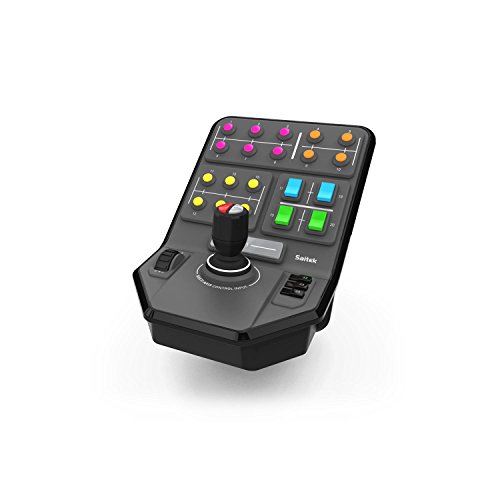
Logitech G PC Farm Sim Vehicle Side Panel

Logitech G USB Pro Flight Radio Panel

CH Products Throttle Quadrant USB (300-133)

Logitech G Saitek PRO Flight Throttle Quadrant

Logitech G PRO Flight Yoke System

Logitech G USB Pro Flight Multi Panel
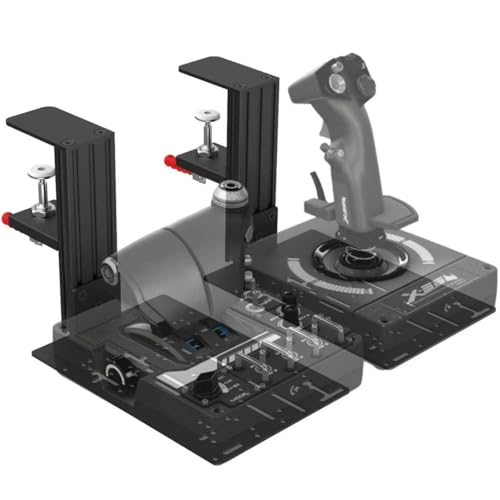
JUYEER Universal Table Mount for Flight Controls

Honeycomb Bravo Throttle Quadrant
A Deeper Look At The Lineup
The Honeycomb Alpha has earned near-universal respect among sim pilots for good reason: its solid steel shaft and dual linear ball bearings translate tiny hand inputs into precise yoke movements without any wobble or lag. Where the earlier Logitech yoke (covered later) uses plastic internals, this one feels closer to something you’d find in a real Cessna 172, and that tactile difference matters during long IFR sessions.
Rotation spans 180 degrees, which is enough for steep turns without forcing your wrists into awkward positions. Pilots transitioning from a gamepad will notice immediately that the controls self-center smoothly, helping you hold headings with less conscious effort. The integrated switch panel handles master, alternator, avionics, and light toggles, plus a five-position ignition, so you’re not hunting through keyboard shortcuts during startup.
Real-World Strengths
- Steel shaft and ball-bearing construction holds up to years of regular use without developing play
- Dampened, self-centering mechanism makes straight-and-level flight less fatiguing
- Red LED backlighting keeps switches readable during night flights without ruining dark adaptation
- 180-degree rotation handles most general aviation maneuvers comfortably
Things To Consider
- Clamp design may require a reinforced desk edge for stability during aggressive inputs
- Switch panel placement is fixed, so cockpit builders wanting angled placement may need a separate mount
Quick Facts
Right Fit For
General aviation pilots flying Cessnas, Pipers, and similar high-wing aircraft in X-Plane or MSFS who want realistic yoke feel without paying airliner-tier prices.
Consider Something Else When
The Logitech G PRO Flight Yoke System makes more sense if you’re building a first cockpit on a tighter budget and want the throttle included in one box.
This Logitech side panel looks like an odd fit in a flight sim roundup, and honestly, it is. But the “PC Farm Sim” label undersells what this hardware actually does: it’s a serious six-axis control loader with 37 programmable buttons and a set-and-forget cruise dial, built originally for heavy equipment simulation. Sim pilots who also run vehicle sims (or DCS helicopter collective work) often mount these for secondary functions.
The screw-thread clamp is the same proven Saitek design used across Logitech’s flight lineup, so it locks onto desk edges with confidence. The button layout groups functions logically, meaning you can muscle-memory your way through complex sequences without looking down. For flight sim use, it works best as a supplemental control panel rather than a primary input device.
Why It Works Well
- 37 programmable buttons cover most secondary cockpit functions (lights, gear override, trim)
- Six-axis control stick handles loader-style or collective-style inputs
- Proven screw-thread clamp keeps the unit planted during heavy use
- Cruise control dial saves fatigue during long cruise segments
Trade Offs
- Labeled for farm sim, so flight-specific button mapping requires software configuration
- Bulkier than dedicated radio or multi panels, demanding more desk real estate
Whose Shelf It Belongs On
Sim enthusiasts who split time between flight sims and farming/construction games and want one programmable panel that handles both.
Look Elsewhere When
The Logitech G USB Pro Flight Radio Panel suits better if you specifically want aviation-labeled COM/NAV controls rather than blank programmable buttons.
The Pro Flight Radio Panel is purpose-built for IFR work, and it shows. Where most sim pilots click COM and NAV frequencies in software, this panel puts real rotating knobs and active standby displays on your desk, so you twist and push just like a real Garmin radio stack. For pilots practicing instrument approaches, that physical feedback accelerates learning dramatically.
It’s a modular piece, meaning you can chain multiple Logitech panels together: a radio panel, a multi panel, and a switch panel sitting side by side creates a credible home instrument panel. Compatibility runs through the major sim platforms, so switching between FSX, X-Plane, and Prepar3D doesn’t require reconfiguring your hardware.
Where It Delivers
- Dedicated knobs and displays replicate real radio stack operation
- Active/standby frequency swap matches real avionics workflow
- Modular design lets you build out a full instrument panel piece by piece
Some Limits To Know
- Only addresses COM/NAV functions, so you’ll need additional panels for autopilot or throttle
- Displays may require software configuration to read clearly on certain monitor setups
- No built-in mounting hardware beyond desk clamp, so angled placement needs a custom solution
Feature Snapshot
Best Suited To
IFR students and instrument-rated pilots practicing ATC communication and frequency management without reaching for the keyboard.
Not Your Match When
The Logitech G USB Pro Flight Multi Panel fits better if autopilot control matters more to your flying than radio tuning.
CH Products has been making flight controls since the 1990s, and the 300-133 throttle quadrant reflects that heritage. It’s a six-axis unit (X, Y, Z, R, U, and V), which means you can map it to multi-engine throttles, prop pitch, and mixture controls simultaneously, making it a favorite for pilots flying complex piston twins or helicopters.
The included Control Manager software unlocks 176 programmable functions, so even sim pilots running obscure aircraft add-ons can usually find a mapping that works. The mounting clamp fits desks from 3/4 inch to 2 1/4 inches thick, covering most standard office furniture. It’s plug-and-play over USB, with no driver hunting required.
Well-Handled Touches
- Six independent axes handle complex multi-engine aircraft convincingly
- 176 programmable functions cover nearly any aircraft add-on’s control set
- Wide clamp range fits most standard desks without modification
Minor Gripes
- Industrial plastic construction feels less refined than newer Honeycomb or Thrustmaster units
- Included software is functional but dated by modern UI standards
Technical Highlights
Who It Suits Best
Sim pilots flying complex multi-engine aircraft, helicopters, or warbirds who need more axes than a standard three-lever throttle offers.
Skip It When
The Honeycomb Bravo Throttle Quadrant suits better if you want a modern build quality with integrated annunciator panels and gear/flap controls in one unit.
Where the earlier CH Products unit goes industrial, the Saitek Pro Flight Throttle Quadrant keeps things simpler and more aligned with consumer sim expectations. Three axis levers plus three two-way rocker switches cover most single and twin-engine aircraft without overwhelming the user. The detent feedback is firm without being harsh.
This unit slots in as an add-on to the Saitek Pro Flight Yoke System (covered next), but it works independently if you prefer a stick-and-throttle setup. Pilots flying airliners benefit from the interchangeable lever handles, letting you configure a four-engine layout or a single throttle with trim wheel depending on your aircraft of choice.
A Few Highlights
- Interchangeable lever handles adapt to single, twin, or four-engine aircraft
- Compact footprint fits alongside a yoke without dominating the desk
- Three rocker switches add secondary control options for trim or mixture
Points To Note
- No integrated autopilot or radio controls, requiring companion panels for full cockpit functionality
- Plastic lever construction may develop wobble after years of heavy use
Made For
Sim pilots who already own a Saitek yoke or stick and want to expand their throttle capabilities without buying an entire new system.
Another Choice May Suit
The CH Products Throttle Quadrant USB fits better if you need six independent axes for complex helicopters or warbirds rather than consumer-grade three-lever simplicity.
The Saitek Pro Flight Yoke System remains the most common entry point into home cockpit building, and for good reason. You get a stainless steel shafted yoke, a separate three-axis throttle quadrant, 75 programmable controls across the system, and a built-in USB hub for connecting additional panels. That all-in-one packaging means one purchase covers the basics.
The yoke’s three-position mode switch is a nice touch, letting you swap control mappings mid-flight (useful for toggling between aircraft in a fleet operation). Compatibility extends back to Windows XP, so older sim rigs still benefit. For pilots building a first cockpit who want to skip the piecemeal approach, this system delivers immediate immersion without months of incremental purchases.
Good Reasons To Consider
- Complete yoke and throttle package removes the need for separate purchases
- 75 programmable controls cover most general aviation needs out of the box
- Integrated USB hub simplifies cable management for additional panels
- Mode switch enables quick mapping changes between aircraft
Worth Noting
- Plastic internal gearing in the yoke feels less refined than the Honeycomb Alpha’s steel internals
- Throttle quadrant is basic, so serious airliner pilots may want to upgrade to the Saitek Pro Flight Throttle Quadrant separately
Feature Rundown
Who Will Love This
First-time cockpit builders who want a complete, affordable foundation that covers basic GA flying without requiring a dozen separate purchases.
A Better Fit Elsewhere
The Honeycomb Alpha Flight Controls Yoke & Switch Panel is a smarter pick if you prioritize smoother self-centering and steel-shaft precision over bundled throttle value.
The Multi Panel fills a specific gap in the Logitech modular ecosystem: autopilot control. The LED display mirrors the autopilot mode you’re currently using, and the integrated dial lets you adjust altitude, heading, and vertical speed without clicking through software menus. For pilots flying airliners or complex GA aircraft with working autopilots, that single upgrade changes how you manage cruise flight.
Beyond autopilot, this panel also gives you fingertip control over throttle, flaps, and elevator trim. That combination is unusual at this price point, where most panels specialize in one system. The same modular mounting system used across Logitech’s flight lineup means it sits cleanly next to the radio panel and switch panel without taking up excessive desk space.
Standout Benefits
- LED autopilot readout displays current mode without software checking
- Integrated trim, flap, and throttle controls consolidate multiple functions
- Modular design chains with other Logitech panels for a unified cockpit
Areas To Watch
- Autopilot features depend on the sim software supporting mapped autopilot modes, which varies by aircraft
- LED display brightness may need adjustment for night flying
Perfect Match For
Airliner and complex GA pilots who frequently engage autopilot during cruise and want physical control over altitude, heading, and speed changes.
Reach For A Different Pick When
The Honeycomb Bravo Throttle Quadrant is a stronger option if you prefer consolidating throttle, trim, and annunciator functions into a single premium unit.
Every flight control in this roundup eventually needs a mount, and the JUYEER universal table mount addresses a problem most sim pilots hit within their first month: factory clamps work fine on thin desks, but thicker surfaces or custom cockpit builds require something more rigid. This mount uses a push-pull quick clamp that locks onto substantial desk edges without sliding.
Compatibility runs impressively wide: Logitech X52, X52 Pro, X56, Thrustmaster Warthog, TCA Officer Pack, VKB Gunfighter, and the T.16000M all fit. That breadth means most sim pilots can standardize on one mounting solution rather than buying proprietary mounts for each control. For sim pit builders, that’s a meaningful cost and complexity reduction.
What It Does Well
- Push-pull clamp design holds firm on desks up to several inches thick
- Broad compatibility covers Logitech, Thrustmaster, and VBK control ecosystems
- Eliminates wobble during aggressive stick or throttle inputs
Honest Caveats
- Mounting footprint adds depth behind the desk, which may not suit shallow furniture
- Compatibility is broad but not universal, so checking your specific control model before purchase is wise
Built With In Mind
Sim pit builders and serious sim pilots whose control hardware shifts or slides during energetic flight maneuvers and needs rigid desk attachment.
Where A Sibling Pick Shines
Sim pilots who only fly occasionally with a single Logitech yoke may find the included factory clamp sufficient and don’t need a separate mount.
The Honeycomb Bravo is the throttle quadrant that pairs with the Alpha yoke (covered first), and together they form a cockpit foundation that rivals setups costing significantly more. What makes the Bravo stand out is the integrated annunciator panel: 14 warning lights and seven programmable switches replicate a real aircraft caution panel, meaning alerts appear physically rather than in a corner of your screen.
Configurable throttle setups range from single-engine Cessnas to four-engine commercial jets, so the same hardware adapts as your flying interests evolve. The gear lever includes red and green LED landing gear indicators, a small touch that adds substantial realism during the approach and landing phase. For pilots committed to long-haul airliner simming, this is the throttle quadrant that keeps you immersed through entire flights.
Points In Its Favor
- 14-light annunciator panel delivers physical warning indicators during system failures
- Configurable from single-engine to four-engine aircraft, adapting as your sim interests grow
- LED gear indicators add landing realism without needing separate hardware
- Trim wheel and flap lever integrated into a single coherent unit
Less-Strong Areas
- Higher price point than three-lever consumer throttles, reflecting the annunciator complexity
- Best experienced alongside the Honeycomb Alpha yoke, so total system cost adds up
Who Should Grab It
Airliner sim enthusiasts and serious GA pilots who want their throttle quadrant to deliver realistic system warnings and gear/flap control in one package.
Swap It Out When
The Logitech G Saitek PRO Flight Throttle Quadrant makes more sense if you’re building a budget cockpit and don’t need annunciator panel functionality.
What To Weigh Before Choosing Your Cockpit Hardware
Match Hardware To Your Aircraft Type
The single biggest decision is which aircraft you fly most. Single-engine Cessna pilots benefit most from a yoke-and-throttle combo like the Honeycomb Alpha and Bravo pairing. Helicopter and warbird pilots, by contrast, need a joystick with twist rudder or a dedicated collective, making the CH Products six-axis unit more relevant. Airliner simmers building toward IFR operations should prioritize radio and autopilot panels over additional control axes. Matching hardware to your primary aircraft prevents buying gear that sits unused because it doesn’t fit your flying style.
Modular Systems Grow With You
Starting with a complete system like the Logitech G PRO Flight Yoke System gets you flying immediately, but modular Logitech panels (radio, multi, switch) let you add capabilities incrementally. Pilots uncertain about long-term commitment often prefer the modular path because it spreads cost over time. Sim pit builders planning multi-year projects usually consolidate toward one ecosystem to avoid compatibility headaches between different brands and software profiles.
Mounting Matters More Than You’d Expect
Factory clamps on most flight controls handle standard desks adequately, but anything beyond gentle cruising eventually exposes wobble. A universal mount like the JUYEER becomes essential once you’re running multiple panels, fighting stick movement during aerobatics, or building a dedicated sim pit. Investing in proper mounting early prevents the frustration of hardware shifting mid-approach when concentration matters most. Thick desk edges in particular demand upgraded clamps, since most factory solutions assume thinner office furniture.
Software Compatibility Saves Headaches
Before purchasing, confirming that your chosen hardware works with your specific sim software (MSFS, X-Plane, DCS, Prepar3D) prevents the frustration of an expensive paperweight. Most Logitech and Honeycomb products support all major platforms, but third-party accessories and older CH Products units may need specific driver versions or community profiles. Pilots running less common add-on aircraft should verify control mapping compatibility rather than assuming universal support, since aircraft-specific bindings vary widely across the sim community.
Quick Tips Before You Buy
Where Shoppers Go Wrong
First-timers often prioritize the yoke and forget the throttle, then discover they’re reaching for keyboard shortcuts during the most critical phase of flight. A balanced setup allocates roughly equal attention to pitch, power, and navigation controls rather than loading up on input devices while ignoring instruments. Another common mistake is buying premium hardware before confirming desk space accommodates the footprint, since some modular systems require 36 inches or more of linear desk depth when fully assembled.
The Upgrade Payoff
Higher-tier options like the Honeycomb Bravo deliver value through features you don’t initially think you need, such as the annunciator panel that surfaces system warnings physically. For pilots who eventually fly complex aircraft with realistic failures, that physical warning system becomes indispensable rather than optional. The same logic applies to steel-shaft yokes over plastic-shaft alternatives: the precision difference feels marginal in casual flying but becomes obvious during sustained instrument work where smooth control inputs matter. You may find the extra investment justified once your skills advance and you notice what the budget tier was missing.
Frequently Asked Questions
Do flight simulator yokes work with all major sim software?
Most modern yokes from Honeycomb, Logitech, and CH Products support Microsoft Flight Simulator, X-Plane, DCS, and Prepar3D without additional drivers. Older CH Products units occasionally need community profiles for newer sim versions, so checking compatibility before purchase is wise.
Can I mix brands in one cockpit setup?
Yes, mixing brands is common among sim pilots, though staying within one ecosystem simplifies software configuration. Combining a Logitech radio panel with a Honeycomb throttle works fine, but each brand may require its own configuration software running in the background.
How much desk space does a basic cockpit need?
A single yoke-and-throttle combo typically needs 24 to 30 inches of desk depth and 20 inches of width. Adding radio, multi, and switch panels increases the footprint significantly, so planning your space before purchasing prevents costly furniture rearrangements.
Are rudder pedals necessary for flight sim?
Rudders add substantial realism during coordinated turns and crosswind landings, but they’re not strictly required for basic GA flying. Pilots focused on airliner operations benefit more from rudder pedals than helicopter pilots, who often use twist-rudder sticks instead.
How long do flight controls typically last?
Quality flight controls from established brands commonly last five to ten years with regular use, with mechanical parts like bearings and potentiometers being the typical wear points. Storing controls covered when not in use and avoiding food spills near the desk extends operational life considerably.
Wrap Up
A well-built home cockpit transforms flight simulation from a keyboard-and-mouse exercise into something approaching real aviation muscle memory. Start with hardware matched to your primary aircraft, add modular panels as your skills and interests grow, and invest in proper mounting once your setup stabilizes. The difference between entry-level and enthusiast-grade controls becomes most obvious during long flights, where precision and immersion matter most.



