


A keyboard and mouse will get a virtual aircraft pointed in roughly the right direction, but serious sim pilots know the gap between mashing keys and actually flying. The right yoke, throttle quadrant, or rudder pedal set turns flight simulation from a twitchy arcade exercise into something that finally feels like flying. This roundup looks at nine options across the spectrum, from beginner-friendly yokes to heavy-duty military replicas, so you can match the hardware to the kind of flying you actually do at home.
A Side-By-Side Look

ThrustMaster Hotas Warthog PC with TFRP Rudder

Logitech G Pro Flight Yoke with Rudder Pedals

Honeycomb Alpha Yoke & Switch Panel

Logitech G USB PRO Flight Rudder Pedals

OCTAVI IFR-1 Compact All-in-One Cockpit

Thrustmaster TPR Rudder Pedals (PC)
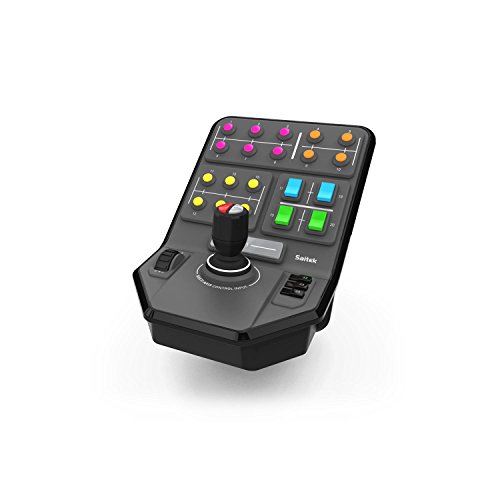
Logitech G PC Farm Sim Vehicle Side Panel

Logitech G USB Pro Flight Radio Panel

Honeycomb Bravo Throttle Quadrant
More On The Choices That Made The List
The Warthog bundle is a serious commitment to desktop, and the weight tells you that the moment you lift the box. Built as a 1:1 replica of the U.S. Air Force A-10C controls, it leans heavily on metal: a fully detachable joystick handle, a detachable metal plate for desk or cockpit mounting, and a dual-throttle system with metal hand rests. For combat-simmers running DCS or similar study-level titles, the 19 action buttons plus an 8-way point-of-view hat give plenty of room to map weapons, radios, and view controls without touching the keyboard.
The included TFRP rudder pedals round out the package, so you’re not hunting for matching add-ons later. This setup anchors a heavy cockpit feel; for casual weekend flights it may feel like overkill.
A Few Highlights
- All-metal joystick, throttle, and control panel for long-term durability
- Detachable handle and mounting plate support both desk and cockpit setups
- 19 action buttons plus an 8-way POV hat cover most mapping needs
- Included TFRP rudder pedals save a separate purchase step
- Dual-throttle design suits twin-engine and combat aircraft
Practical Considerations
- Heavy footprint demands a sturdy desk or dedicated mounting solution
- Metal construction can be tiring during very long sessions without wrist support
Made For
Combat-simmers and DCS pilots who want authentic military hardware and don’t mind dedicating real desk space to it.
Where Another Pick Suits Better
The Honeycomb Alpha Yoke & Switch Panel is a smarter match for general aviation flyers who’d rather turn a yoke than grab a fighter-style stick.
Logitech’s yoke-and-pedal bundle is a familiar starting point for first-time sim pilots, and for good reason. The yoke itself packs a POV hat, 14 button controls, and a 3-position mode switch that together unlock at least 54 programmable commands, so you can grow into the hardware without immediately outgrowing it. Paired with the Pro Flight Rudder Pedals, you get self-centering pedals with adjustable damping and differential toe brakes for runway control, all in one box.
Foot rests adjust for a range of sizes and use non-slip materials, which helps during longer flights. For someone transitioning from mouse-and-keyboard flying, this bundle teaches the yoke-and-rudder muscle memory before any commitment to pricier hardware.
What Works In Its Favor
- All-in-one bundle covers yoke, rudder, and toe brakes from day one
- 54+ programmable commands give plenty of room to map systems
- Self-centering pedals with adjustable damping suit different flying styles
- Non-slip, size-adjustable foot rests accommodate a wide range of pilots
Worth Noting
- Plastic-dominant construction feels less premium than metal alternatives
- Differential toe brakes have a learning curve for first-timers
Who It Suits Best
New sim pilots who want a complete yoke-and-pedal setup in one purchase and a forgiving learning curve.
Consider Something Else When
The ThrustMaster Hotas Warthog Bundle is a better fit for combat pilots who prefer a stick-and-throttle layout over a yoke.
The Honeycomb Alpha is the yoke that keeps popping up in online build photos for a reason. The rotation travels a full 180 degrees, riding on a solid steel shaft with two linear ball bearings, so the action stays smooth even after hundreds of flights. A dampened, self-centering mechanism with no center detent and minimal deadzone means you won’t fight a sticky center during crosswind landings or precise ILS approaches.
The integrated switch panel covers the essentials: master, alternator, avionics, and light switches plus a 5-position ignition. Red LED backlighting keeps everything readable during night flights without flooding the cockpit. Compared with the Logitech G bundle above, the Alpha is a clear step up in mechanical refinement for general aviation work.
Good Reasons To Consider
- Steel shaft and ball-bearing design give a smooth, controlled feel
- No center detent and minimal deadzone improve approach precision
- Built-in switch panel reduces the need for separate hardware
- Red LED backlighting works well for VFR and IFR night flying
Trade Offs
- Yoke only; no throttle quadrant or rudder pedals in the box
- Heavier than plastic yokes, so clamping matters on thinner desks
Right Fit For
General aviation and light twin pilots running X-Plane or MSFS who want premium feel without going full military replica.
Look Elsewhere When
The Logitech G Pro Flight Yoke Bundle is a better starter option for pilots who’d rather have rudder pedals included out of the box.
Not every flight sim setup needs to start from a clean slate. The Logitech G USB PRO Flight Rudder Pedals are the add-on that finally gives you proper rudder and brake control on a budget, slotting neatly next to a HOTAS stick or standalone yoke. Self-centering pedals with adjustable damping let you tune resistance to match how aggressively you fly, and tension adjustment on each axis means you can dial in feel for both light GA and heavier airliners.
Foot rests adjust to fit a range of sizes, with non-slip surfaces that help during long sessions, and the partial metal construction supports years of use rather than feeling disposable. Saitek Smart Technology programming software lets you map controls to your style. The 1.8-meter cable gives some flexibility on desk placement.
Features That Help
- Self-centering pedals with adjustable damping for realistic input
- Tension adjustment lets you tune resistance to your aircraft
- Partial metal frame and non-slip footrests support long-term use
- USB 2.0 connectivity works across modern Windows builds
Small Caveats
- Older generation hardware; may require extra setup steps on the latest Windows updates
- Best paired with a separate yoke or stick for full control
Whose Shelf It Belongs On
Sim pilots who already own a yoke or stick and want to add proper rudder and brake control without overspending.
Swap It Out When
The Thrustmaster TPR Rudder Pedals are a smarter pick for pilots who want HallEffect sensor precision and don’t mind paying more for it.
The OCTAVI IFR-1 isn’t a yoke or a throttle, and that’s exactly the point. It’s a compact, all-in-one cockpit panel that consolidates COM, NAV, FMS, autopilot, and transponder controls into a single Made-in-Germany unit, so you stop hunting through on-screen menus mid-approach. For instrument-rated practice, that consolidation matters: it brings the most-used radio and autopilot inputs into a single tactile surface next to your yoke or stick.
LED-backlit buttons help during night IFR work, and the compact footprint keeps it from taking over your desk. Where the Logitech G Radio Panel below focuses specifically on COM/NAV/XPDR, the IFR-1 goes wider, folding autopilot and FMS into the same panel.
Well-Handled Touches
- Combines COM, NAV, FMS, autopilot, and XPDR in a single unit
- LED-backlit buttons support low-light IFR practice
- Compact footprint fits on most desks next to a yoke or throttle
- Built in Germany, suggesting solid construction standards
Possible Compromises
- Niche focus; less useful for pure VFR or casual flying
- Smaller brand with a more limited sim profile library than major players
Best Suited To
IFR-focused sim pilots who want tactile radio and autopilot control without building a full home cockpit.
Another Choice May Suit
The Logitech G USB Pro Flight Radio Panel is a more established pick for pilots who only need the COM/NAV stack and prefer wider software support.
Thrustmaster’s TPR pedals go after one thing specifically: rudder precision. The H.E.A.R.T HallEffect AccuRate Technology sensor inside uses magnetic sensing rather than mechanical contacts, which keeps inputs frictionless and helps accuracy hold up over years of use. Pendul_r technology is a suspended mechanism that mimics the natural swing of real aircraft pedals, and the difference shows up during crosswind taxi or coordinated turns where a sloppy pedal throws off the whole aircraft.
The TPR slots naturally next to a Thrustmaster HOTAS or a third-party yoke, and the smooth self-centering action helps when you’re flying aircraft with sensitive rudder authority. Foot rests stay put during long sessions, and the metal-heavy build supports years of regular flights.
Everyday Wins
- HallEffect magnetic sensor maintains precision without mechanical wear
- Pendul_r suspension delivers fluid, natural pedal motion
- Compatible with major Thrustmaster joysticks and yokes
- Sturdy construction suitable for daily use
Honest Caveats
- Higher cost than basic rudder pedal sets
- Heavier to move or reposition on a desk than plastic pedals
Perfect Match For
Sim pilots who fly aircraft with demanding rudder input, like taildraggers, warbirds, and heavy airliners.
Reach For A Different Pick When
The Logitech G USB PRO Flight Rudder Pedals are a more accessible option for pilots adding rudder on a tighter budget.
The Farm Sim Side Panel sits a bit sideways in a flight controls roundup, but the broader Saitek/Logitech ecosystem tends to share that overlap. The side panel mounts a loader-style joystick with 6 axes of movement, which makes operating complex logging or harvesting equipment in Farming Simulator feel less like key-mashing and more like driving actual heavy machinery. A set-and-forget cruise control speed dial keeps your harvester moving at a consistent pace, and 37 programmable buttons cover most in-cab controls.
The durable clamp uses Saitek’s proven screw-thread adjustment to keep the panel locked to your desk. For sim pilots who also run farming sims or heavy-equipment titles on the same PC, the panel doubles as a control surface across genres.
Useful Touches
- 6-axis joystick simplifies complex logging and harvesting machinery
- 37 programmable buttons cover most vehicle and implement functions
- Set-and-forget cruise control dial maintains consistent speeds
- Solid clamp design keeps the panel stable during heavy use
Areas To Watch
- Flight-specific use is limited; this is a side panel, not a yoke
- Best value comes from owning multiple Saitek/Logitech panels
Who Should Grab It
Sim enthusiasts who split time between flight and farming/heavy-equipment titles and want one panel that handles both.
Skip It When
Pilots focused purely on flight simulation will get more value from the Honeycomb Bravo Throttle Quadrant, which is built specifically around aircraft controls.
The Radio Panel solves a problem most sim pilots hit within a few months of IFR work: juggling COM1/COM2, NAV1/NAV2, DME, ADF, and transponder (XPDR) frequencies through on-screen menus while flying an approach. The unit integrates in real time with FSX, X-Plane, and Prepar3D, and physical knobs and dual displays let you spin frequencies the way real pilots do. For controllers and ATC-heavy network flying, that tactile feedback makes a real difference in frequency swaps.
Multiple Radio Panels can be daisy-chained for setups that mirror a real airliner’s radio stack. The build is plastic-dominant but the switches and rotary controls feel reliable, and the unit slots neatly next to a yoke or throttle quadrant without dominating the desk.
Practical Pluses
- Dedicated physical knobs for COM1/2, NAV1/2, DME, ADF, and XPDR
- Real-time integration with FSX, X-Plane, and Prepar3D
- Supports daisy-chaining multiple panels for full radio stacks
- Compact footprint fits alongside most yokes and throttle quadrants
Worth Bearing In Mind
- Plastic housing feels less premium than metal alternatives
- Radio-only focus means you still need other panels for autopilot or throttles
Built With In Mind
Active IFR sim pilots who spend more time swapping frequencies and managing ATC hand-offs than they do on visual flying.
Not Your Match When
The OCTAVI IFR-1 is a better consolidated option for pilots who want radio and autopilot in a single all-in-one unit.
Honeycomb designed the Bravo to be the throttle quadrant that grows with you. The configurable throttle setup supports everything from a single-engine Cessna to a four-engine airliner, so swapping aircraft in your hangar doesn’t mean swapping hardware. Built into the unit: an autopilot panel, an annunciator panel with 7 two-way programmable switches and 14 warning lights, plus dedicated gear and flap levers and a trim wheel.
Red and green LED landing gear indicator lights on the gear lever keep you honest about gear state, and the all-in-one design pulls several cockpit panels into a single footprint. It pairs naturally with the Honeycomb Alpha yoke, but it works just as well alongside a third-party stick or the Logitech G yoke from earlier on the list.
The Good Stuff
- Configurable throttles cover single-engine through four-engine aircraft
- Built-in autopilot, annunciator, gear, flap, and trim controls
- 14 warning lights plus 7 two-way programmable switches for systems
- LED gear indicators help with positive gear confirmation
Soft Spots
- Adds another module to an already-busy desk
- Best value realized when paired with the Honeycomb Alpha yoke
The Right Fit
Sim pilots who fly a mix of single-engine GA, twins, and airliners and want one throttle quadrant that handles all of them.
Where A Sibling Pick Shines
The Honeycomb Alpha Yoke is the natural pairing, and the two together form a complete GA cockpit foundation.
What To Weigh Before Picking A Control Setup
The biggest fork in this category is stick-versus-yoke. A traditional yoke mirrors general aviation and airliner layouts, where the visible control in your virtual cockpit is a wheel, and muscle memory transfers from real-world training. A joystick (often called a HOTAS, short for Hands On Throttle-And-Stick, when paired with a separate throttle) suits combat sims, space sims, and older airliners, and gives faster hand movement for high-G maneuvers. Most pilots eventually pick a side based on the aircraft they fly most, so spend a week or two flying your favorite virtual type on a mouse before committing.
Next, consider the axis count. Most sim pilots start with a stick or yoke plus rudder pedals, since coordinated flight needs all three input sources. Rudder pedals matter more than people expect, especially for taildraggers, twins with critical engines, and any crosswind landing. A throttle quadrant (a panel that controls engine power settings) becomes essential once you start flying twins, turboprops, or airliners, where mixture, prop, and throttle are all separate controls.
Software compatibility is the third filter. Most modern flight controls work with Microsoft Flight Simulator, X-Plane, Prepar3D, and DCS, but specific mapping software and button counts vary. Larger button counts give you room to grow into complex aircraft without remapping every flight, so pick a control with more inputs than you need today.
Finally, think about desk and mounting. Heavy metal throttles and yokes need solid surfaces or dedicated mounting brackets, and the bundle footprint can crowd a small desk fast. For most home sim setups, a sturdy desk plus a clamp-style mount handles yokes and throttles without drama.
Key Considerations Across These Picks
Pitfalls Shoppers Hit
A common slip is buying a stick and skipping rudder pedals, then wondering why every crosswind landing ends in a ground loop (a tight, uncontrolled spin on the ground). Coordinated flight requires all three axes of control, and pedals fill in the third. Another trap is choosing a plastic yoke for the price tag and finding the center detent (a small click or notch at neutral) ruins smooth ILS (Instrument Landing System, a precision radio-based approach) tracking. If precision matters, a damped, no-center-detent design like the Honeycomb Alpha is worth the extra cost.
Software compatibility slips past newer sim pilots too, especially with older Saitek-branded hardware on the latest Windows builds. Always check current compatibility listings before committing, since the older USB PRO Rudder Pedals may need extra setup steps on newer operating systems.
Where The Extra Money Goes
Higher-tier controls spend your money in three places: sensors, build materials, and switch count. A HallEffect sensor (a magnetic, contactless sensor) like the one inside the Thrustmaster TPR holds calibration for years longer than a potentiometer-based design (a contact-based sensor that wears with use), which matters for daily sim pilots. Metal construction across the joystick, throttle, and base adds weight and longevity, and it stays put during aggressive maneuvers. Larger button counts and more switches mean less keyboard reliance once you move into complex study-level aircraft, and that’s where the upgrade cost really pays off.
Frequently Asked Questions
What flight simulator controls do I need for a beginner?
A basic setup starts with a stick or yoke, a throttle, and rudder pedals. Bundles like the Logitech G Pro Flight Yoke System cover the first two plus pedals in one box, which is a sensible starting point.
Are rudder pedals really necessary?
For any kind of crosswind, taildragger, or twin-engine flying, pedals are essential. Even a budget-friendly pair like the Logitech G USB PRO Flight Rudder Pedals dramatically improves realism and control authority.
Will these controls work with Microsoft Flight Simulator?
Most modern flight controls are compatible with MSFS, X-Plane, Prepar3D, and DCS. Check each product’s current compatibility listing to be sure, especially for older Saitek-branded units.
How much desk space do I need?
A compact setup with a yoke, throttle, and pedals typically needs around 4 by 3 feet of clear desk. Combat-simmer HOTAS setups with a Warthog can demand more, and home cockpit builders often free up desk space with dedicated mounting solutions.
Is a HOTAS better than a yoke for flight sims?
Not better, just different. A HOTAS layout suits combat and space sims where fast stick movement matters, while a yoke mirrors the layout of most general aviation and airliner cockpits. Pick based on the aircraft you fly most.
Wrap Up
The right flight controls come down to the kind of flying you actually do. Combat sim pilots gravitate toward the Warthog’s metal heft, while general aviation fans find the Honeycomb Alpha’s steel-shaft smoothness hard to beat. Adding rudder pedals rounds out any setup, and dedicated radio or throttle panels add realism as you move into more complex aircraft. Pick the piece that matches your current hangar, and build from there as your skills grow.



