


Pulling a Cessna off the runway with a mouse feels awkward the moment you try a real yoke. The right stick, throttle, or pedal set turns flight simulation from a guessing game into something your hands actually understand, and the gap between those two worlds is bigger than most newcomers expect.
Whether you fly airliners in Microsoft Flight Simulator, dogfight in DCS, or drift around in X-Plane, the hardware below covers a range of setups and budgets. Each pick pulls double duty: realistic immersion when you want to lose a Sunday, and reliable inputs when you want muscle memory for your virtual type ratings.
The Shortlist At A Glance

ThrustMaster Hotas Warthog PC Bundle

Thrustmaster T16000M FCS Space Sim Duo

Logitech G Pro Flight Yoke + Rudder Bundle
OpenWheeler HOTAS Add-on Mount Kit

Honeycomb Alpha Flight Controls Yoke & Switch Panel

Logitech G USB PRO Flight Rudder Pedals

OCTAVI IFR-1 All-in-One Cockpit
Logitech G PC Farm Sim Vehicle Side Panel

Logitech G USB Pro Flight Radio Panel
XRhinorth 2PCS Hotas Desk Mount
Why These Options Stand Out
Few sticks in this category make a stronger first impression than the Warthog, and most of that comes down to weight. The joystick handle and base are metal throughout, which gives every input a grounded, deliberate feel that lighter plastic setups simply cannot match. The throttle is a true dual-unit design with a metal hand rest, letting you run two engines independently the way a warbird sim actually demands.
For DCS World pilots flying the A-10C, the layout maps almost one-to-one, which is the whole reason this set exists. You get 19 action buttons plus an 8-way point-of-view hat, so even complex bindings find a home without resorting to shift modifiers. The included TFRP rudder pedals round out the trinity, giving you toe brakes and yaw control in a compact footprint.
Advantages To Know
- Detachable metal handle swaps between desk and cockpit mounting without tools.
- Dual-throttle design mirrors twin-engine aircraft behavior accurately.
- Heavy construction means the unit stays planted during aggressive maneuvering.
- Button count handles most DCS bindings natively, reducing modifier-layer fatigue.
Things To Consider
- Weight and footprint demand a dedicated desk or cockpit space, not a laptop tray.
- Learning curve is steeper than plug-and-play sticks, and the TFRP rudder tension is commonly reported as light for heavy rudder users.
Feature Snapshot
Best Suited To
Combat sim pilots running DCS or IL-2 who want military-grade immersion and have the desk space to commit.
Reach For A Different Pick When
You fly space sims primarily, where the Thrustmaster T16000M FCS Space Sim Duo offers a more natural two-handed setup.
Where the Warthog leans into replication, the T16000M duo leans into versatility. Two identical sticks, each loaded with Hall Effect sensors, give you true ambidextrous control, which matters far more in space sims like Elite Dangerous or Star Citizen than a single stick ever could. The sensors use magnetic contact rather than physical wipers, which is the kind of detail that pays off across years of daily use.
The included TWCS throttle sits to the left while the right hand flies, freeing up your off-hand for targeting and panning. Each stick offers enough buttons that complex bindings like shield cell banks or weapon groups map cleanly. The whole package lands at a price point newcomers can actually justify, and you can mount both sticks to a desk or dedicated cockpit without much fuss.
Bright Spots
- Hall Effect sensors resist drift over years of heavy use, unlike potentiometer-based sticks.
- Two-handed layout mirrors how space sims are actually flown.
- Ambidextrous design lets left-handed pilots fly without compromise.
Trade Offs
- Plastic construction feels less planted than metal alternatives.
- No rudder included, so you’ll need to source one separately for coordinated flight.
- Stiff learning curve mapping six-axis flight models in space sims.
Who It Suits Best
Space sim pilots who run dual-stick six-axis setups and want reliable sensors without the cost of a premium metal stick.
A Better Fit Elsewhere
Fixed-wing combat pilots in DCS will get more authentic feel from the ThrustMaster Hotas Warthog PC Bundle.
Yokes change the way you think about flying. The Pro Flight Yoke handles like a real general-aviation control column, complete with a POV hat, 14 buttons, and a 3-position mode switch that opens up roughly 54 programmable controls when you layer bindings. That makes it a genuine training tool for anyone working toward a private pilot certificate and using a sim as a practice rig.
The paired rudder pedals feature self-centering action and differential toe brakes, which is the detail that separates taxi-and-takeoff from keyboard-mashing. The footrests adjust across a wide size range, so taller pilots and shorter pilots both find a workable stance. Together, the bundle covers pitch, roll, yaw, and braking, which is the complete control axis set for fixed-wing simulation.
A Strong Showing
- Yoke motion mirrors real GA training, helping build transferable muscle memory.
- Differential toe brakes let you handle realistic rudder-assisted turns.
- Programmable controls through Logitech’s software keep complex aircraft manageable.
Honest Caveats
- Plastic yoke shaft lacks the heft of all-metal yokes like the Honeycomb Alpha.
- Cable management and desk mounting often need third-party clamps for stability.
- Self-centering tension is commonly reported as light, which can feel loose during aggressive maneuvers.
Made For
General aviation and airliner sim pilots who want authentic two-handed wheel control and full pedal authority.
Not Your Match When
You prefer the Honeycomb Alpha Flight Controls Yoke & Switch Panel for its solid steel shaft and built-in switch panel.
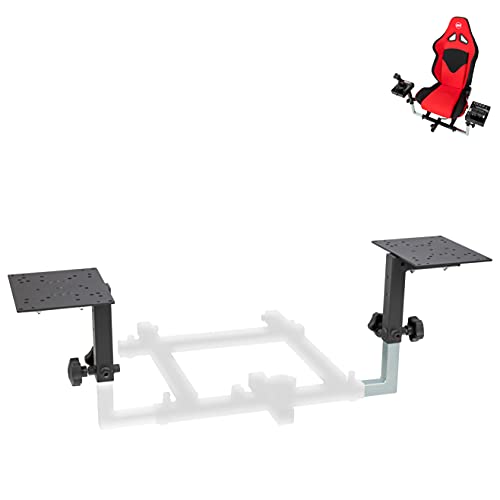
Hardware upgrades often outpace mounting solutions, and that gap is exactly what this kit fills. The Configuration 1 setup handles side-by-side mounted throttle-and-stick layouts and fits an unusually broad range of brands. Thrustmaster T.Flight sticks, T16000M units, the Airbus TCA, Logitech X52, X52 Pro, X56, VKB Gladiator, and CH Products all slot into compatible brackets.
For sim builders who mix and match gear over time, that cross-compatibility is the actual story. You can swap a throttle without rebuilding your entire mount, which most single-brand rigs do not allow. The kit assumes a serious commitment to a dedicated rig, since it is not a casual desk-clamp solution, but for permanent setups it removes a major headache.
Real Benefits
- Cross-brand compatibility protects your mounting investment across hardware swaps.
- Side-by-side configuration matches the natural throttle-and-stick flying stance.
- Adapter plates are included for the most common stick and throttle shapes.
Where It Is Less Suited
- Not a portable option, so casual desk users will find the install commitment heavy.
- Compatibility is limited to listed models, so unlisted sticks need separate adapters.
The Right Fit
Sim rig builders who upgrade peripherals over time and want a mount that survives multiple hardware generations.
Skip It When
You just need a simple desk clamp, where the XRhinorth 2PCS Hotas Desk Mount handles basic setups more easily.
The Honeycomb Alpha earns its reputation through the shaft. A solid steel shaft running through two linear ball bearings gives 180 degrees of rotation with a smoothness that lighter yokes simply cannot replicate. There is no center detent and minimal deadzone, so the control surfaces respond to the lightest input without the stick feeling mushy around neutral.
The integrated switch panel handles the cockpit details that usually live on the keyboard: master, alternator, avionics, light switches, plus a 5-position ignition. Red LED backlighting keeps the panel readable during night VFR flights without washing out your monitors. The whole unit clamps to a desk, so you do not need a dedicated cockpit to use it.
Positive Points
- Steel shaft with ball bearings gives a premium smoothness that lasts across years of use.
- Built-in switch panel eliminates the need for a separate hardware unit for engine starts.
- Red backlighting reads cleanly at night without interfering with display visibility.
Points To Note
- Heavier than most yokes, so thin desks may need reinforcement under the clamp.
- No rudder included, which is a separate purchase for full control coverage.
Feature Rundown
Who Will Love This
General aviation sim pilots who fly Cessnas and Pipers in MSFS or X-Plane and want yoke feel that genuinely trains muscle memory.
Look Elsewhere When
You prefer a complete bundle with rudder pedals, where the Logitech G Pro Flight Yoke + Rudder Bundle covers pitch, roll, and yaw in one purchase.
Adding rudder pedals to a yoke or stick is one of the single biggest immersion upgrades you can make, and the Logitech G PRO set is the most common entry point. The pedals self-center, which mirrors how a real rudder behaves when you release pressure, and the tension is adjustable so you can dial in resistance to match how you fly.
Toe brakes are built in, and the footrests adjust across shoe sizes, which matters more than people expect during long sessions. Partial metal construction keeps the unit stable underfoot without ballooning the price. Setup is USB 2.0 plug-and-play, and the Saitek Smart Technology programming software lets you map each axis the way your sim expects.
Notable Gains
- Self-centering action mirrors real rudder behavior for authentic training.
- Adjustable tension lets you tune pedal feel to your flying style.
- Toe brakes integrated into the same unit save desk space and cost.
Small Caveats
- Plastic-heavy base tends to slide on smooth floors without an anti-slip mat.
- Toe brake axes are commonly reported as needing software remapping for differential braking.
Perfect Match For
Yoke and stick pilots who need yaw control and toe braking but do not want to invest in a higher-priced pedal set yet.
Swap It Out When
You need bundled rudder coverage with a yoke and are starting fresh, where the Logitech G Pro Flight Yoke + Rudder Bundle delivers both units together.
Most flight sim hardware focuses on what your hands touch, but instrument flying is about what your fingers twist. The IFR-1 packs COM, NAV, FMS, autopilot, and transponder controls into a single compact unit, which is the exact stack of panels you would find across the center pedestal of a real airliner. For pilots practicing instrument procedures, that consolidation matters.
Made in Germany, the unit targets a specific gap in the sim ecosystem: IFR training without building a full home cockpit. LED-backlit buttons keep the panel readable in low light, and the all-in-one design means you do not need to mount five separate modules. Software support covers the major desktop sim platforms, so the panel integrates without major setup headaches.
Everyday Perks
- All-in-one design covers COM, NAV, FMS, autopilot, and XPDR in a single compact footprint.
- Backlit buttons support realistic night IFR practice without losing readability.
- Targeted at IFR procedure training rather than casual gaming.
Less Ideal Details
- Specialty focus means it does not replace a yoke, stick, or throttle, so it adds to a setup rather than completing it.
- Smaller ecosystem and brand presence can complicate finding community profiles and binding templates.
Built With In Mind
IFR students and instrument-rated pilots who want realistic radio and autopilot management without building a full cockpit.
Another Choice May Suit
You need only a dedicated radio stack, where the Logitech G USB Pro Flight Radio Panel focuses more tightly on COM and NAV functions.
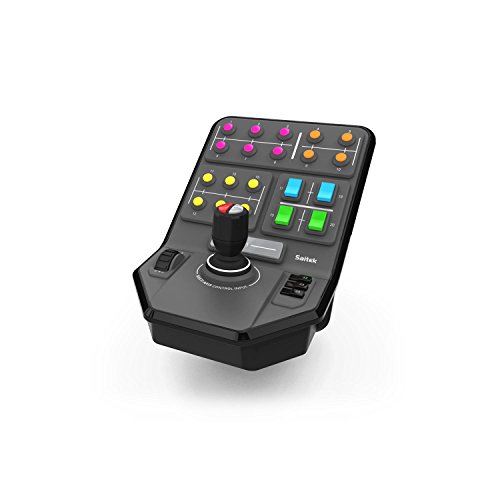
Flight sim controls often overlap with heavy-equipment sims, and the Farm Sim Side Panel is the clearest example. The unit ships with a 6-axis stick and 37 programmable buttons, which sounds excessive until you try to operate a forestry harvester in Farming Simulator. That kind of machinery has too many functions for a keyboard, and this side panel handles the load.
The set-and-forget cruise control dial is a small but thoughtful detail, letting you lock ground speed during fieldwork without holding a button. A durable clamp with Saitek’s screw-thread adjustment locks the panel in place on a desk edge, which is necessary given how hard the stick can be pushed during long logging sessions. The unit works with Farming Simulator and several other heavy-equipment titles.
Practical Pluses
- 37 programmable buttons plus a 6-axis stick cover complex machinery without keyboard overload.
- Cruise control dial removes the fatigue of holding a speed key during long jobs.
- Sturdy clamp keeps the panel planted during heavy stick input.
Some Limits To Know
- Outside Farming Simulator and similar titles, support is more limited.
- Build is plastic-heavy, so longevity under daily heavy use is a common concern.
Whose Shelf It Belongs On
Farming Simulator players running logging or harvest contracts who need dedicated machinery controls.
Where Another Pick Suits Better
You fly aircraft rather than tractors, where any of the dedicated flight sim controls on this list will serve you better.
Onscreen radio panels force you to mouse over tiny frequencies while managing an aircraft, which is the opposite of how a real pilot works. The Pro Flight Radio Panel solves that by giving you physical knobs and dual displays that handle COM1, COM2, NAV1, NAV2, DME, ADF, and transponder functions in real time. The integration with FSX, X-Plane, and Prepar3D makes it plug-and-play for the major desktop sims.
Building a home cockpit means stacking modules, and this radio panel slots into that modular ecosystem cleanly. You can chain multiple panels together, which matters once you start adding autopilot and switch panels alongside it. The displays update live as you twist, so you always see the active frequency without checking the sim window.
A Favorable Mix
- Dual displays show active and standby frequencies at a glance without alt-tabbing.
- Real-time integration with major desktop sim platforms out of the box.
- Modular design chains with other Logitech G Pro Flight panels for expanding cockpits.
Points To Weigh
- Requires a separate yoke or stick, since it does not control pitch, roll, or throttle.
- Display brightness in well-lit rooms is sometimes reported as harder to read.
Right Fit For
Airliner sim pilots building a modular home cockpit who want realistic radio stack management.
Where A Sibling Pick Shines
You want a more compact all-in-one IFR setup, where the OCTAVI IFR-1 All-in-One Cockpit combines multiple panels into a single unit.
Once you commit to a HOTAS (Hands On Throttle And Stick) setup, the next problem is always where to put it. The XRhinorth dual-clamp mount answers that by securing both your stick and throttle to a desk edge with a top-down clamping motion. The dual design matters because most single mounts wobble when you push the stick hard, especially during combat sim maneuvers.
Round anti-slip pads are optional, which is a useful detail for desks with finishes that mark easily. Compatibility is limited to specific listed models, so verifying your stick and throttle against the supported list before ordering saves a return. The clamp tops out at a 6 cm (2.36 inch) table edge, so thick butcher-block desks are out.
What Makes Sense
- Dual-clamp design keeps both stick and throttle locked during aggressive input.
- Optional anti-slip pads protect desk finishes that scratch easily.
- Affordable upgrade compared with full cockpit rigs.
Details To Watch
- Table edges thicker than 6 cm will not fit, so thick desks are incompatible.
- Stick and throttle compatibility is restricted to listed models only.
Who Should Grab It
Desk-based sim pilots who already own a HOTAS setup and need stable mounting without a dedicated rig.
Consider Something Else When
You want a full permanent rig, where the OpenWheeler HOTAS Add-on Mount Kit offers broader cross-brand support.
What Matters Most When Choosing Flight Sim Controls
Matching Hardware To Your Flying Style
The first decision is what you actually fly. Space sims favor dual-stick ambidextrous setups, while general aviation sims lean toward yokes. Combat sims split both ways, but DCS modules often have specific mappings that reward hardware with 15+ buttons. Pick a control philosophy before picking a brand, and the rest of the decision becomes much simpler.
Sensor Technology And Build Quality
Potentiometer-based sensors drift over years of use, which is a real ownership issue. Hall Effect sensors use magnetic contact and resist that drift, which is why the T16000M has earned a long service life among daily sim pilots. Weight and materials matter too: metal handles and steel shafts feel grounded, while plastic-heavy units tend to flex under heavy input.
Compatibility And Software Mapping
Most modern flight sim controls work with MSFS, X-Plane, DCS, and Prepar3D, but specialty panels and side panels often target specific titles. Check community binding profiles before buying, since a panel with great hardware but limited software profiles can be more frustrating than a simpler unit with strong community support. Modular panels chain together well, but each addition adds desk space, cables, and configuration time.
Space, Mounting, And Long-Term Comfort
Be honest about your desk. A full HOTAS setup with pedals and a mount can easily cover a square meter of surface, and a heavy yoke needs a clamp-friendly desk edge. Thin tabletops flex under clamping pressure, and floor mats help pedals stay planted. Comfort over a two-hour session matters more than peak performance, so prioritize ergonomics over feature counts.
Key Considerations Across These Picks
Where Shoppers Go Wrong
The most common mistake is buying a single stick and assuming it will cover every flight genre. A space sim and a 737 cockpit want completely different hardware, and the wrong tool creates frustration that gets blamed on the sim itself. Another trap is ignoring desk space: a premium stick still disappoints if it is sliding around because nobody bought a mount. Verify your stick and throttle against any mount’s compatibility list before you commit, and budget for a mat or clamp as part of the real cost.
Where The Extra Money Goes
Premium tier hardware costs more for reasons that show up over time, not on day one. Metal handles and steel shafts resist the flex and wear that plastic units accumulate, and Hall Effect sensors outlast potentiometer alternatives by years. Dual-throttle designs, integrated switch panels, and modular chaining all add genuine capability rather than marketing fluff. For daily sim pilots flying serious hours, the upgrade pays for itself in reduced maintenance and longer service life, though casual weekend flyers may not log enough time to feel the difference.



