


The Series S already makes a virtue of compactness, but that 512GB (or 1TB) internal SSD fills up fast once modern installs land. A single Call of Duty update can eat 100GB on its own, so the practical question is no longer “do I need more storage” but “which kind.” External HDDs handle last-gen and backward-compatible Xbox One titles cheaply. Officially licensed NVMe expansion cards play current-gen Series S games at full speed. Picking the right format saves money and hours of swapping cables.
The picks below mix both categories, with capacities from 512GB up to 4TB, and a mix of rugged and slim enclosures for the times the drive travels between rooms.
How The Shortlist Stacks Up
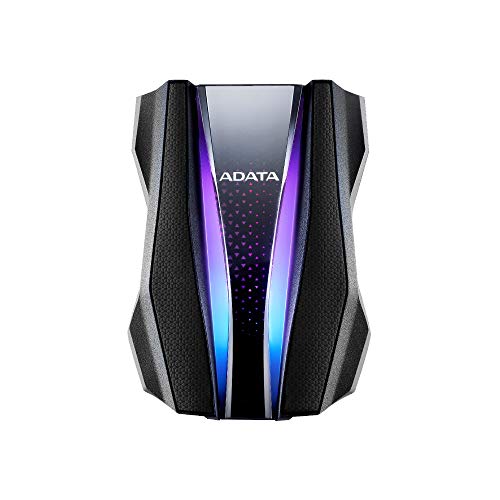
ADATA HD770G 2TB RGB External HDD (Black)
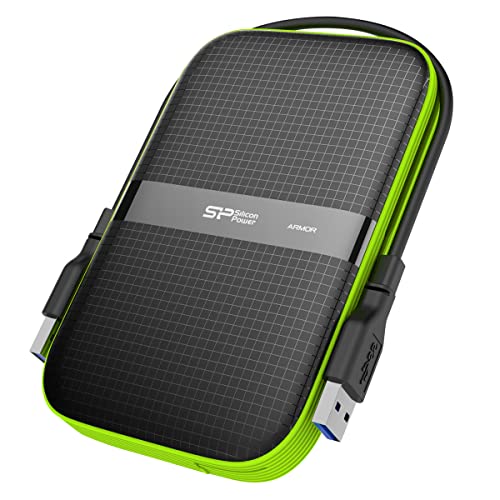
Silicon Power Armor A60 2TB Rugged Drive
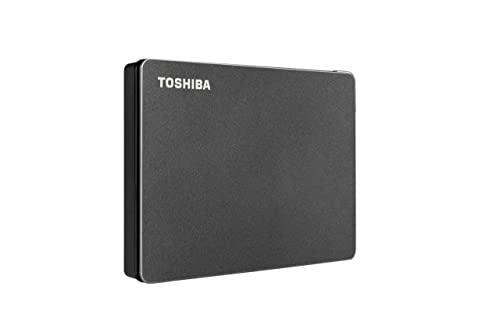
Toshiba Canvio Gaming 2TB USB 3.0

Seagate 2TB Storage Expansion Card (Xbox)

Toshiba 2TB Canvio Gaming USB 3.2
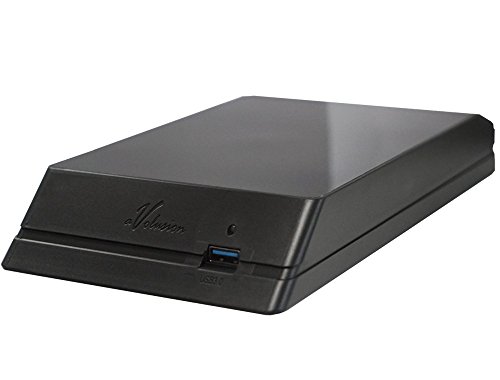
Avolusion HDDGear 4TB Xbox External Drive

PMHKM 1TB USB 3.0 and USB-C Drive

WD_Black 512GB C50 Expansion Card

Silicon Power Armor A62S 2TB Drive
The Details Behind The Selections
The ADATA HD770G is the kind of drive you can knock off a coffee table without flinching. It carries a three-layer protective shell, an IPX8 waterproof rating that can handle two meters of water for up to 120 minutes, and an IP6X dustproof seal. Two RGB light strips run along the edges, giving the matte black housing a little personality in a dim entertainment center.
For Xbox Series S use, this 2TB HDD plays Xbox One, Xbox 360, and original Xbox backward-compatible titles just fine over USB 3.2. Current-gen Series S games still need to sit on the internal SSD or an officially licensed expansion card, so frame this as a deep backlog drive rather than your main library. If you shuttle the console between a dorm and a family room, the rugged shell genuinely earns its keep.
Points In Its Favor
- Rated for drops from roughly four feet onto hard surfaces
- Two-meter water submersion rating for short windows
- RGB strips add visible flair without raising the cost dramatically
- USB 3.2 connection delivers quick-enough file moves for large installs
- Dust-sealed port cover keeps the connector clean during transport
Worth Noting
- Cannot run current-gen Series S games directly from the drive
- Heavier and bulkier than slim portable HDDs
- RGB requires power and stays lit whenever the drive is on
Key Specs
Right Fit For
Xbox owners with rowdy setups, shared living spaces, or travel habits that put a console in a backpack every week.
Where Another Pick Suits Better
For Series S gamers who want to play current-gen titles off the drive, the Seagate 2TB Storage Expansion Card is the smarter investment.
Silicon Power’s Armor A60 takes a quieter, more practical approach to rugged storage. The textured plastic shell absorbs minor bumps, and a slotted groove runs around the edge so you can wrap the USB cable around the drive for travel. That small design touch is what sets the A60 apart: no more lost cables in a drawer somewhere.
Capacity sits at 2TB over a USB 3.1 Gen 1 connection, which is plenty for backward-compatible Xbox titles. You may find the matte finish picks up lint over time, so a quick wipe-down before plugging in keeps the contacts clean. For gamers who want durability without the gaming-flavored aesthetics of the ADATA above, this is a steady workhorse.
What Makes Sense
- Wraparound cable groove keeps everything in one piece during transit
- Military-grade shockproof rating handles everyday drops
- IPX4 splash resistance covers coffee or soda mishaps
- 2TB holds roughly 50 to 100 Xbox One-era titles depending on size
Trade Offs
- USB 3.1 Gen 1 tops out below newer 3.2 speeds
- No current-gen Series S game support from external HDD
Whose Shelf It Belongs On
Console owners who value a tidy entertainment setup and occasionally take the drive to a friend’s place.
Skip It When
Anyone needing full Series S performance from a plug-in card should look at the WD_Black 512GB C50 instead.
Toshiba built the Canvio Gaming line specifically for console storage, and it shows in the details. The matte black casing sits flat, stays cool under load, and the firmware is tuned to behave well with console file systems. A USB 3.0 micro-B cable is the only thing you need to plug in.
The 2TB capacity suits gamers who keep a long rotation of Xbox One-era titles installed. Plug it into the Series S USB port, format through the console’s storage menu, and the drive is ready. Compared to the rugged ADATA above, this Toshiba skips the armor and RGB in favor of a slimmer, lighter profile that’s easier to toss into a drawer.
Where It Excels
- Console-optimized firmware reduces hiccups during long sessions
- Slim 2.5-inch form factor fits behind a console or on a shelf
- Plug-and-play setup with no extra software required
- Cross-compatible with PlayStation and PC for households with multiple systems
Honest Caveats
- No shockproofing, so a hard drop could be the end of it
- USB 3.0 is slower than the 3.2 standard used by newer drives
Best Suited To
First-time Xbox storage expanders who want a clean, no-fuss experience without extra accessories.
Another Choice May Suit
Gamers who regularly travel with the drive should pick the Silicon Power Armor A60 for its shock protection.
The Seagate Storage Expansion Card is the only storage option that runs current-gen Series S titles at full speed without compromise. The card slides into the dedicated NVMe slot on the back of the console, where it works alongside the internal SSD through Xbox Velocity Architecture (Microsoft’s custom data pipeline that lets games load and stream assets in parallel).
2TB of matched performance means Quick Resume, fast travel, and texture streaming all behave exactly as they do from the internal drive. For most setups, the trade-off is cost: an officially licensed expansion card costs more per gigabyte than any HDD on this list. But for gamers who play a rotating slate of Series S optimized titles, the seamlessness is hard to overstate.
Strengths Worth Knowing
- Plugs directly into the console’s expansion slot, no cable needed
- Identical load times and Quick Resume behavior as the internal SSD
- Officially licensed, so future firmware updates stay compatible
- Three-year limited warranty covers the long haul
Points To Keep In Mind
- Higher cost per gigabyte than any external HDD on this list
- Only works with Xbox Series X or Series S consoles
Feature Snapshot
Made For
Series S owners who play current-gen optimized games and want the cleanest expansion experience possible.
Look Elsewhere When
Gamers building out a deep backward-compatible catalog for less money will get more gigabytes from the Toshiba Canvio Gaming 2TB.
The newer Canvio Gaming 2TB keeps everything that worked about its predecessor and steps up the connection. USB 3.2 Gen 1 (a five-gigabit standard common on modern motherboards and consoles) trims transfer time for big installs compared to the older USB 3.0 model above. The exterior is the same understated black slab, small enough to hide behind the console.
For households that own both a PlayStation and an Xbox, this drive jumps between systems without reformatting headaches. The 2TB ceiling holds a year or two of Xbox One-era titles for most gamers. Consider it a sensible mid-life refresh of the Canvio line.
Noteworthy Benefits
- USB 3.2 Gen 1 cuts install times for large game files
- Plug-and-play across Xbox, PlayStation, and PC
- Low-profile design disappears behind most entertainment centers
- Stays cool and quiet under continuous read/write sessions
Some Limits To Know
- Still an HDD, so no current-gen Series S titles play directly from it
- Minimal physical protection compared to rugged alternatives
Perfect Match For
Multi-console households who want one shared external drive for backward-compatible libraries.
Swap It Out When
Players prioritizing current-gen Series S performance should grab the Seagate 2TB Expansion Card instead.
The Avolusion HDDGear leans hard into raw capacity. With 4TB inside a pre-formatted shell, the drive is ready to plug into an Xbox One console the moment it arrives. It also pairs with the Series S for backward-compatible storage, though the format step is still required for that specific console.
This is a renewed unit sold through the marketplace, and the two-year warranty adds a layer of confidence that you don’t always get with refurbished drives. For gamers who built a massive Xbox One library and want to carry it forward to the Series S, the 4TB ceiling swallows it whole.
Notable Upsides
- 4TB holds a deep Xbox One-era library without forced deletions
- Pre-formatted for plug-and-play setup on Xbox One consoles
- Two-year warranty covers renewed-condition purchases
- USB 3.0 connection handles large file transfers without long waits
Things To Weigh
- Renewed condition means cosmetic wear may show up
- Bulkier enclosure than typical 2TB portable drives
- No current-gen Series S game playback from the drive
Who It Suits Best
Xbox collectors and Game Pass deep divers who treat a large game archive as the main reason to expand storage.
Reach For A Different Pick When
If pristine new-condition matters most, the Toshiba 2TB Canvio Gaming is a more conventional route.
The PMHKM 1TB portable drive stands out by shipping with both a USB-A and a USB-C cable in the box. That matters for anyone moving files between the Xbox Series S, a modern laptop, and an Android phone. The 1TB capacity is modest, but it’s often enough for a focused subset of backward-compatible favorites.
The slim housing fits in a jacket pocket, and the matte finish resists fingerprints during daily use. Keep in mind that current-gen Series S games still cannot be run or stored on external HDDs, so this is a travel companion for older titles and general file backup rather than a primary expansion.
Real Benefits
- Dual USB-A and USB-C cables for cross-device flexibility
- Slim profile slips into small bags and console drawers
- Useful for media and file backup beyond just games
Possible Compromises
- 1TB is the smallest capacity in this lineup
- No rugged or waterproof rating for active travel
Quick Technical Notes
Built With In Mind
Students, remote workers, and frequent travelers who split time between the Xbox and a laptop.
A Better Fit Elsewhere
Gamers who want maximum capacity at a budget will find more space per dollar in the Avolusion HDDGear 4TB.
Western Digital’s WD_Black C50 mirrors the Seagate card in approach, slotting straight into the back of the console to expand the SSD-tier storage. 512GB is a smaller capacity than the Seagate 2TB, but it covers a handful of current-gen titles in full resolution with Quick Resume support.
The card uses the same Xbox Velocity Architecture pipeline, so load times, fast travel, and asset streaming all behave as they do from the internal drive. This makes the C50 a useful entry point for gamers who want expansion card performance without committing to the larger 2TB option.
Useful Touches
- Officially licensed for full Xbox Velocity Architecture support
- Quick Resume integration across multiple suspended games
- Plug-and-play setup with zero formatting or extra software
- Compact card form factor tucks into the back of the console
Worth Bearing In Mind
- 512GB fills up quickly with modern Series S optimized games
- Higher per-gigabyte cost than any external HDD option
Key Attributes
Who Should Grab It
Series S gamers who only need a small current-gen library expansion and want the cleanest possible experience.
Where A Sibling Pick Shines
For double the capacity at full performance, the Seagate 2TB Expansion Card fits a deeper rotation of current-gen titles.
The Armor A62S pairs a textured, scratch-resistant shell with the same wraparound cable groove that made the A60 popular. Drop it, drag it across a wood floor, or toss it in a gear bag, and the casing shrugs it off. The IPX4 splash rating handles the occasional spilled drink without panic.
2TB over USB 3.0 is plenty for backward-compatible Xbox titles, and the flexible cable design means one less thing to lose between sessions. Compared to the RGB-loaded ADATA at the top of this list, the A62S is a more understated take on rugged storage. For creators and studio pros who already have a lot of gear in the bag, it fits right in.
Advantages To Know
- Scratch-resistant textured exterior hides daily wear
- Military-grade shockproof rating for travel and field use
- IPX4 splash resistance covers minor liquid contact
- Wraparound cable slot keeps everything together in transit
A Few Limitations
- USB 3.0 is the older transfer standard for this list
- Cannot play current-gen Series S titles directly from the drive
The Right Fit
Creators, field workers, and gamers who already keep a lot of gear in a bag and want storage that blends in.
Not Your Match When
Anyone wanting current-gen Series S performance from a plug-in card will be happier with the Seagate 2TB Expansion Card.
Picking Storage That Fits The Way You Play
The single biggest decision is format. Officially licensed expansion cards run current-gen Series S titles at full speed, which matters the moment you load an optimized game with fast travel or large open worlds. External HDDs handle Xbox One, Xbox 360, and original Xbox backward-compatible games for a fraction of the cost per gigabyte. Most households end up pairing one of each: a card for current-gen rotation, a larger HDD for everything else.
Capacity comes next. A 2TB HDD holds roughly 50 to 100 backward-compatible titles depending on install size, and 4TB doubles that headroom for a true archive. Expansion cards top out at smaller capacities because the NVMe tier commands a higher price per gigabyte. If your backlog churns quickly, a smaller expansion card plus a larger external HDD covers both bases.
Connection standards shape day-to-day speed. USB 3.2 Gen 1 is the modern baseline for portable HDDs, while older USB 3.0 drives still work but take longer to fill. NVMe expansion cards plug directly into the console’s custom slot, so the connection standard is built in. Match the connection to how often you move big files: casual users won’t notice the difference, but anyone transferring 100GB-plus installs weekly will feel it.
Build quality earns its keep for travel. IPX4 splash resistance and shockproof ratings matter when a console moves between rooms, dorms, or friends’ houses. A wraparound cable groove is a small touch that prevents one of the most common storage frustrations: showing up ready to play and discovering the cable is still in a drawer. Rugged enclosures add bulk, so weigh that against how often the drive actually leaves the entertainment center.
Key Considerations Across These Picks
Common Shopping Slip Ups
A frequent misstep is buying an external HDD expecting it to run current-gen Series S optimized games. Microsoft locks Series S optimized titles to the internal SSD or officially licensed expansion cards only, and any external drive shows up strictly for backward-compatible storage. The honest read is that HDDs serve a different role than expansion cards, and pairing the two often beats choosing one.
Another trap is overestimating the value of higher-priced USB 3.2 Gen 2 drives for console use. The Xbox Series S communicates with external storage over USB 3.1 at the platform level, so paying extra for faster interfaces rarely pays off in real-world use. Capacity, build quality, and form factor tend to matter more than peak bandwidth.
What The Higher Tier Buys
Spending up for an officially licensed expansion card trades gigabytes for parity with the internal SSD. Quick Resume, fast travel, and asset streaming all behave identically whether the game sits on the internal drive or the expansion card. That experience is the reason the Seagate 2TB and WD_Black C50 carry a higher price per gigabyte: you’re paying for matching performance, not just storage space.
The premium tier also tends to include longer warranties, cleaner firmware behavior, and consistent compatibility with future console updates. For gamers who keep the same console for several years, that stability has real value beyond the spec sheet. Budget HDDs cover the rest of the library at a fraction of the cost.
Frequently Asked Questions
Can any external hard drive play Xbox Series S games?
No. Current-gen Series S optimized titles only run from the internal SSD or an officially licensed NVMe expansion card. External HDDs handle backward-compatible Xbox One, Xbox 360, and original Xbox titles, plus media storage and saves.
How much storage do I actually need?
Most gamers who rotate three to four current-gen titles and a long backward-compatible backlog fit comfortably on a 2TB HDD plus a 1TB to 2TB expansion card. Heavy archive keepers with hundreds of older titles will appreciate a 4TB external drive.
Do I need to format a new external drive on the Series S?
Yes. After plugging in a new external drive, the console prompts you to format it for Xbox storage. The process is straightforward and only takes a few minutes, and the console handles file system setup automatically.
Will an expansion card work on both Xbox Series X and Series S?
Yes. Officially licensed expansion cards like the Seagate 2TB and WD_Black C50 are designed for the dedicated NVMe slot on both consoles and run current-gen optimized titles at full performance on either system.
Can I use one drive across multiple consoles?
External HDDs generally can be reformatted between Xbox and PlayStation, but switching between them often requires a full reformat. For households with both consoles, dedicating one drive per system avoids constant reformatting and the loss of installed games.



