


The Xbox Series S ships with a slim internal SSD, and modern installs eat that space fast. One well-matched external drive solves the “delete to download” problem without forcing you to redownload a 100 GB title every other week. The right pick also gives you a parking spot for Series X|S-optimized games, retro titles, and captures from the previous generation. What follows are ten drives that handle that job across different budgets, capacities, and use cases.
The Main Contenders

Seagate 2TB Portable Hard Drive (STGX2000400)
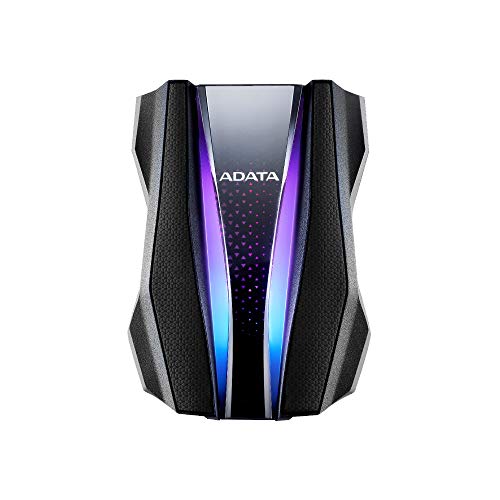
ADATA HD770G 2TB RGB External HDD (Black)
Seagate Portable 4TB External Hard Drive HDD
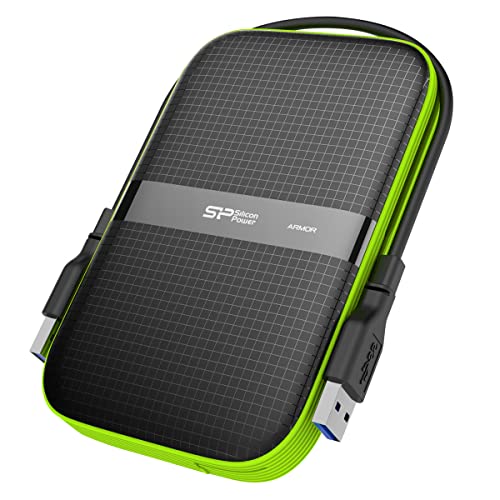
SP Silicon Power 2TB Armor A60 External HDD
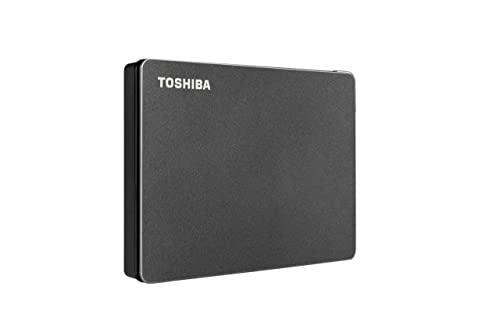
Toshiba Canvio Gaming 2TB External HDD

Toshiba 2TB Canvio Gaming External HDD

WD_BLACK 12TB D10 Game Drive for Xbox

Silicon Power 2TB Rugged Armor A62S

Seagate One Touch 8TB Desktop HDD
Seagate One Touch 24TB Desktop HDD
A Closer Look At Each Pick
The Seagate 2TB Portable is the no-fuss starting point for most Series S owners. It connects over USB 3.0 and shows up the moment you plug it into the console, with no extra formatting required for Xbox media storage.
For anyone playing a rotating handful of Game Pass titles and the occasional big release, 2TB gives a comfortable cushion without crowding a media stand. It is the same case styling that has shipped on Seagate portables for years, so the footprint stays small next to the console.
What Earns Its Place
- 2TB holds roughly 50 to 80 modern titles depending on install size
- Plug-and-play recognition on the Series S removes the setup guesswork
- Compact shell that tucks behind the console on a crowded shelf
- Drag-and-drop file transfer when used with a Windows or Mac computer
Things To Consider
- Spinning-platter drives run warmer and slower than SSDs, which matters most during long file moves
Who It Suits Best
Casual Series S players who want a low-effort storage bump for a handful of side games and older Xbox One titles.
Where Another Pick Suits Better
Anyone regularly moving multi-hundred-gigabyte installs between machines will appreciate the USB 3.2 bus on the Toshiba Canvio Gaming 2TB External HDD instead.
The HD770G leans into survival. ADATA rates it for drops from around four feet, full dust ingress, and a two-meter dunk in water for up to 120 minutes, which is unusual territory for a gaming drive.
Two RGB strips run along the casing, which adds a touch of personality next to the Series S without the bulky desktop footprint of a larger drive. Compared with the more plain-Jane Seagate 2TB Portable earlier in this list, the ADATA is built for rougher handling around pets, kids, or a backpack commute to a friend’s place.
Standout Benefits
- IP68 rating covers both dust and the kind of splash that ruins a casual drive
- Military-grade shock testing reassures anyone tired of replacing drives after drops
- 2TB capacity matches common Series S expansion needs
- Patented port cover keeps the USB connector clean when tossed in a bag
Honest Caveats
- Heavier and chunkier than the Seagate 2TB Portable, so it is less invisible behind the console
- RGB lighting is fun, but it draws the eye in a minimalist entertainment setup
Made For
Gamers who routinely travel with the drive, share it between rooms, or live with pets and small children who treat cables as toys.
Not Your Match When
Minimalists who want the drive to disappear will prefer the slim profile of the SP Silicon Power 2TB Armor A60 External HDD.
The Seagate 4TB Portable is the same chassis as the 2TB version with double the storage. For Series S owners with a long Xbox One backlog, that extra room changes the day-to-day experience: you stop playing storage manager.
It still uses USB 3.0, which is plenty for the read speeds an Xbox external drive is allowed to use. Transfer times to and from a PC stay reasonable for installs in the 50 to 100 GB range, though multi-hundred-gigabyte moves still take a while.
What Works In Its Favor
- 4TB can absorb a deep Game Pass rotation plus full Xbox One library transfers
- Drive is detected automatically on the Series S with no extra software
- One-year Rescue data recovery service adds peace of mind for irreplaceable saves
- Same form factor as the 2TB model for consistent placement behind the console
Points To Note
- Mechanical drives still bottleneck during long file moves compared with the SSD tier
- Higher capacity is only useful if you actually queue that many installs
Best Suited To
Players who own dozens of digital titles and prefer to leave installs in place rather than redownload on demand.
Look Elsewhere When
Anyone wanting one drive for both the console and a PC library might prefer the Seagate One Touch 8TB Desktop HDD for a single shared pool.
The Armor A60 solves a small problem that has tripped up many drive owners: the cable. Silicon Power routes the USB cord around the perimeter of the drive so it tucks neatly into the shell when you grab it to go.
It carries a military-grade shockproof rating plus IPX4 water resistance, which is enough for accidental splashes rather than a full drop in a pool. For a Series S owner who often carries the drive to a friend’s console or a weekend LAN, the cable management is a real quality-of-life win.
The Helpful Details
- Built-in cable storage keeps the USB cord from going missing in transit
- 2TB of storage covers the typical next-gen install rotation
- USB 3.1 Gen 1 interface keeps transfer times reasonable on PC
- Compatible with Windows, macOS, Linux, and console use out of the box
Worth Bearing In Mind
- IPX4 handles splashes, not submersion, so it is not a beach-day drive
- Rugged exterior adds a bit of bulk versus a slim portable
Right Fit For
Gamers who travel light and want one drive that stows cleanly in a backpack or carry pouch without a loose cable.
Skip It When
Anyone prioritizing maximum drop and water survivability should look at the ADATA HD770G 2TB RGB External HDD instead.
The original Canvio Gaming 2TB is tuned for console use from the factory. The firmware is set to behave well with game libraries, so the drive shows up cleanly on the Series S and accepts titles without extra setup.
Its black textured shell is on the conservative side, which is a nice change if the ADATA HD770G’s RGB reads as too much for your media stand. Transfer speeds still live within USB 3.0 limits, so the experience feels familiar to anyone who has used a Seagate portable.
Points In Its Favor
- Console-friendly firmware means fewer manual reformatting steps
- 2TB capacity balances a small library without forcing tough deletes
- Textured black case blends into most entertainment setups
- Works on Xbox, PlayStation, and PC for cross-platform households
Trade Offs
- Mechanical drive performance is comparable to the Seagate 2TB Portable, not faster
Who Should Grab It
First-time drive shoppers who want the closest thing to a “just works” Series S storage upgrade.
Another Choice May Suit
Players who want a tougher shell for travel should consider the SP Silicon Power 2TB Armor A60 External HDD.
The refreshed Canvio Gaming keeps the same 2TB capacity and console-friendly approach as its predecessor but steps up to USB 3.2. For most users, that bumps real-world transfer speeds on PC by a small but welcome margin.
On the Series S the practical difference versus the older USB 3.0 Canvio is subtle, because the console still treats it as a storage drive. Where it stands out is during large PC-side moves of captured clips and screenshots, which often run larger than expected.
Strengths Worth Knowing
- USB 3.2 interface trims wait times during large PC transfers
- Same proven 2TB sweet spot for typical Series S use
- Conservative styling that disappears next to the console
- Multi-platform compatibility for households mixing Xbox and PlayStation
Small Caveats
- Console-side benefits over the older Canvio are modest in real play
- Still a mechanical drive, so load times on the Series S reflect HDD limits
Perfect Match For
Players who regularly shuffle captures and installs to a PC and want a small speed bump over the older Canvio.
Reach For A Different Pick When
Capacity is the bigger concern, and the Seagate Portable 4TB External Hard Drive HDD offers twice the room for similar desktop space.
The D10 is the largest drive on this list and behaves more like a small appliance than a portable. Its 7200 RPM platter spins faster than typical 5400 RPM external drives, which helps in households juggling large installs and recorded gameplay.
Two USB Type-A ports on the back deliver up to 7.5W each, so a controller charger or a headset stand can plug straight into the drive’s brick. Compared with the smaller Seagate and Toshiba portables, the D10 is firmly a “parked next to the console” choice, and it shows.
Everyday Advantages
- 12TB holds an enormous backlog of Xbox One and Series X|S titles
- 7200 RPM speed outpaces typical portable HDDs during long transfers
- Built-in USB Type-A charging ports tidy up a controller setup
- Active cooling inside the enclosure keeps temps reasonable during extended sessions
Things To Consider
- Desktop form factor and external power brick make it a poor travel companion
- Overkill for anyone with a small install queue
Feature Snapshot
Whose Shelf It Belongs On
Series S owners in a family setup who want one drive to back up multiple profiles, install huge titles, and charge a controller in the same footprint.
Consider Something Else When
You live in a small apartment and a portable is more practical than the Seagate One Touch 24TB Desktop HDD for the same family-library use case.
The Armor A62S is Silicon Power’s take on a 2TB drive that can survive everyday bumps. The textured shell resists scratches, which matters when the drive lives on a coffee table or in a shared dorm common area.
It runs over USB 3.0 and uses a flexible cable-carry design similar to the A60 covered earlier. The difference is more in the surface texture and overall styling than raw specs.
Features That Help
- Anti-scratch surface holds up to keys and cables in the same bag
- IPX4 water resistance handles splashes from the typical drink-spill scenario
- Military-grade shockproof rating for short drops from a couch or shelf
- Cable tucks around the enclosure when the drive is on the move
Less-Strong Areas
- Water resistance is splash-only, not submersion like the ADATA HD770G 2TB RGB External HDD
- USB 3.0 interface is older than the Toshiba Canvio Gaming refresh
Built With In Mind
Shared living spaces, college dorms, and family rooms where a drive tends to attract clutter and the occasional splash.
Swap It Out When
You need top-tier water and dust protection, in which case the ADATA HD770G 2TB RGB External HDD is the stronger match.
The One Touch 8TB is bus-powered over USB-C, which means a single cable from the drive to the console is enough. For a setup that already lives on a clean media stand, that one-cord footprint feels quietly premium.
8TB lands between the 4TB Seagate portable and the 12TB WD_BLACK D10. In a typical Series S library of mid-sized installs, that is room for a long stretch of play without juggling titles.
A Few Highlights
- Single USB-C cable keeps the area around the console uncluttered
- 8TB bridges the gap between portable and desktop-class capacity
- Two-year limited warranty and Rescue recovery service add reassurance
- Cross-platform support across Windows and macOS for shared use
Trade-Offs To Consider
- Desktop size, so it does not double as a grab-and-go drive
- Mechanical drive performance, like every other HDD on this list
Who Will Love This
Series S owners with a long digital library who prefer one shared drive sitting next to the console rather than a stack of smaller portables.
A Better Fit Elsewhere
Anyone needing the largest pool possible will appreciate the Seagate One Touch 24TB Desktop HDD instead.
The 24TB One Touch is the most capacity you can park next to the Series S on this list. It uses the same USB-C bus-powered approach as the 8TB version, so the cable story stays simple.
At this size, the drive crosses from “game storage” into “every archive in the house.” For a household that also wants to back up phone clips, PC projects, and photos in one place, the One Touch 24TB quietly pulls double duty.
A Few Strong Suits
- 24TB removes any need to delete games for the foreseeable future
- USB-C bus power means no bulky power brick on the floor
- Two-year warranty plus Rescue recovery service for long-term peace of mind
- Works with Windows and macOS, so a household can share it across devices
Practical Considerations
- Capacity and price climb together, so value only holds for true storage hoarders
- Mechanical performance means large restores still take hours
Who It Suits Best
Series S households treating the console as part of a larger media and game archive on a single shared drive.
Not Your Match When
You mainly need portable backup on the go, and a smaller drive like the SP Silicon Power 2TB Armor A60 External HDD fits a backpack better.
What To Weigh Before Choosing Your Drive
The Series S treats any USB 3.0 or newer external drive as cold storage for Xbox One and older titles, plus Series X|S games you do not need to launch from the internal SSD. The fast next-gen experience still happens on the internal drive, so the external is about capacity, reliability, and how much punishment the drive will take on the way to the console.
Capacity usually drives the decision. A typical modern install ranges from 30 GB to well over 100 GB, and a 2TB drive holds roughly 50 to 80 titles. Larger pools like 8TB or 12TB make sense if you own many digital purchases or want to leave Game Pass installs in place. Smaller 2TB options stay attractive for casual players who rotate a handful of games.
Ruggedness matters more than spec sheets suggest. A drive that lives next to the console on a clean shelf has different needs than one that rides to a friend’s house every weekend. Look for IP ratings (IPX4 covers splashes, IP68 covers dust and submersion) and shockproof certifications if the drive travels.
Interface speed is less of a concern on the console than on PC. USB 3.0 and USB 3.2 both exceed what the Series S will actually use for game storage, so transfer times during large PC moves matter more for anyone who frequently rebuilds their library from a computer.
Cable and power setup influences daily use. Some drives need a wall outlet, others run bus-powered from a single USB-C cable. The fewer cables, the cleaner the media stand, and the easier it is to swap the drive between rooms.
Capacity That Actually Fits Your Library
A good rule is to estimate your current install size, double it for headroom, then pick the next drive up. That tends to land casual players at 2TB and engaged collectors at 4TB or higher, with the desktop 8TB and 12TB options reserved for families and serious hoarders.
Build Quality Versus Real-World Handling
Drop ratings and water resistance are not just spec box-fillers. A drive that survives a one-meter fall off a side table or a spilled drink saves the cost of a replacement and the headache of lost game data.
Key Considerations Across These Picks
Pitfalls Shoppers Hit
The most common mistake is buying a drive without checking the file system. Some drives ship in a format the console does not recognize, which forces a reformat and wipes any preloaded backup software. Another trap is underestimating how fast 2TB fills once Game Pass installs become routine. A drive that feels oversized today tends to feel tight in a year.
Where The Extra Money Goes
Larger capacities cost more per terabyte at the high end, but the jump to 8TB or 12TB is rarely wasted for a household with multiple profiles or a deep digital collection. Paying more for rugged build features, USB-C power, or longer warranty support is the smarter kind of upgrade when the drive is going to live in one spot for years.



