


Your Xbox One fills up faster than you’d expect. Between hefty AAA installs, the Game Pass catalogue you’re always sampling, and a back catalog of digital titles from the last decade, the stock 1TB drive starts crying for help long before the console itself feels old. An external drive fixes that pain, but the wrong pick means slow load times, clunky software, or a brick that quits after one accidental drop. This shortlist focuses on drives that pair cleanly with Xbox One, balance capacity with speed, and survive the way most gaming setups actually get used. Spinning HDDs still make sense for raw capacity, while rugged SSDs earn their keep for travel. Either way, your library stops being hostage to console storage.
How The Shortlist Stacks Up

SAMSUNG T7 Shield 1 TB USB 3.2
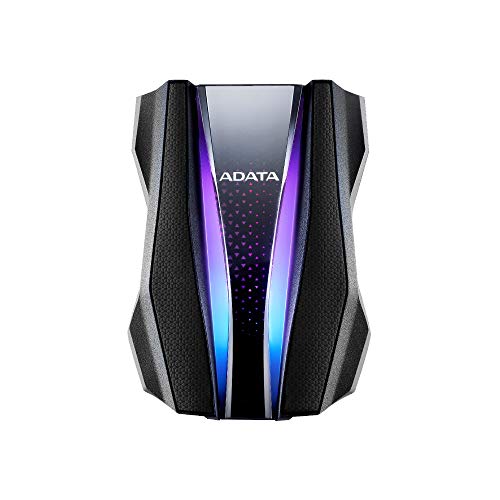
ADATA HD770G 2TB Rugged RGB External HDD

Seagate FireCuda Darth Vader SE 2TB External HDD
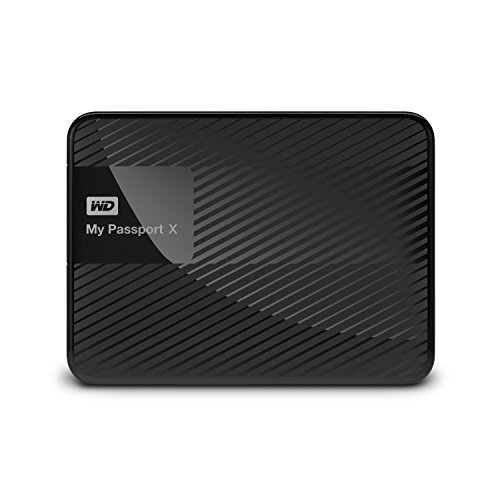
WD 2TB My Passport X Xbox One Drive
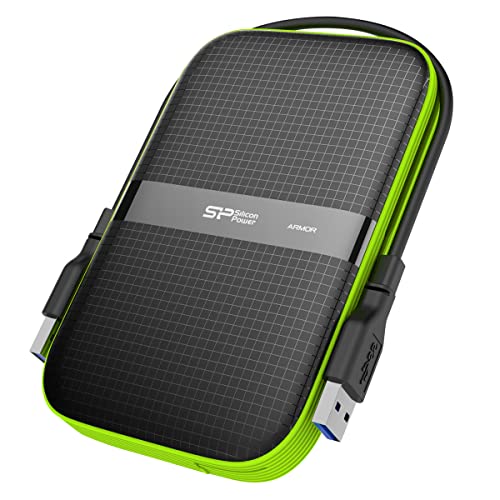
SP Silicon Power Armor A60 2TB Rugged Drive
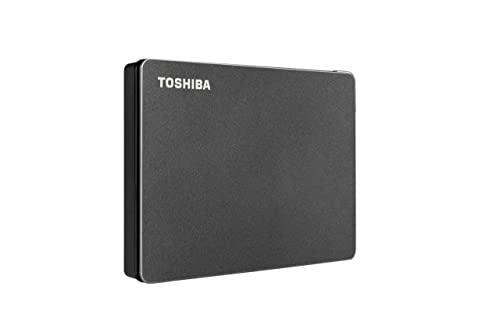
Toshiba Canvio Gaming 2TB USB 3.0 Drive

Seagate Portable 4TB External HDD

Toshiba 2TB Canvio Gaming USB 3.2 Drive
The Details Behind The Selections
The Samsung T7 Shield is the only SSD on this list, and the difference shows up the first time you boot a cold-installed game. Because it uses solid-state storage rather than a spinning platter, you get quiet operation and zero moving parts to worry about if it slips off a shelf. USB 3.2 Gen 2 means transfer speeds that handily outpace any HDD in the roundup, though your Xbox One’s USB port is the limiting factor in practice.
For gamers who treat their library like luggage, the IP65 rating and 3-meter drop resistance give you room to be careless. The chassis feels dense in a way that inspires confidence, and the short USB-C cable tucks easily into a laptop bag. Pick this if you split time between an Xbox, a PC, and a Mac.
Where It Delivers
- Solid-state speed, so cold-launch times feel snappier than the HDDs here
- IP65 dust and water protection plus 3-meter drop resistance handle couch and travel abuse
- Compact, pocketable shape that disappears behind the console
- USB 3.2 Gen 2 interface plays nicely with older USB versions too
Worth Noting
- 1TB fills up fast with modern Xbox installs averaging 50-100GB each
- Costs meaningfully more per terabyte than any platter option below
Who It Suits Best
Travelers and speed-first players who carry a small curated library between an Xbox, a laptop, and friends’ consoles.
Where Another Pick Suits Better
The Seagate Portable 4TB External HDD is a better match for shoppers chasing raw capacity at a lower per-terabyte cost.
ADATA designed the HD770G to take hits, and the spec sheet reads like a checklist for clumsy gamers. It exceeds the IPX8 waterproof threshold, surviving two meters of water for up to two hours, and the IP6X dust rating shrugs off carpet fuzz and pet hair. Where earlier picks focus on quiet competence, this one announces itself.
The two RGB light strips are the personality feature, casting a glow across your desk that you either love or find silly. Beneath the flash sits a real 2TB HDD wrapped in a triple-layer shock-absorbing shell, and a patented port cover seals the USB connection when the drive is in a bag. It’s a strong match for gamers whose console lives in a busy living room.
Standout Benefits
- IPX8 waterproofing goes well beyond a typical splash rating
- Military-grade shock resistance survives 4-foot drops
- RGB glow adds personality in dark entertainment centers
- 2TB capacity covers a sizeable Game Pass rotation
Trade Offs
- Heavier and bulkier than the WD or Toshiba options
- RGB lighting draws extra power from the USB bus and offers limited control on Xbox
Made For
Gamers who want their drive to be part of the room’s vibe and who genuinely need the ruggedness for shared spaces.
Skip It When
Shoppers prioritizing slim looks should consider the Toshiba Canvio Gaming 2TB instead, which trades RGB for a cleaner silhouette.
Seagate’s FireCuda Special Edition line leans hard into licensed shelf appeal, and the Darth Vader variant casts a red LED glow across the front of the drive. The Sith Lord theme is unmistakable on a desk, but underneath the artwork you’re looking at a functional 2TB HDD with USB 3.2 connectivity. Cross-platform compatibility covers PC, Mac, PlayStation, and Xbox without reformatting headaches.
For collectors who already display a stack of Star Wars figures next to the console, this earns its place. The 2TB capacity holds roughly the same library as the ADATA above, and the customizable LED lets you dial back the glow when the room is dim. It’s the rare themed drive that doesn’t look like a toy.
Key Advantages
- Officially themed chassis that doubles as shelf decor
- USB 3.2 interface for fast transfers from PC
- Red LED glow ties into entertainment center lighting
- 2TB capacity suits a moderate Game Pass rotation
Soft Spots
- Themed drives typically cost a small premium over plain models
- No ruggedization rating, so it’s best kept on the desk
Right Fit For
Star Wars fans who want their storage to match the rest of their collection and don’t mind a little extra flair on the shelf.
Not Your Match When
Rough-house households should look at the ADATA HD770G 2TB, which delivers similar capacity with genuine drop and water protection.
WD built the My Passport X specifically with console gamers in mind, and it shows in the small details. The drive is performance-tuned to match the way Xbox One reads game data, and the USB 3.0 connection pairs with the console without needing extra power cables. For shoppers who want the path of least resistance, this is the drive that “just works.”
Capacity is set at 2TB, which is enough for roughly 75 Xbox One titles by WD’s own estimate. The portable chassis is small enough to slide into a backpack, so it doubles as a way to bring your game library to a friend’s house. WD backs it with a 3-year manufacturer’s warranty, longer than most competitors at this tier.
Noteworthy Benefits
- Xbox One and Xbox 360 compatibility out of the box
- Performance tuning aimed at console game loads
- 3-year manufacturer’s warranty covers long-term peace of mind
- Compact, travel-friendly footprint
Points To Note
- USB 3.0 trails the USB 3.2 speeds of newer drives for PC transfers
- No ruggedization rating, so treat it gently in transit
Best Suited To
Console-first gamers who want a clean, warranty-backed drive and don’t need cross-platform file juggling.
Consider Something Else When
Shoppers who also use a PC regularly may prefer the Toshiba Canvio Gaming 2TB USB 3.2, which adds a faster interface for PC-side use.
Silicon Power’s Armor A60 earns its name through a textured rubber shell that wraps the entire drive, plus a cable-carry design that solves a real annoyance. The included USB cable tucks into grooves along the side, so you stop leaving it behind when you take the drive to a friend’s console. The IPX4 water-resistance rating handles splashes and rain but not full submersion.
Compatibility runs across PC, Mac, Xbox, and PS4, and the USB 3.1 Gen 1 interface transfers files at solid speeds for an HDD. For gamers whose console lives in a high-traffic area, the rugged shell absorbs drops that would kill a standard drive. Compared to the ADATA HD770G, you give up deeper waterproofing but gain a slimmer profile.
The Value In It
- Military-grade shockproofing for daily handling
- IPX4 splash resistance for kitchen or basement setups
- Built-in cable storage keeps the USB cord from going missing
- Cross-platform support covers PC, Mac, Xbox, and PS4
Honest Caveats
- Rubber shell attracts dust and lint over time
- 2TB feels modest when Game Pass libraries balloon
Who Should Grab It
Gamers who move their drive between locations and want a chassis that forgives the occasional drop.
Look Elsewhere When
Shoppers wanting maximum capacity should look at the Seagate Portable 4TB External HDD, which doubles the storage in a similar form factor.
The Canvio Gaming lives in the same lane as the WD My Passport X but with a slightly different design philosophy. Toshiba markets it explicitly for gamers, with firmware that prioritizes steady sequential reads, which is exactly how Xbox One pulls game data. The matte black finish is understated enough to disappear behind the console.
2TB covers around 100 games by Toshiba’s own framing, and compatibility spans PlayStation, Xbox, PC, and Mac. There’s no ruggedization rating, so it’s a desk-bound drive, but the slim profile makes it easy to perch on top of the console itself. Plug-and-play recognition means zero setup time on Xbox One.
Real-World Strengths
- Game-tuned firmware keeps load screens predictable
- Plug-and-play recognition on Xbox with no formatting
- Low-profile design slips behind most entertainment centers
- Multi-console compatibility for households that switch platforms
Small Caveats
- No water or drop protection rating
- USB 3.0 is a step behind newer USB 3.2 drives on PC transfers
Who Will Love This
Multi-console households and casual gamers who want a clean, quiet drive that stays out of the way.
A Better Fit Elsewhere
Gamers prone to knocking things off shelves should consider the SP Silicon Power Armor A60 2TB, which adds genuine drop protection.
Where the other HDDs on this list hover around 2TB, the Seagate Portable doubles the offering to a full 4TB. For shoppers who measure their library in dozens of install-and-forget titles, that headroom changes the relationship with the drive. You stop micromanaging storage and start treating the drive as a permanent extension of the console.
The compact shell is light enough to toss in a drawer, and USB 3.0 covers the transfer needs of most gamers. Seagate also bundles a year of Rescue Service for data recovery, which is the kind of safety net you only appreciate after a drive failure. For value-conscious shoppers building a long-term library, 4TB at this tier is hard to argue with.
Where It Excels
- 4TB capacity doubles most competitors in a similar footprint
- Plug-and-play simplicity across PC, Mac, Xbox, and PlayStation
- Included Rescue Service for data recovery adds peace of mind
- Competitive cost per terabyte for budget-focused shoppers
Things To Consider
- No ruggedization rating, so handle with care during transport
- 2.5-inch HDD at 4TB density can feel warm during long transfers
Perfect Match For
Game Pass power users and large-library collectors who measure storage in triple-digit install counts.
Swap It Out When
Shoppers who want speed should reach for the SAMSUNG T7 Shield 1 TB instead, which trades capacity for SSD responsiveness.
The newer Toshiba Canvio Gaming refreshes the older HDTX120XK3AA with USB 3.2 connectivity, which is a meaningful bump for shoppers who also drag large media libraries between PC and console. On Xbox, you won’t feel the full speed ceiling, but PC-side transfers of game clips, screenshots, and 4K captures move noticeably faster.
Durable construction and built-in shock sensors protect the platter during the rough handling that frequent-install gamers inevitably inflict. Compatibility covers PlayStation and Xbox plus standard PC and Mac use, and the firmware continues Toshiba’s game-friendly tuning. It’s the Canvio Gaming you want if you frequently shuttle content between platforms.
Notable Upsides
- USB 3.2 Gen 1 interface for faster PC-side transfers
- Shock sensors help protect the drive from impacts
- Cross-platform support for PlayStation, Xbox, PC, and Mac
- Slim, travel-friendly form factor
Worth Bearing In Mind
- 2TB may feel limited for users eyeing large Game Pass rotations
- USB 3.2 Gen 1 (5Gbps) is not the same as Gen 2 (10Gbps) on the Samsung T7
Whose Shelf It Belongs On
Daily-install gamers who regularly move captures and saves between their console and a PC or Mac.
Where A Sibling Pick Shines
Shoppers chasing maximum capacity will get more breathing room from the Seagate Portable 4TB External HDD at a similar price tier.
Picking Storage That Actually Fits Your Console
Capacity is the headline number, but speed, durability, and connection type all shape how the drive feels in daily use. The Xbox One caps out at USB 3.0 bandwidth, so paying a premium for USB 3.2 only matters if you also use the drive with a PC. HDDs still deliver the best cost per terabyte, while SSDs trade capacity for faster cold launches. Match the drive to the room, not the spec sheet.
Speed Versus Capacity
A 4TB HDD holds a far bigger library than any 1TB SSD at the same price, but the SSD boots games faster because it has no spinning platter to wait on. For a primary Xbox One that lives under the TV, capacity usually wins. For a portable drive that moves between systems, speed saves time.
Interface And Real-World Bandwidth
USB 3.0 (also called USB 3.2 Gen 1 in newer naming) tops out around 5 gigabits per second, which is the ceiling your Xbox One will actually use. USB 3.2 Gen 2 doubles that ceiling, but only PCs with the right port benefit. Don’t overspend on speed the console can’t see.
Durability Ratings That Matter
IP65 means dust-tight and resistant to low-pressure water jets, which covers most living-room accidents. IPX8 is a deeper waterproof rating that handles submersion. Drop ratings, measured in meters or feet, tell you how far the drive can fall onto hard flooring and survive. For desk-bound drives, none of this matters much. For travel-heavy setups, it matters a lot.
Format And Compatibility
Xbox One formats external drives with its own structure, but the underlying file system support varies. Drives that ship NTFS-formatted for Windows usually work after the Xbox’s first-time setup, while exFAT drives can require reformatting on the console. Confirm compatibility before you fill the drive with PC files.
Smart Choices For Your Setup
Where Shoppers Go Wrong
The most common slip-up is buying the smallest drive that “looks enough” and then refilling it within a year. Game sizes have ballooned, and a 1TB drive fills up faster than people expect, especially with Game Pass installs. A second pitfall is chasing a rugged rating you’ll never use, paying for military-grade shock protection when the drive never leaves the entertainment center.
What The Higher Tier Buys
The jump from a 2TB HDD to a 4TB HDD or a 1TB SSD isn’t just about specs. Higher-tier drives typically add recovery services, longer warranties, and materials that hold up to heat and vibration over years of use. For a primary console drive that holds hundreds of hours of progress, that durability premium is the kind of upgrade that pays off quietly, right up until the day the cheaper drive fails mid-install.
Frequently Asked Questions
Can any external hard drive work with Xbox One?
Xbox One supports USB 3.0 or higher external drives with at least 128GB of capacity. Most modern drives from this roundup will work, though you need to format the drive through the console’s storage settings on first use.
Is SSD or HDD better for Xbox One games?
SSDs launch cold games faster because they have no moving parts, but the Xbox One’s USB 3.0 port limits the real-world speed difference. HDDs offer much more storage per dollar, which matters more for large libraries.
How big should an Xbox One external drive be?
For most gamers, 2TB hits the sweet spot between capacity and cost. Heavy Game Pass users or download-only collectors benefit from 4TB, while SSDs make more sense as a small portable drive than a primary library.
Do I need to format a new external drive for Xbox One?
Yes, Xbox One requires you to format new external drives through the system settings before use. The drive will be dedicated to the console afterward, though it can be reformatted for PC later.
Can I use the same external drive on Xbox One and PC?
Not without reformatting, since Xbox One uses its own storage structure. Many shoppers keep two partitions or two separate drives, one formatted for console and one for PC, to switch between them without losing data.
Closing Remarks
An external drive is one of the few Xbox upgrades that pays for itself the day you stop deleting games to make room. Match the capacity to your library size, pick the durability tier to match how the drive gets handled, and don’t overpay for speed the console can’t see. Any of these eight picks will get the job done; the right one depends on whether you value storage space, portability, or pure resilience most.



