


Retro gaming has fractured into a few distinct paths: build-your-own setups that wrap a Raspberry Pi in a nostalgic shell, all-in-one Android handhelds that mimic a console in your palm, and niche accessories that bring back missing hardware features. None of these devices is universally right, which is why this list mixes form factors rather than chasing a single category. You will find a proper case for a Pi build, a serious handheld, a couple of budget-friendly picks, a pocket-size device, a Nintendo-focused NFC tool, and a sliding-screen oddity worth knowing about.
An Overview Of The Picks
An Overview Of The Picks

RETROFLAG MEGAPi Case for Raspberry Pi 3 B+

PEGLY Smart NFC Emulator for Switch & 3DS

Retroid Pocket Classic Retro Handheld (PKM Yellow)

Anbernic RG 476H Retro Handheld (Indigo)

Miyoo Mini V4 Retro Handheld with Case
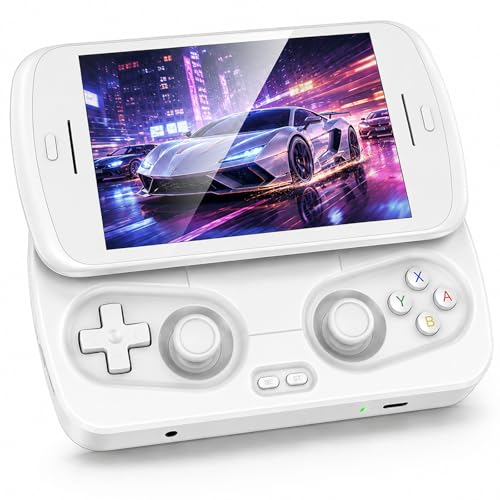
RG Slide Handheld with Sliding Screen
A Closer Look At Each Pick
You are not buying a console here. You are buying the shell that turns a Raspberry Pi 3 B+ into something that looks like a sixteenth-generation home system from the early 90s, complete with vents and a cartridge slot on the front. RETROFLAG designed the MEGAPi case specifically for that Pi board, so alignment of the GPIO (general-purpose input/output) header and SD slot is clean, and the unit closes up without forcing anything. Power and reset buttons on the case route through the Pi’s GPIO pins, which is the trick that makes the whole build feel native rather than jury-rigged.
For tinkerers who already own a Pi and want a tidy desktop build, the MEGAPi earns its place. Unlike the all-in-one handhelds further down this list, this one assumes you bring your own board, storage, and controllers. That tradeoff buys you a polished retro exterior and a satisfying click of real buttons on the front of the case.
Strong Points
- Functional external power and reset buttons, a real convenience over yanking the USB cable every time you want to reboot.
- Safe shutdown and safe reset scripting protects your SD card from the kind of corruption that hits when you cut power mid-write.
- Front access to the SD card slot and all the Pi’s side ports without opening the case, so swapping game collections is fast.
- The cartridge-style shell doubles as conversation piece and protective housing in one.
Worth Bearing In Mind
- You supply the Pi, the microSD card, the power supply, and the controllers, so the real cost stacks higher than the case alone suggests.
- Pinout compatibility is locked to Raspberry Pi 3 B+ and earlier Pi 2 revisions, which leaves newer Pi 4 and Pi 5 owners looking elsewhere.
- The plastic shell runs warm during long sessions since it sits flush against the board, so airflow planning is something owners commonly factor in.
Key Specs
Whose Shelf It Belongs On
It belongs on the desk of a hobbyist who already owns a Raspberry Pi 3 B+ and wants a clean, scripted retro setup without the cable mess of a bare board.
Swap It Out When
Step over to the Miyoo Mini V4 if you want a finished handheld that needs no Pi, no soldering, and no separate controllers.
This is a different kind of emulator entirely. The PEGLY is a small, rechargeable NFC (near-field communication) device that pretends to be an Amiibo or compatible NFC tag when you tap it against a Switch, 3DS, or Wii U controller. It holds up to 3000 stored character data files on board and displays which entry is active on a 1.2-inch OLED (organic light-emitting diode) screen, so you know what you are about to summon. For anyone tired of stacking Amiibo figurines on a desk, the appeal is obvious.
It pairs well with the larger handhelds on this list, since those devices often rely on the same NFC features in their game ports. If your only goal is emulation across classic consoles, you can skip this entirely. If you regularly play newer Nintendo titles that lean on NFC unlocks, this is the most compact way to bring your collection with you.
The Case For It
- Holds roughly 3000 NFC entries in one device, which replaces a stack of figurines and a binder of cards.
- The built-in OLED screen confirms which character you have selected before you tap, so there are no surprises mid-game.
- Rechargeable battery design means you are not feeding disposable coin cells every few months.
- Broad platform coverage across Switch, 3DS, 2DS, and Wii U makes it a single tool for multiple Nintendo systems.
Honest Caveats
- Only useful in games that actually support NFC, so the value disappears for players who stick to older or non-NFC titles.
- Compatibility is limited to a curated set of supported entries, which may not cover every obscure figure in your collection.
- The 1.2-inch display is functional rather than generous, so reading long entry names takes a moment.
Made For
It suits a Nintendo household with a deep Amiibo habit, a Switch OLED or Lite setup, and a wish to cut down on physical clutter from dozens of tiny figures.
Look Elsewhere When
Pick the Retroid Pocket Classic instead, since it handles multi-system emulation natively and skips the NFC layer altogether for classic gaming sessions.
The Retroid Pocket Classic arrives as a finished Android handheld that runs full Google Play access out of the box, so it doubles as both a retro machine and a small streaming tablet. Its 3.92-inch OLED touchscreen running at 1240×1080 and 60fps gives pixel art and early 3D titles the sharp, contrasty look that LCD panels struggle to match. You will notice the deeper blacks immediately on any game with dark dungeons or nighttime levels. Storage and memory sit at 6GB of RAM with 128GB of internal space, which is generous for a pocketable unit.
Battery life lands at 5000mAh, which is a real workday of mixed play rather than a quick two-hour window. Compared to the Miyoo Mini V4 further down, this is a step up in screen quality, app flexibility, and platform reach, and you pay for that step. For most people who want one device to handle a lot of systems well, this is the practical middle ground.
Well-Handled Touches
- The 3.92-inch OLED panel brings genuine deep blacks and saturated color, which retro art styles benefit from more than raw resolution gains.
- Android 14 with full Google Play access means streaming apps and cloud saves sit alongside your local emulation library.
- 5000mAh battery gives long-haul play sessions without the constant low-battery anxiety of smaller handhelds.
- 128GB of internal storage swallows large multi-system ROM collections without forcing an immediate memory card upgrade.
- WiFi 5 connectivity covers fast sideloading and online features where supported.
Where It Is Less Suited
- The pocketable 3.92-inch screen is comfortable for solo play, but feels small for split-screen or co-op sessions on a TV output.
- No preloaded games means you supply your own library and the emulators, which adds setup time for newcomers.
Right Fit For
It fits a hobbyist who wants a single pocketable device to cover most retro systems, modern streaming, and cloud saves without juggling multiple handhelds.
Reach For A Different Pick When
Go with the Anbernic RG 476H if a larger 4.7-inch 120Hz display matters more to you than the OLED contrast of the Retroid Pocket Classic.
The Anbernic RG 476H trades the deep blacks of an OLED panel for a fast 4.7-inch IPS (in-plane switching) screen at 120Hz with multi-touch input. That 120Hz refresh rate is the headline feature. Scrolling menus, fast-action shooters, and anything that scrolls sideways feels noticeably smoother than on a standard 60Hz panel. The 1280×960 resolution keeps pixel art crisp without aggressive smoothing filters muddying the look.
Under the hood, a Unisoc T820 processor drives Android 13, which gives you the same Play Store access as the Retroid Pocket Classic, plus 1080p display output over the USB-C port for big-screen play. Compared to the RETROFLAG MEGAPi case, this is a finished handheld with no Pi to source, and the larger screen beats the Miyoo Mini V4 for anyone whose eyes prefer a roomier image.
The Good Stuff
- 4.7-inch 120Hz IPS display gives buttery menu and gameplay motion, a real upgrade over the 60Hz norm.
- Unisoc T820 chip handles demanding late-era 3D emulators with room to spare.
- 5000mAh battery sustains roughly 8 hours of play per charge, which holds up on long trips.
- 1080p output over USB-C turns the unit into a living-room console when you dock it to a display.
Softer Spots
- IPS contrast cannot match the OLED panel of the Retroid Pocket Classic, so very dark scenes look grayer.
- Full charge takes around 3.5 hours, so a long travel day calls for a power bank.
Key Specs
Best Suited To
It suits a player who values motion clarity, a bigger handheld footprint, and the option to push games to a TV for couch sessions.
Where A Sibling Pick Shines
The Retroid Pocket Classic is the better match for anyone who prizes deep OLED blacks and a slightly smaller, more pocketable form factor.
The Miyoo Mini V4 earns its name. It is genuinely pocket-sized, roughly half a palm across, with a 2.8-inch OCA-laminated (optically clear adhesive, which bonds the screen layers to reduce glare) HD screen that suits Game Boy, Game Boy Advance, and other 4:3-era systems almost perfectly. The 750×561 resolution keeps sprites readable without scaling artifacts. Power comes from a removable 2000mAh battery rated at 5 to 6 hours, which is enough for a coast-to-coast flight in economy class.
It runs a Linux-based system with support for dozens of emulators and open-source firmware projects, so the tinkerer crowd gets plenty to work with. The included storage case is a small but useful touch for tossing the unit into a bag without scratching the screen. Compared to the Retroid Pocket Classic, this one strips out the Android app layer and large OLED in favor of pure pocket portability.
Bright Spots
- The half-palm footprint slips into a jeans pocket without bulging, which is rare for any dedicated handheld.
- Removable 2000mAh battery is replaceable when it eventually wears out, so the device is not a sealed disposable.
- Active custom-firmware community means ongoing OS refinements and emulator tweaks from hobbyists.
- The included hard case keeps the screen and shell safe in a backpack or travel bag.
Practical Considerations
- 2.8-inch screen is small for anything past 16-bit consoles, where text and HUDs can feel cramped.
- Linux-based OS means sideloading new emulators and ROMs is part of the experience, which can be a barrier for beginners.
Perfect Match For
It is a fit for a frequent traveler or coffee-shop gamer who wants true pocketability and is comfortable exploring custom firmware.
Not Your Match When
The Anbernic RG 476H is the better pick for anyone who wants a larger 4.7-inch screen, full Android app support, and 120Hz motion.
The RG Slide’s whole identity is the screen. A spring-loaded mechanism on a sliding rail lets you push the 4.7-inch display up to reveal a second set of controls beneath, turning a compact handheld into something closer to a mini controller layout. It is the rare retro device where the hardware is genuinely a talking point. Inside, a Unisoc T820 6nm (a smaller, more power-efficient chip fabrication process) processor with 8GB of LPDDR4X RAM and 128GB of UFS 2.2 (Universal Flash Storage, a fast solid-state storage standard) storage runs Android 13, so the internals match the Anbernic RG 476H’s chipset family.
That shared silicon means real-world emulation performance is in the same league as the Anbernic, while the form factor sets the two apart. Compared to the Retroid Pocket Classic, you trade OLED contrast for a bigger 4.7-inch panel and a sliding mechanism that some will love and others will see as a moving part to worry about. Long-term durability of the rail depends on how carefully you treat the slider, so rough-pocket owners may want to think twice.
Everyday Wins
- Sliding screen reveals a second control layer, so you can toggle between compact and expanded layouts depending on the system.
- Unisoc T820 chip handles demanding emulators with the same headroom as the Anbernic RG 476H.
- 8GB RAM and 128GB storage cover large game libraries without an immediate card swap.
- Android 13 with Play Store access gives you the same streaming and sideloading flexibility as the other Android handhelds on this list.
Things To Weigh Up
- The sliding rail is a moving mechanical part, so over time it may loosen or collect pocket lint, and owners commonly report being gentler with it than with a fixed-screen handheld.
- Spring mechanism adds a small amount of weight and thickness compared to a fixed-screen design.
Feature Snapshot
Who Should Grab It
It suits a hardware-curious collector who values a unique form factor and is willing to treat a moving screen gently over many years.
Where Another Pick Suits Better
For commuters worried about mechanical wear, the Miyoo Mini V4 is a fixed-screen alternative that trades the slide mechanism for a smaller, lighter shell.
What To Weigh Before Choosing Emulator Devices
Screen, Battery, and Form Factor
The three traits that hit you in the first hour of ownership are screen size, battery life, and how the device feels in your hand. A 2.8-inch panel suits Game Boy-era games beautifully, but text-heavy 16-bit and later titles get cramped fast. A 4.7-inch 120Hz panel like the Anbernic RG 476H is more comfortable for action games, while a 3.92-inch OLED like the Retroid Pocket Classic strikes a balance that fits most pockets. Battery size matters on travel days; 5000mAh is the working baseline for sessions away from an outlet, while smaller cells like the Miyoo’s 2000mAh are fine for short trips. Comfort is personal, so if you can hold one in a store, do, because spec sheets do not capture grip fatigue.
OS, App Access, and Customization
Android handhelds bring Google Play, streaming apps, and Bluetooth controller support out of the box, which lowers setup time for newcomers. Linux-based devices like the Miyoo Mini V4 run leaner and tend to feel snappier on weaker hardware, but expect to load your own emulators and ROMs. Build-your-own Pi setups in a case like the RETROFLAG MEGAPi give you total control over the software stack, at the cost of more time spent before the first game launches. Pick the path that matches how much tinkering you actually enjoy, not the one that looks the most impressive on paper.
Accessories and Companion Picks
A handheld is only part of the picture. For Nintendo-focused setups that depend on NFC unlocks, a tool like the PEGLY Smart NFC Emulator slots in alongside any of the larger handhelds on this list. Hard cases, screen protectors, and microSD cards are common add-ons, and a case like the one bundled with the Miyoo Mini V4 is a quiet cost-saver. Decide which accessories you actually need before checkout, since bundle pricing and separate pricing can shift your final total more than the handheld itself.
Key Considerations Across These Picks
Mistakes Worth Dodging
A common slip is chasing the biggest screen or newest chip without checking the form factor in your hand. A 4.7-inch handheld is genuinely less pocketable than a 2.8-inch one, and that difference shows up every commute. Another trap is assuming every Android handheld is a plug-and-play retro machine. None of the picks on this list come with games preloaded, so factor in time to source a library legally. Finally, do not overlook ventilation. Plastic shells sitting flush against warm SoCs (system on a chip, the integrated processor at the heart of a handheld) can throttle during long sessions, so leaving breathing room around the unit pays off in sustained performance.
What The Higher Tier Buys
Spending up in this category usually buys a better panel, a faster processor, and a longer-lived battery. The Anbernic RG 476H and the Retroid Pocket Classic both show what a tier-up delivers: smoother motion, deeper contrast, and all-day battery. The upgrade is worth it for anyone who plays more than an hour a day or tackles demanding late-era systems. For casual, occasional sessions, a budget tier like the Miyoo Mini V4 still delivers the core retro experience without the premium. Match the spend to the time you will actually put in, and you avoid both overspending and under-buying.
Frequently Asked Questions
What is the easiest emulator device for a total beginner?
The Anbernic RG 476H and the Retroid Pocket Classic are the easiest entry points. Both run Android with a familiar interface, access the Google Play Store, and support standard Bluetooth controllers. You still need to supply your own game files, but the device itself behaves like a small tablet from the first boot.
Can these devices play modern or 3D games?
The higher-spec Android handhelds on this list, including the Retroid Pocket Classic and the Anbernic RG 476H, can run many Android-native and streaming titles alongside retro emulation. Demanding PlayStation 2-era and Dreamcast emulation is the realistic ceiling for these chips, while later console eras are not a fit.
Do emulator devices come with games preloaded?
None of the picks on this list ship with games. You supply your own legally sourced ROMs, homebrew, or streaming library. The PEGLY Smart NFC Emulator likewise requires you to load NFC character data files onto the device.
How is an NFC emulator different from a retro handheld?
An NFC emulator like the PEGY device mimics Amiibo and other NFC tags for newer Nintendo titles, while a retro handheld runs actual classic game software. They are complementary rather than competing. Many players use an NFC emulator alongside a handheld rather than in place of one.
What accessories should I plan to buy alongside a handheld?
A screen protector, a hard case, and a high-endurance microSD card cover the basics. If you travel often, a compact power bank extends the value of any 5000mAh handheld. For Nintendo-focused play, an NFC emulator rounds out the setup nicely.
Bottom Line
The right emulator device depends on whether you want to build, carry, or expand. Builders and Pi enthusiasts will appreciate the RETROFLAG MEGAPi case, Nintendo households will lean on the PEGLY NFC tool, and most players who want one do-it-all handheld will end up happiest with the Retroid Pocket Classic or the Anbernic RG 476H. Pick the form factor that matches your daily routine, and the rest of the decision tends to fall into place on its own.



