


Docking at a remote outpost, lining up a heat-sink shot, and threading a Python through a station mail slot all demand real hardware. A precision flight stick and throttle transform Elite Dangerous from a pretty keyboard exercise into a proper sim, where micro-corrections matter and every axis talks back. The eight setups below cover a wide spread, from the first-time commander’s first HOTAS to a serious metal-bodied Warthog replica. Each one plays well with Elite’s six-degrees-of-freedom flight model, where yaw, pitch, roll, and thrust sliders earn their keep.
The Lineup, Simplified

Thrustmaster TWCS Throttle (PC)

Thrustmaster HOTAS Warthog A10 Replica Set

HORI Ace Combat 7 HOTAS for Xbox

Thrustmaster T-Flight HOTAS X (PC)
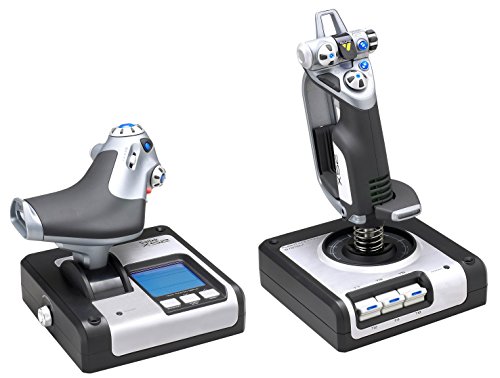
Saitek X52 Flight Control System

Thrustmaster T-Flight HOTAS 4 Ace Combat 7
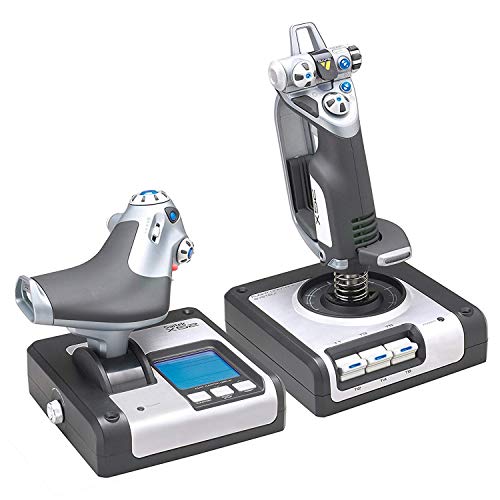
Logitech G X52 Flight Control System

Logitech G Saitek X52 Pro (Black/Silver)
The Picks, Examined More Closely
Already running a T16000M stick and want a real throttle to match? The Thrustmaster TWCS Throttle slots into that ecosystem as a left-hand companion, freeing your keyboard from the constant thrust adjustments that Elite Dangerous demands in combat and station approaches.
It connects to a Windows PC over USB and sits low enough that your hand falls naturally onto the controls during long exploration runs. Compared to a standalone stick, this unit only adds the throttle half, so budget for the existing joystick separately.
Positive Points
- S.M.A.R.T. sliding-rail throttle delivers smooth, precise thrust control that pays off in station docking
- Plenty of programmable buttons and a mini-stick for hat-style commands, which keeps the right hand on the stick
- Low-profile design reduces fatigue during multi-hour trade-route sessions
Things To Consider
- This is a throttle only, so you need a compatible joystick like the T16000M to complete a HOTAS setup
- PC-only compatibility, with no console support, so console pilots should look elsewhere
Right Fit For
PC pilots who already own a T16000M and want a proper throttle to round out the rig.
Reach For A Different Pick When
Newcomers starting from scratch should grab the Thrustmaster T-Flight HOTAS X instead, since it bundles a stick and throttle in one box.
The Warthog lands at the heavy end of the category, modeled on the U.S. Air Force A-10C setup in a near-1:1 replica. Most of the housing, stick, and throttle components are metal, which gives the unit a planted, satisfying heft on the desk.
Hall-effect sensors (contactless magnetic sensors that measure stick position without physical wear points) on the axes mean the stick should hold its centering for years of use. Where the T16000M and T-Flight feel like consumer gear, this set feels like hardware pulled from a hangar. For Elite Dangerous combat pilots who treat every kill as a serious moment, that build shows up in every yank of the stick.
A Favorable Mix
- Metal construction and detachable stick give the set a long, durable lifespan for daily commanders
- Hall-effect sensors on the axes resist drift, so center-point stays reliable over thousands of combat engagements
- Replica A-10 layout puts dozens of controls within reach, which is ideal for complex power management in Elite
Trade-Offs To Consider
- Hefty desk footprint and a strong clamp recommendation, so small desks may struggle to host it comfortably
Quick Facts
Whose Shelf It Belongs On
Veteran commanders who fly daily and want a build that holds up for years, with the budget to match.
Look Elsewhere When
Casual pilots and beginners should consider the Saitek X52 Pro, which delivers useful controls at a much friendlier entry point.
Console commanders often get the short end of the stick when it comes to HOTAS hardware. The HORI Ace Combat 7 HOTAS exists specifically for that gap, offering a full split stick-and-throttle layout officially licensed for Xbox One.
Adjustable sensitivity lets you dial aggression up for bounty hunting or down for deep-space hauling. A headset jack on the unit makes voice comms easy during wing play. Most PC-leaning Thrustmaster gear assumes you live in a Windows rig, so this HORI fills a real niche.
Strengths Worth Knowing
- Officially licensed by Microsoft and Bandai Namco, so you know it plays nicely with the console’s input layer
- Built-in headset jack keeps voice chat simple during multi-crew wing operations
- Split design mirrors the more expensive PC options at a friendlier price tier
Points To Note
- Plastic construction, which is lighter on the wallet but lighter on the desk too
- Console-only compatibility, so PC pilots need a different setup
Who Should Grab It
Xbox One commanders who want a proper throttle and stick combo without swapping to a PC.
Not Your Match When
Pilots who play across PC and console should consider the Thrustmaster T-Flight HOTAS 4 Ace Combat 7 Edition, which covers both worlds.
Walking into Elite Dangerous for the first time doesn’t require a metal Warthog. The Thrustmaster T-Flight HOTAS X delivers a complete stick and throttle at a price most newcomers can stomach, with twelve action buttons, five axes, and a wide hand rest.
Resistance on the stick is adjustable, so you can tighten the feel for combat or loosen it for careful docking. The throttle detaches cleanly, which is handy when you want to mount the stick on the desk and the throttle on a side tray. The plastic body keeps weight down, which makes it portable for LAN setups or a quick desk rearrangement.
Well-Handled Touches
- Wide ergonomic hand rest reduces wrist fatigue on long exploration hauls
- Fully programmable twelve-button layout adapts to your binding style in Elite’s complex control map
- Detachable throttle creates flexible mounting options for cramped desks
Honest Caveats
- Plastic internals feel light next to the Warthog’s metal build
- Potentiometer-based axes (variable resistors that read stick position) tend to drift over years of heavy use
Spec Overview
Who Will Love This
First-time commanders who want a complete HOTAS setup without committing to a premium price.
Swap It Out When
Pilots ready to invest in a long-term build should look at the Logitech G X52, which adds a magnetic-axis upgrade.
The Saitek X52 introduced a lot of pilots to space combat sticks, and it still earns attention for a reason. The standout feature is a small LCD on the stick that shows programmed commands, plus a clock for timing route legs. That little screen turns the stick into a true command center.
The progressive throttle with idle and afterburner detents makes power management feel deliberate, especially in supercruise approaches where micro-throttle inputs matter. Owners commonly report the unit’s solid spring force keeps the stick centered through long sessions, and the software-driven programmability means swapping between a Sidewinder and a Python is a few clicks, not a rewiring job.
Reasons It Performs
- Multifunction LCD shows your current bindings, so you can verify commands without alt-tabbing
- Progressive throttle with adjustable resistance and detents suits both cruise and combat profiles
- No-contact X and Y axis sensors and constant spring force keep the stick centered accurately
Room For Improvement
- Smaller hand grip adjustment range may not suit pilots with larger hands
Built With In Mind
Data-driven commanders who like to see what their hardware is doing, not just feel it.
A Better Fit Elsewhere
Shoppers wanting a more refined software suite and RGB should consider the Logitech G Saitek X52 Pro, which builds on this design.
One stick that follows you from the PS4 to the Xbox Series X to the PC is rare. The Thrustmaster T-Flight HOTAS 4 Ace Combat 7 Edition covers all three, with built-in PlayStation system buttons for fast navigation in console menus.
The throttle detaches cleanly even inside a VR headset, where sight lines are limited. The mapping integrates with Ace Combat 7, though the controls translate well to Elite Dangerous through standard binding tools. Realistic ergonomics give the unit a comfortable reach for both space and atmospheric combat.
The Upside
- Works across PS4, Xbox Series X, Xbox One, and PC, which removes the buy-again cycle for multi-platform pilots
- Detachable throttle stays usable in VR setups where you cannot see the desk
- Ergonomic shape suits long sessions across flight, space, and combat genres
Worth Noting
- Plastic-heavy build feels light against the Warthog’s metal construction
- Officially themed around Ace Combat 7, so the Ace Combat branding shows on the unit
Best Suited To
Multi-platform pilots and VR flyers who want a single stick across PC and console.
Where A Sibling Pick Shines
Pilots locked to a single platform get more value from the Logitech G X52 Flight Control System, which targets PC with a deeper feature set.
The Logitech G X52 takes the classic Saitek design and tightens the engineering. The biggest change is magnetic, non-contact sensors on the X and Y axes, which should outlast the older potentiometer design found in earlier sticks. A built-in clock on the multifunction LCD helps with timing trade routes and jump schedules.
A 3D twist rudder axis on the stick base lets you control yaw by rotating the handle, though it can be locked off if you already have separate rudder pedals. For most setups, that twist input fills in nicely for ship lateral thrust, which matters in Elite’s combat zones.
A Few Highlights
- Non-contact magnetic sensors extend the life of the centering mechanism
- Multifunction LCD with clock helps you plan and time long trade routes
- 3D twist rudder with lock-off suits both pedal users and pedal-less setups
Potential Drawbacks
- No native console support, so console-only pilots need the T-Flight HOTAS 4 instead
Feature Rundown
Made For
Heavy-use PC pilots who log hundreds of hours and want hardware that ages well.
Skip It When
Pilots who want the most feature-packed option should consider the Logitech G Saitek X52 Pro, which adds RGB lighting and a deeper software layer.
The X52 Pro sits at the top of Logitech’s HOTAS line, with a black and silver finish, illuminated buttons, and a deeper software ecosystem. For Elite Dangerous commanders who like to map a different binding profile for every ship, the programmability is the real draw.
The progressive throttle with detents gives you tactile feedback for afterburner and idle zones, and the precision centering mechanism keeps the stick honest through long pulls. The non-contact X and Y axis sensors should hold calibration well over years of use. The trade-off is the price and the learning curve of the Logitech G software suite.
The Case For It
- Illuminated buttons and full RGB lighting give the rig a clean, customizable aesthetic
- Progressive throttle with resistance and detents supports both exploration and combat profiles
- Smart Technology software allows detailed per-game and per-ship binding profiles
A Few Limitations
- Higher price than the standard X52, so casual pilots may not need every feature
Feature Snapshot
Perfect Match For
Tinkerers and macro-driven commanders who like to set up distinct profiles for every ship and play style.
Another Choice May Suit
Pilots who want a similar feature set with a sturdier metal build should consider the Thrustmaster HOTAS Warthog, which trades RGB for a heavier replica frame.
What To Weigh Before Choosing Your Rig
Picking the right HOTAS for Elite Dangerous starts with how you fly. Casual haulers can get away with a lighter setup, while combat-focused commanders benefit from sturdier gear. The first real decision is platform: PC pilots have the widest spread, while console commanders are limited to officially licensed options that show up in the system input list.
Axis count matters more than most newcomers expect. Elite Dangerous uses six axes when you count pitch, roll, yaw, and the three thrust vectors. A stick with twist-rudder covers yaw naturally, while a separate throttle covers the main thrust slider. A five-axis setup leaves lateral and vertical thrust to keyboard, which works in a pinch but breaks immersion quickly.
Build material shapes how the rig feels after a year of use. Plastic sticks are lighter, quieter, and easier on the wallet. Metal-bodied units like the Warthog weigh more, sit firmer, and survive aggressive inputs without flex. For pilots who fly daily, that extra mass pays off in steady aim during long interdiction fights.
Software support determines how deep your binding profile can go. Thrustmaster and Logitech both ship full programming suites, but the layouts differ. Pick a stick whose software looks approachable, since you will spend real time inside it mapping power distribution, pips, and fire groups.
Key Considerations Across These Picks
Pitfalls Shoppers Hit
The most common mistake is buying a stick without checking platform support. A PC-only Thrustmaster will not pair with a console, and an Xbox One licensed stick will not unlock Elite’s full binding depth on PC. Always match the hardware to the platform you actually fly on. Another trap is ignoring desk real estate. The Warthog and X52 Pro both need serious surface area and a clamp-friendly edge, so measure your setup before committing to a heavy unit.
When Paying More Pays Off
Higher-tier models earn their price through sensor technology and build quality. Hall-effect and magnetic non-contact sensors hold calibration across years of use, while potentiometer-based axes tend to drift as the resistive elements wear. For commanders flying several nights a week, that longevity difference is the real value. The upgrade also unlocks better ergonomics, deeper software, and features like LCD readouts and progressive throttle detents that genuinely improve the feel of fine piloting.
Frequently Asked Questions
What is a HOTAS setup and why does Elite Dangerous benefit from one?
A HOTAS (Hands On Throttle And Stick) puts your main hand on the joystick and your off hand on a separate throttle, so thrust, pitch, yaw, and roll all live within reach. Elite’s six-degrees-of-freedom flight model rewards that kind of simultaneous control.
Can I use a console flight stick on PC for Elite Dangerous?
Most console sticks show up as generic gamepads on PC and lose full axis control, so the experience suffers. PC-native sticks with full programming suites give you the binding depth Elite really wants.
Do I need rudder pedals if my stick has twist-rudder?
Twist-rudder works fine for most Elite combat and exploration. Pedals only become worthwhile for serious sim pilots who want precise yaw control during advanced maneuvers, which the average commander rarely needs.
How important is hall-effect sensor technology?
Hall-effect sensors read stick position through magnetic fields rather than physical contact, which means no internal wiper wear over time. For a daily-use rig, that adds years of clean centering to the stick’s lifespan.
Will a budget stick still work for Elite Dangerous?
Yes. A budget stick like the T-Flight HOTAS X handles the full game and most of the binding depth. The trade-off shows up after hundreds of hours, when cheaper axes start to drift, so heavy daily users may want a step up.



