


A long PS5 session can turn your entertainment center into a small radiator, especially during demanding exclusives or open-world marathons. The right cooling fan setup helps your console breathe, keeps noise in check, and protects storage from heat soak. This roundup covers external coolers, internal replacements, dust filters, stands, and skin-style vents, so you can match a solution to your specific PS5 model and play style.
The Shortlist At A Glance

GRAUGEAR Metal Heat Dissipation Cover for PS5 M.2 SSD
ACIDALIE PS5 Fan Dust Filter 4-Pack

GRAUGEAR PS5 Pro/Slim Cooling & Dust Kit

JUSPRO PS5 Pro Cooling Fan 4-Fan

Lictin PS5 Cooling Station Stand with RGB

SIKEMAY PS5 Disc Edition Cover Plates Black

OIVO PS5/Slim/Pro Stand and Cooling Station

JUSPRO PS5 Slim Quiet Cooling Fan

GRAUGEAR PS5 Internal Fan Replacement Kit
Auarte RGB Horizontal Cooling Stand for PS5 Slim/Pro
What Each Pick Brings To The Table
If you have already slotted an NVMe drive into your PS5, you have probably noticed the metal lid that sits over the SSD bay doubles as a heat spreader. This GRAUGEAR cover replaces that lid with a metal plate punched full of ventilation cells, letting the slot breathe better than the stock piece.
The cover is sized for drives carrying integrated heatsinks, so popular sticks like the WD_Black SN850P or Samsung 980 PRO still seat cleanly. For most living-room setups, that means cooler sustained writes and fewer throttling warnings during big patch downloads.
The Upside
- Cellular cutout pattern improves passive airflow across the SSD.
- Fit-friendly for aftermarket NVMe drives that already include a heatsink.
- Color options cover standard, Slim, and Pro chassis so you can match the look.
- Metal construction resists flex during installation.
Things To Consider
- Benefits hinge on having a heatsink-equipped drive already installed.
- It is a passive solution, so very hot rooms still benefit from an active fan like the JUSPRO PS5 Pro Cooling Fan 4-Fan.
Right Fit For
Owners of an expanded PS5 or PS5 Slim who want a low-effort thermal upgrade without adding USB accessories.
Where Another Pick Suits Better
For full-cabinet care, the GRAUGEAR PS5 Pro/Slim Cooling & Dust Kit bundles filters and port plugs in one package.
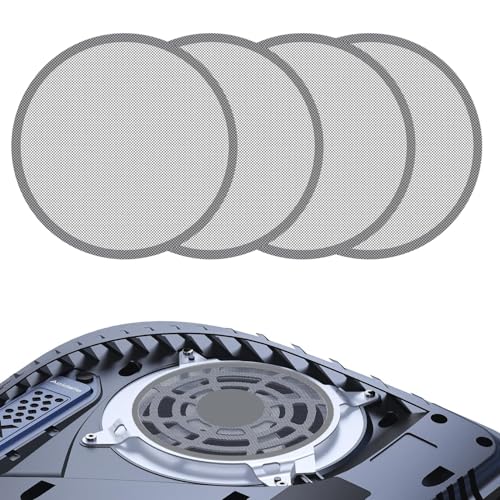
Filters are the unsung heroes of console longevity, and this 4-pack sticks over the intake and exhaust slits to catch pet hair and carpet fuzz before they reach the internal fan. Compared to the GRAUGEAR cover above, this is less about active cooling and more about keeping debris out of the heatsink fins.
For shared spaces with cats, dogs, or open windows, you may find the mesh prevents the slow buildup that turns a quiet PS5 into a whirring one. The included cleaning brush makes quick work of any dust that lands on the surface.
A Few Strong Suits
- Multi-piece pack covers vents on standard, Slim, and Pro models.
- Mesh design aims to balance airflow with filtration.
- Removable format simplifies periodic cleaning.
Worth Noting
- Filters can gradually clog, so plan a light vacuum every few months.
- Stickers are only as durable as the surface prep, so wipe the panel before applying.
Best Suited To
Shed-heavy households and gamers who keep their PS5 in a carpeted den.
Consider Something Else When
You want active airflow on top of dust control, in which case the JUSPRO PS5 Slim Quiet Cooling Fan handles both jobs at once.
GRAUGEAR’s bundle combines an M.2 SSD heatsink cover with four fan dust filters, silicone port plugs, a small screwdriver, and a cleaning brush, all aimed at the Pro and Slim crowd. It is the kind of kit you unbox once and forget about for months.
Where the single GRAUGEAR metal cover handles only the SSD slot, this kit treats the whole console as a system. Port plugs are a thoughtful touch for gamers who leave the front USBs empty between sessions.
What Earns Its Place
- One box covers thermal, dust, and port-level protection.
- Tools included so you do not raid the kitchen drawer for a screwdriver.
- Filters and covers match the Pro and Slim chassis finish.
Trade Offs
- More parts mean more steps during the initial install.
- Original PS5 owners should look at the single GRAUGEAR cover instead, since some pieces are Slim/Pro specific.
The Right Fit
Pro or Slim owners starting from scratch who want a single bundle for long-term upkeep.
Skip It When
You only need one component, in which case the ACIDALIE PS5 Fan Dust Filter 4-Pack is a leaner option.
The JUSPRO clip-on cooler uses four small fans instead of the three you see on many competitors, drawing heat up and out of the Pro’s top vent. An automatic temperature sensor ramps the fans up only when the console asks for it, which keeps idle noise down.
You will also find a passthrough USB 3.0 port on the back, so you do not lose the connection the cooler itself uses. For Pro owners in rooms that run warm in summer, this tends to be the most hands-off option on the list.
Positive Points
- Four-fan layout covers more surface area than typical 3-fan rivals.
- Auto mode syncs fan activity with console power, reducing babysitting.
- Adjustable speed gives you manual control when you want it.
- Elastic lock fits both vertical and horizontal Pro orientations.
Honest Caveats
- USB-powered, so it draws from a port even when auto-cycling.
- Not compatible with original or Slim chassis, which is a non-issue for Pro owners but worth flagging.
Who Should Grab It
PS5 Pro players chasing extra thermal headroom for long, demanding sessions.
Look Elsewhere When
You own a Slim rather than a Pro, in which case the JUSPRO PS5 Slim Quiet Cooling Fan is the matching sibling.
The Lictin dock turns a PS5, Pro, or Slim into a tidier centerpiece. Three fan speeds (3000, 3600, and 4200 RPM) pull hot air downward, while the base doubles as a controller charger and headset stand, with ambient RGB lighting under the console for visual flair.
Compatibility spans the 2020 standard, 2023 Slim, and 2024 Pro, so multi-console households can move units between docks as their library changes. The 1.57-inch enlarged turbo is a small but noticeable bump over earlier Lictin generations.
A Strong Showing
- Three fan speeds cover light sessions to marathon weekends.
- Dual charging for DualSense controllers in the base.
- Headset holder and media remote slot keep the entertainment area tidy.
- RGB ambient lighting gives the setup a finished look.
Room For Improvement
- Larger footprint than a simple clip-on cooler, so it needs shelf space.
- External power brick means one more outlet in use.
Perfect Match For
Multi-console owners who want one dock to handle charging, storage, and active cooling together.
Reach For A Different Pick When
You live in a small apartment and prefer the slimmer OIVO PS5/Slim/Pro Stand and Cooling Station footprint.
SIKEMAY’s black side plates swap the original white shells for a stealthier look, and they include two thermal vents that route additional air across the chassis. The ABS construction adds a layer of scratch resistance without bulk.
For owners who care as much about the look of their setup as the internals, the panels solve two problems at once: a quieter aesthetic and a small cooling boost. They snap onto the disc edition only, so digital-edition shoppers should look at the SIKEMAY digital equivalents.
What Pays Off
- Black finish hides fingerprints better than the stock white shells.
- Dual thermal vents add passive cooling surface area.
- ABS build keeps the panels rigid during install.
Points To Keep In Mind
- Disc edition only, so double-check your model before ordering.
- Passive vents help, but they do not replace an active fan in a hot cabinet.
Who It Suits Best
Style-focused PS5 disc edition owners who want subtle airflow gains alongside a darker aesthetic.
A Better Fit Elsewhere
You want active cooling on top of style, in which case the Lictin PS5 Cooling Station Stand with RGB handles the airflow side.
The OIVO dock is a long-standing favorite because it handles nearly everything at once: a 3-speed cooler, DualSense charging bays, three extra USB ports, headset stand, and slots for an external drive, remote, and 14 game discs. It works across the standard, Slim, and Pro consoles.
For an entertainment center that already feels cluttered, this kind of consolidation tends to be a relief. LED indicators on the front signal charging status without forcing you to check the controllers manually.
The Value In It
- Cross-compatible with standard, Slim, and Pro consoles.
- Three USB ports add back what the dock itself occupies.
- Storage for 14 discs keeps the shelf clear of cases.
- Three fan speeds adapt to game intensity.
Worth Bearing In Mind
- Larger footprint than a clip-on cooler like the JUSPRO PS5 Pro Cooling Fan 4-Fan.
Built With In Mind
Anyone building a centralized PS5 hub who wants charging, storage, and cooling handled in one unit.
Swap It Out When
You prefer a horizontal mount, in which case the Auarte RGB Horizontal Cooling Stand for PS5 Slim/Pro fits that layout.
The Slim version of JUSPRO’s cooler mounts to the top of the console and pulls air up and out through three small fans, with a soft LED accent that does not overpower a dimly lit room. It sips power over USB, leaving the second front port free.
Bedroom setups benefit most, since the fan stays hushed compared to the PS5’s own internal exhaust under load. The elastic lock keeps the unit in place whether the Slim stands tall or lays on its side.
Reasons It Performs
- Compact form factor barely changes the console’s footprint.
- Pass-through USB port keeps your second front connector usable.
- LED light adds personality without flooding the room with color.
- Elastic lock fits both vertical and horizontal mounts.
Small Caveats
- Three fans, not four like the Pro sibling, so peak cooling is slightly lower.
- Not designed for the original 2020 PS5 chassis.
Made For
Slim owners who want a quiet, USB-powered cooler for bedroom or late-night play.
Another Choice May Suit
You want a full dock rather than a clip-on, in which case the OIVO PS5/Slim/Pro Stand and Cooling Station covers storage too.
For older 2020 PS5s whose stock fan has started rattling or running hot, GRAUGEAR’s 23-blade replacement swaps in to restore quiet operation. It is compatible with both the 23-blade and 17-blade revisions of the original fan, which means most launch-era consoles fit.
The included brush helps clear settled dust from the heatsink before you install the new fan, which is the kind of detail that often gets overlooked. This is a screwdriver-level job, so plan on opening the console carefully.
What Works In Its Favor
- 23-blade design supports both 23- and 17-blade original fan mounts.
- Cleaning brush bundled for pre-install maintenance.
- Restores thermal performance on aging original PS5 units.
Things To Weigh
- Requires console disassembly, which voids your warranty if it is still active.
- Only fits the original PS5 chassis, not Slim or Pro.
Whose Shelf It Belongs On
Tinkerers and original PS5 owners comfortable with a screwdriver and a careful teardown.
Not Your Match When
You are still under warranty, in which case a contact-first repair is the safer route, or you own a Slim or Pro.
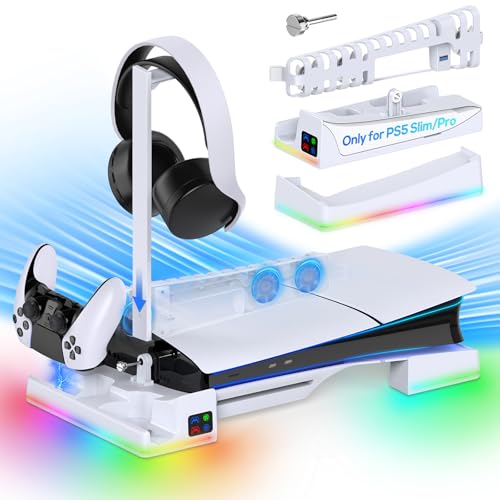
Horizontal mounts free up vertical space and let heat radiate in every direction rather than pooling upward. Auarte’s stand supports that orientation for the Slim and Pro, while adding 14 RGB modes, dual controller fast charging in roughly 3.5 hours, and a USB 3.0 passthrough.
Households with curious kids or pets appreciate the lower profile, since the console sits at a harder-to-tip height. The built-in chip protects against overcharging, so leaving controllers docked overnight is generally fine.
Well-Handled Touches
- 14 RGB modes including 9 monochrome, 1 rainbow, and 4 dynamic effects.
- Dual fast charging in about 3.5 hours with overcharge protection.
- Headset holder and USB 3.0 port included.
- Horizontal mount suits low media shelves and shared living rooms.
Soft Spots
- Not for the 2020 standard PS5, so check your model first.
- RGB modes are decorative; active cooling is moderate compared with a clip-on like the JUSPRO PS5 Slim Quiet Cooling Fan.
Who Will Love This
Slim or Pro owners in apartments, dorms, or shared spaces who want a horizontal setup with charging built in.
Where A Sibling Pick Shines
You need a vertical stand with stronger airflow, in which case the Lictin PS5 Cooling Station Stand with RGB is a closer match.
Matching The Right Cooling Setup To Your Console
Confirm Your PS5 Generation First
Every accessory in this list is built around a specific chassis, and mixing them up is the fastest way to end up with a part that does not seat correctly. The 2020 original PS5 has the largest body and uses an internal fan swap if you want internal cooling. The 2023 PS5 Slim is slimmer and accepts a different set of covers, stands, and clip-on coolers. The 2024 PS5 Pro is the newest and works with the most thermally demanding accessories. Before clicking through to any listing, match the model number on the bottom of your console to the compatibility list, since “fits all” rarely means every revision.
Decide Between Active And Passive Cooling
A passive cover, like the GRAUGEAR metal heat dissipation plate, relies on existing airflow and is best paired with a drive that already carries a heatsink. Active coolers, whether clip-on like the JUSPRO PS5 Pro Cooling Fan 4-Fan or stand-based like the Lictin dock, push or pull air with built-in fans. Gamer profiles that benefit most from active cooling include long-session RPG players and anyone in a room that runs warm during summer. Passive options suit quieter environments where you want minimal extra noise.
Think About Footprint And Orientation
Clip-on coolers keep your existing shelf space intact and travel well, while full stands expand the console’s footprint but consolidate charging, storage, and cooling into one unit. Horizontal stands like the Auarte RGB Cooling Stand suit low media consoles, while vertical stands like the OIVO PS5/Slim/Pro Stand and Cooling Station work in tighter shelving where the console stands tall. The trade-off is essentially a choice between a slimmer profile and a more complete accessory hub.
Plan For Maintenance
Filters, fans, and mesh covers all need a touch of attention over time. Dust filters like the ACIDALIE 4-pack can be lifted off and brushed down, while internal fans like the GRAUGEAR replacement call for a careful console opening. Owners in carpeted rooms or households with shedding pets tend to see the biggest benefit from regular cleaning, so a maintenance-friendly accessory pays for itself in long-term quiet operation.
Smart Buying Advice For PS5 Cooling
Where Shoppers Go Wrong
The most common misstep is buying the wrong generation of accessory. A Pro cooler that fits the larger top vent will not seat on a Slim, and a Slim stand will not cradle a Pro without wobble. Another frequent issue is layering too many coolers at once, which can short-circuit the airflow path the PS5 was designed around. Stick to one cooling approach per console for the cleanest results, and let the stock exhaust do the rest.
Where The Extra Money Goes
Higher-tier options tend to add more fans, smarter temperature sensing, or expanded storage and charging features. A premium pick like the JUSPRO PS5 Pro Cooling Fan 4-Fan earns its price with an automatic temperature sensor and a USB 3.0 passthrough, while a budget filter like the ACIDALIE pack trades electronics for simple mesh and stick-on placement. The upgrade is worth it for hot rooms and heavy play schedules, and less essential for casual gamers in climate-controlled spaces.
Frequently Asked Questions
Do external cooling fans actually lower PS5 temperatures?
External fans move additional air across the console’s vents, which can help in warm rooms or during long sessions. Real-world gains depend on room temperature, game load, and where the PS5 sits.
Can a cooling fan damage my PS5?
Clip-on and stand-based coolers do not touch internal components, so they are safe in normal use. Avoid blocking the stock exhaust, and keep the vents clear of stickers or mesh that could trap heat.
Should I get a filter, a cooler, or both?
Filters prevent buildup, while active coolers move air. Combining a small filter like the ACIDALIE 4-pack with a clip-on cooler covers both jobs without much extra cost.
Will a cooling fan void my PS5 warranty?
External accessories do not void the console warranty. Internal replacements, like the GRAUGEAR PS5 Internal Fan Replacement Kit, may affect coverage if you damage components during the swap.
Is a stand with RGB worth the extra space?
A stand-based dock makes sense when you also want charging, headset storage, and disc organization in one footprint. RGB is a personal preference, so the value depends on how much you use the lighting.
The Takeaway
Your console model, your room temperature, and your tolerance for extra gear should drive the choice more than any single spec sheet. Slim and Pro owners looking for quiet, all-in-one setups will gravitate toward the Lictin or OIVO docks, while original PS5 owners with aging fans may prefer the GRAUGEAR internal replacement. Pick the cooling style that matches your play habits, and your PS5 will thank you with quieter, cooler sessions for years to come.



