


A good flight sim setup starts when a mouse stops pretending to be a yoke. Serious pilots-in-training want hardware that responds like a real cockpit: weighted throttles, rudder pedals with actual travel, and switches you can find by feel during a crosswind landing. The controllers below cover everything from full HOTAS replicas to compact add-on quadrants, so you can match your rig to the aircraft you actually fly.
The Picks In Brief

ThrustMaster Hotas Warthog PC Bundle with TFRP Rudder (PC)

Logitech G Pro Flight Yoke & Rudder Pedals Bundle

Honeycomb Alpha Flight Controls Yoke & Switch Panel

Logitech G USB PRO Flight Rudder Pedals

Thrustmaster TPR Rudder Pedals (PC)
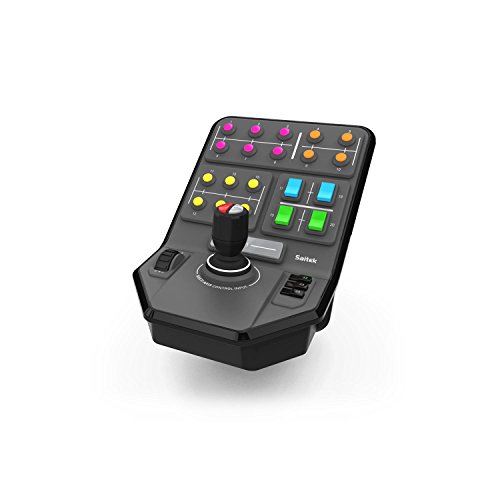
Logitech G PC Farm Sim Vehicle Side Panel

Cessna Style Vernier Controls by Flight Sim Stuff

Thrustmaster TCA Quadrant Add-On Airbus Edition (PC)

Honeycomb Bravo Throttle Quadrant
The Details Behind The Selections
Thrustmaster’s HOTAS Warthog is the kind of rig that turns a desk into a cockpit. It’s modeled after the U.S. Air Force A-10C controls, and the dual-throttle joystick, replica control panel, and bundled TFRP rudder pedals land on your table as one of the most committed aviation setups outside a purpose-built rig. For anyone who spends evenings flying DCS modules, this is the kit everything else gets compared to.
The detachable metal handle and detachable metal base plate matter more than they sound: they let you swap between a desk-mounted hand position and a cockpit-style mount without buying extras. The 19 action buttons plus an 8-way point-of-view hat give you enough inputs to cover a warbird’s hotas layout without leaning on keyboard shortcuts.
The Good Stuff
- All-metal construction across the joystick, throttle, and control panel gives it the kind of weight that doesn’t skate around mid-flight.
- 1:1 A-10C replica layout means muscle memory built here transfers straight to study-level DCS modules.
- Detachable handle and base plate let you reconfigure the rig as your sim space evolves.
- 19 action buttons plus an 8-way POV hat cover most combat-aircraft bindings without keyboard workarounds.
- Dual-throttle system with metal hand rest is ideal for multi-engine airliners and twin-rotor helicopters alike.
Things To Consider
- The all-metal weight means you may want a desk or mount rated for the load, especially once the TFRP pedals are added.
- PC-only by design, so console pilots will need to look elsewhere.
Key Product Details
Who Should Grab It
Combat-simmers and DCS pilots who want a setup that won’t need replacing for years, and who have the desk space (or a mount) to handle a heavy all-metal rig.
Look Elsewhere When
Airliner and GA pilots should consider the Logitech G Pro Flight Yoke & Rudder Pedals Bundle instead, since yokes and not sticks fit the cockpit feel of most civilian aircraft.
The Logitech G Pro Flight Yoke plus rudder pedal bundle is a sensible starting point for anyone whose dream flight is a Cessna down a narrow runway or an A320 in a holding pattern. Where the Warthog goes for military realism, this combo leans into the general-aviation and airliner world with a wheel-style yoke and a self-centering pedal set.
It’s the kind of setup you can grow into: the yoke has a POV hat, 14 buttons, and a 3-position mode switch that brings the configurable controls up to at least 54. The pedals add differential toe brakes, which is the small detail that makes taxiing and runway alignment feel honest rather than guesswork.
Points In Its Favor
- Yoke layout matches what you’d find in a real Cessna or Airbus, so muscle memory lines up with the aircraft you’re flying.
- Self-centering rudder pedals reduce hand correction and let you focus on crosswind technique.
- Adjustable foot rests with non-slip surfaces help during long-haul sim sessions.
- 54 programmable controls through the mode switch keep expanding buttons off your keyboard.
Worth Noting
- Plastic construction in key spots means a gentle mounting approach pays off over years of use.
- You may find the bundle’s footprint demands more desk space than a single joystick.
Whose Cockpit It Belongs In
GA pilots and aspiring airliner crews moving from a gamepad to a real-feeling yoke-and-pedal setup.
Skip It When
Combat sim pilots should look at the ThrustMaster Hotas Warthog PC Bundle instead, where a stick and throttle match the aircraft’s controls more naturally.
Honeycomb’s Alpha yoke is the refined middle ground between entry-level yokes and the heavy combat-hardware tier. The 180-degree rotation feels smooth because of a solid steel shaft riding on two linear ball bearings, which is the kind of detail you don’t appreciate until you’ve flown an ILS approach with it. A self-centering mechanism with no center detent keeps inputs predictable on long cross-countries.
The integrated switch panel, with main, alternator, avionics, and light switches plus a 5-position ignition, removes the need to remap a keyboard for startup procedures. Red LED backlighting on the panel keeps things readable during night flights without ruining dark-cockpit immersion.
Useful Touches
- Steel shaft and ball-bearing construction give the yoke a controlled, premium feel that holds up across years of use.
- 180-degree rotation covers the range most general-aviation aircraft actually use.
- Integrated switch panel trims keyboard dependence during startup and electrical-fire scenarios.
- Red backlighting supports night operations without flooding the cockpit with glare.
Room For Improvement
- Yoke-only setup, so you’ll still need separate rudder pedals and a throttle quadrant for a full single-engine experience.
- The switch panel is fixed in function, so complex airliner flows may need a separate radio stack.
Quick Facts
Right Fit For
Single-engine sim pilots flying Cessna and Piper workflows who want a smooth, durable yoke and don’t mind pairing it with a separate throttle and pedal set.
Consider Something Else When
Anyone who wants yoke, throttle, and pedals in one box should look at the Logitech G Pro Flight Yoke & Rudder Pedals Bundle instead.
These are the pedals most simmers add to their first joystick or yoke setup. The Logitech G USB PRO Flight Rudder Pedals give you self-centering action with adjustable damping, which is a small phrase that does a lot of work: it means the pedals return to neutral on their own and you can tune how much resistance they push back with.
Foot rests adjust to fit a wide range of leg lengths, and the non-slip surfaces keep your feet planted during braking. USB connectivity means a true plug-and-play experience on Windows machines, with no extra power bricks to chase.
Positive Takeaways
- Self-centering action removes the need to manually hold neutral on long cruise legs.
- Adjustable damping lets you tune pedal feel from light Cessna inputs to heavier transport-category rudder pressure.
- Non-slip foot rests adjust to a wide range of foot sizes, helping during multi-hour sessions.
- Partial metal construction supports years of sim use, with the contact points holding up to frequent toe-brake work.
Honest Caveats
- No differential toe brakes built in, so braking precision relies on software mapping.
- Plastic-dominant build keeps it light, which means it may slide on smooth floors without a mounting solution.
Feature Snapshot
Built With In Mind
First-time sim builders adding proper rudder control to a starter joystick or yoke without breaking the budget.
Another Choice May Suit
Sim pilots wanting more precise, magnetic-sensor pedal feel should look at the Thrustmaster TPR Rudder Pedals (PC) instead.
The Thrustmaster TPR Rudder Pedals are the upgrade path for sim pilots who started on budget pedals and want something with a more aircraft-like motion. The Pendul_r suspended mechanism lets the pedals swing in a fluid arc that mirrors how real rudder pedals move, rather than pivoting on a fixed hinge. The result feels less like a foot-controlled joystick and more like a flying surface.
Inside, H.E.A.R.T HallEffect magnetic sensors read your inputs without mechanical contact, so accuracy holds up over time even as the pedals see heavy use. For sim pilots running long-haul airliner routes where small rudder corrections add up, that consistency is the real win.
What Pays Off
- HallEffect magnetic sensors avoid the contact-wear that degrades potentiometer-based pedals over time.
- Pendul_r suspended mechanism produces smoother, more natural pedal travel than fixed-pivot designs.
- Compatible with Thrustmaster’s ecosystem, so it pairs naturally with HOTAS setups from the same brand.
Some Limits To Know
- PC-only compatibility rules out console sim pilots.
- Premium build comes at a cost well above entry-level pedal options, depending on the listing.
Spec Overview
Made For
Long-session sim pilots wanting a premium, durable pedal upgrade that pairs well with Thrustmaster joysticks and throttles.
Where A Sibling Pick Shines
Shoppers prioritizing lower cost over magnetic precision should consider the Logitech G USB PRO Flight Rudder Pedals instead.
This is the odd one out, and that’s exactly the point. The Logitech G PC Farm Sim Vehicle Side Panel isn’t a yoke or a joystick. It’s a side-mounted loader-stick controller with 6 axes of movement, 37 programmable buttons, and a set-and-forget cruise control dial. Anyone running farm sims with logging equipment and complex implements will recognize why that combination matters.
A heavy-duty clamp with screw-thread adjustment keeps the panel locked to your desk, even when the loader is fully extended in the simulation. You may find that running a logging trailer in a farm sim is the moment you realize how much your keyboard was holding you back.
Well-Handled Touches
- 6-axis loader stick captures the full range of motion needed for front-end loaders, forestry equipment, and skid steers.
- 37 programmable buttons cover complex implements without forcing nested key combos.
- Cruise control dial handles set-and-forget ground speed during fieldwork.
- Heavy-duty clamp holds steady during aggressive in-sim loader work.
Trade Offs
- Niche scope means it adds little to fixed-wing flight sim setups.
- Best paired with a separate stick, yoke, or wheel for actual driving roles.
Best Suited To
Farming and heavy-equipment sim enthusiasts looking for a dedicated control surface for loaders and complex implements.
A Better Fit Elsewhere
Anyone focused on aviation should consider the Honeycomb Alpha Flight Controls Yoke & Switch Panel for a more relevant input system.
Flight Sim Stuff’s Cessna Style Vernier Controls are built for the procedures that make a Cessna feel like a Cessna. The vernier prop and mixture controls twist for fine adjustments and push in for large ones, which is exactly how the real levers work. The throttle is a push-pull control with a friction lock nut, so you can set it and leave it during cruise.
A dedicated flaps rocker switch handles notch-by-notch deployment, with the switch auto-returning to center. The whole unit is driver-free on Windows and Mac, working out of the box with Microsoft Flight Simulator, X-Plane, and Prepar3D.
Practical Advantages
- True vernier-style prop and mixture controls replicate the fine-tuning workflow of a real Cessna panel.
- Push-pull throttle with friction lock supports stable cruise power settings.
- Flaps rocker with auto-center simplifies notch-by-notch configuration.
- No drivers required on Windows and Mac, so setup is minimal.
Possible Compromises
- Does not work with Xbox or PlayStation, so it’s strictly a PC desktop tool.
- Single-aircraft-style control set, so it pairs best with a yoke, stick, and pedals for full coverage.
Who Will Love This
GA pilots flying Cessna workflows in Microsoft Flight Simulator or X-Plane who want engine management to feel like the real thing.
Swap It Out When
Sim pilots flying multiple aircraft types should consider the Honeycomb Bravo Throttle Quadrant for broader multi-engine support.
The TCA Quadrant Add-On is an expansion piece rather than a standalone throttle, and it assumes you already own the matching TCA Quadrant Airbus Edition. Once paired, the add-on panel brings roughly 15 additional functions inspired by real Airbus airliner overheads and pedestal panels, putting more cockpit management under your fingertips without a separate button box.
The Airbus-style layout suits pilots who want their airliner workflow to mirror the real fly-by-wire environment. It’s a niche-but-deep piece, ideal for builders running an A320-style setup in Microsoft Flight Simulator or a payware airliner in P3D.
Where It Helps
- 15 additional Airbus-inspired functions expand an existing TCA rig without crowding the desktop.
- Realistic airliner panel layout supports authentic A320-family procedures.
- Plug-and-play with the matching Thrustmaster quadrant for a clean cable setup.
What To Weigh
- Requires the existing TCA Quadrant to function, so it’s not a standalone controller.
- PC-only by design, so console sim pilots are out of luck.
Made For
Airliner cockpit builders who already run a Thrustmaster TCA Quadrant and want to round out their Airbus-style panel.
Not Your Match When
Sim pilots flying a mix of airliners and GA should consider the Honeycomb Bravo Throttle Quadrant for broader aircraft support.
Honeycomb’s Bravo Throttle Quadrant is the most versatile throttle unit on this list, and probably on the market in its tier. The throttle setup is configurable from a single-engine Cessna all the way to a four-engine commercial airliner, with hardware that visually shifts to match the aircraft you’re flying.
On top of the throttle levers, the unit includes an autopilot panel, annunciator panel, gear and flap levers, and a trim wheel. The gear lever has red and green LED indicator lights, and the annunciator panel adds 7 two-way programmable switches plus 14 warning lights. It’s a small cockpit module disguised as a throttle.
Strengths Worth Knowing
- Configurable for single, twin, and four-engine aircraft, so one quadrant covers most of your hangar.
- Integrated autopilot and annunciator panel trim the need for a separate button box.
- LED gear indicator lights add visual feedback during landing-gear sequences.
- Trim wheel gives you the tactile input that trim-hat switches can’t match.
Honest Caveats
- Wider desktop footprint than a simple throttle lever, depending on your rig layout.
- Best paired with a separate yoke, stick, or pedals for full coverage.
Feature Rundown
Perfect Match For
Sim pilots who fly a variety of aircraft and want a single throttle module that adapts to single-engine, twin, and airliner cockpits.
Reach For A Different Pick When
Dedicated Cessna pilots chasing vernier-style realism may prefer the Flight Sim Stuff Cessna Style Vernier Controls instead.
What Matters Most Before Choosing Controllers For Flight Simulator
Match The Hardware To The Aircraft You Actually Fly
A stick and throttle setup feels right for warbirds, helicopters, and military jets because that’s what those cockpits use. A yoke fits Cessna, Piper, and Airbus workflows more naturally, because those aircraft have wheels, not sticks. Picking hardware that mirrors your aircraft’s real controls makes muscle memory transfer almost without thinking.
Decide What Role Each Input Plays
Most flight sim pilots run at minimum a primary control (yoke or stick), a throttle, and rudder pedals. The throttle and pedals are easy to skip at first, but they shape the realism of every takeoff, taxi, and crosswind landing. For most beginners, adding a rudder pedal set first tends to be a quick improvement.
Consider Your Mounting Situation
Heavy all-metal rigs like the Warthog want a desk or mount that can handle the weight. Lighter plastic yokes and side panels are easier to move but may slide during aggressive inputs. A heavy-duty clamp or a stable cockpit mount extends the life of any controller.
Plan For Compatibility And Software
Most modern flight sim controllers use USB and work with Microsoft Flight Simulator, X-Plane, and Prepar3D out of the box. Some, like the Cessna-style vernier controls and the TCA add-on, are PC-only. Check platform and connector details before adding to your rig, especially if you fly on multiple machines.
Key Considerations Across These Picks
Mistakes Worth Dodging
A common trap is buying a high-end HOTAS for general-aviation flying, where a yoke and throttle quadrant fit the workflow better. The reverse is also true: a yoke for DCS combat sim work tends to feel awkward. Match the controller family to the aircraft family before chasing specs.
Another easy slip is ignoring mounting. A heavy all-metal rig on a flimsy desk will walk around during maneuvers and may shorten the life of clamps and joints. Budget for a stable surface or a proper mount alongside the controller itself.
When Paying More Pays Off
The jump from entry-level to premium hardware shows up in sensor quality, construction materials, and component count. HallEffect magnetic sensors, all-metal bodies, and integrated switch panels justify the higher cost for sim pilots logging long hours. For casual flyers, mid-tier hardware often covers the experience without the premium price tag.
Frequently Asked Questions
What Is The Best Beginner Controller For Flight Sim?
A yoke and rudder pedal bundle like the Logitech G Pro Flight Yoke & Rudder Pedals is a strong starting point for most new sim pilots, since it covers both pitch control and foot rudder/brake in one setup.
Do I Need Rudder Pedals For Flight Sim?
Rudder pedals aren’t required, but they make coordinated turns, crosswind corrections, and differential braking far more realistic. They tend to be the first upgrade most sim pilots add after a primary control.
Are HOTAS Setups Only For Combat Sims?
HOTAS setups (Hands On Throttle And Stick) are designed around combat workflows, but some sim pilots use them for civilian aircraft too. Airliner and GA pilots, however, usually find yokes and throttles more intuitive.
Will These Controllers Work With Microsoft Flight Simulator 2024?
Most modern controllers in this list are designed to work with major flight sim platforms. Always check the current product listing for the latest sim compatibility before purchasing.
What Is A Vernier Control In A Cessna?
A vernier control is a fine-adjustment lever for prop or mixture settings. Twist the outer knob for small changes, push the lever in for large ones, just like the real aircraft’s panel.
Closing Remarks
Your simulator feels different once the controls match the cockpit. Pick the family of hardware that fits the aircraft you fly most, and add rudder pedals before you think you need them. The rest comes down to time in the seat.



