


A good fight pad is the difference between landing that dragon punch and watching your character get punished for half a second of input lag. Plenty of folks show up to ranked matches on whatever gamepad came in the box, then wonder why their combos feel mushy or why quarter-circles eat inputs. The picks below lean into what actually matters for fighters: low-latency buttons, layouts built for rapid directional motion, and builds that hold up to thousands of inputs a night.
The Shortlist At A Glance

uxcell Joystick Ball Top Handle 35mm Yellow 2-Pack

Retro-Bit SEGA Genesis 8-Button USB Wired Controller (Black)

Morostron Wireless Controller for PC, Steam, Switch, iOS, Android (White)
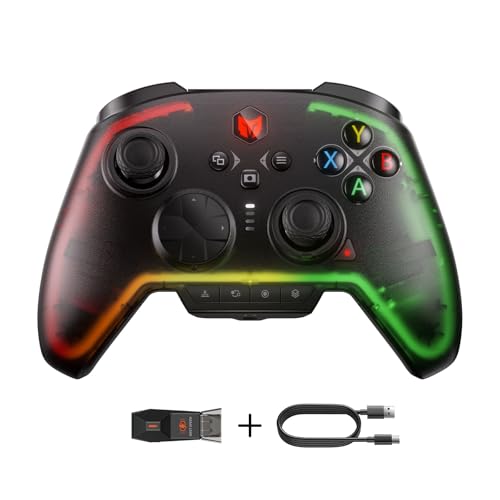
BIGBIG WON Rainbow 2 Pro Wireless PC Controller with Hall Triggers

BIGBIG WON Fight Master Leverless Controller with Hot-Swappable Switches

I-PAC 2 Arcade Game Controller Interface (IPAC2)

8Bitdo All-Button Arcade Wireless Controller for Switch and Windows
What Each Pick Brings To The Table
The uxcell ball tops start the list because they are not a controller, they are the part you swap onto one. The 35mm diameter and standard M6 threading mean they fit the vast majority of Japanese-style arcade joysticks already living in custom panels and tabletop enclosures. Two come in the box, so a two-player cabinet gets a matching pair without a second order.
Replacing a worn or cracked top is a five-minute job with no special tools, and the smooth round profile gives your palm a comfortable pivot point for shoryuken motion inputs. The bright yellow color also doubles as a visual anchor in a busy control layout, which helps when you are coaching a friend or running a stream overlay.
Useful Highlights
- M6 threading fits most arcade-style joysticks already in modder setups
- 35mm diameter lands in the comfortable range for most adult hands
- Two-pack keeps a two-player cabinet visually matched
- Ball top is simple to unscrew and swap when it wears out or cracks
Worth Noting
- These are joystick accessories, not a full controller, so you still need the stick shaft beneath
- Yellow finish can show scuffs after heavy tournament use, and replacement is a separate purchase
Whose Shelf It Belongs On
Anyone mid-cabinet build or refreshing an aging stick will get the most from this two-pack.
Consider Something Else When
Skip the ball tops and go straight to the BIGBIG WON Fight Master if you want a complete, ready-to-play leverless pad instead of a DIY project.
Retro-Bit’s officially licensed Genesis pad is a love letter to the six-button era that defined Street Fighter III, the Sega Saturn ports, and the entire 2D fighter library from the mid-1990s. Where the 3-button Genesis pad forced awkward button holds, this 8-button version gives you a clean three punch and three kick row that mirrors what the arcade cabinet actually had. For fighting game fans, that layout is more than nostalgia, it is functional.
USB connectivity covers PC, Mac, Steam, and the Sega Genesis Mini, and the controller also works with modern consoles like the Switch. Holding START for five seconds toggles between D-Input and X-Input, which matters because some emulators and front ends want one and not the other. The new L and R shoulder buttons add extra configuration room for modern remapping too.
What Stands Out
- Six-button face layout mirrors the arcade panels fighters were designed around
- Officially licensed build carries the original SEGA Genesis silhouette
- D-Input and X-Input switching expands emulator and PC compatibility
- Shoulder buttons add modern remapping options for newer titles
Points To Note
- D-pad only, no analog stick, so 3D fighters and modern movement feel off
- Wired design means cable management matters on a crowded desk
Quick Facts
Right Fit For
Retro fighter fans replaying Saturn and arcade ports on PC or the Genesis Mini will appreciate the six-button layout the most.
Swap It Out When
Pick the BIGBIG WON Rainbow 2 Pro instead if you mostly play modern 3D fighters or platformers that benefit from dual analog sticks and Hall-effect precision.
The Morostron is a controller trying to be a Swiss Army knife. It pairs with PC, Steam, Switch, Switch 2, iOS, and Android through a mix of wired, Bluetooth, and a 2.4G wireless adapter, so the same pad can travel from a desktop Steam session to a Switch dock to a phone running a cloud-streamed fighter. Hall-effect sticks (joysticks that use magnetic sensors rather than physical potentiometers, which means less stick drift over time) sit behind the usual D-pad and face button layout.
The 2-inch interactive screen on the front is the most distinctive touch. It shows connection status, battery level, and can surface settings without opening a software suite. For fighting game sessions that often run hours, the 1200mAh battery gives you more time on the couch between charges, and RGB lighting adds a little visual flair in dim rooms.
Key Advantages
- Multi-platform support covers PC, mobile, and Switch from a single pad
- Hall-effect sticks reduce the long-term drift that plagues analog gamepads
- Onboard interactive screen keeps settings one glance away
- 1200mAh battery handles long ranked sessions without a mid-match recharge
Honest Caveats
- Does not work with Xbox, PlayStation, or GeForce NOW, so the multi-platform promise has real gaps
- The interactive screen adds a learning curve, and it is the first component that feels unfamiliar to long-time fight stick users
Who It Suits Best
Players bouncing between a desktop tower, a Switch, and a phone cloud-streaming service will get the most from the multi-platform reach.
A Better Fit Elsewhere
Choose the 8Bitdo All-Button Arcade Wireless Controller if you want a purpose-built leverless fighter rather than a do-everything pad with analog sticks.
The Rainbow 2 Pro is BIGBIG WON’s answer for PC players who want modern conveniences without giving up the familiar gamepad silhouette. Hall-effect triggers (analog triggers that use magnetic sensing, which means no wear-based input drift) sit behind the bumpers, and ALPS joystick hardware delivers a tight return-to-center feel that matters when you are buffering quarter-circle inputs in a fast combo. Compared to the Retro-Bit pad reviewed earlier, this one trades the six-button face layout for full modern ergonomics.
Two remappable back buttons sit on the rear, and two more custom keys live on the top edge, giving you a healthy pool of inputs to assign without lifting your thumbs off the sticks. Motion aiming, Turbo, and Macro functions cover the kinds of automated inputs that come up in training modes. RGB lighting and 3.5mm audio support round out the package for streamers and headset users.
The Practical Payoff
- Hall-effect triggers and ALPS joystick extend the pad’s service life against stick drift
- Four remappable buttons keep complex combos within thumb reach
- 3.5mm audio jack means no dongle gymnastics for wired headset owners
- Bluetooth, 2.4G, and wired modes cover Switch, PC, Android, and iOS
Small Caveats
- Battery and charging speed sit in the average range for the category, so heavy users will still want a top-up between long sessions
- The ELITE companion app for deeper remapping only works on PC, which limits how much you can tweak from the Switch side
Feature Snapshot
Made For
PC and Switch players who log daily ranked sessions and want premium internals without paying premium console-branded prices.
Reach For A Different Pick When
Go for the BIGBIG WON Fight Master if your main goal is leverless input execution rather than a traditional gamepad shape.
The Fight Master is a leverless controller, meaning it has no joystick at all. Instead, four oversized direction buttons let you input quarter-circles, half-circles, and dragon punch motions with your fingers rather than a stick throw. For serious fighting game players, the leverless format has become the layout of choice at top-level tournaments because it removes the mechanical slop of a stick’s gate. The five-shape button cluster, with convex, flat, and angled caps, is tuned for blind-touch accuracy so your eyes stay on the screen.
Hot-swappable mechanical switches (the small clicky components under each button that you can pull out and replace without soldering) let you swap the feel of the buttons. Some players want linear switches for fast double-taps; others want clicky switches for confident confirmation. Bluetooth, 2.4G wireless, and USB-C wired modes cover the full device list, and the RGB underglow keeps the look competitive-friendly without being gaudy.
The Value In It
- Leverless design removes the stick gate, which is the most common source of missed motion inputs
- Hot-swappable switches let you tune the click feel without a soldering iron
- Five-shape button cluster supports rolling and sliding inputs with confidence
- Tri-mode connectivity covers Switch 2, PC, iOS, and Android from one pad
A Few Limitations
- Switching from a stick to a leverless layout takes a real adjustment period, often a few weeks of training mode
- Spare switch sets for hot-swapping are a separate purchase if you want to experiment with different feel
Feature Card
Best Suited To
Competitive players who have already committed to a leverless workflow and want fast-trigger mechanical switches they can swap on the fly.
Not Your Match When
Pick the 8Bitdo All-Button Arcade Wireless Controller if you want a slimmer, more travel-friendly leverless pad without the RGB and hot-swap complexity.
The I-PAC 2 is not a controller you hold, it is the brain inside one. The IPAC2 is a USB encoder board that lives behind the buttons and joysticks of a custom arcade cabinet, translating each input into standard keyboard or gamepad signals your PC reads natively. Two players get full support: each side has its own joystick, eight action buttons, plus dedicated coin and start buttons.
For cabinet builders, the big draw is the SpinTrak Spinner and U-Trak Trackball support, which lets you wire up the rotary and trackball controls used by classic shmups and puzzle fighters. The board shows up as a generic keyboard, so configuration happens in your emulator or front end, not on the device itself. Wiring is the time-consuming part, and the seller notes that most “broken” returns are actually wiring or config issues rather than board failures.
Everyday Perks
- Two-player layout covers a full cabinet’s worth of inputs on one board
- Native SpinTrak and U-Trak support for rotary and trackball games
- Reports as a standard USB keyboard, so no driver hunting is required
- Solid platform for long-term cabinet builds that need stable input behavior
Trade-Offs
- Wiring a cabinet takes time, and most issues are config-related rather than board defects
- Requires a separate joystick, buttons, and enclosure, so the total project cost adds up fast
Core Details
Who Should Grab It
Cabinet builders who want a proven encoder board that handles two players and the spinners and trackballs older arcade games need.
Where Another Pick Suits Better
Grab the BIGBIG WON Fight Master if you want a finished, playable controller instead of an encoder board that still needs every other component.
The 8Bitdo All-Button Arcade lands at the end of the list as the leverless pad designed for players on the move. It is roughly the size of an A4 sheet of paper and about 1.6cm thin, which is roughly a third the depth of 8Bitdo’s larger arcade stick. A flat controller slides into a laptop bag the same way a sketchbook does, which matters if you commute to weekly locals or grind on hotel-room TVs during travel weeks.
Connection covers Bluetooth to the Switch family, 2.4G to Windows, or wired to either. SOCD cleaning (Simultaneous Opposing Cardinal Directions: a feature that resolves inputs like up and down at the same time, a common combo tool) and tournament lock are baked in, so the pad can travel from casual play to bracket without a settings overhaul. Programmable buttons on the P1 through P4 cluster let you remap on the fly, and the magnetic foldable feet prop the pad at a comfortable typing angle on a desk or tray table.
A Strong Showing
- 1.6cm thin profile is the easiest leverless pad to pack for travel
- Built-in SOCD cleaning and tournament lock keep it bracket-legal out of the box
- Dynamic button layout shifts when toggling between Switch and PC input modes
- Magnetic foldable feet tilt the pad for desk or lap play
Possible Compromises
- Low-profile switches feel shallower than the BIGBIG WON Fight Master’s mechanical switches, which some competitive players find less satisfying for heavy hits
- The thin design means there is no internal weight, so hard inputs can nudge the pad on a smooth tabletop
Who Will Love This
Tournament players who fly, train, or commute regularly and want a slim leverless pad that disappears into a bag.
Look Elsewhere When
Choose the BIGBIG WON Fight Master if home setup is your main environment and you want hot-swappable switches and a deeper, weighted build.
Choosing The Right Fight Pad For Your Setup
The “right” controller is rarely the one with the most buttons. It is the one whose layout matches the games you play and the input style you have trained on. Players who grew up on a Saturn or arcade panel often find a six-button face layout more comfortable than a modern twin-stick pad, while players used to console controllers transition more easily to fight sticks that keep the analog stick or to leverless pads that mimic the same motion input with finger buttons.
Compatibility tends to be the first wall. Cross-platform players need to confirm the pad actually talks to the Switch family, PC, and mobile, because some multi-platform pads skip Xbox, PlayStation, or specific cloud services. Travel-friendly pads should also support wired mode, since tournament setups often ban Bluetooth in bracket play. Build material matters more than people expect, too. ABS plastic housings are light but creak over time, while reinforced shells and metal mounting plates tend to survive a tournament road case better.
For casual players, a feature-rich pad with motion controls, RGB, and onboard screens is fun but rarely necessary. For serious players, the leverless format is worth serious consideration. Removing the joystick removes the gate that causes most missed motion inputs, but it requires a real adjustment period in training mode before ranked play feels natural again.
Key Considerations Across These Picks
Pitfalls Shoppers Hit
The most common mistake is buying a controller based on the number of features listed rather than the layout. A pad with twenty extra buttons means nothing if the four direction inputs feel sloppy, because direction quality drives combo execution in every 2D fighter. A close second is ignoring platform support. Some pads look universal on the box but skip specific consoles or cloud services, leaving you with a controller that works for one game in your library.
Where The Extra Money Goes
Higher-tier pads tend to put the budget into Hall-effect sticks and triggers, hot-swappable switches, and reinforced enclosures rather than cosmetic features. For a player who logs serious ranked hours, those internals reduce stick drift and keep the pad feeling consistent across years. For a casual player, the same upgrade often does not pay back, because the wear simply never shows up in lighter use. The honest call is to size the spend to the hours you actually play.
Frequently Asked Questions
Are leverless controllers better for fighting games?
Leverless pads remove the joystick, which removes the gate that causes many missed motion inputs. They require a real training adjustment but tend to suit players who already execute clean motions with their fingers.
Do I need Hall-effect sticks for fighting games?
Hall-effect sticks (magnetic sensors instead of physical contact points) last longer and resist stick drift, which matters in a controller you will mash on for thousands of hours. Casual players can skip them, but daily grinders tend to appreciate them.
Will a six-button controller work on PC?
Yes, as long as the pad reports as a standard gamepad or keyboard. Most modern six-button pads handle PC fighters without remapping, though you may want a profile in Steam for the cleanest binding.
Can I use a wireless controller in tournament play?
Many tournaments ban Bluetooth specifically because of latency. Check the rule set for the pad’s wired option, and expect to plug in during bracket even if you practice wirelessly.
Is a custom arcade cabinet worth the cost over a fight stick?
Cabinets offer a fuller two-player experience and arcade-accurate control spacing, but the build time and total cost are much higher. A fight stick is a faster path to most of the same gameplay gains.



