


A solid gaming setup starts with the surface underneath everything. A desk that wobbles, overheats, or forces you to choose between a second monitor and your speaker pair is going to bite you within a week. The right frame keeps your gear stable, your cable management sane, and your room from feeling like a server closet.
Whether you stream from a corner office, chase ladder ranks in a bedroom, or split time between work and play, the nine picks below cover the main scenarios. Some prioritize width, others focus on tight corners, and a few lean into industrial styling. Each entry calls out what works, what doesn’t, and who it’s really for.
A Closer Look At The Lineup

Pamray 58 Inch Gaming Computer Desk with Monitor Stand
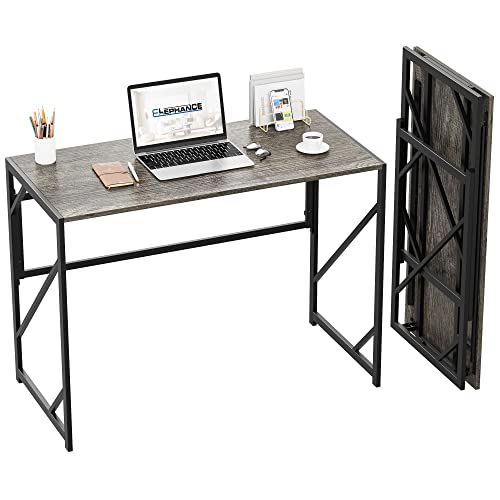
Elephance Folding Desk No-Assembly Computer Desk

EUREKA ERGONOMIC 60 Inch Gaming Desk with RGB

Bestier 42-Inch L-Shaped Computer Desk Black

Bestier 42-Inch L-Shaped Computer Desk White

FATORRI L Shaped Industrial Reversible Desk Walnut Brown 59 Inch

Bestier 42-Inch Pink L-Shaped Gaming Desk with LED

Pamray 71 Inch U Shaped Gaming Desk with Power Outlets

Aquzee Computer Desk with Shelves and Hutch 47 Inch
What Each Pick Brings To The Table
Most 58-inch gaming desks give you a slab and a leg frame. This one adds a built-in monitor shelf, a pair of drawers, and two open side cubbies, which means your keyboard tray, headset, and stream deck all have a home. The raised monitor stand puts the screen closer to eye level without forcing you to buy a separate riser.
It’s a sensible middle ground if you want a ready-to-go setup on day one. Owners with smaller streaming rigs should find the storage plentiful without making the footprint overwhelming for a 10-by-10 room.
Good Reasons To Consider
- Two drawers and two open shelves keep controllers, cables, and small accessories within reach instead of buried in a closet bin.
- Built-in monitor stand lifts your display roughly to eye level, easing neck strain during long sessions.
- Full 58-inch surface fits a widescreen monitor plus speakers without constant shuffling.
- Adjustable shelf height lets you tune cubby spacing for taller gear like a small PC tower or stack of art books.
Things To Weigh Up
- The particle-board construction holds up fine, but you may notice minor wobble if you lean on the edge during intense mouse work.
- Assembly is a longer project than a folding frame like the Elephance option later in this list.
Who It Suits Best
Streamers and competitive players running a full monitor-plus-accessory setup who want storage and a monitor riser in a single piece of furniture.
Where Another Pick Suits Better
Shoppers with a smaller corner and a tighter gear list will find the Bestier 42-Inch L-Shaped Computer Desk in Black fits their room footprint far more comfortably.
You open the box and start playing. The Elephance folding desk ships fully assembled, so the heaviest part of ownership is tearing the packaging off. At 40.6 by 19.7 inches, it’s a compact writing surface, and the P2-class particle board (a low-formaldehyde engineered wood standard) sits on a thicker I-shaped steel frame for rigidity.
This is the pick for anyone whose gaming spot is temporary, whether that’s a dorm, a short-term rental, or a room you share with someone who needs the floor space back. Folding it flat and sliding it behind a door takes about a minute.
Real-World Strengths
- Zero assembly means you can game the same evening it arrives.
- Folds down thin for closet or under-bed storage when the room needs to double as something else.
- I-shaped steel frame adds more stability than you’d expect from a folding design.
- Small footprint suits tight rooms where 58-inch desks simply won’t fit.
Honest Caveats
- 40-inch width is fine for a single monitor and a laptop, but a triple-display rig will feel cramped.
- No integrated cable management, so you’ll want to add your own clips or sleeves.
- Particle board is durable indoors but tends to swell at the edges if it sits in a humid basement.
Right Fit For
Renters, students, and anyone who needs a real desk today but might not need one in the same spot in six months.
Look Elsewhere When
Hardcore multi-monitor battlestations should jump to the EUREKA ERGONOMIC 60 Inch Gaming Desk for the surface real estate.
Sixty inches of surface and a Z-shaped metal frame that won’t shimmy when you snap-aim in a shooter. The EUREKA ERGONOMIC gaming desk covers the full RGB-lighting angle, with a strip that runs along the front edge for late-night sessions. Leveling feet keep the frame planted on older hardwood or slightly uneven rugs.
It’s a strong step up from the Pamray 58-inch model if your gear list includes a second monitor, a microphone arm, and a pair of bookshelf speakers. You can spread the kit across the full surface without constant rearranging.
Practical Pluses
- 60-inch top fits dual monitors, a streaming camera, and a full keyboard plus mousepad without crowding.
- RGB strip adds ambient lighting that pairs well with bias lighting behind the monitor.
- Z-shaped legs transfer weight to the floor rather than the tabletop, reducing flex during aggressive mouse movement.
- Leveling feet correct for slightly uneven floors that would rock a standard frame.
Trade-Offs
- RGB needs a power source for the strip, which means another cable run to your surge protector.
- At 60 inches, you’ll want to measure your wall before ordering, since a snug fit can turn into a problem fast.
Best Suited To
Multi-monitor gamers and streamers who want the lighting and width to run a serious production rig from a single desk.
Skip It When
Anyone working with a corner layout and limited floor space should pivot to the Bestier 42-Inch L-Shaped Computer Desk in Black for a room-friendly alternative.
An L-shaped desk earns its footprint by turning an unused corner into two working surfaces. The 42-inch Bestier tucks into bedrooms, kids’ rooms, and small apartments where a straight desk of the same length would block a closet or door swing. The black finish keeps the visual weight low against dark walls.
If you split time between a gaming PC and a laptop, the two wings solve a real problem. Drop the tower on one side, your monitor and keyboard on the other, and you keep the second screen for notes or a chat window.
What Pays Off
- 42-inch corner footprint leaves floor space free for a chair with a wide base or a small exercise area.
- L-shape separates your gaming zone from your work zone on the same desk.
- Lower visual profile than lighter color options, helping the room feel more grown-up.
Worth Noting
- Smaller surface per side than a 58-inch straight desk, so triple-monitor builds won’t work here.
- Corner placement means cable runs to wall outlets may need longer extensions.
Made For
Gamers in bedrooms or studios who need a clean corner layout without sacrificing the L-shape advantage.
Swap It Out When
Anyone who needs a third monitor or a wider primary surface should consider the Pamray 71 Inch U Shaped Gaming Desk for more room across the board.
Same L-shape footprint as the black version, finished in white for brighter rooms. The Bestier 42-inch white desk also adds an LED strip with multiple colors and modes, plus built-in power outlets and a USB port to keep devices charged without crawling under the desk.
For a setup where the desk itself is part of the room’s look, this one pulls more visual weight than the black sibling. You get a color that bounces light around a darker space and a charging station built into the frame.
Advantages To Know
- White finish brightens dim rooms and pairs well with pastel or minimalist decor.
- Built-in LED strip lets you dial in ambient lighting without buying a separate kit.
- Integrated AC outlets and USB ports remove the need for a bulky power strip on the floor.
- L-shape geometry fits naturally into corners, freeing up the center of small rooms.
Smaller Limitations
- White surfaces show dust, scuffs, and coffee rings more readily than darker finishes.
- LED mode controls sit on the desk, so you’ll want to plan where to mount the small remote.
Perfect Match For
Design-conscious gamers in studio apartments or content creators who shoot video at their desk and want a bright, photogenic setup.
Another Choice May Suit
For an industrial wood-and-metal aesthetic instead of bright white, the FATORRI L Shaped Industrial Desk in walnut brown delivers a different visual feel.
Walnut brown shelves sit on a black metal frame for a workshop look that reads more grown-up than RGB-heavy options. The FATORRI L-shape reverses during assembly, so the storage shelves can land on the left or right depending on your room’s wiring and lighting.
This one’s a natural fit for a basement battlestation or a room where you want the desk to feel like furniture, not gear. The wood tones pair with exposed brick, leather chairs, and warmer floor lamps.
Points In Its Favor
- Reversible layout lets you choose which side faces the wall, which is huge in rooms with off-center outlets.
- Wood-and-metal materials look like furniture rather than gaming gear, fitting loft apartments and home offices.
- 59-inch main surface handles a triple-monitor setup with breathing room.
- Adjustable shelves give you flexibility for PC towers, books, or a printer.
Room For Improvement
- No built-in LED lighting or charging ports, so you’ll add your own power strip.
- Walnut finish shows fingerprints less than gloss but still benefits from occasional dusting.
Core Details
Who Will Love This
Anyone building a mature, wood-toned battlestation that doubles as a working home office, especially in a loft or finished basement.
Reach For A Different Pick When
Gamers who want built-in RGB and charging should look at the Bestier 42-Inch L-Shaped Computer Desk in White for those features in a brighter finish.
Soft pink finish, L-shape footprint, and a built-in power strip rated for everyday electronics. The Bestier pink version of the 42-inch L brings the same compact corner geometry as its black and white siblings, but with a finish that reads more personality than utility.
This is the desk for a bedroom where the gaming setup is part of the room’s decor, not a corner bolted on. The pink tone pairs with soft LED lighting, warm white walls, and pastel peripherals without clashing.
Where It Excels
- Distinctive pink finish makes the desk a feature of the room rather than a utility piece.
- Built-in power outlets and USB-C ports reduce cord clutter for streamers running multiple devices.
- 42-inch L-shape fits the same small-room footprint as the black and white Bestier options.
Points To Note
- Bold color limits how easily you can swap decor later without repainting or replacing the desk.
- Same 42-inch surface as the other Bestier L-shapes, so multi-monitor ambitions need a different pick.
Built With In Mind
Gamers who want their setup to express a personal style and don’t mind a room-defining color choice.
Not Your Match When
Shoppers who want a more neutral, mature finish should pivot to the FATORRI L Shaped Industrial Desk for a wood-and-metal alternative.
Three connected desktops wrap a corner to give you 71 inches of usable surface. The Pamray U-shape splits the work logically: one wing for the gaming PC and primary monitor, another for streaming gear or a second rig, and the third for writing, sketching, or a laptop. Built-in power outlets and USB charging ports run along the frame.
You commit real floor space for this kind of layout, but in return you get clear zone separation without owning two desks. Creators who edit, game, and write from the same room get a sensible workflow built into the furniture.
Key Advantages
- Three surfaces let you separate gaming, work, and creative zones without multiple desks.
- Integrated power outlets and USB ports remove the need for a sprawling power strip.
- 71 inches of total surface handles multi-monitor, dual-PC, and streaming-cam rigs.
- U-shape wraps the user, keeping frequently used gear within arm’s reach.
Worth Bearing In Mind
- Requires a large, mostly empty corner, so smaller rooms will feel cramped around the frame.
- More parts during assembly than a single-surface desk, so budget extra setup time.
Feature Snapshot
Whose Shelf It Belongs On
Multi-zone creators, streamers, and serious enthusiasts who want a permanent command center and have the corner space to support it.
Consider Something Else When
Anyone working with a smaller bedroom or apartment footprint should look at the EUREKA ERGONOMIC 60 Inch Gaming Desk for a wide single surface with less commitment.
Three open shelves above the work surface turn the Aquzee 47-inch desk into a small command station for books, plants, and decor alongside your monitor. The hutch keeps the upper tier within easy reach, so reference materials sit at eye level instead of stacked beside the keyboard.
It’s a strong pick for a hybrid work-and-game space where books, reference guides, or a small collection of figures matter as much as the gaming rig. The straight 47-inch surface is wide enough for a single monitor and a laptop side by side.
What Makes Sense
- Three open hutch shelves put books, plants, or collectibles at eye level instead of buried in a closet.
- 47-inch top fits a single monitor plus a laptop or notebook without crowding.
- Open shelving style lets you grab a controller or peripheral without opening a drawer.
- Works well as a combined gaming-and-study desk for students and remote workers.
Potential Drawbacks
- Open shelves collect dust faster than closed cabinets, so plan a quick wipe-down into your routine.
- 47-inch width is comfortable for one monitor, but dual-display users will feel the pinch.
The Right Fit
Students, remote workers, and hobbyist gamers who want shelf space and a single-screen setup in a tidy, neutral design.
A Better Fit Elsewhere
For a room anchored around multi-monitor gaming, the EUREKA ERGONOMIC 60 Inch Gaming Desk gives you the wider surface this Aquzee model can’t.
Matching Your Space To The Right Frame
Picking a gaming desk comes down to three questions. First, how much floor can you commit. U-shaped and 60-inch-plus desks reward open layouts, while 42-inch L-shapes thrive in corners. Second, how much gear lives on the surface. Dual-monitor streamers should prioritize width and a stable frame like the EUREKA ERGONOMIC, while a single-monitor plus laptop setup fits the Aquzee or Bestier L-shapes comfortably. Third, what role the desk plays in the room. A bold pink or RGB-lit option reads as part of the decor, while a walnut industrial frame blends into more mature spaces.
Frame material matters too. Particle-board tops keep cost down and work fine for light-to-moderate setups, but you may notice more flex if you lean on the edge during competitive play. Metal-framed desks transfer weight to the floor instead of the tabletop, which helps with mouse accuracy. Built-in cable management, integrated power outlets, and adjustable shelves aren’t always necessary, but they remove a handful of small annoyances that add up over months of daily use.
What To Watch Before You Commit
Traps First Timers Fall Into
A common slip is choosing by width alone. A 60-inch desk feels right on a spec sheet, then arrives and overwhelms a small room, leaving no chair clearance or floor for a PC tower. Measure the available wall, then measure the chair’s footprint, before settling on a size. Another mistake is ignoring cable runs. A corner desk may sit on the wrong side of your outlets, forcing extension cords across the floor. Finally, don’t skip the weight of the frame. Particle-board tops on thin legs can wobble during aggressive mouse movement, especially on a plush rug.
Where The Extra Money Goes
Stepping up to a wider desk with a metal frame, integrated power outlets, and a built-in LED strip adds real capability. You get a sturdier surface, fewer cables snaking across the floor, and lighting that ties the room together. The trade-off is more parts to assemble and more money up front, but the day-to-day ownership feels less improvised. For most shoppers, a mid-tier L-shape with a power strip built in hits the balance between cost and convenience, while the heavy-duty U-shape pays off only when the room can host it.
Frequently Asked Questions
How Wide Should A Gaming Desk Be?
A 42-inch desk works for single-monitor gaming or a laptop-plus-screen setup. For dual monitors or a wide ultrawide display, a 55-to-60-inch surface keeps the mouse and keyboard from feeling crowded. Triples typically need a 60-plus-inch surface or a U-shaped layout.
Do I Need RGB Lighting On A Gaming Desk?
RGB lighting is optional, and it adds visual flair more than performance. Useful bias lighting behind the monitor can reduce eye strain, but you can achieve the same effect with a separate LED strip mounted on the wall behind the display.
Are L-Shaped Desks Good For Gaming?
L-shaped desks work well when you split time between a gaming PC and a laptop, or want a dedicated streaming zone. The corner layout keeps frequently used gear within reach, though a 42-inch L-shape has less continuous surface than a 60-inch straight desk for triple-monitor rigs.
How Important Is A Metal Frame On A Gaming Desk?
A metal frame keeps the desk stable during fast mouse movements and supports heavier monitor arrays without flexing. Particle-board tops on thin metal legs can wobble, while thicker Z-shaped or I-shaped frames stay planted even when you lean on the edge.
Do Gaming Desks Need Built-In Power Outlets?
Built-in outlets and USB ports aren’t required, but they reduce cable clutter and remove the need for a separate power strip on the floor. They matter most if you run a lot of peripherals or charge devices at the desk throughout the day.
The Takeaway
The best gaming desk is the one that fits your room, your gear count, and how you actually use the space. A 42-inch L-shape covers a small bedroom, a 60-inch straight desk handles multi-monitor setups, and a 71-inch U-shape rewards a room you can dedicate to the hobby. Pick the frame that matches your floor plan, then layer in the features that genuinely save you cable runs or shelf space. The right surface quietly disappears into your routine, and that’s exactly what you want from a piece of furniture you use every day.



