


Whether you’re a virtual pilot chasing IFR approaches in Microsoft Flight Simulator, a trucker hauling cargo through the Alps, or a farmer juggling implements across a virtual valley, the right physical controls change everything. Fumbling with a keyboard mid-approach kills immersion, and a mouse just doesn’t feel right when you need to adjust throttle while trimming the elevator. Button boxes and dedicated panels bring your simulator cockpit to life, putting real switches, rotary encoders, and toggles at your fingertips. After comparing the layout, build quality, mounting options, and software compatibility of nine popular options, here are the picks worth your attention.
The Main Contenders
PXN CB1 Sim Racing Button Box PC
PXN CB1 Button Box Side Panel

PXN CB1 Programmable Sim Panel
PXN CB1 PC Sim Racing Button Box

Honeycomb Alpha Yoke & Switch Panel

OCTAVI IFR-1 All-in-one Cockpit
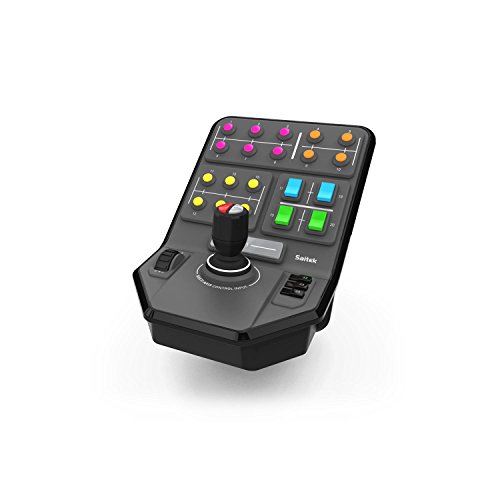
Logitech G Farm Sim Side Panel

Cessna Vernier Throttle/Prop/Mixture
Thrustmaster T-Flight Hotas X
The Picks, Examined More Closely
The PXN CB1 entry-level panel brings serious tactile variety to a desktop sim setup without demanding desk depth. It packs 19 physical controls spanning 9 input types: pushable rotary encoders (rotating knobs you can also press down), momentary and latching buttons, covered and uncovered toggles, a directional joystick, plus dedicated engine start and function keys. That spread means you can map gear, flaps, ignition, lights, and a rotary trim wheel all in one place.
Setup is genuinely plug-and-play on PC, with mapping handled inside your sim software. For cockpit builders running a mixed racing-and-flight library, the layout feels more versatile than a racing-specific grid.
The Value In It
- 9 input types give you knobs, toggles, joystick, and buttons under one panel
- Up to 30 programmable inputs cover trim wheels, comms, and pit functions
- No driver install needed, mapped through your sim’s own settings
- Switch and joystick variety helps both racers and pilots
Things To Consider
- Mapping every input takes patience during the first sim session
- Plastic chassis feels lighter than metal alternatives
Who It Suits Best
PC sim hobbyists wanting one panel for both racing and flight without buying two separate units.
Where Another Pick Suits Better
GA flight purists chasing real vernier throttle feel will prefer the Cessna Style Vernier Controls later in this list.
This side-panel variant of the PXN CB1 is shaped specifically to mount to a wheel stand, freeing up desk space while putting more switches within thumb’s reach. Nine mounting holes on the back, plus included metal clamps rated for surfaces up to 70mm thick, make installation flexible. VESA-friendly 100x100mm hole spacing also lets you bolt it to a monitor arm or stand.
Most buttons (except the directional joystick) carry RGB halo rings, adjustable via the HANDLE plus ABS/TC combo, and a rear switch kills the lighting entirely for daytime flying.
The Case For It
- Clamp system grips wheel stands and desks up to 70mm
- RGB rings help you locate switches in low-light cockpit sessions
- 19-button layout mirrors the standalone CB1 you’re already familiar with
- VESA 100×100 mounting opens up monitor-arm placement
Worth Noting
- Clamps suit tubular stands better than flat aluminum extrusions
- RGB customization takes a small learning curve for first-time users
Feature Snapshot
Made For
Wheel-stand cockpit owners who want their controls integrated into the rig rather than cluttering the desk.
Not Your Match When
You need a panel that lives alone on a bare desktop, where the standalone OCTAVI IFR-1 serves a different role.
Functionally similar to the first PXN CB1 we covered, this revision leans into the customization side of the panel. The headline number is 30 programmable inputs across the 19 physical controls, letting you assign secondary functions like shift layers for engine start, lights, traction, and auxiliaries. The full switch roster includes two pushable rotary encoders, a directional joystick, momentary and latching buttons, and a covered ignition toggle for that satisfying flip-guarded start sequence.
USB connectivity is driver-free on PC, so you plug it in and map through your sim software. RGB halos surround most buttons and can be adjusted with the HANDLE plus ABS/TC key combo.
Good Reasons To Consider
- 30 programmable inputs handle complex sim bindings
- Pushable rotary encoders double as trim wheels or radio tuners
- Engine start button with cover adds theater to ignition
- Plug-and-play USB works without hunting for drivers
Trade Offs
- Initial mapping in your sim software takes time and patience
- Lacks a dedicated radio stack layout for hardcore IFR pilots
Right Fit For
PC sim fans who enjoy fine-tuning key bindings and want a single panel that can serve multiple sim titles.
Look Elsewhere When
Your flying is IFR-heavy and you want real COM/NAV radio stack hardware, where the OCTAVI IFR-1 pulls ahead.
Another PXN CB1 variant, this one emphasizes broader sim title compatibility across racing and flight libraries. It pairs natively with the PXN V9 Gen2 wheel ecosystem but also runs as a standalone USB game controller, so you’re not locked into one hardware family. The switch layout is identical to the other CB1 units: 19 physical controls across 9 input types, with up to 30 programmable inputs available through your sim software’s mapping tools.
For people who switch between Assetto Corsa, iRacing, Project Cars, Euro Truck Simulator 2, and American Truck Simulator on the same rig, the same panel layout works across all of them.
Strong Points
- Works as standalone USB controller or with PXN V9 Gen2 wheels
- Recognized by major racing and trucking sim titles
- Identical 19-control layout for muscle-memory consistency
- No driver installation needed on modern Windows
Room For Improvement
- Flight sim mapping relies on in-game binding menus
- Same plastic build as the other CB1 variants
Best Suited To
Cross-genre sim hobbyists who rotate between truck, race, and flight titles on the same PC.
Skip It When
You need a yoke-style flying experience with throttle quadrant hardware, where the Honeycomb Alpha is a better match.
Stepping away from button boxes, the Honeycomb Alpha brings a real yoke into your flight sim setup. The shaft rotates 180 degrees and rides on two linear ball bearings over a solid steel core, which gives the yoke a smooth, controlled feel through climbs, banks, and stalls. A dampened, self-centering mechanism (a spring-and-damper system that always returns the yoke to neutral when released) keeps the stick from feeling floppy, with no center detent (a tactile notch at neutral) and minimal deadzone (the small range of motion near center that produces no input).
The integrated switch panel covers main, alternator, and avionics bus switches, a 5-position ignition, and light controls. Red LED backlighting preserves your night vision during evening VFR (Visual Flight Rules) hops.
Key Advantages
- Steel shaft and ball bearings give a premium control feel
- 180° yoke rotation matches general aviation aircraft behavior
- Switch panel includes real-looking toggle and ignition controls
- Red backlighting helps during night-flight sessions
Points To Note
- Yoke-only, no dedicated throttle quadrant in the box
- Takes up meaningful desk depth when mounted
Spec Overview
Who Will Love This
General aviation sim pilots flying Cessna, Piper, and similar high-wing aircraft who want a realistic yoke feel.
A Better Fit Elsewhere
Hardcore IFR flyers who need radio stack controls will want the OCTAVI IFR-1 alongside their yoke.
The OCTAVI IFR-1 is a German-built compact cockpit designed to consolidate your most-used IFR functions into one panel. COM radio, NAV radio, FMS (Flight Management System, the unit that programs routes and performance data), autopilot, and transponder (XPDR, the device that reports your aircraft identity and altitude to air traffic control) all live within a single enclosure, with LED-backlit buttons for low-light operations. The whole unit is built around reducing your dependence on the mouse during complex instrument approaches.
For pilots running MSFS 2020/2024 or X-Plane who want a true radio stack on the desk rather than a button box full of generic switches, this is the kind of panel that justifies the price jump.
Where It Excels
- Encapsulates COM, NAV, FMS, autopilot, and XPDR in one enclosure
- LED-backlit buttons help in dim home cockpit setups
- Compact footprint keeps desk real estate reasonable
- High-precision controls aim at IFR-approach workflows
Some Limits To Know
- Higher cost than generic button boxes
- Best suited to IFR-focused sim workflows
Key Product Details
Perfect Match For
IFR-focused virtual pilots flying Airbus, airliner, or complex GA aircraft who need real radio stack hardware.
Another Choice May Suit
Casual flight sim players who only occasionally fly IFR routes will do fine with the Honeycomb Alpha plus a generic button box.
Logitech’s side panel is built for Farming Simulator rather than flight, but it earns a spot on this list as a clear example of how sim control panels solve the same “too many keyboard commands” problem in different genres. A 6-axis loader stick handles complex logging machinery, and 37 programmable buttons let you bind everything from implement depth to cruise control. The set-and-forget cruise control dial is a nice touch for long tractor runs.
The included clamp uses a proven screw-thread adjustment that holds the panel steady even on bouncy seat-mounted setups.
A Strong Showing
- 6-axis loader stick operates articulated machinery
- 37 programmable buttons cover most implement controls
- Cruise control dial simplifies long fieldwork sessions
- Durable screw-thread clamp keeps the panel locked in place
Where It May Fall Short
- Built for Farming Simulator, not flight sims
- No radio or avionics controls for aviation use
Whose Shelf It Belongs On
Farm sim players running heavy machinery mods who want physical control over loader and implement functions.
Swap It Out When
Your simulation hobby leans toward flight, where any of the aviation-focused picks above serve you better.
For Cessna purists, this is the panel that finally makes MSFS feel like a real Skyhawk. The prop and mixture controls are true vernier-style, meaning you twist for fine adjustment and push the button while pulling or pushing for large movements, exactly like a real aircraft quadrant. The throttle is a push-pull design with a friction lock nut that holds position firmly.
A separate flaps switch steps up or down one notch per press and auto-returns to center, mirroring the real Cessna flap handle. Compatibility spans Windows and Mac, works in Microsoft Flight Simulator 2020/2024, X-Plane, and Prepar3D, and does not function on Xbox or PlayStation.
Where It Delivers
- True vernier prop and mixture controls match real Cessna feel
- Push-pull throttle with friction lock holds position securely
- Flaps switch with one-notch-per-press and auto-return
- Plug-and-play on Windows and Mac, no driver needed
Honest Caveats
- Not compatible with Xbox or PlayStation consoles
- Limited to four control functions, no radio stack
Quick Facts
Who Should Grab It
Cessna and high-wing GA pilots who want authentic engine control feel during startup, climb, and descent.
Reach For A Different Pick When
You fly airliners or complex IFR aircraft needing a full radio stack, where the OCTAVI IFR-1 fits the bill.
The T-Flight Hotas X is a long-running entry point into HOTAS (Hands On Throttle And Stick) flight control. The wide handrest and full-size throttle keep your hands in a natural position during long sessions, and the detachable throttle lets you configure the stick and throttle separately for custom cockpit mounts. Twelve action buttons and five axes give you enough inputs to cover most civilian and combat sim titles without a separate button box.
The joystick includes a resistance dial for stick tension adjustment, plus dual rudder control via handle rotation or the progressive tilting lever built into the base.
What Works In Its Favor
- Detachable throttle supports custom cockpit layouts
- 12 buttons and 5 axes cover most flight sim bindings
- Adjustable resistance dial tunes stick tension to taste
- Ergonomic wide handrest supports long flight sessions
Less-Strong Areas
- Plastic construction feels lighter than premium HOTAS units
- No dedicated radio stack or avionics switches included
Built With In Mind
Newcomers to flight sim who want an affordable, all-in-one HOTAS before committing to higher-end gear.
Where A Sibling Pick Shines
Pilots wanting vernier throttle realism will find the Cessna Style Vernier Controls a more authentic match for GA flying.
What Separates a Good Button Box From a Mediocre One
Layout density matters more than raw button count. Cramming 40 identical switches onto a panel looks impressive in photos but leaves you hunting for the right control in flight. A balanced mix of rotary encoders, covered toggles, and labeled buttons helps you build muscle memory faster.
Software mapping is the real test. Panels that work as standard HID (Human Interface Device, a generic USB class your computer recognizes without extra drivers) game controllers get recognized instantly by MSFS, X-Plane, and DCS. Others require profile software or per-sim configuration, which can be a time sink for people who rotate between multiple titles.
Mounting flexibility affects long-term satisfaction more than people expect. Clamp systems that work on wheel stands, monitor arms, and desks without extra adapters let you move the panel as your rig evolves. Solid mounting keeps switches from drifting during aggressive maneuvers.
Key Considerations Across These Picks
Common Shopping Slip Ups
Buying a button box with too many identical switches leaves you without the rotary encoders or covered toggles you actually need. Verify the input mix includes at least two rotary controls and a few guarded switches before committing. Skipping the sim compatibility check is another classic mistake: a panel that works in racing sims may not bind cleanly in MSFS without extra setup.
What The Higher Tier Buys
Premium panels like the OCTAVI IFR-1 consolidate radio stack, autopilot, and transponder controls into purpose-built enclosures rather than generic button grids. The result is faster muscle memory, clearer labeling, and a setup that holds up during complex IFR approaches. For most casual flyers, a mid-tier PXN CB1 delivers 80% of the value at a fraction of the cost.
Frequently Asked Questions
What does a button box actually do in flight sim?
A button box gives you physical switches, rotary encoders, and toggles mapped to in-game functions like landing gear, flaps, trim, radios, and lights. It replaces keyboard shortcuts and mouse clicks with tactile controls, which speeds up cockpit workflow and deepens immersion during approach and landing sequences.
Can I use one button box across multiple flight sim titles?
Yes, most PC button boxes that register as standard USB HID game controllers work across MSFS 2020/2024, X-Plane, Prepar3D, and DCS without changes. You may need to remap bindings inside each sim the first time, but the hardware itself works everywhere.
Do button boxes work with the Honeycomb Alpha yoke?
Yes, button boxes like the PXN CB1 or the OCTAVI IFR-1 connect as separate USB devices alongside the yoke. You can map different functions to each device, so the yoke handles pitch and roll while the button box covers radios, autopilot, and lights.
Is a button box worth it for beginners?
For beginners, an entry-level panel like the PXN CB1 or a HOTAS like the Thrustmaster T-Flight gives a meaningful upgrade over keyboard control without a major investment. A button box is most useful once you start flying aircraft with many cockpit functions to manage, which typically happens after the first few weeks of sim time.
What is the difference between a button box and a HOTAS?
A button box is a panel of switches and knobs, usually stationary, with no flight control axes. A HOTAS (Hands On Throttle And Stick) combines a joystick and throttle, providing pitch, roll, and throttle control but typically fewer dedicated switches. Many serious sim setups use both together.
Bottom Line
The right panel depends entirely on what you fly. Cessna and high-wing GA pilots chasing authentic feel will love the vernier controls, while airliner and IFR-focused virtual aviators get the most from the OCTAVI IFR-1. The Honeycomb Alpha is a fantastic foundation for general aviation realism, and the PXN CB1 family covers anyone wanting flexibility across racing, flight, and farming sims. Pick the one that matches your aircraft and sim library, and you’ll wonder how you ever managed with a keyboard.



