


Fortnite is one of the most forgiving competitive shooters on hardware, but “budget” gets thrown around loosely online. A truly sensible build balances a capable GPU (graphics card), enough RAM for modern matchmaking, and a CPU that doesn’t choke during late-game build fights. The eight systems below were selected for different wallet sizes and use cases, from a starter rig that handles the basics to a higher-end tower that pushes competitive frame rates. Skip the marketing chatter, focus on what each machine actually delivers where you’ll notice it.
The Main Contenders

CYBERPOWERPC Gamer Master Gaming PC (GMA2700A)

Skytech Gaming PC Azure 3 Ultra 7 RTX 5060

acer Aspire Desktop Intel Core i5-14400 (32GB)
Skytech Gaming Azure 3 Ryzen 7 9850X3D RX 9070 XT
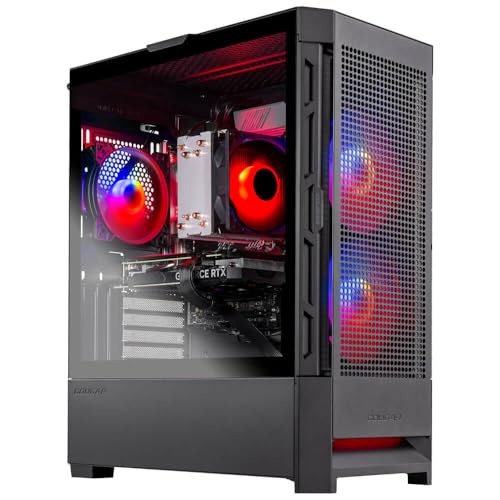
Skytech Gaming Nebula Intel i5 13400F RTX 4060

Skytech Gaming King 95 Intel Ultra 7 RTX 5070 Ti

SkyTech Shadow Ryzen 5 3600 GTX 1660 Ti

Skytech Gaming O11 Vision Ryzen 7 7700X RTX 5070
More On The Choices That Made The List
The CYBERPOWERPC Gamer Master lands in a comfortable middle for Fortnite players who don’t want to gamble on a barebones prebuilt. The AMD Ryzen 5 7600 is a 6-core, 12-thread processor that handles late-game build battles without becoming the bottleneck, while the GeForce RTX 4060 8GB sits in the sweet spot for 1080p and entry-level 1440p. Pair that with 16GB of DDR5 RAM (a fast type of system memory) and a 500GB NVMe SSD (a compact, high-speed storage drive), and you have a machine that boots in seconds and loads matches quickly.
Connectivity is generous for the class: six USB 3.1 ports, two USB 2.0 ports, gigabit Ethernet, and 802.11AC Wi-Fi give you options for peripherals and a stable link. The tempered glass side panel and custom RGB lighting (colored LEDs inside the case) are nice touches if the rig lives on your desk. Owners commonly report that the included keyboard and mouse are basic but functional enough to get you playing the same day, though most upgrade them down the line.
Strengths Worth Knowing
- Ryzen 5 7600 plus RTX 4060 pairing handles Fortnite smoothly at 1080p with headroom for other popular shooters.
- 16GB DDR5 and a 500GB NVMe drive keep load times short and multitasking fluid.
- Modern port selection with six USB 3.1 ports plus gigabit Ethernet for low-latency play.
- Tempered glass panel and RGB lighting give the case a polished look on a starter budget.
- Wi-Fi 802.11AC included, so you’re not hunting for an adapter on day one.
Worth Noting
- 500GB of storage fills up fast once a few modern games and updates are installed.
- The bundled peripherals are starter-grade; serious players will likely swap them out.
Best Suited To
Mainstream competitive players who want a balanced, out-of-the-box build that handles Fortnite at 1080p without overspending.
Where Another Pick Suits Better
If low entry pricing matters more than polished specs, the SkyTech Shadow is a more accessible starting point for very tight budgets.
The Skytech Azure 3 leans into forward-looking silicon without crossing into enthusiast pricing. An Intel Core Ultra 7 270K running up to 5.4GHz on turbo handles the draw calls and physics behind a busy Fortnite endgame, while the RTX 5060 8GB brings newer-generation features that should age well as the game evolves. 32GB of DDR5 RAM is generous for a build at this tier and removes any worry about background apps stealing frames.
The 1TB NVMe SSD is a meaningful upgrade over the 500GB drives found on some prebuilts, holding Fortnite plus a few side games comfortably. A 360mm AIO liquid cooler (an all-in-one liquid cooling unit mounted to the CPU) keeps thermals in check during long sessions, and Wi-Fi 6 support means you’re covered for the fastest home networks. For most players eyeing a 2026 build, this is a confident middle-ground choice.
What Works In Its Favor
- Intel Ultra 7 270K with turbo headroom keeps frame pacing stable in late-game chaos.
- 32GB DDR5 RAM leaves headroom for streaming, Discord, and a browser running alongside the game.
- 1TB NVMe SSD stores Fortnite, asset updates, and a small library without juggling storage.
- 360mm AIO liquid cooling helps the CPU sustain boost clocks under extended load.
- Wi-Fi 6 gives you the latest wireless standard for low-latency home networking.
Trade Offs
- Sits above pure entry-level pricing, so the value case depends on using the headroom.
- Compact builds with AIO coolers can complicate future dust cleaning, depending on layout.
At A Glance
Made For
Long-term value seekers who want a 2026-ready rig with new-gen parts and storage that won’t feel cramped within a year.
Consider Something Else When
Players who primarily want the cleanest aesthetic alongside their GPU may prefer the Skytech O11 Vision’s showcase case design.
The Acer Aspire is the odd one out in this list, and that’s its strength. The Intel Core i5-14400 is a 10-core processor that handles spreadsheets, browsing with dozens of tabs, and a video call without breaking stride, then steps up for casual Fortnite sessions at lower settings. Intel UHD Graphics won’t run a dedicated GPU-heavy loadout, but it keeps the platform compact, quiet, and affordable.
32GB of DDR5 RAM paired with 1.16TB of combined storage (a 1TB SSD plus a 160GB docking station set) means you won’t be juggling files between devices, and the included keyboard and mouse get you started right away. Wi-Fi 6E and Windows 11 Pro round out a sensible everyday desktop. If you only dip into Fortnite between homework or work tasks, this is a comfortable fit.
Bright Spots
- 10-core i5-14400 is overkill for basic tasks, leaving room for multitasking during school or workdays.
- 32GB DDR5 RAM keeps heavy browser sessions smooth alongside other apps.
- 1.16TB combined storage covers documents, media, and lighter games without external drives.
- Compact black tower fits naturally in a home office or shared study space.
Honest Caveats
- Integrated UHD Graphics limit Fortnite to lower settings, so competitive frame rates are unrealistic.
- Not designed for AAA gaming, so the audience is specifically work-first, play-second shoppers.
- Lacks a dedicated GPU, which removes any future graphics upgrade path inside the case.
Who Will Love This
Light casual Fortnite players who want one machine for work, school, and the occasional match without buying a separate rig.
Not Your Match When
Anyone chasing smooth competitive performance should step up to the CYBERPOWERPC Gamer Master for a real dedicated GPU.
The Skytech Azure 3 with the Ryzen 7 9850X3D and Radeon RX 9070 XT is the performance pick of the roundup. The 9850X3D is built on AMD’s 3D V-Cache design, which stacks extra cache (a small pool of super-fast memory sitting close to the processor) directly on the chip, and that advantage shows up in CPU-bound scenarios and high-refresh competitive play. Combined with 32GB of DDR5 at 5600MT/s, the platform responds quickly under pressure.
The 2TB Gen4 NVMe SSD is a serious storage allotment for someone with a packed game library, and the 850W Gold ATX 3 PSU leaves headroom for future GPU upgrades. A 360mm ARGB AIO keeps the CPU cool during marathon sessions. For Fortnite players chasing 240Hz at 1440p, this build has the silicon to actually deliver.
The Case For It
- 3D V-Cache on the 9850X3D delivers strong frame consistency in CPU-heavy late-game moments.
- RX 9070 XT with 16GB GDDR6 handles high-refresh 1440p with room to spare.
- 2TB Gen4 NVMe covers a large library without forcing constant uninstalls.
- 850W Gold PSU is a robust foundation for component upgrades down the line.
Points To Note
- Higher-tier pricing, so the value depends on using the extra headroom.
- 360mm AIO and dense cable layout can make routine dust cleaning a longer process.
Feature Snapshot
Perfect Match For
Performance-first competitive players who want maximum frame rates and a system that can grow with future GPU swaps.
Look Elsewhere When
Shoppers prioritizing a quiet, clean-looking showcase build should consider the Skytech O11 Vision’s design-led chassis.
The Skytech Nebula is the build most reviewers would call the value sweet spot for Fortnite in 2026. The Intel Core i5 13400F hits 4.6GHz on boost and keeps the system responsive in dense build fights, while the RTX 4060 8GB is the workhorse of 1080p gaming. You get a 1TB NVMe SSD, which is generous for the tier, and 16GB of DDR4 RAM running at 3200MT/s.
With a 600W Gold PSU and 802.11AC Wi-Fi on board, this is a clean, no-surprises build for a bedroom or dorm setup. The trade-off is DDR4 instead of DDR5, which is fine for gaming today but slightly behind newer platforms. For most players running a 144Hz or 165Hz monitor, the Nebula hits the frame-rate targets that matter without overspending on parts that don’t move the needle in Fortnite.
A Strong Showing
- i5 13400F plus RTX 4060 hits the 1080p performance mark most players actually want.
- 1TB NVMe SSD is generous storage for the price tier.
- 600W Gold PSU provides stable power with a small upgrade cushion.
- Clean, classic tower styling that fits a dorm or family-room setup.
Points To Keep In Mind
- DDR4 RAM is a generation behind newer picks, so future platform upgrades will cost more.
- The “F” suffix CPU lacks integrated graphics, so any GPU issue leaves no fallback display output.
Right Fit For
1080p esports-minded players who want strong Fortnite frame rates without paying for a 1440p-tier GPU.
Skip It When
Buyers who want a newer-platform CPU and DDR5 should look at the CYBERPOWERPC Gamer Master as a step up.
The Skytech King 95 is the enthusiast pick, pairing an Intel Ultra 7 270K with the RTX 5070 Ti 16GB. The Ti tier of the 5070 line is where high-refresh 1440p stops being a hope and starts being a reality, and 16GB of VRAM (video memory on the graphics card) keeps texture-heavy maps running clean. The 32GB of DDR5 at 6000MT/s is also notably fast, helping the platform feel snappy in everything outside gaming.
The chassis is a larger tower with the cooling and airflow headroom enthusiasts expect, anchored by a 360mm ARGB AIO and an 850W Gold ATX 3 PSU. If you want one rig to carry you through several hardware generations and a stack of demanding games, the King 95 is the kind of build that justifies its place. It’s a big step up in spend, but the long-term calm is real.
Well-Handled Touches
- RTX 5070 Ti 16GB gives comfortable 1440p headroom even with settings cranked.
- 32GB DDR5 at 6000MT/s keeps the platform responsive across gaming and content tasks.
- 850W Gold ATX 3 PSU has the headroom for future GPU upgrades.
- 360mm ARGB AIO keeps the CPU cool under long, demanding sessions.
Practical Considerations
- Premium pricing puts it well above entry-level shoppers’ range.
- Larger tower footprint demands more desk or floor space.
- ARGB lighting appeals to some, distracts others; case lighting is a matter of personal taste.
Who Should Grab It
Enthusiasts who want a premium 1440p build with longevity and aren’t optimizing for the lowest spend.
Swap It Out When
AMD loyalists who want 3D V-Cache advantages should compare this with the Skytech Azure 3 RX 9070 XT build.
The SkyTech Shadow is the lowest-friction way to get into PC Fortnite, and there’s real value in that. The Ryzen 5 3600 with 6 cores is aging gracefully and still handles 1080p gaming competently, paired here with the GTX 1660 Ti 6GB. You won’t be pushing max settings in every new release, but Fortnite is forgiving enough to run well on this kind of hardware.
8GB of DDR4 RAM at 3000MT/s and a 500GB SSD cover the basics, while AC Wi-Fi and a clean RGB-accented case give the system a grown-up feel. Owners commonly report that this is a great “first tower” to learn inside, since the internals are spacious and forgiving for future tinkering. If the budget is tight and Fortnite is the main game, the Shadow gets the job done.
Benefits That Matter
- Lowest entry price in the roundup, ideal for first-time PC shoppers.
- Ryzen 5 3600 and GTX 1660 Ti still hold up for 1080p Fortnite.
- Spacious interior makes the case approachable for future upgrades or cleaning.
- RGB styling and a clean black shell keep the desk setup looking intentional.
Potential Compromises
- 8GB RAM is tight for modern Windows multitasking alongside a game.
- 500GB SSD fills up fast, especially after major Fortnite updates.
- GTX 1660 Ti lacks the modern feature set of RTX cards, including ray tracing and DLSS upscaling.
Quick Facts
Built With In Mind
First-time PC players who want the lowest barrier to entry and a forgiving tower to learn the hobby on.
Another Choice May Suit
Players willing to spend a bit more for modern features should look at the Skytech Nebula’s RTX 4060 build.
The Skytech O11 Vision is for the player who cares about what the rig looks like as much as what it does. The Lian Li O11-style showcase case puts the internals on display, and the build inside is well matched: an AMD Ryzen 7 7700X with 8 cores, paired with an RTX 5070 12GB and an X670 motherboard that leaves real upgrade room down the line.
32GB of DDR5 at 5600MT/s and a 1TB Gen4 NVMe SSD make the system feel responsive in daily use, and a 360mm ARGB AIO keeps the 7700X cool without spoiling the look. The 850W Gold ATX 3 PSU is a sturdy backbone. If the build lives on your desk and you actually want to see the components, this is the rig that turns the PC into part of the room.
The Upside
- Showcase-style case makes the build a visible part of the setup.
- Ryzen 7 7700X plus RTX 5070 12GB handles high-refresh 1440p smoothly.
- X670 board provides meaningful upgrade headroom for future CPUs and storage.
- 1TB Gen4 NVMe SSD is fast and ample for most game libraries.
Things To Weigh
- Premium design-oriented case adds to the cost over equivalent internal specs.
- Tempered glass panels require more frequent cleaning to stay looking sharp.
The Right Fit
Style-conscious setup builders who want a display-grade PC case without sacrificing modern performance.
Reach For A Different Pick When
Pure performance shoppers might prefer the Skytech Azure 3 RX 9070 XT for stronger gaming numbers per dollar.
What Actually Matters When Choosing Budget Pcs For Fortnite
Frame Rate Targets Before Anything Else
Fortnite scales gracefully, but the GPU still does most of the heavy lifting. Decide whether you want smooth play at 1080p, 1440p, or higher before picking a build, since the graphics card is the single biggest factor in performance. Pairing a strong GPU with a weak CPU creates a different kind of imbalance than the reverse, so match your resolution target to a card that can carry it, then let the rest of the build support that choice.
RAM, Storage, and the Small Details
16GB of RAM is the practical floor for modern Windows multitasking alongside a game, and 32GB gives breathing room. NVMe SSDs speed up boot and load times noticeably over older SATA drives, and a 1TB drive keeps Fortnite plus a few other games installed without juggling. Wi-Fi 6 or Wi-Fi 6E is a quiet upgrade that helps if your rig sits far from the router.
Case, Cooling, and Future-Proofing
A 600W or higher PSU gives you room to swap in a stronger GPU later, and 360mm AIO liquid cooling is more useful for sustained boost clocks than a basic air cooler. RGB lighting and tempered glass are nice touches, but pay attention to airflow and case size; you want components that run cool and clean. For most players, a balanced mid-range build now beats an overbuilt one that bottlenecks at the wrong part.
Key Considerations Across These Picks
Common Shopping Slip Ups
A frequent mistake is overspending on a flagship GPU while pairing it with an older or weaker CPU, creating a bottleneck that limits frame rates. Another is underestimating storage: 500GB fills up quickly once a few modern games and their updates land. Buyers also overlook PSU quality, which matters more for long-term reliability than flashy case lighting.
Where The Extra Money Goes
Stepping up to a higher tier typically buys newer GPU architectures, more VRAM, faster DDR5 RAM, and a beefier power supply. These parts age better across multiple hardware generations and keep the system relevant as Fortnite’s requirements evolve. For a player planning to keep their PC for several years, those mid-tier upgrades pay back in avoided rebuilds.
Frequently Asked Questions
Do you need a dedicated GPU to play Fortnite?
You can technically run Fortnite on integrated graphics, but a dedicated GPU is the only realistic path to smooth, high-refresh play. Entry-level cards like the GTX 1660 Ti still hold up, while RTX 40 and 50 series cards add features like DLSS (an AI-driven upscaling technology) and ray tracing that future-proof the experience.
How much RAM do you need for Fortnite?
16GB is the practical minimum for smooth play alongside a browser, Discord, or other background apps. 32GB is a comfortable upgrade if you stream or run heavier creative software at the same time.
Is Fortnite CPU or GPU bound?
Fortnite leans on the CPU during late-game build battles with many players and structures on screen, and on the GPU for raw frame rate and visual effects. A balanced CPU and GPU pairing matters more than maxing out either one in isolation.
Can these prebuilt PCs be upgraded later?
Most prebuilt towers use standard ATX components, which means RAM, storage, and the GPU can usually be swapped down the line. CPU upgrades depend on the motherboard socket, and very compact builds may limit cooling and PSU options.
What resolution should a budget PC target for Fortnite?
1080p is the realistic target for most budget builds, and it’s also where competitive players benefit most from high refresh rates. Higher resolutions are possible but require stronger GPUs that push the budget out of the “budget” category.
Closing Remarks
The right budget PC for Fortnite depends on your frame-rate target, your monitor, and how long you want the build to last. Newer players get the most value from balanced mid-tier systems like the CYBERPOWERPC Gamer Master, while enthusiasts chasing high-refresh 1440p should look at the Skytech King 95 or Azure 3. Pick the build that matches the games you’ll actually play, and the rest of the hobby tends to fall into place.



