


You don’t need a four-figure rig to enjoy flight simulation, and you don’t need to settle for a flimsy toy stick either. The right HOTAS setup turns Microsoft Flight Simulator, DCS World, Star Wars Squadrons, and Ace Combat 7 from a keyboard exercise into something your hands actually understand. The picks below span the entry level to the high end of what’s reasonable, with options for VR pilots, casual arcade flyers, and serious combat sim fans who still want value for money.
A Fast Comparison Of The Options

ThrustMaster Hotas Warthog Bundle with TFRP Rudder

ThrustMaster TFRP Rudder & T16000M FCS HOTAS
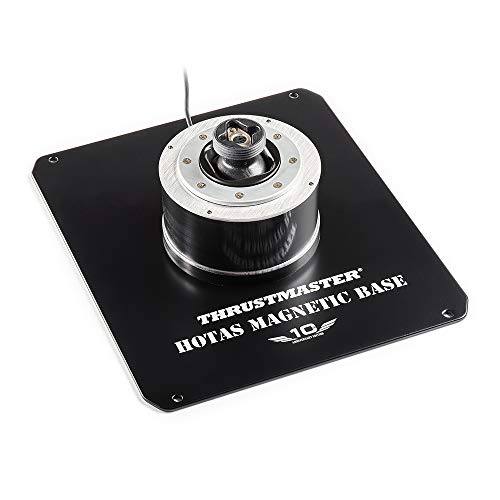
Thrustmaster HOTAS Magnetic Precision Stick Base

Logitech G X56 HOTAS with Pro Rudder Pedals

Thrustmaster T-Flight Hotas One (Xbox & PC)

Thrustmaster T-Flight Hotas X (PC)

Thrustmaster T16000M FCS HOTAS
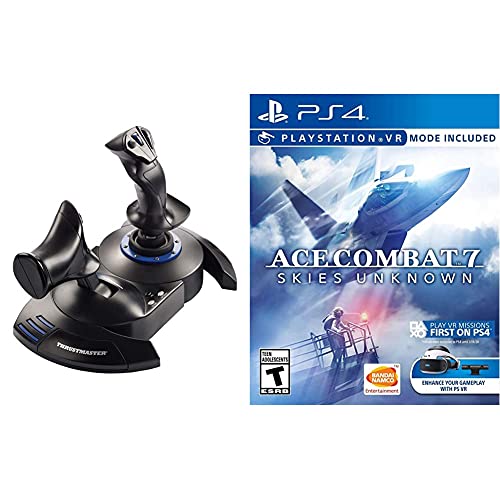
Thrustmaster T.Flight HOTAS 4 with Ace Combat 7

Thrustmaster Viper TQS Mission Pack
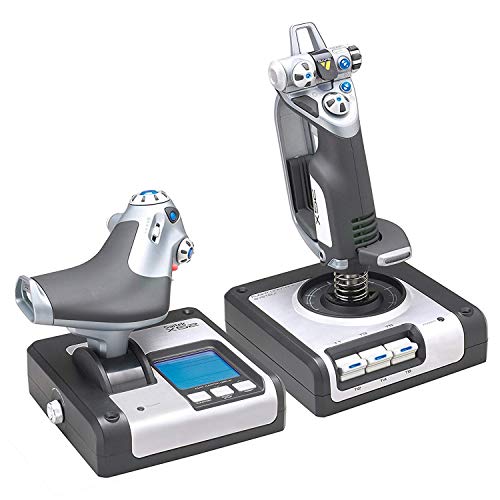
Logitech G X52 Flight Control System
The Strengths Of Each Pick
For pilots who want the closest thing to a real A-10C cockpit on their desk, this Warthog bundle is the high-water mark of the Thrustmaster catalog. The joystick, throttle, and rudder pedals are all near-exact replicas of the U.S. Air Force attack aircraft controls, which means muscle memory built in DCS World transfers naturally to printed checklists and sim procedures. The all-metal construction feels substantial in the hand, and the detachable joystick base lets you mount it directly to a cockpit rig when you’re ready to upgrade your furniture.
Where it earns its place at the top is in the details: 19 action buttons plus an 8-way point-of-view hat, a dual-throttle system with a metal hand rest, and pedals that are wide enough to plant your whole foot on for long missions. Most people considering this stick already know DCS is the destination, and the controls deliver the realism those modules demand. The learning curve is real, but the reward is a setup that grows with you for years.
Everyday Advantages
- Metal construction across the stick, throttle, and pedals, which tends to outlast plastic alternatives under heavy daily use
- Detachable joystick handle and metal base plate that swap between desktop and cockpit mounting
- 19 action buttons plus an 8-way POV hat, giving you plenty of room to bind complex DCS modules without running out of inputs
- Dual-throttle setup with metal hand rest for managing twin-engine aircraft and complicated power setups
Things To Consider
- At this weight and price, you’ll want a sturdy desk or a dedicated cockpit mount to keep everything stable
- Software setup takes patience the first week, especially when mapping custom bindings for less popular modules
Key Specs
Built With In Mind
Combat sim pilots running DCS World modules who want a setup that lasts through years of weekly sessions.
Skip It When
Casual arcade flyers should look at the Thrustmaster T-Flight Hotas One instead, since the Warthog’s realism is wasted on casual titles.
This bundle pairs the T16000M joystick with Thrustmaster’s TFRP rudder pedals, which is one of the most common entry points into proper PC flight simming. The T16000M uses Hall effect magnetic sensors, meaning stick position is read through contactless magnetic fields rather than worn potentiometers, and the same trick is applied to the rudder’s S.M.A.R.T slide rail system. Together they give you accurate yaw control and precise stick input at a price that doesn’t require a second mortgage.
The T16000M itself is ambidextrous, so left-handed pilots aren’t stuck adapting to a right-handed stick, and the 16 action buttons with braille-style markings help you find the right control by feel. Pedal width runs about 10 inches, large enough to support feet up to a US size 12, and the heel rests can be removed if you prefer a different foot position. Compared to the Warthog above, this is a clear step down in build weight, but the sensor tech is genuinely modern.
Features That Help
- Hall effect sensors in the joystick, which owners report holding calibration far longer than cheaper potentiometer sticks
- S.M.A.R.T aluminum rail rudder system that delivers smooth, even pedal travel without the gritty feel of cheaper sliders
- 16 action buttons with braille-style tactile dots, so you can identify controls in VR without looking down
- Wide 10-inch pedal design that fits larger feet and supports proper heel-and-toe rudder technique
Points To Note
- Plastic construction means the throttle and stick base feel lighter than the Warthog and can shift on smooth desks without a mat
- You may find the default stick grip less comfortable for very long sessions than the contoured Warthog handle
Right Fit For
PC pilots who want accurate sensors and real rudder control for civil aviation or combat sims without stepping up to a metal rig.
Look Elsewhere When
Console-only flyers should consider the Thrustmaster T.Flight Hotas One, since this bundle is built for PC with optional PS4 pairing.
This is a stick base only, not a full HOTAS, and that distinction matters. Thrustmaster’s H.E.A.R.T Hall Effect AccuRate Technology uses magnetic sensors that don’t physically contact moving parts, so the sensor itself can’t wear down the way a potentiometer wiper does over years of aggressive flying. For sim pilots who keep their gear for a decade, that sensor longevity is a quiet but real reason to choose magnetic over mechanical.
The base has a detachable metal mounting plate that lets you either clamp it to a desk or bolt it into a cockpit frame. That flexibility means the stick grows with your setup: start at a desk, then move to a chair-mounted rig later without buying new hardware. Most people buying this base already own a compatible Thrustmaster grip and want to swap the electronics, or they’re putting together a custom two-piece rig from scratch.
Positive Points
- Hall effect magnetic sensors that don’t degrade or drift, which matters for pilots who fly the same aircraft hundreds of hours a year
- Detachable metal base plate that handles both desk clamping and cockpit bolting, so the same hardware works in different setups
- USB PC connection that requires no external power brick, keeping the cable clutter on your rig minimal
Worth Noting
- It’s a base only, so you need to budget for a compatible grip and a separate throttle to actually fly anything
- Heavier than a typical plastic base, so it really needs to be clamped down rather than just rested on a desk
Made For
Sim builders who already own a compatible Thrustmaster grip and want a more durable sensor core for long-term use.
Swap It Out When
First-time buyers should grab the Thrustmaster T16000M FCS HOTAS instead, since this base assumes you already know what grip you want.
The X56 leans hard into programmability, and that’s its defining feature. The throttle and stick are covered with controls, including a mini analog stick on the throttle for managing separate axes like weapon gimbals or camera slew without taking your hand off the throttle. RGB backlighting is a small touch, but in a darkened room or in VR, having visible button groups makes a real difference when you’re trying to find a specific switch.
The bundle adds Logitech’s Pro Flight rudder pedals, which use self-centering action and an adjustable tension dial so you can dial in lighter response for a Cessna or heavier feel for an airliner. For space sims like Elite Dangerous or Star Citizen, the analog mini-stick control surface on the throttle is genuinely useful, since those games layer extra axes on top of standard pitch, roll, and yaw. The honest read is that this is a more button-heavy stick than the Warthog, with a different feel in the hand.
Points In Its Favor
- Mini analog stick on the throttle gives you extra independent axes, which Elite Dangerous and Star Citizen pilots use for thrusters and gimbals
- RGB backlighting that you can tune through software, helping you identify control groups in low light or VR
- Self-centering rudder pedals with adjustable tension, so a single pair handles both light GA aircraft and heavy jets
- VR-friendly control layout with shape and texture differences between buttons so your fingers can identify them by feel alone
Honest Caveats
- Plastic-heavy construction is lighter than the Warthog, and the wide stick base can feel bulky on small desks
- Software configuration is deep, so expect to spend time in the Logitech app mapping all the available inputs
Feature Snapshot
Whose Shelf It Belongs On
Space sim and VR pilots who want maximum programmability and don’t mind spending time in configuration software.
Where Another Pick Suits Better
Pilots focused on DCS combat modules will find the ThrustMaster Hotas Warthog more authentic and better weighted.
For console pilots, particularly Xbox One and Xbox Series X owners, the T-Flight Hotas One is one of the few officially supported sticks that plugs straight in without a workaround. It’s also one of the cheapest ways to get into flight sim on PC if you’re not sure you’ll stick with the hobby, since the price is low enough that a short experiment doesn’t sting if you move on. The wide hand rest and ergonomic grip are forgiving during long Star Wars Squadrons or Ace Combat sessions.
The throttle detaches from the stick, which is a small but useful detail: it lets you position the throttle to the left if you fly left-handed, or set it on a separate surface for a more cockpit-like arrangement. There’s a rudder control built into the stick via a twist or tilt lever, so you can fly without pedals while you’re still learning. For most people starting out, this is the minimum viable HOTAS that still feels like a real piece of gear.
Reasons It Performs
- Direct Xbox One and Series X compatibility, so console players don’t need adapters or extra software
- Detachable throttle that repositions for left-handed flyers or custom desk layouts
- Built-in rudder control via handle rotation, letting you skip pedals until you’re ready to invest in a separate set
- Ergonomic grip with a wide hand rest that reduces fatigue during long casual sessions
Trade Offs
- Plastic construction is light enough to slide on smooth desks, so a non-slip mat is a sensible add-on
- Potentiometer sensors in the stick can drift over time, which is worth knowing if you plan to fly thousands of hours
Best Suited To
Console pilots on Xbox or PC newcomers who want a low-risk entry into the flight sim hobby.
Not Your Match When
Hardcore sim pilots should consider the Thrustmaster T16000M FCS HOTAS for its Hall effect sensors and tighter accuracy.
The T-Flight Hotas X has been around long enough that it’s a known quantity, and what it does well is deliver a real HOTAS layout at one of the lowest entry prices on the market. The throttle detaches from the joystick base, the stick has an adjustable resistance dial so you can tune the feel, and there are 12 action buttons plus 5 axes to bind across both halves. For PC pilots flying Microsoft Flight Simulator on a tight budget, this is the kind of stick that lets you commit to the hobby without committing a fortune.
It does feel like a budget stick, and there’s no way around that. The plastic is light, the buttons click rather than press with authority, and the throttle lacks the resistance of more expensive units. But for casual sim sessions, Elite Dangerous starter loadouts, or DCS tutorials, it covers the basics competently. The detachable throttle is the standout feature at this price, since competitors often lock the two halves together.
A Few Strong Suits
- Detachable throttle that you can place on a separate surface or a homemade side mount, which is unusual at this price
- Adjustable resistance dial on the stick, so you can stiffen it for combat or loosen it for civil aviation
- 12 programmable buttons and 5 axes, enough to handle most general aviation and combat bindings
- Wide hand rest that keeps your wrist neutral during longer flights
Less Ideal Details
- Lightweight plastic construction tends to wander on smooth desks, so a mat is a sensible add-on
- Potentiometer-based sensors can develop drift after heavy use, which is the usual trade-off at this price tier
Made For
PC pilots on a tight budget who want a real HOTAS layout with a detachable throttle for casual sim sessions.
Another Choice May Suit
Xbox console players should look at the Thrustmaster T-Flight Hotas One, which is the console-native sibling of this stick.
The T16000M is the workhorse of the budget PC sim world, and the reason it sticks around is the Hall effect sensor. Instead of physical contact parts that wear down, the stick uses magnetic sensors to read position, which means calibration holds steady over years of use rather than slowly drifting the way cheaper potentiometer sticks do. For pilots who fly the same aircraft in DCS or IL-2 Sturmovik week after week, that sensor consistency is a real benefit.
The stick is genuinely ambidextrous, with a centered handle design that works equally well for right or left-handed pilots, and the 16 action buttons include an 8-way POV hat for looking around in cockpit view. A twist rudder function is built into the handle, so you can yaw without pedals while you’re still getting the hang of the controls. The bundled throttle is a basic unit, but the joystick itself is what most people buy this package for.
Everyday Perks
- Hall effect magnetic sensors, which most owners report holding calibration far longer than cheaper potentiometer alternatives
- Ambidextrous stick design with a centered handle, so left-handed pilots aren’t stuck mirroring a right-handed grip
- 16 action buttons with braille-style tactile dots, useful for identifying controls in VR without looking down
- Twist rudder built into the handle, letting you start flying without investing in a separate pedal set
Some Limits To Know
- Plastic throttle feels light and can be knocked around on smooth desks without a mat
- Stick grip is functional but plain, so very long sessions may leave you wishing for more ergonomic contouring
Quick Facts
Who It Suits Best
PC sim pilots who want accurate sensors and ambidextrous design at a price that doesn’t require saving for months.
Consider Something Else When
Console players should look at the Thrustmaster T-Flight HOTAS 4, which is the PlayStation-native option for similar money.
The T.Flight HOTAS 4 is the PlayStation-native sibling of the T-Flight Hotas X, with built-in buttons mapped for the PS4 system menu and Ace Combat 7. That built-in mapping matters more than it sounds: it means the stick works out of the box on PS4 and PS5 without fiddling with adapters, and the included Ace Combat 7 disc gives you a serious combat flight sim to actually fly the moment you plug it in. For PlayStation owners who don’t want to tinker, this is a tidy package.
The stick itself has 12 action buttons, a rapid-fire trigger, and a multidirectional hat switch, which is enough input for most PS4 flight games. The throttle detaches for flexible placement, including in VR setups where you might want to put the throttle on a separate surface. Ace Combat 7 is the kind of cinematic, fast-paced title that suits a lightweight stick well, since you spend more time pulling hard maneuvers than making surgical trim adjustments.
The Good Stuff
- Native PS4 and PS5 support, including built-in system menu buttons, so there’s no adapter or configuration dance
- Bundled Ace Combat 7 disc gives you a polished combat sim to start flying immediately after unboxing
- Detachable throttle that holds up in VR setups where you want to position controls on either side of your chair
- Rapid-fire trigger and 12 action buttons cover the binding needs of most console flight and combat games
Where It May Fall Short
- Plastic construction is light enough to slide on smooth desks without a non-slip mat underneath
- Potentiometer-based sensors can develop drift over time, especially with the rapid input changes arcade sims demand
Perfect Match For
PlayStation pilots who want a plug-and-play stick plus a real combat flight game to fly right away.
Reach For A Different Pick When
PC-only sim pilots will get better long-term value from the Thrustmaster T16000M FCS HOTAS and its Hall effect sensors.
The Viper TQS Mission Pack is Thrustmaster’s official U.S. Air Force licensed replica of the F-16 throttle, paired with a standalone HOTAS Warthog joystick handle. For DCS F-16 module pilots, this is a meaningful upgrade from a generic throttle: the layout matches the real aircraft, the metal construction feels right under your hand, and the iconic chaff and flare slap switch is actually present as a physical control, not a keyboard binding. That’s a small detail until you fly a high-threat environment and need to deploy countermeasures by feel.
Adjustable friction on the throttle lets you tune the resistance so the lever moves with the right amount of weight for your muscle memory, and the linear travel with no dead zones means small throttle inputs translate to small engine changes. The included Warthog stick is the same handle used in the full Warthog bundle, so you’re getting authentic A-10C stick ergonomics in a Viper-specific package. The catch is that this is a serious investment meant for pilots who know they want a Viper cockpit.
Real-World Strengths
- 1:1 scale F-16 throttle replica officially licensed by the U.S. Air Force, which makes DCS module training more intuitive
- Metal construction on the throttle handle and buttons, with a chaff and flare slap switch that deploys countermeasures by feel
- Adjustable friction on the throttle so you can tune the resistance to match your muscle memory for engine management
- Includes the Warthog joystick handle, giving you authentic A-10C stick feel even in a Viper-focused setup
Room For Improvement
- Price puts this out of reach for casual sim fans, so it only makes sense if you fly Viper modules regularly
- Throttle-only design means you may still want to add a separate throttle quadrant for multi-engine aircraft
Who Should Grab It
Hardcore DCS pilots focused on the F-16 module who want a true military-style cockpit feel under their hands.
A Better Fit Elsewhere
Multi-aircraft general sim pilots should look at the full ThrustMaster Hotas Warthog Bundle, which is more versatile across modules.
The X52 has been around long enough to develop a reputation, and that reputation is built on longevity. Logitech uses magnetic sensors on the X and Y axes of the joystick, which means the parts doing the actual reading don’t physically touch, so they don’t wear out the way potentiometer wipers do. For pilots who keep their gear for a decade and don’t want to recalibrate every few months, that sensor choice still matters years after the original release.
The standout feature is the multifunction LCD on the throttle, which displays programmed commands before you press them, along with a built-in clock for timing flight plans. The 3D twist rudder can be locked off if you prefer to use separate rudder pedals, which keeps the system flexible as your setup grows. It’s an older design with a plastic-heavy build, but the sensor core has aged better than most of its contemporaries from the same era.
Real Benefits
- Magnetic sensors on the X and Y axes, which tend to hold accuracy over years of use without the drift common to older potentiometer sticks
- Multifunction LCD on the throttle that previews programmed commands, so you can confirm a binding before pressing it
- 3D twist rudder that locks off when you add separate pedals, keeping the system flexible as your rig grows
- Built-in clock for timing flight plans, a small but useful detail for procedural IFR practice
Small Caveats
- Plastic construction feels dated next to the Warthog, and the wide throttle base needs a fair amount of desk space
- Software support is less active than newer Logitech gear, so some modern sims may need manual mapping
Feature Snapshot
The Right Fit
Long-time sim enthusiasts who want a proven stick with magnetic sensors and don’t mind an older industrial design.
Where A Sibling Pick Shines
Newer pilots looking for a more modern feel should consider the Logitech G X56 HOTAS for its deeper programmability.
What Separates A Good Budget Hotas From A Frustrating One
The most important question is compatibility, and it’s worth checking twice before you buy. Some sticks work on PC only, others work across PC and console, and a few need separate drivers to function at all. Match the stick’s supported platforms against the games you actually play, especially if you’re a console-first pilot.
Next, look at the sensor technology. Hall effect magnetic sensors, which read stick position through contactless magnetic fields, hold calibration far longer than traditional potentiometer designs that rely on physical wipers sliding against a resistive surface. For pilots who fly the same aircraft hundreds of hours a year, that sensor durability is a real long-term value, even when the upfront cost is higher.
Build weight matters more than people expect. A heavy stick with a metal base plate stays put during aggressive maneuvers, while a lightweight plastic stick wanders across a smooth desk the moment you pull a hard turn. If your desk is glass or polished wood, plan on adding a non-slip mat regardless of which stick you choose.
Button count and programmability determine how well a stick scales with your skills. Entry sticks tend to have 12 to 16 buttons, which is enough for casual sims, while serious combat modules often demand closer to 20 inputs. Software support is the hidden factor: a stick with strong, actively maintained configuration software makes the difference between a 10-minute setup and a frustrating weekend.
Finally, think about ergonomics and grip style. A contoured grip that fits your hand will keep you comfortable during long flights, while a flat or oddly shaped handle can lead to wrist fatigue. Left-handed pilots should pay particular attention to ambidextrous designs like the T16000M, which avoids the common problem of mirrored grips feeling awkward.
Key Things To Keep In Mind
Mistakes Worth Dodging
The most common trap is buying a stick that only works on the wrong platform. Pilots who split time between PC and console, or who might switch later, should look for cross-compatible options like the T16000M or the T-Flight Hotas One. The second trap is underestimating how much desk space a HOTAS plus throttle really needs: the two-piece setup demands a wider surface than a single joystick, and very few cheap sticks include mounts.
When Paying More Pays Off
Higher-tier sticks like the Warthog and Viper TQS earn their price through metal construction, military-grade layouts, and sensors that hold calibration for years. For pilots who know they’ll be flying DCS modules weekly for the next several years, the upgrade pays back through durability and realism. Casual flyers who might play once a month are better served by spending less and saving the difference for a head tracker or a VR headset instead.
Frequently Asked Questions
Are budget HOTAS setups good enough for serious flight simulation?
Yes, especially sticks with Hall effect magnetic sensors like the T16000M, which hold calibration over time and offer accurate input for combat modules. The main trade-off is build weight and metal construction, which affect long-term feel more than flight accuracy itself.
Can I use one of these sticks on both PC and console?
Some can. The T-Flight Hotas One works on Xbox and PC, the T.Flight HOTAS 4 works on PS4, PS5, and PC, and the T16000M is PC only with optional PS4 pairing via a separate joystick. Always confirm the supported platforms before buying, since console support varies model to model.
Do I need rudder pedals to fly properly?
Not at first. Most sticks in this list include a twist or tilt rudder built into the handle, which is enough to learn the basics. Pilots who move into complex combat sims or airliners tend to add separate pedals later for more precise yaw control during taxiing and crosswind landings.
How long should a budget HOTAS last?
With moderate use, a Hall effect sensor stick can easily last five to ten years without sensor drift. Plastic potentiometer sticks typically hold up well for two to four years before recalibration becomes a regular chore, though heavy daily use shortens that window.
Is the throttle really necessary?
For most modern flight sims and combat games, yes. The throttle is the most-used input after the stick itself, and a proper HOTAS setup gives you far more precise engine control than a gamepad trigger. The two picks without a separate throttle on this list are stick-only or throttle-only options meant for specific custom builds.
The Takeaway
The right budget HOTAS turns flight sim from a keyboard chore into something your hands actually enjoy, and you don’t need to spend a fortune to get there. Match the stick to your platform first, then prioritize sensor quality and build weight over button count. The rest is just flying.



