


Sim enthusiasts stepping into flight sim for the first time usually want the same thing: a stick that doesn’t fight back and a price tag that doesn’t sting. The picks below span everything from no-frills desk clamps to full HOTAS (Hands On Throttle And Stick) setups, with a couple of specialty sticks mixed in for the right pilot profile. Run a few of these through a search and you’ll see just how wide the field has become.
The Choices Worth Comparing

DA 40 Style Flight Stick

Saitek Pro Flight Rudder Pedals

Thrustmaster T-Flight Hotas One

Thrustmaster T-Flight Hotas X

CH Products Throttle Quadrant USB

Logitech G PRO Flight Yoke System

Honeycomb Foxtrot Aviation Stick

Thrustmaster Sol-R4 HOTAS
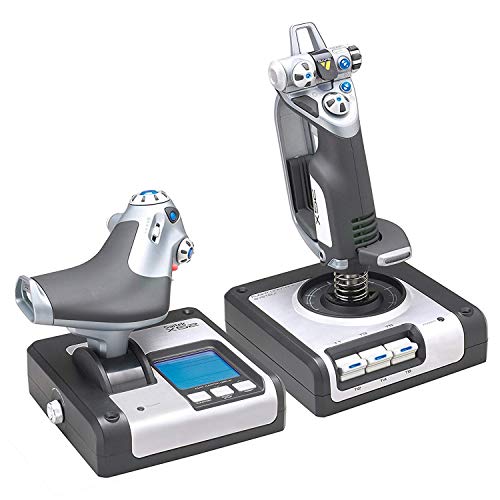
Logitech G X52 Flight Control System

Logitech G Saitek X52 Pro
The Picks, Examined More Closely
The DA 40 Style Flight Stick leans hard into single-engine general aviation (GA) vibes, shaped for someone who wants a taste of the cockpit without dragging a full rig into the room. Its profile mirrors the popular Diamond DA40 trainer that real flight schools lean on for primary instruction, which gives it a clear identity right out of the box.
That styling makes it a natural fit for newcomers running Microsoft Flight Simulator who care more about muscle-memory training than LED-heavy gadgetry. If you mostly fly Cessna 172s and DA40s in sim, the layout starts to feel familiar surprisingly fast.
Key Advantages
- Shaped around a popular real-world trainer, so muscle memory transfers between sim and study material
- Compact footprint fits a smaller desk without crowding your keyboard or mouse
- Simple button layout keeps the learning curve gentle for first-time sim pilots
- Solid entry point for GA hobbyists who don’t need space-combat complexity
Things To Consider
- Limited info on long-term build materials, so durability over years of daily use is harder to predict
- Lacks the throttle quadrant (the engine-power lever module) you’d want for serious twin-engine or airliner work
Who It Suits Best
Student pilots and casual GA sim fans who want a stick shaped like the aircraft they’re training on without paying for a full HOTAS bundle.
Look Elsewhere When
Step up to the Thrustmaster T-Flight Hotas One if you want both a stick and a throttle from day one, since that kit bundles the engine control this one leaves out.
The Saitek Pro Flight Rudder Pedals aren’t a stick at all, and that’s exactly why they make this list. They fill the gap that every joystick-only rig eventually runs into: coordinating turns with your feet instead of cranking a twist-axis handle. Real pilots move their feet on the rudder, and this set brings that motion to your sim rig.
Adjustable, smooth heel-toe action makes them a long-haul companion to whatever stick you already own. Pair them with the Thrustmaster T-Flight Hotas X and you suddenly have a setup that handles a Cessna pattern, a twin-engine approach, or a combat maneuver without your hands doing all the work.
Practical Advantages
- Heel-toe toe brakes replicate real-aircraft footwork during taxi and landing rollout
- Self-centering action gives predictable feedback when feet come off the pedals
- Adjustable resistance lets you dial in the feel for slow GA versus fast airliner-style work
- Plugs into your existing rig without replacing the stick you already trust
Worth Noting
- Not a standalone controller, so it only makes sense alongside a stick and throttle you already own
- Takes a couple of sessions to break the habit of twisting the stick for rudder
Feature Snapshot
Made For
Sim pilots who already run a stick and throttle and want to add realistic foot control for coordinated turns and proper braking.
Consider Something Else When
Choose the Logitech G PRO Flight Yoke System if you’d rather have yoke-style pitch and roll control over a joystick-plus-pedals split.
The T-Flight Hotas One earned its spot in the conversation for a simple reason: it works on both Xbox consoles and PC without forcing you to pick a side. For a household where one sim rig doubles as a console game station and a flight sim station, that cross-platform support is a quiet superpower.
The detachable throttle is the real magic. You can mount the throttle to the left of your stick for a wide HOTAS setup, or slide it inline for a tighter desk footprint. Compared to the bare DA 40 stick earlier on this list, the Hotas One brings engine control, a hat switch (a small directional pad on top of the stick for view controls), and trigger inputs to a beginner-friendly price tier.
The Good Stuff
- Cross-platform support covers Xbox One, Xbox Series X, and Windows in one box
- Detachable throttle gives layout flexibility for small desks or full cockpit rigs
- Ergonomic hand rest helps during long-haul cargo or cross-country flights
- Programmable buttons let you map common sim functions without keyboard shortcuts
Trade Offs
- Plastic construction feels lighter than higher-tier Thrustmaster gear
- Resistance dial is functional but not as finely tuned as the Hotas X
Perfect Match For
Console sim fans who also dabble on PC, or anyone who wants a complete throttle-and-stick bundle without piecing parts together.
Not Your Match When
Pick the Thrustmaster Sol-R4 HOTAS if space-combat flight is your main game, since it offers a much higher button count built for Star Citizen-style loadouts.
The T-Flight Hotas X is the long-running PC favorite in this category, and the resistance dial on the stick base is the feature that keeps it relevant. That small knob lets you tune the stick’s stiffness, which sounds minor until you fly a glider sim one night and a warbird the next. Different aircraft, different feel, no firmware fight.
You also get dual rudder control, either through the handle’s twist axis or via the progressive tilting lever built into the base. The throttle detaches for a wider mount if your desk allows. Compared to the Hotas One reviewed just above, this PC-only kit trades Xbox compatibility for that more nuanced stick feel.
What Earns Its Place
- Adjustable resistance dial matches stick tension to glider, GA, or combat flying
- 12 programmable buttons plus 5 axes cover the input needs of most flight sim titles
- Detachable throttle adapts to both compact desks and wider cockpit mounts
- Dual rudder modes let you pick twist or lever depending on your sim style
Honest Caveats
- PC-only, so console sim pilots will need to look at the Hotas One instead
- Cable routing can get tangled on smaller desks, depending on your mount
At A Glance
Best Suited To
PC sim pilots who fly a mix of aircraft types and want to dial in stick feel without dropping into the next price tier.
A Better Fit Elsewhere
Reach for the Honeycomb Foxtrot Aviation Stick if Airbus-style fly-by-wire aircraft are your main interest, since that stick is purpose-built for center-stick airliner feel.
The CH Products Throttle Quadrant is the right answer to a question most lists ignore: what if you want real multi-engine control without buying another joystick? This standalone throttle module uses six axes (X, Y, Z, R, U, and V) for engine management, which is a fancy way of saying each lever can control a different aircraft system.
For sim pit builders, the chunky mounting clamps grab onto desks between 3/4-inch and 2 1/4-inch thick, so it locks onto almost any home setup. The included Control Manager software unlocks 176 programmable functions, which sounds excessive until you start mapping mixture, prop pitch, and throttle on a radial engine.
Benefits That Matter
- Six independent axes cover throttle, prop, mixture, and other engine controls
- 176 programmable functions through the bundled software handle complex sim bindings
- Sturdy desk clamps hold the unit firm even during aggressive lever work
- Plug-and-play USB works on older Windows and macOS without driver hunting
Points To Keep In Mind
- Pairs with a separate stick, so it’s an add-on, not a complete rig
- Software ecosystem feels dated compared to newer sim peripherals
Who Should Grab It
Multi-engine and radial-engine sim fans who already own a stick and want dedicated, realistic throttle quadrants for piston or turboprop aircraft.
Skip It When
Choose the Thrustmaster T-Flight Hotas X if you want throttle and stick in a single package, since the Hotas X bundles both without separate purchases.
Yokes (steering-wheel-style column controllers used in real airliners) feel like cheating the first time you use one. After years of twisting joysticks, suddenly the pitch and roll motion of a real airliner’s control column lands in your hands, and the muscle memory gap closes fast. The Logitech G PRO Flight Yoke System leans into that reality with a stainless steel shaft that gives the column a sturdy, weighty feel.
You also get 75 programmable controls spread across a POV hat (point-of-view hat switch, a four-direction toggle for looking around), 14 buttons, and a three-position mode switch, plus a separate three-axis lever throttle. The integrated USB hub on the base cleans up cable clutter if you add rudder pedals like the Saitek set covered earlier. For airliner fans, the layout translates to real-world airliner workflow better than any joystick on this list.
The Upside
- Stainless steel shaft gives the yoke column a heavier, more realistic feel
- 75 programmable controls cover complex airliner cockpit workflows
- Three-position mode switch toggles between aircraft profiles without remapping
- Built-in USB hub simplifies adding rudder pedals or other peripherals
Less-Strong Areas
- Takes up more desk space than a compact joystick setup
- Yoke handling feels unfamiliar if you’re coming straight from a joystick background
Feature Rundown
Right Fit For
Airliner and GA sim enthusiasts who want the feel of a real control column rather than a joystick grip.
Another Choice May Suit
Pick the Honeycomb Foxtrot Aviation Stick instead if you fly center-stick Airbus-style aircraft, since the yoke won’t match that sidestick workflow.
Honeycomb built the Foxtrot for a specific kind of pilot: someone who flies Airbus jets and aerobatics planes in sim and wants a stick that feels honest about that work. The linear resistance system has no center detent (a small notch in the stick’s motion that signals the centered position), which is a meaningful detail, because most joysticks include that detent and it forces a stiffness that real airliner sidesticks don’t have.
You get five two-way switches and four programmable action buttons on the grip, including a POV hat. That switch density is modest next to the Thrustmaster Sol-R4 below, but it’s plenty for the way airliner cockpits actually lay out their controls. The build feels closer to a piece of cockpit equipment than a toy, and on a clean desk mount the unit sits steady through aggressive maneuvers.
A Few Highlights
- Linear resistance without center detent matches real sidestick feel
- Five two-way switches cover most Airbus cockpit bindings
- Solid build weight keeps the unit planted during aerobatic inputs
- Works well as a center-stick companion to a Honeycomb throttle or yoke
Some Limits To Know
- Lower button count than space-combat sticks like the Sol-R4
- Pairing it with a matching throttle adds to the total rig cost
Who Will Love This
Airbus and aerobatics sim pilots who want a sidestick-style controller with realistic linear resistance and minimal gimmicks.
Reach For A Different Pick When
Step up to the Thrustmaster T-Flight Hotas X if you want both stick and throttle in a single kit, since the Foxtrot is sold as a standalone stick.
The Sol-R4 is the outlier in this roundup, and it wears that badge on purpose. While most of the sticks above lean into GA and airliner sim, this HOTAS was designed for space combat, the kind of button-heavy flying you find in Star Citizen, Elite Dangerous, and similar titles. The total of 58 programmable action buttons across the stick and throttle is the headline number.
For dogfighting in a hornet cockpit or managing power distribution across multiple ship systems, that input count is genuinely useful. Compared to the T-Flight Hotas One, this kit costs more and skews heavier on both grip and throttle, but it lets you map almost every ship function to a physical control.
Positive Points
- 58 programmable actions cover deep ship system bindings without keyboard shortcuts
- Throttle mirrors the stick’s button density for balanced hand access
- Sturdy base holds up to aggressive space-combat maneuvering
- Purpose-built for space sim fans who want a serious step up from a basic stick
Factors To Consider
- Overkill for pilots who only fly GA or airliners in sim
- Learning curve is steeper given the sheer number of inputs to memorize
Built With In Mind
Hardcore space sim pilots who want near-complete hands-on control of their ship and don’t mind climbing a steeper input map.
Swap It Out When
Pick the Thrustmaster T-Flight Hotas One if you mostly fly airliners or GA aircraft, since the Sol-R4’s button density will sit unused on those cockpits.
The X52 is a workhorse, the kind of HOTAS you set up once and forget about because the layout just works. Magnetic, non-contact sensors on the X and Y axes (the two main stick directions for pitch and roll) mean there’s no physical wear on the sensors themselves, which extends the lifespan of the unit compared to potentiometer-based sticks (older-style sensors that physically rub against a resistive element).
The built-in multifunction LCD display on the throttle is a small touch that pays off every session. You can check programmed commands at a glance, monitor a built-in clock for flight-plan timing, and confirm what mode you’re in without alt-tabbing out of the sim. The 3D twist rudder on the stick can also be locked off if you’re already running dedicated rudder pedals like the Saitek pair covered earlier.
Where It Excels
- Magnetic non-contact sensors extend stick longevity over years of use
- Multifunction LCD on the throttle shows programmed commands without alt-tabbing
- 3D twist rudder locks off cleanly when you add separate pedal control
- Hybrid design handles both space sim and GA work without compromise
Worth Bearing In Mind
- Software for button mapping is functional but feels dated next to newer kits
- Grip ergonomics favor medium to large hands
Whose Shelf It Belongs On
Sim pilots who bounce between space combat and GA aircraft and want a single HOTAS that handles both worlds without swapping gear.
A Better Fit Elsewhere
Choose the Logitech G Saitek X52 Pro if you want the upgraded version with progressive throttle resistance and afterburner detents built in.
The X52 Pro takes the standard X52 covered above and adds the kind of throttle refinements that combat sim pilots actually feel. The progressive throttle includes resistance adjustment and physical detents (click-stop positions in the throttle lever) for both afterburner and idle, which gives you tactile feedback when you hit the right power setting without watching the gauge.
Illuminated buttons on the stick help during night flights, and the precision centering mechanism uses the same non-contact sensor tech as the standard X52. Compared to the Thrustmaster T-Flight Hotas X, the X52 Pro is heavier on the throttle refinement side and lighter on the stick resistance dial, so pilots who care more about engine control nuance tend to land here.
The Practical Payoff
- Progressive throttle with afterburner and idle detents adds tactile engine feedback
- Illuminated buttons improve visibility during night or dark-cockpit flying
- Non-contact X and Y axis sensors support long-term durability
- Strong software ecosystem for custom bindings across many sim titles
Possible Compromises
- Heavier and pricier than the Thrustmaster T-Flight Hotas X
- Grip shape takes a few sessions to feel natural
Perfect Match For
Sim pilots who fly a mix of combat and civilian aircraft and want refined throttle feedback as the centerpiece of the rig.
Where Another Pick Suits Better
Go for the Thrustmaster T-Flight Hotas One if you’d rather have a lighter, cross-platform rig that costs less, since the X52 Pro sits firmly in the PC-only zone.
What Matters Most Before Choosing Budget Flight Sticks
A stick that fits your hands and your desk matters more than a spec sheet packed with features. Start with the aircraft you actually fly: GA and airliner sims lean toward yokes or smooth center sticks, while space combat and dogfighting demand high button counts. Console owners should filter for cross-platform support early, since the field splits fast once you move past the Thrustmaster Hotas One.
Pay attention to resistance and feel, not just button count. A stick with adjustable resistance, like the T-Flight Hotas X, adapts to gliders and warbirds. Detents on throttles help with engine management on piston and jet aircraft. Materials matter over time too: metal shafts on yokes and magnetic sensors on sticks tend to outlast plastic-and-potentiometer combinations.
If you have the space, a stick plus throttle plus rudder pedals gives the most complete sim experience. The Saitek rudder pedals pair well with any of the HOTAS kits on this list, and a dedicated throttle module like the CH Products unit covers multi-engine work that bundled throttles often can’t. Sim pit builders will appreciate mounting clamps and desk-friendly footprints; apartment dwellers will care more about compact sticks that tuck away between sessions.
Key Considerations Across These Picks
Pitfalls Shoppers Hit
A common mistake is buying a HOTAS for a sim that doesn’t need it. The Sol-R4 has 58 programmable buttons, but if you mostly fly a Cessna 172 in Microsoft Flight Simulator, half of those bindings will go unused. Match the kit to the cockpit, not the other way around.
Another trap is ignoring platform compatibility. Several kits on this list are PC-only, and grabbing a Windows-only stick for an Xbox console sim session ends with a return label. Check the platform list before adding to cart, especially for the Logitech G PRO Flight Yoke System and the X52 Pro.
What The Higher Tier Buys
Spending up typically means better sensors, more metal in the construction, and throttle refinements like detents and progressive resistance. The X52 Pro earns its higher tier through afterburner and idle detents that budget kits skip. Honeycomb’s Foxtrot earns it through linear resistance without center detent, which matters for airliner sim authenticity.
The honest read is that the budget tier covers most pilots well, and the upgrade path makes sense only after you know which aircraft and sims you actually fly. If you find yourself reaching for a specific cockpit feature the budget kit doesn’t have, that’s the cue to climb a tier, not a year after you buy the cheaper option.
Frequently Asked Questions
Are budget flight sticks good enough for Microsoft Flight Simulator?
Yes, several kits on this list, including the T-Flight Hotas X and the Logitech G PRO Yoke, handle MSFS without issue. The honest read is that pilot feel and build quality differ, but core functionality is covered at the budget tier.
Do I need a throttle if I already have a stick?
For single-engine GA work, a twist-axis stick can fake throttle control, but for multi-engine and airliner sims, a separate throttle like the CH Products quadrant adds real value. The trade-off is desk space and budget.
Can I use a console flight stick on PC?
Several kits are cross-platform, but many, including the Honeycomb Foxtrot and the X52 Pro, target a single platform. The Thrustmaster T-Flight Hotas One is the most flexible pick on this list for households mixing both.
What’s the difference between HOTAS and a regular joystick?
HOTAS bundles a stick and a throttle, so you control pitch, roll, and engine power without taking your hands off the controls. A standalone joystick handles pitch and roll but usually relies on twist or pedals for rudder and on a separate throttle for power.
Do rudder pedals really improve flight sim?
For coordinated turns, crosswind landings, and realistic taxi work, yes. The Saitek Pro Flight Rudder Pedals are the most common add-on for entry-level rigs, and they pair cleanly with any of the HOTAS kits on this list.
Wrap Up
A stick that matches your sim and your flying style makes more difference than any spec bump. Start with the cockpit you fly most, match the platform, and let the rest of the rig, throttle, pedals, and yoke, fill in around that core. The picks above cover most of the realistic paths a sim pilot takes from first stick to full pit, so pick the one that fits the flying you actually do.



