


Capturing console gameplay or mirrorless camera footage on a laptop used to mean expensive capture hardware, but the budget capture card market has changed that story completely. Today’s affordable dongles handle 1080p60 capture, route a 4K passthrough to your TV or monitor, and plug straight into OBS, Streamlabs, or Zoom without driver headaches. This roundup focuses on value-focused picks for streamers, casual gamers, and creators who want clean 1080p output without paying for a PCIe card. Every option here accepts HDMI input, works plug-and-play with modern desktops and laptops, and covers the most common capture workflows from Twitch sessions to church camera feeds.
A Snapshot Of The Selections

UGREEN 4K@30Hz Loop Out HDMI Capture Card USB 3.0

BIFALE 4K HDMI Video Capture Card USB 3.0
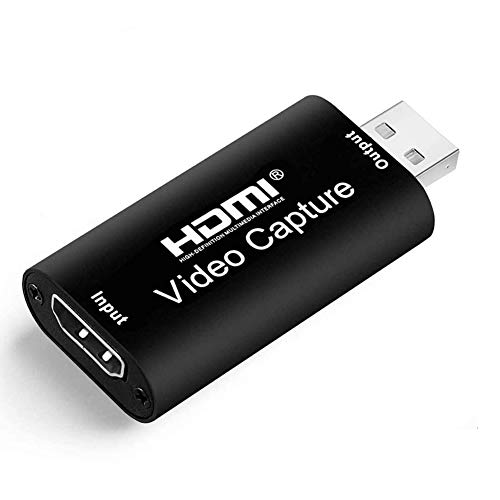
PDAPTMAG HDMI Video Capture Card USB 2.0

PDAPTMAG 4K Video Capture Card USB 2.0
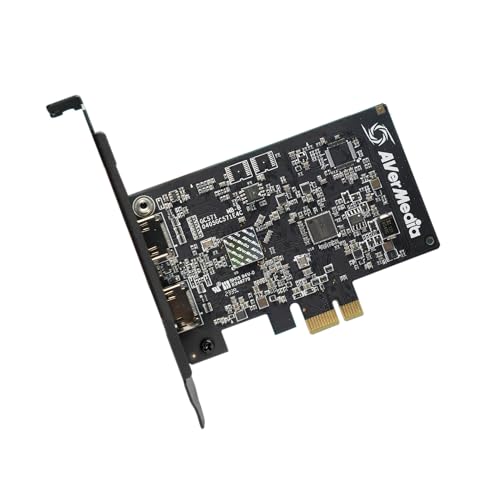
AVerMedia GC571 Live Streamer Ultra HD Capture Card

UGREEN Full HD 1080P 30fps Capture Card USB 2.0

Fulfalic USB3.0 HDMI Capture Card 1080P60 2K30

Dcyfol 4K HDMI Capture Card USB 3.0 1080P 60FPS
Inside Each Recommended Option
UGREEN’s USB 3.0 dongle leads this list because it threads a needle most cheap capture cards miss. The HDMI loop-out port sends a 4K@30Hz signal to your monitor or TV while the USB side captures gameplay at up to 2K 30fps or 1080p 60fps, which is the sweet spot for Twitch and YouTube uploads. In a real streaming setup, that loop-out means you keep playing on the big screen in full resolution while OBS records a clean feed in the background.
The USB 3.0 bus (the high-speed data connection that replaces older USB 2.0 ports) gives this card enough bandwidth for uncompressed 1080p60 capture without dropped frames on a modern laptop. Compared to the USB 2.0-only picks later in this roundup, you trade a slightly higher cost for noticeably smoother footage during fast-paced shooters or racing games.
What Earns Its Place
- HDMI loop-out keeps your TV or monitor showing 4K while you record, so the gameplay never softens just because a capture card is in the chain.
- USB 3.0 bandwidth handles 1080p60 capture cleanly, a real upgrade over USB 2.0 dongles that throttle under motion.
- Plug-and-play with OBS, Streamlabs, Zoom, and Teams means no driver hunting on a fresh Windows or macOS install.
- Compact housing tucks behind a console or sits flat on a desk without pulling attention from the screen.
- Wide HDMI source compatibility covers the Switch, PS5, Xbox Series consoles, mirrorless cameras, and older HDMI gear.
Honest Caveats
- Capture caps at 2K 30fps even though the loop-out accepts 4K, so this is not the right tool for users who need 4K recorded files.
- USB 3.0 ports are still less common on older laptops, and bandwidth drops sharply when the dongle falls back to USB 2.0.
- Owners commonly report the housing running warm during long streams, so airflow around the unit is worth thinking about.
Who Will Love This
Console streamers and content creators who want full-resolution passthrough to a TV while recording clean 1080p60 gameplay on the side will find this UGREEN card a balanced everyday choice.
A Better Fit Elsewhere
Hardcore competitive players chasing variable refresh rate passthrough should look at the AVerMedia GC571 instead, since it supports VRR (a frame-syncing tech that prevents screen tearing) on PS5 and Xbox.
BIFALE’s card earns its value-pick badge by accepting a 4K HDMI signal at 30Hz or 60Hz input while still pushing a 1080p60 stream to OBS. For a Twitch or YouTube creator who only needs 1080p60 output anyway, paying extra for a 4K capture path on the input side is a smart hedge against upgrading consoles or cameras later. The card also pulls in HDMI audio alongside video, so a single USB cable handles both streams.
Day to day, this looks like a sensible starter card for a bedroom streaming rig. Hook up a Switch dock or a PS5, run a USB 3.0 cable to a streaming laptop, and the device shows up in OBS as a video capture source without any driver install. It is one of the most approachable 4K-input cards at this price point, and you may find that it covers a longer capture session than the cheapest USB 2.0 dongles because of the extra data headroom.
Notable Upsides
- 4K HDMI input at 30Hz or 60Hz gives you room to grow into higher-resolution sources without replacing the card.
- Simultaneous audio and video capture means a single USB connection handles your mic-free source feed.
- USB 3.0 output keeps 1080p60 capture smooth even on long, fast-action gameplay clips.
- Works across Windows, macOS, and Linux, which makes it friendly for creators who switch platforms.
Trade-Offs To Consider
- No HDMI loop-out port, so you cannot feed a TV signal through the card while recording on a PC at the same time.
- Maximum capture resolution tops out at 1080p60, which limits appeal for users editing 2K or 4K source footage.
- Plastic housing feels light in the hand, and owners commonly mention treating it gently when packing it for travel.
Made For
Budget-focused Twitch streamers and YouTube creators who already own a USB 3.0 laptop and want 4K input flexibility without overspending.
Skip It When
Anyone who needs a passthrough to a TV while recording will be better served by the UGREEN 4K@30Hz Loop Out card reviewed just above.
PDAPTMAG’s USB 2.0 capture card is the definition of a starter dongle. It accepts 4K HDMI input at 30Hz, sends a 1080p30 feed into your computer, and shows up as a webcam-style source in OBS, Zoom, or even a basic video editor. For first-timers testing the waters of console streaming or DSLR-based content creation, the lack of a driver install removes the biggest friction point.
Where the card stumbles is on motion. USB 2.0 simply does not have the bandwidth for uncompressed 1080p60, so you end up with a 30fps ceiling, which is fine for turn-based games, puzzle streams, or talking-head webcam workflows. The compact shell also slips into a laptop bag easily, and you may find it useful as a backup card that lives in a drawer until a guest console visit or a last-minute church camera run.
Strong Points
- True plug-and-play behavior shows the card as a video source the moment it is plugged in, no driver hunting required.
- Compact housing fits in a coat pocket, making it a natural travel companion for creators who stream from hotel rooms.
- Wide device compatibility covers the Switch, PS4, Xbox One, and most HDMI-equipped cameras and camcorders.
- Low entry cost makes it easy to justify as a first capture card or a backup unit for a packed kit.
Soft Spots
- 30fps capture ceiling rules out fast-paced shooters and sports titles where motion clarity matters most.
- USB 2.0 bandwidth can introduce compression artifacts in high-contrast scenes, especially with busy HUD overlays.
- No HDMI loop-out, so you cannot share one HDMI source between a TV and a recording laptop through the card itself.
Best Suited To
Casual streamers, new creators, and remote presenters who need a low-cost way to add a console or DSLR as a video source at 1080p30.
Consider Something Else When
Anyone recording fast 60fps gameplay should reach for the Fulfalic USB3.0 card instead, since its 1080p60 capture solves the motion blur problem at a small cost step up.
The second PDAPTMAG entry on this list is built for creators who jump between a console today and a mirrorless camera tomorrow. The card accepts a 4K@30Hz HDMI input and pushes a 1080p60 signal out over USB 2.0, which is one of the more unusual spec combinations at this price tier. That input flexibility makes it a useful bridge for church livestreams, lecture capture, and hybrid gaming-plus-camera setups.
The experience in OBS is identical to a webcam, so the card acts more like a cable adapter than a piece of broadcast hardware. You plug a Switch dock or a Sony A6400 into the HDMI port, and the recording laptop sees a clean 1080p60 video source without extra software. The trade-off, much like the previous PDAPTMAG card, shows up when you push the capture toward fast motion or high-contrast scenes, where USB 2.0 compression can show its edges.
Notable Gains
- 4K HDMI input covers modern consoles and 4K mirrorless cameras on the same dongle, reducing kit redundancy.
- 1080p60 output beats the 30fps ceiling of cheaper USB 2.0 cards, giving smoother footage for general gameplay.
- Broad compatibility spans Nintendo Switch, PS4, PS5, Xbox One, and most HDMI-equipped cameras.
- No external power brick required, so the card draws everything it needs from the host USB port.
Points To Keep In Mind
- USB 2.0 bandwidth still bottlenecks the 60fps feed under heavy motion, which can show as occasional compression on busy HUDs.
- No HDMI loop-out means a separate HDMI splitter is needed if you want the source on a TV at the same time.
- Plastic housing does not dissipate heat aggressively, so extended capture sessions in warm rooms can warm the unit noticeably.
Right Fit For
Creators who alternate between console gaming and mirrorless camera capture and want one dongle that handles both without swapping cables.
Look Elsewhere When
If your workflow demands simultaneous TV passthrough and 60fps capture, the UGREEN 4K@30Hz Loop Out card does that job in a single box.
AVerMedia’s GC571 is the odd one out in this roundup, because it is an internal PCIe capture card rather than a USB dongle. That distinction matters: PCIe cards tap directly into the motherboard’s data lanes, so they avoid the bandwidth ceilings that limit USB 2.0 and even some USB 3.0 dongles. The card handles 4K60 passthrough to a gaming monitor, captures 4K30 to disk, and supports VRR for tear-free play on PS5 and Xbox Series X.
For a desktop streamer who already owns a tower PC with a free PCIe slot, the GC571 is the cleanest path to high-fidelity capture. Ultra-low-latency passthrough means the gameplay you see on your monitor lines up almost exactly with what the card sends to OBS, which is critical for rhythm games and competitive shooters. Compared to the USB picks above, the catch is the install step: you open your case, slot the card into the motherboard, and route HDMI cables from the back of the chassis.
A Few Highlights
- 4K60 HDMI 2.0 passthrough (a modern HDMI standard that supports higher bandwidth and HDR) keeps PS5 and Xbox Series X gameplay running at full fidelity on a gaming monitor.
- VRR support removes screen tearing for users with variable-refresh-rate displays, a feature most USB dongles cannot match.
- 4K30 capture to disk gives editors a true 4K master file for cropping, zooming, and reframing in post.
- Internal PCIe design means no extra USB port is consumed, leaving your front-panel ports free for webcams and stream decks.
Factors To Consider
- Requires a free PCIe x1 slot inside a desktop tower, so laptop streamers cannot use it at all.
- Install is more involved than a USB dongle, and some users report needing a fresh HDMI 2.0 cable to hit the full 4K60 passthrough.
- Higher cost than every USB pick in this list, though the build and software ecosystem justify the step up for serious creators.
Key Specs
Perfect Match For
Hardcore PS5 and Xbox Series X owners with a desktop tower who want VRR passthrough and a true 4K capture path in one internal card.
Swap It Out When
Laptop streamers or anyone who needs portable capture should look at the UGREEN USB 3.0 dongle reviewed first, which trades the internal install for a pocket-sized form factor.
UGREEN’s second appearance on this list is a stripped-back USB 2.0 card aimed at creators who want the brand’s reliability at the lowest possible cost. It accepts a 4K@60Hz HDMI input and outputs 1080p30 over USB, which is a reasonable ceiling for webcam-style streaming, talk show formats, and casual gameplay recording. The aluminum-style housing also runs cooler than plastic alternatives under long sessions, which owners commonly mention as a quiet plus.
The form factor is the real story. The dongle is small enough to live on a keychain or slip into a laptop sleeve, making it a natural pick for creators who record at coffee shops, conference rooms, or client offices. You plug an HDMI source into one end, a USB cable into the other, and your recording software treats it like any other webcam. The trade-off is the 30fps ceiling, which limits its usefulness for fast action but covers the vast majority of talking-head and slow-paced capture workflows.
What Works In Its Favor
- Tiny housing slips into a laptop bag or even a coat pocket, ideal for creators on the move.
- 4K@60Hz HDMI input handles modern consoles and cameras, so the source side stays future-friendly.
- Cooler-running chassis design supports longer capture sessions without thermal throttling.
- Plug-and-play compatibility with OBS, Zoom, and most video editors means zero install friction on a new machine.
Honest Caveats
- 30fps capture ceiling rules out smooth motion recording for fast-paced gameplay or sports footage.
- USB 2.0 bandwidth means compression shows up in busy high-contrast scenes, especially with HUD overlays.
- No HDMI loop-out, so the card cannot double as a passthrough device for a TV.
Who Should Grab It
Travel streamers, remote workers, and minimalist creators who want a pocket-sized dongle for talking-head and casual gameplay capture.
Reach For A Different Pick When
Users chasing 60fps motion should step up to the Fulfalic USB3.0 card, which delivers 1080p60 without leaving the budget tier.
Fulfalic’s take on the budget capture card leans hard into the gaming crowd. The unit ships with five ports around its body, accepts a 4K@60Hz HDMI signal, and routes a 1080p60 or 2K30 feed to the host PC over USB 3.0. The extra ports mean you can keep a headset, a controller charger, or a USB microphone plugged into the same hub without sacrificing the capture port, which is a quiet win for Switch players in tight desk setups.
YUY2 color format support (a video color format that gives software cleaner access to raw pixel data) is worth flagging for anyone using OBS with custom scene filters, since the format reduces the CPU hit during preview rendering. In real-world use, that translates to a stream that holds frame rate even when you stack webcams, alerts, and chroma key filters on top of the gameplay source. Compared to the UGREEN USB 3.0 entry at the top of this list, the Fulfalic trades a sleeker housing for a more port-rich layout.
Strengths Worth Knowing
- 5-port hub layout means you can keep a headset and a stream deck plugged in alongside the capture source.
- 1080p60 and 2K30 capture options give creators a choice between high frame rate or higher resolution per stream.
- USB 3.0 bandwidth keeps motion sharp in fast-paced Switch and PS5 gameplay clips.
- YUY2 color format support reduces CPU load inside OBS during heavy scene compositions.
- Plug-and-play detection across Windows and macOS removes driver friction for new streamers.
Less-Strong Areas
- 2K30 capture is half the frame rate of the 1080p60 mode, so the higher resolution costs you smoothness.
- Hub-style housing is bulkier than a plain dongle, which may matter for creators working off a small laptop bag.
- No HDMI loop-out, so a separate splitter is needed to feed a TV and the recorder at once.
Built With In Mind
Switch and PS5 players who want a USB 3.0 capture card with extra hub ports for a tidy desk streaming rig.
Where A Sibling Pick Shines
Anyone who needs a true HDMI loop-out to a TV at the same time as recording should choose the UGREEN 4K@30Hz Loop Out card over this hub-style design.
Dcyfol closes out the roundup with a no-fuss USB 3.0 card that targets the most common capture workflow on the web. It accepts 4K HDMI input, outputs 1080p60 over USB, and shows up in OBS or Streamlabs without any driver install. For a creator whose main job is recording 1080p60 gameplay for YouTube or running a small Twitch channel, the spec sheet covers exactly what the workflow needs without paying for extras.
The card fits the bill for a clean everyday capture device that you can set up in minutes. Plug an HDMI cable from a console into the input, run the USB cable to a laptop, and your streaming software recognizes the source right away. The unit is small enough to live behind a monitor and forgotten about, which is honestly the highest compliment you can give a piece of streaming hardware. You may find the plastic housing is the only real compromise, since long sessions can warm it slightly, but airflow usually keeps it within comfortable limits.
Features That Help
- 1080p60 capture over USB 3.0 hits the resolution and frame rate sweet spot for YouTube and Twitch uploads.
- Driver-free plug-and-play removes the most common install headache for first-time streamers.
- 4K HDMI input keeps the source side future-proof as consoles and cameras push higher resolutions.
- Compact shell fits behind a monitor or beside a console without adding cable clutter.
Worth Bearing In Mind
- No HDMI loop-out, so a passthrough to a TV requires a separate splitter or a direct HDMI cable from the source.
- Plastic housing runs warm under extended capture sessions, so leaving a small gap around the unit helps.
- USB 3.0 is required for full 1080p60, and falling back to a USB 2.0 port drops the experience to a 30fps stream.
Whose Shelf It Belongs On
Everyday YouTube recorders and Twitch streamers who want a straightforward 1080p60 capture path with the simplest possible setup.
Not Your Match When
Creators who need simultaneous TV passthrough should look at the UGREEN 4K@30Hz Loop Out card instead, since it solves the dual-display problem in one box.
What To Weigh Before Picking A Budget Capture Card
The first thing to settle is the host connection. USB 2.0 capture cards are cheap and portable, but the bus caps out around 480 Mbps of real-world bandwidth, which is why those dongles settle at 1080p30. USB 3.0 raises the ceiling to several gigabits per second, opening the door to clean 1080p60 and even 2K30 capture. If your laptop only has USB-C or older USB-A ports, confirm the dongle supports the bus you actually have before buying.
The second decision is whether you need a loop-out. A loop-out port mirrors your incoming HDMI signal to a TV or monitor, so you can keep playing on a big screen while a laptop records in the background. Cards without that port force you to either swap cables or buy a separate HDMI splitter, which adds cost and clutter to a desk. For console gaming, a loop-out is one of those small conveniences that pays for itself the first week.
The third trade-off is form factor. Internal PCIe cards like the AVerMedia GC571 deliver the best latency and VRR support, but they require a desktop tower with a free slot. USB dongles are universally portable and easy to swap between machines. For creators who stream on a laptop, a USB 3.0 dongle with loop-out is the most practical combination of features and flexibility.
Finally, think about your capture software. OBS and Streamlabs accept nearly every UVC-compliant capture card (a standard that lets devices send video to a computer without custom drivers) on the market, which is most of the dongles in this roundup. If you use a niche tool like vMix or a hardware switcher, double-check that the card exposes the formats your software expects, particularly YUY2 or MJPEG. Picking a card that aligns with your software stack saves hours of troubleshooting later.
Key Considerations Across These Picks
Common Shopping Slip Ups
The most common mistake is assuming every USB capture card behaves the same regardless of the port it plugs into. A USB 3.0 card that falls back to a USB 2.0 port will deliver compressed, choppy footage, and that experience often gets blamed on the card rather than the bus. Check your laptop’s port label before buying, and pick a card whose real-world ceiling matches your workflow.
Another trap is ignoring HDCP. High-bandwidth Digital Content Protection is a copy-protection scheme that blocks many capture cards from recording certain HDMI sources, particularly newer streaming sticks and Blu-ray players. The cards here are designed for unencrypted HDMI from consoles and cameras, but if you plan to capture from protected sources, expect the picture to go dark.
What The Higher Tier Buys
Stepping up to a card like the AVerMedia GC571 buys you three things the USB dongles cannot match: VRR passthrough, 4K30 capture, and lower latency. VRR keeps fast console games free of screen tearing on supported monitors, and 4K30 capture gives editors a true 4K master file to crop and reframe. For a hobbyist Twitch streamer, those upgrades are nice to have. For a creator producing long-form YouTube content or competing in online tournaments, the jump to a higher-tier card often pays for itself in cleaner footage and fewer headaches.
Frequently Asked Questions
Do budget capture cards work with OBS? Yes. Every card in this roundup uses the UVC standard, which OBS, Streamlabs, and most video editors recognize as a standard video source with no extra driver install.
Can I capture PS5 gameplay with a budget capture card? Yes, as long as the card accepts a 4K or 1080p HDMI signal from the console. The PS5 outputs 4K over HDMI, and every card here either passes that signal through or downscales it for capture.
What is the difference between USB 2.0 and USB 3.0 capture cards? USB 2.0 cards cap out around 1080p30 because the bus does not have enough bandwidth for higher resolutions or frame rates. USB 3.0 cards can deliver clean 1080p60 and even 2K30, which matters for fast-paced gameplay recording.
Do I need an HDMI loop-out on a capture card? Loop-out is convenient for console gaming because it lets you send a 4K signal to a TV while the laptop records. If you already use your monitor for everything or capture from a camera, a loop-out is less critical.
Will a budget capture card work on a laptop? Yes. USB-based capture cards are designed for laptop use, and most modern laptops include at least one USB 3.0 port. Just confirm the port type before plugging in, since the experience drops noticeably on USB 2.0.
Closing Thoughts
The right capture card depends less on spec sheet tricks and more on the host machine, the source device, and the software you already use. A Switch player with a USB-C laptop, a PS5 owner with a desktop tower, and a camera-first creator all walk away with different winners from this list, and that is exactly how the budget capture card market works. Pick the card that matches your port, your frame rate target, and your desk layout, and the rest of the streaming setup tends to fall into place on its own.



