


Fighting games reward muscle memory, and a stick with the right feel can shave frames off your inputs. The trouble is, premium arcade sticks often cost more than the console you plug them into. This list rounds up ten affordable arcade sticks and DIY kits that cover every common setup, from living-room casual play to a full two-player cab project. Whether you main Ryu on PC or build a retro bartop on weekends, there’s a sensible pick below.
The Picks In Brief

8Bitdo Arcade Stick for Switch & Windows

8BitDo Wireless Arcade Stick for Xbox

8Bitdo Retro Wireless Arcade Fight Stick

MAYFLASH Arcade Stick F700

MAYFLASH Universal Arcade Fighting Stick F500
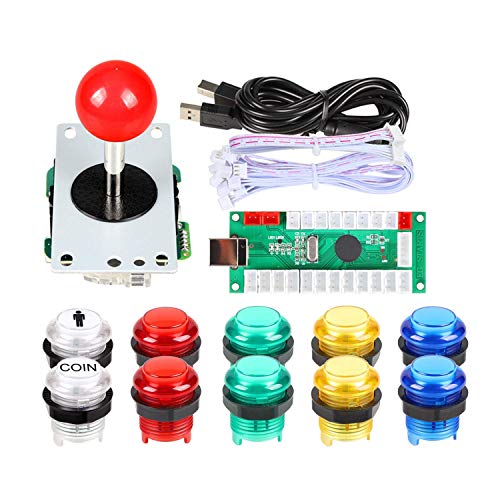
EG STARTS Arcade Buttons 1 Player DIY Kit
Sehawei Haute42 Arcade Stick S16

Qanba N3 Drone 2 Wired Joystick

MAYFLASH F300 Arcade Fight Stick

Qenker 2-Player LED Arcade DIY Kit
What Each Pick Brings To The Table
The 8Bitdo Arcade Stick sits at the sweet spot where most casual and mid-level players live. It connects three ways: Bluetooth for couch play, a 2.4G receiver (a small USB dongle that talks wirelessly to the stick) for low-latency PC sessions, and wired USB-C when you want a guaranteed stable link. The included dongle tucks into a hidden compartment, so it doesn’t go missing in your gear bag.
Inside, a universal mounting plate accepts Sanwa-style parts (Sanwa is the Japanese parts maker whose buttons and joysticks are the arcade standard), so modders can swap in higher-grade components later. Dynamic button mapping means the on-stick labels shift depending on whether you’re in Switch or PC mode, which removes a lot of mental friction during crossover play. Compared with the wired-only options later in this list, the 8Bitdo gives you the most flexibility per dollar.
A Few Highlights
- Three connection modes cover every modern fighting-game scenario without adapters
- Sanwa-compatible mounting plate lets you upgrade parts down the road
- Dynamic button layout reduces confusion when switching between Switch and PC inputs
- Hidden dongle storage keeps the 2.4G receiver from walking off
- Custom mapping and macro support through 8BitDo Ultimate Software
Things To Consider
- Stock buttons and lever feel fine for casual play but not on par with Sanwa-grade parts
- Charging routine depends on which connection mode you use most
Who It Suits Best
Switch and PC players who want a single stick for both systems and like the idea of future upgrades.
Where Another Pick Suits Better
Pure Xbox Series X players should consider the 8BitDo Wireless Arcade Stick for Xbox, which is officially licensed for that console.
Xbox owners have historically had fewer wireless arcade stick options than PlayStation or Switch crowds. The 8BitDo Wireless Arcade Stick for Xbox fills that gap as the first Xbox-licensed wireless arcade stick, which means it pairs cleanly with the console without firmware headaches. You can also run it on Windows 10 and up.
The 3.5mm audio jack with built-in volume control is a quiet but useful touch for late-night ranked sessions where you don’t want to wake the house. Battery life is rated for around 30 hours of play per charge, and a full top-up takes roughly four hours. Fast-mapping buttons let you swap profiles on the fly, which is handy when you jump between training mode and online play. It costs more than the Switch-focused 8Bitdo above, but the Xbox license and wireless convenience justify the premium for the right setup.
Features That Help
- Officially licensed wireless pairing removes the trial-and-error of third-party Xbox controllers
- Around 30 hours of battery per charge covers a week of casual sessions
- 3.5mm jack with on-stick volume keeps headset clutter down
- Profile-switching buttons help during long training blocks
Worth Noting
- Higher price than the Switch-and-PC 8Bitdo option
- Wireless latency is fine for casual play, but tournament purists may still prefer wired
- No mention of swappable Sanwa parts in the listed details
Built With In Mind
Xbox Series X and Xbox One owners who want wireless freedom without the unofficial-controller gamble.
Skip It When
Multi-console households rotating between PlayStation, Switch, and PC are better served by the MAYFLASH F700, which supports all three.
Where the first 8Bitdo on this list is a clean modern shape, the Retro Wireless leans into nostalgia. The color and silhouette nod to classic arcade cabinets, which is a nice fit for anyone running fighting games on a CRT (cathode-ray tube) or a retro-themed setup. Functionally, it covers Switch, Switch 2, and PC with the same Bluetooth, 2.4G, and USB-C options.
Two dedicated macro buttons (P1 and P2) sit on the case, so you can store button combinations for practice drills or character-specific sequences. The dynamic button layout shifts between Switch and X-Input (the standard PC controller protocol) visuals without rebooting. If you like the look of vintage cabs but want modern wireless, this is the most personality-forward pick in the lineup.
Strengths Worth Knowing
- Vintage-inspired design that looks at home next to a retro collection
- Two hardware macro buttons for stored combos and practice routines
- Same three-mode connectivity as the standard 8Bitdo stick
- Dynamic labels simplify Switch versus PC mode switching
Trade Offs
- Aesthetic-focused build may not appeal if you prefer understated hardware
- Macro buttons add a learning curve for players who have never used them
Right Fit For
Style-conscious Switch and PC players who want wireless play and a stick that doubles as shelf decor.
Look Elsewhere When
Hitbox-style players should consider the Sehawei Haute42 S16, which uses an all-button layout instead of a joystick.
The MAYFLASH F700 is the Swiss Army knife in this list. It supports PS5 (limited to fighting titles like Street Fighter 6 and Tekken 8), PS4, Switch, Switch 2, Windows, macOS, iOS, iPadOS, Android, plus retro hardware like the SEGA Mega Drive Mini and NEOGEO Mini. Three connection modes, including a stowable 2.4G receiver, keep it flexible.
PS5 compatibility is the headline. Sony’s policy on third-party fight sticks is strict, so seeing PS5 support in the spec sheet is a real plus. Apple device compatibility is the other surprise, opening up mobile fighting ports. The catch is that PS5 support depends on the specific game recognizing the stick, so double-check your library before committing.
What Helps Most
- Among the widest platform lists in this roundup, including PS5 fighting games
- Apple and Android support opens up mobile fighting ports
- Three connectivity options mirror the 8Bitdo approach
- Hidden 2.4G dongle storage for travel
Points To Note
- PS5 support is limited to fighting games per the source data, not all titles
- Broad compatibility sometimes requires checking per-game support
Made For
Multi-console players who split time across PS5, Switch, and PC and don’t want a separate stick per system.
Not Your Match When
PlayStation-only players who want an officially licensed experience should look at the Qanba N3 Drone 2 instead.
The MAYFLASH F500 has been around long enough to be considered a classic in the budget stick world. It works with Switch, Switch 2, Xbox Series X/S, Xbox One, Xbox 360, PS4, PS3, Windows, macOS, Android, Steam Deck, and several mini-consoles. Few sticks in this price band can claim that kind of reach.
Turbo functionality with adjustable speed settings is built in, which is great for shmups (shoot-’em-up games) or for players who want lighter inputs on training dummies. On PS4 and Xbox, the headset jack passes through background music and online chat. Support for both XInput and DirectInput (two Windows controller protocols) keeps older PC games happy. Versus the newer F700 above, the F500 trades mobile and Apple support for a longer track record and often a lower entry cost.
Reasons It Performs
- Wide platform list including Xbox 360 and PS3 legacy support
- Built-in adjustable Turbo for rapid-fire games
- Headset pass-through on PS4 and Xbox consoles
- Works with both XInput and DirectInput on PC
Honest Caveats
- Wired only, no wireless option
- Plastic shell can feel light compared with pricier sticks
- Stock parts are entry-level; modders will likely want to swap them
Best Suited To
Collectors and retro gamers juggling multiple consoles, including older Xbox 360 and PS3 libraries.
Swap It Out When
Players who want a wireless, modern-feeling stick should choose the 8Bitdo Arcade Stick for Switch & Windows instead.
Half the fun of arcade sticks is building one yourself. The EG STARTS 1 Player DIY Kit gives you the parts for a single-player MAME (Multiple Arcade Machine Emulator) or Raspberry Pi build: an 8-way joystick, illuminated 5V buttons, and a USB encoder. The microswitch (the small snap-action switch under each button) uses a gilded contact leg, which the source lists as tested to one million cycles.
Mounting is straightforward if you own or build a case. The joystick needs a 24mm hole and the large buttons need 30mm holes, so a drill or a pre-cut panel makes the job much easier. The LED lighting runs on 5V DC, which matches most USB power budgets. For a solo bartop or a small desktop arcade, this kit hits a sensible price without skimping on the parts you actually touch.
The Good Stuff
- Gilded-contact microswitches rated for long-term use
- Illuminated buttons add visual flair in low-light rooms
- Compact package with each component individually wrapped
- USB encoder works across modern Windows versions
Softer Spots
- Single-player only; two-player builds need the Qenker kit below
- No enclosure included, so you’ll need a case or panel
- Wiring is simple but requires basic soldering comfort
The Right Fit
Solo DIYers building a one-player bartop or upgrading an existing stick with illuminated buttons.
Reach For A Different Pick When
Two-player cabinet builds are better served by the Qenker 2-Player LED Arcade DIY Kit, which ships two joysticks and 20 buttons.
Hitbox-style controllers trade the joystick for an all-button layout, which many high-level players prefer for specific fighting games. The Sehawei Haute42 S16 is a compact all-button board with Gamerfinger buttons (a popular low-profile, snappy button) and customizable RGB lighting. The low-profile form factor is easier to throw in a backpack than a full-size arcade stick.
Compatibility covers Windows, Steam Deck, PS3, PS4, Switch, Raspberry Pi builds running retro distributions like Lakka and RetroPie, MiSTer (a hardware emulator platform), Android, Linux, and iPadOS. macOS and Windows also work in keyboard mode, which is helpful for games that don’t read gamepad input. PS4 and PS5 setup requires referring to the manual for specific instructions, since Sony’s pairing process is a known hurdle. The low reported input delay is a plus for combo-heavy fighters.
A Strong Showing
- All-button hitbox layout favored by many competitive players
- RGB lighting lets you match your setup or signal profiles
- Wide platform support including retro emulation devices
- Compact footprint for travel or smaller desks
Worth Bearing In Mind
- Hitbox style has a real learning curve for joystick-trained players
- PS4 and PS5 connection requires manual setup steps
Perfect Match For
Players curious about the hitbox layout who also dabble in retro emulation on Raspberry Pi or MiSTer.
A Better Fit Elsewhere
Traditional joystick loyalists will feel more at home on the 8Bitdo Arcade Stick for Switch & Windows, which keeps the classic lever.
Qanba is a familiar name in tournament lobbies, and the N3 Drone 2 carries the brand’s DNA at a more accessible price. Officially licensed for PlayStation 5 and PlayStation 4, plus PC, the stick sidesteps the compatibility quirks that plague cheaper third-party options. The wired-only design removes any wireless latency concerns.
You get authentic Qanba 30mm B30 buttons and a Qanba OV7 joystick with Omron switches (a Japanese switch brand prized for crisp actuation), a full control panel layout, a touch pad for PS4 navigation, and a 3.5mm microphone input with a dedicated mute button. The parts lean toward the parts-bin quality that competitive players expect, though serious modders may still swap in Sanwa parts. For a tournament-curious player who doesn’t want to gamble on unlicensed hardware, this is a sensible middle step.
Benefits That Matter
- Officially licensed for PS5 and PS4, avoiding pairing headaches
- Authentic Qanba buttons and Omron-switch joystick out of the box
- Touch pad included for PS4 menu navigation
- Wired connection removes wireless latency questions
A Few Limitations
- Wired only, no wireless option
- Limited to PS5, PS4, and PC, so no Switch or Xbox support
Whose Shelf It Belongs On
PlayStation fighters who want tournament-style hardware without the four-figure price of flagship sticks.
Consider Something Else When
Multi-platform players splitting time between Switch and PC will get more value from the MAYFLASH F700.
The MAYFLASH F300 is often the first stick recommended to anyone testing the fighting-game waters. It works with Switch, Switch 2, PS4, PS3, Xbox Series S/X, Xbox One, Xbox 360, Windows, macOS, Android, and Steam Deck, which covers nearly every modern setup. PS5 use is possible with the separate MAYFLASH Magic-S Ultimate adapter.
Sanwa Denshi buttons and joystick parts (the same Japanese standard found in Japanese arcade cabinets) are compatible, so a common upgrade path is to swap in better parts later. Turbo with adjustable speeds helps in training. Both XInput and DirectInput work on PC, covering older emulators and modern titles. It lacks the wireless flexibility of the 8Bitdo options, but for wired reliability at a low entry price, the F300 remains a steady choice.
Real Benefits
- Sanwa-compatible parts let you upgrade later
- Adjustable Turbo for shmups and training routines
- XInput and DirectInput coverage for PC
- Wide console support including Xbox 360 and PS3
Points To Keep In Mind
- Wired only, so no wireless convenience
- PS5 support requires a separate adapter
Who Should Grab It
First-time fight-stick shoppers who want a future-proof base for parts swaps without overspending today.
Where A Sibling Pick Shines
Players who prioritize wireless play should spend a bit more on the 8Bitdo Arcade Stick for Switch & Windows.
The Qenker 2-Player LED Arcade DIY Kit is built for full-cab projects. You get two joysticks, twenty illuminated buttons in blue and red, and two zero-delay USB encoders. Zero-delay encoders (small USB boards that translate button presses into instant gamepad signals) keep input lag minimal, which matters in head-to-head matches where every frame counts.
The kit is aimed at MAME, JAMMA-wiring projects, and Raspberry Pi retro builds. Heat-resistant plastic on the buttons suggests durability for long sessions, though as with any DIY parts, comfort depends on the case you put them in. For a couple of roommates or siblings building a shared bartop, the two-player layout is the key feature. If you only need one station, the EG STARTS kit above is a tighter fit.
Good Reasons To Consider
- Two-player layout covers shared cabinet builds
- Zero-delay encoders minimize input lag
- Illuminated blue and red buttons add visual punch
- Works with MAME, JAMMA projects, and Raspberry Pi retro setups
Practical Considerations
- No enclosure included, so a case or panel project is required
- Wiring two encoders is a step up in complexity from single-player kits
Made For
Cab builders and shared-space retro setups that need two simultaneous players.
Look Elsewhere When
Solo builders with a small desk will find the EG STARTS 1 Player DIY Kit a better match.
Picking The Right Stick For Your Setup
The first decision is platform. Sticks that list your console explicitly are almost always smoother than adapters. PS5 owners should look for officially licensed options like the Qanba N3 Drone 2, while Xbox Series X players get the cleanest path through the 8BitDo Wireless Arcade Stick. Switch and PC users have the widest menu, including the three-mode 8Bitdo, the broad MAYFLASH F700, and the Sanwa-friendly F300.
Next, weigh wireless versus wired. Wireless sticks add living-room flexibility, but wired models avoid any charging routine and keep input lag as low as possible. Modding potential is the third axis. Mounting plates that accept Sanwa parts turn an entry stick into a long-term project, which matters if you plan to swap buttons and joysticks later. For DIYers, the question shifts to player count, encoder quality, and whether you want illuminated buttons for the build’s look.
Where Shoppers Slip Up And Where Spending More Helps
Traps First Timers Fall Into
Picking a stick that doesn’t list your console is the most common mistake. Cross-compatibility is improving, but platform support is rarely universal, especially on PS5. Wireless buyers sometimes forget to check battery life and charging time, which matters during long tournament days. DIY kit buyers often underestimate the time and tools needed for drilling, soldering, and wiring, so factor that in before the parts arrive.
The Upgrade Payoff
Spending more on a fight stick usually buys three things: better stock parts, official licensing, and mod-friendly internals. Premium buttons and Japanese-made switches feel crisper and last longer under heavy play. Officially licensed sticks skip the firmware fiddling that some unlicensed models demand. Cases that open cleanly with a standard screwdriver make future swaps painless. None of that matters on day one, but after a few months of regular play, the differences show up.



