


Choosing the right arcade stick shapes how every match feels, whether you main a shimmie-heavy grappler, a charge character, or a modern hitbox specialist. The right combo of lever, switches, and console support removes a layer of friction between muscle memory and frame-perfect inputs. This lineup covers everything from solder-ready boards and DIY cabinet kits to fully assembled wireless sticks for current consoles, so any skill level or build style finds a starting point.
A Quick View Of The Lineup

Brook PS4+ Audio Fighting Board

Qenker Chrome Arcade DIY Shaft Extender (2-Pack)

RetroArcade.us JS19/JS12 Red Flight Stick Top

RetroArcade.us JS19/JS12 Blue Flight Stick Top

8Bitdo Arcade Stick for Switch and Windows

8Bitdo Arcade Stick for Xbox (Officially Licensed, White)
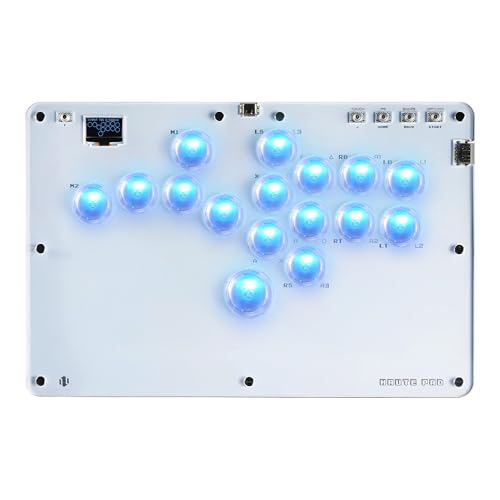
Haute42 R16 Leverless Arcade Stick (16-Key)

MAYFLASH F300 Elite Arcade Stick (Sanwa Parts)

RetroArcade.us JS19/JS12 Black Flight Stick Top

Qenker 2-Player LED Arcade DIY Kit (Blue and Red)
More On The Choices That Made The List
The Brook PS4+ Audio Fighting Board targets the build-it-yourself crowd that already has a case, lever, and buttons ready, and just needs a smart brain to tie them together. Auto-detection across PS4, Switch, PS3, and PC X-input means swapping consoles is a cable change, not a firmware scramble. Compared with the Qenker shaft extender covered later, this board sits deeper in the build chain, so it’s a better fit once your case is already cut and drilled.
For tournament-eligible play, the on-board SOCD cleaner (Simultaneous Opposing Cardinal Directions, the way sticks report left+right or up+down at the same time) can be toggled on or off directly from the case. That’s a meaningful detail for event rules where neutral SOCD is now banned. You’ll also find LS/DP/RS stick mapping, a turbo function, and PS4 touchpad simulation built in, so menu navigation behaves closer to a standard DualShock.
Everyday Advantages
- Multi-console auto-detect covers PS4, PS3, Switch, and PC with no extra adapters for those platforms.
- Toggleable SOCD cleaner keeps the build tournament-legal or neutral depending on rules.
- PS4 audio passthrough through a single headphone jack, useful in noisy living rooms or late-night sessions.
- 20-pin connector plus screw terminal block gives both quick-disconnect and soldered wiring options.
- Upgradable to PS5 fighting games when paired with Brook’s UFB-UP5 add-on board.
Worth Noting
- Board only, no enclosure, lever, or buttons included, so total project cost climbs quickly.
- PS4 audio is the only supported headset path, so PS3, Switch, and PC users lose the convenience.
Who It Suits Best
Intermediate to advanced modders who already own a case and want a flexible multi-platform brain without juggling adapters.
Consider Something Else When
The 8Bitdo Arcade Stick for Switch and Windows is the smarter pick for anyone who wants a finished wireless stick rather than another soldering weekend.
Shaft extenders sound like a small part, but they solve a frustrating build problem: a thick control panel swallows the throw of a standard joystick. Qenker’s two-piece chrome extender bolts between an existing Sanwa, Seimitsu, or Zippyy shaft and its mounting nut, lifting the lever higher above the panel surface. Where the Brook board above is the brain of a build, this part is closer to a fitting under the sink: unglamorous and easily overlooked.
The two-pack format is useful because mirror-image cabinets often need matched pairs to keep the action height consistent between Player 1 and Player 2. Chrome plating resists the sweat and frequent wipe-downs of a working arcade. You may find the chrome finish a bit slick during fast direction changes, so pairing it with a rubber dust cover or textured ball top helps on long sessions.
What Makes Sense
- Cross-brand fit with Sanwa, Seimitsu, and Zippyy shafts covers most standard Japanese-style joysticks.
- Two-pack format keeps left/right player sides matched in a two-player cabinet.
- Chrome finish wipes clean and resists corrosion from humid game rooms.
Trade Offs
- Adds visible height, so layout planning matters before drilling the panel.
- Chrome surface can feel slick to bare fingers until broken in.
Made For
Cabinet builders with thick MDF (medium-density fiberboard) or tempered glass panels who need extra stick clearance without re-cutting the mount.
A Better Fit Elsewhere
Anyone who hasn’t already sourced a Sanwa or Seimitsu joystick should look at the MAYFLASH F300 Elite, which ships with those parts already installed.
When the bat handle on an old JS-series joystick cracks or goes missing, the rest of the stick usually still works fine. RetroArcade.us offers this red flight-style replacement top as a 6mm-thread drop-in, sized to fit JS19 and JS12 models. Where the previous picks are full systems, this is a small fix-it part that brings a tired stick back to life. Elliptical bat shape gives a wider grab surface than a ball top, which some players prefer for palm grip.
Owners commonly report the 51mm height and 17mm diameter make the top feel familiar in the hand, matching classic arcade geometry. The red color pops under the glow of button LEDs, which is a nice touch on themed cabinets. For anyone who just needs one top, the two-pack color-matched siblings below give you backup or a secondary player’s stick.
The Value In It
- Direct replacement for JS19 and JS12 shafts without adapters.
- Elliptical bat handle reduces finger fatigue during long sets.
- Bright red finish stands out under cabinet lighting.
Honest Caveats
- Limited to JS-series joysticks, so generic Sanwa or Seimitsu builds need a different part.
Right Fit For
Owners of a RetroArcade.us JS19 or JS12 joystick restoring a worn or cracked bat handle.
Not Your Match When
Home builders using a Sanwa or Seimitsu shaft should grab the Qenker extender or a full Sanwa-equipped stick like the MAYFLASH F300 Elite instead.
The blue sibling of the red top above keeps the same 6mm thread, 51mm height, and 17mm elliptical bat dimensions, just in a cooler colorway. For two-player cabinets, ordering red for Player 1 and blue for Player 2 makes identifying sides instant during couch tournaments. Compared with the red top’s visual punch under LEDs, blue reads as slightly more subdued, which some players prefer for focused play.
Drop-in fit means no drilling, no shimming, and no filing; you unscrew the old top and thread this one on. The elliptical shape suits palm grip players who anchor the stick with their whole hand rather than pinching with fingertips. Given how small the part is, you may want to order a spare if your cabinet sees heavy traffic.
Real-World Strengths
- Matches red top dimensions, so left/right sides feel identical in a two-player build.
- Cool blue tone stays readable without harsh glare on stage.
- Standard 6mm thread fits any JS19 or JS12 shaft without modification.
Small Caveats
- Replacement only, so you still need an existing JS-series joystick to use it.
- Elliptical shape is less precise for fingertip grip than a smaller ball top.
Best Suited To
JS-series owners matching a Player 2 stick to a red Player 1 setup without buying a whole new joystick.
Skip It When
New builders should skip straight to a complete solution like the Haute42 R16 leverless or MAYFLASH F300 Elite stick.
Where earlier entries were individual parts, the 8Bitdo Arcade Stick for Switch and Windows is a finished controller that needs zero assembly. It supports three connection paths: Bluetooth for the Switch, 2.4GHz wireless through a hidden USB receiver for low-latency PC play, and wired USB-C for tournament setups. The universal mounting plate behind the buttons accepts standard Sanwa parts, so you can swap the stock lever and buttons for higher-end pieces later.
Button mapping changes with each connection mode, so the same physical layout covers fighting game controls and standard controller commands without manual remapping. 8Bitdo’s Ultimate Software handles macros and profile storage, useful for players who switch between genres. The hidden 2.4GHz receiver compartment inside the case prevents that small dongle from vanishing in a bag between events.
Useful Strengths
- Triple-mode connectivity (Bluetooth, 2.4G, wired USB-C) covers Switch and PC without dongle juggling.
- Sanwa-compatible mounting plate lets you upgrade parts as your skills grow.
- Mode-aware button mapping adapts layout to fighting games or standard commands automatically.
Points To Keep In Mind
- Not officially licensed for Xbox consoles, so Xbox owners need the 8Bitdo Xbox version covered next.
- Stock switches feel softer than premium Sanwa parts, so most competitive players swap them.
Key Specs
Who Will Love This
Switch and PC players who want a finished wireless stick today and a Sanwa upgrade path for later.
Reach For A Different Pick When
Xbox Series or Xbox One owners should choose the 8Bitdo Xbox version instead, since it carries the official Xbox license and full audio support.
As the first Xbox-licensed wireless arcade stick, this 8Bitdo model sits at the top of the mainstream tier. Compatibility spans Xbox Series X|S, Xbox One, and Windows 10 and above, covering most current-generation setups. The 3.5mm audio jack with on-board volume control is rare in this category, sparing you a headset adapter.
Wireless 2.4GHz and wired USB both work on Xbox and PC, so the same stick handles living-room play and competitive wired sessions. 8BitDo Ultimate Software unlocks button mapping, fast-mapping, and profile switching for different fighters. Up to 30 hours of play per charge, with a 4-hour top-up, covers long event weekends without hovering near an outlet.
Features That Help
- Official Xbox license means full dashboard integration and button-prompt parity.
- Built-in 3.5mm audio jack with volume control removes the need for an adapter.
- Up to 30 hours of wireless play per charge covers multi-day event schedules.
- Profile switching keys let you reconfigure inputs between different fighters on the fly.
Things To Consider
- White finish shows scuffs faster than the darker 8Bitdo Switch model, depending on your play environment.
- Premium price tier reflects the licensing, so budget-focused players may look at non-licensed alternatives.
Perfect Match For
Xbox and Windows 10 players who want a wireless arcade stick with headset audio and full platform support out of the box.
Look Elsewhere When
Switch-first households save money with the 8Bitdo Arcade Stick for Switch and Windows, which skips the Xbox licensing cost.
The Haute42 R16 is built for the leverless crowd, players who treat direction inputs as a 4-way or 8-way key cluster rather than a stick. Crystal switches sit under each of the 16 keys, giving a clear actuation feel and a see-through look that catches RGB lighting. Compared with the joystick-based picks above, this is a different input philosophy: faster pivots and clean SOCD behavior come built in, since each key can only be pressed individually.
Hot-swap sockets under the keys mean you can change switch feel without soldering, a real plus for anyone still dialing in their preferred actuation weight. The upgraded Type-C port sits flush with the case, reducing the wobble and port damage that earlier flat-panel designs suffered. The 2.8mm slimmer profile versus the T13 and T16 makes it easier to slip into a laptop bag for travel sessions.
Practical Pluses
- Hot-swap crystal switches let you tune feel without a soldering iron.
- Reinforced Type-C port resists the cable-strain damage common on leverless boards.
- Slimmer case profile than earlier T-series models fits more travel setups.
- RGB lighting reads cleanly through the clear switch housings.
Minor Gripes
- Key-only layout has a learning curve for players raised on joysticks.
- Crystal switches feel different from standard mechanical switches, so muscle memory may need recalibration.
Built With In Mind
Hitbox and leverless players who want a travel-ready board with switch customization and a clean SOCD setup.
Where Another Pick Suits Better
Stick-first players looking for genuine Sanwa parts should choose the MAYFLASH F300 Elite, which arrives tournament-ready in a familiar joystick form factor.
MAYFLASH built the F300 Elite around the same Sanwa joystick and nine-button layout that most tournament players train on. Out of the box, it pairs with Switch, Switch 2, PS4, PS3, Xbox Series X|S, Xbox One, Windows, macOS, Steam Deck, and Android, one of the widest platform lists in this roundup. That makes it a strong all-rounder for households that rotate between console generations or play on a Steam Deck away from a desk.
The 4-way joystick is a deliberate choice for fighters, since diagonal SOCD behavior matters more than 8-way flexibility. PS5 access requires MAYFLASH’s Magic-S Ultimate Adapter or MagicBoots-S5 Converter, so PS5-only owners should factor that into the build. Owners commonly report the Sanwa buttons and stick feeling tight out of the box, with little to no break-in needed for serious play.
Everyday Wins
- Genuine Sanwa joystick and buttons arrive pre-installed, no extra parts shopping required.
- Broad platform support covers Switch, Xbox, PlayStation, PC, Steam Deck, and Android in one case.
- 4-way joystick design fits tournament rules for most major fighting games.
Points To Note
- PS5 fighting games need a separate MAYFLASH adapter to work.
- Plastic case, while sturdy, lacks the weight of premium metal enclosures.
Key Specs
Whose Shelf It Belongs On
Multi-console households and tournament-bound players who want Sanwa-grade parts without paying for a custom-built case.
Swap It Out When
Players committed to wireless setups should pick the 8Bitdo Arcade Stick for Switch and Windows instead, since the F300 Elite is wired only.
The black top rounds out the RetroArcade.us trio and gives JS-series owners a low-key colorway that won’t clash with most cabinet artwork. Same 6mm thread, 51mm height, and 17mm elliptical dimensions as the red and blue versions, so it swaps in without re-fitting. Compared with the bright red top, black reduces glare under stage lighting for players who want a calmer visual field.
For tournament organizers and event runners, the black finish also hides minor scuffs and handling wear between sessions. The flight-style bat handle suits palm-grip players who anchor the stick with the heel of the hand, especially on long sets. You may want to stock a few of these as spares if your cabinets see daily use across multiple players.
Benefits That Matter
- Low-glare black finish keeps focus on-screen under bright stage lights.
- Hides handling wear and minor scuffs better than bright colorways.
- Same dimensions as the red and blue tops, so Player 1 and Player 2 setups can be color-coded without size differences.
Where It Is Less Suited
- Black tops can be harder to locate at the bottom of a dim cabinet if one comes loose.
The Right Fit
JS-series owners building a stage-ready or event-grade cabinet who prefer a low-glare colorway that ages gracefully.
Where A Sibling Pick Shines
Players chasing color-coded sides should grab the red and blue versions covered earlier, which let you tell left and right apart at a glance.
Where the earlier Qenker entry was a single shaft extender, this kit ships the full parts list for a two-player MAME (Multiple Arcade Machine Emulator) or Raspberry Pi cabinet: two joysticks, 20 LED-lit buttons, and two zero-delay USB encoders. The zero-delay encoder is the brain of the kit, registering button presses fast enough that input lag stays well under a frame on most emulators. It pairs well with the Brook board covered earlier if you want a wired-PC base with MAME library support.
Color-matched blue and red sides make left and right instantly readable, useful for head-to-head fighters and platformer co-op. The kit assumes you already have a case, a monitor, and a computer to plug into, so plan on adding wood, art, and a screen separately. Owners commonly report the LED buttons lighting evenly under standard 5V power, with no noticeable flicker during long sessions.
What Works In Its Favor
- Two-player parts bundle skips the hassle of buying joysticks, buttons, and encoders separately.
- Zero-delay USB encoders keep input latency low for fighting games and rhythm titles.
- LED buttons add cabinet-style glow without a separate lighting harness.
Practical Considerations
- No case, monitor, or computer included, so total project cost is much higher than the kit alone.
- Plastic components, while heat resistant, are less durable than metal alternatives over years of heavy use.
Key Specs
Who Should Grab It
Hobbyists building a full-size or bartop MAME cabinet who want a clean parts list without mixing brands.
Not Your Match When
Anyone looking for a finished, ready-to-play stick should skip this kit and grab the 8Bitdo Xbox version or MAYFLASH F300 Elite instead.
What Separates A Good Arcade Stick From A Frustrating One
Three attributes matter most when judging an arcade stick: input feel, platform reach, and build quality. Input feel comes down to the joystick mechanism and the switches under the buttons. Japanese-style leaf switches (the classic Sanwa and Seimitsu designs found in real arcade cabinets) feel different from box-style switches, with shorter throw and lighter actuation. Most tournament players train on Sanwa, so buying a Sanwa-equipped stick like the MAYFLASH F300 Elite removes a layer of adjustment when moving between home and event play.
Platform reach matters more than it used to. A stick that supports Switch, PS4, and PC out of the box covers the most common living-room setups, while Xbox-licensed models like the 8Bitdo Xbox stick handle Microsoft’s platform quirks. Cross-console boards like the Brook PS4+ Audio Fighting Board give DIY builders that flexibility at the cost of a full assembly project. For leverless players, hot-swap switch sockets in the Haute42 R16 make a single stick adaptable across different switch preferences.
Build quality shows up in case weight, button mounting depth, and connector quality. A heavier case stays put on a desk during heavy inputs, while a lighter case slides around. Screw-mounted buttons feel more solid than snap-in rings, and detachable cables prevent the most common failure point. None of these attributes is flashy on a spec list, but together they decide whether a stick feels like a tool or a toy after a year of regular play.
Key Considerations Across These Picks
Where Shoppers Go Wrong
The most common mistake is buying a finished stick before checking which joystick and switch standard it uses. A cheap unbranded stick with box-style switches feels completely different from Sanwa parts, and the adjustment period can last weeks. Another trap is ignoring platform licensing: a non-licensed Xbox stick may lose access to firmware updates or fail to wake the console from sleep reliably.
What The Higher Tier Buys
Spending more on a premium stick buys three things: Sanwa or Seimitsu parts, better case materials, and license-backed platform support. A premium stick arrives with input feel that matches tournament play, so home practice transfers cleanly. Higher-tier cases also tend to include headset jacks, weighted bases, and software-driven remapping, which together make a stick last across multiple console generations rather than a single hardware cycle.
Frequently Asked Questions
What is a leverless arcade stick? A leverless stick replaces the joystick with a cluster of keys, one for each direction, so each cardinal input is its own button. Players often find the layout faster for charge characters and cleaner for SOCD-neutral play.
Are Sanwa parts worth the extra cost? Sanwa joysticks and buttons are the de facto standard in Japanese arcades and most tournaments. Sanwa-equipped sticks feel identical to event hardware, which shortens the adjustment period when playing away from home.
Can one stick work across multiple consoles? Multi-console boards like the Brook PS4+ Audio Fighting Board and most 8Bitdo and MAYFLASH finished sticks auto-detect between platforms. Console-specific features, like the PS5 or Xbox dashboard integration, still need a licensed or platform-specific model.
What is SOCD cleaning, and does it matter? SOCD means simultaneous opposing cardinal directions, like pressing left and right at the same time. Modern tournament rules ban neutral SOCD, so sticks with a toggleable cleaner keep you legal without extra software.
How long do arcade sticks usually last? With Sanwa or Seimitsu parts, a well-cared-for stick can run a decade of regular play. Cheaper switches and plastic cases tend to wear out within a few years of heavy use, especially in shared cabinets.
Wrap Up
Your best pick depends on where you sit in the arcade stick world. DIY builders get the most from a board like the Brook PS4+ Audio Fighting Board, while finished-stick shoppers will find the 8Bitdo and MAYFLASH options easier to live with. Leverless and hitbox players should focus on the Haute42 R16, and cabinet builders can pair the Qenker kit with shaft extenders and replacement tops as needed. Match the stick to the way you actually play, and the gear fades into the background where it belongs.



