


A serious fight stick setup starts with the right bones. Joysticks, buttons, encoders, and boards each shape how a controller feels under your fingers during a long training session or a bracket at the local scene. This roundup pulls together ten picks that span full ready-to-play arcade sticks, leverless controllers, internal boards, and the DIY hardware you’ll want on the bench. Skip the guesswork and zero in on the parts that actually move the needle for your setup.
Your Options, Compared

Brook PS4+ Audio Fighting Board for PS4, PS3, NS, PC

Qenker 2-Piece Chrome Arcade DIY Shaft Extender Rods

Sanwa OBSF-30 Original 30mm Push Buttons (12-Pack)

Sanwa JLF-TP-8YT Joystick + 8 OBSF-30 Buttons (White)

8Bitdo Arcade Stick for Switch and Windows

8Bitdo Arcade Stick for Xbox Series X|S and Windows (White)
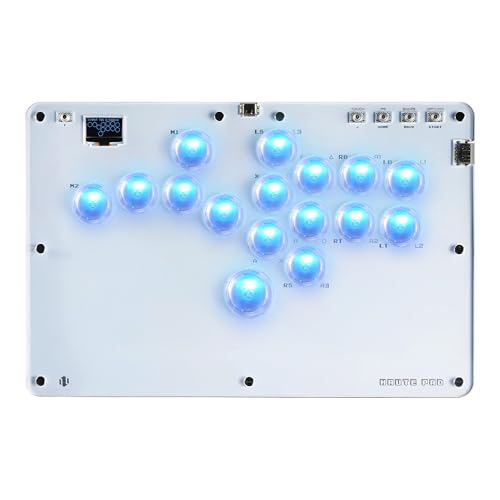
Haute42 R16 Leverless Arcade Stick, 16-Key Hot-Swap

Hikig 2-Player LED Arcade Buttons and Joysticks DIY Kit

Sanwa OBSF-30 Original 30mm Push Buttons (6-Pack, Dark Blue)

Zero Delay Arcade USB Encoder (QR05) for MAME and PC
Taking A Closer Look At The Options
The Brook PS4+ Audio Fighting Board drops into a custom stick case and instantly speaks to four platforms without firmware swaps. Auto-detection figures out whether you plugged into a PlayStation 4, PlayStation 3, Switch, or a PC running X-input, which removes the usual fumble of flipping dipswitches mid-session. A 20-pin connector plus screw terminal blocks makes the wiring step a little less painful if you are building a case from parts for the first time.
Where this board earns its keep is the SOCD cleaner. SOCD stands for Simultaneous Opposing Cardinal Directions, meaning what happens when you press left and right at the same time. A cleaner resolves that input for tournament-legal play, and Brook lets you toggle the feature on or off depending on the ruleset you face. The pre-installed header version means there is one less step before soldering, and an upgrade path through the UFB-UP5 accessory adds PS5 compatibility down the line.
Practical Advantages
- Auto-detects between PS4, PS3, Switch, and PC for quick platform swaps at a tournament station
- Toggleable SOCD cleaner keeps your inputs legal in events that require neutral resolution
- 20-pin connector and screw terminal blocks make initial wiring and future swaps approachable
- Touchpad button simulation and Turbo function help you map PS4-specific inputs onto a stick layout
- UFB-UP5 upgrade path opens a path to PS5 fighting games without replacing the whole board
Honest Caveats
- PS4 audio through the headphone jack does not carry over to PS5, PS3, or Switch, so a headset setup is platform-limited
- Owners commonly report that enabling or disabling the SOCD mode requires a button combo, which is easy to forget mid-grind
Feature Snapshot
Right Fit For
Competitive players who jump between PS4, Switch, and PC tournaments and want one board that follows them.
A Better Fit Elsewhere
Casual Switch-only players may find the 8Bitdo Arcade Stick for Switch and Windows easier since it ships as a finished controller with no soldering.
Stick height is a quiet comfort factor that most people ignore until their wrist aches after a long set. The Qenker 2-Piece Chrome Arcade DIY Shaft Extender sits between your existing joystick and the ball top, adding reach that lets your hand sit in a more relaxed position. Two pieces in the pack mean you can extend both player-one and player-two sticks if you are building a dual setup for a cabinet or a pair of training sticks.
Compatibility is the headline here. The extenders are designed to work with Sanwa, Seimitsu, and Zippyy shafts, so the most common joystick mounts drop on without modification. The chrome finish matches the look of standard arcade parts, which matters for builders who care about a clean final case.
The Value In It
- Raises stick height for a more neutral wrist angle during extended play
- Two-piece pack covers dual-stick projects without a second purchase
- Works across the three most common arcade joystick brands
- Chrome finish blends visually with standard Sanwa hardware
Points To Keep In Mind
- Adds total stick travel, which can feel slightly mushy if you prefer short, snappy throws
- Requires disassembling the joystick to install, so a basic tool kit is necessary
- Chrome plating can show minor scuffs over time with heavy use
Built With In Mind
Players with larger hands or anyone who feels wrist strain after long sessions will appreciate the added reach.
Another Choice May Suit
Build a brand-new stick from scratch and you may prefer the Sanwa JLF-TP-8YT Joystick + 8 OBSF-30 Buttons bundle, which covers the lever and buttons in one pass.
Sanwa is the brand you see under the fingers of nearly every tournament champion, and the OBSF-30 30mm snap-in button is the reason. This 12-pack gives you a full complement of action buttons plus a few spares, with two pieces in each included color. The snap-in mount design means you press the button into a 30mm hole in your control panel and the built-in tabs lock it in place without a separate nut ring.
Each button houses a non-clicking micro switch, which produces a quiet, linear press that registers cleanly without the audible click found in cheaper alternatives. The rated switch life sits at three million cycles, so even daily practice sessions will not burn through these quickly. Owners commonly report the smooth actuation helps with rapid input sequences in games like Street Fighter and Tekken.
Good Reasons To Consider
- 12-pack covers a full eight-button layout plus extras for a second project or repair bench
- Non-clicking micro switches give a quiet, smooth press for late-night practice
- Snap-in installation cuts build time compared to screw-mounted alternatives
- Compatible with most Hori and MadCatz cases for easy upgrades
Small Caveats
- Snap-in design works only with panels drilled to a 30mm spec, so retro-fitting some older cases may need filing
- Color variety in the 12-pack may not match an existing custom build without extra planning
Who It Suits Best
First-time stick builders and anyone rebuilding an aging Hori or MadCatz case with authentic Sanwa parts.
Consider Something Else When
You only need a small repair and want a single color match. The Sanwa OBSF-30 6-Pack (Dark Blue) is a tighter fit for that job.
This bundle packages the two parts that define the feel of a Japanese-style arcade stick: the Sanwa JLF-TP-8YT joystick and eight OBSF-30 push buttons in white. The joystick is switchable between four-way and eight-way operation, which lets you tune the restrictor gate for the precision diagonals of a 3D fighter or the clean cardinal inputs of a 2D classic. A solid spring and excellent return-to-center action keep the lever predictable between rounds.
Mounting depth is rated for control panels up to 5mm thick, which covers the standard wooden and plastic enclosures used in most DIY projects. The package slips into existing Hori and MadCatz cases, so swapping old parts for fresh Sanwa hardware is often a drop-in job. The JLF is the lever that has defined competitive fighting play for over two decades, and the 8YT variant adds a taller mounting plate that suits deeper cases.
Notable Upsides
- Switchable 4-way or 8-way gate adapts the joystick to different game genres
- Mounts in steel or plastic panels up to 5mm thick for flexible case choices
- Fits common Hori and MadCatz shells for straightforward replacement builds
- Eight matching OBSF-30 buttons complete a standard eight-button layout in one pack
Trade Offs
- White buttons show dirt and grime faster than darker colors, depending on how much you snack between sets
- Stick height sits lower than aftermarket JLF mods, so players chasing extra reach may want a shaft extender like the Qenker pair
Best Suited To
First-time builders who want a known-good Sanwa foundation without mixing brands across the joystick and buttons.
Skip It When
You are on a tight budget and just need buttons. The Sanwa OBSF-30 12-Pack is a better fit for pure button swaps.
For Switch players who want a finished stick without soldering, the 8Bitdo Arcade Stick delivers a polished package right out of the box. The case ships with a universal mounting plate that accepts Sanwa joystick and button hardware, so you can swap stock parts for higher-end Japanese components later if you want. Three connection paths are built in: Bluetooth for couch play, a 2.4G wireless receiver stored in a hidden compartment, and a wired USB-C for tournament play.
The 8Bitdo Ultimate Software suite lets you remap buttons and create macros, and a dynamic button layout changes the visible labels depending on the mode you are in. That visual feedback is genuinely useful when you switch between a six-button fighter and a four-button classic. The 2.4G receiver tucks into a hidden slot on the case, which keeps small parts from getting lost in your bag.
What Makes Sense
- Three connection modes cover living room, desktop, and tournament settings
- Sanwa-compatible mounting plate accepts aftermarket joystick and button upgrades
- 8Bitdo Ultimate Software supports button remapping and custom macro creation
- Dynamic label layout shifts visually with the active mode
Some Limits To Know
- Switch compatibility means no native Xbox support, so the 8Bitdo Xbox-licensed model is the better pick for Microsoft owners
- Stock joystick and buttons are decent but not on par with authentic Sanwa, so plan on a parts swap for tournament play
Feature Snapshot
Made For
Nintendo Switch and PC players who want a finished wireless stick that they can also open up and mod later.
Where Another Pick Suits Better
Hardcore PC players who only need an internal board should look at the Brook PS4+ Audio Fighting Board for a lower-cost PCB swap.
The white 8Bitdo Arcade Stick is the first Xbox-licensed wireless arcade stick on the market, which means it talks to Xbox Series X|S, Xbox One, and Windows without third-party dongles or workarounds. The licensed status also signals that the hardware passed Microsoft’s controller checks, so you can bring it to a console tournament without risking compatibility issues. A 3.5mm audio jack on the front plus a volume control let you plug in a headset and tune your mix without diving into a system menu.
Connection comes through 2.4G wireless or wired USB, and 8Bitdo Ultimate Software handles button remapping plus fast-mapping and profile shortcuts. The rated battery life reaches up to 30 play hours on a four-hour charge, so for most weeknight sessions the case will outlast your evening. The Sanwa-compatible mounting plate means you can swap the stock lever and buttons down the road.
Key Advantages
- Officially licensed for Xbox Series X|S, Xbox One, and Windows 10 and above
- 3.5mm audio jack with onboard volume control for headset convenience
- Up to 30 hours of play per four-hour charge covers most offline tournaments
- Sanwa-compatible mount opens the door to future internal upgrades
Potential Drawbacks
- White finish scuffs more visibly than darker colorways, depending on how often you travel with it
- Wireless mode adds a small amount of input lag compared to wired, which competitive players may notice in training
Feature Snapshot
Perfect Match For
Xbox owners who want a wireless stick that is fully licensed and ready to plug in the moment it arrives.
Look Elsewhere When
Switch-only players will get more out of the 8Bitdo Arcade Stick for Switch and Windows, which adds Bluetooth to the mix.
Leverless controllers ditch the joystick in favor of individual directional keys, and the Haute42 R16 leans hard into that design with 16 hot-swappable keys. Hot-swap means the mechanical switches under each key pull out without soldering, so a worn switch or a personal preference change is a 30-second job. Crystal-style switches give the unit a clear, RGB-lit look that stands out from a row of traditional arcade sticks at a meet-up.
The slim 2.8mm-thin profile compared to earlier T13 and T16 models makes the case easier to throw into a backpack alongside a laptop or handheld. A refreshed USB-C port addresses the cable-wear complaints common to earlier leverless designs. Owners moving from a lever may need a few training sessions to adjust, but the payoff is faster directional inputs in games that reward clean, snappy motion.
A Few Highlights
- Hot-swappable switches let you swap individual keys without desoldering
- 16-key layout covers modern six-button fighters plus extra macro slots
- Clear crystal-style switches with RGB lighting add visual flair at a meet-up
- Thinner profile than earlier Haute models fits more bag setups
What To Weigh
- Leverless feel takes practice for anyone trained on a JLF-style joystick
- Hot-swap sockets add a slight cost premium over soldered alternatives
- RGB and crystal aesthetic may not appeal to players who prefer a traditional look
Feature Snapshot
Who Should Grab It
Players exploring the modern leverless scene who want hot-swap convenience and a striking clear case design.
Not Your Match When
Traditional lever-and-button purists will feel more at home with a finished stick like the 8Bitdo Xbox-licensed arcade stick.
The Hikig two-player kit bundles everything you need to wire up a two-player control panel in a single pass: two joysticks, twenty LED-lit arcade buttons, and a zero-delay USB encoder. Red and blue button colors give each player a visual cue about which side is theirs, which keeps guests out of each other’s way during a couch session. The kit is aimed at MAME cabinets, Raspberry Pi retro setups, and PC-based fighting game projects.
The included encoder is the same zero-delay style found in many DIY builds, supporting common 4.8mm terminal joysticks and buttons without extra adapters. Heat-resistant plastic on the buttons and joysticks helps the kit survive the warm interior of an enclosed cabinet. Owners commonly report that the LED wiring takes patience during the first power-up, but the included quick-connect leads keep the job manageable for first-timers.
Where It Excels
- Two-player layout in one box cuts down on multiple orders and shipping waits
- LED buttons add visual feedback in a dim cabinet interior
- Heat-resistant plastic holds up in enclosed wooden cases
- Zero-delay encoder supports MAME, Raspberry Pi, and PC builds
Areas To Watch
- Not all parts are genuine Sanwa, so tournament-grade feel will require a separate parts upgrade
- Wiring twenty LED buttons takes longer than a single-player setup, depending on your soldering speed
Feature Snapshot
The Right Fit
MAME and Raspberry Pi builders planning a two-player cabinet on a single weekend build.
Swap It Out When
Tournament-focused solo players should consider the Sanwa JLF-TP-8YT bundle for the higher-end lever and button feel.
When a worn Sanwa button finally gives up after years of quarter-circles and dragon punches, the 6-pack OBSF-30 set is the kind of small repair that keeps an aging stick tournament-ready. Dark blue is a common color choice for accent buttons, and a six-pack covers a standard six-button layout without leftover parts cluttering the parts drawer. The non-clicking micro switch inside each unit produces the smooth, quiet press that made Sanwa the standard for tournament play.
Installation is the same snap-in style as the larger 12-pack, so pulling an old button and pressing in a new one takes only a few minutes with a basic removal tool. The three-million-cycle rated life means each replacement is likely to outlast the rest of the case around it. Owners commonly pair this pack with a Sanwa JLF joystick for a full refresh of an older Hori or MadCatz shell.
Real-World Strengths
- Six-pack covers a full six-button fighting game layout in one order
- Snap-in mount removes the need for extra hardware or a nut ring
- Three-million-cycle switch rating supports years of heavy practice
- Dark blue color matches common custom build themes
Soft Spots
- Single-color pack offers no variety, so mixed-color projects will need multiple orders
- Snap-in only fits 30mm drilled panels, so older non-standard cases may require additional fitting
Whose Shelf It Belongs On
Stick owners with a worn-out button or two who want a quick, authentic Sanwa swap without buying a full 12-pack.
Reach For A Different Pick When
A full custom build needs more than six buttons. The Sanwa OBSF-30 12-Pack handles bigger projects in one shot.
The QR05 is the small green board that turns a pile of arcade buttons and a joystick into a USB controller your PC can understand. The encoder supports any joystick or push button wired with 4.8mm terminals, which is the standard on most arcade parts. Once connected, the board shows up as a generic gamepad in Windows or in a Raspberry Pi running RetroPie, with no driver install required for most modern systems.
Installation is the simplest part of the build. The encoder sits inside the case, and each button or directional direction lands on a labeled pin on the board. The zero-delay design keeps input lag minimal, which matters for fighting games where a single frame can decide a round. For a budget-friendly single-player build, the QR05 has been the go-to encoder for years in the DIY community.
Positive Points
- Works with any 4.8mm terminal joystick and push button for flexible parts sourcing
- Plug-and-play on Windows and Raspberry Pi without manual driver installs
- Zero-delay design keeps inputs responsive for fast fighting game play
- Compact board fits inside slim arcade cases
Where It Is Less Suited
- No native console support out of the box, so a console build needs a different board like the Brook PS4+ Audio Fighting Board
- Single-player limit per board means two-player builds require two encoders or a different solution
Feature Snapshot
Who Will Love This
PC and Raspberry Pi builders who want a proven, low-cost encoder for a single-player arcade project.
Where A Sibling Pick Shines
Two-player cabinet builders will find the Hikig 2-Player LED Kit a better bundled path with parts and encoder included.
What Shapes A Solid Arcade Stick Setup
The right arcade fight stick depends on where you play and how much you like to tinker. Console-first players who want a finished product should weigh licensing, wireless options, and audio jacks first, since those features vary by model. A wireless stick is convenient in the living room, but wired tournament play still rules out any chance of input lag or battery failure mid-set.
Builders and modders care about parts compatibility more than cosmetics. Sanwa remains the de facto joystick and button standard for Japanese-style arcade hardware, and a board like the Brook PS4+ Audio Fighting Board or a zero-delay USB encoder decides which console or PC you can talk to. Pick the board first, then match the joystick and buttons to the case depth and your hand size.
Leverless controllers like the Haute42 R16 are a different beast entirely. They replace the joystick with directional keys, which can speed up inputs once you adapt, but the feel takes real training time. Treat a leverless stick as a second controller rather than your first if you have years of muscle memory on a JLF-style lever.
A small ergonomic upgrade such as the Qenker shaft extender pair can change long-session comfort without touching electronics. Tall sticks let your wrist rest closer to neutral, which matters during an evening of ranked matches. Try one before committing to a full custom case.
Where Shoppers Go Wrong With Arcade Fight Sticks
Buying a stick that does not match your main platform is the most common slip. An unlicensed controller may work on day one, then stop registering after a console update, so check that the board or finished stick is officially licensed for your console. Wireless convenience also has trade-offs: battery life, occasional input lag, and the need to remember a charging cable all add up during travel.
For DIY builds, underestimating wiring time is a frequent trap. Twenty LED buttons in a two-player cabinet take hours, not minutes, especially if you have never crimped a 4.8mm terminal before. Plan a full weekend, and order a few extra parts in case a terminal cracks or a button arrives with a cosmetic defect.
The Case For Spending Up
Higher-tier arcade fight sticks usually cost more because the internal hardware is built around authentic Sanwa parts, and the case tolerates real mods. A license from Microsoft, Nintendo, or Sony adds a second cost, since the manufacturer pays for the certification. A premium enclosure is also more likely to use a Sanwa-compatible mounting plate, which keeps your upgrade path open.
The upgrade pays off most for players who travel to offline events. A licensed wireless stick avoids compatibility surprises at the setup table, and a Sanwa-equipped case means a worn button can be replaced in minutes. For casual home play, a budget wireless stick or a DIY build with the Zero Delay QR05 encoder delivers most of the experience at a fraction of the cost.
Frequently Asked Questions
Are leverless arcade fight sticks harder to learn than lever sticks? Yes, for players trained on a JLF-style joystick. The directional keys respond differently, and the muscle memory for quarter-circles and dragon punch motions takes a few weeks to rebuild.
Do I need a Sanwa joystick to compete in tournaments? Not strictly, but Sanwa is the most common lever and button standard at offline events, which means parts and advice are easy to find. Many local scenes treat Sanwa as the default.
Can I use a console fight stick on a PC? Most modern fight sticks connect over USB, so Windows recognizes them as generic gamepads. Some features, like SOCD cleaning or audio jacks, may only work on the original console.
How long do Sanwa buttons usually last? The OBSF-30 carries a rated life of three million cycles per switch, which translates to years of daily practice for most players. Worn switches usually show up as a soft, unresponsive press before they fail entirely.
Is building a DIY arcade stick cheaper than buying a finished one? For a single-player PC build, yes, especially with the Zero Delay QR05 encoder. For a multi-console licensed stick, a finished product often ends up cheaper than sourcing parts, a case, and a board separately.
Closing Remarks
Your platform, your modding comfort, and your local scene shape the right pick more than any spec sheet. Console players who travel should lean toward a licensed, Sanwa-equipped stick like the 8Bitdo Xbox-licensed model or the Switch-focused 8Bitdo. Builders who enjoy a weekend project will get more out of the Brook board, Sanwa parts, and a QR05 encoder. Either path leads to the same destination: a controller that responds the way you expect, every match.



