


Racing sims used to demand a dedicated room and a stack of cash. Today’s compact cockpits, modular stands, and budget-friendly pedal sets let you build something convincing in a corner of the bedroom. The trick is matching the frame to the wheel you already own, or plan to buy, without paying for welded steel you’ll never feel a difference from.
The list below pulls together ten setups that keep costs grounded while still moving the needle on immersion. A few are full cockpits with seats, others are wheel stands you fold away after a session, and there’s one button box that turns a flat desk into a proper control panel. Each entry is matched to a specific type of driver, so you can skip straight to the one that fits your floor space, your wheelbase, and the games you actually play.
How The Shortlist Stacks Up
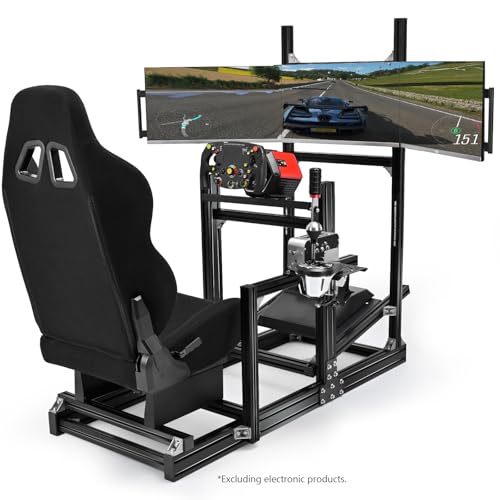
Anman Aluminum Profile Racing Sim Cockpit Triple TV Mount

PXN CB1 Sim Racing Button Box 19 Controls

Logitech G RS Sim Racing Pedals 75 kg Load Cell
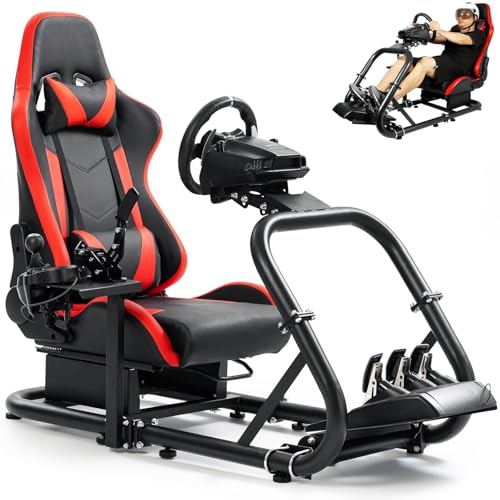
Marada Racing Simulator Cockpit Red Seat 12Nm
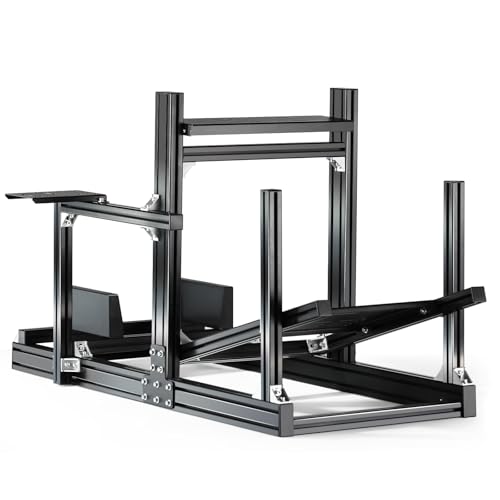
Anman GT/F1 Sim Racing Cockpit 8040 Aluminium

Conquer Racing Simulator Cockpit Wheel Stand

ARES WING Racing Simulator Cockpit with TV Mount

GTPLAYER Sim Racing Wheel Stand Logitech Fit
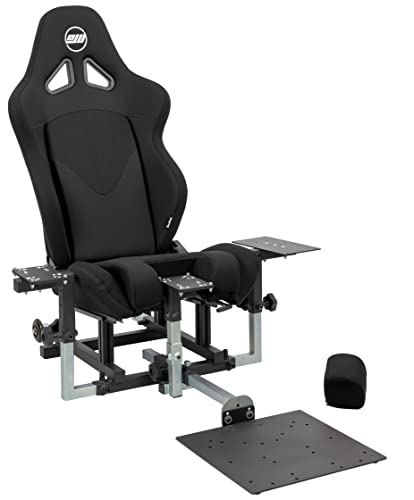
SimFab Modular Flight Simulator Cockpit DCS Edition

Dardoo Racing Simulator Cockpit Logitech G920 G29
Inside Each Recommended Option
The Anman Aluminum Profile Racing Sim Cockpit Triple TV Mount is built around extruded aluminum, which keeps the frame light enough to move but rigid enough to stay planted when a direct-drive wheelbase tugs on it during long braking zones. A support bar at the wheel plate spreads force across the chassis rather than letting it concentrate at the handle.
Triple-monitor support is the headline feature, and the all-in-one stand means one box shows up instead of three separate brackets. For sim racers running iRacing or ACC in a 32:9 spread across three 27-inch screens, this removes the usual monitor-arm shopping trip. The included seat arrives in black and tilts into a comfortable endurance posture.
Why It Works Well
- Triple-screen mount built into the frame, eliminating the need for separate VESA arms
- Aluminum profile construction resists flex when paired with mid-torque wheelbases
- Wheel plate reinforcement bar translates hard steering inputs into stable feedback
- Full seat and frame arrive together, so the setup feels complete out of the box
Worth Noting
- Triple-screen rigs need serious desk depth, and not every room has it
- Assembly time runs longer than a simple wheel stand, so plan a free afternoon
Key Specs
Right Fit For
Tri-screen sim racers running a direct-drive wheelbase in a dedicated space with enough depth for a wraparound display.
Skip It When
The Dardoo Racing Simulator Cockpit Logitech G920 G29 is a better match for single-monitor setups in tighter rooms.
The PXN CB1 Sim Racing Button Box 19 Controls swaps keyboard shortcuts for a dedicated hardware panel. 19 physical inputs across nine types sit within thumb reach, so brake bias, traction control, and MFD pages stop living in menus.
For PC sim racers working from a flat desk rather than a full cockpit, the CB1 fills the gap where a steering wheel alone can’t. The unit supports up to 30 programmable inputs, which leaves headroom for assigning complex car setups or pit macros. Drivers in iRacing, ACC, or rFactor 2 benefit most, since these sims expose dozens of useful adjustments per session.
What Earns Its Place
- 19 controls across nine input types, covering toggles, rotary encoders, and buttons in one panel
- 30 programmable inputs allow deep customization per car or per sim
- Desktop form factor works with any existing wheel stand or desk clamp
- Removes the need to memorize keyboard layouts for in-race adjustments
Trade Offs
- Requires a PC with a free USB port and driver setup before first use
- No mounting hardware, so the box tends to slide on glossy desk surfaces
Who It Suits Best
PC sim racers running from a desk who want cockpit-style control without buying a full frame.
Look Elsewhere When
The Logitech G RS Sim Racing Pedals 75 kg Load Cell is the smarter upgrade for anyone whose main complaint is brake feel rather than input clutter.
The Logitech G RS Sim Racing Pedals 75 kg Load Cell puts a pressure-based brake on a sub-$300 price point. A load cell measures how hard you push rather than how far the pedal travels, so trail braking finally feels like real cars: harder at the apex, lighter on corner exit.
The Hall-effect accelerator and clutch (a contactless sensor that reads pedal position without physical wear) avoid the scratching that wears down cheaper pots. Drivers who already own a Logitech wheelbase and just want a serious pedal upgrade get the most from this set, since the ecosystem wiring is plug-and-play. Adjustable pedal positions help shorter and taller drivers find a natural foot angle.
A Strong Showing
- 75 kg load cell brake gives repeatable pressure-based braking for trail-braking precision
- Hall-effect sensors on accelerator and clutch avoid surface wear and stay consistent over time
- Pedal position is adjustable to suit different leg lengths and seating heights
- Direct fit for existing Logitech ecosystem wheels and stands
Points To Keep In Mind
- Pedal plate is a fixed metal unit that can be slippery on smooth floors without a mat
- Brake stiffness takes sessions to adapt to, especially for drivers used to potentiometer pedals
Feature Snapshot
Made For
Logitech owners who already have a wheelbase and want realistic brake response without jumping to a third-party pedal brand.
Where Another Pick Suits Better
The Marada Racing Simulator Cockpit Red Seat 12Nm makes more sense for anyone upgrading the entire rig, frame and pedals included.
The Marada Racing Simulator Cockpit Red Seat 12Nm is built for drivers who plan to mount a serious wheelbase. Its 50×50 mm round-tube steel frame connects through a four-hole flange system, which keeps the chassis square even when a 12 Nm direct-drive unit snaps the wheel back during understeer corrections.
The included bucket seat reclines from 90 to 180 degrees and ships with neck and lumbar cushions for long stints. For sim racers considering a Fanatec CSL DD or a similar mid-torque base, the Marada frame means no upgrade regret in six months. The red seat trim stands out compared with the usual black cockpits, which matters to anyone who keeps the rig in a shared living area.
What It Does Well
- 50×50 mm round-tube steel frame with four-hole flange connections resists racking forces
- Bucket seat reclines 90 to 180 degrees with neck and lumbar support included
- Direct-drive ready up to 12 Nm of torque, so the frame won’t need replacing when the wheelbase gets stronger
- Red seat trim offers a more aggressive look than standard all-black cockpits
Honest Caveats
- Frame weight makes the cockpit harder to reposition once fully assembled
- Seat cushions may compress over long sessions and benefit from aftermarket padding
Quick Facts
Best Suited To
Sim racers planning to mount a direct-drive wheelbase in the 8 to 12 Nm range and keep the rig stationary in a dedicated room.
A Better Fit Elsewhere
The GTPLAYER Sim Racing Wheel Stand Logitech Fit folds flat against a wall and suits apartment dwellers who can’t dedicate a room.
The Anman GT/F1 Sim Racing Cockpit 8040 Aluminium is the more posture-flexible sibling to the earlier Anman cockpit. Its 8040 aluminum profile (an industry-standard 80×40 mm extrusion commonly used in modular sim builds) gives it the same rigidity you’d expect from a custom rig, but the stepless seat adjustment lets you slide between GT and F1 seating positions without swapping parts.
Drivers who play both iRacing sports cars and open-wheelers benefit most, since F1 seating wants a higher, more upright posture while GT cars feel right reclined. The lightweight profile also makes the whole frame easier to relocate than welded steel alternatives. For a household with a single shared sim space, that mobility counts.
A Favorable Mix
- 8040 aluminum profile construction handles direct-drive wheelbases without permanent deformation
- Stepless seat adjustment covers both GT recline and F1 upright positions in one frame
- Lightweight build makes the rig easier to shift between rooms or pack away
- Modular profile accepts standard T-slot accessories for future expansion
Worth Bearing In Mind
- Aluminum profile can show scuffs and anodization wear if dragged across concrete floors
- Wheel plate height adjustment requires tools, so fine-tuning mid-session isn’t practical
Who Should Grab It
Multi-discipline sim racers who split time between GT and open-wheel cars and want a single frame for both postures.
Consider Something Else When
The ARES WING Racing Simulator Cockpit with TV Mount is the right call for drivers who prioritize a fixed monitor mount over frame mobility.
The Conquer Racing Simulator Cockpit Wheel Stand is the entry point on this list. It’s a wheel stand rather than a full cockpit, so the driver’s own office chair handles seating. The frame supports a wheel mount, a pedal plate, and a gear shifter bracket.
For a first-time sim builder who already owns a Logitech or Thrustmaster wheel and just needs a frame to lock it to a desk, the Conquer stand gets the job done without a big investment. Storage is simple: fold the legs, slide it behind a couch, and it’s gone. The trade-off is rigidity, since lighter stands tend to flex more than welded cockpits when a force-feedback wheelbase tugs hard.
Key Advantages
- Compact wheel stand design stores flat against a wall or under a bed
- Integrated shifter mount accepts standalone or peripheral-mounted shifters
- Entry-level price point lets newcomers test sim racing before committing to a full rig
- Pedal plate and wheel mount arrive in the same package
Potential Drawbacks
- Lighter construction can flex under stronger force-feedback wheelbases
- No seat included, so office chair compatibility limits posture control
- Bolts may need re-tightening after the first few long sessions as the frame settles
Perfect Match For
First-time sim racers who already own a wheel and want a low-commitment frame to test the hobby at home.
Reach For A Different Pick When
The Anman Aluminum Profile Racing Sim Cockpit Triple TV Mount is the upgrade path once sim racing sticks and the wheelbase gets a torque bump.
The ARES WING Racing Simulator Cockpit with TV Mount puts a TV mount on the cockpit instead of a separate stand. That removes the wobble you get when a wheelbase fights a TV on its own VESA arm. The frame also ships with eight non-slip support feet at the base, so the rig stays put during endurance stints.
The structure is rated to handle high-torque direct-drive wheelbases, including Fanatec Pro units, which is a step beyond what most budget cockpits advertise. Drivers running a single large monitor or 32 to 43-inch TV get the cleanest installation here. Compared with the Marada’s red bucket seat, the ARES WING uses a more neutral black setup that fits a wider range of room aesthetics.
Benefits That Matter
- Built-in TV mount eliminates the need to buy a separate VESA stand for the display
- Eight non-slip feet at the base keep the rig from drifting on smooth flooring
- Reinforced frame supports high-torque direct-drive bases without racking
- Neutral black color scheme blends into most living spaces
Less-Strong Areas
- Heavier than aluminum-profile rigs, so initial setup benefits from a second pair of hands
- TV mount sizing should be confirmed against the user’s display before purchase
Spec Overview
Right Fit For
Single-screen sim racers with a TV-sized display who want a clean, single-piece rig without separate monitor arms.
Not Your Match When
The Anman Aluminum Profile Racing Sim Cockpit Triple TV Mount is the better fit for triple-screen setups where display arrangement matters more than the frame’s TV mount.
The GTPLAYER Sim Racing Wheel Stand Logitech Fit is a fold-flat wheel stand built for small rooms. It clamps to a desk for pedal support, supports a wide range of Logitech and Thrustmaster wheelbases, and collapses against a wall in seconds when the racing is done.
The wheel plate adjusts 20 degrees up and down, which covers most seating heights without a wrench. For apartment dwellers who can’t spare a corner for a permanent cockpit, this stand behaves more like a piece of gym equipment that lives in a closet. The catch is that it can’t take the same torque as a full cockpit, so it’s best paired with mid-range belt-driven wheels rather than a 10 Nm direct-drive unit.
Notable Upsides
- Folds flat against a wall for storage in tight apartments
- Wide compatibility across Logitech G25, G27, G29, G920, G923 and Thrustmaster T-series wheels
- 20 degrees of wheel plate tilt covers most seating heights without tools
- Shifter and pedal mounts included in the same package
Room For Improvement
- Wheel and pedals are not included, so the total cost climbs once a Logitech set is added
- Clamp-style desk attachment can leave marks on softer tabletops
Who It Suits Best
Logitech owners in small apartments who need a stand that disappears between sessions and don’t run a high-torque wheelbase.
Swap It Out When
The Conquer Racing Simulator Cockpit Wheel Stand offers a similar foldable form with a slightly different mounting approach and a friendlier entry price.
The SimFab Modular Flight Simulator Cockpit DCS Edition is a curveball in a racing list, but it earns its place for sim enthusiasts who split time between aircraft and cars. The chassis ships with a full foam seat, sliders, and a recliner, and accepts Thrustmaster Warthog, WinWing, VirPil, and VKB controls out of the box.
The “modular” label isn’t marketing fluff. The frame can be upgraded to general aviation, space sim, or sim racing configurations, which is rare at this price tier. For households that share DCS World and iRacing on the same rig, the swap is the real value here. The DCS Edition specifically routes sticks and throttles into combat-simulation positions, so the seating geometry already feels right for fixed-wing and rotary-wing play.
The Helpful Details
- Modular frame accepts Thrustmaster, WinWing, VirPil, and VKB controls without custom drilling
- Full foam seat with sliders and recline, plus a removable foam insert for center-mounted sticks
- Upgrade path to general aviation, space sim, or sim racing configurations
- Complete hardware and wrenches included for assembly
Practical Considerations
- Primarily designed for flight controls, so racing-specific accessories may need adaptation
- Modularity adds assembly steps compared with a single-purpose cockpit
Core Details
Made For
Sim enthusiasts who split play time between flight sims and racing and want one frame that can handle both rather than buying two rigs.
Where A Sibling Pick Shines
The PXN CB1 Sim Racing Button Box 19 Controls is the smarter add-on for a desk-only racing setup with no cockpit frame involved.
The Dardoo Racing Simulator Cockpit Logitech G920 G29 rounds out the list as a straightforward Logitech-friendly frame. Its 50×50 mm round-tube steel construction mirrors the Marada’s design language, and the four-hole flange connections add a layer of rigidity over typical flat-bolt stands.
The two-stage steering wheel platform adjusts for height and angle, and the pedal plate plus shifter mount are configurable. For Logitech G920, G29, and G923 owners who want a permanent home for their existing wheel without overspending, the Dardoo is a sensible middle path. Compared with the higher-priced cockpits on this list, the difference shows up most in accessories and seat padding, not in the core frame strength.
The Value In It
- 50×50 mm round-tube frame with four-hole flange connections for solid assembly
- Two-stage wheel platform allows height and angle adjustment
- Customizable pedal and shifter positioning supports different body sizes
- Direct fit for Logitech G920, G29, and G923 ecosystems
Some Limits To Know
- No seat included, so you’ll need to budget for a separate bucket or office chair
- Frame is heavier than aluminum-profile alternatives, so repositioning takes more effort
The Right Fit
Logitech wheel owners who want a permanent, sturdy cockpit frame without paying for premium add-ons they won’t use.
Another Choice May Suit
The Marada Racing Simulator Cockpit Red Seat 12Nm is a stronger fit for buyers who want a seat and direct-drive support bundled together.
Shopping Sense For A Budget Sim Build
Picking a sim rig on a budget comes down to three honest trade-offs. Frame material, wheelbase torque, and seat inclusion drive most of the price gap, and each one changes how the rig actually feels in use.
Frame Materials That Matter Most
Aluminum profile (8040) frames like the Anman GT/F1 stand stay light, accept standard T-slot accessories, and don’t rust. Round-tube steel frames like the Marada and Dardoo cockpits handle higher torque but add weight, which helps stability but hurts portability. Welded flat-steel stands like the Conquer sit at the entry level and flex more under strong force feedback, so they’re best matched to belt-driven or gear-driven wheels rather than direct drive.
Matching Wheelbase Torque To The Frame
A wheelbase’s torque rating, measured in newton-meters (Nm), tells you how hard the motor can twist the wheel. Anything above 8 Nm of force feedback puts real stress on a frame, and a stand that flexes turns precise inputs into mush. Drivers planning to upgrade to a direct-drive unit in the next year should buy a frame rated for at least 10 Nm now, which is why the Marada, Anman cockpit, and ARES WING earn their place in higher-tier recommendations. Drivers sticking with a Logitech G29 or Thrustmaster T150 can save by going with the Conquer or GTPLAYER stands.
Seat Inclusion And Long-Term Comfort
Cockpits that include a bucket seat save money and guarantee posture compatibility. Frames without a seat force you to match an office chair or aftermarket bucket to the rig’s mounting geometry, which usually means drilling or adapter plates. For sim racers logging two-hour stints, a proper seat with lumbar support isn’t optional.
Real-World Use Scenarios
Apartment dwellers benefit from fold-flat stands like the GTPLAYER that store between sessions. Households with a dedicated corner can justify a full cockpit with seat and triple-screen mount. Esports league drivers need the rigidity of a direct-drive-ready frame more than any other feature, since consistency in seat position and wheel angle matters for repeatable performance.
Key Considerations Across These Picks
Common Shopping Slip Ups
The most frequent mistake is buying a frame before confirming the wheelbase’s torque rating. A $150 stand paired with a $700 direct-drive wheelbase ends in flex, frustration, and a second purchase within six months. Another common slip is ignoring desk depth: triple-screen cockpits need 60 to 72 inches of clearance behind the wheel, and that floor plan rarely fits in a standard bedroom.
Where The Extra Money Goes
Higher-tier cockpits like the Marada and ARES WING add heavier steel, integrated monitor mounts, and reinforced wheel plates. The Logitech G RS pedals jump from potentiometer sensors (which use physical contact and wear down over time) to a load cell brake, which changes how trail braking feels more than any frame upgrade. None of these are mandatory for enjoying sim racing, but each one closes the gap between a game and a real cockpit, which is the whole point of the hobby.
Frequently Asked Questions
Are budget racing sims compatible with consoles?
Most frames in this price range clamp or bolt-mount to any standard wheelbase, so the console question is really about the wheel itself. Logitech and Thrustmaster wheels with console support work on PlayStation and Xbox, while the PXN CB1 button box is a PC-only accessory.
How much space does a sim cockpit need?
A single-screen cockpit needs roughly 6 by 4 feet of floor space. Triple-screen setups push that to 7 by 5 feet, and you need extra clearance behind the seat to slide in and out. Fold-flat stands like the GTPLAYER drop to almost no footprint when stored.
Do I need a direct-drive wheelbase to enjoy sim racing?
Not at all. Belt-driven and gear-driven wheels in the $200 to $400 range pair well with entry-level frames and still deliver immersive force feedback. Direct drive matters most for drivers chasing realism in trail braking and kerb strikes.
Can I upgrade parts of a budget cockpit later?
Frames with aluminum profile construction accept standard T-slot accessories, so adding a keyboard tray, a shifter mount, or a different seat is usually a matter of new brackets. Round-tube steel frames are more limited, and most add-ons need drilling.
How long does assembly take for these rigs?
A wheel stand like the GTPLAYER or Conquer goes from box to race-ready in under an hour. Full cockpits with seats and monitor mounts run two to four hours, and a triple-screen aluminum frame can stretch into a full afternoon the first time you build it.
Wrap Up
Affordable racing sims in 2026 cover more ground than they used to, and the gap between a budget cockpit and a high-end rig keeps shrinking. Match the frame to your wheelbase first, then think about seat, monitor mount, and pedals. Pick the rig that fits the wheel you actually own, and you’ll spend more time driving and less time rebuilding.



