


A flight stick changes the texture of a sim session. Suddenly, banking a 737 through a storm or threading a P-51 through cloud feels deliberate, not improvised with a gamepad thumb. You don’t need a cockpit-grade rig to get there. Plenty of capable sticks live at reasonable prices, and this list collects nine options worth your attention. Each one fits a slightly different pilot: a casual simmer on a console, a space combat hobbyist, someone building out a multi-monitor desk setup on a budget.
The Leading Options At A Glance

Thrustmaster T16000M FCS Space Sim Duo
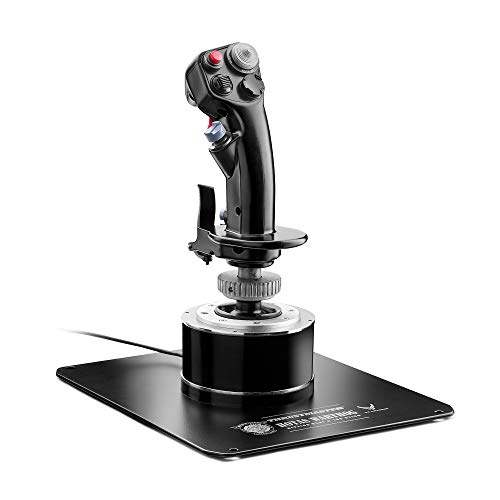
Thrustmaster HOTAS Warthog A-10C Replica Stick

Thrustmaster T-Flight Hotas One

Thrustmaster T-Flight Hotas X (PC)

Thrustmaster T.Flight Stick X (PC/PS3)

Honeycomb Foxtrot Aviation Stick

Thunderstick tsticks GRS Flight Yoke

Thrustmaster T-Flight Stick X (PS3/PC)

Logitech G Saitek X52 Pro Flight System
Meet The Standout Selections
The T16000M FCS Space Sim Duo arrives as a twin-stick package, which makes it unusual at this tier. Most affordable flight sticks ship solo; here you get two ambidextrous sticks plus a dedicated throttle, an arrangement that mirrors how dedicated space combat pilots have flown for years. The sticks use hall effect magnetic sensors, a technology that reads stick position through contactless magnetic fields rather than physical wiper contacts, which means the precision holds up over thousands of hours without the drift that plagues cheaper potentiometer-based sticks.
For someone running a space sim like Elite Dangerous or Star Citizen, the dual-stick layout feels natural from the first session, with thrust on the left and pitch/yaw on the right. The set lives on a PC only, so console shoppers should skip ahead to the Thrustmaster T-Flight Hotas One. For dual-stick space sim fans, the value here is hard to match.
A Few Strong Suits
- Hall effect sensors hold calibration long-term, so you avoid the slow drift that frustrates many budget stick owners.
- Two sticks plus a throttle arrive in the box, saving the cost of buying a second stick separately.
- Ambidextrous grip design lets left- or right-handed pilots swap the primary stick without adapters.
- Wide button layout supports complex bindings common in modern space sim cockpits.
Where It May Fall Short
- PC-only; Xbox and PlayStation pilots can’t plug this in and fly.
- Dual-stick setup eats a lot of desk space compared to a single HOTAS unit.
Whose Shelf It Belongs On
Space combat hobbyists running PC sims who want authentic dual-stick control without spending on higher-end hardware.
Look Elsewhere When
You’d rather fly a single-stick HOTAS setup; the Thrustmaster T-Flight Hotas One is a better fit for that profile.
The Warthog sits in a different league than the other sticks on this list, and the price shows it. Thrustmaster modeled the grip directly on the A-10C Thunderbolt II control column used by U.S. Air Force pilots, so the shape, weight, and button placement match a real warbird. The detachable handle is built entirely from metal, which gives the stick a planted, deliberate feel that plastic alternatives cannot replicate.
Note that the listing covers the stick only; the throttle sells separately, and combined the pair climbs well into enthusiast territory. Still, for sim pilots chasing authenticity, no other option here comes close to the Warthog’s presence on the desk. Compared to the T16000M duo’s polymer build, this one feels like stepping into a museum replica.
A Few Highlights
- Metal handle construction resists the wobble and wear common in plastic grips after heavy use.
- Authentic A-10C replica shape delivers real cockpit ergonomics for DCS and combat sim pilots.
- Detachable handle lets you swap grips later if Thrustmaster releases a profile-matched alternative.
Trade-Offs To Consider
- Stick only; the matching throttle adds significant cost on top.
- Premium pricing puts it out of reach for casual sim fans.
Feature Snapshot
Made For
Hardcore combat sim enthusiasts and DCS pilots who want the most authentic A-10C experience available outside an actual cockpit.
Consider Something Else When
Budget matters; the Thrustmaster T-Flight Hotas X offers a full HOTAS setup at a fraction of the cost.
The T-Flight Hotas One bridges two worlds that most budget sticks do not. It works on Xbox One, Xbox Series X, and Windows, so the same hardware that handles Microsoft Flight Simulator on PC can plug straight into a console for a session of Ace Combat 7. That flexibility alone justifies a closer look for households split between platforms.
The unit feels noticeably lighter than the Warthog, and the plastic construction shows where the price savings live. For newcomers building a first HOTAS, the lighter weight makes it easy to reposition on a desk or tuck into a closet between sessions. It’s a comfortable middle ground, not a permanent cockpit centerpiece.
What Stands Out
- Cross-platform support covers both major Xbox generations plus Windows, an unusual range at this tier.
- Detachable throttle unit adapts to a wide or narrow desk setup.
- Wide hand rest design reduces wrist fatigue across longer sim sessions.
- Plug-and-play profile recognition works in most modern sim titles without manual remapping.
Less-Strong Areas
- Plastic construction feels less rigid than metal-handle sticks during aggressive maneuvers.
Who Should Grab It
Console and PC pilots who want one HOTAS rig that follows them between an Xbox and a Windows tower.
A Better Fit Elsewhere
Hardcore space sim fans; the Thrustmaster T16000M FCS Space Sim Duo suits a dual-stick setup better.
The T-Flight Hotas X is the long-running favorite for first-time PC flight sim pilots. Thrustmaster designed it with ergonomics front and center, fitting a wide hand rest on the stick and a full-size throttle that sits naturally under the left hand. The resistance dial on the stick base lets you tune how stiff the stick feels, which matters more than newcomers expect.
Where the Hotas X shines is in its 12 fully programmable buttons and 5 axes, giving room to map a full civil aviation cockpit without juggling keyboard shortcuts. The detachable throttle adapts to cramped desks or two-piece mounts, so you can configure the rig as your space allows. For PC simmers just getting into DCS, MSFS, or X-Plane, this is the kind of setup that grows with you.
What Pays Off
- Adjustable resistance dial lets you tune stick tension to match personal preference and aircraft type.
- Wide hand rest and full-size throttle reduce wrist strain during long-haul virtual flights.
- Detachable throttle adapts to narrow desks or full cockpit mount builds.
- 12 programmable buttons and 5 axes cover most civil and combat aircraft profiles without keyboard crutches.
- Dual rudder control options (handle rotation or progressive lever) suit different sim styles.
Small Caveats
- PC only; Xbox and PlayStation pilots need a different model.
- Plastic construction is sturdy but not as rigid as premium metal-handle alternatives.
- Some sim profiles require manual remapping out of the box.
Technical Reference
Best Suited To
PC flight sim newcomers who want a HOTAS that grows with them across civil aviation and combat titles.
Skip It When
Console gaming is your main target; the Thrustmaster T-Flight Hotas One is built for that audience instead.
The original T.Flight Stick X is a piece of flight sim history at this point. Released well before modern HOTAS units dominated the conversation, it brought plug-and-play simplicity to a category that used to require driver tinkering. The weighted base keeps it planted on the desk, and the adjustable resistance control still feels useful for civil aviation profiles.
You won’t get a separate throttle here, so combat sim pilots should look elsewhere. What you do get is a comfortable, familiar stick that handles legacy PC titles and PS3-era flight games with no fuss. Think of it as the dependable starter car of the flight stick world: not flashy, just functional.
The Case For It
- Plug-and-play setup skips the driver configuration that frustrates first-time users.
- Weighted base keeps the stick planted during aggressive maneuvers.
- Adjustable resistance control adapts to civil and light combat flight styles.
A Few Limitations
- No included throttle, so combat sim pilots will need a separate unit.
- Legacy design lacks the button density of modern HOTAS options.
Perfect Match For
Casual sim fans flying older PC titles or PS3-era flight games who value simplicity over feature density.
Another Choice May Suit
Anyone wanting a full HOTAS setup out of the box; the Thrustmaster T-Flight Hotas X includes a throttle and more buttons.
Honeycomb built the Foxtrot for pilots who fly the front of an Airbus A320 or similar fly-by-wire airliner. The linear resistance system moves smoothly through the full range of motion with no center detent, the small mechanical bump many sticks have at the neutral position, which mirrors how a real sidestick feels when the flight computer handles trim. For sim pilots chasing that airliner experience on a budget, this stick is a targeted tool.
The switch layout is generous: five two-way switches and four programmable action buttons give plenty of room for systems like autopilot, weather radar, and flight management. Where the T-Flight Hotas X targets general aviation breadth, the Foxtrot narrows in on a specific audience and serves it well.
Useful Strengths
- Linear resistance without center detent mirrors the feel of an Airbus sidestick.
- Five two-way switches support complex airliner systems like autopilot and radio panels.
- Four programmable action buttons handle trim, gear, flaps, and similar secondary controls.
Honest Caveats
- Specialized design means combat and general aviation pilots won’t get the most out of it.
- Stick only, so a separate throttle is required for full cockpit control.
Who Will Love This
Airbus and airliner sim pilots running MSFS or X-Plane who want sidestick authenticity without a cockpit-grade budget.
Look Elsewhere When
Combat is your main interest; the Thrustmaster T-Flight Hotas X covers a wider range of aircraft styles.
Most flight sticks on this list follow the joystick form factor, but the GRS Flight Yoke breaks the pattern. A yoke is a steering-wheel-style control used in general aviation aircraft like the Cessna 172, and for pilots flying those models in MSFS or X-Plane, a yoke simply feels more natural than a joystick. The GRS delivers that experience at a budget-friendly tier.
The unit supports analog control through six physical buttons and works across Windows, Linux, Mac, and even Raspberry Pi setups. If you’ve ever tried to land a Cessna in MSFS with a traditional joystick and felt disconnected, the yoke format here might be the change you didn’t know you needed.
Notable Upsides
- Yoke format matches general aviation aircraft like the Cessna 172 for more authentic feel.
- Cross-platform support covers Windows, Mac, Linux, and Raspberry Pi builds.
- Six physical buttons handle common sim commands without keyboard juggling.
Some Limits To Know
- Yoke format is less suited for combat sims and space titles that expect stick input.
- Niche appeal limits resale value if your interests change.
Right Fit For
General aviation and bush pilot sim fans flying Cessnas, Pipers, and similar light aircraft who want yoke authenticity.
Swap It Out When
You mainly fly combat or space sims; the Thrustmaster T16000M FCS Space Sim Duo fits that profile better.
The PS3/PC version of the T-Flight Stick X is essentially a sibling of the earlier T.Flight Stick X reviewed above, but it ships with two pre-configured default profiles tuned for the platforms it targets. Out of the box, it recognizes Microsoft Flight Simulator X on PC and Blazing Angels on PS3 without manual remapping, which is the kind of convenience that matters when you just want to fly.
The wide handrest and 12 programmable buttons carry over from the design lineage, so comfort is consistent with the rest of the T.Flight family. PS3 owners still actively flying older titles will find this stick purpose-built for that library. Modern console pilots will need to look elsewhere.
Practical Pluses
- Pre-configured default profiles for Flight Simulator X and Blazing Angels save setup time.
- Plug-and-play design skips driver installation for both PC and PS3.
- Wide handrest design matches the comfort profile of the broader T.Flight family.
Points To Note
- No modern console support; PS4 and PS5 pilots need a different unit.
Who It Suits Best
PS3-era flight sim fans who want pre-mapped profiles for the library they already own.
Reach For A Different Pick When
You’re on modern hardware; the Logitech G Saitek X52 Pro offers a full HOTAS experience for current PC sims.
The Saitek X52 Pro is the most feature-dense HOTAS on this list. An illuminated LCD sits on the stick, letting you see your current profile, radio frequency, or timer without alt-tabbing out of the sim. The progressive throttle includes resistance detents, small mechanical bumps that signal afterburner and idle zones, so you feel the throttle notch as you advance it. For sim pilots running complex aircraft in DCS or IL-2, those details change how naturally you fly.
The precision centering mechanism on the stick uses non-contact technology on the X and Y axes, which holds calibration longer than potentiometer-based designs. Combined with a constant spring force, the X52 Pro delivers control feedback that feels closer to mid-tier hardware than the budget tier it lives in. For PC pilots who want one HOTAS to cover space, combat, and civil aviation, this is the most versatile pick here.
Everyday Advantages
- Illuminated LCD display shows profiles, radio frequencies, and timers without leaving the sim.
- Progressive throttle with detents signals afterburner and idle zones by feel.
- Non-contact sensor technology on the X and Y axes holds calibration longer than typical potentiometer designs.
- Programmable software lets you create per-game profiles for a wide range of sim titles.
- Constant spring force gives predictable stick feedback during precision maneuvers.
Where It Is Less Suited
- PC only; console sim fans cannot use this hardware on Xbox or PlayStation.
- Larger desk footprint than a single-stick setup like the Honeycomb Foxtrot.
Key Attributes
Built With In Mind
Multi-genre PC sim pilots who want one HOTAS that handles space, combat, and civil aviation with equal confidence.
Where Another Pick Suits Better
Airbus-only fans should consider the Honeycomb Foxtrot Aviation Stick for its purpose-built sidestick feel.
What To Weigh Before Picking Your Flight Stick
Stick vs. HOTAS vs. Yoke
A joystick is a single grip moved with one hand; a HOTAS (Hands On Throttle And Stick) pairs that stick with a separate throttle under your opposite hand. A yoke is a steering-wheel-style control used in general aviation. Space sim fans often prefer dual sticks, combat pilots lean HOTAS, and Cessna-and-Piper flyers swear by yokes. Picking the right form factor matters more than button count, since the wrong shape feels awkward for hours.
Sensor Technology
Hall effect sensors, which read stick position through contactless magnetic fields, and non-contact optical sensors both outlast the potentiometer-based designs found in older budget sticks. If you fly regularly, a hall effect or non-contact stick saves you from the slow drift that ruins otherwise solid hardware. The Thrustmaster T16000M and Logitech G Saitek X52 Pro both use these longer-lasting sensor types.
Platform Compatibility
Console support is the single biggest filter on this list. Most HOTAS units target PC only, with the Thrustmaster T-Flight Hotas One being the rare cross-platform option that works on both Xbox and Windows. Modern PlayStation support is sparse, so PS4 and PS5 pilots may need to confirm compatibility before committing.
Ergonomics Over Button Count
More buttons look impressive on the spec sheet, but if the grip hurts your hand after an hour, those extra inputs won’t matter. Wide hand rests, adjustable resistance dials, and detachable throttles all improve comfort more than raw button counts. Fly for the longest sessions you actually plan to run, and buy comfort.
Smart Spending In The Flight Stick Aisle
Mistakes Worth Dodging
Buying a stick without checking your desk space is the most common slip. A full HOTAS unit like the Logitech G Saitek X52 Pro needs room for both halves; a cramped desk leaves the throttle in an awkward position. Measure first, then shop.
Ignoring platform support is the second pitfall. A PC-only stick won’t plug into an Xbox, and a PS3-era unit like the T-Flight Stick X won’t work on a PS5. The shape and feel matter, but compatibility is the floor.
What The Higher Tier Buys
The jump from a budget HOTAS like the Thrustmaster T-Flight Hotas X to the Warthog or X52 Pro pays for metal construction, hall effect sensors, and software polish. For casual sim sessions, the budget tier is plenty. For multi-hour DCS campaigns or competitive space sim play, the upgrade pays off in feel and longevity.
Frequently Asked Questions
Are affordable flight sticks reliable long-term?
Most budget sticks hold up well for casual play, though potentiometer-based models can develop drift over time. Sticks with hall effect or non-contact sensors, like the T16000M or X52 Pro, tend to last longer with less calibration fuss.
Can I use a flight stick on a console?
Some can, but platform support varies. The Thrustmaster T-Flight Hotas One works on Xbox One, Xbox Series X, and Windows, while most other options on this list target PC only. Always confirm compatibility before buying.
Do I need a separate throttle?
For combat and space sims, a separate throttle makes coordinated flight far easier. For casual civil aviation, the throttle built into some sticks is enough. Yoke users typically pair their yoke with a separate throttle quadrant.
What is hall effect sensor technology?
Hall effect sensors read stick position through contactless magnetic fields rather than physical contact points. This design avoids the wear and drift that affects potentiometer-based sticks, so calibration holds longer across heavy use.
Is a HOTAS better than a single joystick?
For most combat and space sims, yes. Splitting control between two hands, with the stick in one and the throttle in the other, lets you manage power and direction independently. For casual civil aviation, a single stick is often sufficient.
The Takeaway
Affordable flight sticks have come a long way from the wobbly plastic options of the early 2000s. Today’s budget tier offers genuine HOTAS setups, hall effect precision, and ergonomic comfort that would have cost significantly more a decade ago. Match the form factor to your favorite aircraft, confirm platform support, and pick the sensor technology that fits how often you fly. The right stick makes the sim feel like flying, not just playing.



