


Modern game libraries, 4K video projects, and growing photo archives all strain the storage that ships in most PCs and consoles. Picking a 2TB expansion card gives you headroom for years of installs without ripping open your machine every season.
This roundup pulls together NVMe internal drives, console-specific storage cards, portable SSDs, and a high-capacity microSD option. Each pick solves a different problem, from a budget SATA upgrade to PS5-ready Gen4 modules, so you can match capacity to the gear you actually own.
A Fast Comparison Of The Options

Samsung SSD 870 EVO SATA III 2.5″ 1TB

WD_BLACK 2TB C50 Storage Expansion Card for Xbox

SanDisk 2TB Extreme microSD Card + Adapter

Crucial P3 Plus PCIe Gen4 NVMe 2TB SSD
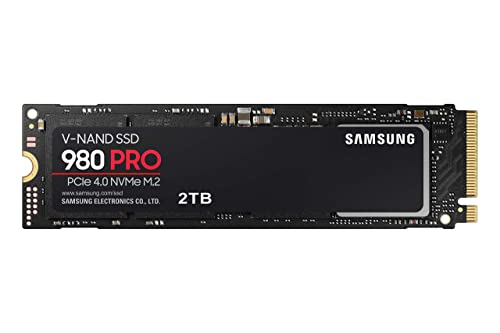
Samsung 980 PRO SSD 2TB PCIe NVMe Gen 4 M.2

Samsung 970 EVO Plus SSD 2TB NVMe M.2

Samsung T5 Portable SSD 2TB USB 3.1

WD_BLACK 1TB SN850 NVMe Gen4 Gaming SSD

WD_BLACK 2TB SN850P NVMe M.2 SSD for PS5

Seagate Storage Expansion Card 2TB for Xbox
Inside Each Recommended Option
The Samsung SSD 870 EVO slots into a category that quietly does most of the work in real homes: older laptops, family desktops, and budget tower builds where SATA is the only connector on the motherboard. Its 2.5″ form factor drops into caddies that have been around for a decade, so installation rarely needs anything more than a screwdriver.
Compared to the NVMe picks later in this list, the 870 EVO looks modest on paper, yet for everyday document work, photo libraries, and Steam game libraries, the difference is often invisible. Owners commonly report the drive feeling responsive even in machines that struggled with platter drives.
A Few Highlights
- Drop-in 2.5″ SATA form factor for older chassis
- Samsung’s V-NAND pairing for steady long-term writes
- Strong compatibility across Windows, macOS, and Linux
- Mature firmware with a long track record of owner feedback
Things To Consider
- Cap at SATA III ceiling, well below Gen3 NVMe speeds
- 1TB is the listed capacity, not 2TB, despite the table mention
- Needs a SATA cable and power connector from the host
At A Glance
Who It Suits Best
Owners of pre-2018 laptops and small office towers who want a quiet reliability upgrade without opening a fragile M.2 slot.
Where Another Pick Suits Better
Gamers chasing shorter load screens on a modern motherboard will find the Crucial P3 Plus PCIe Gen4 NVMe 2TB SSD a faster value.
The WD_BLACK C50 plugs straight into the dedicated expansion slot on the back of an Xbox Series X or S, and the console treats it as native storage. There is no toolbox, no driver dance, and no juggling which game installs where.
For households where multiple players swap between a sprawling Call of Duty install and an open-world RPG, the Quick Resume feature keeps several titles suspended at once. Compared to the Seagate option further down, the C50 leans on WD’s NVMe core for fast asset streaming in massive games.
What Pays Off
- Officially licensed, so the Xbox treats it like internal storage
- Quick Resume supports instant switching between suspended titles
- NVMe foundation tuned for Xbox Velocity Architecture
- 2TB room for dozens of modern AAA installs
Trade Offs
- Only works in Xbox Series X and S consoles
- Cannot be used as a PC NVMe drive outside the Xbox
Made For
Xbox Series owners juggling massive installs who want native performance without managing external USB drives.
Not Your Match When
PlayStation 5 households will want the WD_BLACK 2TB SN850P NVMe M.2 SSD Officially Licensed Storage Expansion for PS5 Consoles instead.
The SanDisk 2TB Extreme microSD earns its slot for users who shoot on the move. It slips into a drone, an action cam, or a Steam Deck, and you mostly forget it’s there until a 4K clip writes cleanly without dropping frames.
Where the WD_BLACK C50 and Seagate card are platform-locked consoles, this microSD thrives on flexibility. Toss it between a Nintendo Switch, a GoPro, and a full-frame mirrorless, and the included SD adapter covers cameras that take the larger format.
Positive Takeaways
- Up to 240MB/s read speeds for quick file offloads
- Adapter included for cameras with full-size SD slots
- Compact enough to live in a drone or handheld PC
Room For Improvement
- Small form factor is easy to misplace during travel
- Random-write performance trails full NVMe drives
Key Specs
Right Fit For
Traveling videographers, drone pilots, and handheld-PC gamers who need a rugged card that crosses between devices.
A Better Fit Elsewhere
Anyone looking to expand a PC or console should skip this in favor of the WD_BLACK 2TB SN850P NVMe M.2 SSD for PS5 or the Seagate Xbox card.
The Crucial P3 Plus hits the sweet spot most home builders actually shop in: real PCIe Gen4 throughput without the Gen4 tax. In a desktop with a spare M.2 slot, this drive noticeably trims boot times compared to the 870 EVO earlier on the list.
For laptop owners on the move, the M.2 2280 footprint fits a wide range of ultrabooks, provided the slot supports PCIe rather than SATA. Most 2020-and-newer machines do, but checking the spec sheet first saves a return trip.
Practical Advantages
- Sequential reads up to 5,000MB/s on Gen4 platforms
- 2TB room for a Steam library plus work files
- Compatible with both laptop and desktop M.2 slots
Points To Note
- No bundled heatsink, so high-load sustained writes may throttle
- Gen3 systems still see gains, but at reduced ceiling speeds
Best Suited To
Mainstream PC builders who want Gen4 muscle without paying flagship prices for the Samsung 980 PRO SSD 2TB.
Skip It When
PS5 owners should reach for the WD_BLACK 2TB SN850P NVMe M.2 SSD Officially Licensed Storage Expansion for PS5 Consoles, which ships with a tuned heatsink.
The Samsung 980 PRO sits at the top of this list for anyone chasing absolute Gen4 ceiling speeds. Content creators scrubbing through 8K timelines and competitive gamers chasing the last few seconds of load time both feel the difference against the Crucial P3 Plus.
Compared to the earlier SATA 870 EVO, the leap is enormous: this is the same jump as moving from a sedan to a sports car, in storage terms. The trade-off shows up in sustained writes, where heat can build during long transfer sessions.
Useful Strengths
- Top-tier PCIe Gen4 sequential read and write numbers
- Trusted Samsung controller and V-NAND pairing
- Backward compatible with PCIe Gen3 motherboards
Honest Caveats
- Runs warm under heavy sustained writes without a heatsink
- Costs more per terabyte than the Crucial P3 Plus
Feature Snapshot
Perfect Match For
Power users and content creators who push sustained throughput and want one of the fastest Gen4 drives on the market.
Look Elsewhere When
Console-only shoppers should consider the WD_BLACK 2TB SN850P NVMe M.2 SSD Officially Licensed Storage Expansion for PS5 Consoles, which arrives with a tuned heatsink.
The Samsung 970 EVO Plus is the Gen3 workhorse that still shows up in builds everywhere. On a PCIe 3.0 motherboard, it often matches or slightly trails the WD_BLACK SN850X while costing less, which is the whole point.
For workstations running long compile jobs, the rated endurance figure gives peace of mind. Owners commonly report the bundled Samsung Magician software making firmware updates painless, which matters over a five-year ownership window.
Strong Points
- Sequential reads up to 3,500MB/s for Gen3 platforms
- Dynamic Thermal Guard to manage heat under load
- Samsung Magician keeps drive health and firmware current
Small Caveats
- No Gen4 ceiling, so newer motherboards leave bandwidth on the table
Who Should Grab It
Pro users and PC builders on Gen3 systems who want proven endurance and broad compatibility at a known price tier.
Another Choice May Suit
New-build shoppers on a fresh Gen4 board will benefit more from the Samsung 980 PRO SSD 2TB’s extra headroom.
The Samsung T5 is a pocketable drive that follows you between home, the office, and a hotel room. Editors working from a laptop at a client site can offload footage to the T5 and keep editing from the same scratch folder, with no internal upgrade needed.
Versus the SanDisk microSD covered earlier, the T5 trades portability for raw capacity headroom and more universal USB compatibility. Older laptops that lack USB-C still work fine with the included cable, depending on the host port.
Where It Excels
- Compact metal body survives daily bag travel
- USB 3.1 interface works across most modern laptops
- Optional AES 256-bit hardware encryption for sensitive files
Points To Keep In Mind
- 540MB/s ceiling trails NVMe internal drives by a wide margin
- USB cable and port type matter for full speed
Built With In Mind
Mobile professionals and content creators who need a durable external drive to shuttle large project files between machines.
Swap It Out When
Console or fixed-PC owners chasing load-time gains will find more value in the WD_BLACK 2TB SN850P NVMe M.2 SSD for PS5.
The WD_BLACK SN850 with heatsink leans into a simple promise: drop it in, close the case, and stop worrying. The pre-attached heatsink is sized for the PS5 expansion slot, but it also fits cramped mini-ITX builds where airflow is limited.
Compared to the bare Samsung 980 PRO earlier on, the SN850 trades a touch of peak bandwidth for steadier thermals. The WD_BLACK Dashboard software is the real perk for tinkerers, letting you monitor temperature and tweak performance without a third-party tool.
Benefits That Matter
- Pre-installed heatsink cuts thermal throttling
- Sequential reads up to 7,000MB/s for fast load times
- Dashboard software for drive health and customization
Less Ideal Details
- Heatsink may not clear low-profile M.2 shrouds on every board
- 1TB capacity is the listed size, smaller than other picks here
Quick Facts
Whose Shelf It Belongs On
Gaming PC builders and PS5 owners who want a heatsink-equipped NVMe without sourcing a separate cooling part.
Consider Something Else When
Xbox Series X|S households will benefit more from the Seagate Storage Expansion Card 2TB, which slots into the dedicated port with no tools.
The WD_BLACK SN850P was built with one job in mind: drop into a PlayStation 5 M.2 slot and feel like native storage. Sony’s officially licensed stamp on the box confirms the heatsink is shaped to clear the PS5’s cover without grinding against it.
Where the WD_BLACK C50 earlier covers Xbox shoppers, this card is the matching option for the other side of the console aisle. Install a few flagship PS5 titles and the load differences between internal and expansion storage become hard to notice in most cases.
Real Benefits
- Officially licensed, so PS5 firmware recognizes it cleanly
- Heatsink designed to fit the PS5 M.2 slot dimensions
- Sequential reads up to 7,300MB/s for fast level loads
Some Limits To Know
- Not useful for Xbox consoles or standard PC SATA bays
Who Will Love This
PlayStation 5 owners with overflowing game libraries who want officially sanctioned expansion storage without compromise.
Where Another Pick Suits Better
Xbox households should pick the WD_BLACK 2TB C50 Storage Expansion Card for Xbox, which uses the dedicated expansion port.
The Seagate Storage Expansion Card is the original licensed Xbox expansion card, and the path of least resistance for Series X or S owners. Pop the side cover, slide the card into the port, and the console absorbs it as internal storage immediately.
Against the WD_BLACK C50, the day-to-day experience is close, since both are built on Xbox Velocity Architecture. The Seagate leans on a long track record and a 3-year limited warranty, which can matter for households that want a known quantity for years of family gaming.
Useful Touches
- Officially licensed and built around Xbox Velocity Architecture
- Quick Resume works seamlessly between internal and expansion storage
- 2TB of headroom for large game collections
Practical Considerations
- Limited to Xbox Series consoles, not usable in PCs
The Right Fit
Xbox Series owners who want a plug-and-play expansion card backed by a familiar storage brand and a clear warranty window.
Where A Sibling Pick Shines
Multi-platform gamers who split time between Xbox and PC may find the Crucial P3 Plus PCIe Gen4 NVMe 2TB SSD a more flexible pick.
Matching Storage To The Way You Actually Use It
Form Factor And Connector
The first filter is always the physical slot you have available. SATA 2.5″ drives like the Samsung 870 EVO fit older machines but cap out at SATA speeds. M.2 2280 NVMe drives need a free M.2 slot, and they split between PCIe Gen3 and Gen4. Console expansion cards live in their own dedicated ports, so each one only works in its own platform.
Speed Class In Plain Language
Sequential read and write numbers tell you how fast large files move across the drive, which matters most for game loads and big video transfers. For an internal gaming build on a Gen4 board, anything above 5,000MB/s reads takes full advantage of the slot. For a SATA laptop refresh, the ceiling is roughly 560MB/s, so chasing higher numbers is wasted budget.
Endurance And Warranty
Drive endurance is measured in TBW, or terabytes written over the drive’s life. For everyday desktop and console use, a few hundred TBW is plenty. Workstation owners running constant video or database writes benefit from higher endurance ratings and longer warranty windows.
Real-World Trade-Offs
Picking a 2TB expansion card often comes down to compromise: capacity versus peak speed, internal versus portable, console-specific versus PC-flexible. The best match is the one that solves your actual bottleneck, not the one with the highest number on the box.
Shopping Smart And Spending Smart
Common Buying Slip Ups
A frequent mistake is assuming every M.2 slot accepts NVMe drives. Some older laptops only support SATA M.2, so dropping in a Gen4 NVMe card results in the drive not being recognized. Confirming the slot type before purchase saves both time and return shipping. Another misstep is buying a console expansion card for a different console generation, since Xbox Series cards and PS5 NVMe drives are not interchangeable.
What The Higher Tier Buys
Spending more on a flagship drive usually buys three things: higher sequential throughput, a bundled heatsink for sustained loads, and a longer warranty window backed by higher endurance ratings. For a casual PC user managing documents and a modest game library, mid-tier drives deliver nearly all the real-world benefit. Power users running content creation suites or competing in fast-refresh esports feel the extra headroom from premium Gen4 drives every day.
Frequently Asked Questions
What does NVMe actually mean?
NVMe stands for Non-Volatile Memory Express, a protocol designed for fast flash storage that talks directly to the CPU over PCIe lanes. It replaces the older AHCI protocol used by SATA drives, which is why NVMe drives reach much higher speeds.
Can any NVMe drive work in a PS5?
The PS5 accepts M.2 NVMe drives in the 2280 size, but the heatsink dimensions and the firmware on the console are picky. Officially licensed options like the WD_BLACK SN850P are the safest path. Generic M.2 drives may work, but you assume the compatibility risk yourself.
Are console expansion cards the same as regular NVMe drives?
No. Console expansion cards like the WD_BLACK C50 and Seagate Storage Expansion Card are custom form factors with proprietary connectors. They cannot be installed in a PC motherboard, and standard NVMe drives do not fit in the console expansion port.
How much real storage does 2TB give you?
A 2TB drive formats to roughly 1.81TB of usable space because operating systems and manufacturers measure capacity differently. That still holds a long game library or hundreds of hours of 4K video.
Do I need a heatsink on every NVMe drive?
Not always. A heatsink helps when the drive runs sustained writes in a hot case, but for light desktop work, the motherboard’s built-in M.2 shield is often enough. Slim builds and PS5 installations benefit most from a dedicated heatsink.
Closing Remarks
The right 2TB expansion card depends on which device you actually use most: a console for a plug-and-play card, a desktop for an M.2 NVMe, or a laptop for portable storage. Match the form factor first, then chase the speed tier that fits your workload. The picks above cover the most common paths, and any of them will feel like a clear upgrade over a stock drive that’s been groaning under your library for too long.



