


Touch controls on an iPad feel natural for a few genres, then fall apart the moment you need real sticks, real triggers, and real aim. Mobile shooters, console ports, and retro emulators all benefit from a dedicated gamepad, but not every wireless pad plays nicely with iPadOS. Compatibility quirks, button layouts, and stick drift vary wildly between models.
This roundup focuses on controllers that pair cleanly with iPads and iPhones over Bluetooth, hold up across long sessions, and feel comfortable in hand. The list also covers options for Nintendo Switch, PC, and Android, so you can use the same pad across multiple devices. Each pick includes honest trade-offs, a clear best-fit profile, and a suggestion for when to reach for a different option from the list.
The Main Contenders

8Bitdo SN30 Pro Bluetooth Wireless Gamepad (Gray)

Mytrix Wireless Pro Controller (Pink)
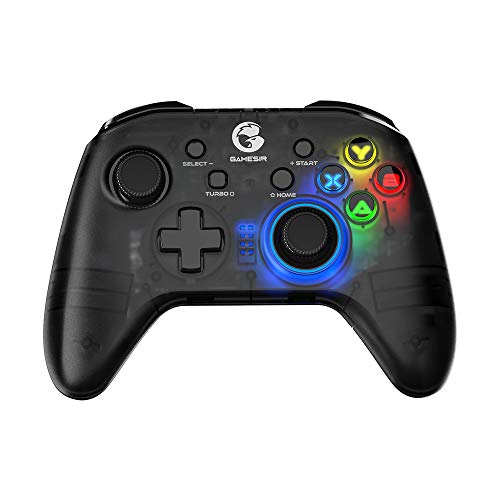
GameSir T4 Kaleid Transparent Wired Gamepad

Ligame Wireless Pro Controller (Purple)

Mytrix Wireless Controller for Switch
Ligame Pro Wireless Controller (Pro Black)

OKETY Bluetooth Mobile Game Controller

OKETY Bluetooth Mobile Game Controller (1000mAh)
More Details On Our Top Picks
The 8Bitdo SN30 Pro leans into a retro Super Famicom silhouette while packing modern internals, which makes it a natural fit for iPad users who split time between classic emulators and current App Store titles. Hall Effect joysticks address the drift issue that plagues older pads, so aiming in shooters stays consistent over months of daily use. The compact shell fits smaller hands well, and the USB-C port keeps charging simple with the same cable most people already own.
For most retro-leaning iPad users, the SN30 Pro strikes a comfortable middle between nostalgia and real-world durability. It is a different feel from the full-size pads later in this list, and the trade-off shows up in grip comfort during long racing or fighting game sessions.
Notable Upsides
- Hall Effect joysticks resist drift, which matters for iPad users who play precision shooters and platformers daily
- Clickable joysticks double as L3 and R3 inputs, expanding control options in modern games
- Rumble vibration and motion controls cover the features most iPad ports expect from a wireless pad
- USB-C charging matches the cable you already use for the iPad itself
- Compact shell travels well in a bag alongside the iPad
Things To Consider
- The smaller grip profile may feel cramped during multi-hour FPS sessions, depending on your hand size
- Button labeling follows the Nintendo layout, so Xbox-oriented iPad games may need muscle-memory adjustment
Feature Snapshot
Best Suited To
Retro enthusiasts and indie game fans who want a compact, drift-resistant pad that pairs cleanly with iPad and travels well.
Where Another Pick Suits Better
The Ligame Pro Wireless Controller (Pro Black) is a smarter match for competitive shooters that lean on back paddles and macro buttons.
The Mytrix Wireless Pro in pink prioritizes visual personality without abandoning the standard dual-stick layout most iPad games expect. It pairs over Bluetooth like the rest of this list, and the familiar grip shape mirrors the controllers many casual players already know. For users who want a pad that stands out on a desk or in a livestream shot, the colorway does the heavy lifting.
Compared to the SN30 Pro’s retro shell, this one feels more conventional in hand. You may find the stick feel less defined for tight platforming, but for general App Store titles and party games, the experience is comfortable enough.
Positive Points
- Distinctive pink finish gives the setup a clear visual identity
- Standard layout reduces the learning curve for new iPad gamers
- Bluetooth pairing covers iPhone, iPad, and Switch with no extra app
Points To Note
- Stick precision and button tactility fall short of the Hall Effect options elsewhere in this list
- Long-term durability reports favor pads with documented drift-resistant hardware, which this model does not advertise
Made For
Casual players who want a recognizable, colorful pad for everyday iPad and Switch sessions.
Consider Something Else When
Drift-sensitive competitive play benefits more from the OKETY Bluetooth Mobile Game Controller’s Hall Effect sticks.
The GameSir T4 Kaleid skips wireless entirely and leans into a transparent shell with visible internals, which gives the desk setup a different look from every other pick here. Hall Effect sticks address drift, the included 2-meter USB-C cable reaches across most desks, and the RGB lighting adds a layer of customization that casual players tend to enjoy.
This controller fits desktop and docked iPad setups where the device stays put, rather than couch or travel use. The wired-only design means no battery anxiety, but it also means you are tethered to the iPad’s port, which is a real consideration for living-room play.
Real-World Strengths
- Hall Effect sticks keep aim stable without the drift issues common in older wireless pads
- Wired USB-C connection removes charging from the routine entirely
- Transparent body and RGB lighting make it easy to spot in a dim room
- Broad compatibility covers PC, Switch, and Android TV boxes
Trade Offs
- Wired-only design limits mobility, so couch and travel sessions feel restrictive
- iPad users need a USB-C to Lightning adapter for older iPad models, which is an extra purchase
Quick Facts
Perfect Match For
Desktop iPad and PC gamers who want a drift-resistant wired pad with personality and no charging routine.
Skip It When
Couch and travel use is the primary scenario, where the OKETY Bluetooth Mobile Game Controller’s wireless design fits better.
The Ligame Wireless Pro Controller covers an unusually wide device list, from Nintendo Switch 2 and OLED to iPhone, iPad, Mac, PC, and Android. Two programmable back buttons let you map a combo like A+B+Y plus all shoulder inputs to a single paddle, and the layout can switch between Switch and Xbox button arrangements. For households that share one pad across multiple systems, that flexibility matters.
This is a more ambitious feature set than the Mytrix Wireless Pro Controller earlier in the list, though the build quality lands in a different price tier than flagship pads. The trade-off shows up in long-term durability reports, which lean positive but not as extensively documented as bigger brands.
Where It Excels
- Cross-platform support means one pad covers Switch, iPad, PC, and mobile
- Two back paddles handle complex combos, useful in action games and fighting titles
- Up to 30 seconds of gameplay recording adds a clip-sharing option without extra software
- Switchable ABXY layout adapts to both Nintendo and Xbox conventions
Room For Improvement
- Turbo and motion control documentation is lighter than established competitors, so setup may require trial and error
- The wide compatibility list sometimes means a specific platform needs an extra pairing step
Right Fit For
Multi-device households that want one wireless pad to cover Switch, iPad, PC, and mobile gaming in a single accessory.
Not Your Match When
Drift-free sticks are the top priority, where the OKETY Bluetooth Mobile Game Controller is a more focused choice.
The Mytrix Wireless Controller for Switch sticks to the basics: a familiar Nintendo-style layout, Bluetooth pairing, and a price that makes it easy to grab a spare. For households that already own a Switch and want a second pad for couch co-op or for use with the iPad, this controller gets the job done without adding complexity.
You will not find Hall Effect sticks or back paddles here, so the feature set is more modest than the Ligame options elsewhere in this list. For casual sessions and family play, that simplicity can actually be a benefit.
What Earns Its Place
- Straightforward Bluetooth pairing keeps setup time short
- Standard layout works well for players new to console-style controllers
- Functions as a cost-effective secondary pad for multiplayer nights
Some Limits To Know
- Lacks Hall Effect sticks, so long-term drift is a real concern for heavy daily use
- No documented back paddles or advanced macro features for competitive play
Who Should Grab It
Families and casual players who want a dependable second controller for Switch and iPad sessions.
Reach For A Different Pick When
Daily competitive play is the goal, where the Ligame Pro Wireless Controller (Pro Black) offers drift resistance and macro buttons.
The Ligame Pro in black steps up from the purple model earlier in the list with refinements aimed at serious play. Hall Effect joysticks are tuned to minimize drift, the C button function adds chat support on Switch 2, and rotary motors handle vibration with a more defined rumble pattern. Two macro back buttons and a switchable ABXY layout make this a versatile option for action and competitive titles.
Compared to the entry-level Mytrix Wireless Controller for Switch, this pad asks more of the user in terms of setup, but the payoff lands in tighter controls. You may find the learning curve steeper if you have never used back paddles before, but the customization is worth the effort.
Useful Touches
- Drift-resistant Hall Effect sticks keep aim tight in FPS and racing games
- Macro back buttons support complex combos, including all face and shoulder inputs on a single paddle
- 30-second recording buffer captures clips without leaving the game
- Rotary motors deliver more nuanced vibration than basic rumble
Worth Bearing In Mind
- Advanced features take time to configure, so first-time users should expect a setup session before gaming
- Wide platform support sometimes means individual game compatibility requires manual mapping
Built With In Mind
Competitive iPad and Switch gamers who want drift resistance, macro buttons, and detailed rumble in one pad.
Swap It Out When
Travel and iPhone use is the main scenario, where the OKETY Bluetooth Mobile Game Controller’s lighter build suits mobile play more naturally.
The OKETY MC5000 is built with iPad and iPhone in mind, including the smaller iPad mini form factor. Hall Effect joysticks use magnetic sensing to avoid the physical wear that causes drift, which matters for mobile gamers who game daily. Programmable back buttons, turbo, and RGB lighting round out a feature set that competes with desktop pads in a more compact shell.
This controller feels more portable than the wired GameSir T4 Kaleid, and the 1000mAh battery supports longer sessions than many competing mobile pads. Depending on your grip style, the slightly smaller footprint may feel more comfortable than full-size options.
Noteworthy Benefits
- Hall Effect joysticks use magnetic sensors, eliminating stick drift in normal use
- iPad mini compatibility is explicitly supported, which is rare in this category
- Programmable back buttons add paddle-style inputs without aftermarket mods
- 1000mAh battery covers long travel sessions without mid-trip charging
Potential Drawbacks
- Smaller shell may not match the palm fit of full-size controllers for some users
- RGB lighting is a battery drain, so heavy use of the lighting effect shortens session time
Key Specs
Who Will Love This
iPhone and iPad mini users who want a drift-resistant, portable pad with paddle-style back buttons and solid battery life.
A Better Fit Elsewhere
Desktop-bound play with a docked iPad is better served by the GameSir T4 Kaleid’s stable wired connection.
The second OKETY entry in this list shares the Hall Effect stick design and iPad mini support of the MC5000, with a focus on extended battery life and travel-friendly dimensions. For commuters and frequent flyers, the 1000mAh capacity reduces the number of charging stops during a busy week, and the wireless setup means no cable management on a tray table or train seat.
Compared to the wired GameSir T4 Kaleid, this pad trades stability for portability. You may find the wireless latency fine for most App Store titles, but for twitch-reflex competitive games, the wired option still has an edge.
The Practical Payoff
- Hall Effect magnetic sensing eliminates stick drift across daily commutes
- 1000mAh battery handles multiple sessions before recharging
- iPad mini support means it pairs cleanly with the smallest iPad form factor
- Programmable back buttons add flexibility for shooters and action games
Honest Caveats
- Wireless connection introduces a small latency compared to wired pads, noticeable in fast-paced competitive play
- Feature parity with the MC5000 means setup steps are similar, so first-time users should plan time for button mapping
Whose Shelf It Belongs On
Commuters and frequent travelers who want a drift-resistant, long-lasting wireless pad for iPad mini and iPhone sessions.
Where A Sibling Pick Shines
Wired stability and zero latency make the GameSir T4 Kaleid a better fit for desktop and docked iPad setups.
What To Weigh Before Choosing A Pad For Your iPad
Compatibility Comes First
iPadOS supports Bluetooth controllers, but not every pad pairs without friction. Before anything else, confirm the model lists iPad or iOS in its supported device list. Some pads advertise Switch and PC compatibility but skip iPad, which leads to pairing headaches that no firmware update will fix. The Ligame and OKETY options in this list are strong picks if you want explicit iPad support, including the iPad mini form factor.
Stick And Trigger Quality
Hall Effect joysticks use magnetic sensors instead of physical contact, so they do not wear down the way traditional potentiometer sticks do. For daily iPad gaming, that translates to years of consistent aim. The 8Bitdo SN30 Pro, GameSir T4 Kaleid, and both OKETY models all feature Hall Effect sticks, which is the most meaningful technical upgrade in this category.
Layout, Paddles, And Extras
Standard dual-stick layouts work for almost every iPad game, but back paddles, turbo modes, and motion controls add real value in specific genres. Shooters benefit from paddle buttons mapped to reload or jump, while fighting games gain from turbo and combo recording. The Ligame Pro Wireless Controller covers this thoroughly, while simpler picks like the Mytrix Wireless Controller for Stick keep the layout minimal.
Wired Versus Wireless
Wired pads offer lower latency and zero battery management, which suits docked or desktop iPad setups. Wireless pads trade a small amount of latency for couch and travel freedom, and modern Bluetooth latency is rarely an issue outside competitive esports. Pick based on where you actually game, not on which sounds better on paper.
Key Considerations Across These Picks
Pitfalls Shoppers Hit
The most common slip-up is choosing a pad based on Switch compatibility alone, then assuming it will pair with the iPad. Many controllers skip iOS support, and the few that include it often require a specific pairing mode. Another trap is ignoring stick type, since traditional analog sticks drift within a year of regular use, while Hall Effect sticks hold up far longer. Always check both the device list and the joystick technology before deciding.
What Separates Premium From Basic
Higher-tier pads in this category justify the extra cost with Hall Effect sticks, programmable back paddles, and broader platform support. The Ligame Pro Wireless Controller and the OKETY MC5000 sit in this bracket, offering drift resistance, macro recording, and refined rumble. Basic pads keep the price down by skipping these features, which works for casual players but limits long-term value. The upgrade pays off most for daily iPad gamers, while occasional players can save with simpler options.
Frequently Asked Questions
Do Bluetooth controllers work with all iPad models?
Most modern iPads running a recent version of iPadOS support Bluetooth controllers, but the specific games vary. Always check the game’s controller compatibility before assuming a pad will work with a given title.
What is the difference between Hall Effect and regular joysticks?
Hall Effect joysticks use magnetic sensors to detect movement, so there is no physical contact that wears down over time. Regular joysticks use potentiometers, which can develop drift after months of heavy use.
Can I use one controller with both my iPad and Switch?
Yes, most modern pads support multiple devices through Bluetooth pairing modes. The Ligame and OKETY models in this list cover Switch, iPad, iPhone, and PC with manual switching between devices.
Is a wired controller better for iPad gaming?
Wired controllers offer lower latency and never need charging, which is helpful for docked or stationary iPad setups. Wireless pads give you couch and travel freedom, and modern Bluetooth latency is rarely noticeable outside competitive play.
How long do controller batteries typically last?
Battery life varies by model, with the OKETY MC5000’s 1000mAh cell supporting long sessions between charges. Heavy use of RGB lighting and rumble shortens runtime, so the actual figure depends on your settings.
The Takeaway
The right iPad controller depends on where you game and how often you play. Hall Effect sticks, like those in the 8Bitdo SN30 Pro and the OKETY models, offer the best long-term value for daily gamers, while multi-platform pads from Ligame suit households that share one accessory across devices. Match the pad to your most common scenario, and the rest tends to fall into place.



