


Android gaming has quietly grown into something serious, and the touchscreen only gets you so far. Long bus rides, lunch-break runs through your favorite RPG, late-night shooter sessions on the couch: a proper gamepad turns a casual tap game into something closer to a console experience. The picks below cover the main flavors of Bluetooth controllers for Android, from full-size pads built for cross-platform players to phone-clamp grips made for one-handed travel use. Each one earns its slot by solving a real problem: low-latency response, ergonomic comfort, multi-device flexibility, or a price that doesn’t sting. No need to be a hardware enthusiast to find a match; just match the controller to how and where you actually play.
A Fast Comparison Of The Options

Morostron Wireless Controller for PC and Steam Games, Switch/Switch 2/iOS/Android Compatible

8Bitdo Pro 3 Bluetooth Controller (Yellow) TMR Joysticks
8Bitdo Ultimate 2 Wireless Gaming Controller WUCHANG: Fallen Feathers
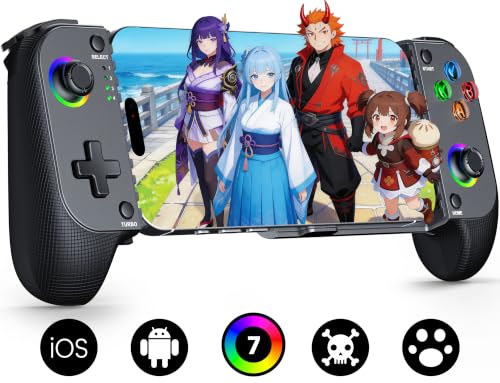
Mocagen MC1 Phone Controller for iPhone and Android (Black)

Mocagen MC1 Phone Controller for iPhone and Android with Turbo

Mocagen MC1 Phone Controller for iPhone and Android (Blue)

Xbox Core Wireless Controller Deep Pink (Android, iOS, PC)

PB TAILS CRUSH Switch Controller with TMR Joysticks and RGB

Xbox Core Wireless Controller Astral Purple (Android, iOS, PC)
A Breakdown Of The Leading Choices
Multi-platform households tend to juggle a Switch, a Windows rig, and a phone without wanting a drawer full of separate pads. This Morostron controller is built for exactly that kind of daily cross-device shuffle, working across Switch, Switch 2, iOS, Android, and Windows PC through wired, Bluetooth, or wireless adapter modes. The little interactive screen on the face is the kind of detail that grows on you over time, letting you peek at settings without alt-tabbing or grabbing your phone.
Hall effect joysticks (sticks that use magnets instead of physical contact for drift-free movement) are increasingly common at this level, and 1200mAh of battery gives you multi-session headroom before a top-up. The catch is platform-specific: it skips Xbox, PlayStation, and GeForce NOW, so anyone locked into those ecosystems should keep scrolling.
Key Advantages
- Three connection modes cover nearly every modern device you’ll reach for.
- Hall effect sticks resist the stick drift that wears out cheaper pads within a year or two.
- The on-controller screen is genuinely useful for tweaking settings mid-game.
- Solid 1200mAh battery handles long sessions without daily charging.
Things To Consider
- Wake-up is not supported on Switch or Switch 2, so you’ll press power manually each time.
- Pairing with less common platforms may need a quick check with the seller first.
- Owners commonly report the on-board interface takes a few sessions to feel intuitive.
Made For
Gamers who split time between Switch, PC, and Android and want a single pad that follows them everywhere.
Where Another Pick Suits Better
Stick with the 8Bitdo Ultimate 2 Wireless Gaming Controller WUCHANG: Fallen Feathers if PC latency matters more to you than mobile phone compatibility.
8Bitdo has earned a quiet reputation among players who care about feel, and the Pro 3 builds on that with TMR joysticks, a newer magnetic-sensor technology that tracks stick position with finer granularity than the older Hall effect design while still avoiding drift. The yellow shell is loud in the best way: a useful visual cue when the pad slips between couch cushions.
It also stands out for how widely it plays. Switch 1 and 2, Windows PC, Apple devices, SteamOS, and Android all sit in the supported list, with profile switching that adapts the button map per platform. Remappable backs, swappable magnetic faceplates, and a layout that nods to classic console pads make it a comfort pick for long sessions.
Advantages To Know
- TMR sticks give precise, low-drift control for genres that punish sloppy aim.
- Profile switching between platforms saves you from menu-diving every time you swap devices.
- Swappable magnetic faceplates let you refresh the look without buying a new pad.
- Wide platform coverage from retro emulators to modern phone games.
Worth Noting
- Premium feel shows up in the cost, so budget-focused shoppers may hesitate.
- The button density can feel busy for casual players used to simpler pads.
- You’ll want to spend time in the companion app to unlock the full customization layer.
At A Glance
Best Suited To
Players who bounce between modern and retro games on multiple devices and want a refined, custom-feeling pad.
Not Your Match When
Choose the Morostron Wireless Controller if you need an integrated screen and broader multi-platform flexibility at a lower tier.
The WUCHANG edition of the Ultimate 2 is more than a reskin: it carries 8Bitdo’s first TMR joysticks, an integrated charging dock, and a 2.4G wireless mode (a dedicated USB dongle that avoids Bluetooth congestion for faster, more stable input) with reported latency as low as 1ms on PC. The dock alone changes daily ownership, since you just drop the pad down and it reconnects the moment you lift it.
Android support is via Bluetooth, while PC taps into the full 1000Hz polling rate (how often the controller reports its position to the device each second; higher means smoother tracking) for the most demanding shooters. Trigger mode switching between linear Hall effect and tactile clicks adapts the feel to racing sims or fighting games on the fly. RGB lighting on the sticks adds flair, though you can switch it off when the glow gets old.
What Earns Its Place
- 1000Hz polling keeps competitive PC play responsive at the highest tier.
- Trigger mode switch tailors pull length to each genre without leaving your seat.
- Integrated dock makes charging feel automatic, not like another chore.
- TMR joysticks aim for precision that survives heavy daily use.
Trade Offs
- The dedicated dock takes up desk space, which matters in tight setups.
- RGB lighting is a small power draw you may not want every session.
- Most advanced features need the 8Bitdo Ultimate Software V2 to fully customize.
Whose Shelf It Belongs On
Competitive and enthusiast players who split time between PC and Android and want a low-latency edge with premium touches.
A Better Fit Elsewhere
Pick the Mocagen MC1 Phone Controller for iPhone and Android (Black) if mobile-only play on a clamped phone is your main scenario.
Phone-first controllers live or die on the clamp, and the Mocagen MC1 plays that card well. It stretches wide enough to keep most cases on, including the chunkier ones that other grips can’t swallow. The handle is laser-textured for grip, and the button layout keeps thumbs in a natural arc instead of forcing you to relearn your hand position every commute.
Hall effect joysticks rated for 5 million cycles are a strong signal for a budget-tier grip, where drift tends to show up after a season of daily subway use. Pairing mimics an Xbox controller profile, which helps with game compatibility across iOS and Android without extra setup steps. The catch is platform focus: this is built for phones, not your Switch dock or PC tower.
Everyday Wins
- Case-friendly clamp avoids the daily hassle of removing your phone case.
- Hall effect joysticks are a real find at this size and tier.
- Ergonomic handle keeps hands relaxed during long transit sessions.
- Quick Bluetooth pairing works with the latest iPhone and Android models.
Points To Note
- Limited to phone play, so it won’t double as a couch pad for your TV setup.
- The clamp is best suited for standard phone sizes; larger Pro Max models may fit snugly.
- No physical D-pad, so retro platformer fans may miss a dedicated input.
Feature Snapshot
Right Fit For
Commuters, travelers, and anyone gaming primarily on a phone who wants console-style comfort without the bulk of a full pad.
Reach For A Different Pick When
Switch to the Xbox Core Wireless Controller Deep Pink if you want one pad that travels between phone, PC, and console equally well.
Same shape and clamp as the black MC1, but this version adds a turbo function, an auto-fire feature that repeats button inputs at a set rate so you don’t have to mash manually, which makes a real difference in action and fighting games. If you’ve ever worn a thumb raw on a boss-rush mode, you’ll appreciate the option.
Hall effect sticks and the laser-textured grip carry over, and the same case-friendly clamp handles bulky shells without complaint. It’s a small upgrade on paper, but for the right player it shifts the controller from convenient to genuinely useful. Android and iPhone compatibility stays the same, including the latest 17/16-series devices.
Practical Pluses
- Turbo function removes thumb fatigue during long auto-fire sequences.
- Hall effect joysticks hold calibration across months of daily travel use.
- Same case-friendly clamp as the standard MC1, no compromises there.
- Compact body slips into a jacket pocket or small bag.
Honest Caveats
- Turbo adds little for slow-paced or strategy games.
- Limited to phone use, with no PC or console support built in.
- No D-pad, so retro platformer fans may want a fuller pad.
Who Should Grab It
Mobile action-game players who want quicker inputs and reduced thumb strain during long sessions away from home.
Swap It Out When
Pick the PB TAILS CRUSH Switch Controller with TMR Joysticks and RGB if you want turbo plus a fuller console-style layout for phone and PC.
If the black MC1 is the stealth option, the blue one is for people who like their gear to match their phone case. The internals are identical, which is the point: same Hall effect joysticks, same case-friendly stretch clamp, same laser-textured grip, just a different colorway.
That means the trade-offs are identical too. The clamp is built for phones, not Switch docks, and the lack of a D-pad limits certain retro genres. For mobile shooters, racing games, and RPGs, the blue MC1 is a comfortable everyday carry with a bit more personality than a black slab.
Real Benefits
- Distinctive blue finish stands out from the usual black and white pads.
- Hall effect sticks provide drift-free performance that holds up over time.
- Case-friendly design works with most protective shells.
- Compact form fits small bags and jacket pockets for true travel use.
Where It May Fall Short
- Same limits as the other MC1 versions: phone-only, no D-pad.
- Color choice won’t matter to anyone who games in a dark room with a tired thumb.
- Pairing steps still rely on a few extra button presses the first time.
Perfect Match For
Mobile-first players who want the MC1 experience with a more colorful finish to match their device or setup.
Consider Something Else When
Choose the 8Bitdo Pro 3 Bluetooth Controller (Yellow) TMR Joysticks if you want the same color-pop energy but in a full console-style layout.
The Xbox Core Wireless Controller is a familiar shape, and that’s not a criticism. The sculpted grip and refined geometry have aged well, and the hybrid D-pad (a four-direction pad that tilts like a traditional one but also registers clean diagonals) finally catches up with the rest of the layout. The deep pink color makes it easy to spot in a shared living room.
Battery life around 40 hours means you can leave the charging cable in the box for stretches at a time. Pairing covers Android, iOS, Xbox consoles, and Windows PC through Bluetooth and Xbox Wireless. The Share button and the Xbox Accessories app for remapping give Android users the kind of customization usually reserved for console play.
The Good Stuff
- One of the most comfortable controller shapes ever shipped, still hard to beat.
- Long battery life keeps you gaming across multiple sessions without a top-up.
- Hybrid D-pad finally feels right for fighting games and menus alike.
- Share button and app-based remapping add genuine value on Android.
Small Caveats
- Larger footprint than a phone-clamp grip, less travel-friendly.
- Color options rotate, so finding your preferred shade can take patience.
- Some Android games still expect touch input first, controller second.
Feature Card
Built With In Mind
Anyone who already likes the Xbox shape and wants the same comfort on phone sessions, without learning a new layout.
Where A Sibling Pick Shines
Pick the Mocagen MC1 Phone Controller for iPhone and Android (Black) if you want something pocketable for subway rides rather than full couch sessions.
The CRUSH sits at the busy end of the list: TMR joysticks, Hall effect triggers, 1000Hz polling on supported connections, RGB lighting, and a three-mode wireless setup. That last detail is the one that matters most day to day, because it lets the same pad hop between Switch, PC, Steam, iOS, and Android without re-pairing headaches.
There’s an X-S mode switch on the body that toggles between Xbox and Switch input mappings, which is the kind of small thing you only appreciate when you stop alt-tabbing into menus. RGB adds personality if you care, and you can dial it down for late-night play. For users bouncing between five platforms, this is one pad that actually keeps up.
A Few Highlights
- Three wireless modes plus the X-S switch make multi-device use feel seamless.
- 1000Hz polling on PC is a strong fit for competitive titles.
- Hall effect triggers avoid the wear-and-tear issues of older analog designs.
- RGB lighting adds flair without getting in the way of the controls.
Factors To Consider
- Lots of features means a learning curve the first week.
- RGB adds a small battery draw you may want to manage.
- The body leans a bit larger, so smaller hands may find it bulky.
Who Will Love This
Power users who own multiple platforms and want one controller that genuinely covers all of them without compromise.
Look Elsewhere When
Pick the 8Bitdo Pro 3 Bluetooth Controller (Yellow) TMR Joysticks if you want a more compact, retro-flavored pad with similar TMR precision.
The Astral Purple version of the Xbox Core Wireless Controller offers the same trusted internals as the deep pink model, with a colorway that tends to blend better in a minimalist setup. For casual players who want plug-and-play comfort across Xbox, PC, Android, and iOS, the experience here is hard to fault.
Same 40-hour battery, same hybrid D-pad, same textured grips on the triggers and back. The Share button pulls double duty for capturing mobile gameplay clips, which is a quiet but real perk for anyone who streams or shares highlights. If you already know you like the Xbox shape, the only real decision is the color.
Reasons It Performs
- Same proven ergonomics and battery life as the rest of the Xbox Core line.
- Subtle purple finish suits understated setups and desk decor.
- Cross-device pairing with Bluetooth covers the major platforms.
- Custom button mapping through the Xbox Accessories app.
Some Limits To Know
- No Hall effect or TMR sticks, so drift can appear after long-term heavy use.
- Larger than phone-clamp grips, so it’s a couch-first pad.
- Color availability depends on what the retailer has in stock at any moment.
The Right Fit
Casual players who want a familiar, low-friction controller that works across console, PC, and phone without extra setup.
Skip It When
Pick the 8Bitdo Ultimate 2 Wireless Gaming Controller WUCHANG: Fallen Feathers if drift-resistant TMR sticks matter more to you than color or familiarity.
Picking The Right Pad For How You Play
Choosing a Bluetooth controller for Android comes down to how and where you play, more than which one has the longest feature list. Mobile-only players who game on the bus or at a coffee shop get a different answer than someone splitting time between a phone, a Switch, and a PC tower. The picks above each solve a different slice of that puzzle, and the right choice is usually the one that fits the device ecosystem you already own.
Start with platform support. Some controllers lean phone-first, like the Mocagen MC1 line, while others stretch across Switch, PC, and Android through multiple wireless modes. The PB TAILS CRUSH and 8Bitdo Ultimate 2 are the most flexible on this list for multi-device households.
Next, think about stick technology. Older analog sticks drift over time, which is why Hall effect and TMR designs are becoming common. They use magnetic sensing instead of physical contact, so they stay accurate longer. If you game daily, that durability is worth a small premium.
Ergonomics matter more than people expect. A full-size Xbox-style pad works for couch sessions, while a phone-clamp grip is easier to toss in a bag. Match the form factor to your real-world scenario.
Finally, polling rate, latency claims, and extras like RGB or charging docks are real but secondary. A 1000Hz polling rate is meaningful for competitive shooters; for most casual players, comfort and platform support matter more day to day.
Common Slips When Shopping For Android Controllers
Wrong Turns To Avoid
The most common mistake is choosing a controller that only works well on the platform you already use, then realizing too late that it doesn’t fit your other devices. Always check the actual supported list, since “multi-platform” can mean very different things across brands. Another trap is ignoring stick technology: a cheaper pad with traditional analog sticks may feel fine for months, then drift sets in and you replace it anyway.
What The Higher Tier Buys
Paying more for a premium controller usually gets you three things: better stick technology, lower latency, and a more comfortable shell. The 8Bitdo Ultimate 2 and PB TAILS CRUSH both add extras like charging docks, RGB, and remappable buttons that genuinely improve daily use. The upgrade pays off most for daily gamers; casual players may be perfectly happy with a budget-friendly grip.
Frequently Asked Questions
Do all Bluetooth controllers work with any Android phone?
Most modern controllers use standard Bluetooth profiles, so pairing is usually simple. That said, some games expect a specific controller profile, like Xbox or generic HID, so the experience can vary by app. Controllers that pair as an Xbox device tend to have the widest compatibility across Android games and streaming apps.
What is stick drift, and why does it matter?
Stick drift is when an analog stick registers movement even when your thumb isn’t touching it. Older controllers with carbon-film sensors are most prone to it, often after a year or two of heavy use. Hall effect and TMR sticks use magnetic sensing to avoid the wear that causes drift, which is why they’re becoming standard on higher-end pads.
Can I use one controller for both my phone and my PC?
Yes, many of the picks above support multiple devices. The 8Bitdo Ultimate 2, PB TAILS CRUSH, and Xbox Core controllers all switch between PC, phone, and consoles with minimal fuss. Look for controllers with multiple wireless modes if you plan to swap often.
Do phone-clamp grips like the Mocagen MC1 work with cases?
The Mocagen MC1 line is built to be case friendly, meaning the clamp stretches wide enough for most protective shells. Very thick rugged cases may still be a tight fit, so it’s worth checking dimensions if you use a heavy-duty case. Standard and slim cases usually fit without issue.
Is a higher polling rate important for mobile games?
Polling rate matters more in fast-paced competitive titles, especially shooters and fighting games. For casual RPGs, puzzle games, or slower-paced genres, the difference between standard and 1000Hz polling is rarely noticeable. Competitive mobile players benefit most from the higher polling rate found on premium pads.
Closing Thoughts
The right Bluetooth controller for Android is the one that fits your hands, your devices, and the games you actually play. Full-size pads like the Xbox Core or 8Bitdo Ultimate 2 are the most versatile, while phone-clamp grips like the Mocagen MC1 shine for commuters and travelers. Cross-platform picks like the PB TAILS CRUSH cover the widest range without forcing you to keep multiple pads around. Take a moment to think about where you play most, and the right choice usually becomes obvious.



