


A real arcade stick lives or dies on the feel of its parts. Whether you’re restoring a battered Street Fighter cabinet, wiring up your first MAME build, or just replacing a stick top that cracked during a tournament, the components below cover every angle of the hobby. The list mixes Sanwa’s legendary Japanese-made buttons and joysticks with replacement shafts, USB encoders, and controller interfaces, so you can match the right part to the right project.
The Shortlist At A Glance

Sanwa OBSF-30 Push Buttons 30mm (White, 8-Pack)

RetroArcade.us Red Flight Stick Top (JS19/JS12)
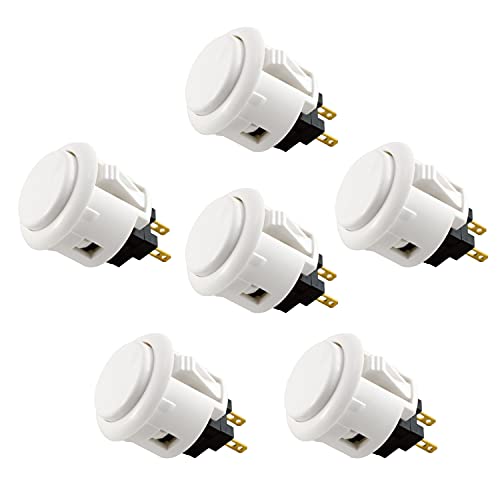
Sanwa OBSF-24 Push Buttons 24mm (White, 6-Pack)
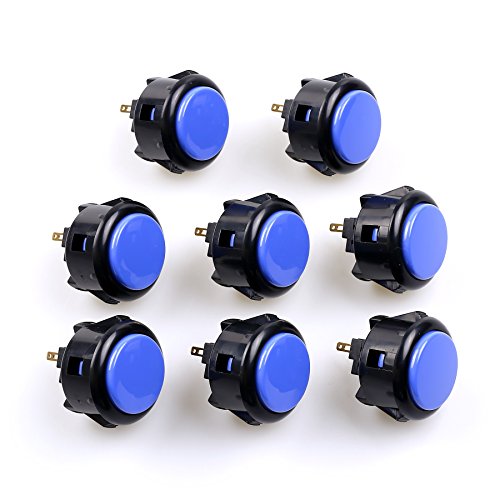
Sanwa OBSF-30 Push Buttons 30mm (Black & Blue, 8-Pack)

Sanwa OBSF-30 Push Buttons 30mm (Multi-Color, 12-Pack)

Sanwa JLF-TP-8YT Joystick + OBSF-30 Bundle Kit (White)

Arcade Renovations I-PAC 2 Controller Interface (IPAC2)

RetroArcade.us Black Flight Stick Top (JS19/JS12)

Quimat Zero Delay USB Encoder for MAME JAMMA (QR05)
Meet The Standout Selections
Sanwa has quietly become the default choice for arcade button enthusiasts, and this 8-pack of 30mm OBSF-30 buttons shows exactly why. The OBSF-30 is a snap-in style button, meaning the housing clips directly into a 30mm hole in a control panel without extra mounting hardware, which makes installation faster than screw-in alternatives. Owners rebuilding a JAMMA-standard cabinet (a common wiring harness used in arcade machines) or upgrading a Hori or MadCatz fight stick tend to land on this part first because the fit is already proven.
These work well for fighting game fans, classic arcade restorers, and anyone building a custom controller from scratch. The white color keeps the panel clean and easy to label, and the non-clicking microswitch (the small electronic sensor inside the button that registers your press) gives you a quiet, linear feel that tournament players tend to prefer.
What It Does Well
- Snap-in mounting speeds up cabinet restoration compared to screw-in designs
- Non-clicking microswitch produces a quiet, smooth press that suits tournament play
- 30mm size matches the JAMMA standard, so it fits the majority of existing panels
- Works as a direct drop-in for most Hori and MadCatz fight sticks
Things To Consider
- White caps can show dust, oils, and drink splashes more visibly than darker colors
- You may want to order extras in case of strip-out during repeated snap-in cycles
Who It Suits Best
Cabinet restorers and fight stick owners who want a quiet, tournament-grade button without sourcing parts from multiple sellers.
Where Another Pick Suits Better
The Sanwa JLF-TP-8YT + OBSF-30 Bundle Kit makes more sense if you also need a matching joystick instead of buttons alone.
Where the Sanwa buttons above add to a build, this RetroArcade.us part is more of a refresh. It’s a replacement top for JS19 and JS12 joysticks, the kind of stick you’ll often find on entry-level and mid-range arcade cabinets. The flight stick style with an elliptical bat handle leans into a more aggressive grip than a ball top, and the red finish stands out on darker control panels.
This top is the right call when the original bat handle has cracked, loosened, or simply worn smooth from years of play. It threads onto a 6mm shaft, stands 51mm tall, and measures 17mm in diameter, so it matches the dimensions of most existing JS-series handles. Players who prefer a wide, paddle-style grip rather than a knob will appreciate the shape.
Useful Strengths
- Direct replacement for worn or broken JS19 and JS12 stick tops
- Elliptical bat handle suits players who prefer a wider, paddle-style grip
- Vivid red finish makes the stick easy to locate in dim cabinet lighting
Trade Offs
- Only fits joysticks with a 6mm threaded shaft, so verify your hardware before ordering
- Limited to replacement use, not a full joystick upgrade for aging cabinets
Made For
JS19 and JS12 owners who need a quick handle swap without rewiring or replacing the full joystick assembly.
Look Elsewhere When
The Quimat Zero Delay USB Encoder is the better fit if your problem is wiring a joystick to a PC rather than replacing a worn top.
The 24mm OBSF-24 plays the same role as the 30mm OBSF-30 above, just on a smaller scale. Sanwa’s snap-in design is identical, so the install experience feels familiar, but the smaller footprint opens up layouts that wouldn’t fit a 30mm button. Six buttons per pack match the common six-button Street Fighter layout, which is the most popular fighting game panel shape.
For builders working with tight control panels, custom handheld enclosures, or 6-button fight sticks, this is the go-to size. The non-clicking microswitch keeps the action quiet and consistent, which matters during long practice sessions in shared spaces. Pairing these with a 30mm OBSF-30 start button gives you a clean mixed-size panel.
The Upside
- 24mm size lets you pack more buttons into the same panel area
- Six-button count matches a standard Street Fighter layout out of the box
- Snap-in housing installs without screws or extra mounting brackets
- Quiet microswitch keeps the build apartment-friendly
Points To Note
- Smaller buttons can feel cramped for players with larger hands or thick gloves
- White finish shows wear faster than darker or two-tone options below
Best Suited To
Fight stick builders with limited panel space or anyone replicating a classic 6-button Capcom-style layout.
Consider Something Else When
The Sanwa 12-pack OBSF-30 multi-color set makes more sense for full cabinet builds that need both start and action buttons in matching colors.
This two-tone OBSF-30 pack splits the difference between the all-white 8-pack and the 12-color variety set. Black and blue caps let you visually separate the punch and kick rows from the start buttons without resorting to stickers or paint, which keeps the wiring and visual language of the panel consistent.
Color-coding buttons is one of those small touches that helps during long tournaments, when you glance down rather than think. The build is the same proven Sanwa OBSF-30: snap-in install, non-clicking microswitch, and a fit for Hori and MadCatz fight sticks. The darker finish also hides the fingerprints and dust that show up fast on white caps.
Where It Excels
- Two-tone finish makes panel layout readable at a glance, which helps in tournament play
- Darker caps show less wear and grime than the white 8-pack option above
- Same trusted OBSF-30 hardware as the rest of the Sanwa line
Honest Caveats
- Only two colors limits creative layouts compared to the 12-pack below
- Black caps can fade or yellow under direct UV light over years of cabinet use
Who Will Love This
Fight stick builders who want a clean, two-zone layout without committing to a full rainbow setup.
A Better Fit Elsewhere
The Sanwa 12-pack OBSF-30 multi-color set is the smarter choice for full custom builds needing more than two color zones.
Key Specs
The 12-pack OBSF-30 is the same button hardware as the 8-packs above, just offered with two pieces per color across six shades. For full custom cabinet builds where each button row needs its own visual identity, the wider palette saves you from mixing multiple orders. One of the small joys of arcade modding is choosing the layout that matches the game.
The snap-in mounting, non-clicking microswitch, and 3,000,000-press lifetime rating carry over from the rest of the Sanwa line, so you can swap colors without changing feel. The catch is that some color combinations are louder than the cabinet aesthetic you might want, so plan the panel before clicking through.
Where It Helps
- Six colors in one pack supports creative, game-themed panel layouts
- Twelve pieces cover most full-size JAMMA panels in a single order
- Identical switch feel to the other OBSF-30 options above
Where It May Fall Short
- Two of every color forces a layout choice you might not have planned for
- Not all six colors are ideal for stealth or minimal-panel designs
The Right Fit
Full custom cabinet builders and theme-driven fight stick owners who want the widest color range from a single pack.
Skip It When
The 8-pack Black & Blue OBSF-30 set is the cleaner choice for two-zone layouts that don’t need a full rainbow.
Where the OBSF-30 packs cover only the buttons, this bundle adds the missing half: the JLF-TP-8YT joystick. The JLF is the joystick most often seen on tournament fight sticks, with a switchable restrictor gate that lets you choose between 4-way and 8-way movement. That’s a real advantage if you split your time between shooters and fighters, since the same stick handles both genres.
First-time builders benefit most, because the joystick and eight matching OBSF-30 buttons arrive in one box, with the dimensions already compatible. The joystick fits steel or plastic panels up to 5mm thick, which covers the common build materials for both JAMMA cabinets and desktop fight sticks. Compared to the Black & Blue 8-pack above, you trade color variety for the joystick itself.
Real Benefits
- Includes both joystick and eight matching OBSF-30 buttons in one kit
- 4-way or 8-way switchable gate adapts to fighters and shooters
- Panel thickness support up to 5mm covers most JAMMA and fight stick builds
Points To Note
- All-white color limits the panel design compared to the multi-color pack above
- JLF-TP-8YT is a solid mid-range stick, not the premium JLW series, so hardcore tournament players may want an upgrade later
Perfect Match For
First-time custom builders who need a joystick and buttons that are known to work together without mixing SKUs.
Reach For A Different Pick When
The 12-pack OBSF-30 multi-color set is the better fit for veterans rebuilding a full cabinet who already own a joystick.
Key Specs
The I-PAC 2 solves a different problem than the buttons and joysticks above. It’s a controller interface, meaning it sits between your arcade hardware and your PC, translating button presses into clean USB keyboard or gamepad signals. This is what eliminates the rat’s nest of wires you get when you wire 16 buttons directly to a generic USB encoder.
The board supports two players, each with a joystick and eight action buttons, plus dedicated coin and start inputs. It also has support lines for a SpinTrak spinner (a rotary controller for games like Tempest) and a U-Trak trackball (a pointing device for Missile Command-style games). For multi-game cabinet builds, the I-PAC 2’s clean input mapping saves hours of troubleshooting. The trade-off is that you’ll likely need to consult the included config tool and support documentation before the first boot, which adds a learning step.
Positive Points
- Two-player support in a single board keeps the wiring tidy and centralized
- Native support for spinners and trackballs expands cabinet game compatibility
- USB keyboard emulation means no special drivers required on most systems
Some Limits To Know
- Configuration requires reading the documentation or contacting support for help, which is a steeper first day than a simple plug-in encoder
- Most setup issues stem from wiring mistakes rather than hardware faults, so careful planning matters
Who Should Grab It
Multi-game cabinet builders who need clean input mapping for two players plus specialty controls like spinners and trackballs.
Not Your Match When
The Quimat Zero Delay USB Encoder is a simpler, more plug-and-play fit for single-purpose fight stick or MAME setups.
Key Specs
This is the same flight stick top as the red version earlier, just in black. For cabinet owners going for a stealth aesthetic, or anyone who finds bright caps distracting during late-night sessions, the darker finish blends into the panel rather than competing with the artwork. The dimensions match the red version: 6mm threaded shaft, 51mm tall, 17mm diameter.
That makes this a direct alternative to pick 2, not a separate category. If your JS19 or JS12 stick has a cracked or worn handle and your panel color is already dark, the black top is the cleaner replacement choice. The elliptical bat handle keeps the wide, paddle-style grip that flight stick players prefer over a knob.
Reasons It Performs
- Direct replacement for worn JS19 and JS12 handles
- Black finish blends into dark panels and hides minor scuffs
- Same 6mm shaft and dimensions as the red top above
Practical Considerations
- Only fits 6mm threaded shafts, so verify your joystick model before ordering
- Black plastic can show dust and lint more than mid-tone colors under bright cabinet lights
Built With In Mind
JS-series owners building dark-themed cabinets or those who simply prefer a low-visibility stick top during gameplay.
Swap It Out When
The Sanwa JLF-TP-8YT + OBSF-30 bundle is the smarter choice if you need a full joystick swap, not just a handle refresh.
Where the I-PAC 2 above is the high-end choice for clean input mapping, the Quimat QR05 is the accessible, plug-and-play alternative. The encoder is the small board that translates your joystick and button presses into USB signals your PC can read, so without one, an arcade stick is just a wired shell. The “zero delay” name refers to the fact that the encoder adds no perceptible lag between button press and on-screen action.
You wire your joystick and push buttons directly to the encoder’s screw terminals, and the board shows up as a generic game controller on your PC. The QR05 works with any joystick and push button that has 4.8mm terminals, which covers the majority of hobby-grade arcade parts. It also supports Raspberry Pi RetroPie projects, so emulator builders can use the same board for retro consoles.
Strong Points
- Direct screw terminal hookup means no soldering required for most installs
- Works with all standard 4.8mm terminal joysticks and buttons
- Supports both Windows PCs and Raspberry Pi RetroPie builds
- Generic HID (Human Interface Device) input shows up without extra drivers
What To Weigh
- Not as tidy or as configurable as the I-PAC 2 for two-player specialty builds
- Input mapping is fixed on the encoder, so remapping requires software-side changes
Right Fit For
DIY cabinet builders and emulator enthusiasts who want a fast, no-fuss way to connect arcade controls to a PC or Raspberry Pi.
Another Choice May Suit
The I-PAC 2 from earlier in this list is the better fit for two-player builds needing spinners, trackballs, or per-button remapping.
Key Specs
Choosing Parts That Actually Work Together
Match The Joystick To Your Game Genre
Joysticks fall into two broad camps. 4-way gates send inputs strictly up, down, left, and right, which works for classics like Pac-Man and Donkey Kong. 8-way gates add the diagonal inputs that fighters and shooters need. The JLF-TP-8YT in the bundle kit above switches between the two, which is a useful hedge if your library spans genres.
Pick The Right Button Size First
Sanwa’s OBSF line comes in 30mm and 24mm sizes, and the difference shapes your entire panel layout. 30mm matches the JAMMA standard and gives you the classic arcade feel. 24mm lets you pack more buttons into tight enclosures, like a tabletop stick or a bartop cabinet. Mixing the two is fine, as long as the larger buttons handle the high-traffic actions.
Decide How The Cabinet Talks To The PC
If you’re building a PC-driven MAME cabinet, the encoder is the brain that ties everything to your software. Plug-and-play boards like the Quimat QR05 are the easy path. Configurable interfaces like the I-PAC 2 cost more setup time, but reward you with cleaner wiring and per-button remapping across two players.
Plan For Spares Before You Build
Snap-in buttons can strip out if removed too many times, and bat handles crack under heavy play. Buying a small overstock of matching caps and one extra microswitch early saves you from a sourcing scramble months later.
Key Considerations Across These Picks
Pitfalls Shoppers Hit
The most common mistake is buying 30mm buttons for a 24mm hole, or vice versa. Measure twice before ordering. Another slip is buying a replacement joystick top without checking the shaft thread size, which is why the RetroArcade.us red and black options above are sold by compatibility. Finally, mixing input boards and controllers without checking voltage and terminal sizes can lead to a stack of parts that simply won’t talk to each other.
Where The Extra Money Goes
Higher-end interfaces like the I-PAC 2 cost more because they replace a tangle of wiring with a single configurable board, plus they support specialty controls like spinners and trackballs. Premium Sanwa joystick models add smoother return-to-center springs and tighter tolerances, which matter for tournament-level input timing. For most home builds, mid-tier parts handle the job; the upgrade pays off once you start chasing frame-perfect inputs or running multi-game cabinets.
Frequently Asked Questions
What Size Button Hole Do I Need To Drill?
Sanwa OBSF-30 buttons need a 30mm hole, and the OBSF-24 needs a 24mm hole. Measure the actual hole diameter on your panel before you order, since older cabinets sometimes have non-standard sizes that need an adapter or a step bit to enlarge.
Are Sanwa Buttons Compatible With Non-Sanwa Joysticks?
Yes, the OBSF line uses a standard 4.8mm terminal that connects to any microswitch-based arcade joystick or generic USB encoder. You can mix brands freely, as long as the terminal size and panel cutout match.
Do I Need A Soldering Iron To Install These Parts?
Snap-in buttons like the OBSF-30 and OBSF-24 do not require soldering. Joystick and encoder hookups depend on the model: the Quimat QR05 uses screw terminals, while some older boards expect soldered wires. Check the encoder’s documentation before you commit to a build method.
What Is The Difference Between JAMMA And A USB Encoder?
JAMMA is a wiring harness standard used inside original arcade cabinets, and it predates USB by decades. A USB encoder is a modern board that translates your arcade buttons and joystick into signals a PC can read, which is what most home MAME builds use today.
Can I Use A Raspberry Pi With An Arcade Encoder?
Yes, both the Quimat QR05 and the I-PAC 2 work with Raspberry Pi setups running RetroPie or similar emulation frontends. You’ll just need to map the inputs inside the emulator’s configuration menu on first boot.
The Takeaway
Arcade hardware rewards matching the part to the project, rather than chasing a single do-it-all component. Buttons handle feel, joystick tops handle grip, encoders handle the bridge to your PC, and bundles handle the guesswork. Pick the layer that solves your current bottleneck, and the rest of the build usually follows.



