


Building a fight stick, restoring a cab, or just swapping out tired buttons, the right parts decide how every match feels under your thumbs. A good set of arcade game buttons should click (or stay quiet), snap in cleanly, and survive thousands of brawls without going mushy. The picks below cover full button sets, joystick upgrades, harnesses, and the control board that ties it all together, so the right fit depends less on the box and more on the build sitting on your workbench.
The Main Contenders

uxcell Joystick Ball Top Handle Round Head Red 2Pcs

Brook Hitbox Cable 5-pin DIY Harness

Sanwa OBSF-30 8-Pack Push Button (White)
Sanwa OBSF-24 6-Pack Push Button (White)
Sanwa OBSF-30 8-Pack (Black & Blue)

Sanwa OBSF-30 12-Pack Multi-Color

Sanwa JLF-TP-8YT Joystick + 8 OBSF-30 Kit

I-PAC 2 Arcade Game Controller Interface (IPAC2)
A Deeper Look At The Lineup
The uxcell ball tops are a quick refresh for an aging stick. Sized at 35mm with a standard M6 thread, they fit the joystick shafts most fight sticks and cabinets already use, so no reaming or adapter hunting is required. You simply unscrew the worn handle, drop the new one on, and you’re back in business.
Color customization is the real draw. With seven shades available, you can match a themed cab or color-code directions for newcomers. Two tops per pack also means you’ve got a spare for when a ball cracks or walks off during a late-night tournament.
Useful Strengths
- Threaded M6 shaft drops onto most Japanese-style joysticks with no extra hardware.
- 35mm ball diameter gives a chunky grip that fighters tend to prefer over smaller bat tops.
- Two-piece pack leaves a backup on hand for quick swaps between play sessions.
- Seven colorways make it easy to match a custom panel without a second order.
Things To Consider
- Plastic construction may feel lighter than premium resin or aluminum alternatives.
- Thread tolerance can vary, so a touch of thread locker is a wise precaution on heavy-use sticks.
Who It Suits Best
Anyone rebuilding a stick who wants a fast, low-cost aesthetic refresh and a spare top in the drawer.
Where Another Pick Suits Better
For a complete joystick overhaul, the Sanwa JLF-TP-8YT Joystick + OBSF-30 Bundle Kit delivers the lever and microswitches in one box.
The Brook Hitbox Cable is a tidy shortcut for anyone wiring a leverless controller. The 5-pin harness terminates in .110 female connectors, which is the industry standard footprint for most Sanwa, Seimitsu, and GamerFinger pushbuttons, so a single cable handles your whole action row.
Compatibility with the Brook Fighting Board series keeps the build straight. You don’t have to splice or pin-out anything yourself, which makes the difference between a clean first build and a frustrating weekend chasing bad connections.
Key Advantages
- Plug-and-play fit with Brook’s Fighting Board lineup trims wiring time.
- Standard .110 connectors work with the major arcade button brands already in your parts bin.
- Engineered for hitbox layouts, so cable lengths and pinout match leverless designs.
Worth Noting
- Only useful if you’re building on a Brook board; other encoders may not match the pinout.
- A single harness covers the action buttons, so you’ll still need separate wiring for the joystick, if used.
Quick Facts
Made For
First-time hitbox builders using a Brook Fighting Board who want a reliable, pre-terminated harness.
Consider Something Else When
If you’re starting from a blank panel and need buttons too, the Sanwa OBSF-30 12-Pack Multi-Color brings the full color spread.
Sanwa’s OBSF-30 is the default for most cab projects, and this white 8-pack covers a single player’s eight-button layout. The 30mm mount is the size you’ll see on classic arcade panels, and the snap-in design drops into standard 30mm holes without a mounting ring or nut.
Each button houses a non-clicking microswitch, which keeps gameplay quiet. The smooth action also resets quickly, helpful for chained combos in fighting games where any lag between presses can break a sequence.
Notable Upsides
- Original Sanwa build from Japan is the long-running reference for arcade feel.
- Snap-in installation suits the typical steel or plastic control panel.
- Drop-in fit for many Hori and MadCatz joystick enclosures already in circulation.
- Non-clicking microswitch keeps noise low for shared living spaces.
Points To Note
- White caps show wear, scuffs, and drink spills faster than darker colors.
- Eight buttons cover one player, so two-player cabinets need a second set.
Right Fit For
Single-player fight stick builders who want the classic OBSF feel in a clean, neutral color.
A Better Fit Elsewhere
For two-player panels, the Sanwa OBSF-30 12-Pack Multi-Color covers both players with spares to spare.
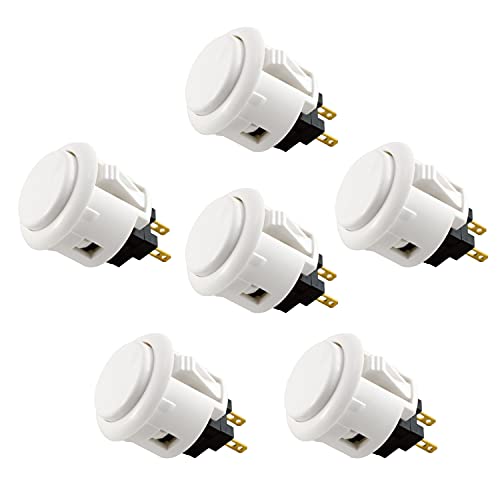
The 24mm OBSF buttons are a step down in size from the standard 30mm, which matters on compact controllers and travel-sized fight sticks. Six buttons per pack covers the typical six-button fighting layout (LP, MP, HP, LK, MK, HK) without a seventh or eighth row getting in the way.
You get the same Sanwa microswitch and snap-in feel as the larger OBSF-30, just in a tighter footprint. For shallow enclosures or controller cases with limited panel real estate, that smaller diameter keeps your layout ergonomic rather than cramped.
Real-World Strengths
- 24mm size fits slim fight stick cases and tight mounting grids.
- Six-button count aligns with classic Capcom-style fighting layouts.
- Snap-in install works on the same Hori and MadCatz enclosures that accept 30mm buttons, in many cases.
Some Limits To Know
- Not the right size if your panel was drilled for 30mm buttons.
- Only six buttons per pack, so larger modern layouts need a second set.
Spec Overview
Best Suited To
Travel-friendly fight stick builds and six-button fighters who want a tight, clean layout.
Look Elsewhere When
If your panel needs 30mm mounting, the Sanwa OBSF-30 8-Pack (Black & Blue) gives you the larger buttons with a sharper color combo.
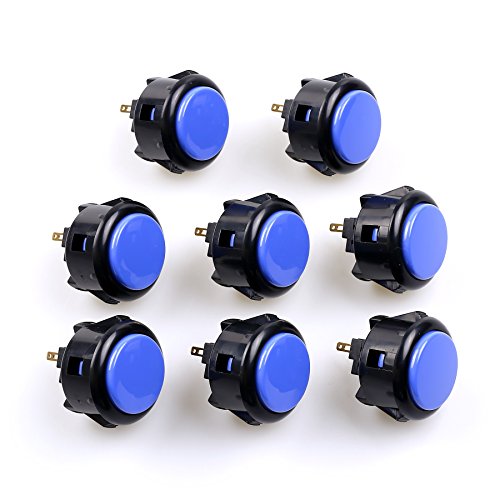
The black and blue version of the OBSF-30 trades the clean white look for a higher-contrast panel. With four black and four blue buttons in each pack, you can split the layout between movement and action rows, or color-code for accessibility when a friend picks up the stick.
Underneath the colors you get the same Sanwa build and snap-in mounting, so installation mirrors the white 8-pack. If you later decide to remap or swap colors, individual caps can be replaced without pulling the whole harness.
The Helpful Details
- Two-tone split helps distinguish action rows at a glance during fast play.
- 30mm size fits the same standard panel cutouts as the classic OBSF-30.
- Eight per pack suits a single-player eight-button layout out of the box.
- Darker colors hide finger oils and minor scuffs during long sessions.
Honest Caveats
- Only two colors, so themed cabs may need a third shade from another set.
- Single pack covers one player, so full two-player builds need to order accordingly.
Who Will Love This
Style-conscious builders who want a punchy, color-coded panel without mixing multiple sets.
Skip It When
For a wider color palette, the Sanwa OBSF-30 12-Pack Multi-Color spreads six hues across a full cab.
Twelve buttons in a six-color mix, with two of each shade, is the most flexible Sanwa set on the list. You can build a full two-player eight-button panel, color-code by fighter, or keep the extras as spares for a future repair.
The mix also makes this the easiest pack for thematic builds. Game logos, character palettes, or simply keeping every player’s row visually distinct is straightforward when you already have the colors on hand instead of ordering one set at a time.
A Favorable Mix
- Two of each color avoids mismatched spares when one button eventually wears out.
- Twelve buttons cover a two-player eight-button layout with margin for replacement parts.
- Multi-color spread gives a finished panel a custom look without buying separate sets.
Less Ideal Details
- You may not need all six colors for a clean monochrome build.
- More buttons in the box means more storage planning if you keep spares.
Feature Snapshot
Perfect Match For
Two-player cabinet builders and anyone wanting a color-rich layout from a single order.
Another Choice May Suit
If your project is a one-player stick and you prefer a clean monochrome look, the Sanwa OBSF-30 8-Pack (White) keeps things simple.
This bundle pairs a Sanwa JLF-TP-8YT joystick with eight OBSF-30 buttons, which is the starting lineup for a single-player arcade build. The JLF is the lever most players picture when they think arcade, with a switchable restrictor plate that lets you toggle between 4-way and 8-way movement depending on the game.
Both the joystick and the buttons are sized for standard 30mm panel cutouts, and the assembly suits control panels up to 5mm thick in steel or plastic. You get a Sanwa ball top with the lever, which is the same profile as the uxcell replacement tops covered earlier, so future color swaps stay simple.
Benefits That Matter
- Joystick plus eight buttons in one kit streamlines the parts list for a first build.
- Switchable 4-way/8-way restrictor adapts the same stick to classic shooters and modern fighters.
- 30mm buttons match standard cab cutouts, simplifying panel drilling.
- Fits panels up to 5mm thick, covering most home arcade enclosure materials.
Trade Offs
- White-only colorway in this kit may not match an existing custom panel.
- Eight buttons cover one player, so a second set is needed for two-player cabinets.
Who Should Grab It
First-time builders who want a Sanwa joystick and matching buttons in a single, compatible bundle.
Reach For A Different Pick When
If you’re wiring a hitbox and don’t need a lever at all, the Brook Hitbox Cable 5-pin DIY Harness handles the action row on a leverless board.
The I-PAC 2 is the brain that sits between your buttons and the PC. It supports two players, each with a joystick and eight action buttons, plus coin and start inputs, which covers a full two-player arcade layout in a single board.
SpinTrak spinner and U-Trak trackball support is built in, so you don’t need a separate encoder if your cab eventually adds rotary controls for games like Tempest or Centipede. Most installs run a configuration tool to remap keys, which lets you tune layouts without rewiring the panel.
The Value In It
- Two-player support with coin and start inputs covers a full standard cab layout.
- Integrated spinner and trackball support avoids stacking multiple encoder boards.
- USB output plugs into a PC or compatible console with no extra driver setup in most cases.
Practical Considerations
- Wiring complexity rises sharply with this many inputs, so plan your harness before you drill.
- Configuration is done through a PC tool, which adds a setup step the simpler button-only picks don’t require.
Feature Rundown
Built With In Mind
Multi-control cab projects that need a USB encoder handling buttons, spinners, and trackballs in one board.
Swap It Out When
For a single-player fight stick without rotary controls, the Sanwa JLF-TP-8YT Joystick + OBSF-30 Kit covers inputs without an external encoder.
What To Weigh Before Picking Arcade Game Buttons
Panel Size And Cutout Compatibility
The first spec to confirm is the button diameter, typically 24mm or 30mm, because that drives the panel drill pattern. A 24mm Sanwa like the OBSF-24 fits slim enclosures, while 30mm buttons match classic cab layouts. Mixing the two on the same panel requires careful spacing, so it’s easier to pick one size and stick with it.
Microswitch Feel And Noise
Arcade buttons generally use either a clicking or non-clicking microswitch. The non-clicking Sanwa-style microswitches stay quiet and reset quickly, which is helpful for shared spaces and chained fighting-game combos. A clicking switch gives a sharper tactile bump that some players prefer for rhythm or retro games, but it adds audible feedback that may bother roommates.
Quantity, Color, And Spare Coverage
Eight buttons cover a single modern eight-button layout, while twelve buttons handle a two-player build with room to spare. Buying a multi-color pack from the start is usually more efficient than reordering a single cap later, and dark colors hide wear better than white in long sessions.
Encoder And Wiring Needs
If your build includes a joystick, spinner, or trackball, an encoder board like the I-PAC 2 ties everything to USB. For leverless hitbox builds, a pre-terminated harness such as the Brook Hitbox Cable cuts wiring time. Simpler single-player sticks with a joystick and eight buttons can sometimes run on a basic controller board without the extras.
Key Considerations Across These Picks
Pitfalls Shoppers Hit
The most common slip is buying 30mm buttons for a panel drilled for 24mm, or vice versa. Measure your cutouts before ordering, and double-check the restrictor gate on a joystick if you play a mix of 4-way shooters and 8-way fighters. Skipping the encoder question also catches people out, because a cab with spinners or two players needs a board that can handle the full input count.
Where The Extra Money Goes
Higher-tier Sanwa sets cost more largely because the buttons are original Japanese-made parts with consistent microswitch tolerances, which translates to a longer service life and a more uniform feel across the panel. Bundles that include a joystick and encoder tend to cost more individually, but the savings show up in compatibility, since every part is sized to work together without guesswork.
Frequently Asked Questions
What Size Buttons Do Most Arcade Cabinets Use?
Most modern arcade and fight stick builds use 30mm buttons, which is the size Sanwa’s OBSF-30 line uses. Compact controllers and some retro-style panels use 24mm buttons instead, so matching your existing drill pattern is the simplest guideline.
Are Sanwa Buttons Worth The Higher Cost?
Sanwa is the long-running reference in arcade hardware, and the non-clicking microswitch feel tends to last through years of play. For casual use, alternative buttons can be perfectly fine, but consistent feel across a panel is where Sanwa’s reputation lives.
Can I Mix And Match Different Button Brands?
Yes, the .110 connector standard is shared across most Japanese-style buttons, so Sanwa, Seimitsu, and GamerFinger parts typically interchange. The catch is matching colors and cap profiles, since brands use slightly different shades and rim shapes.
Do I Need An Encoder Board For A Single Fight Stick?
For a single-player stick with one joystick and eight buttons, a basic controller board often works. If you add a second player, a trackball, or a spinner, an encoder like the I-PAC 2 becomes useful.
How Do I Reduce Button Noise In A Shared Room?
Choose non-clicking microswitch buttons, which Sanwa’s OBSF line uses. Adding rubber panel dampeners or foam under the control panel also reduces the hollow click of the button body hitting the metal.
The Takeaway
The right parts depend on what your build actually needs. A first-time fight stick builder usually wants the Sanwa JLF-TP-8YT Joystick + OBSF-30 Kit for a matched set, while two-player cabs benefit from the Sanwa OBSF-30 12-Pack Multi-Color. Once the buttons and joystick are in hand, an encoder like the I-PAC 2 ties everything to your PC, and the Brook Hitbox Cable or uxcell ball tops cover the smaller, more specific tweaks that turn a project into a finished arcade game button setup.



