


Pinball nostalgia hits different when you bring it home. Some people want a full-size cabinet that anchors a game room, others want a toddler-friendly table that teaches numbers and letters, and a growing crowd just wants to solder together their own MAME (Multiple Arcade Machine Emulator, a software suite that emulates classic arcade games on modern hardware) rig. This list covers all three lanes: ready-to-play cabinets in a range of sizes, DIY button-and-joystick kits for the tinkering crowd, and a preschool table that borrows the flipper format for early learning. You’ll find cocktail-style and upright cabinets alongside joystick kits, balltop handles, and a spinner add-on for Arcade1Up owners looking to expand their control options. The goal is helping you match the right format to your space, skill level, and tolerance for assembly.
The Main Contenders

Little Tikes My First Pinball Activity Table
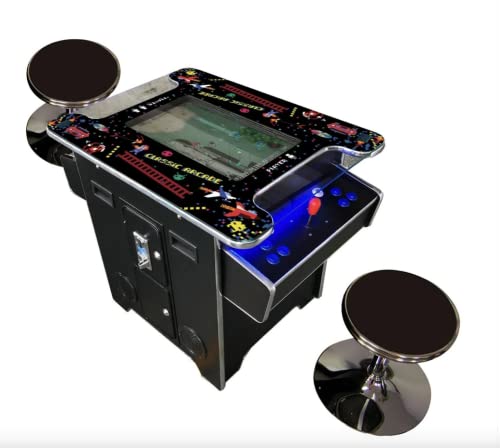
TOP US VIDEO ARCADES Cocktail Arcade Machine 22″ LCD
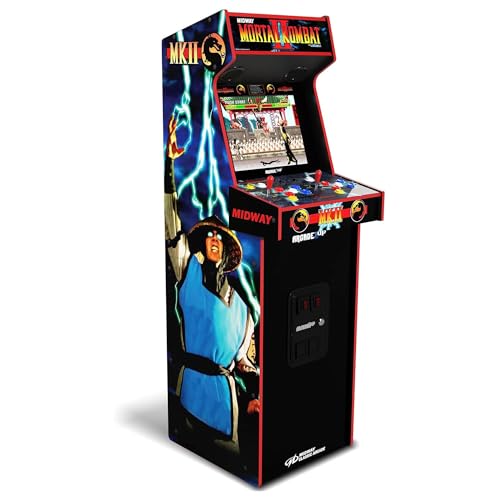
ARCADE1UP Mortal Kombat II Deluxe Arcade Machine
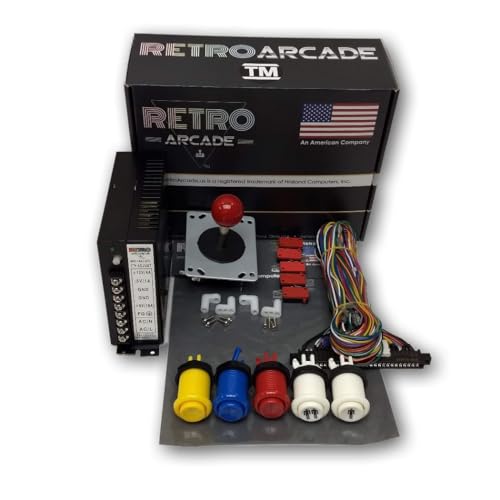
RetroArcade.us Jamma 60-in-1 Multicade Control Kit

Hikig 2 Player LED Arcade Buttons and Joysticks DIY Kit

ThunderStick Arcade Spinner for Arcade1Up

Avisiri Oval Balltop Arcade Joystick Handles (2-Pack)

Doc and Pies Arcade Factory Classic Home Arcade Machine (Green)
Qenker 2-Player LED Arcade DIY Kit for USB MAME

Arcade1Up Pac-Man Deluxe Arcade Gaming Cabinet
Inside Each Recommended Option
This pint-sized table borrows the flipper concept and filters it through a toddler lens, swapping high-score chases for letter and number callouts. The plastic play surface stays low to the ground, so early walkers can lean in without climbing. The activity table format means it doubles as a play stand, which is a nice space-saver for smaller homes.
Parents who already own a console-style cabinet like the TOP US VIDEO ARCADES cocktail unit (covered below) can still justify this purchase: one machine lives in the game room, the other sits in a playroom. For most toddlers, the sound-and-light loop keeps them engaged longer than a static toy.
The Practical Payoff
- Age-appropriate scale means safer reaching and fewer hard corners for new walkers.
- Letter, number, and color callouts tie flipping to early vocabulary, not just noise.
- Low table height removes the need for a separate chair or stool.
- Light and sound feedback reinforces cause and effect in a way toddlers respond to.
Things To Consider
- This is a learning toy, not a true pinball simulator, so older siblings may lose interest quickly.
- Battery requirements aren’t spelled out in the source, so plan to confirm before gifting.
Made For
Toddlers ages 1 to 2 just discovering letters, numbers, and cause-and-effect play.
Skip It When
You want a real pinball feel and a wider age range, in which case the ARCADE1UP Mortal Kombat II Deluxe cabinet fits older kids and grown-ups far better.
The cocktail format trades a tall upright cabinet for a table-style body that two people face across from each other. The 22-inch screen gives both players a clear view, and the tempered glass top shrugs off the kind of accidental drink spills that destroy cheaper particle-board machines. The body is built from 3/4-inch structural plywood, which the brand cites as a deliberate move away from flimsier builds.
Where the Little Tikes table above introduces little ones to flippers, this machine assumes the household wants the genuine sit-down-and-play feel. In our view, the joystick-in-the-middle layout accommodates left- and right-handed players without forcing anyone to stretch.
The Case For It
- 3/4-inch plywood construction resists the wobble that lighter cabinets develop over time.
- Tempered glass top handles routine drink and snack spills far better than acrylic.
- Center-mounted joystick keeps either hand comfortable for extended sessions.
Honest Caveats
- At roughly 140 pounds, the cabinet is a two-person carry, so plan your route before delivery.
- The cocktail body needs enough clearance to pull out stools and sit comfortably.
- Game counts listed in marketing sometimes differ from what arrives, so verify the exact library before you commit.
Feature Snapshot
Who It Suits Best
Hosts with a dedicated game room who want a centerpiece that survives years of parties and family game nights.
Look Elsewhere When
Your space is tight and you need vertical storage: the Doc and Pies Arcade Factory tabletop unit offers a smaller footprint for living-room use.
ARCADE1UP’s deluxe line aims for that middle ground between a real arcade cabinet and a budget shelf toy. The Mortal Kombat II build leans hard into the fighter crowd, with multiple MK entries alongside 10 other classics like Rampage and Gauntlet. Real-feel joysticks and responsive buttons matter here, because fighting games punish mushy inputs.
Compared to the TOP US cocktail unit above, this is a more vertical, single-room footprint. If your household argues over fighters versus maze games, the Pac-Man Deluxe cabinet later in this list covers the other side of that argument.
Strong Points
- 14-game library gives you multiple MK titles plus genre variety like Paperboy and Gauntlet.
- Deluxe-tier buttons and sticks reduce hand fatigue during long combo practice.
- Dual speakers give a fuller, room-filling sound compared to single-driver cabinets.
- Vertical cabinet shape fits along a wall more easily than a cocktail table.
Trade Offs
- No spinner support out of the box, so titles like Tempest still won’t feel right without a modification.
- The 17-inch screen is comfortable for one or two players but feels small across a large room.
Best Suited To
Households where fighting games dominate the playlist and players care about responsive sticks and buttons.
Reach For A Different Pick When
Your library leans maze-and-shooter: the Arcade1Up Pac-Man Deluxe cabinet pairs Pac-Man and Galaga for a more varied roster.
JAMMA is the wiring standard (Japanese Arcade Machine Manufacturers Association) that lets arcade boards plug into a common harness, and this kit is built for hobbyists who already own or plan to source a JAMMA-compatible PCB (printed circuit board, the brains of an arcade board). The harness ships with labeled leads, three action buttons per player in red, blue, and yellow, start buttons, a classic red-top joystick, and a 16-amp power supply.
You won’t find a finished cabinet here. What you get is the control hardware that turns a custom-built enclosure into something that feels arcade-authentic. The Hikig and Qenker kits covered elsewhere target PC builds, so this is the right lane if your project is a JAMMA board rather than a Raspberry Pi.
Positive Points
- Labeled US-spec harness saves time during the first wiring pass.
- Red, blue, and yellow button colors match traditional arcade layouts, helping with muscle memory.
- Included 16-amp power supply covers most single-board JAMMA projects without extra purchases.
- Mounting legs for the PCB slot into standard cabinet positions.
Worth Noting
- The PCB board itself is not included, so factor in sourcing a 60-in-1 or MAME-compatible board separately.
- You supply the cabinet, screen, and marquee; this kit is the control layer only.
Quick Facts
Whose Shelf It Belongs On
Builders with woodworking or fabrication experience who want a true arcade harness, not a USB controller.
A Better Fit Elsewhere
If your build runs on a PC or Raspberry Pi rather than a JAMMA board, the Hikig LED kit gives you a faster plug-and-play path.
The Hikig kit skips JAMMA wiring and goes straight to USB, which makes it the friendliest option for MAME-on-PC or Raspberry Pi projects. You get two joysticks, 20 LED-lit buttons, and the encoders needed to map every input through a single USB cable. The red-and-blue button color split gives each player a distinct side of the panel.
Compare that to the RetroArcade.us JAMMA kit above, and the trade-off is clear: Hikig trades true-arcade wiring for a faster install. The Qenker kit further down is the closest competitor here, so the decision between them comes down to encoder preference and panel layout.
What It Does Well
- USB encoders mean no parallel-port headaches or legacy power supply to wire up.
- LED-backlit buttons add ambiance in dim game-room lighting.
- Heat-resistant plastic construction holds up to long button-mashing sessions.
- Two-player layout covers most fighting and beat-em-up titles out of the box.
Room For Improvement
- Wiring and mounting hardware aren’t always included, so budget for a control panel enclosure.
- Button feel sits in the budget tier; microswitches can wear faster than Sanwa-spec parts.
The Right Fit
First-time builders running MAME on a PC or a Raspberry Pi who want a complete, USB-ready control kit.
Swap It Out When
You want a similar two-player USB layout with a slightly different encoder choice: the Qenker 2-Player LED kit is the natural alternative.
Spinners are the round, twist-style controllers that arcade games like Tempest, Arkanoid, and Pong rely on for analog-feeling input. ARCADE1UP’s stock joysticks can’t replicate that motion, which is where this add-on comes in. It mounts in place of (or alongside) a standard stick and lets the compatible cabinet recognize rotational input.
Where the cabinets above are full builds, this is a focused mod for people who already own the right ARCADE1UP hardware. The compatibility list is short and specific, so you want to confirm your cabinet model before clicking add to cart.
Where It Helps
- Unlocks spinner-driven games that joystick-only cabinets can’t play properly.
- Works across Windows, Linux, and macOS through the included interface board.
- Compact footprint makes it a clean drop-in for most ARCADE1UP control panels.
Factors To Consider
- Not compatible with Counter Cade, Party Cade, or Legacy Tempest cabinets, so verify your model first.
- Limited to the 12-in-1 and 6-in-1 ARCADE1UP boards; newer boards may need a different interface.
- Installation requires opening the control panel, which intimidates first-time modders.
Who Will Love This
ARCADE1UP owners with a compatible 12-in-1 or 6-in-1 cabinet who want to play Tempest the way it was designed.
Not Your Match When
You don’t already own a compatible ARCADE1UP cabinet; in that case, the ARCADE1UP Mortal Kombat II Deluxe is a more complete starting point.
Balltop handles are the removable caps that sit on top of an arcade joystick shaft, and swapping them changes the grip and feel. The Avisiri pair uses an oval (ellipse) shape, which fills the palm a bit more than the standard round balltop and gives fingers a flatter surface to push against. Each handle measures roughly 30mm wide and 51mm tall, in red and blue.
You won’t use this on its own: it needs a compatible M6-thread joystick (the standard screw size on most Japanese arcade sticks, including Sanwa and clone equivalents) and a panel to mount it on. Think of it as a finishing touch for the Hikig or Qenker kits above.
Key Advantages
- Removable design lets you swap tops without disassembling the joystick base.
- Oval shape gives a flatter grip that some players find easier on the fingers during long sessions.
- Standard M6 threading fits Sanwa-style and most clone Japanese arcade sticks.
Where It Is Less Suited
- Only the handles ship in the box: no shaft, no microswitch, no mounting plate.
- Color and shape preferences are personal, so this is the kind of upgrade that pays off only if you already know your grip style.
Perfect Match For
DIY builders who already own a compatible joystick and want to refine the top-of-stick feel.
Another Choice May Suit
You need a complete control kit, not just replacement handles: the Hikig 2-Player LED kit ships with full joysticks and buttons ready to wire.
Bartop cabinets are the half-height format that sits on a counter or shelf, and the Doc and Pies unit leans into that with retro artwork and a 19-inch LCD. The 412-game library draws from 80s titles, with free play across the board, so no quarters or tokens are required. At around 50 pounds, it’s a more reasonable single-person carry than the heavier TOP US cocktail unit above.
This sits in the middle of the roundup’s size scale: bigger than the ARCADE1UP deluxe cabinets in screen real estate, smaller than the cocktail table. Depending on your shelf depth, it can pull double duty as a countertop piece and a shelf unit.
A Favorable Mix
- 412 preloaded games cover multiple genres without swapping boards or cartridges.
- Free-play mode eliminates the token-management step that older cabinets required.
- 19-inch screen is larger than the 17-inch ARCADE1UP deluxe displays.
A Few Limitations
- Bartop height means you’ll likely want a stool or counter for comfortable play.
- Long-term reliability of off-brand multi-game boards varies, so expect occasional resets or hiccups.
Spec Overview
Built With In Mind
Households that want a bartop-style cabinet with a bigger screen than the typical 17-inch deluxe models offer.
Where A Sibling Pick Shines
You want a more curated game selection with licensed branding: the ARCADE1UP Pac-Man Deluxe and Mortal Kombat II cabinets are the cleaner alternative.
Qenker’s kit follows the same USB-encoder playbook as the Hikig option earlier, but ships with two zero-delay USB encoders (boards that translate button and joystick presses into keystrokes the computer can read with no perceptible lag) and a full 20-button layout. The blue-and-red color split keeps player one and player two visually distinct, and the parts are built from heat-resistant plastic to handle long sessions.
Think of this as the Hikig kit’s near-twin. If you already have a control panel enclosure, either one does the job. The deciding factor is usually encoder count and the exact color scheme you want on the finished panel.
Where It Excels
- Two zero-delay USB encoders cover two-player setups without buying extras.
- Works across modern Windows builds without driver fuss.
- Heat-resistant plastic helps in enclosed control panel boxes with limited airflow.
- 20-button count supports 10-button fighters and most shmups (shoot-em-ups, a genre of vertically or horizontally scrolling shooting games).
Practical Considerations
- Like most kit-only options, the enclosure, screen, and PC are not included.
- Wiring harnesses can run short on large custom panels, so plan the layout before drilling.
Who Should Grab It
Builders running MAME on a PC or Raspberry Pi who want a complete two-player USB kit with LEDs included.
Where Another Pick Suits Better
Your project is a JAMMA board rather than a PC build: the RetroArcade.us 60-in-1 control kit is wired for that workflow.
The Pac-Man Deluxe cabinet pairs the most recognizable maze game in history with Galaga and a roster of 14 total classics, including Pac-Land and Dig Dug. The 17-inch color screen sits in a compact vertical body that fits along a wall, in a corner, or beside the Mortal Kombat II Deluxe from earlier in this list if you want a matching pair.
For most households, this is the easier recommendation. The game selection is iconic, the cabinet footprint is modest, and the licensed artwork means the unit looks like a real arcade piece rather than a generic box. If you need a spinner, the ThunderStick add-on from earlier can extend the playability of the supported 12-in-1 boards, though the 14-in-1 Pac-Man board behaves a bit differently.
Useful Touches
- 14 built-in titles cover Pac-Man, Galaga, and other Namco classics across multiple genres.
- Licensed artwork and marquee give it a polished, display-worthy look.
- Real-feel joystick and buttons hold up to regular play without feeling mushy.
- Compact vertical cabinet fits a hallway, den, or game-room corner without dominating the room.
Some Limits To Know
- The 17-inch screen can feel tight if your main viewing distance is more than eight feet.
- Game library is fixed at 14 titles, so there’s no MAME-style expansion without modding.
Feature Card
Right Fit For
Households where Pac-Man, Galaga, and maze games carry the nostalgia, and a vertical cabinet is the right shape for the space.
Consider Something Else When
Your tastes run to fighters and larger libraries: the ARCADE1UP Mortal Kombat II Deluxe cabinet answers that profile with 14 different titles.
What To Weigh Before Choosing Arcade Flipper Machines
Cabinet Size and Room Footprint
The biggest decision most households face is whether they want a vertical upright, a bartop unit, or a cocktail table. Vertical cabinets (the ARCADE1UP deluxe models) hug a wall and free up floor space. Bartop units like the Doc and Pies machine need a counter or stool but offer larger screens. Cocktail tables invite face-to-face play but demand open floor space on both sides. Measure the intended spot before you commit: a 22-inch cocktail table needs clearance on all sides for two players and two stools.
Wired, USB, and JAMMA Paths
DIY kits split into two camps. JAMMA kits (the RetroArcade.us option) assume you’ll plug into a real arcade board and need a separate PCB, power supply, and cabinet. USB kits (Hikig and Qenker) assume a PC or Raspberry Pi is doing the emulation work, which makes them faster to set up but ties you to a computer. Pick the path that matches the project you actually want to finish, not the one with the most impressive parts list.
Build Materials and Long-Term Wear
Plywood, tempered glass, and standard-density fiberboard (MDF) all show up in this category, and they age differently. The TOP US cocktail machine leans on 3/4-inch structural plywood for rigidity. Cheaper MDF cabinets can develop corner dings and wobble over a few years of regular moves. If the cabinet will see parties or frequent relocation, heavier construction pays off in the long run.
Control Layout Compatibility
A spinner, a trackball, and a joystick each unlock different game libraries. If Tempest, Arkanoid, or Centipede matter to you, plan a control upgrade like the ThunderStick add-on. The Avisiri balltop handles cover the smaller upgrade path: grip preference on an existing joystick. Skip these accessories if your library is mostly fighters and maze games, where a standard stick is enough.
Common Shopping Slip Ups and Smart Upgrades
Where Shoppers Go Wrong
The most common mistake is buying a cabinet before measuring the room, including doorways and stairwells. A 140-pound cocktail cabinet that fits in the game room may not fit through the front door. Another frequent miss is assuming every ARCADE1UP board supports the same add-ons; the spinner and other mods list specific compatible boards, so verify your exact model before buying accessories. DIY buyers often underestimate the wiring time, so a kit that lists “easy install” still benefits from a weekend of planning the panel layout.
When Paying More Pays Off
The jump from a budget multi-game board to a licensed cabinet usually buys better artwork, a sturdier body, and tighter quality control on the joystick and button mounting. If the cabinet is going to live in a visible part of your home rather than a basement, the aesthetic upgrade alone often justifies the higher tier. For DIY builds, paying more for Sanwa-spec parts (Japanese-made arcade components considered the gold standard for feel and durability) or better encoders shows up in the input feel, especially after a year of regular play.
Frequently Asked Questions
What is the difference between an arcade cabinet and a pinball machine?
Arcade cabinets use joysticks, buttons, and sometimes spinners or trackballs to control video games on a screen. True pinball machines use physical flippers, bumpers, and ramps to move a steel ball across a playfield. The Little Tikes activity table borrows the flipper concept for a toddler toy, but the rest of this list focuses on video-game cabinets and the controls that go with them.
Can I add a spinner to any arcade cabinet?
No. Spinner compatibility depends on the control board inside the cabinet. The ThunderStick add-on works with specific ARCADE1UP 12-in-1 and 6-in-1 boards, but not with Counter Cade, Party Cade, or Legacy Tempest cabinets. Always check the board revision before buying a spinner mod.
Do I need a dedicated cabinet to use a USB arcade kit?
You need a control panel enclosure and a computer running MAME, RetroPie (a software package that turns a Raspberry Pi into a retro gaming console), or similar emulation software. The Hikig and Qenker kits supply the controls and encoder; the enclosure, screen, and computer are separate purchases. Many builders use a wood or MDF box with a mounted LCD for a bartop-style result.
How heavy are these arcade cabinets?
The cabinets in this list range from roughly 50 pounds for the Doc and Pies bartop unit to around 140 pounds for the TOP US cocktail machine. ARCADE1UP deluxe cabinets typically sit in between. Plan a two-person carry for anything over 80 pounds, and measure doorways before delivery.
Are multi-game boards legal to own?
Multi-game boards sold for personal, in-home use are widely available, though the legal landscape varies by region and by the specific titles included. This article is informational only and does not constitute legal advice. Research your local rules and the specific board’s licensing before purchasing.
Wrap Up
The right pick depends on where the machine will live and who will play it. A toddler gets the Little Tikes table, a fighter household gravitates to the Mortal Kombat II Deluxe, and a tinkerer with a workshop pulls together the Hikig or Qenker kit. Cabinets like the Pac-Man Deluxe and the TOP US cocktail unit round out the ready-to-play end of the roundup. Match the format to your space, then verify compatibility for any add-ons or mods. The rest is just finding the games you want to play first.



