


Whether you are restoring a vintage cabinet, kitting out a bartop for the living room, or finally committing to a leverless fight stick for ranked matches, the right arcade controls change how every session feels. The category splits into three loose groups: replacement parts and encoders for DIY builders, classic gamepads for retro purists, and modern leverless or wireless pads for serious competitive play. This list covers each angle with something that fits a real budget and a real play style.
A Snapshot Of The Selections

Arcade Joystick Replacement Top Blue Flight Stick (JS19/JS12)
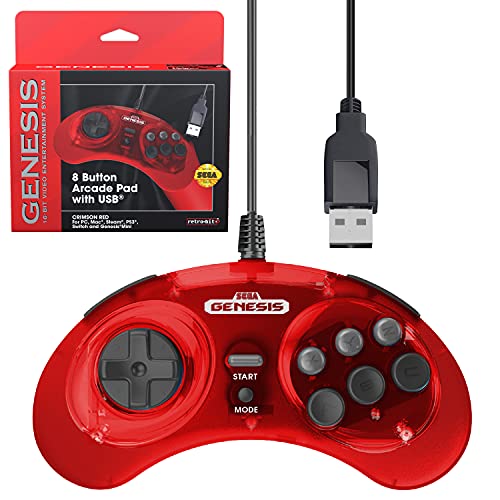
Retro-Bit SEGA Genesis 8-Button USB Wired Controller (Black)
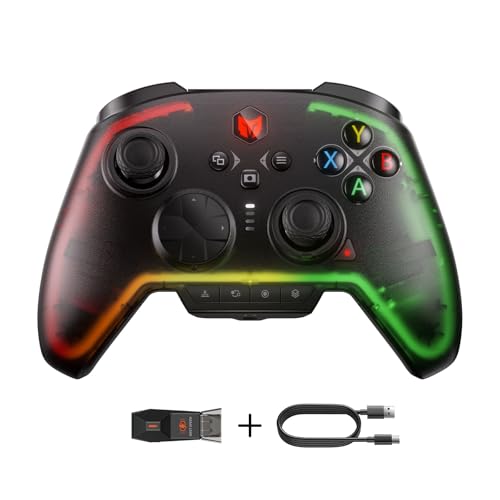
BIGBIG WON Rainbow 2 Pro Wireless Multi-Platform Controller

BIGBIG WON Fight Master Leverless Arcade Stick

Sehawei Haute42 T16 Leverless Arcade Controller (White)

I-PAC 2 Arcade Game Controller Interface (IPAC2)

Zero Delay Arcade USB Encoder QR05
Meet The Standout Selections
This is not a controller, it is the part you swap onto one. The blue flight stick top from RetroArcade.us is a direct-fit replacement handle for the brand’s JS19 and JS12 joystick bodies, with a 6mm threaded shaft, a 51mm tall profile, and a 17mm diameter grip. The elliptical bat-handle shape feels closer to a flight-sim yoke than a traditional ball top, which makes it appealing for shooter fans, dogfighting arcade games, and anyone whose wrists prefer a longer lever arc.
If your current stick top is cracked, stripped, or just uncomfortable after a few years of use, this is the simplest fix without replacing the whole joystick assembly. Cabinet restorers working on a classic multi-game rig will appreciate the color-matched blue finish, and the threaded drop-in design means no extra hardware is required.
Notable Upsides
- Drop-in replacement for JS19 and JS12 joystick bodies, no rewiring needed.
- 51mm tall elliptical profile suits flight-style and shooter genres where long throws help.
- Threaded 6mm shaft matches the most common arcade joystick standard for easy sourcing of alternatives later.
- Blue finish adds a custom look without repainting the whole control panel.
Things To Consider
- Only fits specific JS-series bodies, so verify your existing joystick model before ordering.
- Does not include a new microswitch or actuator, so worn internals stay worn.
Made For
DIY cabinet restorers and tinkerers who already run RetroArcade.us JS-series joysticks and want a comfort upgrade or color swap.
Look Elsewhere When
You are starting from scratch on a build; the I-PAC 2 plus a separate joystick and button set is the more flexible foundation.
Retro-Bit’s officially licensed Genesis pad rebuilds the six-button face that defined the console’s fighting game era, then quietly adds L and R shoulder buttons for modern remapping. The result is a controller that feels right in your hand for Streets of Rage 2, but also behaves well when you boot up a Steam fighting game with the same muscle memory. USB plug-and-play means it shows up on Windows, Mac, Steam, RetroPie, and the Sega Genesis Mini without extra drivers.
You can switch between D-Input and X-Input by holding START for five seconds, which matters because some emulators and PC games prefer one protocol over the other. Where the earlier picks on this list are aimed at builders, this one is for someone who just wants to play, no soldering or wiring required.
Strong Points
- Eight-button layout with shoulder triggers keeps a classic Genesis feel while adding modern remap options.
- Wide platform support covers Sega Genesis Mini, Switch, Switch 2, PC, Mac, and Steam out of the box.
- D-Input and X-Input switching solves a common headache on PC fighting games and emulators.
- Long cable gives comfortable couch-play distance without a USB extension.
Points To Note
- Wired only, so couch players will need to plan their seating distance.
- D-pad feel is closer to original hardware than modern pads, which longtime Genesis fans love and newcomers may find stiff.
Right Fit For
Retro enthusiasts running emulators, original Genesis Mini owners, and anyone who wants a faithful six-button layout for fighting games on PC or Switch.
Skip It When
You want wireless freedom and gyro or motion aiming; the BIGBIG WON Rainbow 2 Pro covers that ground with broader platform reach.
The Rainbow 2 Pro is the controller you reach for when you split time between a Switch, a Windows PC, an Android phone, and an iPad. Built-in Bluetooth handles most of that, and the pad also includes an ALPS joystick (a premium Japanese component known for tight, consistent centering), Hall-effect triggers (which use magnets instead of physical contacts for longer life and smoother pulls), and motion aiming for games that support gyro aiming. Two rear custom buttons and a 3.5mm audio jack round out a genuinely flexible feature set.
For PC players running everything from shooters to action RPGs, the companion app and RGB lighting add a layer of personality that the more retro-focused Retro-Bit pad does not attempt. Compared with the leverless fight sticks further down this list, the Rainbow 2 Pro is a more traditional gamepad shape, so the trade-off is portability and platform reach versus the pure execution precision of an all-button hitbox.
Positive Takeaways
- Hall-effect triggers resist stick drift and tend to last longer than traditional potentiometer triggers.
- Motion aiming gives a precision option for shooters on platforms that support gyro input.
- 3.5mm audio jack means a single headset works across Switch, PC, and mobile without adapters.
- Two rear buttons and an ALPS joystick make remapping and stick durability much stronger than entry-tier pads.
Worth Noting
- Companion app features add setup time and may require updates before first use.
- Battery-powered wireless play means you will charge it regularly, depending on RGB use.
Best Suited To
Multi-platform players who game on Switch, PC, and mobile and want motion aiming plus remappable paddles in one device.
Reach For A Different Pick When
Your main goal is competitive fighting games; the BIGBIG WON Fight Master leverless stick is purpose-built for that genre.
Leverless controllers trade the traditional joystick for an all-button layout, and the Fight Master leans into that with a five-shape button arrangement designed for blind-touch accuracy. Hot-swappable mechanical switches (small clicky switches that click and reset under each button) let you swap the feel of every input without soldering, which is huge for fighting game players who tune actuation distance and switch type to match their execution style. Connection covers Bluetooth, 2.4GHz wireless, and USB-C wired, so you can take it from a Switch 2 dock to a tournament PC to a phone without thinking.
Where the Rainbow 2 Pro covers a wide genre mix, the Fight Master is squarely aimed at Street Fighter, Tekken, and Guilty Gear players who want every input a finger-press away. RGB lighting is a nice cosmetic touch, though most owners will focus on the button feel rather than the color profile.
Noteworthy Benefits
- Hot-swappable switches mean you can change actuation feel without opening the case or touching a soldering iron.
- Tri-mode connectivity covers Switch 2, Switch, PC, iOS, and Android from one device.
- All-button hitbox layout supports fast dash, charge partition, and motion inputs once you retrain muscle memory.
- Mechanical switches feel more responsive than rubber-membrane alternatives for repeated combos.
Trade Offs
- Leverless learning curve is real, and you may need weeks of practice before input speed catches up to a traditional stick.
- Mechanical switches are louder than membrane pads, which matters in shared living spaces.
Who Should Grab It
Fighting game players entering the leverless format who want hot-swap flexibility across Switch 2 and PC tournaments.
Swap It Out When
You want a more traditional arcade feel with a real joystick; the Sehawei Haute42 T16 stays leverless but offers a different 16-button layout for broader genre use.
The Haute42 T16 stretches the leverless idea to sixteen mechanical keys, opening up genres that need more inputs than a standard fight stick offers: shoot ’em ups, twin-stick shooters, MAME-style multi-button arcade games, and complex modern fighters with multiple macro buttons. The 40nm-process internals are advertised for ultra-low input delay, and the white housing with custom RGB gives the desk-friendly form factor a clean look.
Compatibility is broad: Windows 10 and above, Steam Deck, PS3, PS4, Nintendo Switch, Raspberry Pi running Lakka, RetroPie, Recalbox, or Batocera, MiSTer, Android, Linux, iPadOS, and macOS in keyboard mode. PS4 and PS5 connections need a manual setup step on the official site, which is worth knowing before you plug in. Compared with the Fight Master, you get more buttons in a smaller footprint but lose the hot-swap switch tray.
Bright Spots
- Sixteen-button layout covers shmups, twin-stick shooters, and complex fighters that a six-button stick cannot.
- Cross-platform reach includes Steam Deck, Raspberry Pi arcade images, and most desktop operating systems.
- Keyboard mode on macOS and iPadOS turns the unit into a creative input device beyond gaming.
- Compact footprint fits a desk setup without dominating the surface like a full-size arcade stick.
Points To Keep In Mind
- PS4 and PS5 setup is not plug-and-play, so check the manual before console tournaments.
- Sixteen keys can overwhelm players used to a six-button face, depending on the genre mix.
Who Will Love This
Multi-genre arcade fans who want a single all-button pad for shmups, fighters, and MAME on a desk-sized footprint.
A Better Fit Elsewhere
You are laser-focused on ranked fighting games only; the Fight Master’s hot-swap switches and tighter button count serve that path more directly.
The I-PAC 2 is the silent hero of custom arcade builds. It is a small interface board that turns your joystick and button wiring into keyboard and mouse signals, so Windows, MAME, RetroPie, and most emulators see your arcade controls as plug-and-play keystrokes. This unit supports two players with a joystick, eight action buttons per player, plus coin and start buttons for both sides, and it also handles a SpinTrak spinner and a U-Trak trackball for games that need analog-feeling input.
Compared with the Quimat encoder further down, the I-PAC 2 leans toward builders who want a more configurable board and reliable support documentation. The vendor explicitly recommends contacting support before starting a return, since most reported issues are config or wiring related, not hardware failure. That kind of human support is a real value-add on a longer-term build.
Useful Highlights
- Two-player support with sixteen action buttons plus coin and start inputs covers most two-player arcade layouts.
- Spinner and trackball support opens up classics like Centipede and Missile Command without extra adapters.
- Keyboard emulation means zero driver installation on Windows, MAME, and most emulators.
- Config tool on the vendor site lets you remap every input without reflashing firmware.
Less Ideal Details
- No joystick or buttons included, so this is one piece of a larger parts list.
- Wiring requires basic tools and a working knowledge of ground and signal daisy-chaining.
Built With In Mind
Custom cabinet and control panel builders who want reliable two-player support and the option to add a spinner or trackball later.
Not Your Match When
You are wiring a single-player bartop on a tight budget; the Zero Delay encoder gets you up and running with less planning.
Quimat’s Zero Delay encoder is the friendly on-ramp for first-time arcade builders. The board accepts any joystick and push button with 4.8mm terminals, which covers the most common Sanwa-style and Happ-style parts you will find on the market. One USB cable to the host PC or Raspberry Pi is all you need; no driver hunting, no extra power supply, no firmware flashing on the first run.
It pairs well with MAME on Windows and RetroPie projects on Raspberry Pi, which is why it is a frequent sight in bartop and full-size cabinet builds. The honest read is that the I-PAC 2 is a more refined, configurable board, but it also costs more and assumes you already know what you want. This encoder is for the moment you decide to wire your first panel and need it to just work.
What Pays Off
- 4.8mm terminal compatibility covers the most common arcade joystick and button standards in one board.
- Driver-free USB connection to Windows PCs and Raspberry Pi keeps setup time short.
- Low entry cost makes it easy to test a layout before committing to a full custom build.
- Wide support in community guides for MAME and RetroPie projects.
Honest Caveats
- Single-board design is great for one player, but two-player builds need a second encoder or a different model.
- Wiring several buttons on a shared ground requires care to avoid ghost inputs, depending on the panel layout.
Whose Shelf It Belongs On
First-time DIY arcade builders wiring a single-player bartop or control panel on a tight timeline.
Consider Something Else When
You are planning a two-player cabinet from the start; the I-PAC 2 covers both players on one board and saves you a second USB port.
What To Weigh Before Picking Arcade Controls
The category splits cleanly into three jobs, and the right pick depends on which one you are trying to do. Replacement parts and encoders serve builders, classic gamepads serve retro purists, and leverless or feature-packed modern pads serve competitive players.
Joystick style and feel matters most for traditional arcade parts. Ball-top and bat-top handles change the throw distance, with bat-style and flight-stick shapes like the blue replacement top above giving longer arcs that suit shooters. Leverless pads like the Fight Master and Haute42 T16 skip the joystick entirely and trade it for buttons, which favors blind-touch accuracy over muscle memory from a stick.
Connection and platform reach is the deciding factor for modern pads. The Retro-Bit Genesis controller is wired USB only, the Rainbow 2 Pro goes wireless across PC, Switch, and mobile, and the Fight Master adds tri-mode connectivity. Match the controller to the device you actually play on most, not the one with the longest spec list.
Build scope drives the encoder choice. A single-player bartop on a short timeline is the Zero Delay encoder’s sweet spot. A two-player cabinet, a trackball, or a spinner for games like Centipede leans toward the I-PAC 2’s wider input support.
Switch type and durability is where spending up actually shows. Mechanical switches and Hall-effect triggers outlast rubber-membrane pads by a wide margin, especially in hot climates or long sessions. For daily ranked play, that extra life matters more than RGB or cosmetics.
What Most Shoppers Get Wrong About Arcade Controls
Pitfalls Shoppers Hit
The most common mistake is buying a leverless pad as a first stick without accounting for the learning curve. Leverless layouts reward precise finger placement, so anyone coming from a six-button Genesis pad or a traditional joystick will need real practice time before the execution feels natural. Borrowing or testing one at a local tournament before spending is worth the time.
A close second is underestimating the wiring side of a custom build. Encoder boards, microswitches, and ground daisy-chaining all have quirks, and a panel that ghosts inputs or misses directions is almost always a wiring problem, not a hardware defect. The I-PAC 2 and Zero Delay encoders both ship with support documentation for a reason: read it before you solder.
Where The Extra Money Goes
Higher-tier arcade controls spend the budget on switch quality, internal components, and platform-specific tuning. Hall-effect triggers and ALPS joysticks on the Rainbow 2 Pro are the kind of upgrades that show up after months of daily use, not on day one. Leverless sticks like the Fight Master add hot-swappable switches, which let you change the feel of every button without tools, a meaningful advantage for players who like to tune their inputs.
The upgrade is worth it for anyone who plays ranked sessions multiple nights a week, fights games competitively, or builds once and expects the panel to last. Casual weekend builders usually get plenty out of an entry encoder and a solid set of buttons, so the premium tier is more about longevity and tuning than raw playability.
Frequently Asked Questions
What is a leverless arcade controller? A leverless controller replaces the joystick with an all-button layout, so directions and attacks are all finger presses. The trade-off is faster inputs once trained, with a learning curve during the first few weeks.
Do arcade encoders need drivers? Most modern encoders like the I-PAC 2 and the Zero Delay QR05 show up as standard USB keyboards and need no driver installation on Windows, MAME, or RetroPie.
Are Hall-effect triggers worth it? Hall-effect triggers use magnets instead of physical contacts, so they tend to last longer and feel smoother than traditional triggers. For daily PC or Switch play, the upgrade is noticeable, especially in shooters.
Can a Genesis-style controller work on a PC? Yes, USB Genesis-style pads like the Retro-Bit 8-Button controller work on Windows, Mac, and Steam with no extra drivers, and they often support D-Input and X-Input switching for emulator compatibility.
What is the difference between an arcade encoder and a fight stick? An encoder is a small board that translates arcade controls into keyboard or gamepad signals for a PC. A fight stick is the finished controller, including the case, buttons, and joystick or leverless layout, that you plug in and play.
Wrap Up
The right arcade controls depend on what you are actually building, restoring, or playing. A new joystick top, a faithful Genesis pad, a feature-rich wireless controller, a competition leverless stick, a multi-button arcade keyboard, a configurable encoder, or a beginner-friendly USB board all earn their place in a different kind of setup. Pick the one that matches your genre, your platform, and how much wiring you actually want to do, and the rest falls into place.



