


Plug a $200 fight stick into a weekend arcade build, or pop a Bluetooth leverless pad into your Switch dock for a quick ranked session, and the gap between hobbyist tinkering and casual play gets surprisingly small. That overlap is the whole point of this shortlist: ten picks spanning screw-on ball tops, USB encoders, and full controllers. Fliers, retro collectors, and DIY cab builders should all find something that fits the way you actually play.
How The Shortlist Stacks Up

RetroArcade.us Blue Flight Stick Joystick Top (JS19/JS12)
TAPDRA Chrome Arcade Shaft Extender (M6, 2-Pack)

Sehawei Haute42 16-Key Leverless Arcade Stick (RGB)
Retro-Bit SEGA Genesis 8-Button USB Controller (Black)

Reyann Zero Delay Arcade USB Encoder

Retro-Bit SEGA Genesis 6-Button USB Controller (Clear Blue)

Hikig 2-Player LED Arcade Button & Joystick DIY Kit

I-PAC 2 Arcade Game Controller Interface (IPAC2)

8Bitdo All-Button Arcade Wireless Controller

Quimat Zero Delay Arcade USB Encoder (QR05)
Taking A Closer Look At The Options
A taller ball top can quietly change how a fight stick feels under your fingers during a long set, and that is exactly the upgrade this replacement top delivers. Designed for RetroArcade.us JS19 and JS12 joysticks, it uses a 6mm thread, stands 51mm tall, and runs 17mm across the grip. The blue finish has a bit of visual personality in a mostly black setup.
Installation is a quick unscrew-and-swap if your existing shaft already accepts a ball top. The thread is standard enough that it plays nicely with most of the same brand’s joystick bodies, and the elliptical bat handle shape gives you a more locked-in grip than a pure sphere.
A Strong Showing
- Drop-in replacement for JS19 and JS12 owners, no rewiring required
- Taller 51mm height helps clear tight control layouts
- Elliptical bat handle offers a more planted grip than a round ball
- Blue finish adds a pop of color to monochrome builds
Small Caveats
- Only fits a narrow range of joysticks, so confirm your model before ordering
- Single top per pack, so two-player builds need to grab two
- Finish can show scuffs from heavy play over time, like most glossy ball tops
Quick Facts
Whose Shelf It Belongs On
Anyone already running a JS19 or JS12 joystick who wants a taller, flight-style grip without a full rebuild.
Reach For A Different Pick When
The TAPDRA Chrome Arcade Shaft Extender fits better if your stick height is the actual problem, since it lifts the existing ball top rather than replacing it.
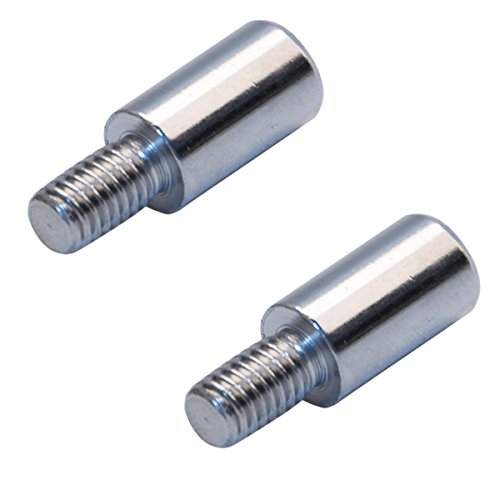
Sometimes a stock stick just sits too low in the panel, and the cleanest fix is a 1.5cm spacer rather than a new joystick. These chrome M6 extenders slot between your existing ball top and shaft, which is a nice middle ground for builders who already like their joystick’s feel but want a touch more reach.
The two-pack approach lines up with how most two-player fight stick projects are wired, so you generally get the matching pair in one box. The stainless steel body is rigid enough not to flex under hard directional inputs, and the M6 thread is the most common arcade stick pattern.
Features That Help
- Lifts joystick height by 1.5cm without a full swap
- Stainless steel body holds up under competitive use
- Standard M6 thread fits Sanwa, Zippyy, and similar joysticks
- Two-pack covers most two-player builds in one order
Trade-Offs To Consider
- Only 1.5cm of extra height, so it won’t fix sticks that feel dramatically short
- Chrome finish can show fingerprints during install
- Extending the lever changes leverage, so very light microswitch sticks may feel slightly different
Right Fit For
DIY builders tweaking ergonomics on a Sanwa or Zippyy-based stick who want a small but noticeable height bump.
A Better Fit Elsewhere
The RetroArcade.us Blue Flight Stick Joystick Top is the better call for JS-series owners, since a full replacement top tends to feel more solid than a spacer on that body.
Leverless controllers (all-button designs with no joystick) are taking over the competitive fighting game scene, and the Sehawei Haute42 16-Key sits right in that lane. Sixteen mechanical keys replace directional input, which lets you execute quarter-circles and dash motions with individual finger presses rather than stick sweeps.
RGB backlighting is a visual perk for late-night sessions, while broad platform support covers Windows, Steam Deck, PS3, PS4, Switch, Raspberry Pi builds like Lakka and RetroPie, MiSTer, Android, Linux, and macOS in keyboard mode. That said, the PS4 and PS5 hookup needs a manual or settings check before it works, so plan a few minutes for first-time setup.
Advantages To Know
- All-button layout reduces finger travel for tight combos
- Broad platform coverage including Steam Deck and Switch
- RGB lighting adds visible feedback for inputs
- Compact footprint works for couch or travel play
Honest Caveats
- No stick means a real learning curve coming from traditional pads
- PS4 and PS5 connection may need extra setup steps
- Low-profile switches favor accuracy over tactile click
Feature Card
Best Suited To
Competitive fighting game players who already want to commit to the leverless style and play across multiple systems.
Look Elsewhere When
The 8Bitdo All-Button Arcade Wireless Controller is a friendlier entry if you want Bluetooth and a smaller desk footprint at a friendlier price.
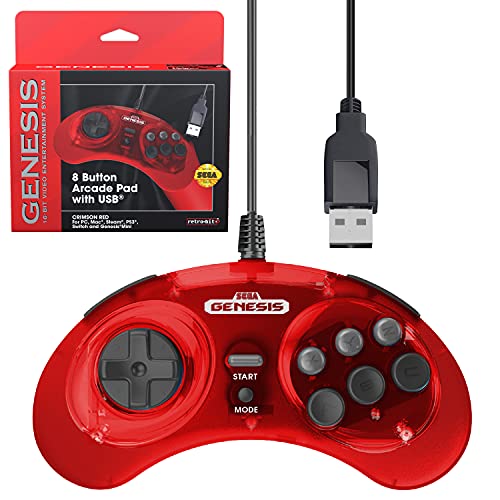
The 8-Button Genesis pad exists because six buttons ran out of room once Street Fighter and friends moved in, and this Retro-Bit version captures that exact era. It’s officially licensed by SEGA, so the shape and weight should feel familiar to anyone who played a real Genesis in the nineties.
USB connectivity expands the use case well beyond the original console. The pad works with the Genesis Mini, Nintendo Switch, Switch 2, PC, Mac, Steam, and retro hardware like RetroPie on a Raspberry Pi. Holding the Start button for five seconds swaps between D-Input and X-Input, which matters when jumping between retro emulators and modern Steam titles.
Why It Works Well
- Officially licensed SEGA design for authentic retro feel
- Eight buttons unlock modern fighting games on original hardware
- Works with Genesis Mini, Switch, PC, and most emulators
- D-Input and X-Input swap covers most modern platforms
Practical Considerations
- Wired only, so cable routing matters on a crowded desk
- Smaller hand profile may feel cramped for larger hands
- Stock availability has been spotty in some regions
Made For
Retro collectors and Genesis Mini owners who want the original button layout extended for fighting game ports.
Swap It Out When
The Retro-Bit SEGA Genesis 6-Button is the simpler fit if you only need the original six-button layout and prefer a clear colorway.
Every arcade stick needs a translator between the buttons and the PC, and that’s where a USB encoder like this Reyann model comes in. A “zero delay” board is a community term for encoders that skip the keyboard scan matrix found in cheaper boards, so presses register as fast as a standard gamepad does.
The board works with American-style joysticks and HAPP-style arcade buttons, which lines up with most North American cab kits. It supports PC and Raspberry Pi 1, 2, and 3, so it covers a wide range of MAME and RetroPie projects. The 4.8mm terminal compatibility keeps wiring simple with standard push-on connectors.
What Makes Sense
- Zero-delay design removes the input lag of scan-matrix boards
- Drop-in compatibility with common American-style parts
- Works on PC and multiple Raspberry Pi generations
- Standard 4.8mm terminals make wiring straightforward
Things To Consider
- Configuration is minimal, so advanced mapping requires the OS layer
- Single-board design supports one player, so two-player builds need two encoders
- Documentation is sparse, which can challenge first-time builders
Who It Suits Best
First-time cab builders working on a MAME or arcade-style project with American HAPP parts and a Raspberry Pi or PC brain.
Consider Something Else When
The I-PAC 2 Arcade Game Controller Interface is worth the jump if you want a more polished two-player encoder with trackball and spinner support.
The 6-Button Genesis pad is the layout most players picture when they think of the original console, and this Clear Blue version leans into that nostalgia. The translucent shell gives you a peek at the PCB underneath, which is a small touch that goes a long way on a display shelf.
Functionally, the pad lines up with its 8-Button sibling across supported platforms: Genesis Mini, Nintendo Switch, PC, Mac, Steam, RetroPie, and Raspberry Pi. The same Start-button hold swaps between D-Input and X-Input, so setup parity with the 8-button model is nice if you mix layouts across a collection.
Reasons It Performs
- Classic six-button layout matches original Genesis feel
- Translucent shell shows off internal components
- USB works across retro and modern systems
- Input mode swap is the same simple Start-button hold
Soft Spots
- Six buttons may feel limiting on ports that expect eight or more
- Cable length is generous but fixed, so a longer replacement may be needed for some setups
Key Details
Who Should Grab It
Collectors who want an authentic six-button shape and a translucent shell that pops on a shelf.
Not Your Match When
Pick the Retro-Bit SEGA Genesis 8-Button instead if you play ports that expect more face buttons, like later Street Fighter entries.
Starting an arcade build usually means a parts list that sprawls across ten product pages, and kits like this Hikig set pull most of that list into one box. You get two joysticks and twenty LED-lit buttons, which is enough parts for a clean two-player control deck in a bartop or full-size cab.
The included zero-delay USB encoder pairs with the buttons and sticks, and Hikig notes the kit works across Windows systems, MAME, and Raspberry Pi projects. The high-temperature-resistant plastic helps if your build sits in a garage or workshop where summer heat can warp cheaper enclosures.
What Earns Its Place
- Two-player kit cuts down on separate part orders
- LED buttons add visual flair without separate lighting wiring
- Zero-delay encoder included for low-latency input
- Plastic rated for high temperatures handles warm environments
Possible Compromises
- Wiring harness is minimal, so you may need to buy additional quick-disconnects
- Two-player encoder support may need a second board depending on layout
- Buttons feel lighter than premium Japanese-made alternatives
Spec Overview
Built With In Mind
First-time cab builders who want a single kit that handles two players and most fighting game layouts.
Reach For A Different Pick When
The I-PAC 2 Arcade Game Controller Interface suits a polished two-player interior better if you also want trackball and spinner support for games beyond fighters.
The I-PAC family has a long reputation in the arcade cab community, and this second-generation board expands what a single encoder can do. It supports two players with a joystick and eight action buttons each, plus dedicated coin and start inputs, which covers nearly any control panel layout you can imagine.
The real upgrade over a basic zero-delay board is the addition of SpinTrak spinner and U-Trak trackball support. That opens the door to games like Arkanoid, Centipede, and Missile Command, which a standard stick-and-button encoder just cannot handle. Configuration runs through a tool on Arcade Renovations’ site, and the seller notes most issues are wiring related, so it helps to double-check each connection before powering up.
The Case For It
- Two players, 32 inputs, plus coin and start per player
- Spinner and trackball support for classic arcade genres
- Single board handles complex control panels
- Established community presence with active support
Worth Noting
- Pricier than single-player encoder boards
- Wiring takes longer given the higher input count
- Configuration tool lives on the seller’s site, so offline setup is harder
Who Will Love This
Custom cab builders planning a control deck with trackball, spinner, and full two-player button layouts.
Where A Sibling Pick Shines
The Hikig 2-Player LED Arcade Button & Joystick DIY Kit is a better starting point if you want buttons and sticks bundled in one order.
8Bitdo has a habit of shrinking controllers without shrinking what they can do, and the All-Button Arcade is no exception. The body is roughly A4-paper sized and about 1.6cm thin, which is roughly a third the thickness of the larger 8BitDo Arcade Stick. Toss it in a bag and it disappears next to a laptop.
Connectivity covers three modes: Bluetooth to Switch or Switch 2, 2.4G to Windows, or a wired connection to either. Programmable buttons let you remap P1 through P4 to fit different postures, and four lock caps disable the remapping once you have a layout you trust. SOCD cleaning (simultaneous opposing cardinal directions, like up plus down) and tournament lock round out the competitive feature set.
Useful Strengths
- Tri-mode connectivity covers Switch and PC over Bluetooth, 2.4G, or USB
- Ultra-thin body slips into most laptop bags
- Programmable buttons with included lock caps for tournament play
- Hot-swappable PCB and magnetic feet for layout tweaks
Small Limitations
- All-button layout still has a learning curve for stick players
- Low-profile switches may feel too flat for users who prefer clicky keys
- Switch 2 support depends on firmware updates, so check before relying on it
Feature Snapshot
Perfect Match For
Couch and travel players who split time between Switch and PC and want a portable leverless layout.
Skip It When
The Sehawei Haute42 16-Key Leverless Arcade Stick is a better fit for stationary setups with more keys and full RGB customization.
For a basic one-player stick, the Quimat QR05 hits the same zero-delay benchmark as pricier boards at a much lower cost. It accepts any joystick or push button with standard 4.8mm terminals, which is the same terminal size used by the vast majority of arcade parts on the market.
Installation is intentionally simple: connect the joystick and buttons to the board’s quick-disconnect terminals, plug the USB cable into your PC or Raspberry Pi, and the system recognizes it as a generic gamepad. Software mapping is handled by the OS layer rather than the board itself, so the QR05 pairs well with MAME’s built-in input config.
The Value In It
- Zero-delay design at a friendly price point
- Works with PC, Windows, and Raspberry Pi projects
- Standard 4.8mm terminals accept most arcade parts
- Plug-and-play recognition across most operating systems
Things To Weigh
- Single-player board, so two-player builds need a second unit
- No native trackball or spinner support
- Plastic shell is functional, not premium, and may crack if stressed
Who It Suits Best
Budget-focused builders putting together a one-player stick or a starter Raspberry Pi cab.
Another Choice May Suit
The I-PAC 2 Arcade Game Controller Interface is worth the jump if you want two-player support and trackball or spinner inputs on a single board.
What To Think About Before You Pick
Match The Controller To Your Platform Stack
Start with where you actually play. Modern consoles like Switch and Switch 2 lean toward wireless or all-button pads like the 8Bitdo All-Button Arcade, while PC and Raspberry Pi builds need an encoder-friendly setup with quick-disconnect wiring. Cross-platform shoppers benefit from pads with D-Input and X-Input toggles, which cover both retro emulators and Steam.
Decide Between Stick, Leverless, And Pad
A traditional joystick still rules for shmups and 3D fighters, while leverless designs (all-button controllers with no lever) reward players who want finger-speed combos in 2D fighters. Retro consoles like the Genesis pair best with the era-appropriate six- or eight-button pad, since modern joysticks often feel out of place on those games. Your muscle memory usually matters more than the spec sheet.
Watch The Encoder If You Build Your Own
A “zero delay” encoder is the baseline for any serious arcade build, because the older scan-matrix boards add noticeable lag. For multi-input setups that include a trackball or spinner, look at boards like the I-PAC 2 that support those peripherals natively. Single-player sticks can stick with a basic zero-delay board like the Quimat QR05 to keep costs in check.
Plan For Two-Player From The Start
Two-player setups need either two single-player encoders or a dedicated two-player board. Buying two single-player boards is the cheaper route, but a single two-player board simplifies wiring and reduces points of failure. It also frees up USB ports, which matters on a Raspberry Pi where ports are limited.
Key Considerations Across These Picks
Common Shopping Slip Ups
First-time arcade builders often underestimate the wiring work. Most encoder kits include the board and the USB cable, but quick-disconnect terminals, daisy-chain harnesses, and mounting hardware usually arrive separately. Add a healthy margin to your parts list before the first order goes in, and double-check the encoder’s terminal size matches the buttons and joystick you plan to use.
Where The Extra Money Goes
A higher-tier board like the I-PAC 2 earns its keep through broader input support, including spinners and trackballs, and a more robust configuration tool. The trade-off is a stiffer price and a longer wiring session, since the higher input count means more terminals to land cleanly. For projects that stay strictly within fighting games, a basic zero-delay board delivers the same input performance for less, so the upgrade only makes sense when your game list goes beyond fighters.
Frequently Asked Questions
What Is A “Zero Delay” Encoder?
A zero delay encoder is a USB board that registers button and joystick presses as quickly as a standard gamepad, unlike older scan-matrix boards that cycle through inputs and add a small but noticeable lag. For competitive play or anything timing-sensitive, zero delay is the baseline worth targeting.
Can I Use A Leverless Controller For Games Other Than Fighting Games?
Yes, although it depends on the game. Platformers, shmups, and racing titles often assume a stick, so muscle memory will need a real adjustment. For 2D fighters and some action games, leverless designs are widely considered the input method of choice.
Do These Controllers Work On A Raspberry Pi?
Most USB pads and encoders on this list work with Raspberry Pi projects running RetroPie, Recalbox, Lakka, or Batocera. The Retro-Bit Genesis pads, the encoder boards, and the leverless controllers with keyboard mode all line up with that ecosystem. Wireless controllers generally need a Bluetooth-capable Pi or a supported USB dongle.
How Hard Is It To Wire An Arcade Stick?
Wiring an arcade stick is manageable for a first-time builder, since most parts use quick-disconnect terminals that push on by hand. The most common stumbling point is matching the ground (GND) wires correctly across the encoder, and many guides suggest daisy-chaining ground from each button to keep the layout tidy.
Are Officially Licensed Retro Pads Worth The Premium?
Officially licensed pads from brands like Retro-Bit tend to match the original button spacing, weight, and shell shape more closely than third-party clones. For collectors or anyone with strong nostalgia for the original hardware, that authenticity is usually worth the extra cost. For casual play, generic pads can still get the job done.
The Takeaway
Arcade controllers cover a wide spectrum, from a $10 ball top that fine-tunes an existing stick to a $200 leverless pad built for ranked play. Start with your platform and your favorite genre, then match the format (stick, pad, or all-button) to the games you actually play. The rest of the build tends to fall into place once those two questions have a clear answer.



