


Stick drift is the curse of modern gaming. One minute you’re lining up a headshot; the next your character walks on their own because a worn potentiometer has lost its center. Anti-drift controllers solve that with Hall effect sensors, a design that uses magnets instead of physical contact to read stick position, so there’s nothing to wear down. This roundup looks at nine options worth your attention in 2026, from a $10 repair kit to premium paddles built for tournament play.
The Choices Worth Comparing
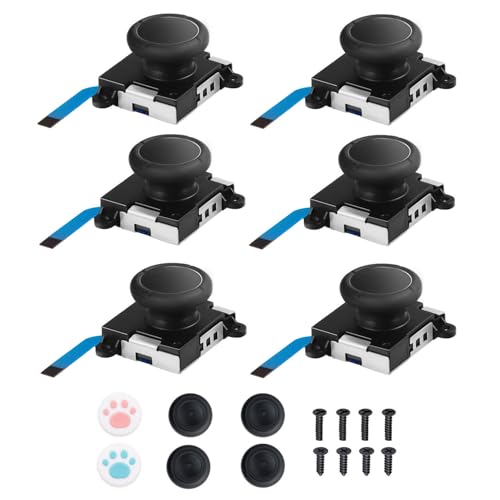
JAOYSTII Joycon Joystick Replacement 6 Pack

Morostron Wireless Controller for PC and Steam Games

ProControllers Rasta Fade Custom Xbox Controller
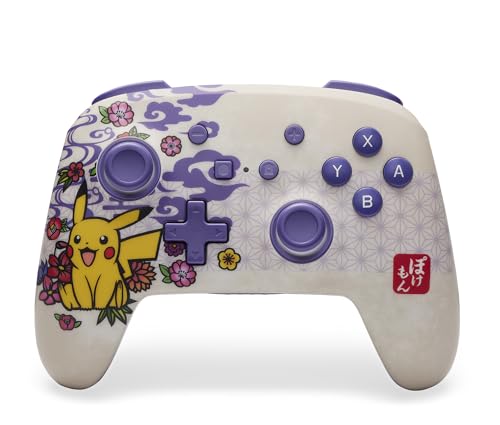
PowerA Enhanced Wireless Pokémon Blossom Controller

FIOTOK Wireless Switch Controllers for Nintendo Switch/Switch 2/Lite/OLED

GameSir Tarantula 8K PC Wired Esports Controller

GaloDrmy Wireless Switch Controllers for Nintendo Switch/OLED/Lite/Switch 2

GameSir G7 SE Wired Controller for Xbox and Windows

8Bitdo Ultimate 2 Wireless Controller for PC, Apple, Steam & Android
The Strengths Of Each Pick
Not every drift problem needs a new controller, and the JAOYSTII six-pack exists for owners who’d rather solder a $10 part than buy a $70 replacement. Each stick comes with thumbstick caps and screws, so you’re getting a full kit for both the left and right Joy-Con, including the Lite and OLED models. The modules ship with a wear-resistant housing that’s meant to outlast the original part.
Owners with a tri-wing screwdriver and a steady hand will find this is a Saturday afternoon project. The package covers both left and right sticks, which matters because drift on the directional pad side is just as common as on the analog side. If your Joy-Con is past warranty and the drift has become unbearable, this is the kind of repair that pays for itself fast.
Everyday Advantages
- Six sticks in one pack covers multiple controllers or future repairs
- Includes thumbstick caps and screws, no extra parts run to the store
- Works across Switch, Switch Lite, and OLED Joy-Con models
- Wear-resistant housing aims to outlast the original equipment part
Things To Consider
- Requires opening the Joy-Con with a tri-wing screwdriver and some soldering comfort
- Not a true Hall effect module, so the underlying wear design is similar to the OEM part
- First-timers may find the YouTube repair rabbit hole longer than expected
Feature Snapshot
Right Fit For
Tinkerers comfortable opening a Joy-Con with a tri-wing screwdriver and replacing the stick themselves.
Skip It When
You’d rather not crack open a controller, in which case the 8Bitdo Ultimate 2 offers drift-free Hall effect sticks right out of the box.
The Morostron is the controller that tries to be everything to everyone. Hall effect sticks anchor the anti-drift story, while a small interactive screen on the face gives you quick access to settings, battery, and connection status without opening an app. At 1200mAh the battery is generous for a wireless pad, and the RGB lighting is a fun touch for evening sessions.
Multi-platform support is the real pitch here: Switch, Switch 2, iOS, Android, and Windows PC all connect over Bluetooth, wired, or the included wireless adapter. The wake-up function won’t work on Nintendo consoles, which is a small wrinkle for anyone who likes their console to fire up the moment they tap a button. For PC and mobile gamers juggling multiple devices, this is one pad to keep on the desk.
The Good Stuff
- Hall effect sticks address drift at the sensor level rather than through software
- 1200mAh battery delivers long wireless sessions between charges
- Multi-platform support spans Switch, mobile, and PC over Bluetooth or wireless adapter
- Interactive screen surfaces settings without needing companion software
Points To Note
- No wake-up support on Switch or Switch 2 consoles
- Not compatible with Xbox, PlayStation, or GeForce NOW streaming
Who It Suits Best
Multi-platform players who hop between PC, Switch, and mobile and want one pad with anti-drift hardware.
A Better Fit Elsewhere
Console purists tied to Xbox will get a more native feel from the GameSir G7 SE, which was built for that ecosystem.
The Rasta Fade is the controller for someone who treats their gaming shelf like a display case. Each unit is hand airbrushed, so no two fade patterns match exactly, and the red, yellow, and green gradient stands out the moment the lights dim. Underneath the artwork it runs on the standard Xbox wireless platform, so pairing with Xbox Series X/S and Xbox One works out of the box.
PC compatibility comes through the same wireless adapter most Xbox pads use, and the layout follows the familiar Xbox button map. The airbrushed finish does mean the surface has more texture than a glossy shell, which some people find easier to grip during long sessions. It’s a custom controller first and an anti-drift story second, but if you want a piece that looks the part on camera, this delivers.
Noteworthy Benefits
- Hand airbrushed finish makes each unit visually unique
- Native wireless support for Xbox Series X/S and Xbox One
- Textured painted surface tends to improve grip during long sessions
Trade Offs
- Custom finish costs more than a stock Xbox pad with the same internals
- Painted shells need gentle cleaning to keep the fade looking sharp
- Limited edition runs can be hard to replace if the controller is lost or damaged
Made For
Collectors and style-first Xbox players who want a pad that looks as distinctive as it plays.
Look Elsewhere When
Hall effect stick hardware is the priority, in which case the GameSir G7 SE offers the same drift-resistant technology in a more conventional shell.
PowerA’s Pokémon Blossom edition leans hard into character without giving up the practical features Switch owners actually use. The pink floral shell is officially licensed, so the Pikachu silhouette and Poké Ball accents aren’t bootleg art. Bluetooth 5.0 keeps the wireless connection stable, and the built-in rechargeable battery stretches up to 30 hours per charge, which means most people can play a full week before reaching for a cable.
Two mappable Advanced Gaming Buttons sit on the back, letting you remap a combo or jump without lifting your thumbs. The anti-friction rings around the thumbsticks are designed for smoother, more controlled movement, which is a quiet but real upgrade over entry-level pads. The C button is unavailable, which is a small footnote for anyone tied to specific Switch 2 functions, but for most Switch and OLED play this controller punches above its price tier.
Positive Points
- Officially licensed Pokémon Blossom design with detailed shell art
- Up to 30 hours of wireless play per charge covers most weeks easily
- Two mappable back buttons add flexibility for combo-heavy games
- Anti-friction thumbstick rings aim for smoother stick travel
Honest Caveats
- Stock analog sticks, not Hall effect, so drift resistance is conventional rather than sensor-based
- C button unavailable, limiting some Switch 2-specific functions
Spec Overview
Best Suited To
Switch and Switch Lite owners who want a licensed design with strong battery life and don’t need Hall effect sensors.
Another Choice May Suit
Drift-free Hall effect hardware matters most, in which case the FIOTOK Wireless Switch Controllers add that layer without sacrificing Nintendo compatibility.
FIOTOK is the budget option that doesn’t feel like one, at least on paper. It covers Switch, Switch 2, Lite, and OLED, plus Windows PC, PS3, and Android, which means the same pad follows you between handheld, docked, and mobile sessions. The two back-mounted programming buttons support both single and multi-button mapping, covering up to 16 inputs, which is more flexibility than most pads at this tier.
One-button wake-up works on Switch consoles, though the pairing process differs slightly between Switch and Switch 2, so the manual is worth a quick read. The controller supports one-button screenshot capture, which is genuinely useful for sharing clips. If you’re stocking a household with several pads, FIOTOK’s price-to-features ratio is hard to ignore.
Useful Highlights
- Compatible with Switch, Switch 2, Lite, OLED, PC, PS3, and Android
- Two programmable back buttons with up to 16 mapped inputs
- One-button wake-up and screenshot capture on Switch consoles
- Pairs with all major Switch software without extra drivers
Worth Noting
- Pairing steps differ between Switch 1 and Switch 2, so the manual matters here
- Stock analog sticks mean no magnetic anti-drift safety net
Whose Shelf It Belongs On
Multi-console households and casual players who want programmable back buttons without paying premium prices.
Where Another Pick Shines
Hardcore PC players will get a more competitive feel from the GameSir Tarantula 8K, which targets esports-grade polling.
The Tarantula 8K is GameSir’s pitch to PC players who treat controllers like precision instruments. The Gen-2 TMR sticks, a refined version of Hall effect sensing that uses tunneling magnetoresistance for finer positional readouts, eliminate physical contact inside the stick, which removes the wear path that causes drift. The 8K polling rate is the headline number, sending stick position updates fast enough that input lag becomes a non-issue in shooters and fighters.
Dual-mode trigger stops let you switch between hair-trigger and full analog travel depending on the game. For a fighting game you might want the full pull; for a shooter the short stop is faster. The wired connection adds zero battery anxiety, and for desk-bound PC play that’s a feature, not a compromise. The catch is platform focus: this is a Windows controller through and through.
What Helps Most
- Gen-2 TMR sticks use magnetic sensing, so there’s no physical contact to wear out
- 8K polling rate delivers extremely fast stick position updates
- Dual-mode trigger stops adapt travel distance to game genre
- Wired connection removes battery and latency concerns
Practical Considerations
- Wired-only design means you’re tethered to the desk
- Windows PC focused, so console and mobile use is out of scope
- Cable length and routing deserve attention in a cramped setup
Feature Card
Who Will Love This
Competitive PC players running shooters, fighters, or racing sims who want magnetic stick technology and fast polling on a wired pad.
Swap It Out When
Wireless freedom matters more than 8K polling, in which case the 8Bitdo Ultimate 2 brings TMR sticks to a wireless form factor.
GaloDrmy’s pitch is reach: the same pad works with Switch, Switch OLED, Switch Lite, Switch 2, iOS, Android, and Windows 7 through 11. The one-key pairing is the small touch that makes the difference, hold the Home button for five seconds and you’re paired, no menu-diving required. Both wired and wireless connections are supported, so you can charge through a cable during long sessions without losing input.
The wake-up function on Switch consoles means tapping a button brings the system out of sleep, which is the kind of detail you don’t appreciate until it’s missing on a competitor pad. For households with mixed devices, the broad OS support turns one controller purchase into coverage for the whole family. The trade-off is that you won’t get the absolute premium build of a higher-tier brand, but for casual through mid-core play it holds up well.
Real Benefits
- Broad platform support across Switch family, mobile, and Windows
- One-key pairing takes seconds and skips the menu walk-through
- Wake-up support on Switch consoles for fast resume
- Wired and wireless options add flexibility at the desk
Some Limits To Know
- Build quality sits below premium brands, so longevity depends on careful use
- Stock analog sticks don’t address drift at the sensor level
Perfect Match For
Cross-device households who want a single pad for Switch, mobile, and PC without juggling multiple controllers.
Not Your Match When
Console-locked Xbox owners should reach for the GameSir G7 SE, which is purpose-built for that ecosystem with Hall effect sticks.
The G7 SE is the controller for anyone tired of companion apps. Plug in the detachable USB cable and the pad works on Xbox Series X/S, Xbox One, and Windows 10 or 11 with no driver installation, which is rare in a category where every other flagship demands a software download. The Hall effect joysticks and Hall effect triggers both rely on magnetic sensing, so neither the sticks nor the shoulder buttons have a physical contact surface to wear down.
A 3.5mm audio jack on the bottom lets you wire a headset directly, which keeps latency low and avoids Bluetooth audio hiccups. The Xbox-licensed layout means the Xbox button, View, Menu, and bumpers all sit where muscle memory expects them. Wired controllers are a hard sell against wireless competition, but for anyone who’s ever had a pad die mid-boss fight, the trade-off starts to look like a feature.
What Earns Its Place
- Hall effect joysticks and triggers remove physical contact from both inputs
- Detachable USB cable for true plug-and-play setup with no drivers
- 3.5mm audio jack supports wired headsets with minimal latency
- Compatible with Xbox Series X/S, Xbox One, and Windows 10/11
Where It May Fall Short
- Wired-only connection means you’re tethered during play
- No wireless option for living room setups away from the console
Key Attributes
Who Should Grab It
Xbox owners who want magnetic stick and trigger hardware, wired reliability, and a headset jack without software setup.
Where A Sibling Pick Shines
Wireless play is the priority, in which case the PowerA Enhanced Wireless Pokémon Blossom gives you a Bluetooth pad with similar back-button flexibility.
The Ultimate 2 is 8Bitdo’s flagship wireless pad and the one most likely to satisfy people who want refinement over flash. The TMR joysticks pair higher sensitivity with greater precision than earlier Hall effect designs, and the company’s exclusive 2.4G wireless protocol, branded 8Speed, claims sub-1ms latency with strong resistance to interference across a 10-meter range. The trigger mode switch on the back lets you flip between linear Hall effect and a clickier digital response without opening software.
Compatibility covers PC, Apple devices, Steam, and Android, which makes this a strong fit for anyone whose gaming happens across a Mac, a Steam Deck, and a phone. Charging is over USB-C, and the build quality has the weight and finish of a premium pad. The trade-off is platform scope: this is not a Switch or Xbox controller, and you won’t find official support for those consoles in the spec sheet.
Why It Works Well
- TMR joysticks deliver higher sensitivity and precision than older Hall effect designs
- 2.4G wireless protocol claims sub-1ms latency with strong anti-interference
- Trigger mode switch toggles between linear and digital response on the fly
- Cross-platform support for PC, Apple, Steam, and Android
Soft Spots
- No native Switch or Xbox support limits the audience somewhat
- Premium pricing reflects the build, but the spend only pays off for the supported platforms
Built With In Mind
PC and Apple ecosystem users who want premium wireless feel, TMR stick precision, and sub-1ms input lag for fast-paced play.
Where Another Pick Suits Better
Console-first households on Switch or Xbox will get more value from the GameSir G7 SE or PowerA Enhanced Wireless controllers in this roundup.
What Matters Most Before Choosing Anti-Drift Controllers
Sensor Type: Hall Effect vs TMR vs Traditional Potentiometers
Traditional analog sticks use potentiometers, small resistive contacts that physically scrape against each other as the stick moves. Over time that contact wears and the stick reports movement when you’re not touching it, which is drift. Hall effect sensors replace the contact with a magnet and a sensor that reads magnetic field strength, so there’s nothing to wear out. TMR (tunneling magnetoresistance) is a refinement of Hall effect that delivers higher sensitivity and lower power draw. If you game daily for years, magnetic sensing is worth the step up.
Platform Match and Connection Method
A controller is only useful if it talks to the device in front of you. Switch family consoles need either an officially licensed pad or a third-party pad with confirmed Switch support. Xbox controllers don’t work on Switch, and vice versa. PC pads typically support the widest range through Bluetooth or USB receivers, while mobile gaming prioritizes low-latency Bluetooth profiles. Match the connection type to your primary device before anything else.
Wired vs Wireless and Battery Life
Wired controllers remove battery anxiety and usually drop input latency, but they tether you to the desk. Wireless pads add freedom and couch-friendly play, with battery life ranging from a dozen hours to 30+ per charge on premium models. Consider where you’ll sit when you play, since wired pads work best at a desk and wireless pads work best in a living room. Rechargeable lithium-ion batteries are now standard, and most premium pads charge over USB-C.
Ergonomics, Weight, and Back Buttons
A controller that fights your hands is a controller you stop using. Weight distribution matters for long sessions; lighter pads reduce wrist fatigue but can feel cheap. Back buttons let you map combos or jump without taking thumbs off the sticks, and the best implementations have remappable profiles. Anti-friction thumbstick rings, present on some pads in this roundup, smooth the feel of the stick against the shell.
Key Considerations Across These Picks
Where Shoppers Go Wrong
Many shoppers focus on stick technology and ignore trigger construction. Triggers use the same contact-based potentiometers as sticks on most controllers, so a pad with Hall effect joysticks and traditional triggers still has a wear path. The GameSir G7 SE and a few others address this with Hall effect triggers, which is worth checking if you game in genres where trigger response matters.
Another common slip is buying a controller that doesn’t support wake-up on your console. Tapping a button to bring a Switch out of sleep feels like table stakes, but several third-party pads skip that function, which gets old fast. Confirm wake-up and pairing details in the spec sheet before adding to cart.
What Separates Premium From Basic
Higher-tier pads earn their price through sensor refinement, build materials, and wireless latency. TMR sticks outperform first-generation Hall effect in precision, and proprietary 2.4G protocols can beat generic Bluetooth for input lag. Aluminum or reinforced plastic shells hold up better over years of daily use, and software customization through a companion app adds depth for competitive players.
The honest case for spending up is use intensity. A casual player gaming a few hours a week won’t notice the difference between a budget pad and a flagship. A daily multiplayer grinder will feel it within a month. Match the spend to the hours you’ll actually log, not the marketing claims.
Frequently Asked Questions
What is stick drift and why does it happen?
Stick drift is the controller registering movement when your thumb is still. It happens because traditional analog sticks use physical resistive contacts that wear down over time.
Hall effect and TMR sensors solve this by reading a magnetic field instead, so there’s no contact surface to degrade.
Do anti-drift controllers feel different from regular ones?
For most players the feel is identical at the center of the stick’s range. Some gamers notice that magnetic sticks have a slightly smoother, more linear response, especially near the edges.
Adjustment is minimal, and most people stop thinking about the difference within a session or two.
Can I replace the sticks in my existing controller instead of buying a new one?
Yes, replacement joystick modules exist for Switch Joy-Cons and some other controllers, like the JAOYSTII six-pack in this roundup. The repair requires opening the shell and sometimes soldering.
Comfort with small electronics and a steady hand are the main prerequisites, and the savings are real if you already own the tools.
Are wireless anti-drift controllers as responsive as wired ones?
Premium wireless pads with proprietary 2.4G protocols can match or beat wired latency. The 8Bitdo Ultimate 2 claims sub-1ms response over its wireless link.
Generic Bluetooth connections add a small amount of latency that competitive players may notice, though most people won’t feel the difference in casual play.
Do Hall effect controllers work on every console?
Hall effect is a sensor technology, not a console standard, so it depends on whether the manufacturer built it into a pad licensed for your console. Xbox, PC, and Switch third-party options all exist with magnetic sticks.
Check the specific model’s compatibility list before buying, since not every anti-drift pad supports every platform.
Closing Remarks
The right anti-drift controller depends on where you game and how often. Multi-platform casual players get the most from the Morostron or GaloDrmy, while Xbox and PC users chasing Hall effect hardware should look at the GameSir G7 SE. Competitive PC players who want sub-1ms wireless and TMR precision will find the 8Bitdo Ultimate 2 hard to beat. Pick based on platform fit first, sensor type second, and extras third, and the drift frustration becomes a solved problem.



