


Desktop flight sim sticks serve a purpose, but the moment you start flying a complex airliner in Microsoft Flight Simulator, X-Plane, or Prepar3D, the keyboard stops cutting it. Real airline procedures demand a real-feeling yoke, dedicated throttle, twist rudder or pedals, and physical radios you can twist without looking. The right airplane simulator controls turn a mouse-and-keyboard hobby into a believable procedural workflow, from COM1 frequency changes to flap and gear management.
These ten picks cover the core categories: full yoke systems, throttle quadrants, rudder pedals, and dedicated radio or switch panels. Every one is USB-based and PC-compatible. Mix and match the modular options if you want a layered home cockpit, or start with a single all-in-one panel if space is tight.
The Choices Worth Comparing

Logitech G Pro Flight Radio & Switch Panel Bundle

Honeycomb Alpha Flight Controls Yoke & Switch Panel

Logitech G Pro Flight Rudder Pedals

Octavi IFR-1 Compact All-in-One Cockpit
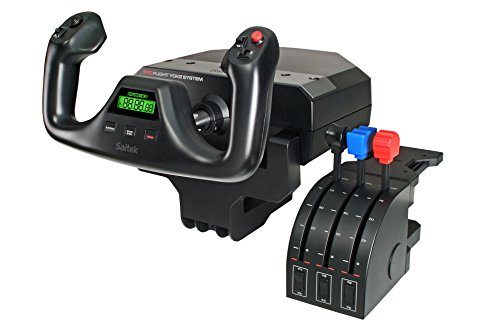
Logitech G Saitek Pro Flight Yoke (Renewed)

Logitech G Pro Flight Radio Panel

Logitech G Saitek Pro Flight Throttle Quadrant

Logitech G Pro Flight Yoke System

Logitech G Pro Flight Yoke System (Black)

Logitech G Pro Flight Switch Panel (White)
A Breakdown Of The Leading Choices
Two panels in one box makes this bundle the easiest way to start replacing keyboard shortcuts with physical controls. The radio side handles COM1, COM2, NAV1, and NAV2 frequencies through a pair of twin concentric dials (two knobs stacked on one shaft, each rotating independently for the whole number and the fractional digit), while the switch panel covers landing gear, lights, and engine power.
For sim pilots building a multi-panel rig on a desk, the bundle slots into the same Saitek/Logitech ecosystem covered later in this list. The radio displays react in real time with FSX, X-Plane, and Prepar3D, so you see the active and standby frequencies tick over as you twist. For airline flyers running IFR procedures, that visual feedback alone removes a layer of friction from frequency swaps.
Bright Spots
- Twin-stack dials let you walk through COM and NAV frequencies without menu-diving in the sim.
- Standby switch transfers a pre-set frequency to active in one press, mirroring real cockpit flow.
- Switch panel covers landing gear, lights, and engine power on dedicated rockers, freeing up key bindings.
- Real-time LED feedback for both panels keeps your eyes on the gauges, not the menus.
- Stacks cleanly with other Logitech/Saitek panels, so it grows with your rig.
Points To Note
- Two panels take up more desk width than a single unit, so measure your surface first.
- USB cables and power leads need a reachable hub, and the bundle uses two USB ports.
- Owners commonly report occasional firmware quirks on older sim builds, so check Logitech’s site for the current driver before installing.
Key Specs
Best Suited To
Sim pilots building a layered home cockpit who want radio and switch controls in one purchase without juggling two separate orders.
Look Elsewhere When
Desk space is at a premium and you would rather consolidate everything into a single unit like the Octavi IFR-1.
Honeycomb built the Alpha around a solid steel shaft riding on two linear ball bearings, and you can feel the difference the first time you make a steep turn in a Cessna. The yoke rotates 180 degrees with a dampened, self-centering mechanism (a spring-and-damper system that returns the control to neutral when released, without a hard detent or notch at center), which gives smooth, accurate inputs without a stiff mid-point stop.
The integrated switch panel adds a 5-position ignition switch alongside main, alternator, avionics, and light toggles, and red LED backlighting keeps the labels readable on night flights. Compare that to the Logitech yoke system below, which relies on fewer dedicated switches. For general aviation pilots flying props and light twins in X-Plane or MSFS, the Alpha’s feel is the closest you’ll get to a real Cessna yoke at this level.
What Helps Most
- Steel shaft with linear ball bearings keeps pitch and roll smooth through long sessions.
- Dampened, self-centering mechanism removes the twitchy mid-point detent found on cheaper yokes.
- 5-position ignition switch mirrors real aircraft startup sequences.
- Red LED backlighting on the switch panel stays readable on red-light night flights.
Worth Noting
- Clamps to a desk up to roughly 1.75 inches thick, so a deeper tabletop may need a mounting board.
- The premium feel comes with a heavier price tag than the Logitech yoke system.
- You will likely still want separate rudder pedals, since the Alpha does not include twist rudder.
Who Will Love This
General aviation enthusiasts flying Cessnas, Pipers, and similar single-engine props who care about realistic yoke feel during pattern work and cross-country flights.
Consider Something Else When
You mostly fly large airliners and want a yoke-and-throttle combo out of the box; the Logitech G Pro Flight Yoke System ships with both for less.
No matter how good your yoke is, coordinated turns and differential braking need real feet. The Logitech G Pro Flight Rudder Pedals fill that gap with self-centering action, adjustable damping, and a tension knob that lets you dial in resistance to match how you fly. The footrests adjust to fit a wide range of shoe sizes and use non-slip surfaces to keep your feet planted during crosswind landings.
For pilots pairing these with the Logitech Pro Flight Yoke System, the cable is 1.8 meters long, so you can place the pedals where your chair naturally lands. The partial metal construction adds weight to the base, which keeps the pedals from sliding on hard floors. If you fly taildraggers or large twins, differential braking on the toe brakes is a meaningful upgrade over a single shared rudder axis.
A Favorable Mix
- Self-centering pedals with adjustable damping let you tune resistance to your flying style.
- Footrests adjust across sizes and use non-slip surfaces for stable foot placement.
- Toe brakes enable differential braking for taildraggers and large twins.
- 1.8-meter USB cable reaches most desk-and-chair setups without an extension.
Trade Offs
- Plastic outer shell on the wings means heavier boots can scuff the finish over time.
- No heel rests, so pilots coming from real-aircraft pedals may need an adjustment period.
- Wired only, so cable management matters in a tight sim corner.
Key Specs
Right Fit For
Sim pilots adding yaw and braking control to a yoke-only setup, especially those flying taildraggers, twins, or airliners with rudder-dependent handling.
Skip It When
You already own the Honeycomb Alpha yoke and prefer to consolidate; many sim pilots pair the Alpha with the matching Honeycomb Bravo throttle instead and rely on twist rudder elsewhere.
The Octavi IFR-1 takes a different approach from the modular Logitech/Saitek ecosystem: pack COM, NAV, FMS, autopilot, and XPDR controls into a single compact unit built in Germany. For sim pilots short on desk real estate, that consolidation matters more than endless expandability. One box, one USB cable, one footprint.
Built for IFR practice, the panel uses LED-backlit buttons so labels stay readable in dim rooms, and the high-precision controls are tuned for the kind of repetitive workflow you run during an instrument approach. The catch is that the IFR-1 does not include a yoke or throttle, so you will still want a separate control surface for pitch, roll, and power. Pair it with the Honeycomb Alpha or the Logitech yoke, and you have a complete IFR station in a tight footprint.
Useful Strengths
- All-in-one design consolidates COM, NAV, FMS, autopilot, and XPDR into a single panel.
- LED-backlit buttons make labels readable during night and IFR scenarios.
- Compact footprint suits small desks where multiple Logitech panels would not fit.
- High-precision controls are tuned for repetitive IFR workflow.
Honest Caveats
- Does not include a yoke, throttle, or rudder, so a separate control surface is required.
- Less expandable than modular setups, so you cannot add a second radio panel later.
- Drivers and sim compatibility are narrower than the Logitech ecosystem, so verify support for your specific sim version before buying.
Feature Snapshot
Made For
IFR-focused sim pilots with limited desk space who want a single panel that handles radios, autopilot, and transponder without stacking separate units.
Not Your Match When
You want to grow a multi-panel home cockpit over time; the Logitech G Pro Flight Radio & Switch Panel Bundle expands more easily into a larger rig.
Refurbished, not new, but the Saitek Pro Flight Yoke design has stayed relevant for a reason: a stainless steel shaft, dedicated throttle quadrant, and 75 programmable controls across the setup. Going the renewed route lets first-time sim pilots get into a proper yoke without stretching to the cost of a fresh unit.
The trade-off is the usual one with refurbished gear: cosmetic wear and a shorter remaining lifespan than a new boxed set. For a beginner still figuring out whether flight sim will stick, that is often a worthwhile trade. Compare that to the Honeycomb Alpha, which is more refined but priced for someone who already knows they will fly often.
Real-World Strengths
- Stainless steel shaft gives smooth pitch and roll inputs similar to the new version.
- Includes a separate throttle quadrant with three axes, so you are not buying a yoke only.
- Lower entry cost than the equivalent new unit, leaving budget for pedals.
Points To Keep In Mind
- Refurbished stock means cosmetic wear is possible and packaging may not be retail-grade.
- Remaining product lifespan is shorter than a new unit, depending on prior use.
- Renewed listings vary by seller, so check the return window and what accessories are included.
Whose Shelf It Belongs On
First-time sim pilots who want a real yoke without paying full retail and are comfortable accepting some prior use.
A Better Fit Elsewhere
You want a brand-new unit with full packaging; the Logitech G Pro Flight Yoke System (new) covered later in this list ships fresh.
If the keyboard frequency entry in your sim feels clumsy, the standalone Radio Panel replaces it with physical knobs and live displays. The unit integrates directly with FSX, X-Plane, and Prepar3D, so COM1/2, NAV1/2, DME, ADF, and XPDR frequencies show up on the panel and swap over with the same standby-and-transfer workflow you would use in a real cockpit.
This is the standalone version of the radio half of the bundle reviewed at pick 1, and it makes sense for sim pilots who already own a yoke and throttle from a different brand. Stack two radio panels in a multi-COM setup, or run just one if your typical flight only uses COM1 and NAV1. The honest read is that you do not need this if you only fly VFR on one radio, but IFR pilots who program multiple frequencies per leg will feel the difference within the first approach.
Advantages To Know
- Physical knobs replace keyboard frequency entry, cutting cockpit workload on IFR legs.
- Standby-and-transfer workflow mirrors real COM and NAV panel operation.
- Real-time displays show active and standby frequencies without alt-tabbing to the sim.
- Stacks with other Logitech panels for a layered multi-radio rig.
Less-Strong Areas
- Only covers radios, so you will still want a switch panel for gear and lights.
- USB cable and power lead add to the cable count on an already-busy sim desk.
- Less useful for VFR-only pilots who rarely swap frequencies mid-flight.
Feature Snapshot
The Right Fit
Airline and IFR sim pilots who want physical radio tuning without replacing the yoke and throttle they already own.
Reach For A Different Pick When
You need radios and switches together out of the box; the Logitech G Pro Flight Radio & Switch Panel Bundle covers both in a single purchase.
The Pro Flight Throttle Quadrant is the natural add-on for anyone already running a Logitech/Saitek yoke. It expands the available levers from a single throttle axis up to three, with three additional two-way rocker switches for trim, mixture, or other cockpit functions. For multi-engine aircraft work, having a dedicated lever per engine makes power management far more believable than assigning both to one axis.
The quadrant mounts to the desk on its own clamp and connects via USB, so installation is straightforward. For sim pilots flying the PMDG 737 or similar airliners in FSX, mapping each axis to a real engine simplifies the scan pattern. Worth noting though: the unit does not include a yoke, so it is an upgrade, not a starting point.
The Case For It
- Three-axis levers cover throttle, prop, and mixture for single- and multi-engine aircraft.
- Three two-way rocker switches add trim and other frequently used controls.
- Modular fit with existing Logitech/Saitek yokes for a layered home cockpit.
Small Caveats
- No yoke included, so a separate control surface is required for pitch and roll.
- Desk clamp depth limits which tabletops it can mount on without a board underneath.
- Most useful with Logitech/Saitek yokes; pairing with other brands may require manual mapping.
Built With In Mind
Sim pilots with an existing Logitech/Saitek yoke who fly multi-engine props or want realistic per-engine power control on a complex airliner.
Swap It Out When
You do not yet own a yoke; the full Logitech G Pro Flight Yoke System ships with a throttle in the box for similar money.
The Pro Flight Yoke System is the most balanced all-in-one option in this roundup: a stainless steel yoke shaft, separate three-axis throttle, 75 programmable controls, and an LCD display on the yoke itself. For sim pilots who want to start with a complete pitch, roll, and power station in one box, this is the default. You can always add a radio panel, switch panel, or rudder pedals later, and they all sit on the same ecosystem.
Compatibility runs through Windows 7, 8.1, 10, and 11, with PS/2 and USB connections covered. The yoke has a 2-position clamp for mounting on different desk thicknesses, and the integrated USB hub on the throttle lets you plug nearby peripherals in without reaching for the computer. The 3-position mode switch is a small but useful touch for swapping profiles between aircraft types mid-session.
Notable Gains
- Stainless steel yoke shaft keeps inputs smooth and stable during long sessions.
- 75 programmable controls across the yoke and throttle cover most aircraft functions out of the box.
- Separate three-axis throttle ships included, so power management is realistic from the first flight.
- Integrated USB hub reduces cable clutter on the desk.
Where It May Fall Short
- No rudder pedals included, so you will want a separate set for coordinated turns and braking.
- Plastic body panels feel lighter than the all-metal Honeycomb Alpha.
- Older drivers may need updating for the latest MSFS and X-Plane releases.
Feature Snapshot
Perfect Match For
All-around sim pilots who want a complete yoke and throttle foundation that can grow with additional Logitech panels and rudder pedals.
Where A Sibling Pick Shines
Sim pilots focused on general aviation who prioritize yoke feel; the Honeycomb Alpha Flight Controls delivers a noticeably stiffer, smoother throw.
This listing covers the same proven Pro Flight Yoke platform as pick 8, packaged in the black color variant. The fundamentals carry over: stainless steel yoke shaft, separate three-axis throttle quadrant, POV hat, and 14 button controls on the yoke for trim, autopilot, and other frequently used functions.
For sim pilots who already know they want the Logitech ecosystem and just need a yoke + throttle to start, this version is a reliable entry. The included 1.8-meter USB cable on the yoke and 1.5-meter cable on the throttle give enough slack for a typical desk-and-chair setup. The PS/2 connector on the throttle links the two units so they behave as one control surface in your sim.
Strengths Worth Knowing
- Stainless steel shaft keeps pitch and roll inputs consistent over long sessions.
- POV hat and 14 button controls on the yoke cover trim and autopilot without keyboard shortcuts.
- Throttle quadrant attaches via PS/2 link, treating yoke and throttle as one unit in the sim.
Some Limits To Know
- Functionally similar to pick 8, so the choice between them is mostly cosmetic and listing availability.
- No rudder pedals or radio panel included, so further purchases are likely for a complete setup.
Who Should Grab It
Beginners to intermediate sim pilots who want a proven yoke and throttle foundation without extra features they may not yet use.
Where Another Pick Suits Better
You fly GA props and care about precise feel; the Honeycomb Alpha Flight Controls is the better match for that focus.
The Switch Panel is the small-but-mighty piece of the Logitech/Saitek ecosystem: dedicated rockers for landing gear, lights, and engine power, with status LEDs that mirror what is actually happening in FSX. For sim pilots running complex airliners or older taildraggers with retractable gear, watching the panel light up as the gear comes down adds a layer of immersion that a keypress cannot.
The unit is also modular, with mounting brackets that let you stack it above or beside the radio panel and other accessories. The white finish is the only visual difference from the standard black Switch Panel; the controls are identical. Worth noting that this panel reads gear status from FSX, so behavior in MSFS, X-Plane, and Prepar3D may vary depending on how the addon aircraft exposes that data.
The Value In It
- Dedicated rockers for landing gear, lights, and engine power replace keyboard shortcuts.
- Status LEDs mirror actual aircraft state from FSX, adding real-time visual feedback.
- Modular brackets let you stack the panel with other Logitech accessories.
Factors To Consider
- Gear status feedback is FSX-native, so behavior in other sims depends on the aircraft addon.
- Single panel only, so you will want a radio panel or multi-panel alongside it for a complete stack.
Who It Suits Best
Sim pilots running FSX with complex airliners or retractable-gear aircraft who want physical switches and live status feedback for the systems they touch most often.
Consider Something Else When
You want radios and switches in one purchase; the Logitech G Pro Flight Radio & Switch Panel Bundle covers both at pick 1.
Picking The Right Setup For Your Sim Rig
Airplane simulator controls fall into three functional families, and the right answer depends on what you fly most. Yokes, the steering wheel-style controllers pilots grab with both hands, suit general aviation and airliners with conventional control columns. Joysticks (HOTAS setups) suit fighter jets and military sims but are not the focus here. Throttle quadrants, rudder pedals, and radio/switch panels layer on top to fill in the systems a yoke alone cannot reach.
Start by matching the controller to your most-flown aircraft. A single-engine Cessna pilot gets the most out of a smooth yoke plus rudder pedals, because coordinated turns and crosswind landings live in the feet. An airliner pilot running IFR procedures gets more from a radio panel and autopilot controls, because the workflow happens on the center stack, not the yoke.
Compatibility matters more than people expect. Check the supported sim and version on the product page before buying, and confirm whether the unit needs a USB hub or external power. Modular ecosystems like the Logitech/Saitek line grow well, but a compact all-in-one panel like the Octavi IFR-1 trades expandability for desk space.
Build quality shows up in the bearings, the shaft material, and the foot pedal tensioning. A steel shaft and linear ball bearings hold calibration better over years of use than all-plastic alternatives, which is worth considering if you fly often. For infrequent sessions, plastic builds hold up fine, and the cost savings can fund extra panels or pedals.
Common Slip Ups And Smart Spending Choices
Where Shoppers Go Wrong
The most common mistake is buying a yoke without rudder pedals, since coordinated turns feel half-finished without foot input. Another is mixing brands without checking driver support, since some units need specific sim plugins to map every switch. Cable planning also trips up first-time buyers; a single panel can use two USB ports plus power, and a multi-panel rig benefits from a powered hub.
Where The Extra Money Goes
Higher-priced yokes like the Honeycomb Alpha use steel shafts and dampened centering for a more realistic throw, which matters if you fly long IFR legs and want muscle memory to feel right. Premium all-in-one panels bundle radio, autopilot, and transponder controls into one box, which costs more but saves desk space and setup time. The upgrade is worth it once you know your flying style, not before.



