


Flying a desktop simulator with a mouse and keyboard works for quick sessions, but a dedicated airplane controller for PC turns the same software into something closer to a real cockpit. Yokes give you proper pitch and roll muscle memory. Throttle quadrants let you manage power, prop, and mix like a real pilot. Rudder pedals add the yaw and differential braking that round out coordinated flight. Switch panels and radio stacks take the keyboard shortcuts out of the equation entirely, so your hands stay on realistic controls the whole flight.
This list covers nine solid options across yokes, HOTAS systems (Hands On Throttle And Stick, meaning a joystick and throttle in one setup), rudder pedals, and modular panels, so you can build a setup that fits your desk, your budget, and the aircraft you fly most.
A Side-By-Side Look

Logitech G Pro Flight Radio and Switch Panel Bundle
Logitech Pro Flight Rudder Pedals and Switch Panel

Octavi IFR-1 Compact All-in-One Cockpit
Logitech G Saitek Pro Flight Yoke (Renewed)

Logitech G Saitek Pro Flight Throttle Quadrant

Logitech G Pro Flight Yoke System

Logitech G Pro Flight Yoke System (Black)

Logitech G Pro Flight Switch Panel

Saitek Pro X-56 Rhino HOTAS Controller
More Details On Our Top Picks
This bundle pairs two of Logitech G’s standalone instrument panels, designed to slide into an existing cockpit setup rather than stand alone. The radio module handles COM1/2 and NAV1/2 frequency changes, while the switch panel covers landing gear, lights, engine, and auxiliary toggles. Real-time LED readouts mirror what’s happening in FSX, Prepar3D, and X-Plane, which means you stop squinting at onscreen menus during busy approach phases.
For sim pilots who already own a yoke and throttle, these panels fill the missing hands-on layer without breaking the desk budget. The radio dials rotate with a satisfying click, and the standby switch lets you queue up your next frequency before swapping, which is how real radios work in the cockpit. Most users will find the install straightforward, since the panels use the same modular mounting brackets as the rest of the Saitek lineup.
The Upside
- Twin concentric dials let you adjust frequency units incrementally, which speeds up COM and NAV swaps during instrument approaches
- LED displays sync with your sim software in real time, so the panel always reflects your current aircraft state
- Modular design means you can stack panels vertically or arrange them side by side to match your desk space
- Standby switch lets you preset the next frequency and swap with one button, mirroring how real radio stacks function
Things To Consider
- You’ll need a separate yoke, throttle, and rudder pedals since these panels only handle radios and switches
- The plastic chassis can feel light compared to higher-end panels, so plan to clamp it firmly to avoid desk drift
- Some users on older Prepar3D builds report occasional LED lag during dense operations
Who It Suits Best
Sim pilots who already own a Logitech or Saitek yoke and want to round out the cockpit with realistic radio and switch controls.
Skip It When
The Octavi IFR-1 makes more sense if you’d rather get a single compact unit with all major controls in one box, since this bundle still leaves you hunting for the rest of the rig.
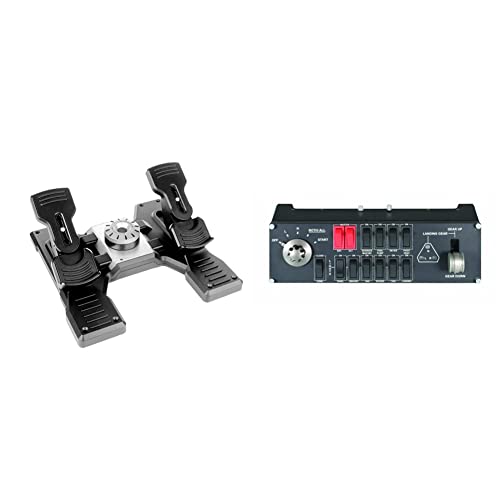
This pair tackles the two control surfaces most home cockpit builds skip: rudder pedals for yaw control, plus a switch panel for gear and engine management. The pedals self-center, and the tension dial underneath lets you tune the feel from light single-engine aircraft to heavy jet response. Differential toe brakes are built in, which is the kind of detail that transforms a short-field landing from guesswork into something repeatable.
Switching between aircraft profiles feels smoother once you have real feet-on-pedals feedback, especially during crosswind landings. Compared to the radio bundle above, this set focuses on the lower body and engine layer, so the two complement each other rather than overlap. The white finish coordinates with modern rig builds, and the modular brackets let you stack the switch panel next to your yoke or radio stack.
Positive Takeaways
- Self-centering pedals with an adjustable tension dial let you match resistance to aircraft type, from a light Cessna to a heavier airliner
- Differential toe brakes add realistic deceleration control, which makes short-field and runway alignment noticeably more precise
- Switch panel LEDs reflect actual gear status from FSX, so the panel tells the truth even when you forget
- Modular layout works with the broader Saitek panel ecosystem for a tidy custom rig
Points To Note
- No rudder lock means if you already own pedals, the twist axis on a HOTAS stick could conflict until you remap
- Pedal base runs long, so measure your floor space before ordering, especially under a standing desk
Made For
Pilots focused on coordinated turns, crosswind landings, and differential braking who want to add a missing layer to an existing yoke setup.
Consider Something Else When
The Saitek Pro X-56 Rhino HOTAS makes more sense for combat or space sim pilots who want stick, throttle, and rudder twist in one rig rather than separate floor pedals.
Where most cockpit hardware comes in separate boxes, the OCTAVI IFR-1 crams COM, NAV, FMS, autopilot, and transponder controls into a single desktop-sized unit. Built in Germany, the unit uses high-precision hardware aimed at IFR (Instrument Flight Rules, meaning flying primarily by reference to cockpit instruments rather than outside visuals) students and serious sim enthusiasts who don’t have room for a multi-panel rig. LED-backlit buttons and encoders help during night flights, and the tactile feel leans closer to professional avionics than toy-grade plastic.
You trade modular expansion for a clean, small footprint, which suits a bedroom desk or a one-cable setup. Compared to the Logitech panels above, the IFR-1 trades brand familiarity for more functions per square inch. It’s a different philosophy: less piecing together, more plug-and-fly.
What Works In Its Favor
- Combines COM, NAV, FMS, autopilot, and XPDR controls in one compact unit, eliminating the need for several separate panels
- LED-backlit buttons stay readable in dim rooms, which matters during long evening IFR sessions
- High-precision encoders and switches give a tactile feel closer to real avionics than entry-level gear
- Small footprint fits on most desks, including standing desks where space is at a premium
Honest Caveats
- Sim compatibility is narrower than mainstream Logitech panels, so check support for your specific flight sim before ordering
- Single-unit design means you can’t rearrange individual sections the way you can with modular panels
Right Fit For
IFR students and small-desk sim pilots who want most cockpit functions consolidated into one device without buying a full modular rig.
Look Elsewhere When
The Logitech G Pro Flight Yoke System makes more sense if you don’t yet own a yoke, since the IFR-1 complements rather than replaces primary flight controls.
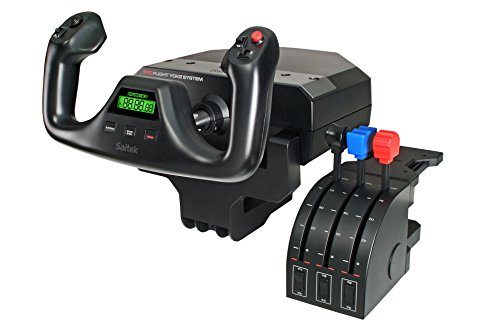
The renewed Pro Flight Yoke brings the same Saitek hardware into a lower price bracket, which matters for first-timers who want a real yoke before committing to a full rig. The stainless steel shaft and smooth bearing assembly carry over from the new version, so the pitch and roll feel matches what experienced sim pilots already trust. You get the full yoke plus throttle quadrant, just without the sealed retail packaging.
For desk-bound beginners, this entry route sidesteps the usual “is flight sim really for me” hesitation. Renewed units typically show minor cosmetic wear but function as new, which is the realistic trade-off in this category. The savings often fund a second accessory like rudder pedals or a switch panel, which closes the cockpit gap faster than buying everything new at once.
What Earns Its Place
- Stainless steel shaft and precision bearings deliver smooth pitch and roll, the same core hardware as the new unit
- Includes a dedicated throttle quadrant so you get primary controls in one purchase
- Lower entry cost leaves budget for additional panels or pedals to build a fuller setup
Some Limits To Know
- Renewed units may show minor cosmetic wear, and packaging is generic rather than retail
- Same internal hardware as the new version, so any long-term reliability questions apply equally here
Best Suited To
First-time sim pilots who want a proven yoke and throttle at a lower cost before expanding into a fuller modular setup.
Reach For A Different Pick When
The Logitech G Pro Flight Yoke System (new) makes more sense if retail packaging and full warranty coverage matter more to you than saving on the entry price.
This standalone throttle quadrant exists to expand a yoke that came with a basic single-lever throttle. You get three axis levers, three two-way rocker switches, and a configurable layout that suits twin-engine props, jets, and helicopters. The build uses the same modular frame as the rest of the Saitek Pro Flight range, so it locks into your existing rig with the included brackets.
Pilots who fly complex aircraft with separate throttle, prop, and mix controls find this quadrant essential once they move past Cessna-style flying. The quadrants are also useful for helicopter sim pilots managing collective, throttle, and pitch independently. Compared to the full yoke system below, this is purely the throttle half, which is a feature when you already own the matching yoke.
Practical Advantages
- Three-axis lever layout covers throttle, prop, and mix for complex multi-engine aircraft
- Two-way rocker switches add extra programmable inputs for trim, flaps, or other cockpit functions
- Modular frame matches the rest of the Pro Flight line, so it integrates with existing Saitek hardware
Trade Offs
- Only useful as an add-on, since it doesn’t include a yoke or pitch controls
- Configuration software is the same older Logitech panel tool, which can feel dated next to newer sim plugins
Who Will Love This
Yoke owners flying multi-engine aircraft or helicopters who need independent throttle, prop, and mix levers rather than a single combined throttle.
Swap It Out When
The Logitech G Pro Flight Yoke System makes more sense if you don’t yet own a yoke, since this quadrant is designed to expand one rather than start a new rig.
The full Pro Flight Yoke System remains one of the most complete yoke-plus-throttle packages in this price tier. The stainless steel shaft with smooth bearings gives pitch and roll a precise, weighted feel, and the 14-button layout, POV (point-of-view) hat, and three-position mode switch give you 75 programmable controls across the whole unit. A separate three-axis lever throttle ships in the box, so you get more than just pitch and roll from the start.
An integrated USB 2.0 hub on the back reduces cable clutter, which matters when you’re adding more panels over time. The included LCD display shows mode info, which helps you keep track of which layer of buttons is active. Compared to the renewed unit above, this is the retail version with full packaging, and it remains the reference point most other yokes are measured against.
Real-World Strengths
- Stainless steel yoke shaft provides smooth, accurate pitch and roll, which makes long flights less fatiguing
- 75 programmable controls across the yoke and throttle give plenty of room for complex aircraft bindings
- Built-in LCD screen and USB hub simplify adding more peripherals without rearranging cables
Less-Strong Areas
- Clamp design suits desks up to a certain thickness, so very thick gaming desks may not secure the yoke firmly
- Plastic throttle quadrant is functional but not as premium as the yoke itself
Key Specs
Whose Shelf It Belongs On
General aviation sim fans and aspiring airliner pilots who want a full yoke and throttle setup with room to grow into modular panels.
Not Your Match When
The Saitek Pro X-56 Rhino HOTAS suits combat and space sim pilots better, since HOTAS ergonomics favor stick-and-throttle over yoke-and-throttle for those genres.
Functionally identical to the Pro Flight Yoke System covered above, this listing offers the same stainless-steel-shaft yoke and matching throttle quadrant in a black finish. The 1.8-meter USB cable for the yoke and 1.5-meter cable for the throttle give you reasonable placement flexibility, and the included desk clamps secure both modules to standard surfaces.
The core appeal is the same: realistic muscle memory for general aviation and airliner flying, plus enough programmable inputs to handle complex aircraft. Where this version differs is mainly cosmetic, which matters if your rig has a specific color scheme. For most pilots, the choice between this and the sibling listing above comes down to availability rather than performance differences.
Benefits That Matter
- Stainless steel shaft delivers the same smooth control as the sibling Pro Flight Yoke System
- POV hat, 14 buttons, and three-position mode switch give layered control for different aircraft
- Black finish coordinates with most gaming setups and dark cockpit builds
Small Caveats
- Functionally the same as the other Pro Flight Yoke listing, so the choice often comes down to stock and color preference
- Throttle quadrant plastic is light, so plan to clamp it securely during spirited flying
Perfect Match For
General aviation and airliner sim pilots who prefer a black-themed rig and want a proven yoke and throttle combo without surprises.
A Better Fit Elsewhere
The Logitech G Pro Flight Yoke System listed above is essentially the same product in a different finish, so check both listings before deciding which version to grab.
The Pro Flight Switch Panel is one of the most popular add-ons in the Saitek lineup because it fills a specific gap. The realistic landing gear lever and engine start switches mirror what you see in airliner cockpits, and the LEDs reflect actual gear status from FSX, so you always know whether your gear is down before landing. The panel also exposes additional programmable switches for lights, pitot heat, and other cockpit functions.
For HOTAS owners flying combat or transport sims, this panel pairs especially well with the X-56 Rhino covered below. Mounting brackets let you stack it with other Saitek panels or place it beside your stick. You may find the gear lever alone justifies the cost, since fiddling with keyboard shortcuts during the flare is the kind of detail that breaks immersion fast.
A Few Highlights
- Realistic landing gear lever and engine start switches mirror airliner cockpit layouts
- LEDs reflect actual gear status from FSX, removing the guesswork during final approach
- Fully customizable buttons let you assign lights, pitot heat, and other functions to your preferences
- Modular design stacks with other Saitek panels, or sits beside a HOTAS stick
Where It May Fall Short
- Works best as part of a larger panel setup, so it feels limited if used alone
- Requires Logitech/Saitek configuration software, which can be unintuitive on first install
Built With In Mind
HOTAS pilots flying airliners or military transports who want realistic gear, engine, and light controls within easy reach of their stick.
Where A Sibling Pick Shines
The Logitech G Pro Flight Radio and Switch Panel Bundle makes more sense if you also need a radio module, since it pairs both at once.
The X-56 Rhino sits at the top of Saitek’s HOTAS range, designed for sim pilots who fly modern jets, helicopters, and space craft. The stick uses magnetic, non-contact sensors on both X and Y axes, which improves long-term durability and keeps the stick centered without mechanical wear. A 3D twist rudder axis with a rudder lock means you can yaw on the stick or defer to separate pedals, depending on your setup.
The throttle unit is unusually versatile, with twin throttles and a mini analog stick for fine adjustments, plus an LCD that shows mode info and a built-in flight timer. In our view, the X-56 fits best in combat-heavy sims where thumb hats, triggers, and rapid mode switching matter more than realistic yoke feel. Compared to the yokes above, the ergonomic difference is significant: this is stick-and-throttle flying, not airliner flying.
Useful Strengths
- Magnetic non-contact sensors on the stick axes reduce wear and keep the control centered over time
- Twin throttles with a 3D twist rudder and rudder lock give flexibility for jets, helicopters, and twin-engine aircraft
- Multifunction LCD displays programmed commands and includes a built-in flight timer
Trade-Offs To Consider
- Stick-and-throttle ergonomics don’t suit general aviation sims designed around yokes, so genre match matters
- Software customization is extensive but the learning curve is steeper than for a single-mode controller
Who Should Grab It
Combat, space, and helicopter sim pilots who want a full HOTAS rig with twin throttles, twist rudder, and long-lasting magnetic sensors.
Another Choice May Suit
The Logitech G Pro Flight Yoke System suits general aviation and airliner flying better, since yokes match the muscle memory those aircraft are designed around.
What To Weigh Before Buying An Airplane Controller For PC
The first thing to settle is the type of aircraft you fly most. Yokes like the Logitech G Pro Flight Yoke System make sense for general aviation and airliners, while HOTAS setups like the X-56 Rhino work better for combat and space sims. Mixing the two in a multi-panel rig is also valid, but it requires desk space and patience with mounting hardware.
Build quality matters more than the spec sheet suggests. Stainless steel shafts and smooth bearings last longer under daily use than all-plastic assemblies. The number of programmable controls should match the complexity of your favorite aircraft: a 172 trainer doesn’t need 75 buttons, but an airliner profile does.
Compatibility with your sim software is the other big one. Most Logitech and Saitek panels support FSX, Prepar3D, and X-Plane, though the OCTAVI IFR-1 has a narrower compatibility list. Check that your current sim and any planned upgrades work with the controller before you commit.
Key Considerations Across These Picks
Mistakes Worth Dodging
Buying a full HOTAS when you mostly fly GA airliners is one of the most common slip-ups. The stick ergonomics feel wrong in a 172 or a 737, and you’ll end up remapping half the controls. Another trap is skipping rudder pedals. You can technically fly with twist rudder or keyboard, but coordinated turns and crosswind landings improve dramatically once your feet have a job.
What Separates Premium From Basic
The jump from entry-level to mid-range hardware usually buys you smoother bearings, sturdier clamps, and more programmable inputs. Higher-tier picks like the X-56 Rhino add magnetic sensors and twin throttles, which extend the lifespan of the unit and unlock more complex aircraft profiles. The upgrade tends to pay off for pilots logging multiple sessions per week rather than occasional weekend flyers.
Frequently Asked Questions
What Is A HOTAS Controller?
A HOTAS (Hands On Throttle And Stick) setup combines a joystick and throttle in one configuration so your hands never need to leave the controls. HOTAS works best for combat and space sims, while yokes suit general aviation.
Do I Need Rudder Pedals For Flight Sim?
You can fly without them using keyboard or twist rudder, but pedals add realistic yaw control and differential braking. Most sim pilots find that pedals noticeably improve crosswind landings and short-field work.
Will These Work With Microsoft Flight Simulator 2020?
Most Logitech and Saitek yokes and panels work with MSFS 2020, sometimes requiring community plugins. The OCTAVI IFR-1 has a narrower compatibility list, so verify your specific sim version before buying.
How Much Desk Space Do I Need?
A full multi-panel rig with yoke, throttle, rudder pedals, and two or three panels needs around five feet of desk width plus floor space for pedals. Modular panels help you scale up gradually.
Can I Mix Yoke And HOTAS Hardware?
Yes, many sim pilots use a yoke for airliner flying and a HOTAS stick for combat, switching between rigs as needed. The main challenge is desk space and USB ports, not technical compatibility.
The Takeaway
The best airplane controller for PC depends on what you fly and how often you fly it. Yoke pilots get the most out of the Logitech G Pro Flight Yoke System, while combat sim fans should look hard at the X-56 Rhino. Modular panels fill in the cockpit over time, and pedals add the realism that ties everything together.



