


Flying a desk at home only feels real when your hands stop hunting for a keyboard. A proper yoke, throttle, or switch panel changes flight sim from a game into a cockpit, and the gap between cheap and well-built is wider than most newcomers expect. If you are kitting out a first rig or replacing a worn throttle quadrant, this lineup covers the modules, yokes, and pedals that show up again and again in serious home cockpits. You will find flagship setups alongside compact panels for tighter desks, with honest notes on what each one is genuinely good at.
A Side-By-Side Look

Logitech G Pro Flight Multi and Switch Panel Bundle

Flight Simulator Controls Panel 1:1 with Sync Digital Screen

Honeycomb Aeronautical Alpha Yoke and Switch Panel (Renewed)

Saitek Pro Flight Rudder Pedals
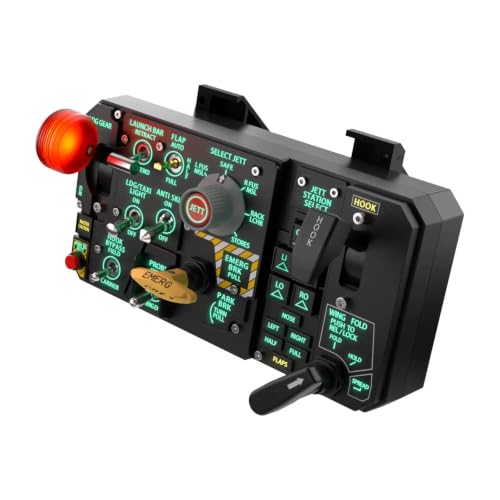
Flight Simulator 3D Stereoscopic Carrier Control Panel Kit

Desktop Simulator Cockpit Panel USB Plug and Play

Realistic Desktop Cockpit Instrument Controller with LED

CH Products Throttle Quadrant USB (300-133)

Logitech G USB Pro Flight Multi Panel
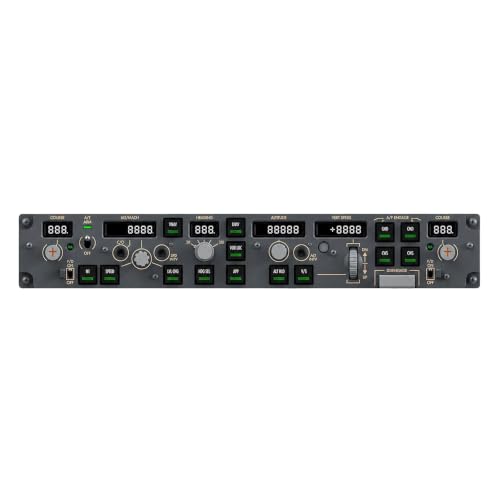
Full Size MCP Flight Controller Panel for PC Sim
More Details On Our Top Picks
The two-panel pairing is the easiest way to expand a Logitech rig without buying a new yoke. The Multi Panel acts as a full autopilot readout with a real LED screen, while the Switch Panel handles gear, lights, engine, and other aircraft systems, and on top of that the indicators mirror what your simulator reports in real time.
Both modules clip onto the Pro Flight Yoke System, and the interchangeable mounting design lets you rearrange panels as your rig grows. Setup is USB on Windows, and the controls map cleanly into Microsoft Flight Simulator X and Prepar3D, with broad support across newer sims as well. For someone running a long IFR flight, pulling altitude and heading off a real display instead of a virtual menu is genuinely relaxing.
Where It Delivers
- Autopilot LED display replaces menu diving during cruise.
- Switch Panel status lights confirm gear position without alt-tabbing.
- Clips onto existing Logitech hardware, no extra clamps needed.
- Modular layout scales as you add radio or trim panels later.
Points To Keep In Mind
- Most useful inside a Logitech ecosystem, less flexible if you run a different yoke brand.
- USB cables are on the shorter side, so plan your desk depth before mounting.
Who It Suits Best
Logitech rig owners flying IFR in FSX, Prepar3D, or Microsoft Flight Simulator who want autopilot and gear readouts off the screen.
Where Another Pick Suits Better
Combat sim pilots in DCS should look at the 1:1 Sync Digital Screen panel further down, which has a dynamic display rather than static LEDs.
Where the Logitech bundle relies on printed legends and LED segments, this panel puts a real IPS screen in front of you. The anti-glare display syncs with the sim, so route data, waypoints, and aircraft status refresh live, and adjustable brightness keeps it readable across long sessions.
Mechanical switches back up the on-screen readouts, which gives it that proper jet cockpit feel. Compared to the Logitech Multi Panel earlier in the list, this one trades fixed LEDs for a dynamic screen, meaning it adapts to the aircraft you are flying instead of locking you into one layout. For DCS users, the carrier-friendly UFC layout is the headline feature.
Everyday Advantages
- High-refresh IPS screen mirrors in-game data without visible lag.
- Mechanical switches give clearer tactile feedback than membrane pads.
- Layout adapts to the active aircraft rather than staying fixed.
- Plug-and-play USB keeps setup simple on a Windows PC.
Trade Offs
- Heavier than a plastic panel, so a stable mount or bracket is essentially required.
- Carrier-specific UFC focus means GA pilots may only use a fraction of the controls.
Made For
DCS combat pilots running carrier ops who want the actual UFC layout under their fingers.
Look Elsewhere When
Casual GA flyers will get more value from the Logitech G Pro Flight Multi Panel, which covers the basics without the steeper footprint.
The Honeycomb Alpha is widely treated as the standard general-aviation yoke, and the renewed bundle drops the price for pilots who want that feel without paying full retail. The yoke itself is a solid-shaft unit with realistic resistance, paired with a switch panel that handles trim, flaps, and other GA essentials.
This is the pick that earns its reputation in X-Plane and Microsoft Flight Simulator, where the smooth pitch and roll translates well from real Cessna and Piper handling. Going renewed also means professional inspection before shipping, which can ease worries about used electronics, and the unit still functions as a full flight controller setup rather than a single module.
What Works In Its Favor
- Realistic GA yoke feel that holds up across long cross-country flights.
- Switch panel covers trim, flaps, and other essentials in one place.
- Renewed pricing makes the bundle more accessible for new sim pilots.
- Plays well with X-Plane, MSFS, and Prepar3D profiles out of the box.
Soft Spots
- Renewed condition means cosmetic wear, and packaging may be generic.
- Accessories are compatible but not always original, so check included cables.
Feature Snapshot
Right Fit For
General-aviation pilots in X-Plane or MSFS who want a premium yoke feel at a reduced entry cost.
Swap It Out When
Combat sim pilots flying DCS should consider the 1:1 Sync Digital Screen panel for a layout that actually matches their aircraft.
No yoke setup is really complete without pedals, and the Saitek Pro Flight set has been the default floor unit for years. Self-centering rudder pedals give you the natural feel of feet returning to center after a slip, and the integrated toe brakes add differential braking for taxi and rollout.
Where a keyboard can fake rudder inputs, real pedals make coordinated turns click in muscle memory, especially in taildraggers and twins. The build is heavy enough to stay put under foot, and the adjustment range fits a wide range of seating positions. Compared to the Honeycomb Alpha earlier, this fills in the missing lower-body input that even a great yoke cannot replace.
Notable Gains
- Self-centering action feels close to a real rudder returning to neutral.
- Toe brakes add realistic differential braking during taxi and landing rollout.
- Adjustable geometry fits different shoe sizes and seating positions.
- Heavy base keeps pedals planted during aggressive rudder inputs.
A Few Limitations
- No heel support, so longer sessions can feel less locked-in than premium alternatives.
- Plastic construction is durable but does not feel as solid as all-metal pedals.
Best Suited To
Yoke owners flying GA, twins, or taildraggers in MSFS and X-Plane who need real rudder authority.
Reach For A Different Pick When
Sim pilots focused on airliner procedures may want the Full Size MCP Flight Controller Panel for upper-deck realism instead of pedal work.
Carrier aviation is its own skill, and the controls are too. This panel focuses on the levers and switches you actually touch during a deck landing, including pull-style gear and tail hook handles that match what a carrier pilot pulls in real life. Synced warning and indicator lights bring that “three in the green” experience to the desktop.
It is a niche pick, and that is the point. Where the Logitech Multi Panel earlier is a generalist module, this one is purpose-built for naval aviation, and the trade-off is that you will not get much use out of it flying airliners. Set it up alongside a HOTAS or stick, and carrier ops start to feel like the real challenge they are.
Useful Touches
- Pull-style gear and tail hook handles match real carrier procedures.
- Synced warning lights mirror in-game status during trap and launch sequences.
- Jettison controls add a layer of immersion rarely seen in entry-level panels.
- Mounts on a standard desktop with no special bracket required.
Less Ideal Details
- Most controls only matter for carrier ops, so GA pilots will leave it idle.
- Indicator mapping depends heavily on the specific DCS module being flown.
Whose Shelf It Belongs On
Carrier-obsessed DCS pilots who want tail hook, gear, and jettison handles under their hands.
Consider Something Else When
General aviation simmers will get more use from the Honeycomb Alpha yoke, which fits everyday flying.
Not everyone has a flight sim rig room, and this panel accepts that reality. At roughly 5.75 by 2.17 by 2.24 inches, it slips into a small desk corner without crowding your mouse hand, and the modular bracket layout means you can stack more panels as your cockpit grows.
It is a USB plug-and-play unit aimed at Windows PC simulators, with universal mounting compatibility for hobby frames. The trade-off is that the controls are basic, so think of this as an entry point rather than a flagship module. Pilots deep into IFR will probably want the Logitech Multi Panel instead, but beginners gain a lot from a panel that fits anywhere.
What Helps Most
- Compact footprint suits small desks and shared workspaces.
- Universal mounting brackets let you build a panel cluster over time.
- Plug-and-play USB keeps the first install painless for new sim pilots.
- Affordable way to add real controls to a mouse-and-keyboard setup.
Possible Compromises
- Limited control count, so advanced IFR work may outgrow it quickly.
- Plastic shell is light enough to slide if not firmly clamped down.
Perfect Match For
Beginners with limited desk space who want a starter panel before committing to a larger rig.
Not Your Match When
Long-haul sim pilots should consider the Logitech G Pro Flight Multi Panel for richer autopilot controls.
For first-time sim pilots, the appeal of a panel is the look as much as the function, and this one leans into the visual side. The full mold design reproduces real aircraft colors and replicated symbols, while an LCD with independent backlight adjustment gives the screen and panel their own brightness levels.
The tradeoff is that what looks like a full cockpit panel is actually a focused module, so power users will find the control count limited. The backlit LED treatment and physical buttons do a good job of building immersion for someone still learning IFR flows. You may find it works best as a starter panel you later replace with something deeper.
Standout Benefits
- Color-matched display with replicated symbols boosts visual immersion.
- Independent backlight control lets you tune screen and panel separately.
- Physical buttons make for tactile practice, not just mouse clicking.
- Approachable price for someone exploring sim hardware for the first time.
Where It Is Less Suited
- Control count is limited compared to multi-module setups like the Logitech bundle.
- Best used for practice and training rather than complex airliner flows.
Who Should Grab It
New sim pilots who want a tactile, good-looking panel for practicing basic flows at home.
A Better Fit Elsewhere
Pilots running full airliner procedures should look at the Full Size MCP Flight Controller Panel further down for airliner-grade controls.
CH Products has been building flight controls since the joystick era, and the Throttle Quadrant shows that experience. Six axes cover X, Y, Z, R, U, and V for multi-engine setups, with 24 programmable buttons and six physical detents that click into the positions your engine profiles demand.
The large base clamps onto desks from 0.75 to 2.25 inches thick, so it stays planted even during aggressive throttle work. The 7-foot USB cable is generous for most desk layouts, and the driverless install means no hunting for outdated software. This is the choice for someone running complex twins or radial aircraft where the throttle mapping is half the simulation.
Useful Highlights
- Six independent axes handle multi-engine and mixture setups.
- 24 programmable buttons and six detents cover most aircraft profiles.
- Sturdy clamp mount holds firm on a wide range of desk thicknesses.
- Driverless USB install works with both PC and Mac simulators.
Honest Caveats
- Industrial look and feel may not match sleeker cockpit aesthetics.
- 176 programmable functions require time spent mapping controls in your sim.
Built With In Mind
Sim pilots flying complex twins, radials, or warbirds who need real throttle authority and detents.
Skip It When
Single-engine GA pilots will get more value from the Honeycomb Alpha yoke, which covers pitch, roll, and trim in one unit.
This is the standalone version of the Multi Panel from the bundle at the top of the list, useful when you already own other Logitech modules or just want the autopilot unit. The LED readout pulls double duty as a real display, so you can adjust altitude, heading, and vertical speed through a tactile dial rather than clicking through on-screen menus.
For pilots running FSX and Prepar3D, the integration is mature and predictable, and it slots neatly into a wider Logitech ecosystem. The trade-off is the single-panel focus, so if you also need gear and light controls, the bundle at item one is a more complete starting point. Treated as a focused autopilot module, it earns its place.
The Helpful Details
- Dedicated autopilot dial keeps altitude and heading changes off the keyboard.
- LED screen replaces menu diving during cruise phases.
- Mature FSX and Prepar3D support makes mapping painless.
- Modular hardware expands cleanly with other Logitech panels.
Where It May Fall Short
- Single-panel focus means no gear or light controls out of the box.
- Most useful when paired with other Logitech hardware.
The Right Fit
Sim pilots already invested in Logitech hardware who need a focused autopilot module on its own.
Another Choice May Suit
Combat sim pilots should look at the 1:1 Sync Digital Screen panel, which uses a real display rather than fixed LEDs.
Airliner sim hobbyists know that the Mode Control Panel is the heart of autopilot work, and this one treats the panel seriously. Backlit aircraft-grade push buttons and high-precision metal rotary encoders handle altitude, speed, heading, and course, with the kind of tactile feedback you expect from a real MCP.
The plug-and-play USB design targets Windows PC sim platforms, so setup stays simple. The full-size footprint gives you room to land each control without fumbling, and that matters during a busy descent. Compared to the Logitech Multi Panel earlier, this trades a smaller screen for the layout airliner pilots actually use, and the metal encoders feel more substantial than plastic dials.
Noteworthy Benefits
- Aircraft-grade backlit buttons give a real airliner MCP feel.
- Metal rotary encoders for altitude, speed, and heading adjust smoothly.
- Full-size layout reduces fumbling during busy phases of flight.
- Plug-and-play USB keeps installation simple on a Windows PC.
Small Caveats
- Larger footprint than compact panels, so desk space matters.
- Best use case is airliner and business jet procedures, less so for GA.
Feature Snapshot
Who Will Love This
Airliner sim hobbyists running Zibo, FBW, or other popular airliner modules in X-Plane and MSFS.
Not Your Match When
GA pilots should consider the Honeycomb Alpha yoke, which better suits single-engine flying.
What To Weigh Before Choosing Aircraft Simulator Yokes
Start With The Airplane You Actually Fly
A yoke works beautifully for Cessnas and Pipers but feels wrong in an F-16. Pick hardware that matches your most-flown aircraft first, then add modules for secondary use. Pilots running MSFS, X-Plane, and Prepar3D should also confirm profiles exist for their sim, since mapping support varies more than the marketing suggests.
Realism Versus Footprint
Full yokes like the Honeycomb Alpha feel like flying, but they demand desk depth and clamp space. Compact panels like the Desktop Simulator unit cover the basics and stack into a custom rig later, which makes them a smarter first buy for tight spaces. A throttle quadrant like the CH Products 300-133 earns its desk space for multi-engine work, while the Logitech Multi Panel sits flat and works in smaller setups.
Build Quality And Long-Term Feel
Plastic enclosures are lighter and cheaper, but metal encoders, solid-shaft yokes, and aircraft-grade buttons tend to outlast membrane pads. If you fly daily, the upgrade to metal components pays off in tactile consistency over years rather than months. Renewed units like the Honeycomb bundle lower the cost of stepping into that premium build.
Compatibility And Software
Always confirm Windows version support and any required drivers before buying. Driverless USB installs (like the Logitech and CH Products units) save headaches, while some third-party panels need extra software for full functionality. For a multi-panel rig, sticking to one ecosystem reduces mapping friction.
Key Considerations Across These Picks
Where Shoppers Go Wrong
A common slip is buying a full-size yoke before confirming your sim actually supports the hardware, leaving you with a heavy desk ornament and a half-mapped control set. Another trap is chasing a screen-heavy panel when a tactile switch panel would actually improve your workflow. Measure your desk first, confirm sim support, and resist the urge to over-buy at the start.
What The Higher Tier Buys
Stepping up to panels like the Full Size MCP unit or the 1:1 Sync Digital Screen adds real metal encoders, dynamic displays, and aircraft-grade buttons that simply do not exist on entry-level modules. The extra cost buys durability, deeper aircraft-specific layouts, and a level of tactile feedback that makes long sessions less tiring. For hobbyists logging serious hours, the upgrade typically pays for itself in comfort and immersion.



