


The PlayStation Portal is a great handheld, but it leaves you wanting more the moment you travel with it, dock it, or hand it to a kid. Cases help. Charging stands help. Cooling stations help. The trick is knowing which combo actually fits how you play, and what to skip. This list rounds up nine accessories that solve specific problems, from slim shell protection to multi-device charging hubs, so you can build out a setup that matches your habits instead of fighting them.
The Shortlist At A Glance

FYOUNG 3 in 1 Accessories Case Bundle for PlayStation Portal

Raven’s Savage Case for PlayStation Portal by Skull & Co.

Foluck 4 in 1 Carrying Case for PlayStation Portal Remote Player

FASTSNAIL Charging Stand for PS Portal Remote, Friendly for Hard/Soft Cover

FASTSNAIL Charging Stand for PS Portal Remote Player, RGB Charging Station

FYOUNG Charger Station for PlayStation Portal, Case Friendly, Magnetic Type C

STARTRC GAMES Carrying Case for PlayStation Portal Remote Player, Hard Shell with DIY Foam
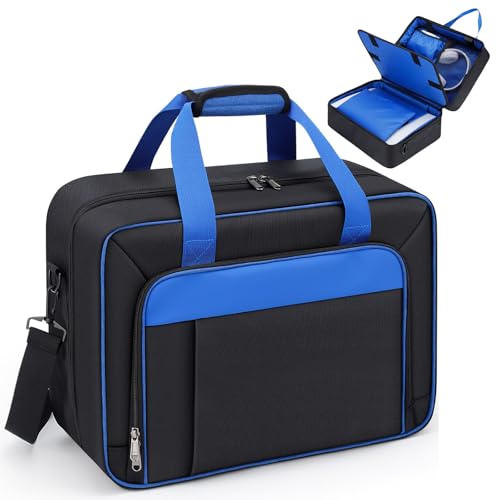
GDNasist Carrying Case Compatible with PS5/PS5 Pro/PS5 Slim
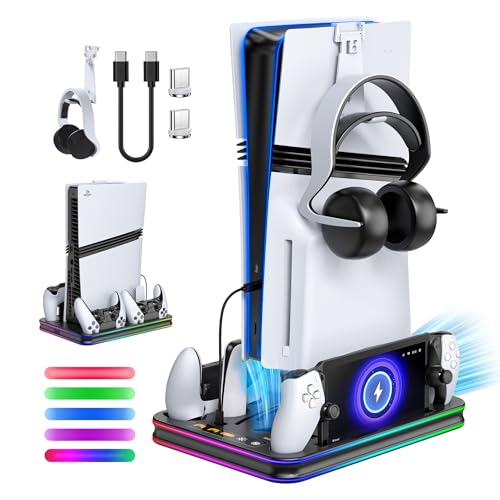
FYOUNG All in One Cooling Stand & Charger Station for PS5/Slim/Pro and Portal
A Breakdown Of The Leading Choices
Throwing a Portal into a backpack next to a water bottle and a tangle of cables is asking for trouble, and the FYOUNG 3 in 1 bundle aims to fix that exact scenario. The package pairs an EVA hard travel case with a crystal-clear PC shell and a 9H hardness glass screen protector, covering the three most common damage points in one shot.
It works well as a starter kit because nothing requires a second purchase. The clear shell keeps the original hardware visible while the tempered glass (a thin, scratch-resistant pane rated at 9H on the pencil hardness scale) handles the touchscreen. Owners who commute on public transit or toss the device in a carry-on will appreciate not having to research each piece separately.
The Helpful Details
- Three-piece kit covers shell, screen, and travel storage in a single purchase
- 9H tempered glass keeps the touchscreen responsive at high transparency
- Clear PC shell preserves the original look of the Portal
- EVA hard case absorbs bumps during daily commutes or flights
Things To Consider
- The hard-shell design adds noticeable bulk compared to slimmer sleeves
- Screen protector alignment can require a careful first install
Key Specs
Right Fit For
First-time Portal owners who want one purchase that covers transport and daily protection without research paralysis.
Consider Something Else When
You need a truly rugged shell for rough outdoor use, in which case the Raven’s Savage Case by Skull & Co. is a stronger fit for heavy-duty travel.
Skull & Co. built the Raven’s Savage Case for the kind of user who treats the Portal like a primary travel device rather than a casual couch accessory. The water-resistant hard shell wraps all sides of the unit, and the soft interior lining keeps the screen and thumbsticks free of scuff marks during transport.
What separates it from the FYOUNG bundle is the integrated mesh pocket for cables, thumb grips, and small extras. It also plays nicely with thumb grips, so gamers who already use stick accessories don’t have to remove them before docking the case. The trade-off is that it focuses on shell and storage rather than adding a screen protector, so you may still want one separately.
What Pays Off
- 360-degree hard-shell coverage guards all edges and corners
- Water-resistant exterior handles rain, spills, and damp bag interiors
- Mesh pocket organizes cables, thumb grips, and earbuds in one place
- Soft interior lining prevents scratches on the screen and analog sticks
Worth Noting
- No screen protector included, so a separate purchase is likely
- Slightly heavier than minimalist sleeves due to the reinforced shell
Who Will Love This
Daily commuters and frequent flyers who want one rugged case that handles the Portal, accessories, and the occasional weather surprise.
Look Elsewhere When
You want a screen protector in the same bundle, in which case the FYOUNG 3 in 1 bundle is a more complete starter option.
The Foluck 4 in 1 leans into the idea that buying accessories should feel like a complete setup, not a starter checklist. It includes a waterproof hard case, a soft silicone cover, two screen protectors, and four thumbstick caps, covering protection, grip, and stick feel in a single box.
The waterproof shell is the headline feature for anyone who has ever worried about a sudden downpour or a leaking water bottle. The silicone cover adds grip for longer sessions, while the thumbstick caps help players who want a slightly taller, more textured stick surface. Compared to the Skull & Co. Raven, this kit sacrifices a mesh storage pocket for added screen coverage and stick accessories.
Standout Benefits
- Four-piece bundle covers case, shell, screen protection, and stick feel
- Waterproof hard case guards against rain and liquid spills
- Silicone cover improves grip during extended play sessions
- Two screen protectors give you a backup after the first install
Trade Offs
- No internal mesh pocket for storing cables or small extras
- More parts to keep track of compared to a single-case solution
Perfect Match For
New Portal owners who want the most complete protection bundle available without buying each piece separately.
Not Your Match When
You only need a rugged case and prefer built-in cable storage, in which case the Raven’s Savage Case by Skull & Co. suits that need more directly.
Docks that require you to pry a case off every time you charge quickly lose their appeal, and the FASTSNAIL Charging Stand for PS Portal Remote is designed around avoiding that friction. It works with most mainstream TPU (a soft, flexible plastic), EVA, and silicone shells, so you can drop the Portal into the cradle and let it top up between sessions.
The stand doubles as an upright display, which suits nightstand and shelf use. A built-in indicator shifts from red to blue once the device is full, so you can tell charging status at a glance. One thing worth knowing: very thick or unusually shaped covers can block the connection, so removing the case during charging is the safer move in those edge cases.
Strengths Worth Knowing
- Works with most hard and soft Portal covers without removal
- Upright cradle angle suits bedside and shelf display
- Color-changing LED (red to blue) makes charging status easy to read
- Compact footprint fits on small desks and nightstands
Room For Improvement
- Not compatible with very thick or unusually shaped covers
- No additional ports for charging a controller alongside the Portal
Who Should Grab It
Anyone who keeps a protective case on the Portal full-time and wants a no-fuss bedside dock.
A Better Fit Elsewhere
You want a multi-device hub that charges a DualSense controller and the Portal at the same time, in which case the FYOUNG All in One Cooling Stand makes more sense.
Where the non-RGB FASTSNAIL stays understated, this RGB version leans into the battlestation crowd with 14 lighting modes, including nine solid colors and five color-flow patterns. A memory function stores your last setting, so the dock powers up exactly how you left it without extra button presses.
It still works as a charging stand with a comfortable viewing angle, and the indicator light shifts from red while charging to blue when full. The catch is the same as its sibling: thick or oddly shaped covers can interfere, so the case needs to come off during charging in some setups. For most users with standard shells, that extra step is a non-issue.
A Few Highlights
- 14 RGB modes with a memory function that remembers your last setting
- Doubles as an upright display stand for tabletop play
- Color-coded charging indicator (red/blue) keeps status clear at a glance
- Short press to switch modes, long press to turn lights off
Points To Keep In Mind
- Requires removing thick or specialty covers before charging
- RGB adds a stylistic element that may not suit minimalist setups
Built With In Mind
Gamers building a coordinated desk aesthetic who want their dock to match the rest of their RGB gear.
Swap It Out When
You prefer a no-lights approach and want case-friendly charging without the extra step, in which case the standard FASTSNAIL Charging Stand for PS Portal Remote is the better pick.
Most charging docks still depend on plugging in a USB-C cable by hand, but the FYOUNG Charger Station uses a magnetic Type C port (a small magnetic adapter that snaps onto the device’s charging port) to skip that step entirely. The Portal drops into the cradle and connects on its own, which is genuinely useful when you’re half-asleep or already mid-game.
It also stays case-friendly with most standard covers, so you don’t have to choose between protection and convenience. The included USB Type C cable handles the power side, and a soft color light indicates charging status. Where it differs from the FASTSNAIL RGB dock is the magnetic approach, which trades the light show for one-handed docking.
Strong Points
- Magnetic Type C port enables one-handed drop-in docking
- Works with most protective cases still attached
- Includes the required USB Type C cable in the box
- Color light indicator shows charging status at a glance
A Few Limitations
- Magnetic adapter stays plugged into the Portal’s port at all times
- Not compatible with unusually thick or specialty case designs
Key Specs
Whose Shelf It Belongs On
Anyone who docks the Portal multiple times a day and values a quick, cable-free connection over RGB flair.
Reach For A Different Pick When
You want a multi-device station that also cools a PS5 console, in which case the FYOUNG All in One Cooling Stand covers a much wider setup.
The STARTRC GAMES case takes a different angle from most competitors by offering a DIY customizable foam insert. You cut or pre-shape the foam (a dense, cushioning material commonly used in protective cases) to match your exact accessories, which is a real advantage if you carry specific cables, dongles, or a second controller alongside the Portal.
The hard shell is built from PP material (a rigid, impact-resistant plastic) with a soft foam lining, and the top sponge padding includes dedicated slots that keep the thumbsticks from being pressed during transport. It is less about extras and more about a tailored fit, so users who already own screen protectors and grips can pair this case with what they have.
Useful Touches
- DIY foam insert allows a custom fit for specific accessories
- PP hard shell resists impacts and rough handling
- Thumbstick slots in the top padding prevent stick pressure in transit
- Soft foam lining reduces vibration and scratch risk
Honest Caveats
- Customizing the foam takes time and a bit of trial and error
- No bundled screen protector or thumb grips
Key Specs
Best Suited To
Travelers who carry multiple accessories and want a case that adapts to their setup instead of forcing a fixed layout.
Where A Sibling Pick Shines
You prefer a pre-arranged case with built-in extras like thumb grips and screen protectors, in which case the Foluck 4 in 1 fits that need more directly.
Strictly speaking, the GDNasist case is built for the full-size PS5 family rather than the Portal alone, but it earns its place here for households that move an entire PlayStation setup between rooms, friends’ houses, or storage. The wear-resistant, water-resistant exterior paired with thick EPE foam (a lightweight, shock-absorbing padding material) handles the weight of a console plus accessories.
The internal layout is the real draw, with separate compartments for the console, controllers, earphones, and cables. Three additional protective cushions in the main compartment keep the console centered. For Portal-focused shoppers this is overkill, but for anyone consolidating PS5 transport, it solves a specific problem that Portal-only cases cannot.
Practical Advantages
- Multi-compartment design separates console, controllers, and accessories
- Thick EPE foam padding absorbs shocks during transport
- Wear-resistant and water-resistant exterior handles rough conditions
- Compatible with PS5, PS5 Slim, and PS5 Pro
Where It May Fall Short
- Bulkier than Portal-specific cases, not ideal for daily commuter use
- Best suited to console transport, not handheld-only carry
Made For
PS5 owners who already own a Portal and want a single bag for moving a full PlayStation setup rather than a handheld-focused case.
Skip It When
You only need a case for the Portal itself, in which case the Foluck 4 in 1 or Raven’s Savage Case is a tighter, handheld-specific fit.
The FYOUNG All in One is the most ambitious pick on this list, designed to anchor an entire PlayStation setup rather than a single device. It holds a PS5, PS5 Slim, or PS5 Pro vertically with anti-slip support, charges a DualSense controller, and includes a dedicated cradle for the Portal, all wrapped in an RGB-lit stand.
The built-in cooling system helps during long sessions or enclosed TV stand setups where heat builds up. For shoppers already invested in the PlayStation ecosystem, this consolidates several accessories into one footprint, which can declutter a desk or entertainment center. The trade-off is size: this is a stationary piece, not something you pack for travel.
What Earns Its Place
- Multi-device charging covers PS5 console, DualSense controller, and Portal
- Built-in cooling system supports longer sessions in enclosed spaces
- Anti-slip vertical stand secures the console safely
- RGB lighting adds ambient flair to a gaming setup
Points To Note
- Larger footprint than a simple Portal-only dock
- Stationary design, not suited to portable or travel use
Key Specs
The Right Fit
Households with a full PS5 setup who want one station that handles console cooling, controller charging, and Portal docking.
Another Choice May Suit
You only need a simple Portal dock on a nightstand, in which case the FASTSNAIL Charging Stand for PS Portal Remote is a smaller, more focused option.
Picking The Right Portal Accessories For Your Setup
The first thing to consider is where you actually use the Portal. Couch-bound players need less from a case and more from a charging dock, while commuters benefit from a hard shell, mesh pocket, and screen protector in one bundle. Matching the accessory to the use case matters more than chasing the most features.
Build quality and materials define long-term value. EVA and PP hard shells hold up to repeated drops better than soft fabric sleeves, while tempered glass screen protectors at 9H hardness resist scratches from keys and zippers. For charging stands, magnetic Type C ports and case-friendly designs remove daily friction, which is a quiet but real quality-of-life improvement.
Compatibility deserves a close read. Some charging docks work with most cases, while others require removal for thicker shells. If you already use thumb grips or a silicone cover, check whether the dock accommodates them. The Foluck 4 in 1 is the most “complete” bundle, while the STARTRC GAMES case rewards shoppers who want a custom foam layout.
Finally, think about your broader PlayStation setup. A Portal-only shopper does not need the FYOUNG All in One station, but anyone already managing a PS5 console and DualSense controllers will appreciate consolidating everything into one powered unit. Pick based on the gear you actually own, not the gear you might buy later.
Key Considerations Across These Picks
Wrong Turns To Avoid
The most common slip-up is buying a case that does not fit your daily carry style. A rugged hard shell is great for backpacks and travel, but it feels excessive for someone who only moves the Portal from the couch to the bed. Conversely, a soft sleeve offers almost no protection if you actually commute with the device.
Another trap is assuming every charging dock works with your case. Some require removal for thicker shells, which quickly turns a convenient dock into an annoyance. Check the case-friendly claims carefully, and factor in any thumb grips or silicone covers you already use.
The Upgrade Payoff
Higher-tier accessories earn their price through convenience and longevity. A multi-device station like the FYOUNG All in One replaces several chargers, saving cable clutter and outlet space. Premium cases with mesh pockets, water resistance, and reinforced shells outlast budget options that fray or crack within months.
The upgrade is worth it when you use the Portal daily, dock it often, or carry it between locations. For occasional or strictly couch-bound use, a simpler bundle or dock delivers the same core function without the extra investment.
Frequently Asked Questions
Do PlayStation Portal cases fit with thumb grips installed?
Most Portal-specific cases and bundles, including the Foluck 4 in 1 and Raven’s Savage Case, are designed to accommodate standard thumb grips. Specialty or oversized grips may not fit, so check the case description for confirmation before pairing them.
Can I charge the Portal with a case on?
Some charging docks are case-friendly with standard shells, while others require removal. The FYOUNG Charger Station with magnetic Type C and the standard FASTSNAIL Charging Stand both work with most mainstream cases.
What screen protector hardness should I look for?
9H hardness tempered glass is the common standard for scratch resistance. It holds up well against keys, zippers, and pocket debris without affecting touchscreen sensitivity.
Are carrying cases waterproof or just water-resistant?
The Foluck 4 in 1 case is described as waterproof, while others like the Raven’s Savage Case offer water-resistant exteriors. There is a meaningful difference, so consider your exposure to rain or spills before choosing.
Do I need a cooling stand for the Portal?
Active cooling matters more for the full-size PS5 console than the Portal handheld. The FYOUNG All in One station is useful when you also want console cooling, but a dedicated cooler is rarely necessary for Portal-only setups.
Closing Remarks
The right Portal accessories come down to how and where you play. Travel-focused shoppers will lean toward the Foluck 4 in 1 or Raven’s Savage Case, while desk-based setups benefit from the FYOUNG All in One or the magnetic FYOUNG Charger Station. Pick the gear that fits your routine, and the Portal stays ready when you are.



