


Losing a Joy-Con mid-session stings. Drift, dead batteries, and cramped grips turn a relaxing gaming night into a hunt for the right replacement, and the official store rarely offers a clear path forward. This roundup sorts through third-party controllers, charging gear, shells, and racing accessories that address those pain points directly. You will find honest trade-offs for each option, with a profile of the gamer or household scenario each one fits best.
The Choices Worth Comparing
KINVOCA Charging Grip 2000mAh Comfort Grip
Orzly Steering Wheels Twin Pack for Switch 2

PomisGam Joy-Pad Controller for Switch
HORI Split Pad Compact (Apricot Red)

8BitDo Ultimate 2C Bluetooth Controller (Blue)

eXtremeRate Cherry Pink Joycon Housing (D-Pad)

KINVOCA Charging Dock for Switch Joycons

HORI Joy-Con Charge Stand with PowerA Grips
NYXI Hyperion 3 Switch 2 Controller
What Each Pick Brings To The Table
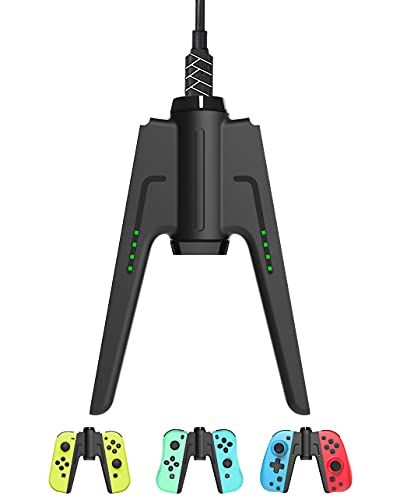
Docked-mode players know the slow creep of a red battery icon mid-boss fight, and the KINVOCA charging grip tackles that frustration head-on. The 2000mAh internal pack tops off both Joy-Cons over roughly four hours, and once the controllers read full, the auto-shutoff kicks in so the unit stops pulling current. Overcharge, over-voltage, and short-circuit protections add a layer of reassurance for anyone who habitually leaves gear plugged in overnight.
The form factor stretches the Joy-Cons into something closer to a traditional gamepad, which reduces hand fatigue during marathon sessions of Zelda or Animal Crossing. A 32-inch USB-C cable gives flexibility for the living-room TV setup. The grip is not a battery replacement but a supplemental charger, so most households will still want a standard dock for daily top-ups.
The Case For It
- Charges while you play, eliminating mid-game downtime in TV and tabletop modes
- Auto-shutoff after roughly 30 seconds of full charge protects controller battery health
- 2000mAh capacity adds meaningful hours between full dock cycles
- Comfortable gamepad silhouette eases hand strain versus bare Joy-Cons
Things To Consider
- Bulkier than a simple charging dock, so storage on a tight shelf is awkward
- You still need a separate solution for handheld-mode charging
Key Specs
Who It Suits Best
Living-room players who game in TV or tabletop mode and want to keep playing without pausing to swap batteries.
Where Another Pick Suits Better
Households juggling four or more controllers should look at the HORI Joy-Con Charge Stand further down for higher capacity.
Pulling off a clean drift in Mario Kart feels better when the controller rotates in your hand, and the Orzly twin pack offers that extra immersion for two players at once. Each wheel slides onto a Joy-Con, exposing the SL and SR shoulder buttons through dedicated cutouts so you can throw items without finger gymnastics. Black plastic construction is light enough that kids can hold the wheels for an entire cup without complaint.
Unlike the KINVOCA charging grip, this accessory does not change input feel; it simply reorients the stick into a steering-axis motion. That added rotation helps beginners predict drift angles and lets competitive players fine-tune their entry points. The bundled gift box makes it a clean present for a Switch 2 launch gift.
Benefits That Matter
- Two wheels in one box, perfect for two-player split-screen races
- Shoulder button access stays responsive through wheel cutouts
- Lightweight enough for extended play sessions across age groups
- Compatible with Mario Kart World and Mario Kart 8 Deluxe
Trade Offs
- Adds bulk to handheld play, so storing the wheels with the console takes extra pouch space
- Strictly a racing accessory, with little value outside driving titles
Best Suited To
Two-player households who host weekly Mario Kart tournaments and want a more physical racing feel for casual competitors.
Skip It When
Solo adventurers playing Zelda or Pokémon will get no benefit; the 8BitDo Ultimate 2C is a smarter fit for varied libraries.
Replacing a lost Joy-Con is rarely fun for the wallet, and the PomisGam pair covers the core feature list without the premium price tag. NFC support handles amiibo scanning, while dual vibration motors and a six-axis gyro cover the sensory basics that most Switch and Switch Lite games expect. Custom turbo mapping lets fighting-game players chain combos with a single button press.
Where the Orzly wheels handle racing, this pair fits any genre the original Joy-Con does, and the slide-rail attachment means handheld play stays fully supported. The unit pairs via Bluetooth for split multiplayer, and the first charge is a little longer than expected straight out of the box. Owners commonly report a slight learning curve when registering the controllers the first time.
Why It Works Well
- Full feature parity with first-party Joy-Cons for everyday gaming
- Programmable turbo reduces finger fatigue in long fighting or action matches
- Amiibo scanning works natively through the NFC sensor
- Works as two independent controllers for Bluetooth multiplayer parties
Points To Keep In Mind
- Build quality feels lighter than first-party controllers, so rough drop treatment may wear the shell
- Initial Bluetooth pairing can take a few attempts before the console recognises the unit
Feature Snapshot
Right Fit For
Shoppers replacing a missing or damaged Joy-Con without wanting to spend the cost of an official pair.
Look Elsewhere When
Competitive gamers who value premium sticks and buttons should consider the NYXI Hyperion 3 instead.
Handheld mode is the default for many Switch and Switch OLED owners, and HORI built the Split Pad Compact to make those solo sessions easier on the hands. Ergonomic grips extend from each side, and assignable rear triggers bring a console-controller feel to a portable setup. The apricot-red shell stands out from a sea of grey and neon consoles without looking garish.
The compact form factor trims some of the bulk from earlier HORI Split Pad models, so smaller hands find a comfortable hold. Unlike the PomisGam budget pair, this unit is officially licensed by Nintendo, which is reassuring for shoppers who want assurance of fit. The trade-off is that the Split Pad does not attach to the console for true one-piece handheld play; it works best when you set the screen down.
A Few Strong Suits
- Assignable rear triggers bring console-controller muscle memory to handheld mode
- Officially licensed, so fit and finish match Nintendo’s standards
- Compact size fits younger hands better than full-size grips
- Turbo functionality speeds up grinding in RPGs and platformers
Some Limits To Know
- Cannot be used in motion-controlled games that require the Joy-Con sensors to stay attached to the console
- No vibration or NFC, so certain amiibo and rumble-heavy titles lose features
Quick Facts
Whose Shelf It Belongs On
Single-player handheld gamers who want a pro-controller grip during long sessions on the couch or in transit.
Reach For A Different Pick When
Multiplayer households who need two connected controllers will find the KINVOCA Charging Dock more useful for shared play.
Hall effect joysticks are the headline feature on the 8BitDo Ultimate 2C, and they address the drift problem that plagues so many older Joy-Cons. Unlike traditional potentiometer sticks, which wear down through contact, Hall effect sticks use magnets to detect position. That design choice should reduce long-term drift for anyone who games daily, and the wear-resistant metal rings reinforce that longevity. A firmware update is required to enable Switch 2 compatibility, which is a small extra step during setup.
The recalibrated bumpers and D-pad give a clicky, tactile press that platformer and fighting-game players tend to appreciate. Extra R4 and L4 rear bumpers expand the button layout, and custom mapping happens on the controller itself with no software required. Six-axis motion control rounds out the feature set for games that need it. The blue shell gives a clean, modern look without screaming for attention.
Notable Gains
- Hall effect joysticks resist the drift that ends so many older controllers
- Works on both Switch and Switch 2 over Bluetooth after a firmware update
- On-controller button mapping avoids the need for a companion app
- Extra rear bumpers give a more flexible input layout for complex games
Honest Caveats
- Wake-on-shake feature is not supported on the Switch 2, so quick resume from sleep requires button press
- Firmware update can feel like an extra chore right out of the box
Spec Overview
Who Should Grab It
Gamers who own both Switch and Switch 2 consoles and want a single premium controller that pairs with either system.
A Better Fit Elsewhere
Shoppers who already own a Switch 2 and want the deepest feature set should compare the NYXI Hyperion 3 down the list.
The default grey Joy-Con feels anonymous after a few years, and the eXtremeRate housing solves that with a bright cherry-pink shell plus colorful replacement buttons. The real upgrade is the proper D-pad on the left side, which replaces the four individual buttons and changes how retro and indie games feel. Fighters, puzzle games, and 2D platformers respond much better to a true D-pad than to isolated direction buttons.
Unlike the 8BitDo Ultimate 2C, this is a shell-only kit, so installation requires a screwdriver and a careful hand. The original electronics move over into the new housing, which keeps NFC, gyro, and rumble intact. Buyers should expect a moderate DIY project, and a steady hand helps avoid stripped screws. The console shell is not included, so this is purely a Joy-Con facelift.
What Earns Its Place
- True D-pad makes platformers and retro collections much more precise
- Cherry-pink shell gives a custom look without aftermarket decals
- Colorful buttons add a coordinated aesthetic across the whole controller
- Fits Switch and Switch OLED Joy-Cons
Worth Bearing In Mind
- Installation requires moderate electronics experience; the original console shell is not included
- Once the original housing comes off, the warranty terms on a first-party Joy-Con may change
Feature Rundown
Who Will Love This
Retro collectors and customization fans who enjoy hands-on projects and want a Joy-Con that looks distinct from the crowd.
Consider Something Else When
Anyone who would rather plug in and play should grab the HORI Split Pad Compact for instant comfort without disassembly.
A clutter-free entertainment center needs a place to drop controllers between sessions, and the KINVOCA dock does that without taking up much shelf real estate. LED indicators on the front show charge status at a glance, which removes the guesswork of whether a controller is ready for the next round. The dock is built to accept first-party and third-party Joy-Cons alike, so mixed-brand households do not need separate charging stations.
Unlike the KINVOCA charging grip that doubles as a play accessory, this is a stationary dock meant to sit near the Switch itself. Owners commonly report a snug fit, which keeps the Joy-Cons from drifting off the pins during top-up. The trade-off is no extra battery pack, so charging time depends on the controller’s internal cell.
Positive Points
- LED indicators show charging status without checking the Switch menu
- Compatible with first-party and third-party Joy-Cons in the same dock
- Compact footprint fits on narrow shelves or beside a TV stand
Possible Compromises
- Charges only two controllers at once, so multi-controller households may want a higher-capacity stand
- No extra battery feature; the dock only passes power to the controllers
Made For
Living rooms with two Joy-Cons in rotation, where a simple drop-and-charge station keeps everything ready.
Swap It Out When
Multi-controller families should consider the HORI Joy-Con Charge Stand, which handles four controllers at once.
Multi-controller households need more than a two-slot dock, and the HORI Charge Stand tops up to four Joy-Cons in parallel. The unit plugs directly into the Switch dock, which keeps cable clutter down to a single connection. LED status lights on each slot confirm the charging state without the need to wake the console. The PowerA grips included in the bundle add a second layer of value for everyday comfort.
Where the KINVOCA dock suits a basic two-controller setup, this HORI option scales up for party-play families. The grips are made of double-injected rubber, which adds grip security during longer play sessions. The slide-in design keeps each Joy-Con seated against the charging pins, and the visible player indicator lights help identify which controller belongs to whom.
Strong Points
- Charges up to four Joy-Cons in parallel for family or party play
- Plugs into the Switch dock, removing the need for an extra outlet
- Player indicator lights help match the right controller to the right gamer
- Bundled PowerA grips add comfort on top of charging capacity
Where It Is Less Suited
- Larger footprint than a two-slot dock, so it needs a dedicated spot on the entertainment center
- Dock-connection design means it must live near the Switch itself
Details At A Glance
Perfect Match For
Families who frequently host four-player sessions and want a single station that handles charging and grip comfort together.
Not Your Match When
Minimalist two-controller households may prefer the smaller KINVOCA Charging Dock to keep the entertainment center tidy.
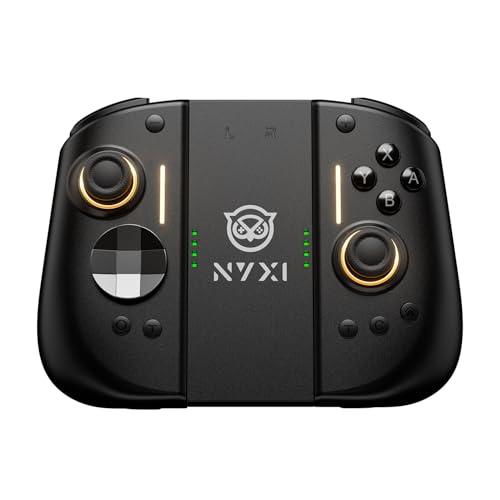
Competitive Switch 2 players want inputs that feel as precise as their reflexes, and the NYXI Hyperion 3 delivers with full mechanical buttons that snap cleanly on every press. Hall effect joysticks address the drift problem at the source, just like the 8BitDo Ultimate 2C, so stick movement stays true across marathon sessions. A 9-axis gyro with magnetometer keeps motion tracking accurate in shooters and racing games where a few degrees of tilt change the outcome.
Unlike the eXtremeRate shell kit, this is a complete wireless controller built specifically for the Switch 2, not a retrofit. Dual back buttons expand the input map for advanced players who want paddles without buying a pro-controller shell. Adjustable vibration lets you tune rumble intensity to your taste, which is a small but appreciated touch for long sessions. The build leans toward the premium end, and the feature set reflects that.
Features That Help
- Mechanical buttons give a tactile, fast response for competitive inputs
- Hall effect joysticks resist drift through heavy daily use
- 9-axis gyro with magnetometer keeps aim and steering precise
- Dual back buttons expand the input layout for advanced commands
- Adjustable vibration lets you dial rumble intensity to your preference
Less-Strong Areas
- Premium feature set comes with a higher price than budget third-party options
- Some users may find the deeper button travel takes time to adjust to if they are used to membrane pads
Who Will Love This
Competitive Switch 2 gamers who want the input precision of a pro-grade controller without building one from parts.
A Better Fit Elsewhere
Casual players on the original Switch get more value from the 8BitDo Ultimate 2C, which pairs with both console generations.
Matching Third Party Joy Cons To Your Setup
Compatibility sits at the top of the decision tree. Original Switch, Switch Lite, Switch OLED, and Switch 2 each support different accessories, and not every third-party controller covers the full range. A quick check of the console model and the accessory’s compatibility list prevents the frustration of unboxing something that never pairs.
Stick technology matters more than most shoppers expect. Traditional analog sticks use physical contact that wears over time, which is the root cause of drift. Hall effect sticks, found in the 8BitDo Ultimate 2C and NYXI Hyperion 3, use magnetic sensing instead, so they tend to last longer under daily use. For gamers who play more than a few hours a week, the upgrade is usually worth it.
Comfort shapes the long-term experience. The HORI Split Pad Compact and PowerA grips extend the Joy-Con silhouette into something that fits adult hands during longer handheld or tabletop sessions. A real D-pad, like the one in the eXtremeRate housing, also changes how older games feel, especially 2D platformers and fighting titles.
Charging workflows depend on household size. Two-controller homes can rely on the KINVOCA dock, while four-controller families benefit from the HORI Charge Stand. For gamers who want play-and-charge in TV mode, the KINVOCA charging grip adds a battery bank that keeps controllers alive during long sessions.
Racing and motion genres add another layer. The Orzly twin pack turns Joy-Cons into steering wheels for Mario Kart nights, and gyro-equipped controllers like the NYXI Hyperion 3 keep motion aiming tight in shooters. Match the accessory to the games that take up most of your play time, and the rest of the experience tends to fall into place.
Key Considerations Across These Picks
Where Shoppers Go Wrong
Buying a controller for the wrong console generation is the most common slip up in this category. Switch 2 accessories do not always pair with original Switch consoles, and vice versa. Checking the supported console list before purchase saves a return trip. Ignoring stick technology is another pitfall; budget controllers often skip the magnetic design, which means drift can show up within months of heavy use. The honest read is that the higher upfront cost of Hall effect sticks pays off over time for daily gamers.
When Paying More Pays Off
Higher-tier models like the NYXI Hyperion 3 and 8BitDo Ultimate 2C add mechanical buttons, magnetic joysticks, and richer motion tracking. The extra cost shows up in input precision, button feel, and long-term durability, so competitive players tend to find the upgrade worthwhile. For casual players who only game a few hours a week, budget options still hold their own, and the spend-up is less urgent.
Frequently Asked Questions
Do third-party Joy-Cons work with the original Switch dock?
Most third-party Joy-Cons pair with the console over Bluetooth and slide onto the console in handheld mode, but they typically do not charge through the original Switch dock. You will need a dedicated charging dock or grip like the KINVOCA options to keep them powered.
Are third-party Joy-Cons safe for younger kids?
Many third-party options include smaller grips and lighter shells that fit younger hands, but fit and finish vary by brand. Look for officially licensed models like the HORI Split Pad Compact if build quality is a priority, and always check the recommended age range on the listing.
Can you use two different third-party Joy-Cons in the same game?
In most cases, you can mix and match brands for local multiplayer, since the Switch treats each controller as an independent input. The KINVOCA dock specifically supports mixed-brand charging, which helps households that have accumulated different controllers over time.
What causes Joy-Con drift in third-party controllers?
Drift happens when the analog stick registers movement without any input, and traditional potentiometer-based sticks tend to develop the issue as the internal contacts wear. Hall effect sticks, found in the 8BitDo and NYXI options, use magnets instead, which avoids that wear pattern.
Is a charging dock worth it for two controllers?
A dock like the KINVOCA model keeps both controllers topped up between sessions and removes the need to plug cables in one at a time. For most households, the small investment saves daily friction and keeps the entertainment center tidy.
Wrap Up
The right third-party accessory depends on your console, your play habits, and the games that take up most of your week. Racing fans will get a lot out of the Orzly wheel pair, while competitive players will appreciate the precision of the NYXI Hyperion 3. Pick the option that solves the specific frustration that pulls you out of the game, and the rest of the experience tends to take care of itself.



