


The 32-inch 4K class keeps maturing, and OLED keeps pushing the conversation forward. If you color-grade video, render 3D, or simply want a desktop panel that makes everyday work feel sharper, the picks below cover the angles that matter. The truth is, only two screens in this roundup are true 32-inch 4K OLEDs, so the rest stand in as honest alternatives, wider, curvier, or built for split-screen workflows that a flat 32 can’t match.
Your Options, Compared

SANSUI 32 Inch Curved 240Hz Gaming Monitor FHD 1080P

INNOCN 34C1R 34″ Ultrawide WQHD 180Hz IPS Monitor

INNOCN 49″ Curved DQHD 5120×1440 240Hz Ultrawide

ASUS ROG PG32UCDM 32″ 4K 240Hz QD-OLED Monitor
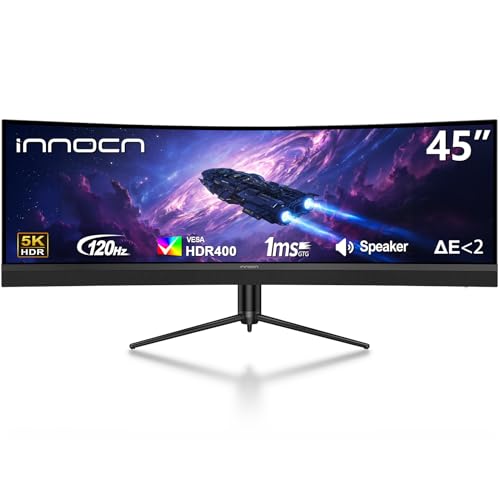
INNOCN 45″ 5K2K 120Hz Ultrawide Curved Monitor

INNOCN 40″ WQHD 144Hz Ultrawide IPS Monitor

Samsung 32″ Odyssey OLED G7 4K Gaming Monitor

INNOCN 49C1G 49″ Curved 32:9 Ultrawide 144Hz

INNOCN 45C1R 45″ 5K2K Ultrawide Curved Monitor

INNOCN 40C1R 40″ WQHD 144Hz Ultrawide Monitor
Taking A Closer Look At The Options
The SANSUI 32-inch curved monitor leans hard into speed rather than pixel count, and that tradeoff tells you most of what you need to know. A 1500R curve wraps around your peripheral vision, which helps if you sit close during long sessions of ranked play.
With a 240Hz panel and a 1ms MPRT response time, motion stays clean in shooters, and FreeSync support keeps frame tearing at bay when your GPU swings. A metal stand and VESA mount compatibility keep placement flexible on a crowded desk.
A Few Highlights
- 240Hz refresh rate keeps fast motion sharp and competitive
- 1500R curve feels immersive during long gaming sessions
- FreeSync reduces screen tearing without manual tweaking
- HDMI and DP 1.4 cover modern GPUs and consoles
Things To Consider
- 1080p resolution looks soft on a 32-inch panel for productivity tasks
- No built-in speakers means headphones or external audio is required
Feature Snapshot
Best Suited To
Competitive gamers who chase high frame rates and prefer fast response over pixel density.
Consider Something Else When
The ASUS ROG PG32UCDM 32″ 4K 240Hz QD-OLED Monitor suits shoppers who want true 4K resolution and OLED contrast on the same 32-inch form factor.
The 34C1R earns its place by refusing to specialize. A 21:9 ultrawide IPS panel gives you the desk real estate of two monitors without the bezels, and 3440×1440 resolution keeps text sharp at typical viewing distances.
Adaptive-Sync with G-SYNC compatibility (meaning it cooperates with both AMD FreeSync and many G-SYNC setups) means your frame rate and the panel stay aligned, and PIP/PBP (Picture-in-Picture and Picture-by-Picture) modes let you route two devices into one screen. A height-adjustable stand and tilt range help dial in posture over a long workday.
What Stands Out
- 21:9 ultrawide gives meaningful side-by-side workspace
- 180Hz refresh handles modern games smoothly
- PIP and PBP support dual-source workflows
- Height and tilt adjustments reduce neck strain
Trade Offs
- Not 4K, so 32-inch-class 4K shoppers may want the ROG PG32UCDM instead
- IPS glow can show in dark rooms during late-night gaming
Who Will Love This
Hybrid users who split their day between spreadsheets, video calls, and after-hours gaming on one screen.
Skip It When
The INNOCN 49″ Curved DQHD 5120×1440 240Hz Ultrawide serves multitaskers who need even more horizontal room for timelines or trading charts.
The 49-inch DQHD panel behaves like two 1440p monitors fused together, and the 1800R curve keeps the edges within your natural sightline. The 32:9 aspect ratio changes how games and apps feel, often filling your view in ways 16:9 simply can’t.
USB Type-C, DisplayPort, and HDMI ports keep connectivity flexible, and tilt, swivel, and height adjustments help position a panel this wide at a comfortable angle. For sim-racing, flight sims, and dense trading layouts, the screen real estate pays for itself.
The Practical Payoff
- 5120×1440 gives you two full-width workspaces
- 240Hz keeps fast motion clean in racing and shooters
- 1800R curve reduces head turning at the edges
- USB-C simplifies laptop docking
Honest Caveats
- Demands a deep desk, often 30+ inches of clearance
- Not all games support 32:9, leading to letterboxed images
Feature Snapshot
Right Fit For
Sim enthusiasts, traders, and editors who routinely use two windows side by side and want one tidy panel.
Look Elsewhere When
The INNOCN 45C1R 45″ 5K2K Ultrawide Curved Monitor suits those who want ultrawide immersion but need less desk depth.
This is the panel most people shopping for true 32-inch 4K OLED actually want. The third-generation QD-OLED panel (Quantum Dot OLED, which layers quantum dots over an OLED backplane for richer color) delivers true blacks, wide color, and a 0.03ms response time, and a custom heatsink with graphene film helps manage heat during long sessions.
USB-C power delivery up to 90W means a single cable can drive the display and charge a laptop, and 99% DCI-P3 coverage makes it a serious tool for content work, not just play. Compatibility with both PC and current consoles broadens its usefulness.
A Strong Showing
- True 4K on a 32-inch OLED with 240Hz
- 0.03ms response eliminates motion blur almost entirely
- 99% DCI-P3 suits color-accurate creative work
- USB-C 90W simplifies laptop setups
Worth Noting
- QD-OLED benefits from automatic panel refresh cycles that briefly dim the screen
- Premium positioning means a meaningful price step up from non-OLED picks
Feature Snapshot
Whose Shelf It Belongs On
Gamers and creators who want 4K sharpness, OLED contrast, and high refresh on one panel without going ultrawide.
A Better Fit Elsewhere
The Samsung 32″ Odyssey OLED G7 4K Gaming Monitor is worth a look for shoppers who want OLED image quality with a dual-mode refresh feature.
The 5K2K resolution, 5120 horizontal pixels packed into a 45-inch ultrawide, lands a sweet spot for video editing timelines and dense code windows. The 1500R curve is gentler than a 49-inch 1800R, so the panel feels less wraparound at typical desk depths.
USB-C power delivery at 65W handles mid-range laptops, and HDR400 support gives compatible content a modest boost in bright highlights. PIP and PBP modes keep dual workflows manageable on a single panel.
Where It Excels
- 5K2K gives generous horizontal pixels for editing
- 120Hz suits both creative work and casual play
- USB-C 65W reduces cable clutter
- Height, tilt, and swivel adjustments aid ergonomics
Points To Keep In Mind
- 120Hz trails the 240Hz ultrawides for competitive gaming
Perfect Match For
Video editors, music producers, and developers who want a single ultrawide canvas that replaces dual-monitor clutter.
Not Your Match When
The INNOCN 49″ Curved DQHD 5120×1440 240Hz Ultrawide is a better fit for shoppers chasing higher refresh rates in racing and shooters.
The 40-inch ultrawide sits in a useful middle ground, smaller than 45-inch and 49-inch panels, but wider than a standard 34-inch. The IPS panel delivers 95% DCI-P3 color and 500 nits of brightness, and the included USB-C port handles 90W of laptop charging.
AMD FreeSync Premium support, meaning low-framerate compensation (LFC) plus certified tear-free performance, smooths gameplay when frame rates dip, and screen split with PIP/PBP modes supports two-source workflows. For desks where a 45- or 49-inch panel simply won’t fit, this is a practical compromise.
What Works In Its Favor
- Smaller ultrawide footprint fits tighter desks
- 95% DCI-P3 and 500 nits support color work
- USB-C 90W handles most modern laptops
- 144Hz covers mainstream gaming and creative tasks
Small Caveats
- Not 4K, so 32-inch-class 4K shoppers will want the ASUS ROG PG32UCDM
Feature Snapshot
Built With In Mind
Desk-space-conscious home office users who want ultrawide workflow benefits without the bulk of 45- or 49-inch panels.
Reach For A Different Pick When
The INNOCN 45C1R 45″ 5K2K Ultrawide Curved Monitor better serves users with deeper desks and bigger workflow demands.
The Samsung Odyssey OLED G7 earns attention through a dual-mode feature that switches between 4K at 165Hz and Full HD at 330Hz, which means single-player cinematic games and competitive shooters both feel dialed in. OLED gives you true blacks and the kind of color pop that makes HDR content stand out.
For most living-room-friendly desk setups, the 32-inch form factor is the most practical OLED size, and the Odyssey’s glossy panel suits darker rooms especially well.
Reasons It Performs
- Dual-mode 4K/165Hz or FHD/330Hz suits mixed game libraries
- OLED contrast makes HDR content look striking
- 0.03ms response time keeps motion clean
Trade Offs
- Glossy finish reflects in bright rooms
- 32-inch 4K can feel dense to read without scaling
Best Suited To
Gamers who alternate between story-driven 4K titles and twitchy competitive genres and want one display to handle both.
Consider Something Else When
The ASUS ROG PG32UCDM 32″ 4K 240Hz QD-OLED Monitor fits shoppers who want a slightly higher native 4K refresh ceiling.
The 49C1G goes wide without going tall in resolution, offering a 32:9 panel at 3840×1080. The 1800R curve keeps the edges within reach, and a 144Hz refresh rate makes casual gaming feel responsive.
For shoppers who want ultrawide immersion but don’t need pixel density for color-critical work, this panel trims the budget while still giving the wraparound feel. USB-C, DisplayPort, and HDMI inputs keep it flexible, and built-in speakers handle basic audio without an external setup.
Points In Its Favor
- Wide 32:9 canvas for multitasking
- 144Hz covers everyday gaming well
- Built-in speakers reduce extra hardware
- Height and tilt adjustments support ergonomics
Honest Caveats
- 3840×1080 looks soft by 2026 standards for productivity
- Some games don’t support 32:9 out of the box
The Right Fit
Casual multitaskers who want a single panel that replaces a dual-monitor array on a budget.
Where A Sibling Pick Shines
The INNOCN 49″ Curved DQHD 5120×1440 240Hz Ultrawide is a stronger fit for users who need more pixels and a faster refresh rate.
The 45C1R shares much of the 5K2K experience with its sibling above, but bumps USB-C power delivery up to 90W. For users running a mid-to-high-power laptop, that means one cable handles the display and keeps the battery topped.
PIP and PBP modes support dual-source workflows, and the 1500R curve keeps the panel feeling natural at typical desk distances. It’s a sensible middle step between productivity and play.
Useful Strengths
- 5K2K resolution is generous for timelines and code
- USB-C 90W charges most laptops while in use
- PIP and PBP support dual-source work
- Height-adjustable stand helps posture
Soft Spots
- Lower 120Hz refresh than some siblings
Best Suited To
Laptop-centric professionals who want a single-cable docking display with ultrawide workspace to spare.
Swap It Out When
The INNOCN 40″ WQHD 144Hz Ultrawide IPS Monitor is a smarter pick when desk space is limited and a 45-inch panel is too wide.
The 40C1R is a long-standing workhorse in INNOCN’s ultrawide lineup, and it remains a practical choice for daily mixed use. WQHD resolution at 21:9 is sharp at typical desk distances, and 144Hz keeps motion clean during breaks for gaming.
AMD FreeSync Premium, a certified tier that guarantees tear-free performance above a minimum refresh floor, smooths frame-rate dips, and the IPS panel covers 95% DCI-P3 with 500 nits of brightness. USB-C connectivity rounds out the package for laptop users who want a single-cable setup.
Where It Delivers
- Reliable ultrawide workhorse for daily use
- 95% DCI-P3 supports a range of creative tasks
- FreeSync Premium handles casual gaming well
- Mountable design fits VESA arms
Honest Caveats
- Not 4K, so 32-inch-class 4K shoppers will want the ASUS ROG PG32UCDM
- Refresh tops out at 144Hz, well below 240Hz picks
Made For
Home office users who want ultrawide workflow benefits and reliable everyday performance without overspending.
Where Another Pick Suits Better
The INNOCN 34C1R 34″ Ultrawide WQHD 180Hz IPS Monitor fits shoppers who want a faster refresh on a smaller ultrawide footprint.
What To Weigh Before Picking A Big Panel
Panel Technology And Image Quality
OLED and QD-OLED panels produce true blacks because each pixel switches off completely, which means contrast you can see in dim scenes. IPS panels hold strong viewing angles and color accuracy, which matters for photo and video work, while VA panels tend to deliver the deepest contrast among LCD types but narrower viewing angles.
For a 32-inch 4K OLED, the pixel density is high enough to skip scaling, and the panel’s color volume gives HDR content a noticeable lift. For ultrawides at 3440×1440, density is comfortable for text at typical desk distances.
Refresh Rate And Response Time
Higher refresh rates, measured in Hz, smooth motion and reduce input lag. Above 144Hz is where most competitive gamers feel a real upgrade, while 240Hz panels suit fast shooters. Response time, measured in milliseconds (G2G, or gray-to-gray, and MPRT, or moving picture response time), tells you how quickly pixels change, and lower is better for sharp motion.
Connectivity And Single-Cable Setups
USB-C with power delivery lets one cable carry video, data, and charging to a laptop. 65W handles thin-and-light machines, and 90W covers most workhorse laptops. Check port specs carefully: HDMI 2.0 caps at lower refresh rates than HDMI 2.1, and DisplayPort 1.4 typically handles the highest bandwidth.
Desk Space And Ergonomics
Ultrawide and super-ultrawide panels need real desk depth, and a 49-inch 32:9 panel often calls for 30 inches or more between you and the screen. Adjustable stands help, and a VESA-compatible mount lets you pair the panel with an arm for fine-tuned positioning.
Key Considerations Across These Picks
Where Shoppers Go Wrong
A common mistake is chasing a wide panel without measuring the desk first. A 49-inch 32:9 display can dominate a small workspace, leaving no room for speakers, a keyboard, or even a notebook. Another slip is ignoring connectivity: HDMI 2.0 tops out well below 4K at 120Hz, so users with newer GPUs and consoles need HDMI 2.1 or DisplayPort 1.4 to use the panel fully.
When Paying More Pays Off
Stepping up to a true OLED or QD-OLED panel brings real visual gains, including perfect blacks, faster response, and wider color. For gamers and creators who spend hours in front of the screen, the jump from a budget IPS to a premium OLED is often felt within minutes, not days. The honest read is that the premium is worth it for primary-use displays, less so for secondary screens or secondary rooms.
Frequently Asked Questions
Is a 32-inch 4K OLED worth it over a 34-inch ultrawide?
A 32-inch 4K OLED gives sharper text and deeper contrast, which helps for color work and cinematic single-player games. A 34-inch ultrawide gives more horizontal workspace and feels wider during immersive play, but its pixel density is lower and it uses an LCD panel.
Do these monitors work with consoles?
Most include HDMI inputs that work with current-generation consoles, but the highest resolutions and frame rates typically require HDMI 2.1 support, which not every panel listed offers. Check each product’s port specs before assuming full compatibility.
What is FreeSync Premium and does it matter?
FreeSync Premium is an AMD certification that guarantees tear-free performance above a minimum refresh rate, plus low framerate compensation. It matters most for gamers with variable frame rates, because it smooths out dips that would otherwise stutter or tear.
How big a desk do I need for a 49-inch ultrawide?
For comfortable viewing at a 49-inch 32:9 panel, a desk depth of at least 30 inches is a sensible starting point, and deeper is better. Wall placement behind you helps too, since you sit relatively close to keep the whole panel in view.
Are OLED monitors safe from burn-in?
Modern OLED panels include pixel refresh, logo dimming, and heat management features that reduce burn-in risk. For mixed-use screens that don’t show static images for many hours a day, the risk is low, but it’s worth knowing the feature exists rather than expecting zero concern.
Wrap Up
The right pick comes down to your primary use: the ASUS ROG PG32UCDM for genuine 32-inch 4K OLED, the INNOCN 49-inch DQHD for max ultrawide workspace, or a compact 34-inch like the INNOCN 34C1R for desks that can’t go wider. Your desk, your GPU, and the games or apps you live in will tell you which tradeoff makes sense. Whichever panel you choose, measure first and pick the port specs that match your setup.



