


Stepping into PC gaming without the hassle of sourcing parts and building from scratch is exactly why prebuilt RTX 3060 Ti systems exist. You’re looking at solid 1080p and entry-level 1440p performance (1440p means rendering at roughly 2560 by 1440 pixels, sharper than standard Full HD), a graphics card that still holds up well in modern titles with DLSS (Nvidia’s AI-driven frame booster) helping stretch frame rates further. Picking one of these rigs also skips the compatibility headaches, BIOS updates, and thermal guesswork that come with a first build. These four prebuilts cover a range of budgets, processor pairings, and storage layouts, so you can match the hardware to the games and workload you actually run.
A Closer Look At The Lineup

iBUYPOWER SlateMR 291i Gaming Desktop (i7-12700F, RTX 3060 Ti)
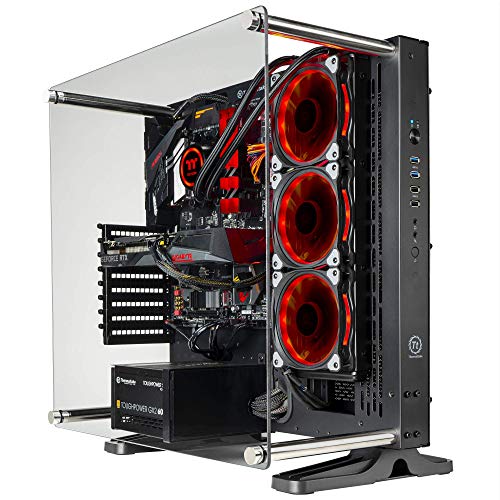
Thermaltake Shadow 360i Liquid-Cooled Gaming PC (Ryzen 5 3600)
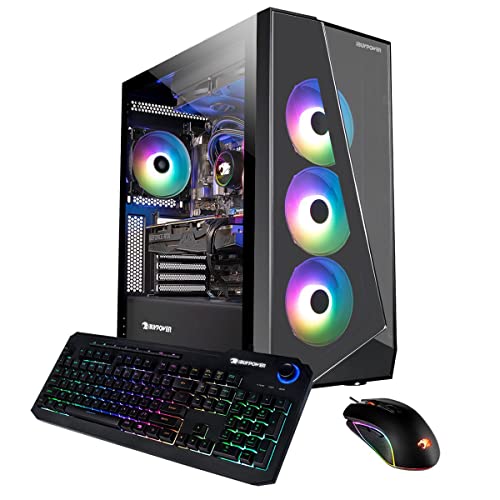
iBUYPOWER SlateMono 238i Gaming Desktop (i5-12600KF, RTX 3060 Ti)
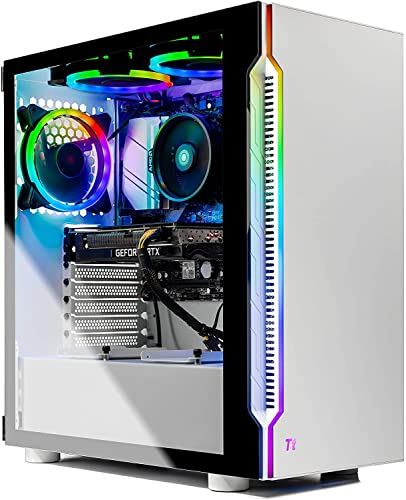
Skytech Archangel Gaming PC (Ryzen 5 5600X, RTX 3060 Ti)
A Closer Look At Each Pick
The SlateMR 291i sits at the top of this list because its 12th Gen Intel i7-12700F pairs meaningfully with the RTX 3060 Ti, avoiding the bottleneck a weaker CPU can create in CPU-bound games. The 1 TB NVMe SSD (a non-volatile drive that reads roughly five to ten times faster than a spinning hard disk) keeps load times short, while 16 GB of RGB DDR4 handles modern titles with headroom for browser tabs or Discord running alongside. The tempered-glass case shows off the 16-color RGB lighting without screaming for attention, and the included keyboard and mouse mean you can start playing the day the box arrives.
For streamers and content creators running OBS or editing software in the background, that extra core count on the i7 matters more than the slightly faster single-core speed of the i5-12600KF in the iBUYPOWER SlateMono 238i below. Connectivity is generous with six USB 3.1 ports on the front and rear, plus Gigabit Ethernet for low-latency online play.
Bright Spots
- 12th Gen i7-12700F handles game streaming, video calls, and creative apps in parallel
- 1 TB NVMe SSD keeps boot and load times snappy across a sizable library
- Six USB 3.1 ports mean plenty of room for peripherals and external drives
- Tempered-glass case with 16-color RGB lighting and bundled keyboard and mouse
- Wi-Fi and Bluetooth built in, so no extra adapter needed for wireless peripherals
Worth Noting
- 16 GB of RAM is the comfortable minimum today, so future memory upgrades are likely
- The “F” suffix on the i7 means no integrated graphics, a non-issue with the RTX 3060 Ti installed but worth knowing for troubleshooting
Who It Suits Best
Gamers who want a balanced prebuilt strong enough for streaming, content work, and AAA titles at high settings, without needing to swap parts.
Consider Something Else When
You prefer AMD’s platform and quiet liquid cooling, in which case the Thermaltake Shadow 360i Liquid-Cooled PC is the better fit.
The Shadow 360i is the only rig in this roundup with a closed-loop liquid cooler (an AIO, or all-in-one, which uses a radiator, pump, and tubing to move heat away from the CPU more efficiently than a basic heatsink fan), and that single design choice changes the long-session experience. The Ryzen 5 3600 still holds its own in most esports titles and lighter AAA games, and pairing it with 16 GB of ToughRAM RGB and a 1 TB NVMe M.2 drive gives you a responsive system from day one.
Where this build differs from the iBUYPOWER SlateMR 291i above is platform philosophy: AMD’s AM4 socket, Thermaltake’s own chassis, and a cooling setup aimed at quieter operation during extended play. For anyone gaming in a shared room or running long Creative sessions, the radiator-based thermal headroom is a meaningful upgrade over the stock-fan cooling most prebuilts ship with.
Good Reasons To Consider
- Closed-loop liquid cooling keeps CPU temperatures lower under extended load
- Ryzen 5 3600 still handles 1080p esports and most modern single-player titles well
- ToughRAM RGB modules add polished lighting alongside the case fans
- Thermaltake chassis includes VESA mounting support for wall placement
Trade Offs
- The Ryzen 5 3600 is now two generations old, so CPU-heavy titles may show its age sooner than the i7-12700F in the SlateMR 291i
- 16 GB of DDR4-3000 is functional, but slower than the 3200 MHz memory in the Skytech Archangel
- Windows 10 Home out of the box rather than Windows 11, depending on preference
Key Product Details
Made For
Players who value quiet operation and cooler thermals over raw CPU muscle, especially during long multiplayer sessions or creative workloads.
A Better Fit Elsewhere
You want the latest Intel platform and a bundled peripherals package, where the iBUYPOWER SlateMR 291i Gaming Desktop serves you better.
Storage is the headline feature of the SlateMono 238i, pairing a 500 GB NVMe boot drive with a 1 TB HDD (a traditional spinning-platter hard drive, slower than SSD but cheaper per gigabyte) for bulk game storage. The i5-12600KF is a strong gaming CPU, often within a few percent of the more expensive i7-12700F in frame rates, and the “KF” variant leaves the integrated graphics disabled. With the RTX 3060 Ti installed, that missing iGPU (integrated graphics processing unit, a basic GPU built into the CPU) is irrelevant.
Unlike the iBUYPOWER SlateMR 291i above, this rig ships without bundled peripherals, so factor in the cost of a keyboard, mouse, and monitor. The dual-storage layout, though, gives you a real advantage if your Steam library is the kind that spans dozens of titles and you hate uninstalling to make room for a new release.
What Makes Sense
- 500 GB NVMe SSD plus 1 TB HDD handles both fast boot and large game archives
- i5-12600KF delivers strong gaming performance with high boost clocks
- 16 GB of RGB DDR4 gives the build a cohesive lighting look
- Six USB 3.1 ports and Gigabit Ethernet match the connectivity of pricier siblings
Honest Caveats
- The 500 GB SSD fills up quickly with modern AAA installs, often 70 GB and up
- No bundled keyboard or mouse, unlike the SlateMR 291i
- HDDs can show up as load-time bottlenecks for games installed on them
Right Fit For
Gamers with large existing libraries who want both fast boot and plenty of bulk storage without buying extra drives on day one.
Look Elsewhere When
You prefer a clean white aesthetic and a modern AMD CPU, where the Skytech Archangel Gaming PC fits your setup better.
The Archangel is the rig for someone who cares as much about how the PC looks on the desk as what it does in games. The white chassis with RGB fans gives it a distinct presence, and the Ryzen 5 5600X is a meaningful step up from the older Ryzen 5 3600 in the Thermaltake Shadow 360i Liquid-Cooled PC, especially in single-threaded scenarios like competitive shooters. The 1 TB NVMe SSD handles storage on its own, and 16 GB of DDR4-3200 RAM (3200 MHz, faster than the 3000 MHz in some older builds) gives the system a little more bandwidth to work with.
For first-time builders or anyone setting up a fresh battlestation, the white shell pairs naturally with light-colored desks and minimalist monitor arms. The included Wraith cooler is a quiet stock solution, though you may find the fan ramping up under sustained load on warmer days.
Why It Works Well
- Ryzen 5 5600X outperforms older Ryzen 5 chips in single-threaded gaming workloads
- 1 TB NVMe SSD provides fast storage without needing a secondary drive
- White case with RGB fans looks clean in modern setup photos
- 802.11AC Wi-Fi built in, no adapter purchase required
Points To Note
- Stock Wraith cooler is functional but audible under heavy, sustained load
- Only 16 GB of RAM, common across all four prebuilts here, limits heavy multitasking
Feature Snapshot
Best Suited To
Buyers who want a white-themed setup with a modern AMD CPU, balanced storage, and a clean visual footprint on the desk.
Reach For A Different Pick When
You need dual-drive storage out of the box, where the iBUYPOWER SlateMono 238i Gaming Desktop with its SSD plus HDD combo is the stronger match.
What To Weigh Before Choosing Your 3060 Ti Prebuilt
CPU Pairing Matters More Than You Think
The RTX 3060 Ti is a consistent performer, but the CPU behind it determines how many frames actually reach your monitor. Pairing the GPU with an older Ryzen 5 3600, a still-strong i5-12600KF, or a more capable i7-12700F creates noticeably different experiences in CPU-heavy games like Cyberpunk 2077, Microsoft Flight Simulator, or large-scale shooters. Look at recent benchmarks for the specific CPU rather than trusting the GPU alone to carry the build.
Storage Layout Shapes Your Daily Use
A single 1 TB NVMe SSD keeps things simple and fast, but modern game installs can swallow 100 GB or more, filling a 500 GB drive in a hurry. Dual-drive systems like the iBUYPOWER SlateMono 238i split fast boot from bulk storage, which suits gamers with deep libraries. If you mostly play a handful of online titles, a single SSD is plenty. If you hoard single-player releases, a second drive helps.
Cooling Defines Long-Session Comfort
A closed-loop liquid cooler, like the one in the Thermaltake Shadow 360i, runs quieter and cooler than a stock air cooler, though it adds cost and a small leak risk that is rare in modern AIOs. Stock fans like the AMD Wraith on the Skytech Archangel are perfectly adequate for casual play, but they ramp up under sustained load. Consider your room temperature, typical session length, and noise tolerance before deciding.
Connectivity And Future Expansion
Count the USB ports you need for controllers, webcams, streaming gear, and external storage. Check the power supply wattage and case clearance too, so future GPU or storage upgrades remain realistic. Prebuilts often use proprietary components or limited-clearance cases, so verifying upgrade paths now saves frustration later.
Quick Notes On Common Choices
Pitfalls Shoppers Hit
One common trap is picking a prebuilt based purely on GPU model while ignoring the CPU generation and RAM speed. A RTX 3060 Ti paired with an older processor and slow memory can bottleneck the GPU, leaving performance on the table. Another mistake is overlooking the storage layout, then struggling with a full drive within months of setup. Verify the included accessories, like a Wi-Fi card or peripherals, before assuming they’re part of the package.
Where The Extra Money Goes
Spending more on a higher-tier prebuilt usually means a newer or higher-core-count CPU, faster RAM, better cooling, and a more flexible case with cleaner cable management. A better power supply also opens the door to future GPU upgrades without replacing the whole rig. For most 1080p gamers, a mid-tier prebuilt handles the workload, while stepping up makes sense for streamers, content creators, and anyone planning to keep the system for five years or more.
Frequently Asked Questions
Is The RTX 3060 Ti Still Good In 2026?
The RTX 3060 Ti remains a capable 1080p card and handles many games at 1440p with DLSS enabled. For high-refresh 1440p or 4K gaming, newer mid-range cards offer more headroom, but the 3060 Ti still delivers solid value for the price.
How Much RAM Do These Prebuilts Need?
16 GB of DDR4 is the comfortable baseline for modern gaming, though 32 GB gives you more headroom for browser tabs, Discord, and background apps. All four prebuilts here ship with 16 GB, and each supports user upgrades if you want more later.
Can You Upgrade The GPU Later?
Most prebuilts allow GPU upgrades, but the case size, power supply wattage, and motherboard clearance all matter. Check the included PSU rating and case dimensions before buying a future graphics card to confirm compatibility.
What Is DLSS And Does It Help?
DLSS, or Deep Learning Super Sampling, is Nvidia’s AI-based rendering technology that renders games at a lower resolution and upscales them using machine learning. It boosts frame rates significantly with minimal visual impact, and it works especially well on the RTX 3060 Ti at 1440p.
Do These Prebuilts Come With Windows Pre-Installed?
Yes, each system ships with Windows pre-installed, either Windows 10 Home or Windows 11 Home depending on the model. You can check the specific operating system on the product page before purchasing.
Closing Thoughts
Any of these four prebuilts will serve you well for 1080p gaming, light streaming, and everyday productivity. The right choice comes down to your platform preference, storage needs, and whether you value quiet cooling or a clean white aesthetic. Match the rig to your actual use case, and you’ll get years of solid performance without second-guessing the parts list.



