


FPS players live and die by tiny adjustments. A missed flick at long range, a fumble switching weapons, a stuttery sensor during a flick shot; the margin between a clean headshot and a frustrating death is often a matter of milliseconds and millimeters. Your mouse is the most personal tool in that equation, and the right one disappears into your hand while giving you precise, repeatable control when it counts.
This roundup breaks down ten FPS-focused mice across budget and premium tiers, from familiar ergonomic shapes to ultralight wireless shells built for tournament play. Each pick is reviewed for sensor behavior, weight, button layout, grip style, and the kind of desk setup it actually suits, so you can find a mouse that matches how you play.
A Side-By-Side Look
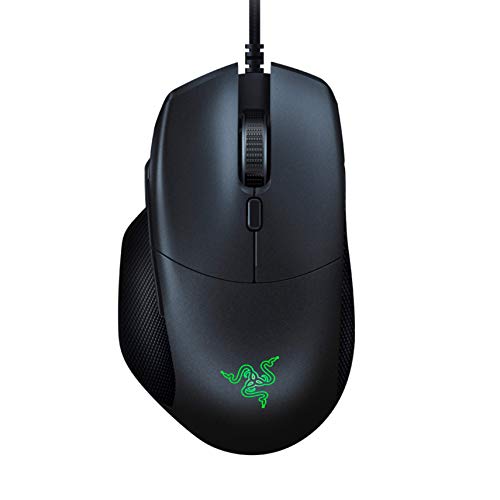
Razer Basilisk Gaming Mouse (Renewed)

Razer Basilisk Gaming Mouse (Quartz Pink)

PWNAGE Ultra Custom Symm 2 Wireless Gaming Mouse (White)

wegear USB Wireless Mouse (Black)

wegear USB Wireless Mouse (Pink)
Corsair Sabre v2 PRO Wireless Ultralight FPS Mouse (Black)

Corsair Sabre v2 PRO Wireless MG FPS Mouse (Black)

Corsair Sabre v2 PRO Wireless CF FPS Mouse (Black)
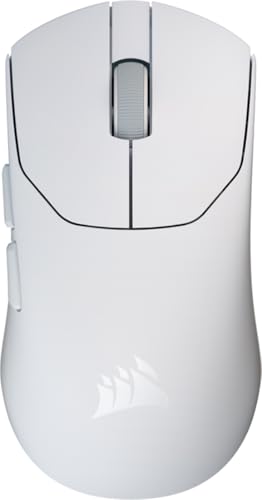
Corsair Sabre v2 PRO Ultralight FPS Mouse (White)
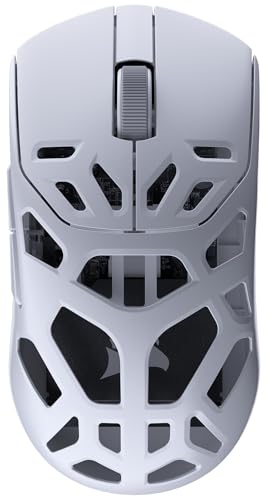
Corsair Sabre v2 PRO Wireless MG FPS Mouse (White)
A Deeper Look At The Lineup
The renewed Razer Basilisk brings a familiar ergonomic shape to players who want a real FPS-oriented mouse without paying flagship pricing. Its 6400 DPI optical sensor is on the modest side by 2026 standards, but for players still learning sensitivity tuning, that headroom is plenty.
Compared to the PWNAGE Ultra Custom Symm 2 later in this list, the Basilisk is heavier and lacks a paracord-style cable, yet it wins on out-of-box comfort for palm and claw grip users. The replaceable DPI clutch side button is the kind of feature that quietly makes sniping easier, and Razer Synapse support keeps the customization story familiar.
The Value In It
- Ergonomic right-handed shape with rubber side grips for long session stability
- Quick DPI drop button for sniping at lower sensitivity on the fly
- Mechanical switches rated for long-term click durability
- 7 programmable buttons, enough for common FPS binds and utility macros
- Chroma RGB lighting for subtle desk flair without overdoing it
Worth Noting
- Renewed condition means cosmetic wear may vary between units
- 6400 DPI ceiling feels limited next to newer competitive sensors
- Cable is a standard rubber type, not the flexible paracord seen on the PWNAGE
Made For
First-time FPS players building a setup on a tighter budget who value comfort over cutting-edge sensor specs.
Look Elsewhere When
The PWNAGE Ultra Custom Symm 2 Wireless Gaming Mouse suits competitive players who want a lighter shell and a more flexible cable.
This full-spec Razer Basilisk takes the same comfortable shape as pick one and pushes the internals up several notches. The 16,000 DPI optical sensor reads fine crosshair movements without lag, which matters when tracking heads at long range or correcting micro-flicks in close quarters.
Where the renewed version is a budget bridge, this one is a real mid-range workhorse. The physical scroll wheel resistance dial is a quiet standout feature, letting you tune the wheel from a smooth, fast scroll to a notchy tactical click without leaving Synapse.
A Few Strong Suits
- Tunable scroll wheel resistance for both inventory scrolling and weapon switching
- High-resolution 16,000 DPI optical sensor handles wide sensitivity ranges cleanly
- Replaceable DPI clutch for quick sniping drops on the fly
- 8 programmable buttons give room for macros and class-specific binds
Trade Offs
- Right-handed ergonomic shape won’t suit left-handed players
- Heavier than ultralight shells like the Corsair Sabre v2 PRO family
- Wired connection, no wireless option for cable-free setups
Right Fit For
Mid-range competitive players who want a versatile FPS mouse with a tuned sensor and physical customization, without chasing tournament-weight shells.
Consider Something Else When
The Corsair Sabre v2 PRO Wireless Ultralight FPS Mouse fits players who prioritize a wireless setup and a much lighter 36g shell.
PWNAGE takes a different route with the Ultra Custom Symm 2, building around a Pixart 3370 sensor, an ultralight symmetrical shell, and a flexible paracord cable that gives a near-wireless feel without the wireless tax. The 19,000 DPI ceiling is generous, though most FPS players will live well below that.
Unlike the Razer Basilisk pair above, this mouse is built for tinkerers. Hot-swappable shells, on-board memory for DPI and lift-off distance, and PTFE skates with custom rounded edges give this one a custom-shop feel straight out of the box.
What Makes Sense
- Symmetrical ultralight shell suits claw and fingertip grip styles
- PTFE skates with rounded edges glide smoothly on cloth and hard pads
- On-board memory stores profiles for tournament setups
- Flexible paracord cable reduces drag compared to standard rubber cables
Room For Improvement
- Symmetric shape lacks the thumb rest of an ergonomic Basilisk-style mouse
- Hot-swappable shells and modular options can feel like extra setup work
- On-board memory management is less polished than Razer Synapse or Corsair iCUE
Best Suited To
Competitive players who like to fine-tune their setup and want a light, ambidextrous-friendly shape for claw or fingertip grips.
A Better Fit Elsewhere
The Razer Basilisk Gaming Mouse (Quartz Pink) is a smarter choice for players who prefer a contoured right-handed ergonomic grip with a familiar software suite.
The wegear 2.4GHz wireless mouse isn’t built for tournaments; it’s built for getting out of a cable. A small USB receiver tucked into the bottom of the mouse pairs instantly with a laptop or desktop, no driver install required.
Compared to the Razer and Corsair picks in this list, the wegear is closer to a productivity tool that can handle light gaming. For an FPS player who plays casually or works from the same desk, the appeal is portability and silent operation rather than competitive specs.
What Pays Off
- 2.4GHz wireless connection cuts cable clutter on small desks
- Storable USB receiver keeps the dongle safe in transit
- Multi-platform support for laptop, PC, and Mac setups
- Simple, low-fuss design works for everyday browsing and casual play
Honest Caveats
- Not aimed at competitive FPS use; sensor specs are modest
- Light gaming and productivity only, limited button count for complex binds
Perfect Match For
Casual users, students, and office workers who want a clean wireless setup for browsing, documents, and light gaming.
Reach For A Different Pick When
The Razer Basilisk Gaming Mouse (Renewed) suits first-time FPS players who want real gaming-focused buttons and tuning software.
The pink version of the wegear 2.4GHz wireless mouse is the same core hardware as pick four, just with a softer finish for a different desk setup. The 2.4GHz wireless connection and storable USB receiver make it a tidy travel companion.
Most of the practical notes from the black model apply here, so this pick exists for shoppers who care about color coordination with a setup or simply prefer a non-traditional look. The honest read is that this is style first, FPS capability second.
Everyday Perks
- Soft pink finish for a distinctive desk setup
- Plug-and-play wireless pairing across PC, Mac, and laptop
- Compact shape that fits smaller hands comfortably
Points To Note
- Same modest sensor as the black wegear, not a competitive FPS tool
- Color may not appeal in a serious gaming environment
Whose Shelf It Belongs On
Style-focused casual users who want a wireless mouse that fits a softer aesthetic and handles everyday tasks and light play.
Swap It Out When
The PWNAGE Ultra Custom Symm 2 Wireless Gaming Mouse suits players who want a real competitive sensor and ultralight shell in a clean colorway.
The black Sabre v2 PRO is the lightest mouse in this list, weighing in at just 36 grams, and it feels every bit like a tournament tool. The CORSAIR MARKSMAN S sensor pushes up to 33,000 DPI, but the real story is the 8,000Hz hyper-polling that reports position eight times per millisecond, making micro-corrections feel almost instant.
Where the PWNAGE Symm 2 leans into modular shells, the Sabre v2 PRO is focused on speed. A symmetrical shell, mechanical switches, and a wireless design aim squarely at players who already know their preferred sensitivity and just need a mouse that keeps up.
Where It Excels
- 36g ultralight shell reduces fatigue over long competitive sessions
- 8,000Hz hyper-polling delivers responsive tracking for fast flicks
- Mechanical switches rated for many millions of clicks
- Wireless design keeps the desk setup clean for tournament play
Less Ideal Details
- Light shell can feel too insubstantial for palm grip players used to heavier mice
- Hyper-polling benefits are most visible on high-refresh monitors and fast hardware
Who Should Grab It
Tournament-level FPS players running high-refresh setups who want a wireless, ultralight shell with near-instant polling.
Not Your Match When
The Corsair Sabre v2 PRO Wireless CF FPS Mouse is a better pick for players who want a stiffer, carbon-fiber build for added rigidity.
The magnesium-shelled Sabre v2 PRO swaps the polymer body of pick six for a magnesium alloy chassis, trading a small amount of weight for notable rigidity and improved heat dissipation. For sweaty-palm competitive players, the cooling benefit is a real consideration during long bracket runs.
Compared to the carbon fiber CF variant further down, the MG leans more toward durability than maximum stiffness. Both keep the same 33,000 DPI sensor and 8,000Hz polling, so the choice comes down to material preference rather than core performance.
Reasons It Performs
- Magnesium alloy shell for better heat dissipation under stress
- Same 33,000 DPI sensor and 8,000Hz polling as the lighter Sabre v2 PRO
- Wireless design with strong battery life for multi-day events
- Tournament-ready shape for claw and fingertip players
Practical Considerations
- Slightly heavier than the polymer Sabre v2 PRO
- Magnesium finish may show scratches more than soft-touch plastic
Built With In Mind
Long-session competitive players who run warm hands and want a stiffer, cooler shell that holds up to constant use.
Where Another Pick Suits Better
The Corsair Sabre v2 PRO Wireless CF FPS Mouse suits players who prioritize maximum stiffness and rigidity over heat dissipation.
The CF variant of the Sabre v2 PRO uses a symmetrical carbon fiber unibody, hitting roughly 55 grams while still feeling notably stiff. For players who want the rigidity of a solid shell without the weight penalty of a magnesium build, this is the most interesting mouse in the lineup.
Where the MG version prioritizes thermal management, the CF prioritizes structural feedback. The sensor, polling rate, and wireless design are consistent with the rest of the Sabre v2 PRO family, so this is essentially a chassis decision for discerning players.
Useful Highlights
- Carbon fiber unibody delivers rigidity at around 55g
- Symmetrical shape suits a wide range of grip styles
- 33,000 DPI sensor with 8,000Hz hyper-polling for precise tracking
- Wireless design cuts cable drag for cleaner flicks
Factors To Consider
- Carbon fiber finish may feel less warm in hand than matte polymer
- Premium tier pricing puts this above most mid-range FPS mice
Who Will Love This
Competitive players who want a stiff, light, wireless shell and don’t mind paying a premium for carbon fiber construction.
Skip It When
The Corsair Sabre v2 PRO Wireless Ultralight FPS Mouse (Black) is a smarter pick for players who want the lightest possible 36g shell at a lower tier.
The white Sabre v2 PRO pairs the 36g ultralight shell of pick six with a soft white finish for a brighter desk setup. Up to 70 hours of wireless battery life means you can take it to a weekend event without thinking about charging, which is a small detail that matters during marathon sessions.
Compared to the black Sabre v2 PRO, the only meaningful difference is color and battery specs, with the same 33,000 DPI sensor and 8,000Hz polling underneath. For minimalist or white-themed battle stations, this is a tidy fit without compromising on specs.
What Helps Most
- Up to 70 hours of wireless battery life for multi-day use
- 36g ultralight shell keeps aim fatigue low
- Clean white finish for bright or minimalist desk setups
- 8,000Hz hyper-polling for responsive tracking
Things To Weigh
- White shell tends to show dirt and discoloration over time without regular cleaning
- Light shell still won’t suit palm grip players who prefer a heftier feel
The Right Fit
Wireless-first minimalist players who want a bright, clean setup and long battery life without giving up tournament-level specs.
Where A Sibling Pick Shines
The Corsair Sabre v2 PRO Wireless MG FPS Mouse (Black) suits players who run warm hands and want a magnesium shell for better cooling.
The white magnesium version of the Sabre v2 PRO wraps the MG chassis in a soft finish, combining cooling and rigidity with a brighter aesthetic. For players who want a stiffer shell and a clean look, this lands at the intersection of durability and design.
It shares the same 33,000 DPI sensor and 8,000Hz hyper-polling as the rest of the Sabre v2 PRO family, so the real choice here is material and color rather than raw performance. The trade-off, as with any white shell, is keeping the finish looking fresh over time.
The Practical Payoff
- Magnesium chassis adds rigidity and helps manage heat under stress
- White finish for clean, modern desk aesthetics
- Tournament-grade 33,000 DPI sensor and 8,000Hz polling
- Wireless setup for clutter-free tournament play
Where It Is Less Suited
- Slightly heavier than the polymer 36g Sabre variant
- White magnesium finish can show wear if bumped against hard surfaces
Who It Suits Best
Clean-desk competitive players who want magnesium cooling and rigidity in a bright finish, and don’t mind a touch more weight.
Where Another Pick Suits Better
The Corsair Sabre v2 PRO Wireless CF FPS Mouse (Black) is a better fit for players who want maximum stiffness and prefer a darker finish.
What To Weigh Before Choosing An FPS Mouse
Sensor And Tracking Behavior
A higher DPI ceiling doesn’t automatically mean better aim. What matters more for FPS is consistent tracking at the sensitivity you actually use, with minimal smoothing or jitter. The Razer Basilisk Quartz Pink and the Corsair Sabre v2 PRO family all use optical sensors with strong tracking reputations, while the PWNAGE Symm 2 leans on the Pixart 3370, a well-regarded sensor among competitive players. If you already know your ideal DPI and in-game sensitivity, prioritize tracking consistency over raw numbers.
Shape, Weight, And Grip Style
A mouse that fights your grip style will feel wrong long before specs come into play. The Razer Basilisk pair favors palm and relaxed claw grips, while the PWNAGE Symm 2 and Corsair Sabre v2 PRO family lean toward claw and fingertip grips. Weight is the other half of the equation: ultralight shells around 36g reduce fatigue during long sessions but can feel insubstantial to players used to heavier mice.
Wired Vs Wireless
Modern wireless mice have closed the latency gap with wired models, and the Corsair Sabre v2 PRO line uses 8,000Hz hyper-polling to keep input reporting extremely tight. For tournament players, a clean wireless setup is now a serious option. For casual or budget builds, a wired Razer Basilisk or even a basic wegear wireless mouse can do the job.
Buttons And Software
FPS games don’t need dozens of buttons, but extra inputs for push-to-talk, grenades, or DPI shifting can be useful. The Razer Basilisk’s DPI clutch and tunable scroll resistance are real quality-of-life features, while the PWNAGE Symm 2’s on-board memory and hot-swappable shells appeal to tinkerers. Consider how much time you want to spend in software like Razer Synapse or Corsair iCUE, and whether on-board profile storage matters for your setup.
Smart Choices Around FPS Mouse Shopping
Common Shopping Slip Ups
A frequent mistake is chasing the highest DPI number on the box without checking tracking quality at your real-world sensitivity. Another is buying a tournament-weight shell before trying claw or fingertip grips, which can feel strange for players used to heavier palm-grip mice. Grip tape and weight tuning exist, but starting with the right shape saves a lot of fiddling.
Where The Extra Money Goes
Premium tiers like the carbon fiber CF and magnesium MG Sabre v2 PRO variants add material strength, heat management, and rigidity over standard polymer shells. Wireless convenience, longer battery life, and high polling rates also scale with price. The honest read is that the upgrade is worth it for players who already know what they want from a mouse, while newer FPS players get more value from a mid-range pick they can learn on.
Frequently Asked Questions
What DPI should an FPS player actually use?
Most competitive FPS players land somewhere between 400 and 1600 DPI, paired with an in-game sensitivity that feels comfortable for full arm sweeps. Higher sensor ceilings matter less than consistent tracking at your real sensitivity.
Is wireless really fine for FPS now?
Modern wireless mice with high polling rates, like the Corsair Sabre v2 PRO family, deliver responsiveness comparable to wired models for most players. The remaining gap is small enough that tournament players regularly use wireless setups.
Do I need an ultralight mouse under 40 grams?
Ultralight shells help reduce fatigue during long sessions and can make flicks feel faster, but they’re not mandatory. A heavier, well-shaped mouse like the Razer Basilisk can still deliver strong FPS performance if the grip suits your hand.
How important is mouse weight for aim?
Weight affects how easy it is to stop a flick and how much fatigue builds up over hours of play. Lighter mice generally feel more responsive, while heavier mice can feel more controlled for some grip styles. It’s a personal preference more than a hard rule.
Are magnesium and carbon fiber shells worth the extra cost?
Magnesium adds heat dissipation and rigidity, while carbon fiber focuses on stiffness at low weight. Both feel meaningfully different from standard polymer, but the upgrade is most worth it for players who already know they want that specific feel.
Wrap Up
The right FPS mouse is the one that matches your grip, sensitivity, and how long your sessions tend to run. Start with shape and weight, then narrow down on sensor behavior, polling rate, and wireless convenience. Whatever tier you land on, the goal is a mouse that feels invisible in your hand so your aim can do the talking.



