


Settling on a control setup that actually helps in a fast-paced shooter can feel like a bigger decision than picking the game itself. Aim wobble, sluggish triggers, and a slippery desk all chip away at the experience, and most generic gear does little to fix those specific issues. The picks below focus on input precision, comfort during long sessions, and the little ergonomic details that tend to matter most when a match goes long. You’ll find traditional mice, custom mods, mobile handhelds, and a keycap kit that helps you stay oriented on the keyboard without ever dropping your eyes to the caps.
A Snapshot Of The Selections

SteelSeries QcK L Performance Control Mousepad

Elgato Stream Deck Scissor Keys
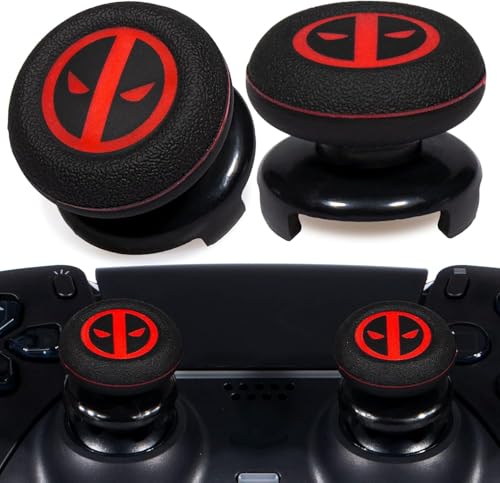
PlayRealm FPS Thumbstick Extender & Grip (Immortal)

eXtremeRate Strong Clicky Kit for PS5 BDM-030

HyperX Pulsefire FPS Pro Gaming Mouse

Azeron Classic Gaming Keypad (Galaxy Purple)

CORSAIR FPS MOBA Keycap Kit White

HyperX Alloy FPS RGB Mechanical Keyboard

Tighter Hall Effect Joystick for Steam Deck OLED

Swiftpoint Z Gaming Mouse
The Details Behind The Selections
Before any of the other picks matter, the surface your mouse sits on sets the baseline. The SteelSeries QcK L Performance Control Mousepad leans into friction rather than glide, giving a heavier, more deliberate feel that rewards micro-adjustments. At roughly 3.5 mm thick, it cushions the wrist without feeling like a sponge, and the low-profile stitched edges keep the perimeter from catching on sleeves.
For players who chase small, controlled corrections over sweeping flicks, this surface tends to feel natural. It also helps stabilize a heavy palm grip during long sessions, where lighter pads can let the mouse wander.
Strengths Worth Knowing
- High-grade neoprene foam anchors the pad so it rarely creeps on a smooth desk.
- Higher friction profile favors controlled aim correction over glide-heavy movement.
- Stitched edges are low enough that your forearm brushes without snag.
- Generous desk footprint suits low-sensitivity DPI players who sweep wide.
Trade-Offs To Consider
- The control surface feels sluggish to anyone used to a fast glide pad.
- Owners commonly report the texture needs a quick wipe-down once a week to stay consistent.
Whose Setup It Belongs On
Competitive players running low DPI with deliberate, controlled aim benefit most from this pad.
Look Elsewhere When
Speed-focused flick aimers should look at lighter pads or the HyperX Pulsefire FPS Pro setup for a faster, less resistant feel.
The Elgato Stream Deck Scissor Keys isn’t a mouse or a gamepad in the traditional sense, but it earns a place in any FPS setup where chat, OBS, and Discord all need attention at once. Each key uses a scissor mechanism, giving a crisp, responsive feel closer to a laptop key than a mushy rubber pad. Presses land quickly, which matters when you need to mute, swap scenes, or trigger a chat line without breaking focus.
Where the standard Stream Deck leans into visual feedback, this version sharpens the tactile side. For streamers and creators running FPS content, that tactile precision tends to outrank flashy icons during live play.
A Favorable Mix
- Scissor switches deliver quick, consistent key travel that suits rapid macro commands.
- Each key doubles as a mini display, so you can label and reorganize actions on the fly.
- Integrates with OBS, Discord, and most streaming tools out of the box.
Less-Strong Areas
- Not a true FPS input device on its own, so it works best as a complement to a mouse or controller.
- Software setup can feel heavy if you only want a handful of macros.
Who Will Love This
Live streamers, content creators, and FPS players who juggle comms and overlays benefit most from this deck.
Reach For A Different Pick When
Pure PC aimers who only need a mouse and keyboard should head to the HyperX Pulsefire FPS Pro for a more direct setup.
Console players rarely get to swap their aim stick the way PC players swap mice, which is where extenders like this PlayRealm set come in. The extender physically lengthens the lever, which increases the input range at a given stick angle. The result is finer aim without forcing a full grip change on the thumb.
Paired with the included silicone cover, the same sticks also get a softer, more tactile feel. The grip is particularly welcome in long sessions where stock plastic gets slick with sweat.
Notable Gains
- Longer stick reach helps with small, precise aim corrections at the same physical motion.
- Silicone cover softens the edge and helps with grip during sweaty hands.
- Set includes two pairs, so a backup or a second controller is covered.
Points To Keep In Mind
- Adds height above the stick, which can catch on cases or travel bags during storage.
- Some users find the new angle takes a few sessions to recalibrate muscle memory.
Right Fit For
PS5 and PS4 players who want more precise aim without ditching their standard controller benefit most here.
Skip It When
If you already run an eXtremeRate kit on a BDM-030 PS5 controller, you may find the thumbstick mods are a smarter upgrade path.
The eXtremeRate Strong Clicky Kit isn’t for everyone, but for competitive PS5 players chasing faster trigger response, it changes the way the controller feels under fire. The kit replaces the shoulder button internals with micro switches that activate at a much shorter throw, around 1.5 mm compared to the stock travel. That shortened distance is the difference between reacting to a sightline and arriving a beat late.
Because it only fits the BDM-030 revision, it pays to check the controller model before installing. Owners with the BDM-010, 020, 040, or 050 will need a different version entirely.
Benefits That Matter
- Hair-trigger activation noticeably shortens response time on rapid fire.
- Micro switches rated for over three million presses, so heavy daily use is realistic.
- Comes with a screwdriver, prying tool, and spare screws for the install.
A Few Limitations
- Requires full disassembly of the controller, so it’s not a casual mod.
- Strong click feel can be jarring if you also use the same controller for non-FPS games.
Best Suited To
Competitive PS5 players who play shooters almost exclusively and want every trigger edge they can get benefit most here.
Consider Something Else When
Anyone playing a mixed library of games, or with a non-BDM-030 controller, should pass and look at the PlayRealm thumbstick kit instead.
The HyperX Pulsefire FPS Pro covers the basics most FPS players need without overengineering anything. A Pixart 3389 sensor with native DPI up to 16,000 gives the tracking headroom for any monitor setup, while the 95 g body keeps the mouse light enough for long sessions. Six programmable buttons handle a thumb button or two plus side commands without turning the shell into a busy mess.
The ergonomic shape leans toward a claw or fingertip grip, which is where most competitive FPS aimers land. RGB lighting and onboard memory for profiles are nice touches, but the real value sits in the sensor and weight balance.
Noteworthy Benefits
- 95 g body weight keeps it light enough for extended play without feeling fragile.
- Six programmable buttons support common shooter binds without crowding the shell.
- Onboard memory stores profiles so setups travel between machines.
Things To Weigh Up
- Wired only, so cable drag on the SteelSeries QcK Control pad can become noticeable in long matches.
- Shape favors medium to small hands, so larger palm grips may feel cramped.
Key Specs
Made For
Claw and fingertip grip competitive FPS players who want a no-fuss, sensor-strong mouse benefit most here.
A Better Fit Elsewhere
Players who want an analog stick on top of standard mouse input should look at the Swiftpoint Z for a hybrid setup.
The Azeron Classic isn’t a keyboard in the traditional sense. It’s a left-hand keypad with a 3D-printed chassis, an analog thumbstick, and 26 individually wired keys. The design lets the index, middle, ring, and pinky each rest on their own cluster of buttons while the thumb handles movement through the analog stick. For anyone with a sensitive wrist or a hard time reaching across a full keyboard, that hand position is the whole appeal.
Each button is fully remappable to keyboard, controller, or mouse inputs, and two profiles can be stored on the device itself. The Galaxy Purple finish is a minor touch, but the real engineering is in the adjustable finger towers.
The Helpful Details
- Analog thumbstick supports 360° movement in games that read analog input.
- 26 keys, each on its own input, so there’s no matrix ghosting to worry about.
- Adjustable angle and distance on each finger tower supports a wide range of hand sizes.
- Contoured wrist pad keeps the hand in a neutral position during long sessions.
Room For Improvement
- Calibration software is required to tune the analog stick’s deadzones and curve.
- Designed for right-hand mouse use, so left-handed players will need a different model.
Who Should Grab It
PC and console hybrid users who want a hand-friendly, fully remappable input device for FPS and sim play benefit most here.
Swap It Out When
Standard keyboard-and-mouse players who don’t need a custom keypad should look at the HyperX Alloy FPS RGB keyboard instead.
Keycap kits are easy to overlook, but the CORSAIR FPS MOBA set solves a real problem: knowing which key you’re on without looking down. The textured keycaps are contoured to give your fingers a consistent reference point, so movement keys sit under your fingers even when your eyes are locked on a target. It works because the texture matches up across the WASD cluster.
Set is designed for CORSAIR mechanical keyboards, so fit and backlight compatibility are reliable. A key puller is included, which keeps the swap from needing a separate tool.
A Few Highlights
- Textured surface gives reliable finger placement on common movement keys.
- Backlight-compatible, so the keys stay visible in dim rooms.
- Includes a key puller for quick, tool-free swaps.
Some Limits To Know
- Fit is guaranteed on CORSAIR boards, so other brands may need a careful check.
- Only covers the FPS and MOBA reference keys, not a full keycap replacement.
Built With In Mind
Keyboard-heavy FPS players on CORSAIR mechanical boards who want to keep their eyes on the screen benefit most here.
Not Your Match When
Mouse-only aimers should skip this and look at the HyperX Pulsefire FPS Pro for a more direct aim input.
Compared to the SteelSeries QcK pad that sets the surface, the HyperX Alloy FPS RGB covers the keyboard side of a tight FPS setup. The board uses Silver Speed switches, which are tuned for shorter actuation distances, and a tenkeyless layout that frees up desk space for wide mouse sweeps. A solid steel frame keeps the chassis planted, even during intense typing.
RGB lighting is fully customizable through HyperX’s software, and the detachable USB cable makes transport easier for LAN setups or hotel desks. Three onboard profiles can be saved directly to the keyboard for travel between systems.
Points In Its Favor
- Silver Speed switches fire faster than standard mechanical keys.
- Tenkeyless frame leaves more room for low-DPI mouse movement.
- Steel chassis adds weight that keeps the board from sliding under fast input.
- Detachable cable simplifies travel and storage.
Where It Is Less Suited
- No numpad means spreadsheet-heavy users will need a separate board.
- Software customization requires a download, which adds a setup step on first use.
Feature Card
Perfect Match For
FPS players with limited desk space who want a fast, sturdy tenkeyless board benefit most from this pick.
Another Choice May Suit
Anyone who wants analog stick input alongside the keyboard should check the Azeron Classic keypad instead.
Stock Steam Deck thumbsticks tend to drift over time, and the looser feel can throw off tight aim in FPS games. This Hall Effect replacement joystick addresses both at once. Hall Effect sensors use a contactless magnetic system rather than physical contact, which is the engineering reason they don’t drift the way stock sticks eventually do. The “tighter” version here also raises rotational resistance to 190gf, roughly 30% stiffer than the default.
It is designed for the OLED model only, so anyone with the original LCD Deck should double-check before buying. Pre-soldered with caps included keeps the install to a swap rather than a soldering project.
Where It Delivers
- Higher rotational resistance helps with steady, controlled aim in FPS games.
- Hall Effect sensor design is far less prone to stick drift over time.
- Pre-soldered, so the install is closer to a swap than a soldering job.
Potential Compromises
- Limited to Steam Deck OLED; the original LCD Deck is not supported.
- Stiffer feel may not suit players who prefer the looser default stick motion.
Who This Suits Best
Steam Deck OLED owners playing competitive shooters who want a tighter, longer-lasting stick benefit most here.
Consider Something Else When
Console players on PS5 should look at the eXtremeRate clicky kit or the PlayRealm thumbstick set for similar aim gains.
The Swiftpoint Z is a different kind of animal compared to the HyperX Pulsefire FPS Pro. It packs 13 programmable buttons, 5 of which are pressure-sensitive, plus a small analog joystick for peeking and flight control. The pressure buttons change behavior based on how hard you press, so a soft tap and a deep click can trigger different actions. For FPS players who also fly sims, that hybrid input tends to feel like a single device doing the work of two.
Two interchangeable caps for fingertip and trigger styles, plus a tilt base, let you reshape the mouse to your grip. The trade-off is a steeper learning curve compared to a standard FPS mouse.
Everyday Advantages
- Pressure-sensitive buttons add a layer of analog control most mice lack.
- Analog joystick supports peeking and flight inputs without leaving the mouse.
- Adjustable tilt base and interchangeable caps help dial in the grip shape.
Where It May Fall Short
- Software setup is more involved than a standard FPS mouse, so plan on a learning phase.
- Unusual button placement can feel awkward in the first few sessions.
Quick Facts
Right Fit For
Hybrid input enthusiasts who fly and shoot in the same sessions benefit most from this mouse.
Where Another Pick Suits Better
Players who only need a clean, no-fuss FPS mouse should look at the HyperX Pulsefire FPS Pro for a simpler setup.
Matching Gear To Your Aim Style
Three attributes drive most of the choice in this category. First, the input device itself. A wired mouse like the HyperX Pulsefire FPS Pro is the standard for PC competitive play, while console and handheld users get the most out of stick upgrades like the PlayRealm extenders or the Hall Effect Steam Deck joystick. Second, response feel: trigger throw, sensor DPI, and stick resistance all change how the device responds under pressure. Third, surface and key reference. A consistent mousepad and keycap kit quietly remove small errors that add up across a session.
Comfort matters just as much as specs. A heavy mouse on a slow pad can wear out a wrist fast, and a tall keypad can cramp fingers that don’t fit the towers. Match the device to the grip and posture you already use, not the one you wish you had.
Surface And Sensor Pairings
Pairing a fast sensor with a control-oriented pad is a common route for tactical shooters, since the pad tames the sensor’s natural glide. Pairing the same sensor with a hard plastic desk surface tends to feel inconsistent. The reverse works for flick aimers, where a slicker surface rewards quick wrist movement.
Console And Handheld Tweaks
Mod kits like the eXtremeRate clicky kit work best on controllers you already use for shooters, not as an across-the-library upgrade. The shorter trigger throw feels wrong in games that reward a soft, analog pull.
Streaming And Multitasking
A Stream Deck earns its place when chat, scenes, and overlays all compete for keyboard space. It loses value in a single-screen, single-game setup.
Common Pitfalls And Upgrade Trade-Offs
Common Shopping Slip Ups
The most common mistake is buying a high-DPI mouse and pairing it with a soft, slippery pad that swallows the precision. Another is buying a hair-trigger kit for a controller you also use for story games, where the short throw becomes annoying. Console players also tend to grab the wrong BDM revision when buying mod kits, which is why it’s worth double-checking the model printed near the controller’s battery bay before opening the package.
Why Top Tier Costs More
The premium tier in this category usually buys three things: better sensors, sturdier frames, and longer-lasting switches. Whether that matters depends on how many hours a week you actually play. For occasional sessions, mid-tier gear covers the same ground. For daily competitive play, the upgrade tends to pay off in the form of fewer micro-replacements and more consistent aim over months of use.
Frequently Asked Questions
Do I need a special mousepad for FPS games?
A consistent surface helps, but you don’t need an expensive pad to get good aim. The SteelSeries QcK L Performance Control Mousepad is a strong option for players who want deliberate, controlled aim rather than wide flicks.
Are trigger mods safe for PS5 controllers?
Kits like the eXtremeRate Strong Clicky Kit use micro switches rated for millions of presses, so daily use is realistic. The bigger concern is the install: opening a PS5 controller voids its coverage, so weigh the trade-off before modding.
Can a Stream Deck really help in FPS games?
For pure aim, no. For the rest of the experience, including muting comms, switching OBS scenes, and triggering chat lines, the Elgato Stream Deck Scissor Keys removes a lot of alt-tabbing friction during a stream.
What’s the best input for Steam Deck FPS play?
The Hall Effect joystick upgrade delivers a stiffer, drift-resistant feel that suits competitive shooters. Pair it with a comfortable grip case and the difference shows up in long sessions.
Are hybrid mice like the Swiftpoint Z worth the learning curve?
If you fly and shoot in the same setup, the pressure-sensitive buttons and analog joystick replace a separate peripheral. If you only play one genre, a standard mouse like the HyperX Pulsefire FPS Pro is easier to live with day to day.
The Takeaway
The right input gear is the one that disappears during play, leaving only the game. Start with the device your hand already likes, then layer in the surface or trigger changes that match the way you actually aim. From there, the upgrades read like small course corrections rather than wholesale swaps.



