


Competitive shooters on Xbox reward precision, comfort, and the ability to react fast. Stock controllers get the job done, but the right accessory, whether thumbstick extenders, rumble-tuned gamepads, or external aim helpers, can tighten up your aim in Halo, Call of Duty, or Apex. Below are five solid options worth a look, picked for different play styles and budgets.
An Overview Of The Picks

Dinosoo RGB Wireless Controller for Xbox Series X|S

KontrolFreek FPS Freek Galaxy White for Xbox

KontrolFreek FPS Freek Galaxy Black for Xbox
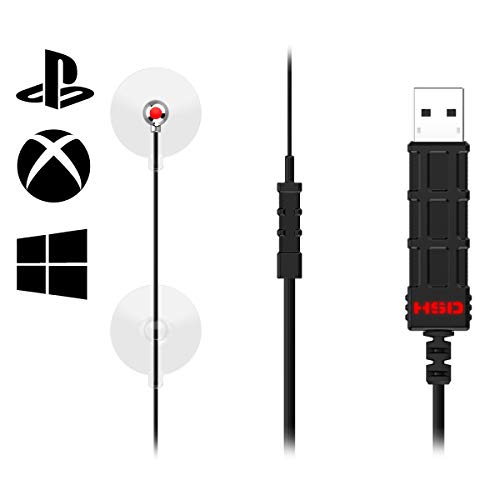
Hipshotdot PRO LED Aim Assist Mod

PDP Wired Game Controller for Xbox
More Details On Our Top Picks
The Dinosoo RGB wireless pad packs in extras that budget third-party controllers usually skip, making it a flexible companion for anyone running multiple platforms. Bluetooth support means it pairs with Xbox consoles and PC without a dongle, while a 3.5mm audio jack keeps your wired headset in play during late-night ranked sessions. The four rumble motors distribute vibration across the grips, so directional feedback in racing games and shooters feels more textured than a standard dual-rumble setup.
For hands that want more control, the built-in Turbo function and programmable macro buttons let you map repeatable inputs, useful in MMOs or fighting games where a combo lives or dies on timing. The six-axis gyroscope adds motion sensitivity for games that support it. Where it stands out most is customisation, but the added weight from those extras may bother players used to featherlight stock pads.
Reasons It Performs
- Four rumble motors spread feedback across both grips for a more immersive feel during firefights
- Turbo and macro support let you automate combos or rapid-fire inputs, helpful in fighting games and shooters alike
- Bluetooth connection pairs with Xbox and PC without needing an adapter, simplifying multi-platform use
- 3.5mm audio jack preserves wired headset compatibility without dongles or extra accessories
Points To Note
- Extra motors and internals add noticeable heft, which can wear on your hands during marathon sessions
- RGB lighting is a battery drain, so plan to recharge more often if you keep it on full glow
Feature Snapshot
Built For Tinkerers And Cross-Platform Players
Gamers who switch between Xbox and PC and want a single pad with macros, motion, and rumble will get strong value here.
Look Elsewhere When
Pick the KontrolFreek FPS Freek Galaxy Black instead if you only need a stick-upgrade accessory and prefer a lighter native controller.
KontrolFreek thumbsticks snap onto your existing Xbox controller and add instant height to the analog sticks, a small change that translates to noticeably better aim control in shooters. The Galaxy White pair ships with one high-rise convex stick for the right stick and one mid-rise for the left, an asymmetric setup that gives you extra range on the aiming axis while keeping movement smooth. The proprietary rubber compound grips your thumb in sweaty matches, reducing the micro-slips that throw off tracking shots.
Unlike the Dinosoo RGB Controller reviewed above, this isn’t a new gamepad, it’s an upgrade. You keep the controller you know and just improve the sticks. Most FPS players feel the difference within minutes, especially in mid-range duels where the right stick needs just a little more travel to land headshots. Depending on your grip style, the taller stick may take a session or two to feel natural.
The Value In It
- High-rise convex right stick adds 10mm of height for finer aim control during long-range fights
- Non-slip rubber compound improves thumb grip in sweaty or intense matches
- Asymmetric height pairing balances aim precision with left-stick movement control
Small Caveats
- Adds bulk on top of the original sticks, so it can feel awkward for players with smaller hands
- Rubber surface can attract dust and lint over time, requiring occasional cleaning to keep grip consistent
Right Fit For Shooter Specialists
Competitive FPS players who already own a comfortable Xbox controller and just want sharper aim input will find this accessory a quick, affordable upgrade.
Swap It Out When
Consider the Dinosoo RGB Wireless Controller instead if your controller is aging out and you’d rather replace the whole gamepad than modify it.
The Galaxy Black edition takes the same proven FPS Freek formula and swaps in concave tops, which cup the thumb rather than push it outward. For players who prefer a fingertip grip on the right stick, the concave shape keeps your thumb locked in during flick shots and tracking. The high-rise right stick still adds 10mm, while the mid-rise left adds 6.5mm, preserving the natural asymmetry that makes the FPS Freek line work for shooter-first players.
Where the Galaxy White pair feels neutral, this Black set leans aggressive, aimed at anyone who finds convex sticks too slippery under pressure. The non-slip rubber holds up in long Warzone or Apex sessions, and installation is just a press-on replacement of the factory caps. You may find the extra height makes the sticks poke out enough to catch on a couch cushion or bag pocket, so storage matters.
Well-Handled Touches
- Concave profile cradles the thumb, reducing slip during flick shots and rapid direction changes
- Same trusted 10mm high-rise on the right stick gives the same precision boost as the Galaxy White version
- Rubber compound maintains grip even when hands get clammy in tense ranked matches
A Few Limitations
- Concave shape may feel cramped for players who prefer the wider tactile feel of convex sticks
- Stick height can cause the controller to feel unstable when set face-down on flat surfaces
- Press-on design means adhesive can weaken over years of heavy use, occasionally requiring a replacement
Key Attributes
Made For Aggressive Aimers
Players who favour claw or fingertip grip and want their thumb locked into the stick during fast flicks will appreciate the concave design.
Consider Something Else When
Choose the KontrolFreek FPS Freek Galaxy White if you prefer convex tops and a more neutral thumb feel.
The Hipshotdot PRO takes a completely different approach to FPS aim, mounting a small USB-powered red dot on top of your TV bezel so you can shoot from the hip without looking down your sights. The idea is simple: instead of aiming through the in-game scope, you place the red dot on the target and fire, keeping your attention on the wider screen. For hardcore modes where the in-game sight sometimes vanishes or feels off, the permanent external dot is a reliable backup.
Unlike thumbstick upgrades like the KontrolFreek Galaxy Black, this is a TV-mounted accessory that requires some setup, and the position has to be re-aimed whenever you adjust your screen. The colour and brightness controls let you match the dot to your display, so it stays visible against bright or dark scenes. It’s a niche tool, but for run-and-gun playstyles in games like Call of Duty, it can feel like a cheat code, just expect curious looks from anyone watching you play.
Positive Points
- External red dot lets you keep both eyes on the action, useful in fast-paced run-and-gun firefights
- Stays active even if the in-game sight glitches or disappears, a backup you can trust in clutch moments
- Colour and brightness adjustments help the dot stay readable across different TV scenes and lighting
Trade Offs
- Requires USB power and physical mounting on your TV, adding cables and setup steps before you can play
- Needs re-alignment whenever you change TV position, angle, or swap displays, which can interrupt your session
- Won’t be allowed in some competitive or tournament settings where external aids are restricted
Right Fit For Hip-Fire Enthusiasts
Players who prefer aggressive run-and-gun play in casual lobbies and want a permanent reference point on screen will get a kick out of this one.
Reach For A Different Pick When
Pick the PDP Wired Game Controller if you want a standard gamepad upgrade without modifying your TV setup.
The PDP wired gamepad is officially licensed by Microsoft, so it drops into Xbox Series X|S, Xbox One, and Windows PCs without driver headaches. The wired USB connection eliminates input lag concerns and battery charging, making it a dependable choice for long sessions or tournament play where reliability matters more than wireless freedom. Dual rumble motors deliver standard haptic feedback, and a 3.5mm audio jack keeps your wired headset plugged in.
For casual FPS players or anyone needing a backup controller, the value here is hard to argue with, the red camouflage finish is a nice touch, and the dedicated share button streamlines clip capture. The free PDP Control Hub app lets you remap buttons and tweak trigger sensitivity, so you can fine-tune the response for twitch shooters. Where it differs from the Dinosoo RGB Controller is simplicity: no macros, no motion controls, no RGB, just a solid wired pad that does the basics well.
Useful Touches
- Wired USB connection means zero charging downtime and consistent input response for ranked play
- Officially licensed by Microsoft, ensuring full compatibility with Xbox consoles and PC without quirks
- 3.5mm audio jack plus on-D-pad volume controls keep headset management quick during matches
- Remappable buttons through the PDP Control Hub app let you tailor trigger and button layout to your FPS preferences
Honest Caveats
- Cable length can restrict your seating position, especially in larger living rooms far from the console
- Lacks the extra features (macros, motion, RGB) found on pricier third-party pads, so it’s more limited out of the box
Who Should Grab It
Casual Xbox and PC players who want a reliable, officially supported pad for FPS sessions without overspending will be well served here.
Where Another Pick Suits Better
Choose the Dinosoo RGB Wireless Controller if wireless freedom and programmable macros matter more to your setup than official licensing.
What To Weigh Before Choosing Fps Controllers For Xbox
Stick Height And Aim Precision
A taller right analog stick gives your thumb more travel distance, which translates into finer adjustments during long-range duels. Low-profile sticks, by contrast, demand less thumb movement but can feel twitchy when precision matters. If you main a sniper or DMR in Halo or Warzone, the extra height from accessories like the KontrolFreek FPS Freek line tends to pay off in headshot percentage.
Grip Style And Comfort
Convex stick tops let the thumb move freely, while concave cups lock it in place for flick shots. Players with smaller hands may find tall sticks uncomfortable, and heavy controllers with extra rumble motors can wear on the wrist during marathon sessions. Matching the stick shape and pad weight to your grip style matters more than chasing the tallest option.
Wired Versus Wireless
Wired controllers like the PDP gamepad offer zero input lag and no battery concerns, ideal for tournaments or long co-op nights. Wireless pads give you couch freedom but add charging routines and a small amount of input latency. The choice comes down to how far you sit from your console and whether you play competitively where milliseconds count.
Extra Features Versus Simplicity
Macro buttons, motion sensors, RGB lighting, and rumble motor counts all add personality but also weight and complexity. A controller loaded with extras suits a tinkerer who enjoys remapping inputs for genre-specific builds. A streamlined pad works better for someone who just wants to pick up and play without fiddling with software or charging cycles.
Picking The Right Setup Without Overpaying
Mistakes Worth Dodging
Buying a controller packed with features you never use is the most common slip-up in this category. Macro buttons and motion sensors sound great on paper, but a simpler wired pad often serves casual players better at a fraction of the cost. Compatibility matters too, not every third-party pad supports every Xbox menu feature, so check that the controller handles headsets, screenshots, and system navigation before committing.
Where The Extra Money Goes
Premium tiers in this category usually buy better build quality, tighter thumbstick tension, and longer-lasting parts. Hall-effect sticks (a contactless sensor design that resists stick drift) and metal-construction components cost more but reduce common wear issues like stick drift over years of use. For players logging serious hours each week, that upgrade pays for itself in avoided replacements.
Key Considerations Across These Picks
Common Buying Slip Ups
Overlooking stick drift protection is a frequent mistake. Cheaper pads use potentiometer-based sticks (analog sensors that wear with friction over time), which can develop drift after a year of heavy use. Mid-tier options with hall-effect or improved sensor designs cost more upfront but tend to last longer for daily gamers.
When Paying More Pays Off
Spending up makes sense once you start logging serious ranked hours or streaming. Tighter triggers, remappable paddles, and software-driven customisation let you tune the pad to your exact playstyle. For anyone playing a few hours a week, a budget pad handles the job just fine, and the savings can go toward games instead.
Frequently Asked Questions
What is FPS Freek and how does it work?
FPS Freek is a snap-on thumbstick accessory that adds height to your existing controller’s analog sticks. The extra height gives your thumb more travel, which generally improves aim precision in shooters where small adjustments matter.
Do thumbstick extenders actually improve aim?
Most players notice a real difference in long-range tracking and headshot accuracy after a short adjustment period. The improvement depends on your grip style and the game, but for controller FPS players, taller sticks tend to feel more precise than stock ones.
Are third-party Xbox controllers reliable for FPS games?
Reliability varies by brand, but officially licensed pads from Microsoft-approved partners like PDP tend to work without quirks. Unlicensed pads may skip features or have less consistent build quality, so checking for the official license label is a smart first step.
Can you use a wired controller on Xbox Series X?
Yes, the Xbox Series X supports USB-wired controllers that are officially licensed for the console. They plug into the front USB port and work identically to wireless pads in supported games.
What is stick drift and how do you prevent it?
Stick drift happens when an analog stick registers input without being touched, usually from worn sensors inside the stick mechanism. Choosing controllers with hall-effect sensors or higher-quality components, plus keeping the controller away from dust and spills, helps extend its life.
Final Verdict
The right pick depends on your style: thumbstick extenders like the KontrolFreek Galaxy pair for sharper aim, the Dinosoo RGB pad for loaded features, the Hipshotdot PRO for a niche run-and-gun advantage, and the PDP wired controller for solid, no-fuss reliability. Start with the one that solves your biggest pain point, whether that’s drift, aim precision, or a tired old gamepad, and you can’t go far wrong.



