


A serious home cockpit starts with a yoke that feels right in the hand, and the gap between a budget stick and a well-engineered one shows up fast during a long cross-country in Microsoft Flight Simulator or X-Plane. Anyone flying general aviation in a sim quickly learns that a precise self-centering yoke with the right rotation arc changes how naturally the aircraft responds. The ten picks below cover the range from entry-level yokes built for first-timers to full systems that bundle throttle quadrants, rudder pedals, and switch panels for pilots building a permanent sim desk.
A Quick View Of The Lineup

Logitech G Pro Flight Yoke System + Rudder Pedals

Honeycomb Alpha Flight Controls Yoke & Switch Panel
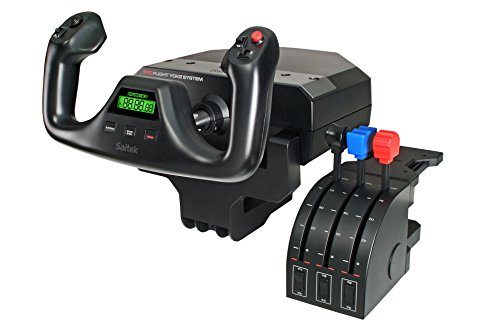
Logitech G Saitek PRO USB Flight Yoke (Renewed)

Honeycomb Alpha LITE

Honeycomb Aeronautical Alpha Yoke & Switch Panel

CH Products Flight Sim Yoke USB

Turtle Beach VelocityOne Flight Universal System

Honeycomb Alpha Flight Controls Yoke Bundle

Logitech G PRO Flight Yoke System

Logitech G X52 Pro Flight Switch Panel
A Deeper Look At The Lineup
Setting up a believable sim cockpit in a single afternoon becomes much easier when the yoke and rudder pedals arrive in the same box, and that convenience is the headline of the Logitech G Pro Flight Yoke System + Pro Flight Rudder Pedals bundle. The yoke brings 14 button controls, a POV hat, and a three-position mode switch, and the accompanying pedals add self-centering action plus differential toe brakes for runway steering. The bundle suits anyone stepping into flight simulation for the first time who wants the rudder, brakes, and pitch already wired up.
Clamps and the standard Logitech desk-mount footprint work for most sim desks, though a heavier rig benefits from bolting the components down. For most desks, the included hardware is enough to keep things stable during coordinated turns.
Useful Strengths
- Yoke and pedals ship as one package, removing the need to research compatibility separately.
- 54 programmable controls give plenty of headroom for mapping radios, trim, and autopilot functions.
- Self-centering pedals with differential toe brakes deliver believable rudder authority on the runway.
- Adjustable foot rests with non-slip surfaces accommodate a wide range of shoe sizes.
- Modular mounting means you can start with the bundle and expand into throttle quadrants later.
Worth Noting
- The plastic-heavy construction is sturdy but lacks the heft of all-metal yokes.
- Cable management across three USB connections can clutter a smaller desk without planning.
Quick Facts
Who Should Grab It
First-time sim builders who want a complete yoke and rudder package on day one without sourcing components separately.
Skip It When
Pilots who already own a Honeycomb Alpha Yoke should look at the Turtle Beach VelocityOne Flight instead for a different mounting footprint.
Honeycomb built its reputation on the Alpha yoke’s solid feel, and that DNA carries into the Honeycomb Alpha Flight Controls Yoke & Switch Panel. A solid steel shaft rides on dual linear ball bearings, which gives 180 degrees of rotation without the wobble cheaper yokes develop after months of use. The integrated switch panel adds master, alternator, avionics, and light switches plus a five-position ignition, so startup sequences feel more like the real thing than clicking through menus.
A dampened, self-centering mechanism with no center detent keeps inputs smooth, and the red LED backlighting on the switch panel helps during night flights. The result is a yoke that feels closer to a real Cessna or Piper than a game controller with a steering wheel bolted on.
What Makes Sense
- Steel shaft with linear ball bearings delivers premium smoothness at the price point.
- 180-degree rotation matches the travel of real general aviation yokes for authentic muscle memory.
- Integrated switch panel replaces the need to buy a separate radio stack as a starter piece.
- Red backlit switches remain readable without lighting up the room during evening sessions.
Trade Offs
- Heavier chassis means you need a sturdy desk or a dedicated mounting solution.
- No throttle quadrant included, so that becomes a separate purchase for most pilots.
Made For
Sim enthusiasts and student pilots training for real-world check rides who want yoke feel that translates to actual aircraft handling.
Look Elsewhere When
Beginners unsure how much sim time they’ll log each week may find the Honeycomb Alpha LITE a more forgiving starting point.
Renewed condition does not change the architecture of a product, and the Logitech G Saitek PRO USB Flight Yoke System (Renewed) keeps the same Saitek DNA that made the original a sim standard. The yoke still pairs with Logitech’s throttle quadrant, and the programming software that built the platform’s reputation still works the same way. Pilots on tighter budgets get a path into the Saitek ecosystem without paying full retail.
The trade-off with any renewed unit is cosmetic variability, and that shows up most in the finish on the handles or the desk clamps. For most setups, a quick inspection at unboxing and a soft cloth wipe-down is enough to make a renewed unit feel like new.
Strong Points
- Proven Saitek design at a lower entry cost than the brand-new equivalent.
- Compatible with the full Logitech flight ecosystem of throttles, pedals, and switch panels.
- USB connection keeps the install simple on modern PCs without legacy ports.
Points To Note
- Renewed condition means cosmetic wear and a shorter practical lifespan than a sealed unit.
- Manufacturer accessories and replacement parts can be harder to source for older Saitek hardware.
Right Fit For
Budget-conscious sim pilots who want Saitek compatibility and are comfortable with a renewed-condition product.
Swap It Out When
Anyone building a long-term sim desk should consider the Logitech G PRO Flight Yoke System for newer Logitech support and warranty pathways.
Honeycomb trimmed the Alpha platform down to the essentials, and the Honeycomb Alpha LITE exists for pilots who do not yet need a full switch panel bolted to their desk. The 180-degree rotation, self-centering mechanism, and minimal dead zone carry over from the standard Alpha, so the core flying feel stays familiar. The LITE is essentially the front seat of the cockpit for users still deciding how far they want to take their sim setup.
Entry-level positioning means the LITE does not include the master, alternator, and avionics switches the bigger Alpha has built in. Pilots flying complex airliners or twin-engine props will still want the full Honeycomb Alpha or a dedicated switch panel down the road.
Noteworthy Benefits
- Same 180-degree self-centering feel as the full Alpha at a lower cost.
- Compact footprint fits smaller desks where the standard Alpha’s base would crowd the workspace.
- Honeycomb’s build quality carries through despite the trimmed feature set.
Honest Caveats
- No integrated switch panel, so complex aircraft startup requires keyboard or mouse for now.
- Lighter overall weight means mounting clamps need a solid edge to grip onto during aggressive maneuvers.
Best Suited To
First-time flight sim pilots who want Honeycomb’s flying feel without committing to the full switch panel and price tag.
Not Your Match When
Pilots already flying complex aircraft in sim should pick the Honeycomb Alpha Flight Controls Yoke & Switch Panel for the built-in avionics controls.
The Honeycomb Aeronautical Alpha Flight Controls Yoke & Switch Panel is the version of the Alpha that earned the brand its reputation. Designed and developed in California by pilots and aerospace engineers, the yoke pairs 180-degree rotation with a solid steel shaft riding on dual linear ball bearings, giving the smooth, predictable response that real-world training demands. The base carries a full switch panel with master, alternator, avionics, and light controls alongside a five-position ignition, so startup flows naturally from switch to throttle.
Honeycomb’s Dual Mounting Solution is the unsung detail here, and the two heavy steel clamps and a 3M Micro-Suction Pad (rated to roughly 40 pounds of tensile strength) give pilots real choices. Thicker tabletops work best with the suction pad, while standard desks get the clamps.
What Helps Most
- Solid steel shaft with linear ball bearings sets a benchmark for smoothness in this price tier.
- Eight-way hat switch, dual rocker switches, and a push-to-talk button on each handle cover most sim needs.
- Dual mounting system (clamps plus 3M suction pad) adapts to thick tabletops and standard desks.
- Backed by engineers with actual aviation backgrounds, which shows up in switch labeling and ergonomics.
Points To Keep In Mind
- Heavier than entry-level yokes, so portable sim setups may find it cumbersome to pack.
- No throttle quadrant in the box, which means a separate purchase for most pilots.
Quick Facts
Perfect Match For
Serious home cockpit builders who want pilot-engineered ergonomics and a yoke that holds its calibration over years of use.
Where Another Pick Suits Better
Xbox or cross-platform console pilots should look at the Turtle Beach VelocityOne Flight, which is built specifically for that audience.
The CH Products Flight Sim Yoke USB has been a fixture in serious sim setups for years, and its longevity speaks to a design that simply holds up. Five axes spread across the grips and levers cover aileron, elevator, throttle, prop, and mixture, while the optional PC programming software opens up 144 programmable functions. Plug-and-play setup keeps the entry barrier low for pilots who want to start flying without a long configuration process.
Older CH Products hardware has a track record of surviving sim-room conditions and frequent travel between events. For most pilots, the all-plastic body is a real trade-off: it keeps weight down for portable rigs but lacks the reassuring solidity of a steel-shaft design.
Positive Takeaways
- Five axes cover aileron, elevator, throttle, prop, and mixture without a separate throttle unit.
- 144 programmable functions through CH’s PC software handle complex aircraft with room to spare.
- Plug-and-play USB works across modern sim titles without driver headaches.
Where It May Fall Short
- Plastic construction feels dated next to steel-shaft yokes like the Honeycomb Alpha.
- No native switch panel, so pilots flying complex aircraft will need a separate hardware stack.
Whose Shelf It Belongs On
Long-time sim veterans and pilots who value multi-axis programming over the latest ergonomic refinements.
Reach For A Different Pick When
Pilots wanting modern switch integration should consider the Honeycomb Aeronautical Alpha Yoke & Switch Panel for a more current feature set.
Cross-platform flight sim is its own niche, and the Turtle Beach VelocityOne Flight Universal Control System was built specifically for pilots who split time between Xbox Series X, Xbox Series S, Xbox One, and Windows PCs. The all-in-one design folds a throttle quadrant, trim wheel, rudder controls, and a 180-degree yoke handle into a single unit. A non-contact hall effect sensor on the yoke handle keeps the inputs precise, and a full-color flight management display makes configuration and in-flight reference quick.
The modular throttle quadrant accepts customizable lever handles and buttons, so the same hardware covers a Cessna 172 today and a Boeing 737 later. For most pilots, that flexibility is what justifies the desk space.
Where It Excels
- Hall effect sensor on the yoke handle avoids the contact-wear issues of potentiometer-based yokes.
- Modular throttle quadrant with configurable levers adapts from single-engine to airliner profiles.
- Full-color flight management display simplifies setup and surfaces in-flight information.
- Single-unit design reduces cable clutter compared to multi-component bundles.
Practical Considerations
- Larger footprint than a standalone yoke, which may not suit cramped sim desks.
- Cross-platform support sometimes trails PC-only yokes when new sim titles launch.
Feature Snapshot
Built With In Mind
Cross-platform pilots who want one hardware set to handle Xbox and PC sim sessions at the same desk.
Consider Something Else When
PC-only pilots with an existing rudder pedal setup may prefer the Honeycomb Alpha Flight Controls Yoke & Switch Panel for its switch integration.
Bundles change the math on sim upgrades, and the Honeycomb Alpha Flight Controls Yoke Bundle pairs the Alpha yoke and switch panel with the Bravo Throttle Quadrant in a single package. The Bravo is genuinely configurable, covering single-engine general aviation through four-engine commercial aircraft, so the same throttle hardware supports both a Cherokee and a 747. The result is a believable sim cockpit for pilots who want the most common controls wired up without buying components one at a time.
Pilots already running a desk-mounted rig will want to plan space for the Bravo, which is wider than a standalone throttle. For most desks, sliding the existing keyboard tray back a few inches is enough to make room.
The Practical Payoff
- Yoke, switch panel, and Bravo throttle arrive together, eliminating compatibility guesswork.
- Bravo’s configurable throttle setup supports single-engine through four-engine profiles.
- Honeycomb’s mounting hardware works across the bundle without extra adapters.
- One software ecosystem across the bundle simplifies profile sharing between sim titles.
Less Ideal Details
- Larger combined footprint requires a wider desk or dedicated sim table.
- Bundle pricing is higher than a single Alpha yoke, so budget-conscious pilots may need to scale up gradually.
Who Will Love This
Sim pilots planning a multi-engine or airliner profile who want the throttle quadrant sorted on day one.
Another Choice May Suit
Single-engine recreational pilots on tighter budgets should look at the Honeycomb Alpha LITE to get the flying feel first.
The Logitech G PRO Flight Yoke System is the standalone version of the yoke that anchors the Logitech G Pro Flight ecosystem, and it carries the same stainless steel shaft and smooth pitch/roll control as the bundled units. In the box you get the yoke with a 1.8-meter USB cable and a flight throttle quadrant with a 1.5-meter PS/2 cable, plus two desk clamps. The 14 button controls, POV hat, and three-position mode switch keep programming simple for new sim pilots while still leaving headroom for muscle memory training.
Logitech’s software integration with Microsoft Flight Simulator and X-Plane means most aircraft profiles are pre-mapped. For most pilots, that means time flying rather than time configuring.
Practical Pluses
- Stainless steel yoke shaft provides smooth, accurate pitch and roll inputs.
- Includes both yoke and throttle quadrant in a single purchase, simplifying the starter setup.
- Pre-mapped profiles for major sim titles reduce setup time on day one.
A Few Limitations
- PS/2 throttle cable may require an adapter for newer PCs that have dropped legacy ports.
- Lacks the integrated switch panel that the Honeycomb Alpha offers in its base unit.
Spec Overview
The Right Fit
Intermediate sim pilots who want Logitech’s software ecosystem and a stainless steel shaft at a single-component price.
Skip It When
Pilots wanting integrated avionics switches should consider the Honeycomb Aeronautical Alpha Yoke & Switch Panel instead.
Expanding an existing sim rig is a different conversation than starting one, and the Logitech G X52 Pro Flight Switch Panel is built for pilots adding modular hardware to a setup they already own. The unit works as part of Logitech’s X52 HOTAS (Hands On Throttle and Stick) family, and the magnetic, non-contact X and Y axis sensors on the connected stick deliver pinpoint accuracy. A 3D twist rudder control with rudder lock keeps the axis available for pilots without separate rudder pedals, while a built-in multifunction LCD shows programmed commands and a flight timer.
Saitek’s range of instrument panels stack or sit side-by-side, so the same mounting brackets support a Switch Panel to the left of a yoke and a Multi Panel above a Radio Panel. The realistic landing gear control with LEDs syncing to Microsoft FSX gear status is a small detail that adds a lot of immersion.
Reasons It Performs
- Modular design stacks with other Saitek instrument panels for a custom cockpit layout.
- Magnetic non-contact sensors on the connected stick reduce long-term wear.
- Multifunction LCD surfaces programmed commands before activation, plus a flight timer.
Small Caveats
- Specialty expansion piece, so it makes less sense without an existing Logitech or Saitek rig.
- Some sim features are tuned for Microsoft FSX, which may affect value for X-Plane or P3D-only pilots.
Who It Suits Best
Sim owners building out an established Logitech or Saitek cockpit who want to add modular switch panels in stages.
A Better Fit Elsewhere
First-time sim builders should start with the Logitech G PRO Flight Yoke System instead and expand from there.
What Matters Most Before Choosing Flight Yokes
A yoke that feels right in a calm cruise can feel sloppy in turbulence, so the rotation arc and the centering mechanism deserve attention first. Most general aviation yokes offer 180 degrees of rotation with a self-centering spring, and the smoothness of that centering comes from the shaft material and bearings inside. A solid steel shaft with linear ball bearings costs more but holds its calibration over years of use, while plastic or hollow shafts tend to develop slop after months of heavy flying.
Mounting matters just as much as the hardware itself, and a yoke that walks across the desk during coordinated turns makes precise flying harder than it needs to be. Heavy steel clamps grip standard desks, and a 3M Micro-Suction Pad works for thicker tabletops where clamps would not seat. For heavier units, a dedicated sim table or a bolted-down rig keeps everything stable.
The control layout should match the aircraft you fly most, and that is where switch panels, hat switches, and programmable buttons earn their place. A simple Cessna profile needs less than a complex airliner, and adding a dedicated switch panel later is easier than replacing a yoke that came up short. Pilots who fly across multiple aircraft benefit from configurable throttle quadrants and modular panels that adapt as the hangar grows.
Real-world use scenarios shape priorities too, and a pilot running a 30-minute commute in X-Plane does not need the same hardware as someone logging five-hour IFR sessions. Heavier steel-shaft yokes reward longer sessions, while lighter units work for casual flights.
Common Shopping Slip Ups And Where The Money Goes
Mistakes Worth Dodging
The most common mistake in this category is buying a yoke without thinking about rudder control, since coordinated turns feel wrong without a way to control the rudder separately. A yoke-only purchase is fine if pedals are already owned, but bare-bones kits should come with a clear plan for the rudder.
Another trap is choosing a yoke on the look of the handles alone, since the shaft, bearings, and centering mechanism do the real work during a flight. Plastic bodies around quality internals can be a smarter pick than heavy externals hiding loose internals. Pilots often overlook the mounting solution too, and a yoke that walks under aggressive inputs is more annoying than one with slightly less premium materials.
What The Higher Tier Buys
Stepping up to a premium yoke usually means a solid steel shaft with linear ball bearings, a tighter self-centering mechanism, and an integrated switch panel that covers master, alternator, avionics, and light controls. The build quality shows up in calibration hold, where a premium yoke still feels the same a year in while budget units develop slop.
Modular mounting solutions, including heavy steel clamps and 3M suction pads, also tend to arrive with higher-tier picks. Pilots who fly complex aircraft in sim benefit most from the upgrade, since the additional switches and the smoother inputs reduce the gap between sim time and real-world muscle memory.
Frequently Asked Questions
What does a flight yoke do in a simulator?
A flight yoke replaces the mouse or gamepad for pitch and roll control, mimicking the steering column found in general aviation aircraft. Most yokes also include hat switches, buttons, and sometimes integrated switch panels for radios and electrical controls.
Do flight yokes need rudder pedals?
Coordinated turns in real aircraft require separate rudder control, and most sim pilots benefit from dedicated rudder pedals or a twist-handle rudder function. A yoke alone works for casual flying, but serious IFR or multi-engine work feels more authentic with the pedals.
Are metal yokes worth it over plastic?
Metal yokes, especially those with solid steel shafts and linear ball bearings, hold their calibration and smoothness over years of use. Plastic yokes are lighter and cheaper, but they tend to develop slop at the centering mechanism after extended heavy use.
Can a flight yoke work on Xbox consoles?
Cross-platform yokes like the Turtle Beach VelocityOne Flight are built specifically for Xbox Series X, Xbox Series S, Xbox One, and Windows PCs. Most PC-only yokes do not have native console support, so check platform compatibility before purchasing.
How long does a flight yoke typically last?
With reasonable care, a well-built flight yoke can last several years of regular sim use. Steel-shaft models tend to outlast plastic units because the centering mechanism and bearings resist wear better.
Final Verdict
The right flight yoke depends on how much sim time you log and which aircraft you fly most, and the ten picks above cover everything from a first-day starter to a multi-component sim rig. The Logitech G Pro Flight Yoke System + Rudder Pedals bundle and the Honeycomb Aeronautical Alpha Yoke & Switch Panel stand out as the strongest all-around choices, while the Honeycomb Alpha LITE and the Logitech G Saitek PRO USB Flight Yoke (Renewed) give budget-conscious pilots a credible entry point. The honest read is that any of these yokes will sharpen your sim flying once you pair it with the right throttle, pedals, and switch setup for the aircraft in your hangar.



