


A proper flight simulator setup lives or dies on the controls in your hands. Sliding a mouse around a virtual cockpit works for short hops, but the moment you want to feel a crosswind correction or trim a heavy Cessna on final, a dedicated yoke transforms the experience. The challenge is that the category stretches from budget yokes that mount on a desk to full modular cockpits that swallow your whole office.
This list covers ten options across that spectrum, from standalone yokes and throttle quadrants to rudder pedals and cockpit frames. Each pick has a specific job, so matching one to your space, sim of choice, and ambition level matters more than chasing the most expensive box. The details below help you sort which belongs in your sim room.
A Fast Comparison Of The Options

Logitech G Pro Flight Yoke and Rudder Pedals Bundle

SimFab Modular Flight Simulator Cockpit MSFS Edition

Honeycomb Alpha Flight Controls Yoke and Switch Panel

Logitech G USB PRO Flight Rudder Pedals

Honeycomb Alpha Flight Controls Yoke and Switch Panel Renewed

Thrustmaster TPR Rudder Pedals

Logitech G USB Pro Flight Radio Panel
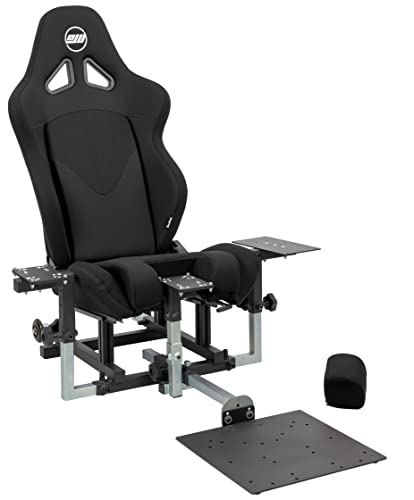
SimFab Modular Flight Simulator Cockpit DCS Edition
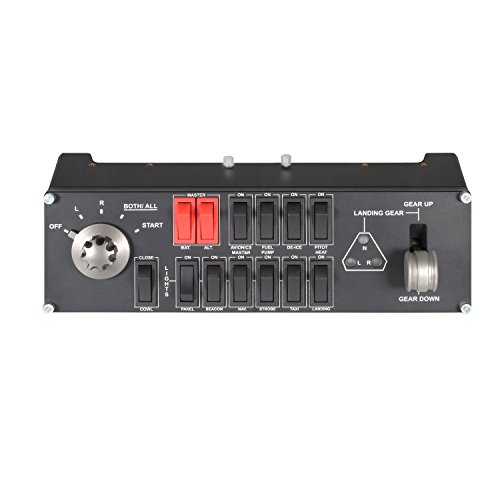
Saitek PRO Flight Switch Panel (PZ55)

Honeycomb Bravo Throttle Quadrant
What Each Pick Brings To The Table
Starting a sim build from a bare desk can feel overwhelming, which is exactly why this Logitech G bundle exists. The package combines a full yoke with throttle quadrant and a matching set of rudder pedals, so you handle pitch, roll, differential braking, and rudder input from day one without hunting for separate parts.
For someone dipping a toe into MSFS or X-Plane, the path of least resistance matters. The yoke offers enough programmable inputs to cover most general aviation aircraft, while the pedals handle the runway directional control that a desk clamp simply cannot replicate. Most aspiring pilots find this bundle gets them airborne faster than mixing brands.
Advantages To Know
- Yoke plus throttle quadrant plus rudder pedals in a single purchase
- Adjustable pedal footrests accommodate a wide range of shoe sizes
- Differential toe brakes give realistic runway steering feedback
- 54+ programmable controls cover most general aviation switchology
- Self-centering pedals return to neutral without manual adjustment
Points To Keep In Mind
- Plastic construction feels lighter than metal alternatives on heavy use
- Suction-cup desk mounting may need re-seating on smooth surfaces
Who It Suits Best
First-time flight sim builders who want a working cockpit in one box without sourcing components piecemeal.
Where Another Pick Suits Better
Simmers who already own rudder pedals and want a sturdier yoke should consider the Honeycomb Alpha Flight Controls Yoke and Switch Panel instead.
Once sim sessions stretch past an hour, leaning over a desk clamp gets old fast. The SimFab MSFS cockpit solves the posture problem with a purpose-built chassis, foam seat, and dedicated mounting plates for your existing controls.
Compatibility is the headline feature here. The frame accepts Logitech, Honeycomb, Turtle Beach, and CH Products gear, so you can mount whatever you already own or plan to upgrade into. Long-haul flyers who run cross-country legs in the sim will appreciate having a planted, ergonomic seat rather than an office chair bolted to a controller.
Everyday Wins
- Full-size foam seat with recline reduces fatigue on long sessions
- Cross-brand compatibility protects existing hardware investments
- Mounting hardware included so assembly stays straightforward
Trade Offs
- Frame footprint requires a dedicated room or corner of a room
- Seat upholstery may need vacuuming in dusty gaming spaces
- Assembly time runs longer than a simple desk clamp install
Made For
Sim enthusiasts running multi-hour MSFS legs who want a proper seated rig instead of improvising with office furniture.
Consider Something Else When
Apartment dwellers with limited floor space should reach for the Honeycomb Bravo Throttle Quadrant, which adds realism without demanding a full cockpit frame.
The Honeycomb Alpha has earned a near-cult following among general aviation simmers, and the build quality is the reason. A solid steel shaft running through two linear ball bearings gives the yoke a smoothness that plastic-clamped units struggle to match.
For pilots flying GA aircraft like the Cessna 172 or Bonanza, the 180-degree yoke rotation and self-centering mechanism feel close to the real thing. The integrated switch panel adds master, alternator, avionics, and light switches alongside a five-position ignition, so you spend less time hunting through software menus. Compared to the Logitech bundle above, this yoke leans heavier and sturdier, trading the included pedals for a more refined control feel.
Useful Highlights
- Solid steel shaft and dual ball bearings deliver smooth, accurate rotation
- Self-centering mechanism with minimal deadzone for precise inputs
- Red LED backlighting on the switch panel aids night flight operations
- Five-position ignition switch matches real aircraft startup sequences
Honest Caveats
- Heavier chassis demands a solid mounting surface, not a flimsy desk
- Switch panel integration works best when paired with the Honeycomb ecosystem
Key Specs
Right Fit For
General aviation simmers flying Cessna and Piper aircraft who want a metal-shaft yoke with built-in switch logic.
Look Elsewhere When
Hardcore combat sim pilots running DCS modules should consider the SimFab Modular Flight Simulator Cockpit DCS Edition for its side-stick and throttle mounting layout.
Some simmers already own a yoke they love and just need foot control added to the rig. The Logitech G USB Pro Flight Rudder Pedals target exactly that gap, offering self-centering action and adjustable damping without forcing a full ecosystem upgrade.
For a setup built around a Honeycomb or CH Products yoke, these pedals slot in cleanly via USB. Tension adjustment lets you tune the resistance to match your flying style, and the partial metal construction holds up to years of heel-toe braking. The 1.8-meter cable gives enough reach to place them on a low footrest without strain.
A Few Highlights
- Adjustable damping suits aggressive or smooth pedal styles
- Non-slip footrest surfaces stay planted during turbulence corrections
- Saitek Smart Technology software enables custom button mapping
- USB 2.0 connectivity keeps installation driver-light on modern PCs
Worth Noting
- Toe brake feel is functional but not as nuanced as metal-shaft alternatives
- Footrest adjustability favors average shoe sizes over very large or small feet
Best Suited To
Simmers with an existing yoke and throttle setup who only need to add rudder and brake inputs to round out the controls.
A Better Fit Elsewhere
Pilots who want smoother heel-toe transitions should look at the Thrustmaster TPR Rudder Pedals for their suspended mechanism.
Honeycomb’s Alpha yoke delivers near-universal praise, but the retail price places it out of reach for hobbyists on tight budgets. The renewed edition offers the same steel-shaft, ball-bearing core at a reduced cost, professionally inspected and cleaned before resale.
For someone stepping up from a plastic Logitech yoke without paying full retail, this option makes sense. You get the same 180-degree rotation, self-centering feel, and switch panel that earned the original its reputation. Accessories may ship in generic packaging, but the controls themselves perform identically to a new unit.
What Works In Its Favor
- Same steel-shaft, dual-bearing build as the new Alpha yoke
- Professional inspection and cleaning before resale
- Reduced cost opens up the Honeycomb ecosystem to budget shoppers
Less Ideal Details
- Generic packaging and possible non-original accessories
- Stock can be inconsistent compared to the new model
Who Will Love This
GA simmers who want Honeycomb build quality but prefer spending less on a professionally refurbished unit.
Not Your Match When
Pilots who want factory-sealed packaging and full warranty coverage should grab the new Honeycomb Alpha Flight Controls Yoke and Switch Panel instead.
Where most flight sim pedals rely on sliding mechanisms, the Thrustmaster TPR takes a different approach with a suspended PENDUL_R design. That floating architecture lets the pedals move more naturally, mimicking how real aircraft rudder pedals hang from a pivot rather than sliding on a track.
The result is a fluid motion that procedural training sim users tend to appreciate, especially during crosswind landings where smooth rudder modulation matters. The contactless Hall Effect AccuRate Technology sensor avoids the wear patterns that plague potentiometer-based pedals, so accuracy holds up over years of daily flights.
Where It Excels
- Suspended PENDUL_R mechanism delivers natural, smooth pedal travel
- Contactless Hall Effect sensor avoids mechanical wear over time
- Wide footrest area accommodates different stance preferences
Practical Considerations
- Suspended design requires a flat, stable floor for proper alignment
- Heel-toe brake differentiation takes practice for first-time pedal users
- Larger footprint than compact sliding-pedal alternatives
Perfect Match For
Simmers who run procedural trainers and airliner modules where precise, repeatable rudder input matters more than aggressive aerobatic maneuvers.
Swap It Out When
Desk-mounted setups with limited floor space should consider the Logitech G USB Pro Flight Rudder Pedals, which sit flatter and tighter against a baseboard.
Once you move beyond VFR circuits and start flying IFR routes, the cockpit screen real estate gets crowded with COM1, COM2, NAV1, NAV2, and transponder tuning. The Logitech G Radio Panel dedicates physical knobs and dual displays to those functions, freeing your mouse from endless menu hunting.
The unit pairs naturally with FSX, X-Plane, and Prepar3D, syncing frequency data to the sim in real time. For pilots running airliner add-ons, having stand-alone radio hardware shortens the learning curve because the workflow matches a real Garmin stack. The chunky detents on each rotary knob give satisfying feedback during frequency swaps.
What Helps Most
- Dedicated COM and NAV dual-stack for IFR flight planning
- Real-time frequency sync with major desktop sim platforms
- Detented knobs prevent accidental frequency drift during turbulence
Factors To Consider
- Only meaningful for IFR and airliner workflows, not basic GA circuits
- Requires desk or frame space alongside yoke and throttle
Feature Snapshot
Built With In Mind
IFR and airliner simmers who want physical radios without clicking through virtual cockpit menus mid-flight.
Reach For A Different Pick When
VFR-only weekend flyers should consider the Saitek PRO Flight Switch Panel for its landing gear and lighting controls instead.
Digital Combat Simulator players have very different ergonomic needs than civilian pilots. The DCS Edition cockpit from SimFab reflects that, with a side-stick mount on the right, throttle on the left, and a center-mount bracket for cyclic controls and grips with extensions.
Compatibility is broad on the combat side, supporting Thrustmaster Warthog, WinWing, VirPil, and VKB hardware right out of the box. The seat features a patented removable foam insert for center-stick configurations, and the chassis can be upgraded later for general aviation or sim racing. For someone building a long-term sim room that might shift toward space sims or racing down the road, that modularity pays off.
What Stands Out
- Side-stick and center-stick mounting covers jet and helicopter layouts
- Cross-compatibility with major combat sim hardware brands
- Upgradable chassis design adapts as your interests evolve
- Full-size foam seat with sliders and recline supports long DCS missions
Possible Compromises
- Initial build leans toward combat rather than civilian flight ergonomics
- Assembly requires time and a clear workspace to lay out parts
Whose Shelf It Belongs On
DCS World pilots running modules like the A-10C, F/A-18, or Apache who want their HOTAS gear properly anchored in a stable frame.
Skip It When
Civilian-only flyers should look at the SimFab Modular Flight Simulator Cockpit MSFS Edition, which is configured for yoke-and-throttle layouts.
The Saitek PZ55 has been a fixture of FSX and Prepar3D cockpits for over a decade, and it remains relevant for simmers flying classic airliners. The panel handles landing gear, engine start, and auxiliary cockpit functions with physical switches that match the look of a real overhead panel.
LED indicators reflect actual gear status from the sim, so you see green when the gear is down and locked without alt-tabbing to a virtual cockpit. The unit attaches directly to the base of the Saitek Pro Flight Yoke System, which makes it a clean addition for anyone already running that yoke. For older FSX-era setups, this panel still earns its place.
Notable Upsides
- LED gear status mirrors sim state in real time
- Direct mounting to the Saitek Pro Flight Yoke base keeps the desk tidy
- Engine start switches replicate classic airliner startup sequences
Where It Is Less Suited
- Best experience lives in FSX, FSX Steam, and Prepar3D environments
- Limited relevance for modern MSFS or X-Plane default aircraft
Quick Facts
Who Should Grab It
FSX and Prepar3D enthusiasts flying classic airliners who want an authentic overhead panel feel at a modest cost.
Another Choice May Suit
MSFS pilots should consider the Logitech G USB Pro Flight Radio Panel, which integrates more cleanly with the current Microsoft Flight Simulator ecosystem.
A yoke without a dedicated throttle lever leaves you reaching for keyboard shortcuts during power adjustments, which breaks the immersion that a proper yoke just built. The Honeycomb Bravo Throttle Quadrant closes that gap with configurable levers that scale from a single-engine Cessna to a four-engine jumbo jet.
Beyond throttle, the Bravo packs an autopilot panel, annunciator with 14 warning lights, gear lever with red and green LED indicators, and a trim wheel. That depth makes it just as useful in a 737 sim as in a Baron, so the unit grows with you as you move from basic trainers to complex airliners.
Features That Help
- Configurable throttle setup from single-engine to four-engine aircraft
- Integrated autopilot and annunciator panel eliminate keyboard shortcuts
- Trim wheel replicates real aircraft trim management
- LED gear indicators confirm landing gear position visually
Soft Spots
- Learning curve for first-time users to map all panels correctly
- Weight and size demand a stable mounting surface
At A Glance
The Right Fit
Pilots flying a mix of general aviation and airliner modules who want one throttle unit that adapts across both worlds.
Where A Sibling Pick Shines
GA-only pilots sticking to single-engine Cessna and Piper aircraft may find the Logitech G Pro Flight Yoke and Rudder Pedals Bundle covers their needs with less setup.
What To Weigh Before Choosing A Flight Sim Yoke
Yoke feel separates a serious cockpit from a toy. Shaft construction matters more than most beginners expect: a solid steel shaft with ball bearings, like the Honeycomb Alpha, holds calibration longer than plastic alternatives. For desk-mounted setups, the weight of the chassis also matters, because a lighter yoke will creep during aggressive maneuvers.
Mounting style shapes the whole experience. Suction-cup and clamp mounts work for occasional flying, but anything beyond an hour of use points toward a proper cockpit frame like the SimFab MSFS or DCS editions. The frame protects your desk, holds the controls at the right angle, and lets you add rudder pedals, throttles, and radio panels in a logical layout.
Software compatibility and ecosystem lock-in are quieter concerns. The Saitek PRO Flight Switch Panel, for example, shines in FSX and Prepar3D but offers less in modern MSFS. The Honeycomb ecosystem, by contrast, supports a wider range of current sims. Matching your existing or planned sim platform to the hardware’s sweet spot avoids frustration later.
Finally, think about growth. A bundle like the Logitech G Pro Flight Yoke and Rudder Pedals Bundle gets you flying fast, but modular systems let you upgrade one piece at a time. Yokes and throttles tend to last for years, while rudder pedals and radio panels are easier to swap, so starting with a strong yoke foundation usually pays off.
Key Considerations Across These Picks
Pitfalls Shoppers Hit
A common trap is buying a yoke without checking its desk clamp reach. Some clamps only fit desks up to two inches thick, which rules out many standing desks. Measure your workspace before settling on a unit, especially if you use a thick solid wood or metal desk.
Another slip is ignoring sim software support. Hardware built a decade ago for FSX may not map cleanly to MSFS or X-Plane without third-party profiles. Always check for community-developed profiles or recent firmware updates before committing.
Why Top Tier Costs More
The price jump between a plastic budget yoke and a metal-shaft unit like the Honeycomb Alpha comes down to three things: sensor quality, bearing systems, and chassis rigidity. Higher-tier units use contactless sensors that hold calibration over years, dual ball bearings that eliminate slop, and weighted bases that stay planted during turbulence corrections.
The upgrade makes most sense for simmers flying weekly rather than occasionally. A heavy all-metal yoke only earns its keep when you log enough hours to notice the smoother feel and longer lifespan. Weekend flyers often find mid-tier bundles deliver plenty of realism for their time investment.
Frequently Asked Questions
Do I need rudder pedals with a yoke?
A handheld yoke alone leaves you with no way to control rudder or differential braking, which matters for taxi, takeoff, and crosswind landings. Adding pedals completes the flight control axis set and makes real-world procedures feel natural in the sim.
Can I use these yokes on a console or just PC?
Most flight simulator yokes and rudder pedals in this list target Windows PCs because popular sim platforms like MSFS, X-Plane, and Prepar3D run there. Console flight sims are limited, so PC remains the primary ecosystem for serious hardware.
What is a HOTAS setup?
HOTAS stands for Hands On Throttle And Stick, a fighter-style layout with a joystick and throttle on a shared mount. The SimFab DCS Edition cockpit is built around that arrangement, while yokes in this list serve civilian layouts instead.
Will a flight sim yoke work with racing games?
Yokes are designed for pitch and roll axes, not the steering range a racing wheel provides, so they feel awkward in driving games. The Honeycomb Bravo Throttle Quadrant is an exception, since its levers can map to throttle, brake, and clutch inputs for sim racing.
How much desk space do I need?
A standalone yoke with a small throttle quadrant fits on a standard 48-inch desk. Adding rudder pedals, radio panels, and switch panels quickly consumes floor and desk real estate, which is where a cockpit frame like the SimFab editions becomes the more practical option.
The Takeaway
Flight sim yokes come in every shape and size, from compact desk units to full cockpit frames that swallow an entire room. The right pick depends on your sim platform, the aircraft you fly most, and how much space you can dedicate to the rig. Yokes with steel shafts and smooth bearings reward frequent flyers, while bundles and modular frames help beginners build a coherent setup without guesswork. Pick the one that matches your current ambitions, and upgrade in stages as your hours in the sim grow.



