


Putting together a serious home cockpit used to mean bolting plywood to a garage wall. These days, a clean desk and the right combination of yokes, throttles, pedals, and mounts can deliver a startlingly real flight experience without the workshop project. The picks below cover entry-level HOTAS bundles, rudder pedals that actually feel like rudder pedals, a few premium add-ons, and a desk-mount set that turns loose gear into something you can fly by hand. Whether you fly airliners in MSFS, dogfight in DCS, or just want your Cessna to feel less like a mouse, there’s a setup here that matches the way you actually fly.
A Closer Look At The Lineup

Logitech G Pro Flight Yoke + Rudder Pedals Bundle
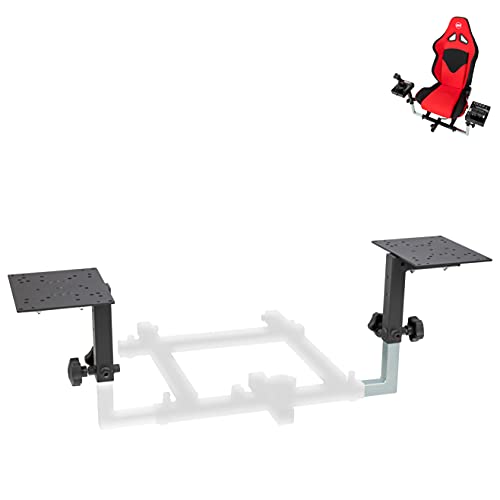
OpenWheeler HOTAS Add-on Kit (Config 1)

Honeycomb Alpha Flight Controls Yoke & Switch Panel

Logitech G USB PRO Flight Rudder Pedals

Thrustmaster TPR Rudder Pedals (PC)

Thrustmaster T.Flight Hotas One MSFS Edition

Thrustmaster Hotas Warthog Dual Throttles

Honeycomb Bravo Throttle Quadrant

Meza Mount HOTAS Desk Mount Set of 2
Taking A Closer Look At The Options
The Logitech G Pro Flight Yoke + Rudder Pedals Bundle is the most frictionless way to walk into flight simming with both hands and feet already in the cockpit. The yoke side delivers a familiar column shape with 14 buttons, an 8-way point-of-view hat (a small directional switch used to look around the cockpit), and a three-position mode switch, giving you up to 54 programmable controls across Microsoft Flight Simulator, X-Plane, and Prepar3D.
The included rudder pedals add yaw and differential toe brakes (separate left and right brake axes controlled by each foot), which matter the moment you start taxiing a taildragger or lining up an airliner on a wet runway. The pedals self-center, the footrests adjust for different foot sizes, and the surfaces stay planted thanks to non-slip pads. Compared to the OpenWheeler mount kit later in this list, this is a turnkey bundle rather than an accessory you bolt onto something you already own.
What Stands Out
- Yoke and pedals ship as a matched pair, so you skip the compatibility guessing game
- 54 programmable inputs cover everything from radios to landing light toggles
- Differential toe brakes finally make realistic taxi and braking feel possible
- Self-centering pedals keep your feet honest during long cruise segments
Points To Keep In Mind
- Plastics feel light next to all-metal throttles, and owners commonly report needing to clamp the yoke down for spirited maneuvers
- Software setup is PC-focused, so console-only simmers should look at the Thrustmaster T.Flight Hotas One MSFS Edition instead
Key Specs
Best Suited To
Brand-new sim pilots who want yoke and pedals from one box, plus anyone rebuilding a sim rig after outgrowing a gamepad.
Look Elsewhere When
Combat flyers and HOTAS loyalists will be happier with the Thrustmaster Hotas Warthog Dual Throttles for the metal throttle feel.
The OpenWheeler HOTAS Add-on Kit is less a flight stick and more a docking system for the one you already own. Configuration 1 mounts throttle and stick side by side in a HOTAS layout (Hands On Throttle And Stick, where your right hand flies the joystick and left hand runs the throttle), and the bracket set covers a long list of popular bases: Thrustmaster T.Flight, T16000M, TCA Airbus, Logitech X52, X52 Pro, X56, VKB Gladiator, CH Products, and Hori.
What that gets you in real life is a cockpit-style hand position on a normal desk, with the throttle and stick locked down tight enough to handle aggressive maneuvers. Pilots who upgrade sticks every few years will appreciate not having to replace the mount every time. Compared to the Meza Mount set later, this is the choice if you fly a joystick-and-throttle pair rather than a single HOTAS unit like the Warthog.
Advantages To Know
- Broad compatibility covers most mainstream throttle-and-stick combos
- Side-by-side HOTAS position reduces wrist strain on long flights
- Metal bracket construction keeps heavier throttles planted during combat
- Survives multiple hardware upgrades without needing to be replaced
Trade-Offs To Consider
- You’ll need to confirm your exact stick and throttle model against the compatibility list before buying
- Assembly and clamp tension can take a little patience to dial in
Whose Shelf It Belongs On
Simmers flying joystick-and-throttle pairs from mixed brands who want a tidy HOTAS hand position without buying a dedicated rig.
Another Choice May Suit
The Meza Mount HOTAS Desk Mount Set is a better match for Warthog owners who already have a single unit and want pre-machined fitment.
Honeycomb’s Alpha is the yoke that finally makes the Logitech G setup feel like a stepping stone. A solid steel shaft rides on two linear ball bearings, giving the column a weight and precision that’s hard to fake with plastic. Travel runs a full 180 degrees with a dampened, self-centering mechanism, and the deadzone (the small range of motion near center that the controller ignores) is minimal, so small corrections show up on the ailerons exactly when you want them to.
The integrated switch panel is the sleeper feature. Master, alternator, avionics, and light toggles sit right where you’d expect, and a 5-position ignition switch covers the start sequence. Red LED backlighting means you can actually read the panel on a red-eye flight across the Atlantic in a dark room. Pair it with the Honeycomb Bravo Throttle Quadrant later in this roundup and you have a real-looking GA (general aviation) cockpit in two boxes.
Key Advantages
- Steel-shaft construction gives noticeably smoother, heavier control than plastic yokes
- 180-degree rotation covers the full range of light-aircraft control motion
- Red backlit switch panel is genuinely usable for night flying
- Self-centering mechanism with no center detent feels predictable in turbulence
Honest Caveats
- No toe brakes or rudder built in, so you’ll need separate rudder pedals for a complete setup
- Heavier yoke means a more permanent desk placement rather than a grab-and-go rig
Feature Snapshot
Made For
General aviation enthusiasts flying Cessnas, Pipers, and light twins in MSFS or X-Plane who want realistic yoke feel without building a full cockpit frame.
Skip It When
Airline and airliner simmers will get more out of the Honeycomb Bravo Throttle Quadrant for thrust lever realism and flap management.
These pedals share the Saitek-era hardware that made the original Pro Flight line famous, and the core design has aged well. The self-centering action is smooth, footrests adjust to fit a wide range of foot sizes, and tension can be dialed up or down to match the way you fly. In practice, that means a relaxed low-tension setting for smooth airliners or a stiffer feel when you’re flying a tailwheel trainer that punishes sloppy rudder.
The 1.8-meter cable is long enough to route behind a desk without an extension, and the partial metal construction handles years of footwork. Saitek Smart Technology programming software gives you the hooks to remap axes for left-foot braking or unusual sim profiles. For shoppers weighing this against the Thrustmaster TPR later, the difference is sensor tech and smoothness; this one wins on value.
The Case For It
- Adjustable damping lets you tune pedal feel to your airframe and style
- Non-slip footrests and self-centering action make long sessions comfortable
- Remappable axes through Saitek Smart Technology software for unusual sim profiles
- Long 1.8-meter cable simplifies desk placement
Small Caveats
- No Hall-effect sensors (contactless magnetic sensors that don’t wear down over time), so long-term smoothness depends on how heavily you fly
- PC-only with no native console support, which matters for Xbox simmers
The Right Fit
Simmers on a budget who want real rudder control and tension adjustment without stepping into Hall-effect sensor pricing.
Reach For A Different Pick When
Long-term durability matters most, in which case the Thrustmaster TPR Rudder Pedals with magnetic sensors hold up better over years of heavy use.
Thrustmaster’s TPR pedals focus on the one thing that matters most on a rudder bar: precision. The H.E.A.R.T HallEffect AccuRate Technology uses magnetic sensors to read pedal position, which means no potentiometers (the resistive wiper-style contacts that wear out over time) to drift or get scratchy. In a sim where a few degrees of rudder input decides whether you land on the centerline or veer into the grass, that kind of consistency is hard to beat.
The Pendul_R suspended mechanism underneath gives the pedals a floating, gliding motion that feels more like a real aircraft than a hinge on the floor. Thrustmaster’s wider sim ecosystem, including T.A.R.G.E.T programming software for binding axes across devices, makes the TPR a strong partner for a Warthog or TCA throttle. Compared to the Logitech G pedals earlier, this is a step up in feel and longevity.
Noteworthy Benefits
- Hall-effect magnetic sensors stay accurate over years of heavy use
- Pendul_R suspended mechanism delivers fluid, aircraft-like pedal motion
- Works with Thrustmaster T.A.R.G.E.T for unified device programming
- Smooth modulation makes precision crosswind landings much more manageable
Potential Drawbacks
- PC-only; Xbox Series X|S users will need to look elsewhere
Who Should Grab It
Hardcore sim pilots flying airliners, warbirds, or bush planes who want pedal inputs they can trust flight after flight.
Swap It Out When
Console-only simmers are better served by the Thrustmaster T.Flight Hotas One MSFS Edition for a fully Xbox-compatible setup.
The T.Flight Hotas One Microsoft Flight Simulator Edition is one of the rare HOTAS bundles officially licensed for Xbox Series X|S and PC, which sounds like marketing copy until you try to plug a non-licensed stick into a console. The MSFS edition refreshes Thrustmaster’s most popular entry-level HOTAS with mapping tuned for the current sim, and the throttle’s realistic resistance makes power management a tactile exercise rather than a mouse-wheel spin.
For living-room flyers, the appeal is clear: one box, one cable, console-friendly. For PC-only simmers running a desk setup, the Logitech G bundle earlier or the Honeycomb Alpha both feel more refined, but if Xbox is your platform, this is the smoothest on-ramp. In our view, this is the choice for anyone whose PC is more of a living-room console than a dedicated flight sim tower.
The Helpful Details
- Officially licensed for Microsoft Flight Simulator on Xbox Series X|S and PC
- Entry-level HOTAS layout keeps the learning curve gentle
- Ergonomic throttle with realistic resistance for power management
Some Limits To Know
- Plastic construction feels light compared to all-metal throttle units like the Warthog
- Limited button count makes complex airliner workflows a stretch
- You’ll likely want rudder pedals for proper coordinated flight in bigger aircraft
Who Will Love This
Console simmers and living-room flyers running MSFS on Xbox Series X|S who want one simple, licensed HOTAS solution.
Where Another Pick Suits Better
PC-only simmers chasing higher realism should jump to the Honeycomb Alpha Flight Controls for a proper yoke and switch panel.
The Hotas Warthog Dual Throttles are the throttle half of Thrustmaster’s flagship combat sim setup, and they pull real weight, literally and figuratively. Metal construction, a pull-and-push throttle system, and a disengageable afterburner give the unit the kind of heft and resistance that combat pilots care about when managing a flameout landing or running in at full military power.
The control panel carries five programmable LEDs that surface status info in T.A.R.G.E.T (Thrustmaster’s Advanced pRogramming EnvironmenT, a PC tool for unifying bindings across Thrustmaster devices), which means you can label a light “gear up” or “master arm” and have a glanceable readout without alt-tabbing. As a standalone throttle pair, this is the unit serious combat simmers reach for when they already own a high-end stick like the Warthog joystick or a Virpil base.
Everyday Wins
- Metal throttle quadrant with realistic pull-and-push action for jet power management
- Disengageable afterburner adds combat-style power handling
- Five programmable LEDs give glanceable cockpit status
- T.A.R.G.E.T software unifies bindings across Thrustmaster devices
Practical Considerations
- Stick not included, so you’ll need a separate joystick or HOTAS base
- International product variant may differ in labeling, manuals, and warranty coverage from US models
Quick Facts
Right Fit For
Combat sim enthusiasts flying DCS modules, IL-2 Sturmovik, or warbirds who already own a high-end stick and want the throttle to match.
Not Your Match When
Airliner and GA pilots will find the Honeycomb Bravo Throttle Quadrant better suited for flap, gear, and trim workflows.
The Bravo Throttle Quadrant is the airliner-friendly counterpart to the Honeycomb Alpha yoke, and together they form the most realistic mid-priced GA and airliner cockpit you can put on a normal desk. The unit configures from a single-engine Cessna all the way up to a four-engine airliner, with separate throttle, prop, and mixture levers for the piston side and paired thrust levers for the jets.
The autopilot panel, annunciator with seven programmable switches and 14 warning lights, gear lever with red and green LED indicators, flap lever, and trim wheel cover nearly every cockpit input you actually use during a normal flight. The build quality and panel density make it feel like a piece of a real cockpit panel rather than a plastic toy, and the gear LEDs change in real time as you cycle the handle.
The Good Stuff
- Configurable from single-engine GA to four-engine airliner layouts
- Full autopilot panel with trim wheel, gear, and flap controls on the unit
- Annunciator with 7 two-way switches and 14 warning lights for realistic cockpit feedback
- Red and green LED gear indicator syncs with the sim for true-to-life handling
Worth Bearing In Mind
- Large footprint on the desk; you’ll want to plan a permanent placement
- No rudder, so it pairs best with separate rudder pedals like the Thrustmaster TPR
Perfect Match For
Airline and twin-engine simmers who want a believable throttle setup without bolting a real Boeing quadrant to their desk.
Where A Sibling Pick Shines
Single-engine GA purists should look at the Logitech G Pro Flight Yoke + Rudder Pedals Bundle for a more straightforward starter experience.
The Meza Mount set is the missing link that turns a Warthog or Virpil setup into something that actually stays put. The kit ships with two mounts, one for the stick and one for the throttle, machined specifically for the Thrustmaster Warthog, WinWing Orion 2, VPC WarBRD-D base, and VPC MongoosT-50CM 2 and 3 bases. Clamp-on design means you skip drilling holes in your desk.
In use, the mounts lock the gear at a stable height and angle, which kills the wobble you get from a joystick sitting directly on a flat surface during combat maneuvers. The adjustability lets you fine-tune hand position to match a real cockpit geometry. Compared to the OpenWheeler kit earlier, this one is purpose-built for a narrower set of high-end bases, which is exactly what Warthog owners usually want.
Useful Highlights
- Purpose-built fitment for Warthog, Orion 2, WarBRD-D, and MongoosT-50CM 2/3 bases
- Set of two mounts gives you a matched stick-and-throttle layout
- Clamp-on design keeps your desk free of drilled holes
- Adjustable height and angle for an authentic cockpit hand position
Less-Strong Areas
- Narrow base compatibility; not the right mount for entry-level sticks like the T16000M
- Clamp reach may not fit unusually thick or curved desk edges
Technical Sheet
Built With In Mind
DIY cockpit builders and serious combat simmers with high-end bases who want a stable, no-permanent-modification mounting solution.
Consider Something Else When
Entry-level and mid-tier stick owners will find broader compatibility in the OpenWheeler HOTAS Add-on Kit.
Key Factors When Building A Flight Simulator Setup
The first decision is control type. Yoke systems feel right for general aviation and airliners because that’s how the real airplanes work, while HOTAS setups (joystick plus throttle) suit combat and fast jets where the right hand steers and the left hand runs power. Choose the layout that matches the aircraft you fly most; switching between styles in a single sim works, but the muscle memory builds faster when the gear matches the airframe.
The second decision is whether to start with a bundle or build piece by piece. Bundles like the Logitech G Pro Flight Yoke + Rudder Pedals Bundle or the Thrustmaster T.Flight Hotas One MSFS Edition get you flying the same day, while a build-your-own approach with a Honeycomb Alpha, Bravo, and Thrustmaster TPR pedals lets you tune each component to your airframe. For most beginners, a matched bundle is faster; for simmers with a specific airliner or warbird in mind, modular beats bundled.
Finally, plan for stability and floor space. A heavier throttle like the Thrustmaster Warthog benefits enormously from a clamp mount like the Meza Mount set, and a rudder pedal like the TPR needs enough room under the desk for full heel-and-toe travel. Measure your floor clearance before buying, and consider how the gear will move when you swap between seated and standing positions, especially if your sim rig doubles as a regular workstation.
Smart Shopping Moves For Sim Gear
Pitfalls Shoppers Hit
Many first-time simmers buy a yoke and forget that real aircraft need your feet too, then realize taxi and braking are nearly impossible without rudder pedals. The fix is simple: budget for pedals in the same shopping trip, even if they have to be the entry-level Logitech G USB PRO.
Another common trap is buying gear that does not fit the desk. Heavy throttles, full-size yokes, and clamp mounts all assume a reasonable desk edge and clearance. Measure thickness and depth before you commit, and double-check clamp range on products like the Meza Mount set.
When Paying More Pays Off
Premium tiers in this category buy you better sensors, metal construction, and a noticeably longer service life. Hall-effect magnetic sensors on the Thrustmaster TPR pedals stay accurate where potentiometer-based units drift, and a steel-shaft yoke like the Honeycomb Alpha simply outlasts plastic competitors. For shoppers who log many hours per week, those upgrades pay back through years of consistent feel rather than a calendar date.
Frequently Asked Questions
Do I need rudder pedals if I have a yoke?
Yes, for the most realistic experience. Yokes control pitch and roll, but rudder pedals handle yaw and braking, which matter on every takeoff and landing. A small set like the Logitech G USB PRO Flight Rudder Pedals covers the basics.
Can I use a HOTAS setup with Microsoft Flight Simulator?
Yes, MSFS supports joystick, throttle, and rudder inputs natively. The Thrustmaster T.Flight Hotas One MSFS Edition is even officially licensed for the sim on Xbox and PC.
What is a HOTAS layout?
HOTAS stands for Hands On Throttle And Stick, meaning the throttle and joystick are mounted so both hands can rest on them at the same time. It is the standard layout for combat and fast jets, and products like the OpenWheeler kit help you set it up on a regular desk.
Are desk mounts stable enough for heavy throttles?
Quality clamp mounts like the Meza Mount set handle Warthog-class hardware without flex. Cheap universal mounts can wobble under aggressive use, so a purpose-built mount is worth the spend for heavy gear.
Should I buy a bundle or build piece by piece?
Bundles are faster and cheaper upfront, and they remove compatibility guesswork. Building piece by piece costs more but lets you match each component to the airframe you fly, which is the right call for serious simmers.
Final Verdict
Your best flight simulator setup comes down to what you fly and how much desk you’re willing to give up. Beginners get the most out of a matched bundle, while simmers chasing a specific airframe benefit from the precision of Hall-effect pedals, a steel-shaft yoke, or a heavy metal throttle. Start with the controls that match your favorite cockpit, then add pedals, mounts, and throttle quadrants as your airframes and ambitions grow.



