


Flying into Microsoft Flight Simulator from a couch with a standard gamepad gets old fast. The right yoke, stick, or HOTAS setup turns a sluggish sim into something that finally feels like the cockpit, and the Xbox ecosystem has quietly grown into one of the strongest places to buy one. The picks below span racing wheels, military-style HOTAS rigs, and a few add-on quadrants that work whether you taxi a Cessna or chase a bandit in DCS.
A Side-By-Side Look

Logitech G920 Racing Wheel and Pedals for Xbox

Thrustmaster HOTAS Warthog A10 Replica Flight Stick & Throttle Set

Thrustmaster T16000M FCS Space Sim Duo Combat Flight Sim Joystick

Logitech G Pro Flight Yoke System + Rudder Pedals Bundle
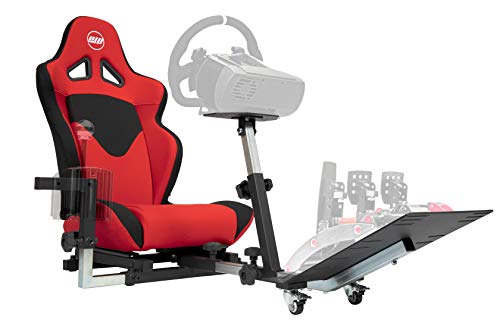
OpenWheeler Advanced Racing Simulator Seat with Gear Shift Mount

Honeycomb Alpha Flight Controls Yoke & Switch Panel

Flight Sim Stuff Cessna Style Vernier Controls

Thrustmaster T.Flight Hotas One Microsoft Flight Simulator Edition

Honeycomb Bravo Throttle Quadrant
What Each Pick Brings To The Table
The G920 is technically a racing wheel, but it does double duty as a flight stick substitute for casual Xbox sessions, especially if you already own one for Forza and want to avoid a second purchase. The hand-stitched leather rim, helical gearing for smooth steering, and pressure-sensitive pedals translate into surprisingly usable throttle and elevator control in light aircraft sims.
For someone dipping a toe into Microsoft Flight Simulator on console without committing to a full HOTAS, this is a practical first step. It plugs into Xbox natively, no adapters required.
The Value In It
- True Xbox plug-and-play, no driver fuss
- Helical gearing keeps the wheel quiet and precise
- Pressure-sensitive floor pedals double as rudder inputs
- Stitched leather rim wears well over years of use
Points To Note
- No dedicated throttle axis means mapping takes work in heavier sims
- Wired desk clamp can be awkward on a media console setup
Right Fit For
Owners who already enjoy racing on Xbox and want a budget-friendly bridge into flight sim without buying a dedicated setup.
A Better Fit Elsewhere
Anyone serious about Microsoft Flight Simulator should reach for the Thrustmaster T.Flight Hotas One Microsoft Flight Simulator Edition, which has dedicated throttle and stick controls.
This is the setup you buy when DCS World and IL-2 Sturmovik have replaced your evening TV time. The HOTAS Warthog is a near-exact replica of the U.S. Air Force A-10C “Warthog” cockpit controls, and the source data confirms the build leans on metal construction for longevity.
Hall effect sensors (contactless magnetic sensors that never physically rub together) in the stick deliver crisp centering, and the dual-throttle design handles multi-engine aircraft with room to spare. You will want a sturdy desk and a serious chair.
Useful Strengths
- Metal-bodied stick and throttle for desk-beating durability
- Detachable stick for tighter desk layouts or two-handed sticks later
- Dual throttle handles four-engine jets without modding
- Hall effect sensors resist the drift that plagues cheaper potentiometer sticks
Trade-Offs To Consider
- PC only, no Xbox compatibility at all
- Heavy unit demands a reinforced mounting surface or dedicated cockpit frame
Core Details
Whose Hands Belong On It
PC combat sim pilots flying DCS, IL-2, or War Thunder who want the closest thing to a real A-10C stick on the consumer market.
Look Elsewhere When
Xbox-only players need the Thrustmaster T.Flight Hotas One Microsoft Flight Simulator Edition instead, since this Warthog will not pair with a console.
The T16000M FCS Space Sim Duo is built around a very specific crowd: people who want two hands on sticks for six degrees of freedom in space sims like Elite Dangerous or Star Wars: Squadrons. You get two T16000M sticks, both using hall effect sensors, plus a TWCS throttle to round out the trio.
Compared to the Warthog above, this kit is friendlier to first-time joystick owners. The plastic build is lighter, but the magnetic sensors hold their calibration through long play sessions.
Why It Works Well
- Two identical sticks let you mirror the real two-handed setup found in cockpits and space pods
- Hall effect sensors in both sticks keep inputs drift-free
- Included TWCS throttle adds a separate hand axis
- Slim base footprint suits crowded desks
Worth Bearing In Mind
- PC only, no console compatibility
- Plastic construction feels lighter than the Warthog if you push hard on the stick
Who Will Love This
PC space sim enthusiasts running Elite Dangerous, Star Citizen, or dual-stick flight profiles who value a true left-hand/right-hand split.
Reach For A Different Pick When
A general aviation pilot looking for yoke realism should consider the Honeycomb Alpha Flight Controls Yoke & Switch Panel, which is closer to a Cessna steering column.
Bundle culture has its perks, and pairing the Pro Flight Yoke with the matching rudder pedals means you do not have to chase a second box of mismatched parts. The yoke brings 14 buttons, an 8-way POV hat, and a 3-position mode switch that the source lists as exposing around 54 programmable controls once you factor in shift layers.
The companion rudder pedals use self-centering springs and differential toe brakes. In a sim like MSFS 2024, taxiing a taildragger actually feels like pushing with the correct foot.
Bright Spots
- POV hat and 14 buttons cover most light aircraft switchology
- Self-centering rudder pedals keep your toes from drifting mid-cruise
- Differential toe brakes let you steer with feet like a real pilot
- Adjustable foot rests on the pedals accommodate a range of shoe sizes
A Few Limitations
- Plastic-heavy build feels toy-like next to metal yokes
- Yoke requires clamping or bolting to stay put during aggressive maneuvers
Best Suited To
New general aviation sim pilots wanting a complete starter package, including the matching rudder pedals, in one purchase.
Swap It Out When
Pilots who prefer a center-mounted joystick style should consider the Thrustmaster T.Flight Hotas One Microsoft Flight Simulator Edition, which works natively on Xbox.
Not a controller itself, but the OpenWheeler is the frame most people forget until their third peripheral falls off a folding table. It is a cockpit-style seat with a gear shifter mount that bolts on the left or right, and the manufacturer lists compatibility with PlayStation, Xbox, and PC peripherals across several console generations.
If you are tired of cradling a wheel against a coffee table, this is the furniture upgrade that finally lets the G920 from pick 1 do its job.
What It Does Well
- Side-switchable shifter mount fits left or right hand drive
- Stable platform stops wheel and pedals from sliding mid-session
- Wide peripheral compatibility keeps your options open across console generations
Points To Keep In Mind
- Assembly typically requires a helper and several hours the first time
- Footprint is large, measure your room before ordering
Feature Snapshot
Right Fit For
Console players who want a permanent cockpit at home rather than balancing a wheel on their lap every flight.
Not Your Match When
Apartment dwellers with limited floor space should look at the Honeycomb Alpha yoke on a desktop clamp instead.
Honeycomb’s Alpha is the yoke that lives on desktop flight sim YouTube channels for a reason. The source data confirms a 180-degree yoke rotation driven by a solid steel shaft on two linear ball bearings, plus a self-centering mechanism with no center detent (the small click or notch some yokes use to mark neutral) and minimal deadzone (the unresponsive wiggle room around center).
Integrated switch panel covers main, alternator, avionics, and light switches, plus a 5-position ignition. Red LED backlighting helps during red-eyes.
What Pays Off
- Steel shaft and ball bearings keep yoke travel smooth for years
- Built-in switch panel saves desk real estate versus a separate unit
- Red backlighting preserves dark-adapted vision on long night legs
- Self-centering feel mimics a real general aviation yoke
Honest Caveats
- Clamp works on desks up to a limited thickness, glass tops are out
- You will still want a throttle quadrant like the Honeycomb Bravo in pick 9 for full GA realism
Who Will Love This
Single-engine and twin-engine sim pilots who want yoke feel that punches above typical consumer hardware.
A Better Fit Elsewhere
Combat sim pilots chasing a stick should skip this and go for the Thrustmaster T.Flight Hotas One Microsoft Flight Simulator Edition for a more aggressive hand position.
Where most “throttle quadrants” approximate Cessna controls, Flight Sim Stuff’s Vernier panel does the actual job. The source lists true vernier-style prop and mixture knobs (twist for fine adjustment, push the button and push/pull for coarse), a push-pull throttle with a friction lock nut, and a flap switch that auto-returns to center.
The honest read is that this is a connoisseur’s tool, and the listing is explicit that it does not work on Xbox or PlayStation.
Positive Points
- Real vernier prop and mixture twist locks feel like a Cessna panel
- Friction lock on the throttle lets you set power and walk away
- Flap switch returns to center on its own, matching the real cockpit
- Driver-free install on Windows and Mac
Where It May Fall Short
- No Xbox or PlayStation support, PC only
- Smaller brand means firmware updates and support can move slowly
Quick Technical Notes
Who It Suits Best
PC Cessna and general aviation pilots chasing authentic panel feel inside Microsoft Flight Simulator 2020 or 2024, X-Plane, or Prepar3D.
Skip It When
Xbox owners must look at the Thrustmaster T.Flight Hotas One, since this Vernier unit is locked out of console use.
This is the rare Thrustmaster HOTAS officially licensed for Microsoft Flight Simulator on Xbox Series X|S and PC. The “H” stands for hands, the “T” for throttle, and the “S” for stick, so HOTAS means the throttle and stick are physically separate units under your two hands.
For console players who feel locked out of the HOTAS world, this is the entry door. The throttle includes a rudder control via twist handle, and the stick has a full hat switch and trigger layout.
Reasons It Performs
- First-party Xbox Series X|S license removes compatibility guesswork
- Detachable throttle lets you set hand position to taste
- Rudder built into the throttle reduces desk clutter
- Maps cleanly to MSFS 2024 right out of the box
Possible Compromises
- Plastic build is lighter than the Warthog and can shift on slick desks
- Limited button count for complex warbirds with extensive switchology
Who Should Grab It
Xbox Series X|S players entering Microsoft Flight Simulator 2024 who want a stick-and-throttle setup that just works on console.
A Better Fit Elsewhere
Anyone flying on PC should consider the Thrustmaster HOTAS Warthog A10 Replica for a far more durable, all-metal experience.
The Bravo is the matching throttle quadrant to the Honeycomb Alpha yoke in pick 6. The manufacturer lists a configurable throttle setup covering everything from a single-engine Cessna to a four-engine airliner, plus an autopilot panel, annunciator panel, gear and flap levers, and a trim wheel.
Paired with the Alpha, it builds out a credible desktop cockpit. On its own, it works as a throttle add-on for any yoke or stick setup.
Standout Benefits
- Configurable throttle layout covers single through four-engine aircraft
- Annunciator panel with 7 programmable switches and 14 warning lights
- Red and green LED gear indicators match real airliner cues
- Trim wheel feels weighty and accurate for long cruise segments
Some Limits To Know
- No native Xbox support, PC and select platforms only
- Full feature set shows up best with Honeycomb’s own yoke or a quality stick
Feature Card
Made For
PC sim pilots aiming for the full airliner or twin-engine experience with a matching quadrant that scales to different aircraft types.
Where Another Pick Suits Better
Xbox owners should pair the Thrustmaster T.Flight Hotas One Microsoft Flight Simulator Edition with a stand-alone throttle add-on, since the Bravo is PC focused.
Factors That Shape A Smart Flight Control Purchase
The first fork in the road is what you actually want to fly. Civilian sim pilots tend to gravitate toward yokes like the Honeycomb Alpha or the Logitech G Pro Flight Yoke, because general aviation aircraft use a steering column rather than a side stick. Combat sim players, on the other hand, usually prefer a HOTAS setup where a center-mounted joystick sits next to a separate throttle under the left hand.
Build materials matter more than spec sheets suggest. Metal-bodied units like the Thrustmaster Warthog handle aggressive maneuvers for years, while plastic builds can flex and shift on the desk. Hall effect sensors, the contactless magnetic type that never physically rubs, hold calibration far better than older potentiometer designs (variable resistors with sliding contacts that wear over time).
Console support is the make-or-break spec. Only a handful of products in this category officially work on Xbox Series X|S, and even fewer on Xbox One. The T.Flight Hotas One Microsoft Flight Simulator Edition and the Logitech G920 are the safest console picks, while the Warthog, T16000M, Vernier controls, and Honeycomb units are mostly PC territory.
Key Things To Weigh Before You Commit
Common Pitfalls When Shopping Flight Controls
Buyers regularly assume any joystick will work on Xbox, only to discover mid-install that the unit is Windows-only. Always check platform compatibility before checking anything else. Another trap is buying a HOTAS setup without measuring the desk. The Warthog in particular needs a reinforced surface, and many cheaper sticks shift around on smooth tabletops.
A third mistake is overlooking the throttle. A standalone stick forces you to map throttle to keyboard or rotary knob, which kills immersion. Pairing a stick with a dedicated throttle quadrant, like the Honeycomb Bravo or the TWCS included in the T16000M Duo, is the single biggest quality-of-life upgrade.
Why Premium Flight Controls Cost More
The jump from a plastic beginner stick to a metal-bodied HOTAS brings three real upgrades. First, the sensors hold their calibration through years of input, instead of drifting every few months. Second, the physical weight and base design stop the unit from skating across the desk when the controls get aggressive. Third, the button count and hat switches expand, letting you map complex procedures without mode-switching mid-flight.
The honest read is that premium gear is not for everyone, but for anyone logging more than a few hours a week, the upgrade tends to pay for itself in reduced friction and longer hardware life.
Frequently Asked Questions
Do flight controls work on both Xbox and PC?
Some do, but most do not. The Logitech G920 and the Thrustmaster T.Flight Hotas One Microsoft Flight Simulator Edition are confirmed Xbox-compatible, while the Warthog, T16000M Duo, Vernier controls, and Honeycomb units are PC focused. Always confirm the platform listing before purchase.
What is the difference between a yoke and a HOTAS?
A yoke mimics a general aviation steering column and pairs with a separate throttle quadrant, while a HOTAS uses a center-mounted joystick under one hand and a throttle under the other. Yokes suit Cessnas and airliners; HOTAS suits warbirds and space combat.
Is a hall effect sensor worth the extra cost?
For long-term ownership, yes. Hall effect sensors are contactless and resist the calibration drift that wears down cheaper potentiometer sticks. You may find the difference subtle in the first month, but it becomes obvious over years of use.
Can a racing wheel be used for flight sims?
Yes, with caveats. The Logitech G920 works in many flight sims and doubles as a budget-friendly entry point, but the lack of a dedicated throttle and rudder axis means heavier aircraft feel limited. Yokes and HOTAS setups are closer to the real cockpit feel.
Do I need rudder pedals as well?
For taildraggers and airliners, yes. Rudder pedals add the foot-controlled yaw and differential braking that a single hand cannot replicate. The Logitech G Pro Flight Yoke bundle from pick 4 includes a matching set, and you can also pair the Honeycomb Alpha with the Honeycomb Bravo throttle quadrant plus third-party rudder pedals.
Final Verdict
The best Xbox-friendly pick here is the Thrustmaster T.Flight Hotas One Microsoft Flight Simulator Edition, since it is officially licensed for console and works out of the box with MSFS 2024. For PC sim pilots chasing the most authentic feel, the Thrustmaster Warthog or the Honeycomb Alpha plus Bravo combo will serve you for years. Match the platform, match the aircraft type, and the rest falls into place.



