


Adding foot pedals to a flight sim setup changes the way you taxi, line up on final, and skid through a crosswind landing. The right pair gives your toes something useful to do, so the stick and throttle can stay where they belong. This list looks at ten pedal units, throttle add-ons, and cockpit rigs that pair well with rudder control, from budget plug-and-play basics through full modular cockpits built for DCS combat.
A Side-By-Side Look

Ultimarc A-PAC Analog Arcade Controller Interface

Logitech G Pro Flight Yoke + Rudder Pedals Bundle

Thrustmaster TFRP Pedals + T.16000M FCS HOTAS

Logitech G PRO Flight Rudder Pedals

Thrustmaster TFRP Precision Rudder Pedals

Logitech G Pro Flight Rudder Pedals
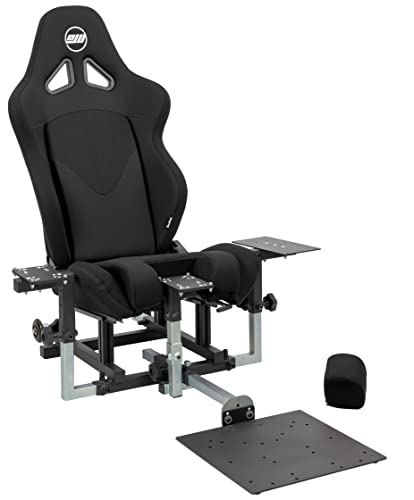
SimFab Modular Flight Sim Cockpit (DCS Edition)

Thrustmaster T-Flight Hotas X Stick and Throttle

Thrustmaster Hotas Warthog Dual Throttles

Thrustmaster TCA Quadrant Airbus Edition
The Picks, Examined More Closely
The Ultimarc A-PAC is a circuit board, not a finished pedal set, and that is exactly the point. It accepts up to four analog inputs from potentiometers (variable resistors that change resistance as you move them) and a wide set of button inputs, then speaks USB to your PC. You wire your own foot pedals, steering wheel, or analog joystick to it and the board translates the motion into clean axis data.
This is a builder’s pick, not a plug-and-play product. Owners commonly mount the A-PAC inside a wooden rudder pedal enclosure, a racing wheel base, or a custom sim panel. The unit emulates two gamepads so Windows treats each input set as standard controllers with no extra driver fuss.
Where It Delivers
- Accepts up to four analog axes plus a large bank of buttons, so you can run a rudder, toe brake, and a hat switch from one board.
- Ratio-comparison analog conversion stays accurate across a wide range of potentiometer values, meaning you do not have to hunt for perfectly matched pots.
- Works as a digital input board too, so unused pins can become panel buttons rather than wasted connectors.
- Standard USB interface keeps setup simple on modern Windows installs.
Things To Consider
- You supply the pedals, the enclosure, the wiring, and the patience. Nothing is prebuilt.
- Documentation is geared toward arcade builders, so first-time sim pilots may find the wiring side steep.
Right Fit For
Sim hobbyists who already enjoy a soldering iron and want a custom rudder and brake assembly without paying for a finished consumer product.
A Better Fit Elsewhere
The Logitech G PRO Flight Rudder Pedals make more sense if you want a finished pedal set that you can unbox, set on the floor, and start flying with the same afternoon.
This bundle pairs Logitech’s Pro Flight Yoke with the matching Pro Flight Rudder Pedals, so you receive both halves of the basic control triangle in one box. The pedals are self-centering, which means springs return them to the neutral position the moment you take your feet off, and they offer toe brakes that press independently for differential braking on the runway.
Compared with the bare Logitech G PRO Flight Rudder Pedals covered in pick 4, this set includes the yoke plus a multi-mode switch, an 8-way POV hat, and 14 buttons, giving you roughly 54 programmable inputs once you map things out in Logitech’s software. For aspiring general aviation pilots, that level of control hits a useful middle ground between console-style simplicity and full cockpit replicas.
Good Reasons To Consider
- Pedal footrests adjust to fit a wide range of shoe sizes and use a non-slip surface that stays put on hardwood or carpet.
- Differential toe brakes let you push the left pedal harder than the right for ground steering on a taildragger.
- Yoke adds a mode switch and a hat for trim, view panning, and radio changes without taking your hand off the grip.
- Software customization means the same hardware can serve a Cessna in one sim and a warbird in another.
Honest Caveats
- This is a desktop bundle, so a heavy combat flight session may still benefit from a mounted setup like the SimFab cockpit in pick 7.
- Plastic construction keeps the weight down, which is friendlier on a desk but not as planted as metal-rail options.
Who It Suits Best
Brand-new sim pilots who want a yoke and a pedal set that talk to the same software ecosystem out of the box.
Look Elsewhere When
Combat sim players chasing a stick rather than a yoke will get a more natural fit from the Thrustmaster TFRP + T.16000M FCS HOTAS in pick 3.
This set teams the Thrustmaster TFRP rudder pedals with the T.16000M joystick, so your hands get an ambidextrous stick with 16 action buttons and your feet get a wide aluminum-rail pedal set. The T.16000M reads as a familiar PC flight stick, and the TFRP introduces you to the brand’s S.M.A.R.T. slide rail system, which uses aluminum tracks for smoother pedal travel than spring-only designs.
The two large 10-inch brake pedals accommodate up to roughly a US men’s size 12, and the heel rests are removable if you prefer to perch the ball of your foot on the pedal face instead. Cross-platform support makes this a sensible choice for households where one person plays on PC and another keeps a PS4 nearby.
Features That Help
- Four industrial aluminum slide rails give a noticeably smoother feel during long cross-country flights.
- Removable heel rests let you swap between full-foot contact and ball-of-foot contact, useful for heel-brake pilots.
- T.16000M joystick offers 16 action buttons with braille-style markings so you can identify them by feel during night ops.
- Plays nicely with Thrustmaster’s T.A.R.G.E.T. software, so you can combine axes and buttons from both units into a single virtual profile.
Practical Considerations
- Console support on PS4 requires the matching Thrustmaster joystick, so you cannot pair the TFRP with a non-Thrustmaster stick on a console.
- The wide pedal base eats floor space under a small desk, so apartment dwellers should measure first.
Best Suited To
PC-based general aviation and space pilots who want a single coherent kit from one accessory brand and like the idea of aluminum-smooth pedal travel.
Not Your Match When
Yoke-trained pilots flying big iron in Microsoft Flight Simulator will find the Logitech G Pro Flight Yoke + Rudder Pedals Bundle in pick 2 a more natural hand-to-foot pairing.
The Logitech G PRO Flight Rudder Pedals are the standalone version of the pedal unit that ships in the yoke bundle. That separation matters if you already fly with a stick or a sidestick and only need to add the foot side. A tension adjustment dial lets you firm up or soften the spring return, so a relaxed approach in a Cub feels different from a tight crosswind correction in a twin.
Inside the housing, a partial metal frame supports the pivot points, which generally holds up to years of repeated toe presses. Footrests slide to match your shoe size, and the non-slip pad helps if your carpet tends to drift during a tense landing rollout.
Where It Helps
- Self-centering pedals with adjustable damping suit both casual and serious pilots, depending on how stiff you set the tension.
- Partial metal internals extend the lifespan of the pivot and spring components under daily use.
- Long 1.8-meter USB cable makes it easy to route the cable around a desk leg or under a cockpit rig.
- Saitek Smart Technology programming software exposes a wide range of axis curves, dead zones, and button maps.
Small Caveats
- Connection is USB 2.0, so the cable is fixed; replacement requires opening the housing rather than unplugging.
- The plastic outer shell is lighter than the Thrustmaster TFRP’s aluminum rail setup, so heavy-footed users may feel a slight flex during hard braking.
Made For
Sim flyers who already own a Logitech stick or yoke and want to round out the controls with a brand-matching pedal set.
Skip It When
Console players on PS5 should look at the Thrustmaster TFRP Precision Rudder Pedals in pick 5, which is purpose-built for cross-platform use.
The TFRP Precision is the console-friendly sibling of the Thrustmaster pedal family, explicitly supporting PS5, Xbox One, Xbox Series X, and PC. That wide compatibility makes it the easiest option in this list for a household that bounces between a media-room console and a desk-bound PC tower.
The same S.M.A.R.T. aluminum rail design from pick 3 shows up here, so pedal motion is smooth and consistent even after long sessions. Removable heel rests let you adjust the contact style without tools, and the wide 10-inch brake spacing means larger shoes still fit comfortably on the pedal face.
Standout Benefits
- Multi-platform support removes the guesswork when moving a sim rig between PC, PS5, and Xbox systems.
- Aluminum rail system gives a controlled, repeatable pedal feel that plastic-only designs struggle to match.
- Adjustable heel rest positions make it easier to find a comfortable foot angle during a long haul flight.
- Large brake pedals offer enough surface area to modulate brake pressure with confidence on rollout.
Less-Strong Areas
- Pedal width can crowd narrow cockpits or sim racing seats where every centimeter of footwell counts.
- On PC, you give up some software depth compared to dedicated PC-only units with deeper configuration suites.
Right Fit For
Households that split flight sim time between a living-room console and a desktop PC and want one pedal set that works in both rooms.
Consider Something Else When
PC-only users who want fine-grained axis curves and a long track record of Logitech software support will be happier with the Logitech G PRO Flight Rudder Pedals in pick 4.
The standalone Logitech G Pro Flight Rudder Pedals in this listing are the consumer-facing version of the same pedal family, with the self-centering action and adjustable damping that the brand is known for. The fluid pivot motion lets your feet move quickly between rudder and brake without a clunky return, which matters in a sidestep maneuver or a go-around.
Compared with the Logitech G PRO Flight Rudder Pedals in pick 4, this is a slightly updated housing with similar internals and the same software ecosystem. If you fly mostly Microsoft Flight Simulator or X-Plane and want a single pedal set without bundling in a yoke, this is a clean choice.
Everyday Wins
- Self-centering action keeps your feet oriented at neutral when you lift off the pedals, which helps when you also steer with a stick twist.
- Adjustable damping lets you match the resistance to the aircraft, light for a glider, firmer for a taildragger.
- Footrests adjust to a wide size range and the non-slip material keeps the unit planted on smooth floors.
- Pairs naturally with the Logitech Pro Flight Yoke for a full Logitech cockpit feel.
Trade Offs
- Plastic shell construction is lighter than aluminum-rail competitors, so it can shift during aggressive rudder kicks on a hard floor.
- Configuration options require Logitech’s software, so a quick swap to a different sim may need a profile load.
Who Will Love This
Mid-range sim pilots who already own a Logitech stick or yoke and want a balanced, well-known pedal set to complete the rig.
Swap It Out When
Anyone who wants a cockpit-style mounted rig should look at the SimFab Modular Flight Sim Cockpit in pick 7, where the pedal plate bolts directly to the frame.
The SimFab DCS Edition is a tubular cockpit frame with a full-size foam seat on sliders and a recliner, designed to mount a throttle, a stick or cyclic, and a set of rudder pedals at fixed ergonomic positions. The chassis accepts Thrustmaster Warthog hardware along with WinWing, VirPil, and VKB controls, so the frame stays useful even as you upgrade your electronics over the years.
Where this differs from a flat pack of desktop gear is the way the pedal plate is part of the frame itself. Your existing Thrustmaster TFRP, Logitech PRO, or similar pedals bolt to the cockpit rather than sliding on a hardwood floor. A modular design means you can later swap in a center stick mount or reconfigure the rig for space sim or general aviation.
Useful Strengths
- Integrated pedal mount keeps the rudder pedals at the correct distance from the seat, so muscle memory carries over between sessions.
- Seat sliders and recliner let you adjust posture for a long-haul Boeing hop or a sharp DCS dogfight.
- Patented removable foam insert in the seat accommodates a center-mounted stick or cyclic without buying a second seat.
- All assembly hardware is included, so you do not have to source separate bolts and wrenches.
Points To Note
- This is the frame only, so you still need to bring your own stick, throttle, and pedals from the rest of this list.
- The frame is large, so smaller living spaces may need to dedicate a corner of a room to the rig.
Best Suited To
DCS combat pilots who want a stable, repeatable seating position for long missions and intend to grow their hardware over time.
Another Choice May Suit
Casual players with limited space will find the Thrustmaster T-Flight Hotas X in pick 8 a friendlier entry that lives on a desk between sessions.
The T-Flight Hotas X is the budget gateway into a HOTAS setup, where HOTAS stands for Hands On Throttle And Stick, meaning both controls live under your hands without reaching for a keyboard. It bundles a joystick and a throttle on a single wide base, with the throttle detaching if you want to spread the controls across your desk.
You get 12 action buttons and 5 axes, including a handle-rotation rudder and a progressive tilt lever for additional rudder control, so you can experiment with foot-free flying before committing to a real pedal unit like the TFRP in pick 5. Adjustable stick resistance lets you tune the feel for slow Cesnas or sharper warbirds.
Everyday Advantages
- Wide hand rest supports the wrist during long sessions, so fatigue is less of an issue on a four-hour cross-country.
- Detachable throttle lets you rearrange the layout for narrow desks or wide cockpit frames.
- Fully programmable buttons mean you can move most functions off the keyboard, which is a major quality-of-life upgrade for a beginner.
- Dual rudder input (twist handle and tilt lever) gives you two ways to test rudder feel before choosing dedicated pedals.
Worth Noting
- No actual rudder pedals here, so the rudder control is shared with the right hand and can feel less precise than a dedicated foot pedal.
- PC-only in this listing, so console players need a different Thrustmaster model.
Perfect Match For
First-time sim builders who want a low-friction way to get into HOTAS-style control and decide whether to invest in a full rudder pedal set later.
Reach For A Different Pick When
Anyone who already knows they want dedicated feet-on-pedals control should skip straight to the Thrustmaster TFRP Precision Rudder Pedals in pick 5.
These are the throttle half of Thrustmaster’s flagship Warthog replica set, sold here as a standalone unit. The dual throttles mimic the A-10 Thunderbolt II style cockpit feel, with a pull-and-push thrust lever system, a disengageable afterburner detent, and a backlit control panel with five programmable LEDs for status indication.
Inside, H.E.A.R.T. HallEffect AccuRate Technology uses contactless magnetic sensors (a method that avoids the wear of physical potentiometers) for both throttles, which generally keeps the units accurate for years of heavy use. Pair these with a Thrustmaster Warthog stick, the TFRP pedals, and the SimFab cockpit frame from pick 7, and you have a serious combat rig.
Bright Spots
- Hall-effect sensors on both throttles mean no physical contact on the axis sensors, which generally extends service life.
- Replica metal construction gives the throttles an authentic weight and a planted feel on a desk or cockpit mount.
- Backlit control panel with five programmable LEDs can show engine state, gear, or flaps inside the sim.
- Thrustmaster’s T.A.R.G.E.T. programming software ties the throttles, stick, and pedals into one virtual profile.
Potential Drawbacks
- These are the throttles only, so you will need a compatible Warthog stick and a rudder pedal set to complete the rig.
- PC-only operation, which limits options for console-based flight sim players.
Who Should Grab It
Military sim enthusiasts who already have a Warthog stick and a set of rudder pedals and want the matching throttle to round out the cockpit.
Where A Sibling Pick Shines
Airline sim pilots flying airliners will find the Airbus-style layout on the Thrustmaster TCA Quadrant in pick 10 a more relevant throttle for that type of flying.
The TCA Quadrant Airbus Edition is an officially licensed throttle quadrant that mimics the Airbus sidestick airliner layout, with two navigation axes, a thrust reverser mechanism, and detents that you can feel when you move through the thrust gates. It is built around the airliner experience, so takeoff, climb, cruise, and idle all have distinct positions under the fingers.
Like the other Thrustmaster units in this list, the TCA Quadrant is best used alongside a dedicated rudder pedal set, since real airliners coordinate rudder, brake, and thrust together during rollout. The quadrant does not include rudder pedals, so pairing it with the Thrustmaster TFRP from pick 5 closes the loop on a coherent Airbus-style setup.
What Pays Off
- Airbus-licensed layout puts detents, thrust reversers, and a familiar lever shape in the right place for airliner sim pilots.
- Modular quadrant design can be expanded with additional add-on modules for trim, flaps, or speed brake.
- PC plug-and-play setup means most sims recognize the unit without custom mapping.
Honest Caveats
- No rudder pedals included, so this is a complement to a separate foot controller, not a replacement.
- PC-only listing, so Xbox and PS5 players need a console-specific throttle option.
Right Fit For
Airline sim pilots who spend most of their virtual hours in the A320, A330, or similar fly-by-wire jets and want the throttle to feel like the real cockpit.
Not Your Match When
Combat sim pilots looking for an afterburner-equipped military throttle will get more out of the Thrustmaster Hotas Warthog Dual Throttles in pick 9.
What To Weigh Before Buying a Flight Sim Rudder Pedal Set
Pedal travel length matters more than it sounds. A short throw gives quick rudder corrections for an airliner, while a longer throw helps with the slow, deliberate inputs of a taildragger or a glider. Thrustmaster’s aluminum rail system on the TFRP feels noticeably smoother than spring-only designs, but if you mostly fly Airbus liners, the airline pilot in you will rarely use the full travel.
Toe brakes are the second key attribute. Differential toe brakes, where the left and right pedal halves each act on a separate brake channel, let you steer a tailwheel aircraft on the ground in a way that a single combined brake cannot. Most of the standalone pedal sets in this list, including the Logitech G PRO and the Thrustmaster TFRP, offer differential braking.
Platform compatibility is the third pillar. PC flight sim players can use virtually every unit here, but console pilots need to check explicit support for PS5, Xbox Series X, or PS4. Pedal-only models like the Thrustmaster TFRP Precision in pick 5 are the most flexible across consoles. Finally, mounting matters: a heavy cockpit frame like the SimFab in pick 7 removes the floor-slip problem entirely, while a desktop user may need a non-slip mat to keep plastic-housed pedals from drifting during a hard rudder kick.
Picking Wisely Across This Shortlist
Common Slip Ups To Dodge
Most first-time flight sim shoppers buy pedals only to discover their desk and chair put their knees at the wrong height for proper foot contact. Measure from the floor to the underside of your desk and your seated knee height before ordering, so the pedals do not arrive and then live in a closet. A second common miss is buying differential toe brakes for an airliner-only setup where you will never use them, paying for a feature that sits unused. Map your planned aircraft list to the pedal features first.
Where The Extra Money Goes
Higher-tier pedal sets invest the extra cost in metal rails, hall-effect sensors, and wider pedal spacing, and the difference shows up over years, not weeks. Owners of the Thrustmaster TFRP aluminum-rail system often describe the feel as closer to real aircraft pedals than the plastic spring-only units, and the contactless sensors in the Warthog throttles tend to outlast potentiometer designs. That matters most for pilots flying daily, while casual weekend flyers can comfortably stay with the entry-level Logitech or Thrustmaster units and still enjoy the upgrade from twist-stick rudder to proper feet-on-pedals.
Frequently Asked Questions
Do I really need rudder pedals for a flight sim?
A joystick twist or a hat switch can fake rudder input for casual flying, but feet-on-pedals give you the muscle separation that real pilots use, and that separation makes coordinated turns and crosswind landings much easier.
Are toe brakes worth the extra cost?
If you ever plan to fly taildraggers, warbirds, or any aircraft with a steerable tailwheel, differential toe brakes turn a frustrating ground-taxi task into a manageable one, and most standalone pedal sets in this list include them.
Can I use one set of pedals with both PC and console?
The Thrustmaster TFRP Precision in pick 5 supports PS5, Xbox, and PC, while the Logitech G PRO Flight Pedals are PC-focused. Check the platform list for each unit before assuming cross-compatibility.
Will pedals work with my existing stick or yoke?
Most modern rudder pedals appear as a separate USB input device, so they pair with almost any stick, yoke, or HOTAS without driver fuss, though software profiles may need a small amount of setup to map axes cleanly.
How much floor space should I plan for?
Plan on a pedal base roughly 12 to 14 inches wide and a few inches of clearance behind the pedals for full travel, plus room to slide the unit back under a desk when you are done flying.
Closing Remarks
Your feet deserve real work to do in a sim, and a good pedal set changes the way every takeoff and landing feels. Match the platform support to the hardware you already own, decide whether differential toe brakes matter for the aircraft you fly, and only step up to a full cockpit frame once the rest of the controls feel right. Start simple, fly often, and upgrade with intent.



