


Whether you’re lining up a final approach in a Cessna over the Rockies, hunting bandits in a DCS A-10, or just tired of mousing your way through a dogfight, the right hardware changes everything. The picks below cover a wide range of setups, from serious combat rigs to casual desktop flying, so you can find gear that actually fits how you play. Most home pilots and aspiring pros will find something here that earns its keep.
The Main Contenders

Thrustmaster Hotas Warthog PC Bundle with TFRP Rudder

Thrustmaster T16000M FCS Space Sim Duo

Logitech G Pro Flight Yoke & Rudder Bundle
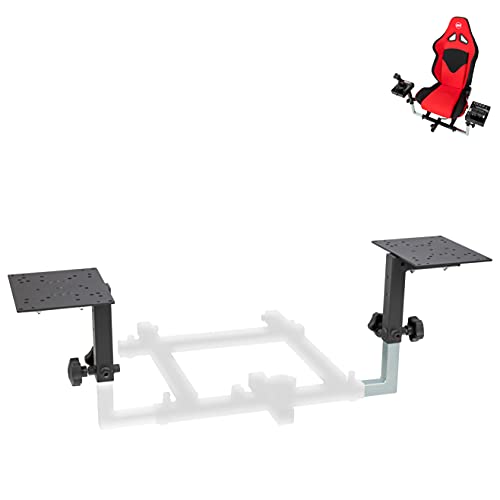
OpenWheeler Flight Simulator HOTAS Add-on Kit

Honeycomb Alpha Flight Controls Yoke & Switch Panel

Honeycomb Alpha Flight Controls Yoke (Renewed)
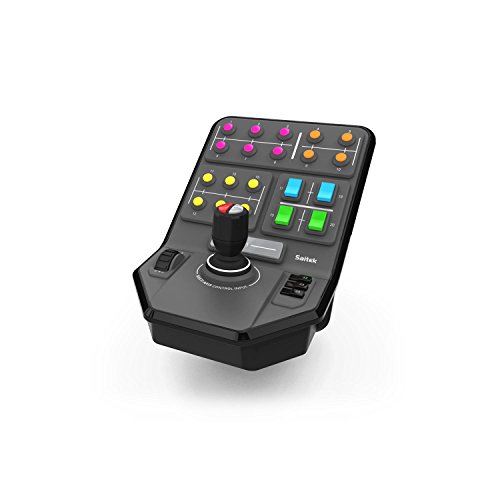
Logitech G PC Farm Sim Vehicle Side Panel

Thrustmaster T-Flight Hotas X Flight Sim Stick & Throttle

Thrustmaster TCA Quadrant Airbus Edition Throttle

BUJ Metal Desk Mount for Thrustmaster Sticks
More Details On Our Top Picks
The Thrustmaster Hotas Warthog sits at the top of Thrustmaster’s HOTAS line, pairing a joystick, dual throttle unit, and a set of TFRP rudder pedals into a single desktop-ready package. Its claim to fame is a 1:1 replication of the U.S. Air Force A-10C Warthog cockpit controls, with nearly all-metal construction throughout the stick and throttle for a feel closer to a real cockpit than a toy.
Combat sim pilots running DCS World or IL-2 Sturmovik will get the most from this bundle, since the A-10C replica layout lines up with the actual aircraft in DCS. The detachable joystick handle and metal base plate also make it easier to move from desk use into a custom cockpit later. You may find the learning curve steep if you mostly fly casual arcade titles, but for study-level sims it earns its place.
What Stands Out
- Near-all-metal build across stick, throttle, and panel for long-term durability under heavy use
- 19 action buttons plus an 8-way point-of-view hat cover nearly every in-game command without keyboard juggling
- Dual-throttle system with a metal hand rest supports twin-engine aircraft modeling in serious combat sims
- TFRP rudder pedals included, so the bundle is closer to a complete setup out of the box
Worth Noting
- Heavier than entry-level sticks, so a sturdy desk or dedicated cockpit mount is worth planning for
- Specialized for combat aircraft layouts, with less direct appeal for civil aviation or space sim genres
Key Specs
Who Will Love This
Combat sim pilots flying DCS A-10C or similar military aircraft who want near-replica hardware and are ready to invest in a serious rig.
Where Another Pick Suits Better
General aviation fans flying Cessnas and airliners will get far more value from the Logitech G Pro Flight Yoke System bundle, which suits desk-style civilian cockpits.
The Thrustmaster T16000M FCS Space Sim Duo packages two T16000M joysticks, a TWCS throttle, and the T.A.R.G.E.T. programming software into a setup built for six degrees of freedom flight. Where the Warthog leans military, this kit leans into space sims like Elite Dangerous and Star Citizen, where a second stick effectively becomes your throttle and lateral thrusters.
Both sticks use Thrustmaster’s Hall Effect AccuPoint Technology, which uses magnetic sensors instead of physical contact potentiometers, so they should resist drift over long play sessions. Hotas-style fans flying DCS or IL-2 can also use the left stick as a primary joystick with the TWCS handling engine power. The honest read is that this kit rewards simmers who actually want a dual-stick setup rather than a traditional single-stick HOTAS.
The Case For It
- Dual-stick configuration translates directly to six-axis space sim flight without extra mapping work
- Hall Effect sensors on both sticks aim to stay accurate even after thousands of hours of use
- 32 programmable action buttons across the kit provide room for complex bindings and macros
- Includes a TWCS throttle, so traditional combat sim setups are covered too
Trade Offs
- Plastic-heavy construction feels less premium than the Warthog bundle above
- T.W.C.S. throttle is a small unit that may feel cramped under larger hands
- Dual-stick learning curve is real, and the kit is overkill for casual arcade flyers
Right Fit For
Space sim pilots running Elite Dangerous, Star Citizen, or similar titles who want true six-axis control and the precision of magnetic sensors.
Consider Something Else When
Combat sim purists chasing a heavy, all-metal A-10C feel will be happier with the Thrustmaster Hotas Warthog bundle for its near-replica military layout.
The Logitech G Pro Flight Yoke System, paired here with Logitech’s Pro Flight Rudder Pedals, is the go-to entry point for desktop general aviation flying. Unlike the joystick-based Warthog and T16000M above, this rig uses a real yoke, which mirrors how most single-engine Cessnas and Pipers actually fly in Microsoft Flight Simulator and X-Plane.
The yoke’s POV hat, 14 buttons, and 3-position mode switch combine for at least 54 programmable controls when the mode switch is used, and the self-centering rudder pedals with differential toe brakes add proper ground handling. The 8-axis layout suits pilots who want realistic muscle memory rather than stick-and-throttle shortcuts. You may find the plastic build less satisfying than the Honeycomb Alpha, but the broader button count is a real edge for complex airliners.
Strong Points
- Yoke-and-pedal layout mirrors real general aviation training aircraft
- 54+ programmable controls via the mode switch cover nearly any airliner or GA workflow
- Self-centering rudder pedals with adjustable foot rests fit a wide range of body sizes
- Differential toe brakes bring an extra layer of realism during taxi and landing rollout
Honest Caveats
- Plastic construction feels lighter in hand than all-metal competitors
- Yoke design is less intuitive for combat or space sim titles where a stick is the norm
Quick Facts
Made For
Civilian flight sim pilots in Microsoft Flight Simulator or X-Plane who want realistic yoke handling and a generous button count for complex airliners.
A Better Fit Elsewhere
Hardcore military combat pilots will get more from the Thrustmaster Hotas Warthog bundle, which is purpose-built for fighter-style layouts.
The OpenWheeler HOTAS Add-on Kit, Configuration 1, is a side-by-side mounting solution for throttle and stick, aimed at simmers assembling a cockpit-style rig from existing gear. Where the T16000M and T-Flight above give you the controls themselves, this kit is what turns loose sticks into a tidy combat-ready setup on your desk or chair frame.
It’s compatible with a long list of popular sticks, including Thrustmaster T.Flight One and 4, the T16000M, TCA Airbus editions, Logitech X52, X52 Pro, and X56, plus VKB Gladiator, CH Products, and Hori hardware. Simmers mixing brands or planning to swap controllers over time will appreciate that flexibility. The trade-off is that this is a frame and bracket solution, not a controller, so you’ll still need a stick and throttle to make it useful.
What It Does Well
- Cross-brand bracket compatibility covers most mainstream HOTAS and stick setups
- Side-by-side throttle-and-stick layout mimics fighter-cockpit ergonomics
- Pairs naturally with the BUJ desk mount below for a budget custom rig
Practical Considerations
- Does not include a joystick or throttle, so it’s an upgrade, not a starting point
- Configuration-specific fit, so you need to confirm your exact model before ordering
At A Glance
Who Should Grab It
Simmers who already own a HOTAS setup and want to upgrade from a loose desk arrangement to a more stable, cockpit-like layout.
Look Elsewhere When
First-time simmers without a stick and throttle should start with the Thrustmaster T-Flight Hotas X instead, which bundles both controls in one box.
The Honeycomb Alpha Flight Controls Yoke & Switch Panel is a study-level general aviation yoke built around a solid steel shaft running through two linear ball bearings. Compared to the Logitech G Pro Flight yoke above, the Alpha delivers noticeably smoother 180-degree rotation and a more grounded feel, which matters on long cross-country legs in Microsoft Flight Simulator.
A dampened, self-centering mechanism with minimal deadzone helps keep your inputs predictable, and the included switch panel adds main, alternator, avionics, and light switches plus a 5-position ignition with red LED backlighting for night flights. It’s a strong match for serious GA and twin-engine simmers who want one fewer step between a mouse and a real-feeling cockpit. Depending on your sim of choice, the included switches can replace a lot of keyboard tapping.
Everyday Advantages
- Steel shaft with linear ball bearings gives a smoother, more consistent throw than plastic yokes
- 180-degree rotation and self-centering action suit real GA aircraft handling
- Built-in switch panel with red LED backlighting covers common startup and electrical controls
- Compatible with most major sim platforms, so it slots into existing setups cleanly
Where It Is Less Suited
- No rudder pedals included, so you’ll likely pair it with separate pedals for full control
- Priced above entry-level yokes, which may stretch a casual simmer’s budget
Perfect Match For
GA and twin-engine sim pilots in Microsoft Flight Simulator or X-Plane who fly regularly and want smoother, more realistic yoke inputs.
Another Choice May Suit
Simmers on tighter budgets who still want a Honeycomb yoke should look at the renewed Honeycomb Alpha listed below for a lower entry cost.
This renewed version of the Honeycomb Alpha Flight Controls Yoke and Switch Panel gives you the same hardware, including the steel shaft, linear bearings, and integrated switch panel, at a lower outlay. It’s professionally inspected and cleaned, and accessories are confirmed compatible and fully functional, though the box may be generic.
For simmers who want the Honeycomb feel without paying full retail, this is a sensible alternative. The yoke action and switch panel layout match the new version directly, so you won’t have to relearn anything. The honest read is that cosmetic wear can vary on renewed units, so inspect the listing photos before committing.
Everyday Perks
- Same steel-shaft smoothness and switch panel as the new Honeycomb Alpha
- Lower entry cost makes serious GA hardware more reachable for hobbyists
- Inspected and tested to confirm working condition before shipping
Possible Compromises
- Renewed condition can include minor cosmetic wear that doesn’t appear in the official product images
- Accessories may not be in original packaging, which matters for simmers who keep tidy setups
Feature Snapshot
Who It Suits Best
Budget-conscious GA simmers who want Honeycomb quality but prefer a lower price than the new unit.
Swap It Out When
Simmers who want the longest possible lifespan and a fresh retail package should go with the new Honeycomb Alpha yoke above instead.
The Logitech G PC Farm Sim Vehicle Side Panel is a niche pick: a side-mounted stick-style controller with a loader control stick on 6 axes, a set-and-forget cruise control dial, and 37 programmable buttons. It’s designed to sit alongside a keyboard for Farming Simulator and other heavy-equipment titles, giving you direct control over complex machinery like harvesters, telehandlers, and forestry loaders.
It’s not a flight stick in the traditional sense, but it shows up in flight sim conversations because heavy-equipment sims often share the same audience and rig. The durable clamp with screw-thread adjustment keeps the panel locked to a desk during long work sessions. You may find the specialized layout less useful if your time is split across many genres.
Everyday Wins
- 6-axis loader stick handles complex equipment like forestry cranes and front loaders
- 37 programmable buttons keep most in-game actions on a single panel
- Set-and-forget cruise control dial simplifies long field work
- Sturdy screw-thread clamp holds firm on standard desks
Some Limits To Know
- Niche scope means it complements rather than replaces a standard flight setup
- Layout assumes a Farming Simulator-style workflow, so button mapping has a learning curve
Built With In Mind
Farming and heavy-equipment sim players who want direct control over complex machinery in Farming Simulator or similar titles.
Not Your Match When
Pilots focused on actual flight should look at the Thrustmaster T-Flight Hotas X for a true stick-and-throttle flight setup.
The Thrustmaster T-Flight Hotas X is the entry point that many first-time simmers end up buying, and for good reason. It pairs a full-size ergonomic joystick and throttle in a single, budget-friendly package, with a wide hand rest and dual rudder control via handle rotation or a progressive tilting lever.
The stick features an adjustable resistance dial for tuning tension to your liking, and all 12 action buttons plus 5 axes are fully programmable, which means you can map flaps, gear, and weapons without keyboard shortcuts. The throttle is detachable, so you can space it out for a more cockpit-like setup or keep it attached for a compact desk arrangement. Compared to the T16000M Duo above, the build is lighter, but the price-to-feature ratio for a new sim pilot is hard to argue with.
A Few Strong Suits
- Combined stick and throttle at an approachable price for new sim pilots
- Adjustable resistance dial lets you tune the stick feel to your preferences
- Dual rudder control through handle rotation or tilting lever adds realism
- Detachable throttle supports a cockpit-style or compact desk arrangement
Small Caveats
- Plastic construction feels less premium than the Warthog and Honeycomb options
- Not as many programmable inputs as higher-end Thrustmaster kits
Best Suited To
New sim pilots and budget-conscious hobbyists building their first proper HOTAS setup for Microsoft Flight Simulator or DCS.
Skip It When
Simmers ready for a meaningful step up in build and inputs should look at the Thrustmaster T16000M FCS Duo for a magnetic-sensor dual-stick kit.
The Thrustmaster TCA Quadrant Airbus Edition is a throttle quadrant, not a full HOTAS, built as a throttle add-on for Airbus-style airliner sims. It’s officially licensed to mirror Airbus ergonomics, so pilots flying the A320neo in Microsoft Flight Simulator or the Fenix A320 in X-Plane will find the detents, thrust reverser feel, and switch layout familiar from real airliner training.
It’s designed to pair with Thrustmaster’s TCA sidestick and TCA captain’s pack, which means it’s a modular addition to an existing setup rather than a stand-alone solution. The throttle feel and detent behavior are the highlights here, since they make engine management more intuitive. You may find it less compelling if your time is mostly spent in Cessnas or military jets.
Useful Touches
- Airbus-licensed layout mirrors real airliner throttle feel, including detents and thrust reverser action
- Modular design pairs well with other Thrustmaster TCA components for a growing cockpit
- Authentic ergonomics reduce the keyboard-tapping needed for engine management
Worth Bearing In Mind
- Throttle only, so you’ll need a separate sidestick, yoke, or HOTAS for the rest of the cockpit
- Most useful for Airbus-specific workflows, so GA and combat pilots get less out of it
Feature Overview
Whose Shelf It Belongs On
Airbus airliner sim fans in Microsoft Flight Simulator or X-Plane who want a throttle that mirrors the real cockpit’s thrust controls.
Reach For A Different Pick When
Simmers flying Cessnas, Pipers, or military jets will get more from a complete HOTAS like the Thrustmaster T-Flight Hotas X or the Warthog bundle.
The BUJ Metal Desk Mount is a sturdy clamp solution for Thrustmaster flight sticks and HOTAS units, including the T-Flight Hotas One, 4, and X, the T16000M FCS, TCA Sidestick, and several Winwing and Turtle Beach controllers. It’s a metal upgrade from the plastic clamps many sticks ship with, and the silicone pad under the top plate keeps your desk surface safe from scratches.
The robust metal clamp adjusts to a wide range of desk thicknesses, and a vertical adjustment feature lets you set the stick height to match your seating. The rounded chamfer edges are a small but thoughtful detail that prevents skin scrapes during setup. It’s a no-frills accessory, so its value depends on whether your current mount feels wobbly during heavy stick inputs.
The Upside
- All-metal clamp holds sticks firmly under aggressive stick inputs
- Adjustable fit covers a wide range of desk thicknesses
- Silicone pad protects desk surfaces from scratches and slippage
- Rounded chamfered edges keep fingers safe during installation
Points To Keep In Mind
- Mount only, so you’ll need a separate joystick and throttle to make it useful
- Limited to specific Thrustmaster and compatible models, so confirm fit before ordering
Who It Suits Best
DIY sim rig builders who already own a compatible Thrustmaster stick and want a more stable, desk-friendly mounting solution.
Where A Sibling Pick Shines
Simmers who want a full HOTAS layout with mounting included should consider the OpenWheeler HOTAS Add-on Kit above, which covers a wider range of brands.
Factors To Consider When Choosing Flight Sim Joysticks
A HOTAS setup, short for Hands On Throttle And Stick, places both controls within reach so your hands never leave the controls during a flight, while a yoke and pedal setup mirrors how general aviation and airliner pilots actually train. Picking the right form factor comes down to which aircraft you fly most: military jets and space sims favor dual sticks or HOTAS, while Cessnas, Pipers, and airliners feel right with a yoke.
Sensor type matters more than most shoppers expect. Hall Effect sensors use magnets instead of physical contact, so they tend to resist drift over years of use compared to traditional potentiometer-based sticks. If you plan to fly daily, that long-term accuracy is worth factoring into your decision, especially in the price gap between the T16000M FCS and entry-level sticks.
Build quality and mounting go hand in hand. Heavier all-metal sticks like the Warthog stay planted during aggressive maneuvers, but they need a sturdy desk or dedicated mount, which is where clamps and frames like the OpenWheeler and BUJ options come in. A wobbly mount can make a great stick feel cheap, so plan the whole rig, not just the controls.
Button count and software support shape day-to-day use. A 3-position mode switch on a yoke or a 32-button kit like the T16000M Duo can dramatically cut down on keyboard shortcuts, and software like Thrustmaster’s T.A.R.G.E.T. lets you build layered profiles for different aircraft. Match the input count to the complexity of the modules you actually fly.
What To Weigh Before Upgrading
Common Buying Slip Ups
Picking a stick purely by price often backfires when the sensor technology can’t keep up with daily use, so check whether the stick uses Hall Effect or traditional potentiometers. Another common trap is buying a HOTAS without confirming mounting support, since heavy metal sticks need a real desk or frame, not a wobbly clamp. Finally, ignoring software ecosystem support can leave you wrestling with custom mappings rather than flying, so verify that your sim of choice has solid profiles for the hardware you’re eyeing.
When Paying More Pays Off
Premium picks like the Warthog and Honeycomb Alpha cost more for tangible reasons: all-metal construction, study-level ergonomics, and sensor tech that holds accuracy over years rather than months. The upgrade tends to pay off for simmers who fly several times a week, want realistic muscle memory, or plan to invest in custom cockpits down the road. Casual weekend flyers may find the price gap hard to justify when a T-Flight Hotas X or renewed Honeycomb yoke covers most of the experience.
Frequently Asked Questions
Do I need a full HOTAS to enjoy flight sims?
A HOTAS isn’t required, and many sim pilots fly happily with a joystick and throttle combo, a yoke, or even a gamepad. Serious combat and space sims benefit most from HOTAS or dual-stick layouts because your hands stay on the controls during dogfights, but casual Microsoft Flight Simulator pilots often prefer a yoke and pedals for realism.
Are Hall Effect sensors worth the extra cost?
For simmers who fly often, Hall Effect sensors tend to resist drift over time, which means your stick stays accurate across thousands of hours of use. For casual players flying a few hours a week, the difference may be less noticeable, and a traditional potentiometer-based stick can still deliver a satisfying experience.
Can I mix brands in a HOTAS setup?
Yes, many simmers pair a Thrustmaster stick with a Logitech throttle or add Honeycomb pedals into the mix. Software like Thrustmaster’s T.A.R.G.E.T. and generic mapping tools can help bridge brands, though a same-brand kit usually offers tighter integration out of the box.
What’s the difference between a yoke and a joystick for civilian flying?
A yoke mirrors the control layout found in most general aviation aircraft and airliners, which makes muscle memory more realistic for Cessna and Boeing training. A joystick is more compact and often more familiar to gamers, but it doesn’t translate as directly to real-world training scenarios.
Do I need rudder pedals?
Rudder pedals add yaw control and toe brakes, which matter for coordinated turns, crosswind landings, and realistic ground handling. They’re not strictly required for casual simming, but they noticeably improve realism for serious GA and combat flying.
Closing Remarks
The best flight sim joystick is the one that matches how you actually fly, whether that’s a yoke in a Cessna, a dual-stick rig for space dogfights, or a near-replica A-10C setup for DCS. Start with the simulator and aircraft you fly most, then choose hardware that supports that workflow rather than chasing the most expensive kit on the shelf. With the right foundation, your hardware will keep up with you as your skills grow.



